IBM ContextForge Pricing: A Complete Breakdown for 2026

Built for Speed: ~10ms Latency, Even Under Load
Blazingly fast way to build, track and deploy your models!
- Handles 350+ RPS on just 1 vCPU — no tuning needed
- Production-ready with full enterprise support
IBM ContextForge, published on GitHub as mcp-context-forge, doesn't have a pricing page, a plan comparison, or a sales team. That's because it isn't a commercial product. It's open source infrastructure, and the real cost question isn't "what does it cost" but "what do you take on by running it yourself."
This guide breaks down what that actually means: what's genuinely free, what shows up on your infrastructure bill instead, and how the total compares to a managed platform with published pricing.
Does IBM ContextForge have pricing?
Short answer: no.
IBM ContextForge is released under an open source license. That means:
- No license fee
- No per-user pricing
- No token-based billing
- No hosted SaaS
Instead, your costs come from running and maintaining the platform yourself. There's no invoice from IBM for using ContextForge; there's a bill from your cloud provider and a chunk of your engineering team's time.
What do you actually pay for?
Since there's no pricing table to show, here's what a cost breakdown looks like instead.
Every row past "software license" is a cost your team absorbs directly, either in cloud spend or in hours.
Hidden costs of IBM ContextForge
None of these show up anywhere near the GitHub README, but they're real line items once ContextForge is running in production.
1. Infrastructure costs
- Kubernetes cluster to run and scale the gateway
- Redis for federation and caching
- Persistent storage for state and logs
- Networking and ingress configuration
- TLS certificates
- High availability setup across nodes
2. Engineering time
- Initial installation and configuration
- Ongoing maintenance
- Version upgrades as new releases ship
- Bug fixes and workarounds
- Disaster recovery planning and testing
3. Observability stack
- OpenTelemetry instrumentation
- A Prometheus deployment for metrics
- Grafana for dashboards
- Centralized logging
- Alerting rules and on-call routing
4. Security
- OAuth configuration and token scoping
- Secrets management
- RBAC policy design
- Certificate rotation
- Auditing and compliance reporting
5. Scaling
- Multi-region deployment if you need it
- Backup and restore procedures
- Redis in a highly available configuration
- Load balancing across gateway instances
Example total cost of ownership
There's no honest way to put a single dollar figure on this since it depends entirely on your infrastructure choices and existing team capacity. What's more useful is a sense of how operational complexity scales with your situation.
The same pattern holds across environments, not just team size:
A dev sandbox running ContextForge on a single node is genuinely low effort. A production, multi-region deployment with HA Redis and full observability is a different project entirely, closer to standing up a small platform team than running a script.
TrueFoundry MCP Gateway: managed governance without the Kubernetes bill

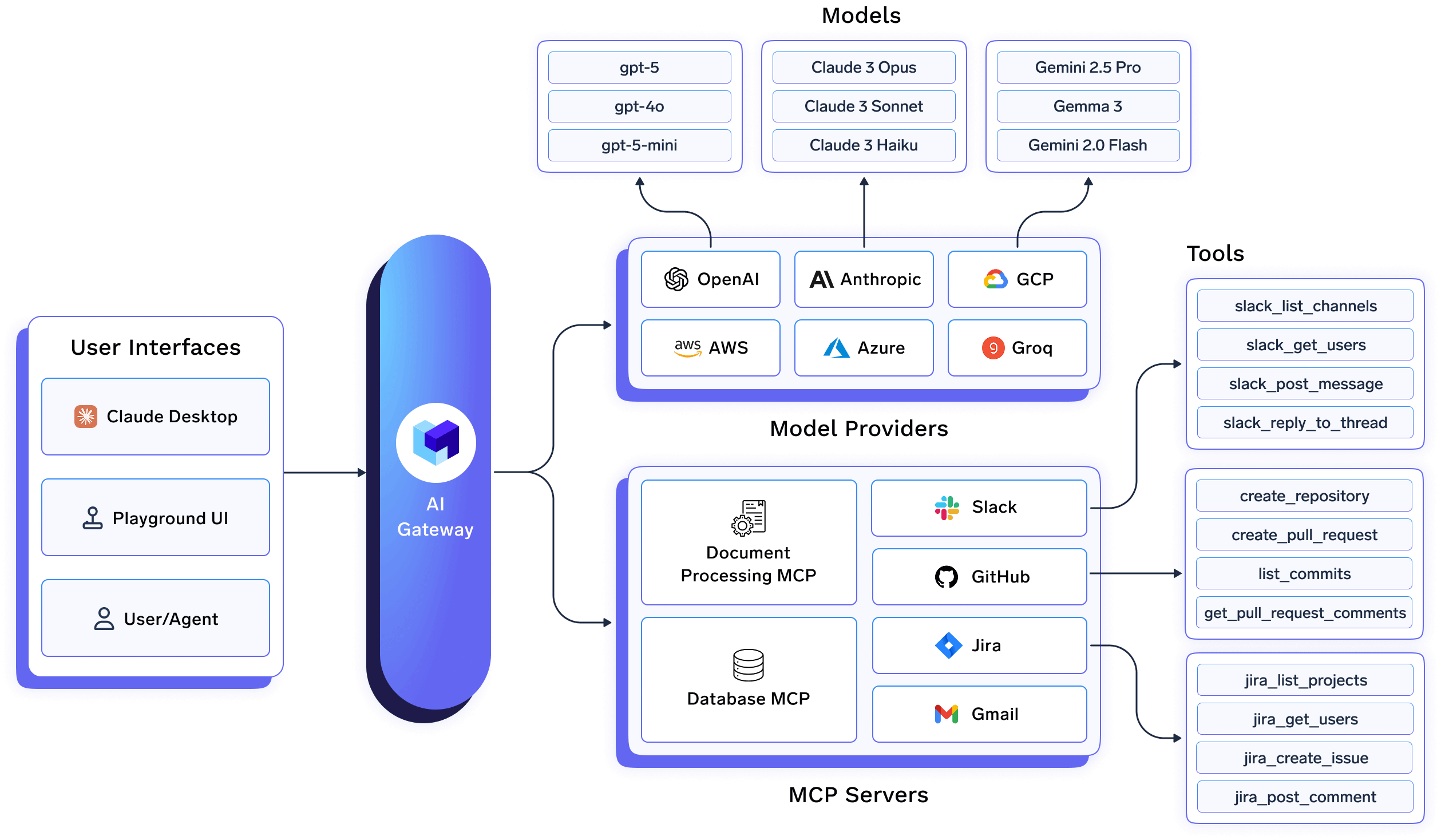
The gap ContextForge leaves open (hosting, patching, observability, and org-wide governance) is exactly what TrueFoundry's MCP Gateway is built to remove. Instead of provisioning a Kubernetes cluster and standing up your own OpenTelemetry backend, you register MCP servers into a managed gateway that already has RBAC, virtual MCP servers, self-hosted MCP support, and tool-call metrics built in.
It also solves a gap ContextForge doesn't attempt: LLM traffic. ContextForge proxies MCP, A2A, and REST/gRPC calls, but doesn't route or govern model calls. TrueFoundry's AI Gateway sits alongside its MCP Gateway in the same control plane, so a team that outgrows a single open source proxy gets model routing, cost controls, and MCP governance from one vendor instead of stitching two systems together.
On the MCP side specifically, TrueFoundry applies RBAC to registered MCP servers, supports virtual MCP servers, and logs every tool call with comprehensive metrics. It's also SOC 2, HIPAA, and GDPR-ready, and deployable in VPC, on-prem, or fully air-gapped environments for teams with data residency requirements.
TrueFoundry’s approach is simple: if organizations are already managing AI infrastructure for LLMs, there is little value in fragmenting operations across separate systems for MCP tools. Instead, TrueFoundry unifies LLM infrastructure and MCP management into a single control plane with shared security, observability, governance, and performance characteristics. This centralized approach simplifies AI operations while giving engineering teams a consolidated platform for monitoring, deployment, and cost management.
For teams still deciding between self-hosting and managed, TrueFoundry's Developer plan is free up to 50,000 requests and 5 registered MCP servers, enough to run the same kind of pilot you'd run against a self-hosted ContextForge instance, without provisioning infrastructure first.
Best for: Enterprises that want MCP governance and LLM/AI Gateway management in one platform, with a support SLA and compliance certifications, instead of assembling and hosting the equivalent from open source parts.
Pricing: Free Developer plan (50k requests/month), Pro at $499/month, Pro Plus at $2,999/month, custom Enterprise. Full breakdown at truefoundry.com/pricing.
IBM ContextForge vs TrueFoundry (managed platforms)
"Limited" on RBAC isn't a knock on ContextForge's engineering; it ships OAuth-scoped auth and an admin UI. It just hasn't built out the org-wide, multi-team policy layer that enterprise buyers usually mean by "RBAC," and building that yourself is one more item on the hidden-costs list above.
When IBM ContextForge is the right choice
ContextForge is a genuinely good fit for teams that:
- Already run Kubernetes and have the operational muscle for one more service
- Prefer open source and want full control over the code
- Have dedicated platform engineers who can own patching and upgrades
- Don't mind carrying the operational overhead in exchange for zero license cost
When a managed platform makes sense
A managed platform like TrueFoundry tends to make more sense once:
- Multiple teams need to share the gateway with different access levels
- You're running production AI workloads where downtime has a real cost
- Compliance requirements (SOC 2, HIPAA, GDPR) need to be demonstrated, not built from scratch
- You want enterprise support with an SLA instead of community forums
- Your team would rather spend engineering time on product work than on maintaining infrastructure
Conclusion
ContextForge is free in the way that matters least, license cost, and expensive in the ways that matter most: infrastructure, engineering time, and operational risk. If your team has the Kubernetes capacity and wants full control, it's a legitimate choice. If you'd rather skip the infrastructure math and get MCP governance, AI Gateway, and compliance-ready deployment as one line item,
See TrueFoundry's published pricing or book a demo to compare the total cost against what you're currently budgeting for self-hosting.
FAQ
Does IBM ContextForge have pricing?
No. ContextForge is open source with no license fee, no per-user pricing, and no hosted SaaS option. Your cost comes from the infrastructure you run it on and the engineering time to maintain it.
What does IBM ContextForge cost for enterprise?
There's no enterprise pricing tier because it's a self-hosted open source project, not a commercial product. Enterprise cost comes entirely from your own hosting, scaling, and support overhead.
IBM ContextForge vs TrueFoundry pricing?
TrueFoundry starts free on the Developer plan and publishes paid tiers up to $499/month for Pro, with hosting, support, and MCP governance included. ContextForge has no license cost but requires you to build and maintain the hosting and support layer yourself.
Does ContextForge include an admin UI and RBAC?Yes, ContextForge ships with an admin UI, OAuth-based authentication, and rate limiting. Building out granular, org-wide RBAC and budget policies on top of that is left to the deploying team.
How many LLMs does TrueFoundry support?
1,000+ LLMs through a single OpenAI-compatible API. You switch models by changing the model name in the request, same URL, same credentials.
TrueFoundry AI Gateway delivers ~3–4 ms latency, handles 350+ RPS on 1 vCPU, scales horizontally with ease, and is production-ready, while LiteLLM suffers from high latency, struggles beyond moderate RPS, lacks built-in scaling, and is best for light or prototype workloads.
The fastest way to build, govern and scale your AI


.webp)
.webp)
.webp)
.webp)


.png)
.webp)
.png)