


.webp)
June 6, 2026
|
5 min de lecture


Accédez instantanément à un environnement TrueFoundry en direct. Déployez des modèles, acheminez le trafic LLM et explorez la plateforme complète : votre sandbox est prête en quelques secondes, aucune carte de crédit n'est requise.



.png)
Une méthode incroyablement rapide pour créer, suivre et déployer vos modèles !
SAML signifie Security Assertion Markup Language. La version 2.0 a été ratifiée par l'OASIS en 2005 et constitue depuis lors la base du SSO web en entreprise.
Le mécanisme est simple une fois que l'on fait abstraction du XML. Un utilisateur accède à votre application — le fournisseur de services (SP) — qui ne connaît pas son identité, redirige donc le navigateur vers le fournisseur d'identité (IdP). L'IdP authentifie l'utilisateur et génère une assertion: un document XML signé indiquant l'identité de l'utilisateur, ses attributs et la durée de validité de l'assertion. Le navigateur envoie ce document par POST à l'URL du service consommateur d'assertion (ACS) du SP, et le SP vérifie la signature à l'aide du certificat X.509 de l'IdP.
Trois propriétés en découlent, expliquant la plupart des points forts et des limites du protocole :
OpenID Connect est une couche d'identité légère reposant sur OAuth 2.0, publiée par l'OpenID Foundation en 2014. OAuth 2.0 a résolu la question de l'autorisation déléguée en choisissant délibérément de ne pas définir l'identité de l'utilisateur. OIDC comble cette lacune.
Il s'agit du flux de code d'autorisation OAuth avec une portée supplémentaire, openid. L'application redirige vers le point de terminaison d'autorisation de l'IdP, l'utilisateur s'authentifie, et l'IdP redirige vers l'application avec un code à courte durée de vie appelé code d'autorisation. L'application appelle ensuite le point de terminaison de jeton via un canal sécurisé (back channel) et échange ce code contre un jeton d'accès, éventuellement un jeton de rafraîchissement, et un jeton d'identité (ID token).
Le jeton d'identité est ce qui définit OIDC : un JSON Web Token signé avec JWS, généralement en RS256, contenant sub, iss, aud, exp et souvent l'e-mail. Vous le vérifiez à l'aide d'une clé provenant du point de terminaison JWKS de l'IdP.
Deux propriétés sont importantes :
La vérité, que les pages de comparaison des fournisseurs omettent :
Pour connecter des utilisateurs à une application d'entreprise basée sur un navigateur, les deux fonctionnent et la différence de sécurité est négligeable. Tous deux sont matures et sécurisés. Personne n'a subi de faille de sécurité pour avoir choisi SAML plutôt qu'OIDC.
La décision est généralement prise pour vous. Si votre équipe IdP gère quarante applications SAML et possède une procédure établie, ajouter une quarante-et-unième prend vingt minutes, tandis que votre première application OIDC nécessitera une réunion. Suivez le courant.
La différence technique ne se manifeste qu'aux extrémités — mais ces différences sont bien réelles :
Là où SAML reste avantageux : il fonctionne lorsque le fournisseur de services (SP) et le fournisseur d'identité (IdP) ne peuvent pas communiquer directement, car le navigateur transporte tout — le cas classique étant AD FS sur site derrière un pare-feu.
Considérer le choix du protocole comme une décision de sécurité. Les équipes passent des semaines à comparer SAML et OIDC, mais seulement dix minutes à vérifier si la revendication de groupe est renseignée. La seconde détermine les droits d'accès, la première définit simplement l'écran de configuration à remplir.
Supposer que les groupes sont transmis par défaut. La plupart des IdP n'émettent pas de revendication de groupe sans configuration spécifique, et beaucoup l'émettent sous un nom avec espace de noms, tel que http://schemas.xmlsoap.org/ws/2005/05/identity/claims/groups. Le SSO réussit, tout le monde se retrouve avec le rôle par défaut, et personne ne s'en aperçoit pendant une semaine.
Ignorer la destination du trafic d'authentification. Quel que soit le protocole choisi, une entité reçoit l'assertion ou le jeton d'identité. Si cette entité se trouve en dehors de votre périmètre, le protocole n'a jamais été la question pertinente.
TrueFoundry prend en charge OIDC et SAML 2.0 de manière équivalente, avec des guides pour Entra ID, Okta, Google Workspace, JumpCloud, OneLogin, Auth0, Keycloak, AD FS, PingOne et Rippling, ainsi que pour les configurations SAML et OIDC personnalisées.
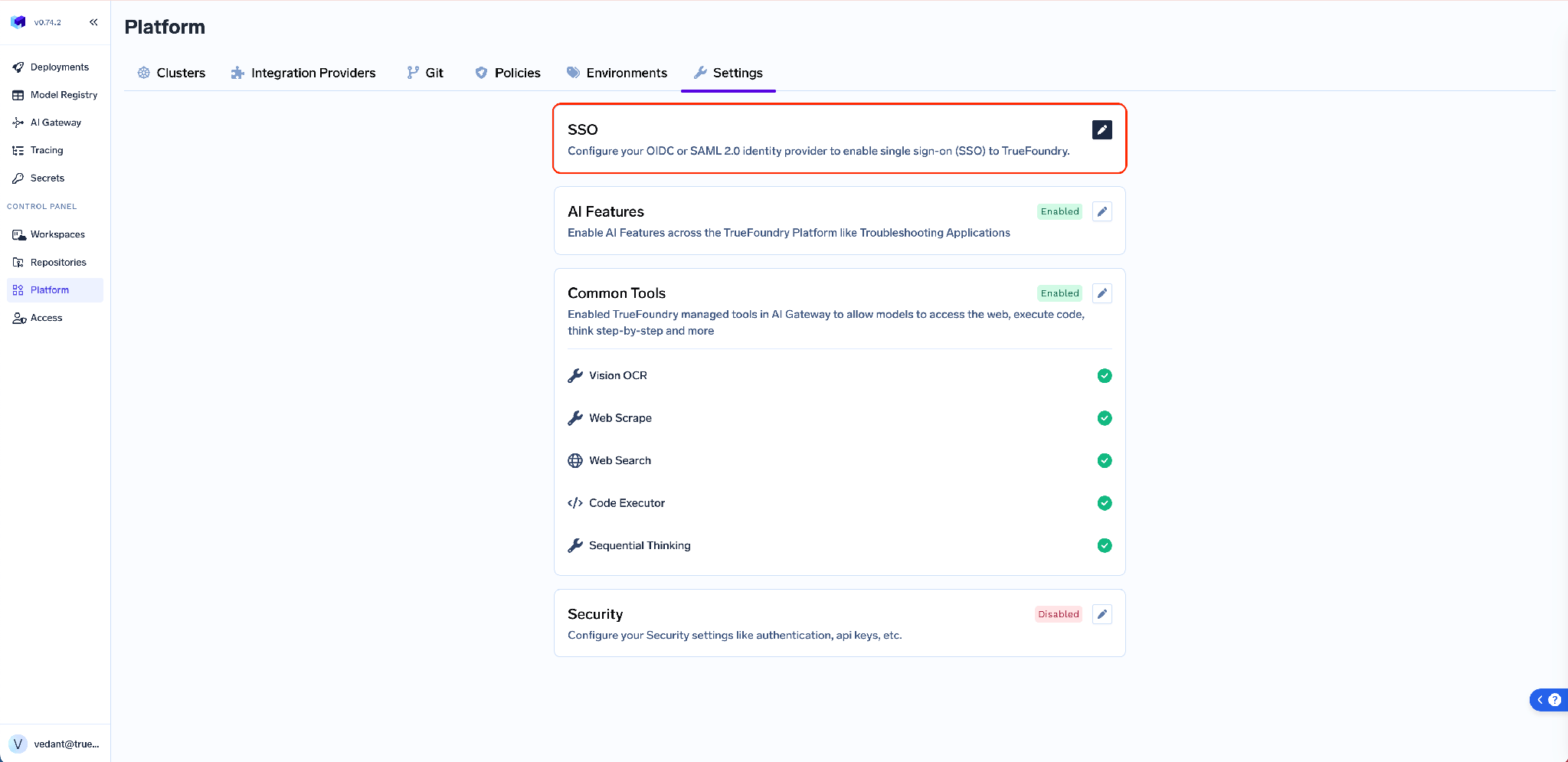
Configurez-le sous Plateforme → Paramètres → SSO: basculer Activé, choisissez votre fournisseur SSO, puis sélectionnez OIDC ou SAML v2.
Avant de choisir le protocole, déterminez où circule le trafic d'authentification.
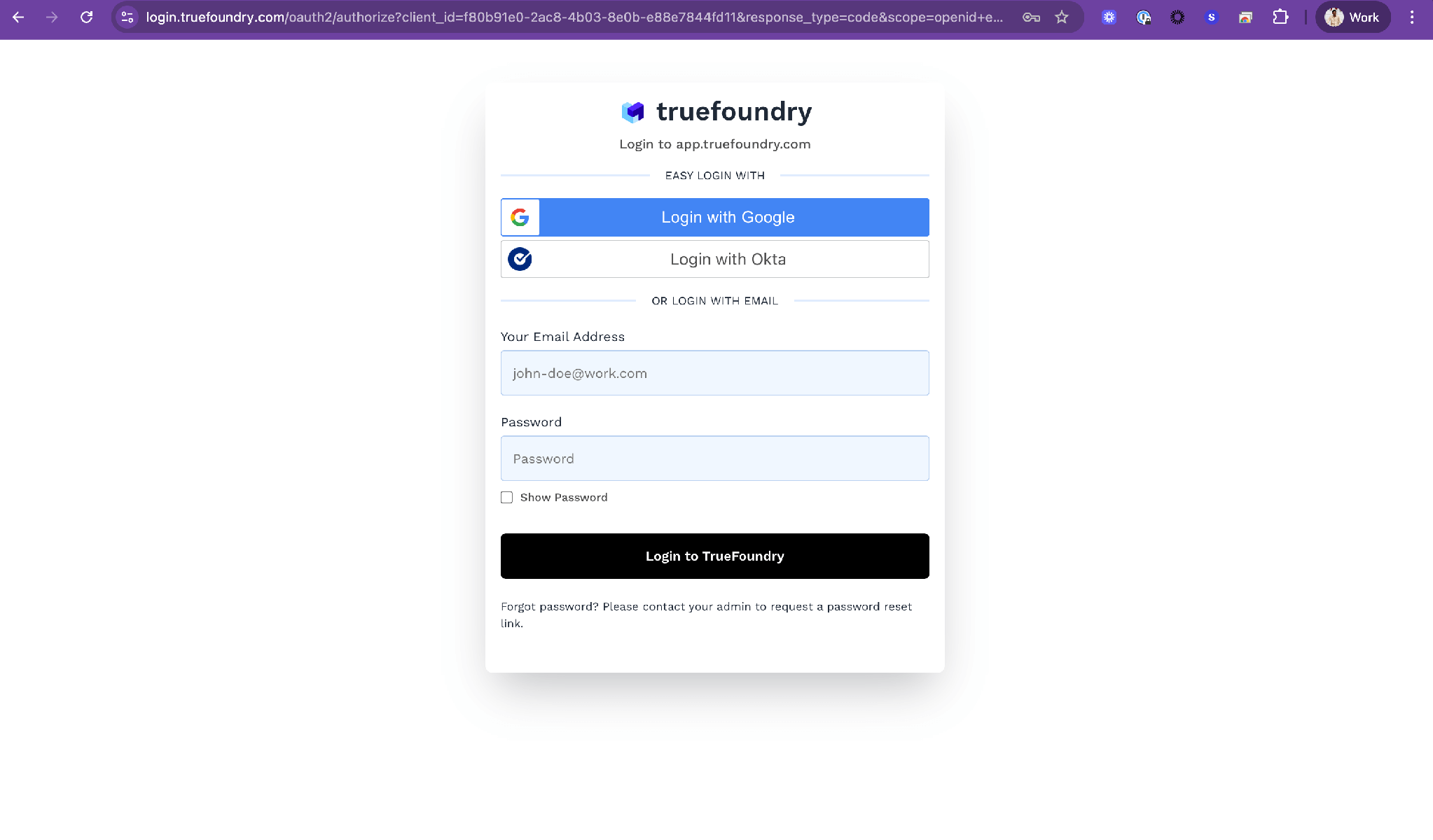
Option 1 — Serveur d'authentification TrueFoundry et votre IdP. L'option par défaut, sur SaaS et sur site. Le serveur d'authentification sur login.truefoundry.com se place entre votre plan de contrôle et votre IdP : le plan de contrôle délègue au serveur d'authentification, qui délègue à votre IdP, puis valide la réponse, crée ou met à jour la fiche utilisateur et renvoie les jetons.
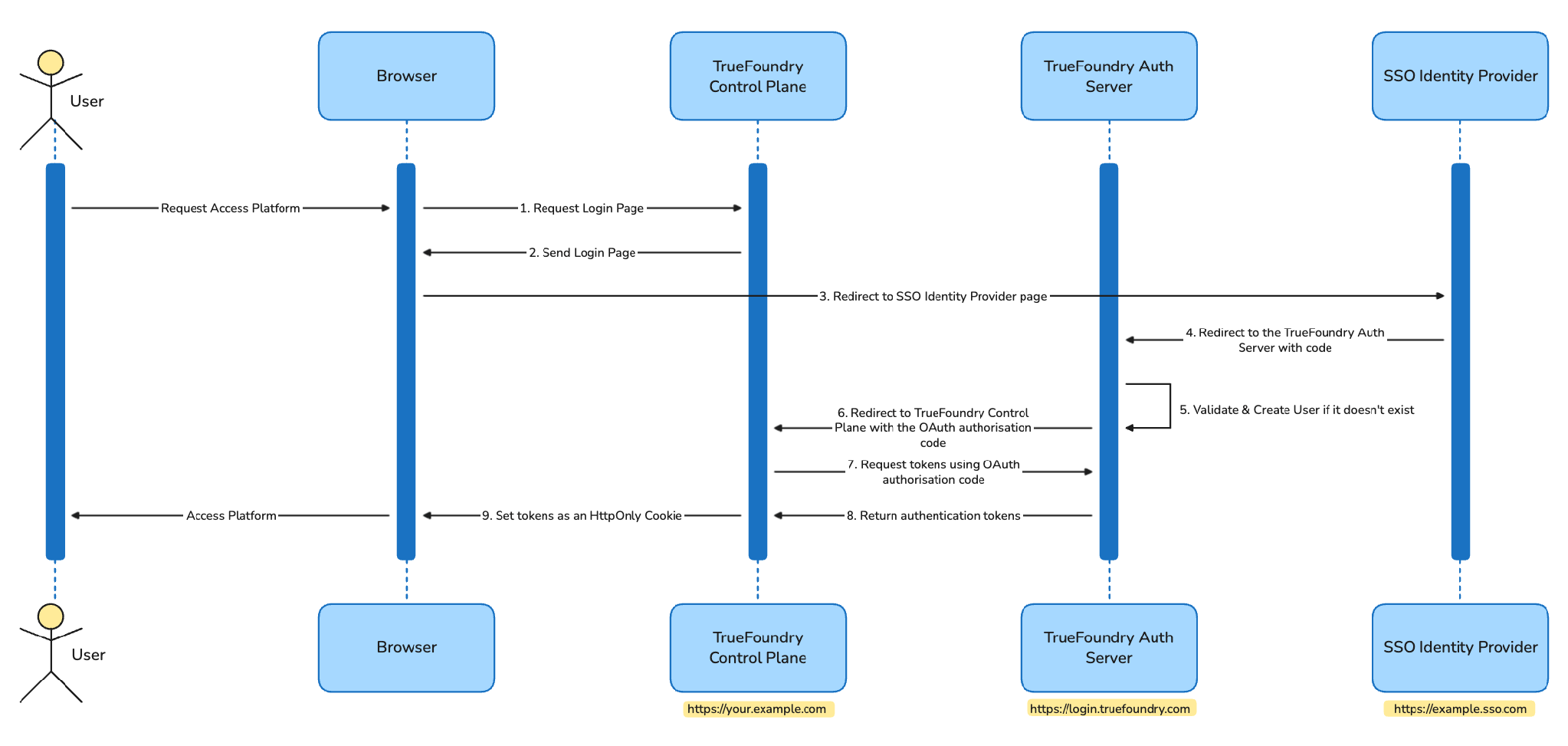
Seuls l'e-mail de l'utilisateur et un compteur de requêtes atteignent login.truefoundry.com, à des fins de licence et de routage de locataire. En échange, TrueFoundry gère de manière centralisée les spécificités OIDC et SAML, la rotation des clés et les points de terminaison SCIM, vous permettant de changer d'IdP sans redéploiement. Les requêtes vers l'IdP sont signées avec une paire de clés RS256 et l'assertion de destination SAML est activée.
Option 2 : intégration IdP directe. Sur site uniquement, sur le plan Enterprise de niveau supérieur. Le plan de contrôle communique directement avec votre IdP. login.truefoundry.com n'est pas impliqué, et les adresses e-mail des utilisateurs ainsi que le nombre de requêtes ne quittent jamais votre réseau. Le plan de contrôle est configuré lors de l'installation avec l'émetteur OIDC ou les métadonnées SAML de votre IdP dans les valeurs Helm, et les jetons sont signés localement avec une valeur INTERNAL_JWT_JWKS fournie par le support.
Les deux options prennent en charge les mêmes IdP et les deux mêmes protocoles. La seule différence réside dans le fait que le trafic d'authentification traverse ou non votre périmètre — et c'est cette question qu'il convient de soumettre à votre équipe de sécurité, plutôt que de comparer XML et JWT.
De TrueFoundry vers votre IdP il n'existe qu'une seule valeur, identique pour tous les clients :
https://login.truefoundry.com/oauth2/callback
Définissez-la comme URI de redirection, URI de redirection de connexion ou URL de réponse dans votre application IdP.
De votre IdP vers TrueFoundry :
Ce commutateur concrétise l'avantage de l'OIDC. Laissez-le activé et TrueFoundry lira lui-même les points de terminaison d'autorisation, de jeton, d'informations utilisateur et JWKS. Désactivez-le — ce qui n'est nécessaire que si votre IdP ne publie aucun document de découverte — et vous devrez remplir les quatre champs manuellement.
Le SAML est un échange bidirectionnel, c'est pourquoi vous devez d'abord enregistrer, puis configurer l'IdP.
De votre IdP vers TrueFoundry :
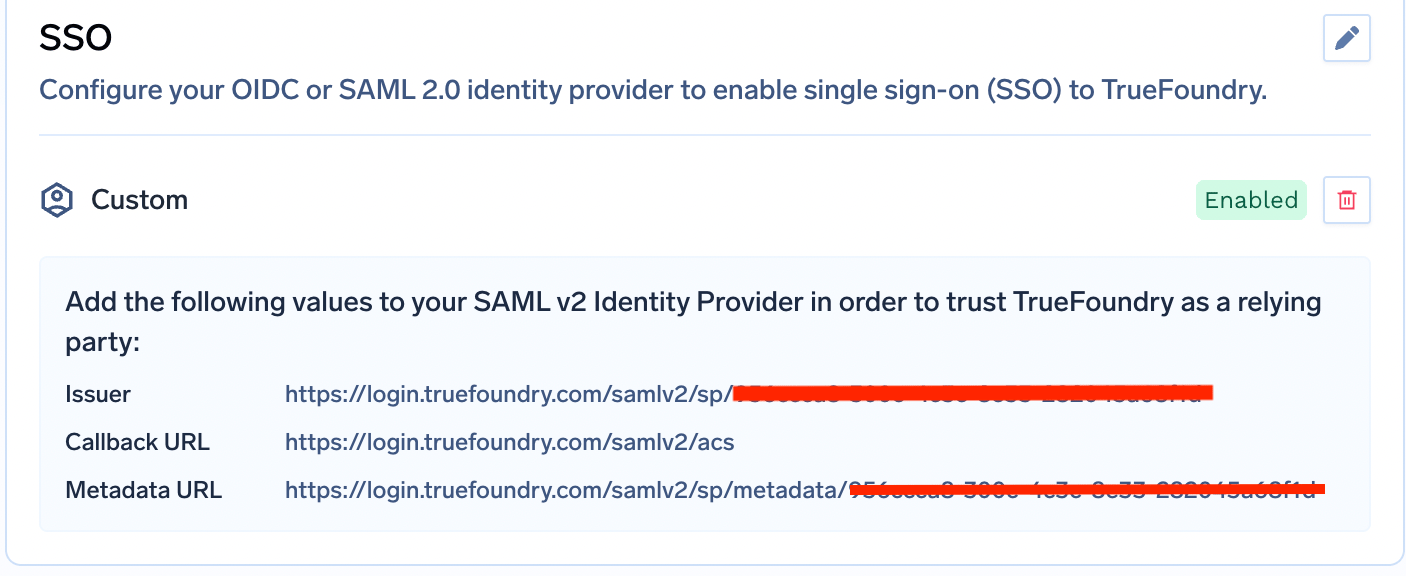
Cet aller-retour résume toute la différence. L'OIDC nécessite une URL de rappel fixe. Le SAML requiert quatre valeurs circulant dans les deux sens, ainsi qu'un certificat dont vous devez désormais gérer la date d'expiration.
Quel que soit le protocole choisi, TrueFoundry lit les mêmes attributs. Les valeurs par défaut sont email et sub, modifiables sous Afficher les champs avancés en tant que Revendication d'e-mail et Revendication d'identifiant unique. groups est la revendication utilisée pour le contrôle d'accès basé sur les rôles (RBAC).
Plutôt que de remplacer les noms de revendication dans TrueFoundry, créez des alias côté fournisseur d'identité (IdP) pour que les paramètres par défaut fonctionnent :
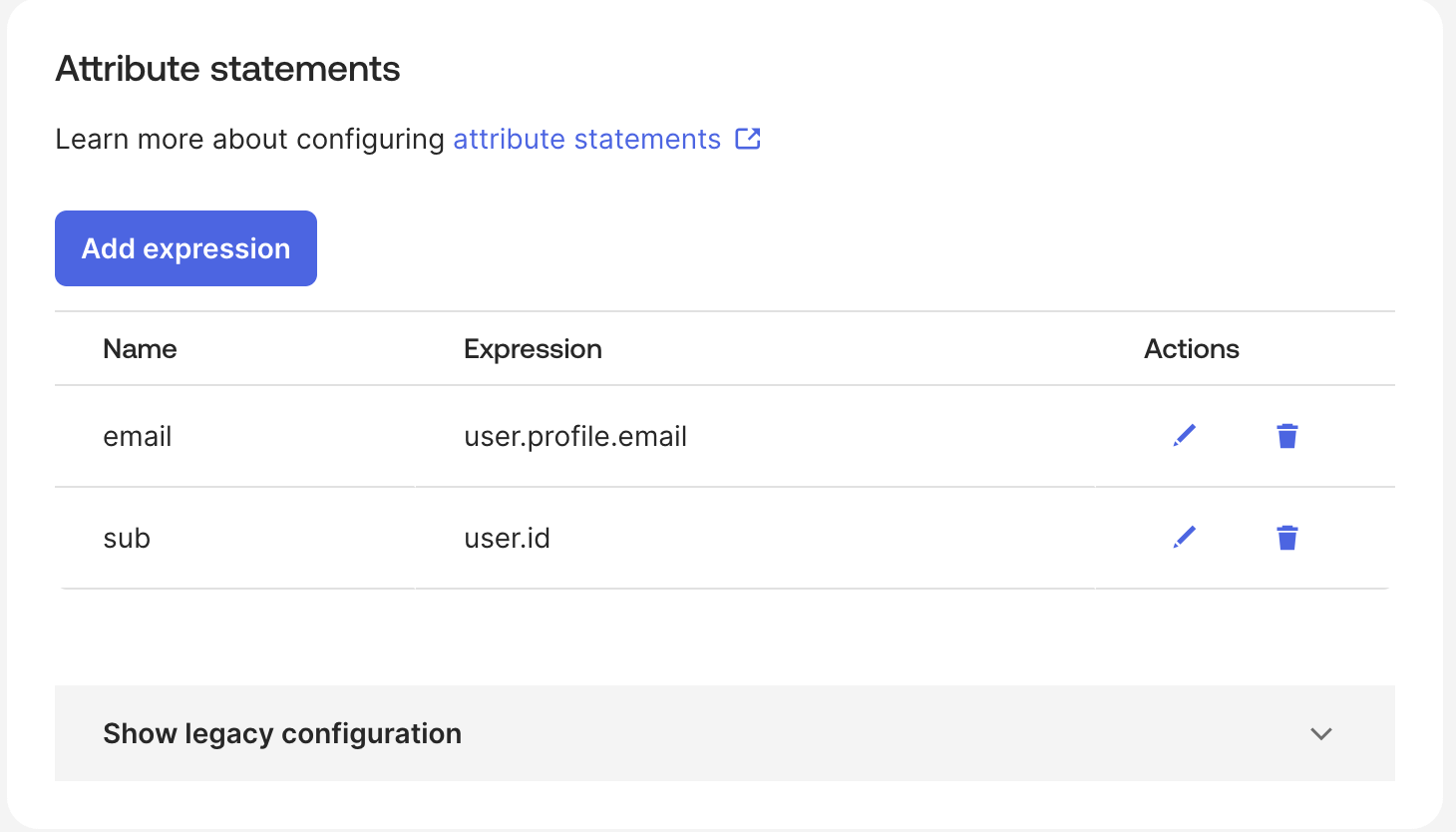
Une fois cette étape validée, le reste est automatique. Une valeur de revendication est associée à une équipe via les champs FQN du fournisseur d'identité et Valeur de la revendication — si votre IdP utilise groups comme revendication d'équipe et que le jeton contient ml-platform, saisissez ml-platform ici.
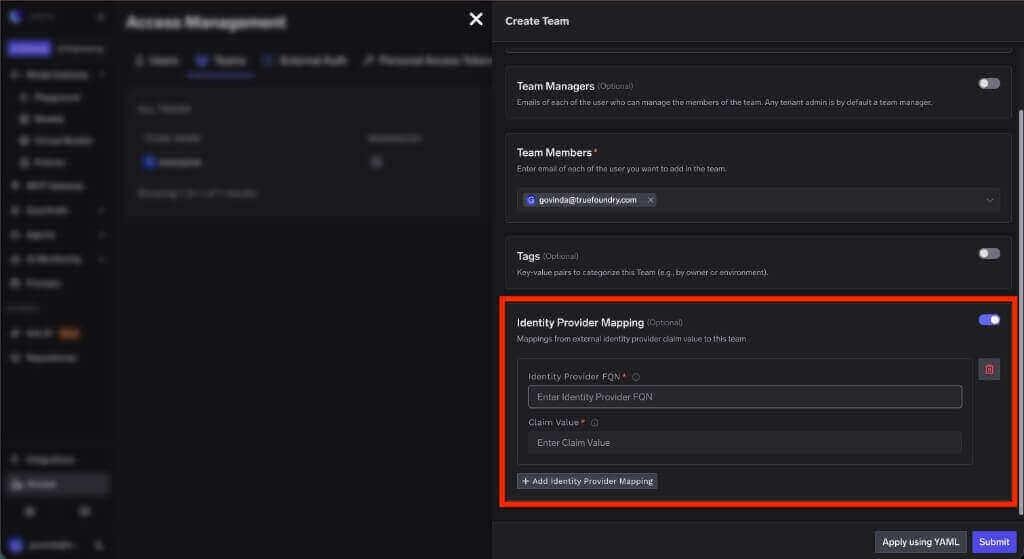
Cette équipe se voit ensuite attribuer des rôles : accordez-lui un rôle de locataire et chaque membre en hérite, ou attribuez un rôle de ressource depuis la page de contrôle d'accès de la ressource concernée.
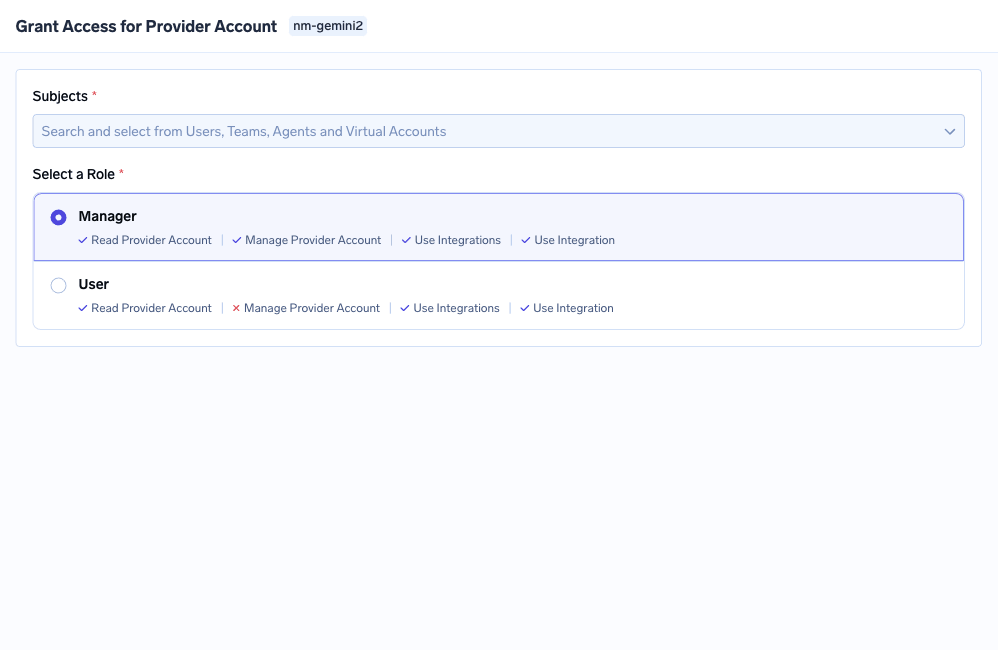
Cette association est identique pour les deux protocoles. Pour le modèle de rôle, consultez Authentification API et RBAC dans la passerelle, et pour le cas au niveau de l'outil, consultez Contrôle d'accès MCP.
Ici, l'échange de champs se déplace dans values.yaml, sous servicefoundryServer.env. Les deux protocoles nécessitent également INCLUDE_TRUEFOUNDRY_MANAGED_JWKS: "false", INTERNAL_JWT_SERVICE_ENABLED: "true", INTERNAL_JWT_JWKS fourni par le support, et ENABLE_EXTERNAL_OAUTH: "true" sur la passerelle.
OIDC : OAUTH_PROVIDER_TYPE: "EXTERNAL" ainsi que EXTERNAL_OAUTH_ISSUER, EXTERNAL_OAUTH_CLIENT_ID et EXTERNAL_OAUTH_CLIENT_SECRET. L'URI de redirection devient <CONTROL_PLANE_URL>/auth/callback, la découverte doit être active sur <ISSUER_URL>/.well-known/openid-configuration, et les portées par défaut ici sont openid email profile offline_access.
SAML : OAUTH_PROVIDER_TYPE: "EXTERNAL_SAML" ainsi que EXTERNAL_SAML_IDP_ENDPOINT et un EXTERNAL_SAML_CERTIFICATE encodé en base64. L'URL ACS est <CONTROL_PLANE_URL>/api/svc/v1/saml/acs et l'état de relais par défaut est <CONTROL_PLANE_URL>. Les revendications sont remplacées via EXTERNAL_SAML_EMAIL_CLAIM, EXTERNAL_SAML_UNIQUE_ID_CLAIM et EXTERNAL_SAML_GROUPS_CLAIM, avec EXTERNAL_SAML_ROLE_MAPPING_TENANT_ADMIN_GROUPS définissant quels groupes obtiennent les droits d'administrateur de locataire. Conservez les secrets dans les secrets Kubernetes.
La déconnexion est le point où l'écart est le plus important. Avec OIDC, TrueFoundry découvre automatiquement votre end_session_endpoint ; votre seule tâche consiste à enregistrer <CONTROL_PLANE_URL> comme URI de redirection après déconnexion, et l'IdP renvoie une erreur HTTP 400 si vous l'omettez. Avec SAML, la déconnexion unique (Single Logout) implique de générer une paire de clés de signature SP avec openssl, d'encoder la clé privée en base64 dans EXTERNAL_SAML_SP_PRIVATE_KEY, de télécharger le certificat correspondant et de pointer l'URL de déconnexion unique de l'IdP vers <CONTROL_PLANE_URL>/api/svc/v1/saml/slo.
Après l'échange, le plan de contrôle définit les jetons d'accès et de rafraîchissement en tant que cookies HttpOnly, et chaque requête ultérieure les transporte pour l'authentification et l'autorisation.
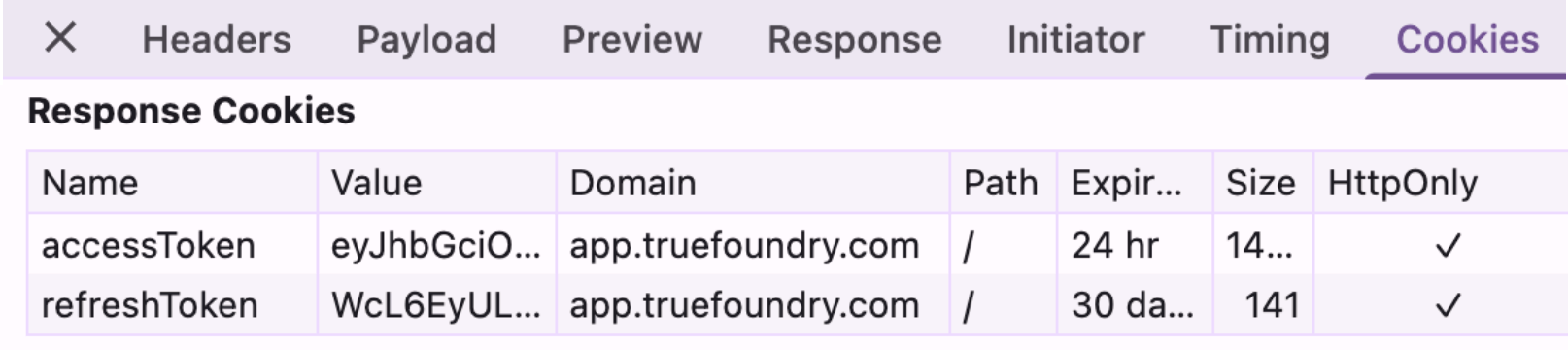
Les durées de vie par défaut pour l'Option 1 sont de 1 jour pour le jeton d'accès et 7 jours pour le jeton de rafraîchissement, modifiables via le support. Pour l'Option 2 SAML, EXTERNAL_SAML_ACCESS_TOKEN_EXPIRY_SECONDS définit l'expiration du jeton d'accès, avec une valeur par défaut de 3600 secondes. Les utilisateurs désactivés sont rejetés lors du flux d'authentification, où la réponse de l'IdP est associée à un utilisateur par son adresse e-mail.
Vous utilisez Okta, votre équipe de sécurité a standardisé sur SAML, et le groupe ml-platform doit administrer les clusters tandis que tous les autres bénéficient d'un accès de base en lecture seule.
Rien ne change fondamentalement avec l'OIDC : les étapes 1 à 3 se résument à une URL de rappel fixe et trois valeurs de champ, et les étapes 4 à 6 sont identiques. C'est la réalité de ce choix de protocole.
Pour provisionner automatiquement les utilisateurs et les équipes au lieu de le faire lors de la première connexion, activez SCIM dans Paramètres → Sécurité et accès → Provisionnement, puis copiez l'URL de base SCIM, générez un jeton Bearer et collez les deux dans Okta.
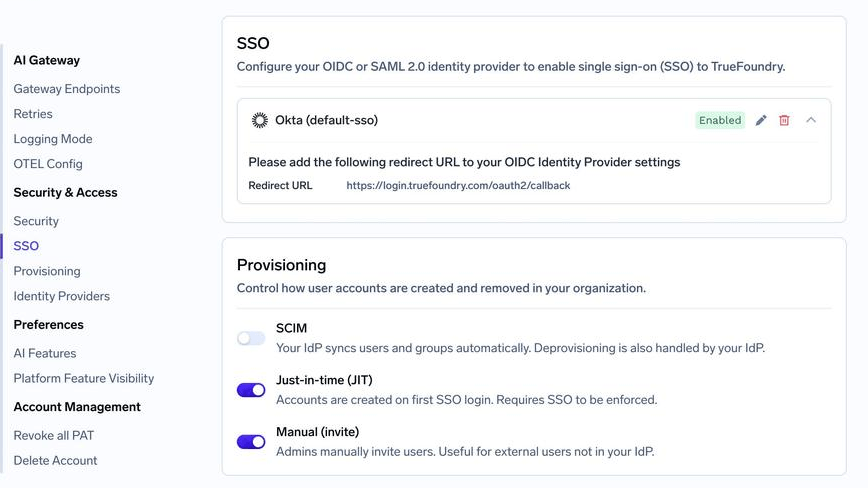
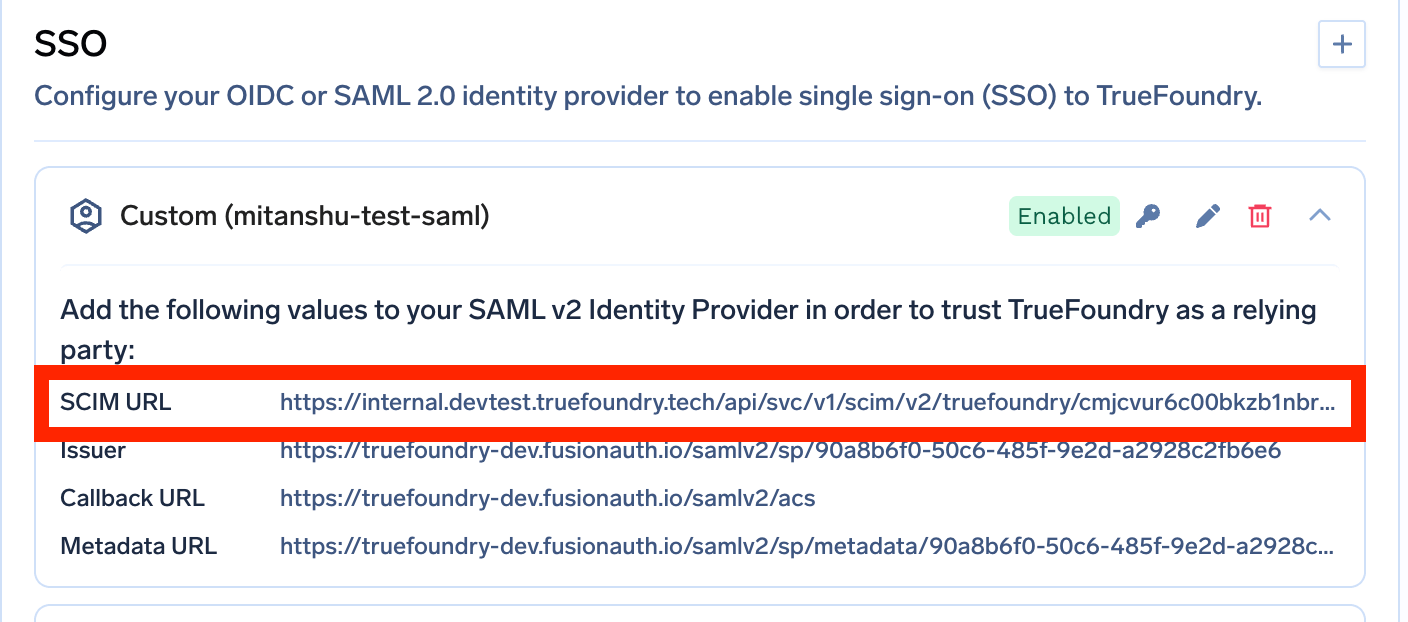
Sur Entra ID et Okta, SCIM nécessite SAML. C'est le seul cas où le choix du protocole a une réponse claire sur TrueFoundry. Si vous utilisez l'un de ces fournisseurs d'identité et souhaitez un provisionnement automatisé, choisissez SAML — et décidez-en avant de créer l'application OIDC.
Les noms de groupes SCIM sont limités. Le nom du groupe dans le fournisseur d'identité devient le nom de l'équipe : seuls les caractères alphanumériques, les traits d'union et les traits de soulignement sont autorisés, jusqu'à 36 caractères. « ML Platform (EMEA) » ne sera pas accepté.
La suppression d'une configuration SSO peut échouer avec une erreur indiquant que la configuration n'est pas synchronisée avec le serveur d'authentification central. Réessayez la suppression avec force=true sur l'API des paramètres, ce qui nécessite Gérer les paramètres sur le tenant.
La déconnexion unique (SLO) SAML échoue de deux manières prévisibles. Un certificat qui n'est pas la paire publique de EXTERNAL_SAML_SP_PRIVATE_KEY génère une « signature invalide » ; un ID d'entité SP qui ne correspond pas exactement à <CONTROL_PLANE_URL> génère une erreur « l'émetteur ne correspond pas ».
Le choix entre SAML et OIDC est moins crucial que son volume de recherche ne le laisse supposer. Les deux permettent de connecter les utilisateurs en toute sécurité et sont pris en charge partout ; utilisez donc la solution que votre équipe IdP gère déjà. Optez pour OIDC si vous avez des clients mobiles ou des applications monopages, si vous avez besoin de jetons API ou si vous souhaitez ne plus avoir à gérer l'expiration des certificats. Restez sur SAML si votre organisation l'utilise déjà, si le fournisseur de services (SP) et le fournisseur d'identité (IdP) ne peuvent pas communiquer entre eux, ou si une fonctionnalité dont vous avez besoin n'est disponible que via ce protocole.
La question qui mérite plus d'attention est celle du chemin emprunté par le trafic d'authentification. Sur TrueFoundry, les deux protocoles fonctionnent de manière identique quel que soit le modèle de déploiement, mais un seul permet de garder toutes les connexions au sein de votre réseau. Dans un environnement réglementé, c'est le point sur lequel votre auditeur vous interrogera, et cela n'a rien à voir avec le XML.
TrueFoundry AI Gateway offre une latence d'environ 3 à 4 ms, gère plus de 350 RPS sur 1 processeur virtuel, évolue horizontalement facilement et est prête pour la production, tandis que LiteLM souffre d'une latence élevée, peine à dépasser un RPS modéré, ne dispose pas d'une mise à l'échelle intégrée et convient parfaitement aux charges de travail légères ou aux prototypes.




SAML 2.0 envoie une assertion XML signée via le navigateur vers votre URL ACS, vérifiée à l'aide d'un certificat X.509 épinglé. OIDC est une couche d'identité au-dessus d'OAuth 2.0 qui renvoie un ID token JWT signé, vérifié à l'aide de clés récupérées en direct depuis le point de terminaison JWKS de l'IdP. Les deux authentifient les utilisateurs dans les applications web ; OIDC couvre en plus les applications mobiles, les SPA et les jetons d'accès aux API.
Pas intrinsèquement. Les deux sont signés et matures. OIDC a une surface d'implémentation plus réduite, et JWKS supprime la défaillance liée à l'expiration des certificats, à l'origine de la plupart des pannes SAML réelles. Correctement configurés, les deux offrent les mêmes garanties.
Utilisez celui que votre IdP et votre équipe de sécurité exploitent déjà à grande échelle. Pour le SSO via navigateur, les deux sont fonctionnellement équivalents ; les facteurs décisifs sont donc opérationnels : les runbooks existants, la nécessité ou non d'authentifier des clients hors navigateur, et le fait qu'une fonctionnalité dont vous avez besoin ne soit disponible que sur l'une des deux voies. Sur TrueFoundry avec Entra ID ou Okta, SCIM nécessite SAML.
Oui. TrueFoundry s'exécute dans votre VPC, on-premise, en environnement air-gapped ou en hybride, de sorte que les prompts et les réponses ne quittent jamais votre domaine, même lorsque vous routez vers de nombreux fournisseurs.
Oui. Il comprend une MCP Gateway, une Agent Gateway et un MCP & Agents Registry avec un contrôle d'accès au niveau des outils. Les agents construits avec LangGraph, CrewAI, AutoGen ou un framework maison peuvent tous être gouvernés de manière centralisée.
Oui. La passerelle est compatible OpenTelemetry et s'intègre à Grafana, Datadog, Prometheus, ou à votre pile technologique préférée. Elle trace chaque requête, du prompt à l'exécution de l'outil et du modèle, vous offrant ainsi une journalisation unifiée sans avoir à remplacer ce que vous utilisez déjà.



Les dernières nouvelles, articles et ressources envoyés dans votre boîte de réception

.webp)
.webp)
.webp)
.png)
.png)
.png)
.png)
.png)
.png)
.webp)
.webp)

.png)
.png)
.png)


