


November 5, 2026
|
5 min de lecture


Accédez instantanément à un environnement TrueFoundry en direct. Déployez des modèles, acheminez le trafic LLM et explorez la plateforme complète : votre sandbox est prête en quelques secondes, aucune carte de crédit n'est requise.



Une méthode incroyablement rapide pour créer, suivre et déployer vos modèles !
SCIM signifie System for Cross-domain Identity Management. C'est un standard ouvert — schéma dans la RFC 7643, protocole dans la RFC 7644 — qui définit une API REST pour transférer des données d'identité entre différents systèmes. La version 2.0 est celle implémentée par tous les principaux fournisseurs d'identité (IdP).
Le concept est plus simple que l'acronyme. Votre IdP est le client, l'application en aval est le serveur. L'IdP détient une liste de personnes et de groupes, et lorsque cette liste change, il effectue un appel HTTP pour le signaler.
SCIM définit deux collections de ressources sur lesquelles repose tout le protocole :
Et le cycle de vie s'associe aux verbes HTTP habituels :
L'avant-dernière ligne est la plus importante. SCIM possède un moyen standard de premier ordre pour indiquer que cette personne ne doit plus avoir d'accès — et ce signal provient de l'endroit où le départ d'un collaborateur est déjà enregistré, c'est-à-dire l'identité gérée par les RH, et non un fichier tableur tenu par l'équipe informatique.
Le SSO répond à une question au moment de la connexion : cette personne est-elle bien celle qu'elle prétend être à cet instant précis ? Une assertion SAML ou un jeton OIDC arrive, l'application la valide, la session commence.
SCIM répond à une question de manière continue : cette personne doit-elle exister ici ? Il s'exécute selon son propre calendrier, indépendamment du fait que quelqu'un se connecte ou non.
L'écart entre ces deux approches constitue tout le problème. Si vous utilisez le SSO avec une création de compte Just-in-Time (JIT) sans rien d'autre, votre IdP surveille la porte d'entrée tandis que les comptes s'accumulent indéfiniment derrière. Désactiver quelqu'un dans l'IdP bloque les nouvelles connexions, mais l'objet compte est toujours présent, toujours rattaché à ses rôles, ses appartenances aux groupes et — ce qui est particulièrement critique sur une plateforme d'IA — aux clés API et jetons de service qu'il a accumulés.
L'intégration (onboarding) est un échec bruyant. Le départ (offboarding) est un échec silencieux. Cette dissymétrie explique presque tous les résultats lors des audits d'accès.
Personne ne se plaint d'avoir des accès qu'il ne devrait pas avoir. Lorsque le provisionnement échoue, un nouvel ingénieur envoie un message sur un canal dans les vingt minutes. Lorsque le déprovisionnement échoue, le bénéficiaire a déjà quitté l'entreprise. Il n'y a pas de boucle de rétroaction, donc le problème persiste jusqu'à ce qu'un auditeur effectue des vérifications.
Les listes de contrôle manuelles de départ s'obsolètent. La liste de contrôle est rédigée quand l'entreprise utilise huit outils SaaS. Deux ans plus tard, elle en utilise soixante, mais la liste de contrôle n'en comporte toujours que huit.
La durée de maintien des accès est longue. Comme rien ne fait surface, les comptes orphelins sont généralement comptabilisés en mois et apparaissent lors d'un audit ou d'un incident — les deux pires moments pour les découvrir.
Sur les plateformes d'IA, un compte orphelin est bien plus qu'un simple identifiant. Un enregistrement d'utilisateur obsolète peut être associé à des identifiants de fournisseurs de modèles, des accès à des serveurs MCP, des charges de travail déployées et des clés API à longue durée de vie. Les sessions de navigateur expirent d'elles-mêmes, contrairement aux identifiants programmatiques. C'est pourquoi l'authentification API et le contrôle d'accès basé sur les rôles (RBAC) dans une passerelle d'IA doivent être orientés identité plutôt qu'orientés clé — une clé sans propriétaire est une clé que personne ne révoquera jamais.
SCIM supprime l'étape humaine. Le départ est enregistré une seule fois dans l'IdP et se propage vers l'extérieur.
TrueFoundry prend en charge trois modes de provisionnement, et un tenant en utilise exactement un à la fois. C'est le choix que la plupart des équipes cherchent à faire lorsqu'elles se renseignent sur SCIM.
Trois conclusions s'imposent à la lecture de ce tableau :
Le JIT n'est pas un SCIM allégué. C'est la moitié de SCIM — la partie visible. Il gère très bien la création de compte pour une nouvelle personne, sans aucune configuration. Il ne fait rien lorsqu'une personne quitte l'entreprise. Si vous choisissez le JIT en vous disant « nous gérerons le départ manuellement », définissez clairement qui est responsable de cette étape et comment elle est auditée.
L'invitation seule n'est pas une moins bonne option, c'est une option différente. Pour un prestataire externe d'une entreprise partenaire qui n'est pas répertorié dans votre IdP, l'invitation est le mécanisme approprié. Le problème survient lorsque vous l'utilisez pour des employés qui sont dans votre IdP, car vos administrateurs deviennent alors les exécuteurs manuels d'un système que vous payez déjà.
La synchronisation des groupes est l'aspect le plus sous-estimé. La création automatique d'utilisateurs fait gagner quelques minutes par embauche. La synchronisation des groupes est ce qui garantit la justesse des autorisations dans le temps — un coût récurrent plutôt qu'un effort ponctuel.
Traiter le SSO comme du déprovisionnement. C'est l'erreur la plus fréquente, et elle est compréhensible, car désactiver un utilisateur dans l'IdP bloque effectivement les nouvelles connexions. En revanche, cela ne supprime ni le compte, ni ses appartenances aux groupes, ni les identifiants qu'il détient. Bloquer la porte d'entrée n'est pas équivalent à fermer le compte.
Des noms de groupes qui échouent silencieusement à se synchroniser. Chaque système de provisionnement possède des contraintes de nommage, et les groupes IdP sont généralement nommés par des personnes qui ne les ont jamais lues. Un groupe nommé ML Platform — Prod (EMEA) contient un espace, un tiret cadratin et des parenthèses, et ne deviendra pas une équipe valide en aval. L'échec est silencieux : les utilisateurs se synchronisent, mais pas le groupe, et personne ne s'en aperçoit jusqu'à ce que quelqu'un demande pourquoi l'équipe est vide.
Supposer que SCIM couvre tous les accès attribués à une personne. SCIM synchronise les utilisateurs et l'appartenance aux groupes. Il n'a aucune connaissance des permissions attribuées directement sur une ressource spécifique, en dehors de tout groupe. Si vous retirez quelqu'un d'une équipe, l'accès attribué directement subsiste. C'est l'explication la plus courante à la question « pourquoi cette personne peut-elle encore voir cet élément ? ».
Stocker le jeton SCIM de manière inadéquate, voire ne pas le conserver. Le jeton Bearer s'affiche une seule fois. Les équipes le collent dans l'IdP, ferment l'onglet et n'en gardent aucune copie. Cela reste gérable — vous pouvez en générer un nouveau —, mais cette action invalide l'ancien jeton, interrompant le provisionnement jusqu'à la mise à jour de l'IdP. Enregistrez-le dans votre gestionnaire de secrets avant de fermer l'onglet.
TrueFoundry prend en charge SCIM avec les configurations SSO OIDC et SAML v2. Avant de configurer le provisionnement, vous devez avoir un SSO fonctionnel — l'URL et le jeton SCIM se trouvent aux côtés de la configuration SSO, et non dans une intégration séparée.
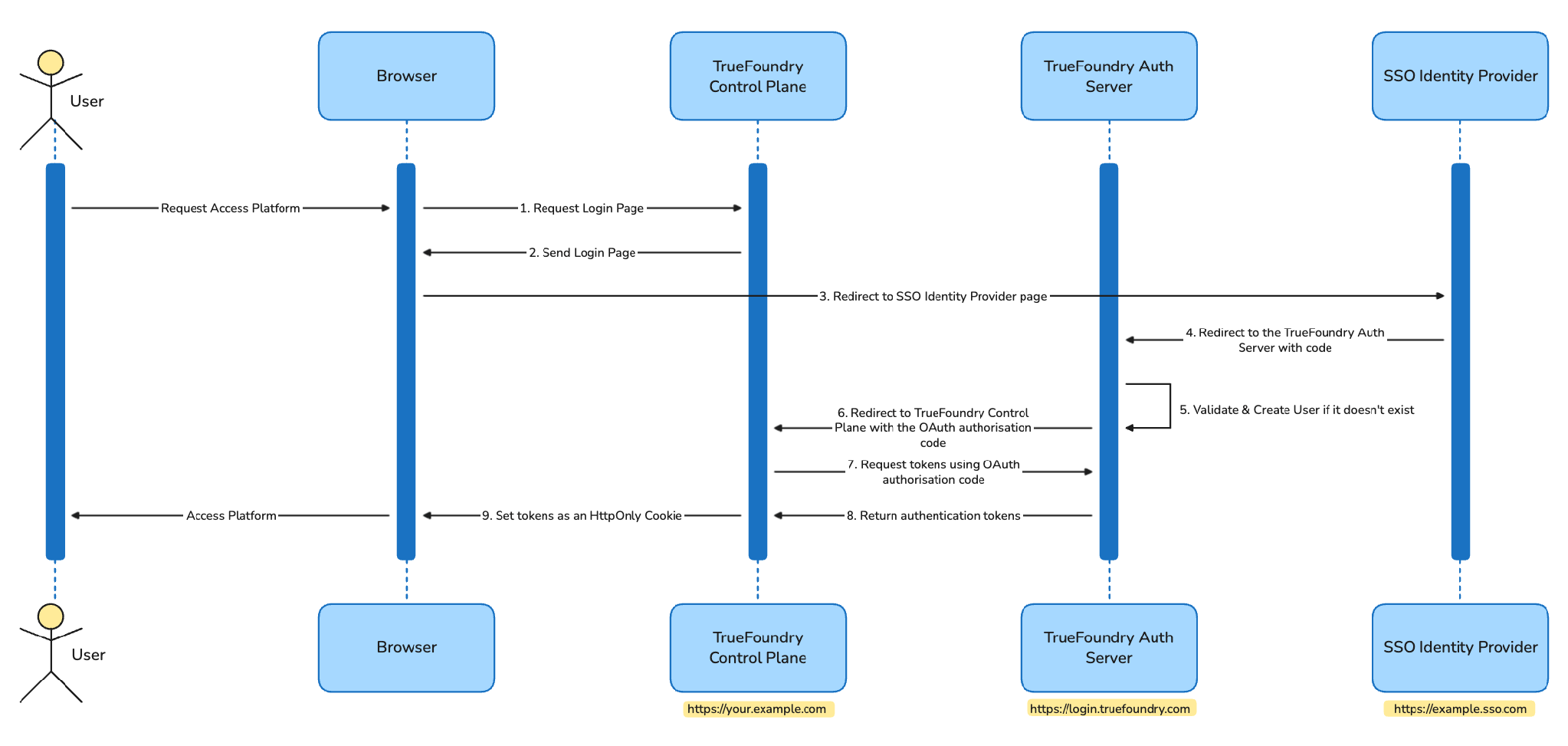
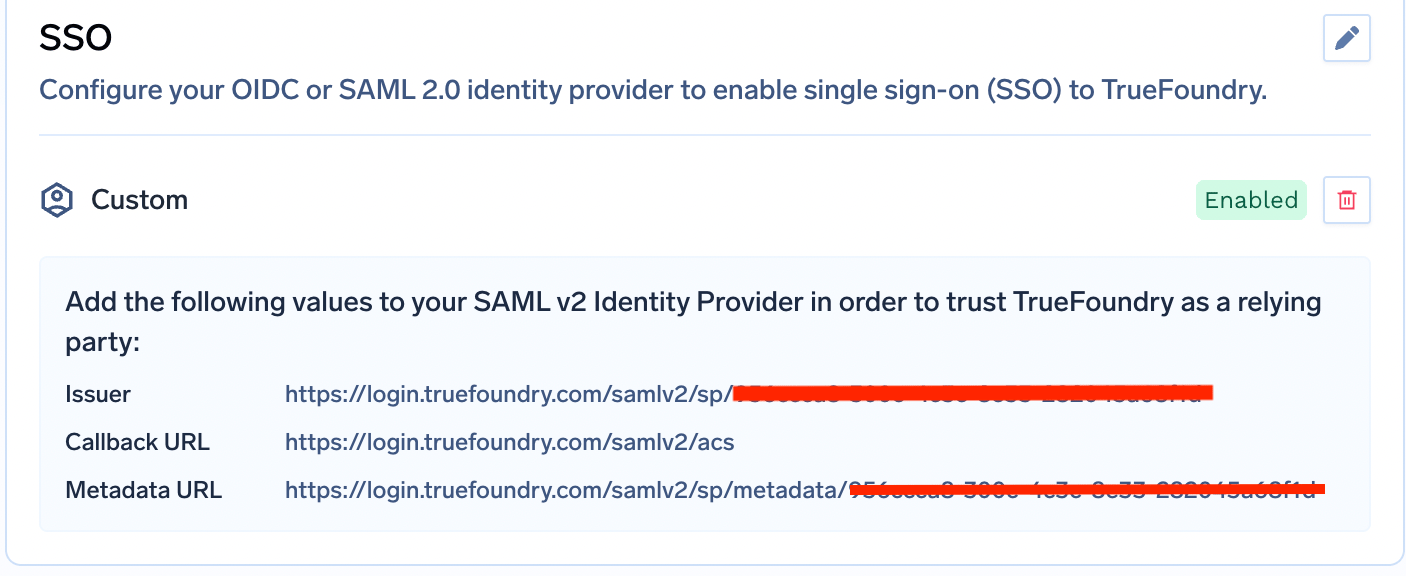
Accédez à Platform → Settings → SSO, activez l'option Enabled, sélectionnez votre fournisseur et choisissez OIDC ou SAML v2.
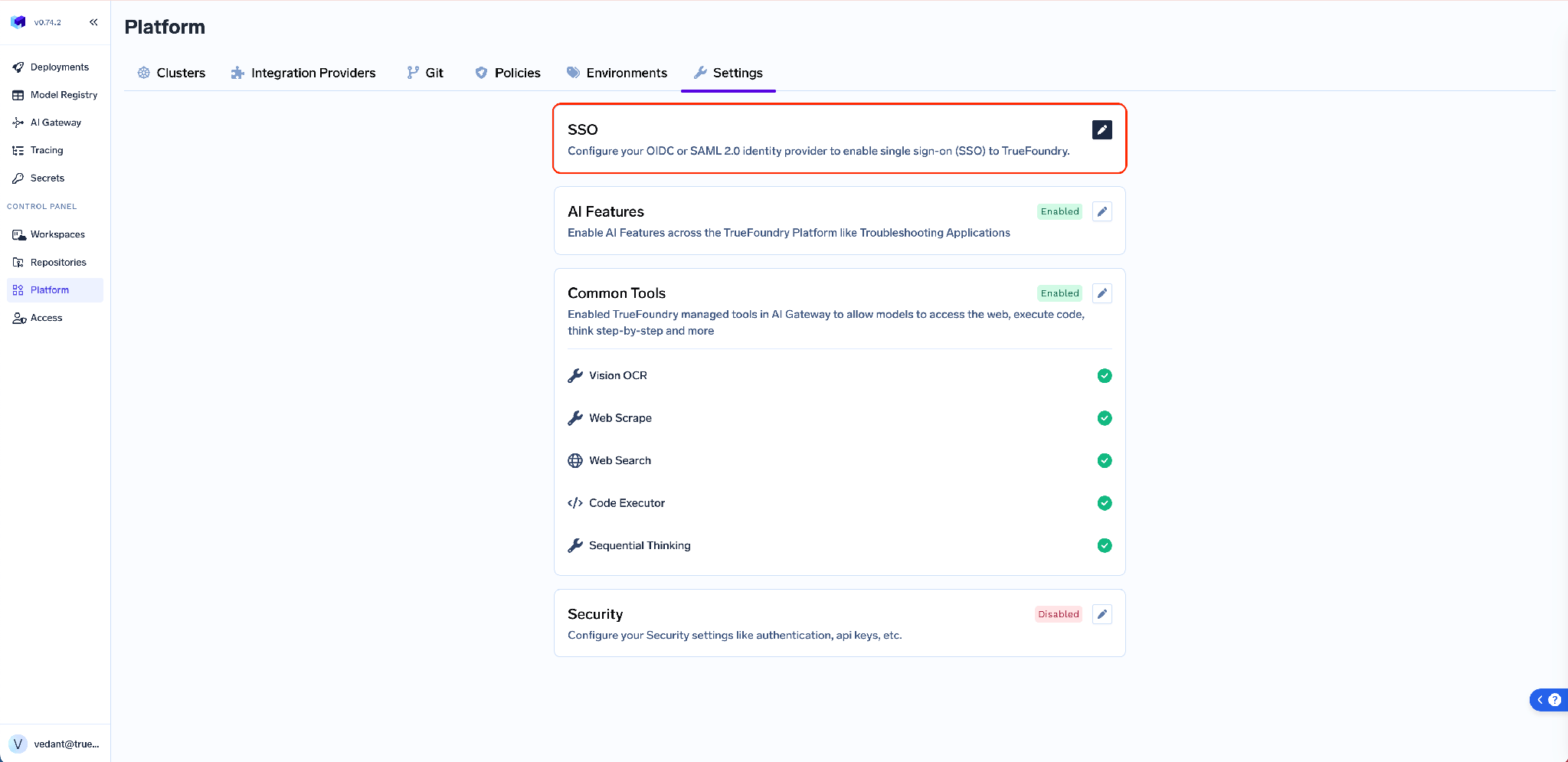
Pour OIDC, vous fournissez un Client ID, un Client Secret et une Issuer URL ; l'URL de rappel (callback URL) côté IdP est toujours https://login.truefoundry.com/oauth2/callback. Pour SAML, vous fournissez l'URL SSO de l'IdP et un certificat de signature X.509, puis vous revenez après l'enregistrement pour récupérer la Callback URL et l'Issuer générés par TrueFoundry afin de les coller dans votre IdP.
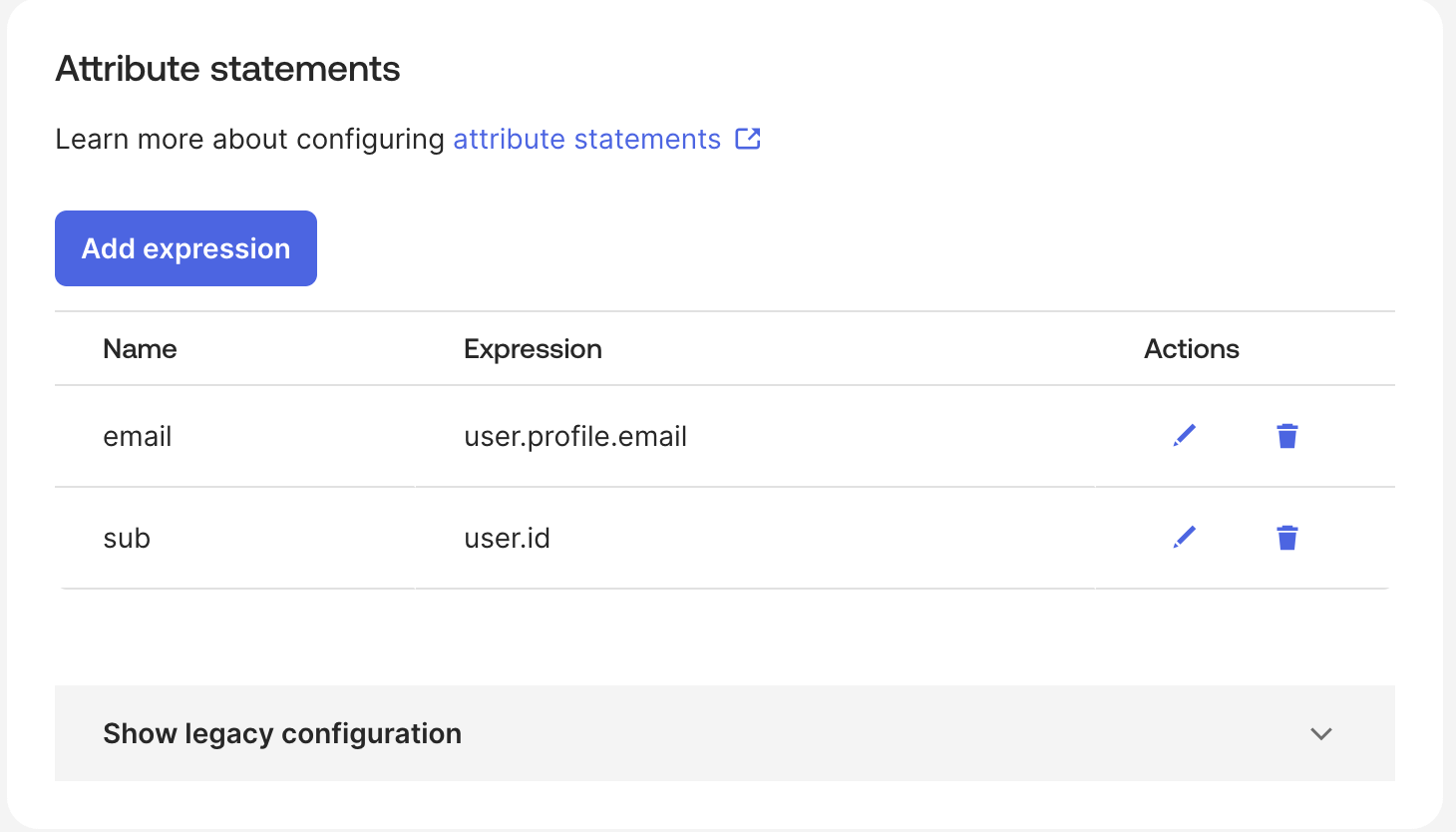
Un détail qui fait gagner du temps par la suite : configurez votre IdP pour émettre des claims nommées email, sub et groups. Ce sont les valeurs par défaut de TrueFoundry, et définir ces alias côté IdP vous évite de toucher aux champs avancés.
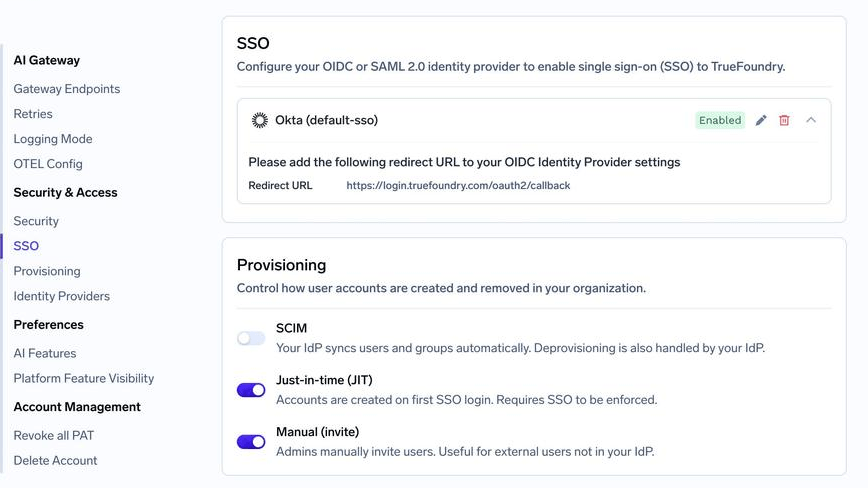
Accédez à Settings → Security & Access → Provisioning et sélectionnez SCIM. C'est ici que se trouvent les trois modes de provisionnement, et en choisir un permet de définir le modèle de cycle de vie du tenant.
Dépliez votre configuration SSO enregistrée pour afficher l'URL SCIM ainsi que le reste des métadonnées. C'est la valeur appelée par votre IdP.
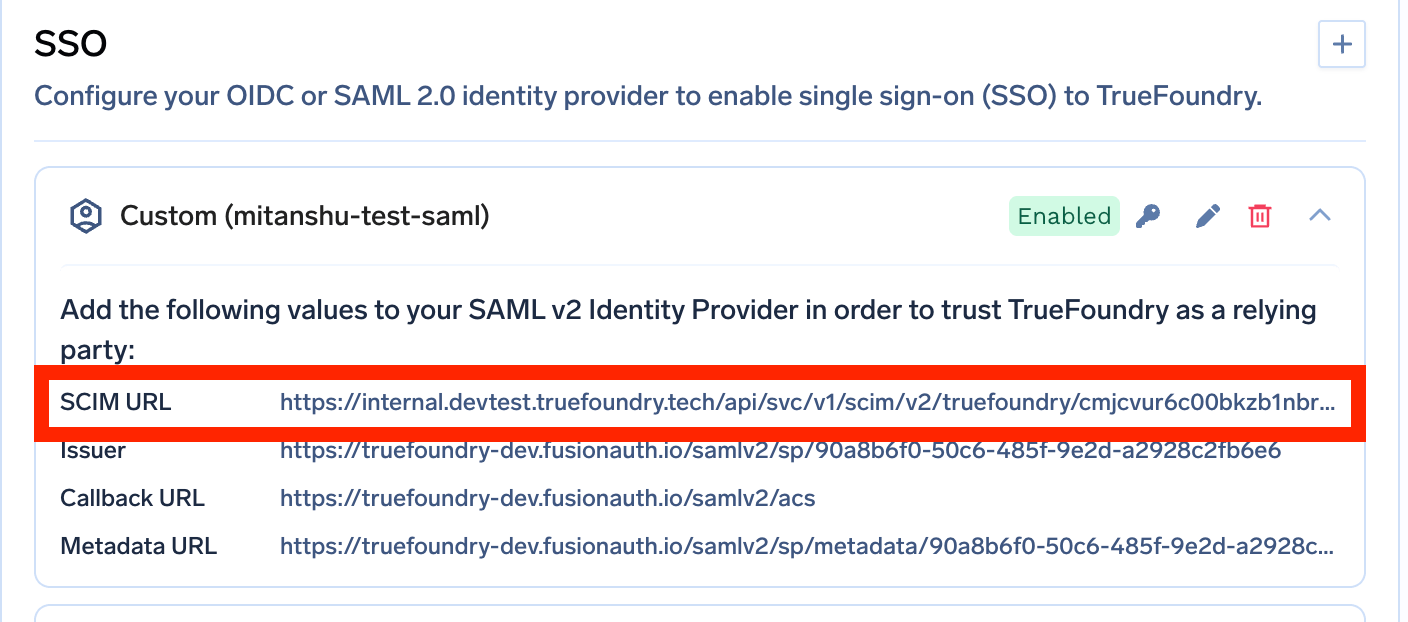
Cliquez sur l'icône de clé à côté de la configuration SSO pour générer le jeton d'authentification SCIM.
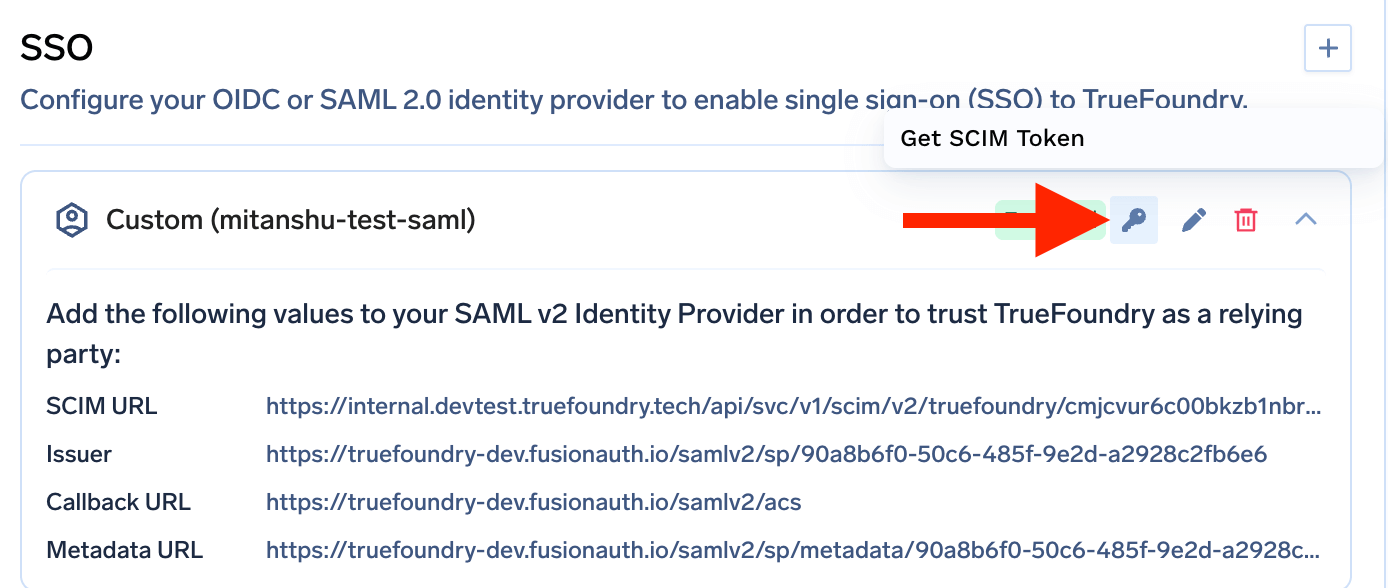
Traitez-le comme un mot de passe. Il s'affiche uniquement lors de sa création ; si vous le perdez, vous devez en générer un nouveau et le jeton précédent cesse de fonctionner.
Dans les paramètres de provisionnement de votre IdP, définissez la Base URL (certains IdP l'appellent Tenant URL) avec l'URL SCIM, réglez l'Authentication sur Bearer Token et collez le jeton SCIM dans le champ correspondant. Assignez ensuite des utilisateurs et des groupes dans l'IdP et démarrez le provisionnement. En quelques minutes, les utilisateurs et les équipes apparaissent dans TrueFoundry.
La plupart des présentations de SCIM s'arrêtent à la synchronisation des utilisateurs. La synchronisation des utilisateurs est la partie la plus simple. La véritable raison d'utiliser SCIM sur une plateforme comme celle-ci est la synchronisation des groupes, car c'est au niveau des groupes que se situent les autorisations.
Lorsque le tenant est configuré pour SCIM, chaque groupe transmis par votre IdP devient automatiquement une équipe TrueFoundry. Ajoutez une personne au groupe IdP et elle rejoint l'équipe ; retirez-la et elle la quitte.
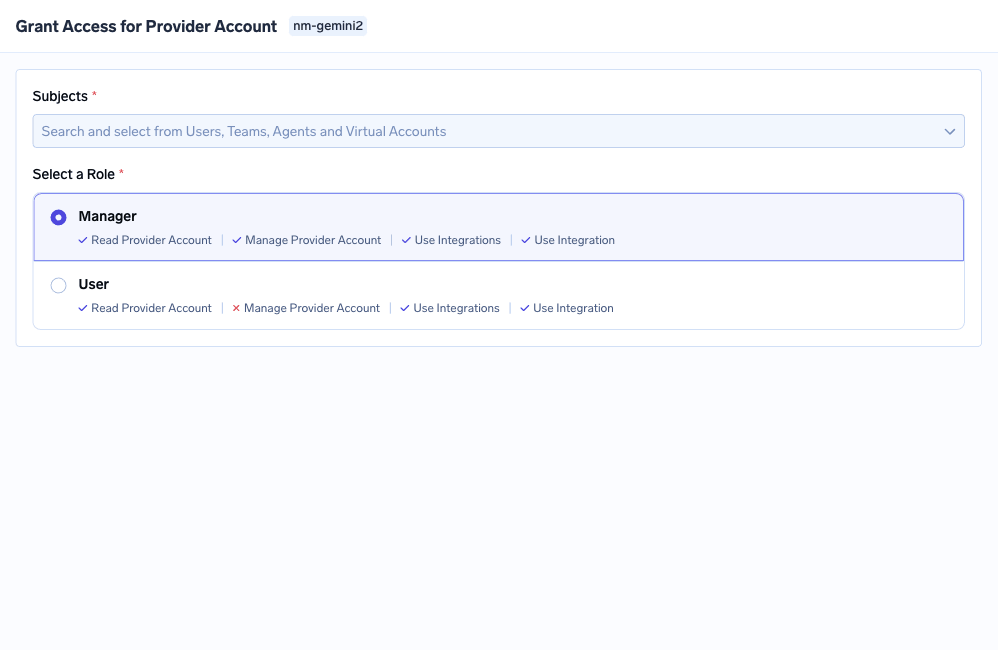
Les équipes synchronisées sont des équipes ordinaires à tous les autres égards. Vous pouvez leur accorder un accès aux ressources, leur attribuer des rôles au niveau du tenant et ajouter des mappages de claims de fournisseur d'identité.
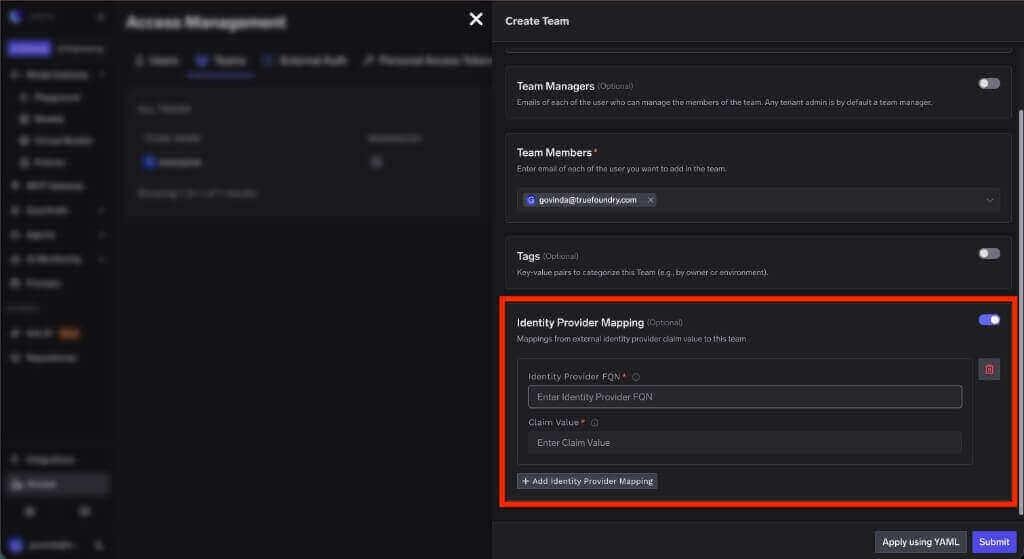
Soyez précis sur la séparation des rôles, car il est facile d'en présumer trop. SCIM ne décide pas de ce qu'une équipe est autorisée à faire — un administrateur attribue ses rôles à l'équipe une fois pour toutes, de manière délibérée. SCIM automatise l'appartenance, et comme les permissions sont rattachées à l'équipe, l'appartenance à jour garantit un ensemble de permissions effectives à jour. Concevez l'autorisation une fois, et laissez l'IdP gérer les mouvements d'effectifs.
Il existe une contrainte de nommage à respecter. Le nom du groupe IdP devenant le nom de l'équipe, il ne doit contenir que des caractères alphanumériques, des tirets et des tirets du bas, et ne doit pas dépasser 36 caractères. Renommez les groupes dans l'IdP avant d'activer le provisionnement, et non après.
Voici le déroulement complet du cycle de vie, avec les étapes manuelles indiquées.
Configuration initiale (manuelle). Un administrateur crée un groupe IdP nommé ml-platform-contractors — en minuscules, avec des tirets, 23 caractères, conforme. SCIM le transmet et une équipe du même nom apparaît dans TrueFoundry. L'administrateur attribue à cette équipe ce dont elle a besoin : le compte du fournisseur de modèles concerné, un accès User sur deux serveurs MCP, rien d'autre. La conception des autorisations est terminée, faite en une seule fois.
Intégration (automatique). Un prestataire arrive. Le provisionnement RH l'ajoute à ml-platform-contractors. SCIM crée son utilisateur TrueFoundry et l'ajoute à l'équipe. Il se connecte via le SSO avec exactement les accès détenus par l'équipe. Personne n'a eu à créer de ticket.
Changement de périmètre (automatique). Au bout de trois mois, le prestataire change de projet. Il est retiré de ml-platform-contractors et ajouté à un autre groupe. SCIM ajuste les deux équipes. Ses accès au fournisseur de modèles disparaissent en même temps que son appartenance à l'équipe, sans qu'aucun administrateur n'ait eu à intervenir sur TrueFoundry.
Départ (automatique). Le contrat prend fin. L'enregistrement IdP est désactivé. SCIM marque l'utilisateur TrueFoundry comme inactif, et un utilisateur désactivé est rejeté lors du flux d'authentification. Le compte ne fonctionne plus, sans que personne n'ait eu besoin de se rappeler que TrueFoundry faisait partie des accès à révoquer.
Le seul élément restant manuel. Si ce prestataire avait également reçu un accès direct — un groupe de secrets spécifique, par exemple, en dehors de toute équipe —, cet accès subsiste car il ne provenaient pas de l'IdP. La désactivation bloque la connexion dans tous les cas, mais l'enregistrement de l'attribution reste présent jusqu'à ce que quelqu'un le supprime. Intégrez cela dans vos revues d'accès. C'est le même schéma que l'on retrouve dans le contrôle d'accès MCP en entreprise : les permissions héritées et directes se combinent, et en supprimer une ne supprime pas l'autre.
Pour Entra ID et Okta, SCIM nécessite SAML. La matrice des fonctionnalités indique que le SSO est seulement recommandé pour SCIM de manière générale, mais pour les deux IdP les plus déployés, les guides de provisionnement reposent sur la configuration SAML. Si vous configurez OIDC avec Entra ou Okta puis cherchez à mettre en place SCIM, vous devrez refaire la configuration.
Un seul mode de provisionnement par tenant. Vous ne pouvez pas utiliser SCIM pour les employés et le mode invitation seule pour les prestataires sur le même tenant en activant les deux options. Si vous devez ajouter une personne qui n'est pas présente dans votre IdP, le flux Invite User sous Access > Users reste disponible — et lorsque vous l'utilisez pour un utilisateur SSO, laissez la case Send email to set password décochée, puisqu'il n'y a pas de mot de passe à définir.
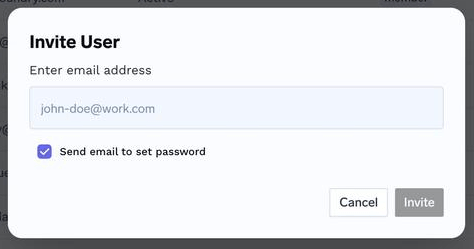
La désactivation et la suppression sont deux opérations différentes. La désactivation bloque la connexion et est gérée par SCIM. Supprimer définitivement un utilisateur est une action d'administration distincte, et TrueFoundry la refuse tant que l'utilisateur n'a pas été explicitement retiré de toutes les ressources et équipes. Cette sécurité évite de supprimer une identité alors que des accès directs y font encore référence.
La page dédiée au provisionnement a été introduite dans la v0.143. Dans les versions antérieures, SCIM est configuré directement dans le formulaire SSO. Les valeurs sont identiques, seules les interfaces diffèrent.
Le provisionnement SCIM est généralement mis en avant pour la gestion des arrivées (onboarding), car c'est une fonctionnalité très démonstrative. Mais son véritable bénéfice se situe à l'autre extrémité. Le déprovisionnement est un mode de défaillance sans boucle de rétroaction — pas de ticket, pas de réclamation, pas d'alerte — et la seule solution pérenne consiste à faire en sorte que les départs se propagent automatiquement depuis le seul système qui en a déjà connaissance.
Sur TrueFoundry, cela se résume à trois paramètres et une décision de conception : activer SCIM, copier l'URL de base, générer le jeton, puis définir une fois ce que l'équipe associée à chaque groupe est autorisée à faire. Ensuite, l'organigramme maintient votre modèle d'accès pour vous, et les comptes qui ne doivent plus exister s'éteignent d'eux-mêmes — le seul processus de départ qui résiste à la croissance d'une entreprise.
TrueFoundry AI Gateway offre une latence d'environ 3 à 4 ms, gère plus de 350 RPS sur 1 processeur virtuel, évolue horizontalement facilement et est prête pour la production, tandis que LiteLM souffre d'une latence élevée, peine à dépasser un RPS modéré, ne dispose pas d'une mise à l'échelle intégrée et convient parfaitement aux charges de travail légères ou aux prototypes.




Le provisionnement SCIM est la synchronisation automatique des comptes utilisateurs et des appartenances aux groupes depuis un fournisseur d'identité vers une application, selon le standard SCIM 2.0. L'IdP appelle une API REST de l'application pour créer des utilisateurs, mettre à jour des attributs, ajuster l'appartenance aux groupes et désactiver les comptes lorsque des personnes partent. Les changements d'identité sont effectués une seule fois dans l'IdP et se propagent partout, au lieu d'être répétés à la main dans chaque outil.
Le JIT crée un utilisateur la première fois qu'il se connecte via le SSO, et ne fait rien d'autre. SCIM s'exécute en continu et indépendamment des connexions ; il gère donc aussi les mises à jour, l'appartenance aux groupes et la désactivation. Le JIT règle l'onboarding ; SCIM règle l'ensemble du cycle de vie. Avec le JIT, le déprovisionnement reste un processus manuel dont quelqu'un doit être responsable.
Configurez d'abord le SSO, puis activez SCIM sous Settings → Security & Access → Provisioning. Développez la configuration SSO pour copier la SCIM Base URL, cliquez sur l'icône de clé pour générer un jeton Bearer, puis collez les deux dans votre IdP avec la méthode d'authentification réglée sur Bearer Token. Affectez les utilisateurs et les groupes dans l'IdP : ils apparaissent en quelques minutes. Pour Entra ID et Okta, SCIM s'appuie sur une configuration SSO SAML.
Oui. TrueFoundry s'exécute dans votre VPC, on-premise, en environnement air-gapped ou en hybride, de sorte que les prompts et les réponses ne quittent jamais votre domaine, même lorsque vous routez vers de nombreux fournisseurs.
Oui. Il comprend une MCP Gateway, une Agent Gateway et un MCP & Agents Registry avec un contrôle d'accès au niveau des outils. Les agents construits avec LangGraph, CrewAI, AutoGen ou un framework maison peuvent tous être gouvernés de manière centralisée.
Oui. La passerelle est compatible OpenTelemetry et s'intègre à Grafana, Datadog, Prometheus, ou à votre pile technologique préférée. Elle trace chaque requête, du prompt à l'exécution de l'outil et du modèle, vous offrant ainsi une journalisation unifiée sans avoir à remplacer ce que vous utilisez déjà.



Les dernières nouvelles, articles et ressources envoyés dans votre boîte de réception

.png)
.webp)
.webp)
.png)
.png)
.png)
.png)
.png)
.webp)
.webp)

.png)
.png)
.png)


