


.png)
October 31, 2026
|
5 minutos de lectura


Obtenga acceso instantáneo a un entorno TrueFoundry en vivo. Implemente modelos, dirija el tráfico de LLM y explore la plataforma completa: su sandbox estará listo en segundos, sin necesidad de tarjeta de crédito.



.png)
¡Una forma increíblemente rápida de crear, rastrear e implementar sus modelos!
ElEl servidor MCP de Notion es un servidor remoto Model Context Protocol para Notion. MCP es el estándar abierto que permite a un agente descubrir y utilizar herramientas en un sistema externo; la implementación de Notion expone la búsqueda en el espacio de trabajo, la lectura y escritura de páginas y bases de datos, y los comentarios como herramientas invocables.
La documentación de TrueFoundry describe la superficie como la capacidad de buscar, obtener, crear y actualizar páginas, bases de datos y comentarios, con herramientas bajo la convención notion-*: notion-search, notion-fetch, notion-create-pages, notion-update-page. Clasificadas por capacidad:
Esa pestaña de Recursos es importante: la mayoría de los servidores MCP solo exponen herramientas, por lo que Recursos es una segunda vía de recuperación que es fácil pasar por alto al auditar a qué puede acceder un agente.
Al ser un servidor remoto, no hay ningún contenedor que ejecutar ni procesos npx por portátil; simplemente apuntas un cliente a una URL y te autenticas, un patrón que ahora es estándar en servidores MCP remotos.
Los usos más valiosos encadenan herramientas y se apoyan en la búsqueda, ya que el contenido de Notion es, por naturaleza, no estructurado:
La distinción entre lectura y escritura es más marcada aquí que en la mayoría de las herramientas. Las lecturas son el objetivo principal: la recuperación es la razón por la que lo conectas. Las escrituras son útiles, pero rara vez fundamentales, y pueden sobrescribir una página en la que alguien ha trabajado durante una semana. Afortunadamente, las herramientas de Notion vienen ya etiquetadas Solo lecturaoDestructiva, por lo que la pestaña de Herramientas te indica cuál es cuál sin necesidad de inspección.
El perfil de riesgo de Notion es distinto al de un repositorio de código. El fallo peligroso no es que un agente reescriba una página de forma malintencionada, sino que un agente lea legítimamente mucho más de lo que nadie pretendía.
La herencia de permisos hace que el alcance sea invisible. El acceso en Notion tiene forma de árbol de páginas: si concedes acceso a una página principal, este se propaga hacia abajo a todas las páginas secundarias, nietas y bases de datos que contenga. Cuando alguien comparte la "wiki de ingeniería" con una integración, piensa en la página de inicio. Lo que realmente ha concedido es todo lo que se ha acumulado bajo ese nodo durante tres años, incluida la página de planificación de compensaciones que un gerente guardó allí a toda prisa. Nadie tiene la intención de entregar datos de RR. HH. a un agente. La herencia lo hace por ellos.
El consentimiento a nivel de espacio de trabajo es demasiado general. La pantalla de OAuth de Notion te pide que elijas un espacio de trabajoy, a continuación, muestra las categorías concedidas: acceso a páginas y bases de datos, búsqueda y usuarios del espacio de trabajo. Nunca te pide que enumeres las páginas. La unidad de consentimiento es mucho mayor que la unidad de necesidad, por lo que, por defecto, lo más probable es que "el agente pueda verlo todo", a menos que algo lo limite.
La búsqueda lo amplifica. Una concesión demasiado amplia sería manejable si un agente tuviera que adivinar las URL de las páginas. Pero no es así. La búsqueda de Notion es una herramienta de descubrimiento: si diriges un agente a un espacio de trabajo, encontrará las páginas confidenciales, porque ese es su trabajo. La calidad de la recuperación y el radio de impacto aumentan a la par.
Nadie puede reconstruir lo que se ha leído. Notion registra la actividad de la API. Pero no registra que tu agente de soporte interno buscó "indemnización por despido" mientras respondía a una pregunta de un hilo de Slack. Las lecturas son la superficie de riesgo, y son lo menos probable que se detecte a posteriori.
Nada de esto es motivo para prescindir del servidor MCP de Notion. Es motivo para poner un plano de control delante de él, que es lo que pasarela MCP hace.
En TrueFoundry, Notion es un MCP gestionado por TrueFoundry. TrueFoundry publica definiciones de servidor verificadas por la plataforma en un catálogo gestionado; para aprovisionar uno, solo tienes que proporcionar un Nombre, y la plataforma se encarga de todas las URL, detalles de autenticación, alcances y credenciales, manteniéndolos actualizados a medida que el proveedor los modifica.
Paso 1: abre el catálogo.Ve aServidores MCP en la barra lateral, haz clic en Añadir nuevo servidor MCPy seleccioneConectar MCP gestionados por TrueFoundry. Busca notion , catalogado como «Notion es una herramienta de colaboración y productividad», y haz clic en + Añadir. TrueFoundry registra el servidor y abre su página de detalles.
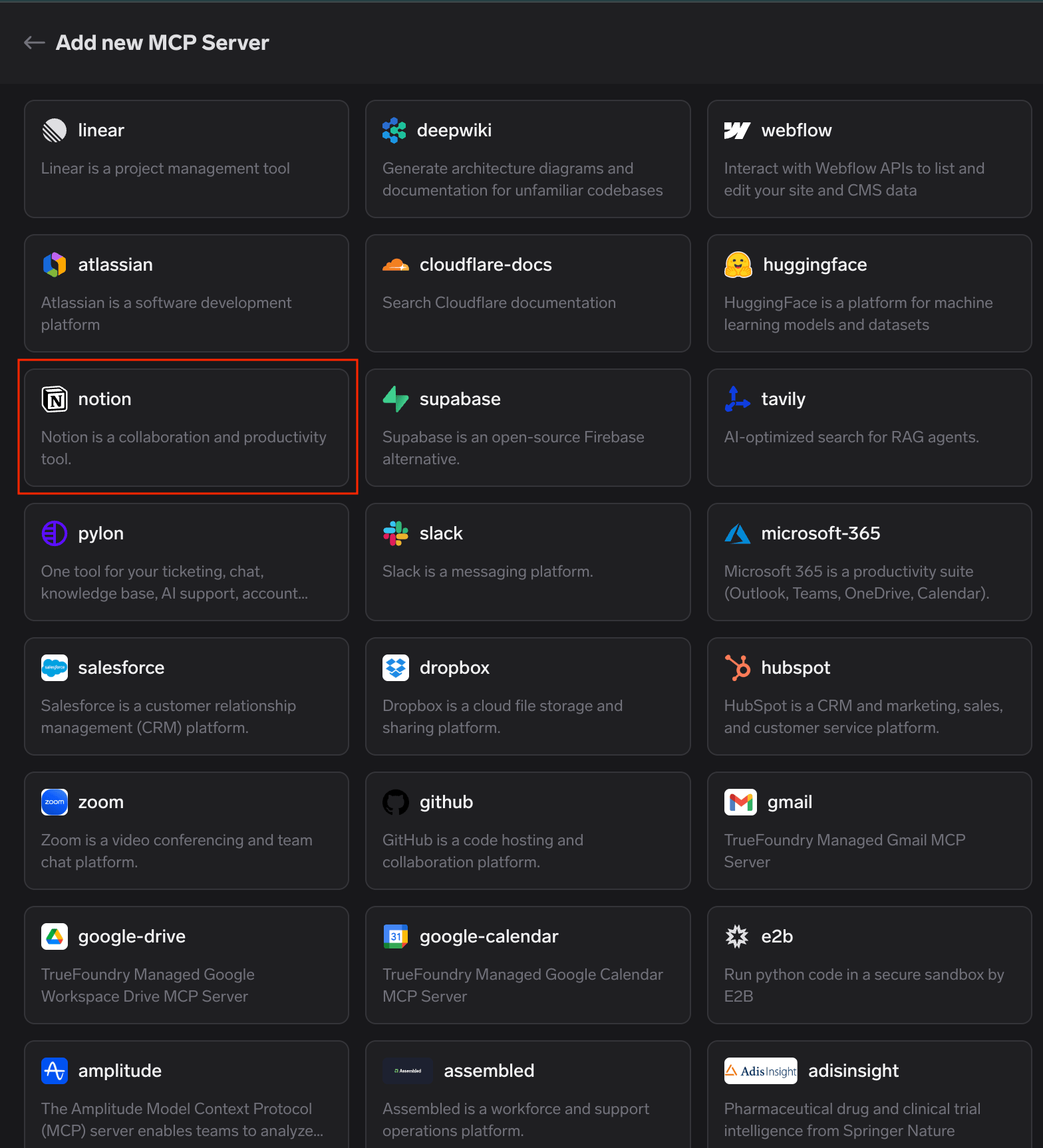
Catálogo de MCP gestionados por TrueFoundry con la tarjeta de Notion resaltada entre los servidores MCP verificados por la plataforma
Eso es todo el registro: sin URLs que pegar, sin integraciones de Notion que crear y sin secretos de cliente que almacenar.
Paso 2: inicia la conexión. La pestaña Herramientas se abre con el mensaje «No estás conectado a este servidor MCP». Haz clic en Conectar ahora para iniciar la autorización OAuth2; la página de detalles muestra el tipo de autenticación antes de que hagas clic en nada.
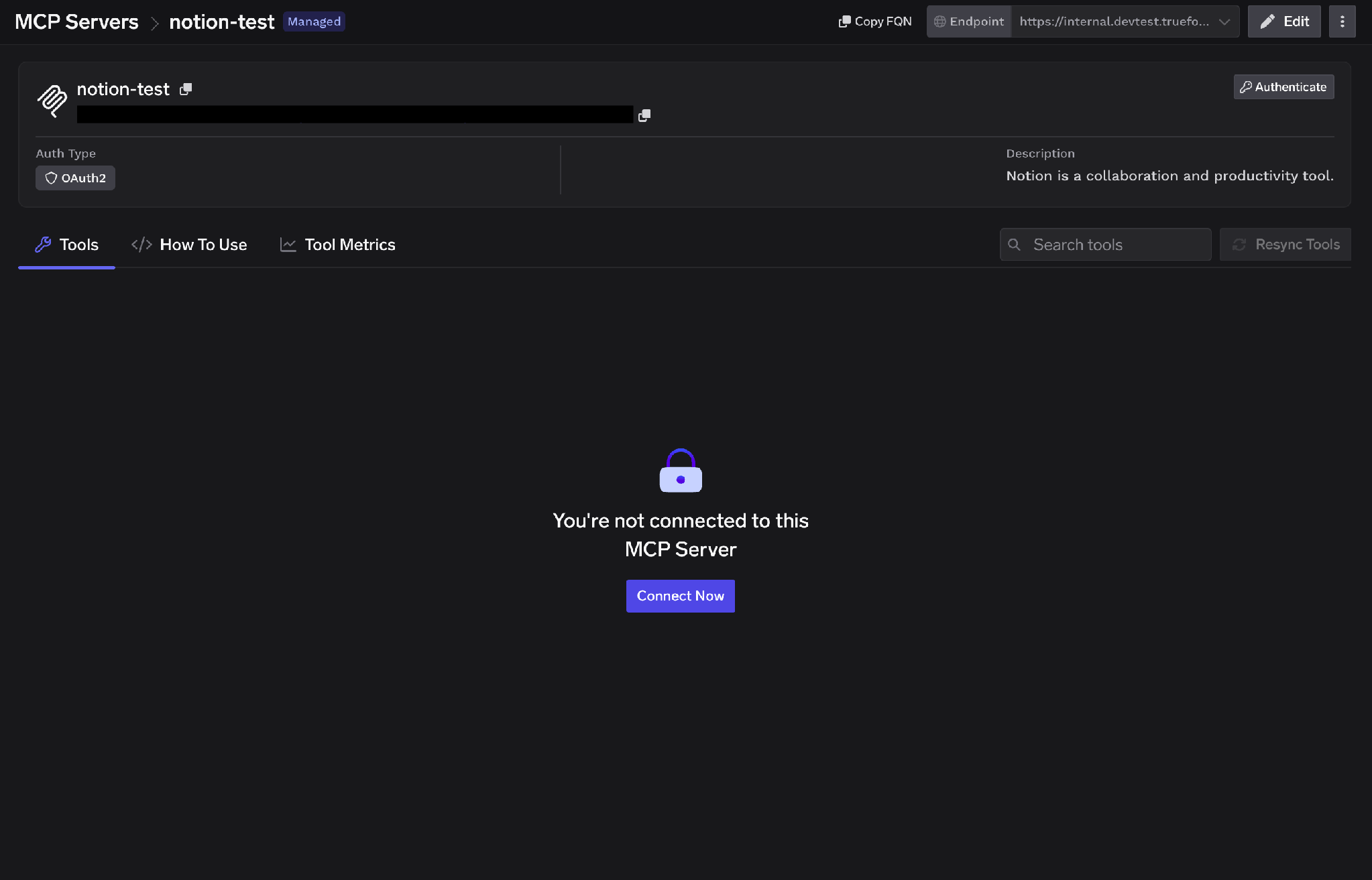
Página de detalles del servidor MCP de Notion que muestra el tipo de autenticación OAuth2 y el botón Conectar ahora en la pestaña Herramientas desconectada
Paso 3: aprueba en la pasarela. Aparecerá una ventana emergente de «Conectar a través de TrueFoundry AI Gateway» con la URL de la pasarela MCP, la URL de redirección y los servidores a autorizar. Revísalo y haz clic en Aprobar. A continuación, se te redirigirá a cada servidor MCP de forma secuencial; es importante saberlo si vas a autorizar varios a la vez, ya que el proceso es una cadena y no un único paso.
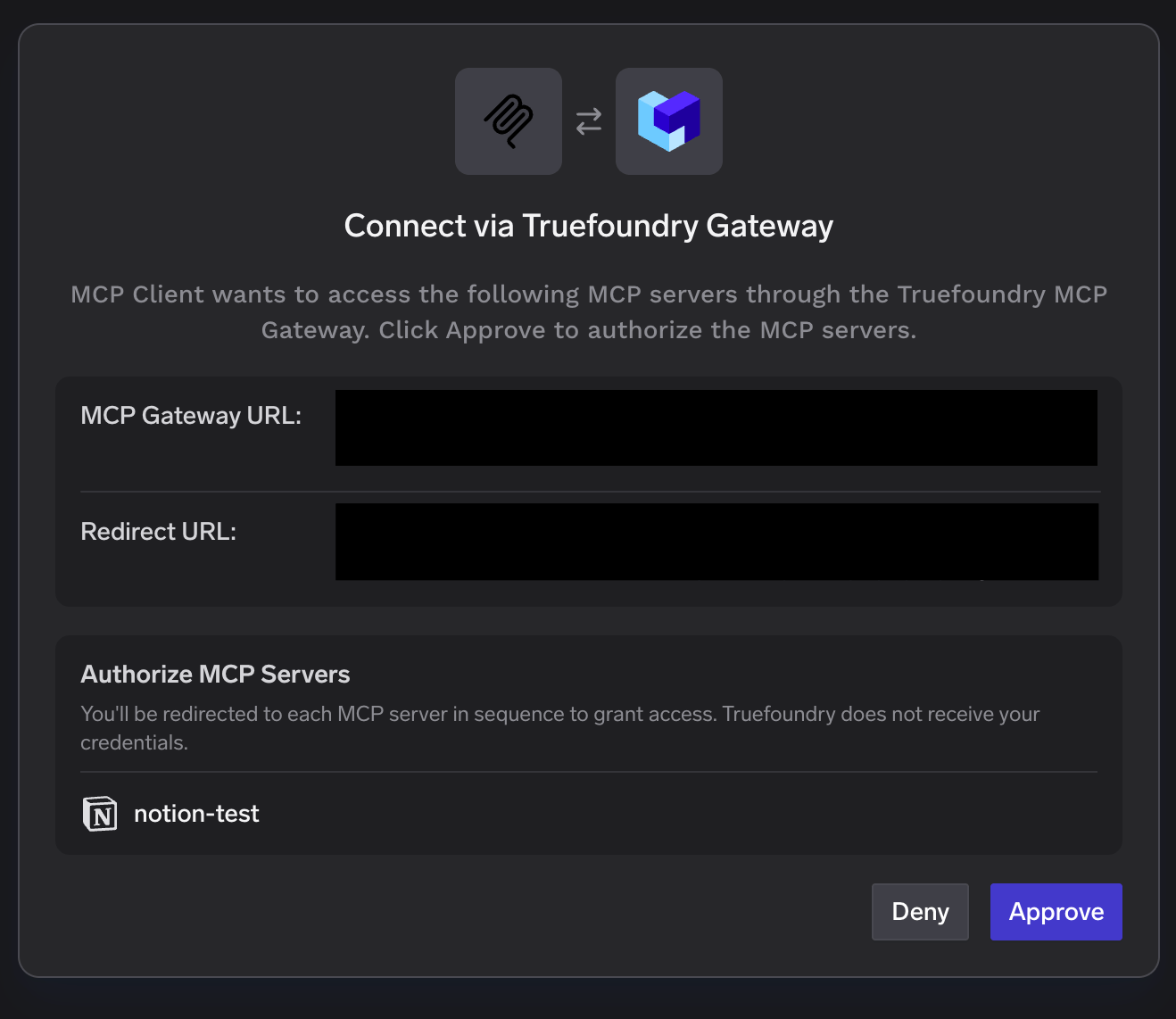
Ventana emergente de Conectar a través de TrueFoundry AI Gateway que enumera el servidor de Notion en Autorizar servidores MCP con los botones Denegar y Aprobar
Paso 4: Autoriza tu espacio de trabajo de Notion. Se abrirá la pantalla de consentimiento de Notion. Selecciona el espacio de trabajo, revisa los permisos que se van a conceder (acceso a páginas y bases de datos, búsqueda, usuarios del espacio de trabajo), confirma que confías en la URL de redirección y haz clic en Continuar.
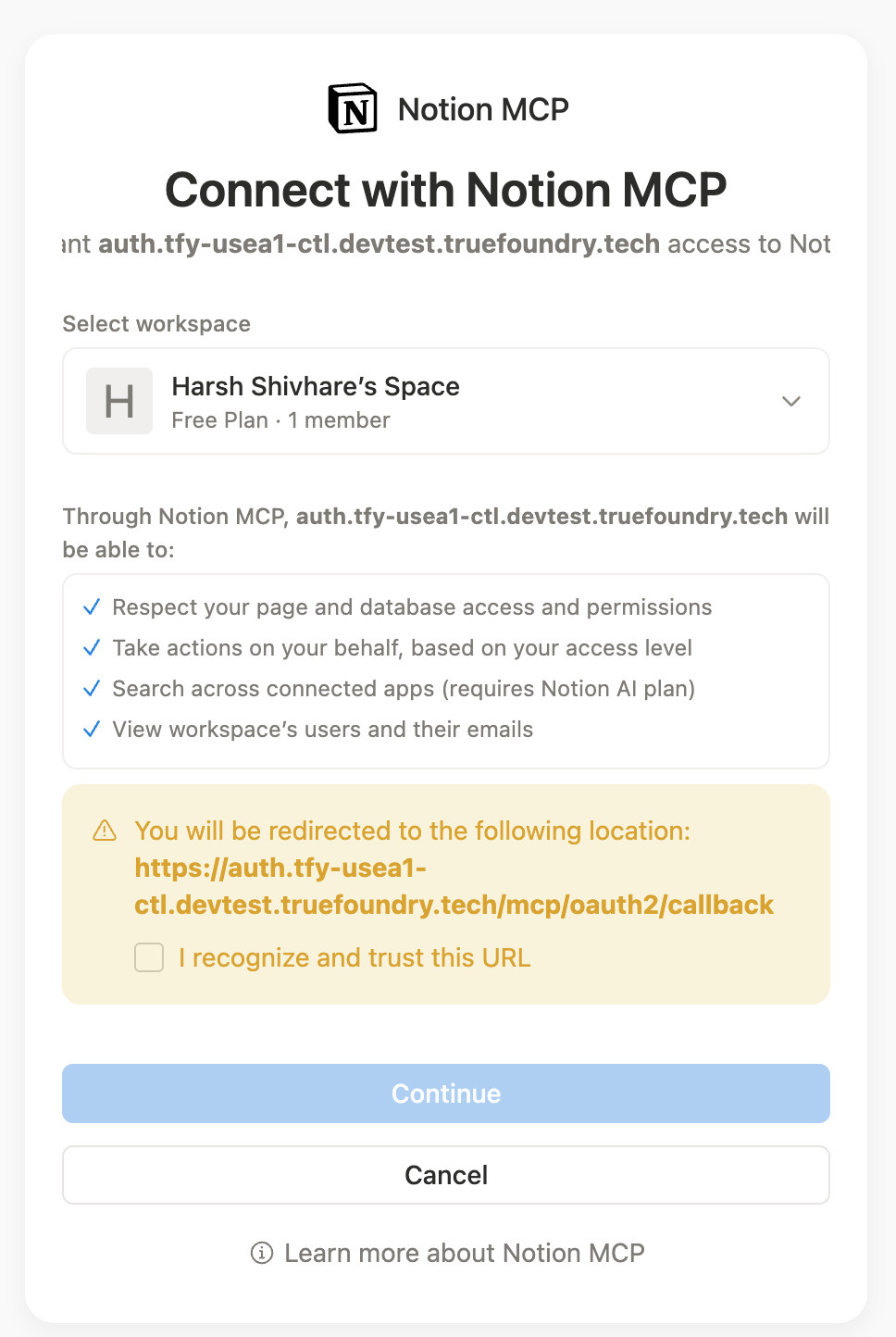
Pantalla de consentimiento de Connect with Notion MCP que muestra la selección del espacio de trabajo, la lista de permisos concedidos y el botón Continuar
Lee esta pantalla con atención: es aquí donde el problema de la herencia se convierte en una decisión. Quien haga clic en Continuar está eligiendo cuánto contenido del espacio de trabajo podrá buscar un agente.
Paso 5: Verifica las herramientas.ElHerramientas La pestaña se completa con las herramientas de Notion, cada una con una descripción, un Probar botón y una etiqueta de «Solo lectura» o «Destructiva». Recursos aparecen en su propia pestaña.
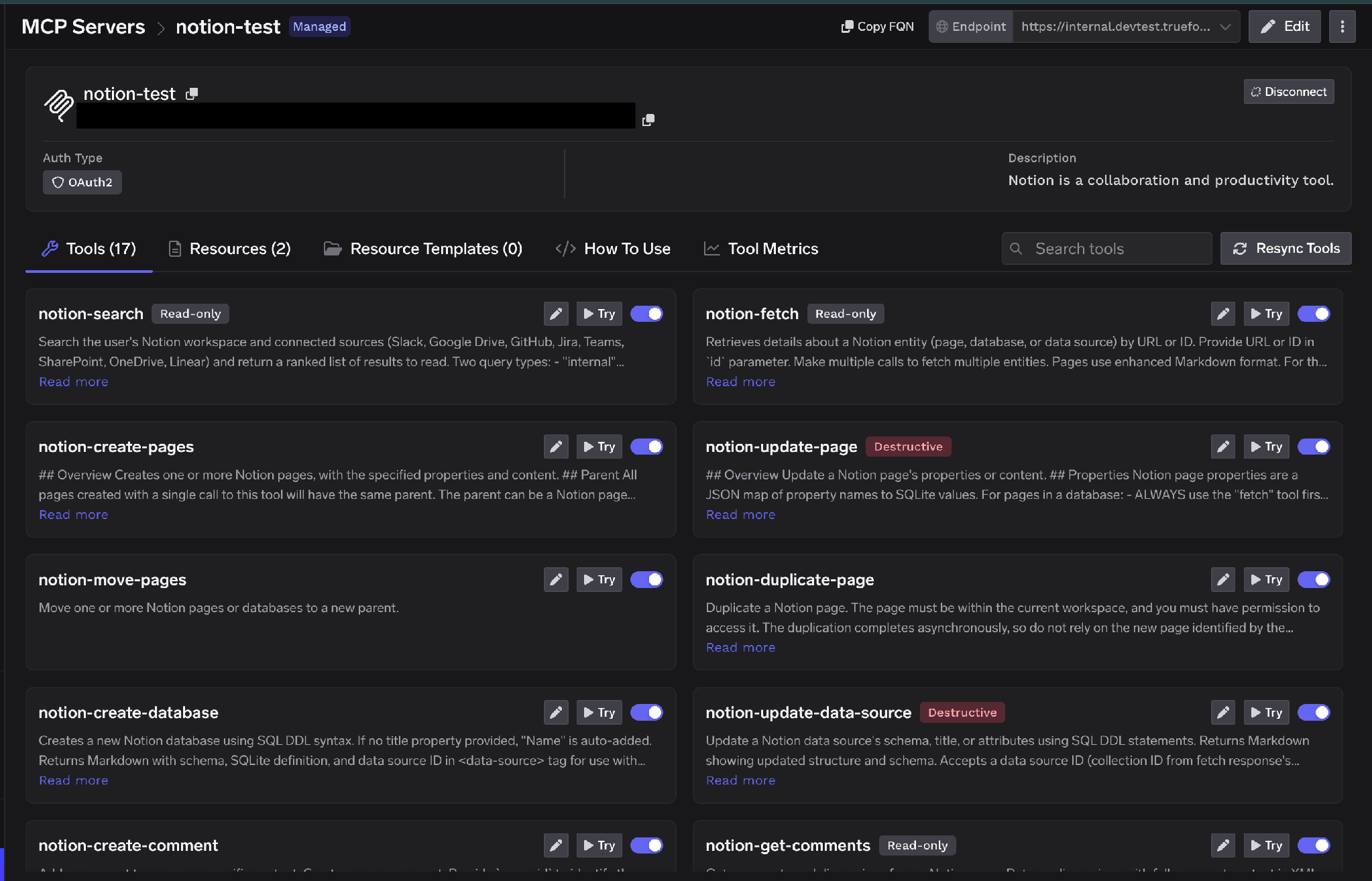
Pestaña de herramientas de Notion con herramientas como notion-search, notion-fetch, notion-create-pages y notion-update-page, cada una etiquetada como «Solo lectura» o «Destructiva»
TrueFoundry separa laautenticación de entrada autenticación (cómo se identifica un cliente ante la pasarela) desde autenticación de salida (cómo se identifica la pasarela ante Notion). Las capas son independientes, y esa distinción es lo que hace posible el alcance por usuario.
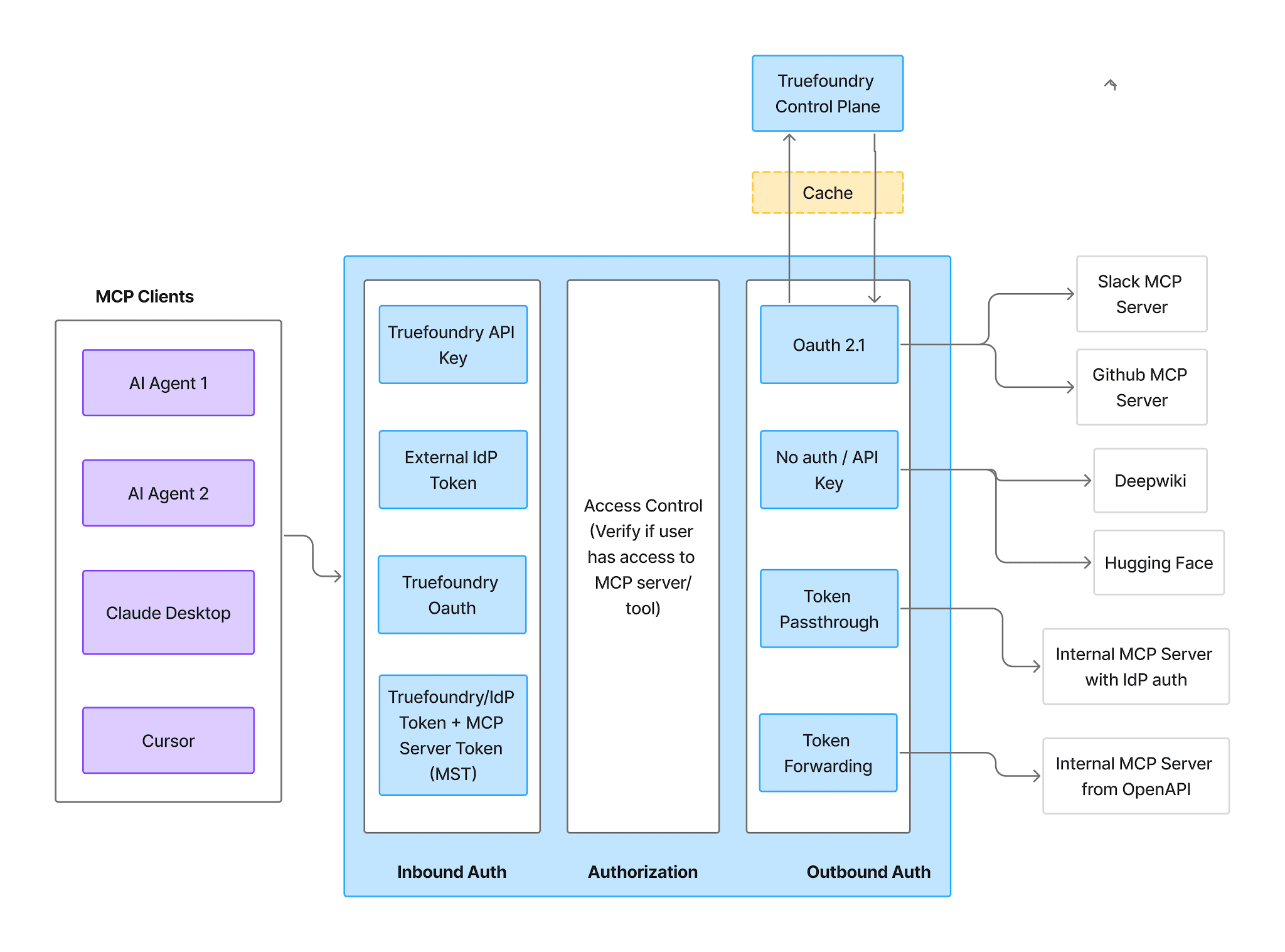
Flujo de autenticación y autorización de la pasarela MCP que muestra la autenticación de entrada, el control de acceso y la autenticación de salida como tres etapas diferenciadas
Entrada—cuatro métodos admitidos:
TrueFoundry AI Gateway ofrece una latencia de entre 3 y 4 ms, gestiona más de 350 RPS en una vCPU, se escala horizontalmente con facilidad y está listo para la producción, mientras que LitellM presenta una latencia alta, tiene dificultades para superar un RPS moderado, carece de escalado integrado y es ideal para cargas de trabajo ligeras o de prototipos.




Un servidor remoto de Model Context Protocol para Notion que expone un workspace como herramientas invocables: buscar, obtener páginas y bases de datos, crear y actualizar páginas, y leer y publicar comentarios. Los agentes se conectan mediante una URL y se autorizan con OAuth2 en lugar de ejecutar nada en local. Notion también expone MCP Resources como una primitiva independiente.
Búsqueda, obtención de contenido, creación y actualización de páginas, lecturas y escrituras en bases de datos, y comentarios, con nombres que siguen la convención notion-*, como notion-search, notion-fetch, notion-create-pages y notion-update-page. La lista completa aparece en la pestaña Tools una vez autorizado; cada herramienta lleva la etiqueta Read-only o Destructive y se configura de forma individual.
Sí, con un alcance bien definido, y la cuestión es la amplitud de lectura, no las escrituras maliciosas. Los permisos de Notion se heredan hacia abajo en los árboles de páginas, por lo que una sola concesión puede exponer mucho más de lo previsto. Ejecútelo detrás de un gateway que aplique OAuth por usuario en lugar de un token de integración compartido, desactive las herramientas de escritura que un agente no necesite, condicione el resto a una aprobación humana y trace cada llamada junto con el usuario que la realiza.
Sí. TrueFoundry se ejecuta en su VPC, on-prem, en entornos air-gapped o híbridos, de modo que los prompts y las respuestas nunca salen de su dominio, incluso cuando enruta entre muchos proveedores.
Sí. Incluye un MCP Gateway, un Agent Gateway y un MCP & Agents Registry con control de acceso a nivel de herramienta. Los agentes creados con LangGraph, CrewAI, AutoGen o un framework propio pueden gobernarse de forma centralizada.
Sí. La pasarela es compatible con OpenTelemetry y se integra con Grafana, Datadog, Prometheus o tu pila preferida. Rastrea cada solicitud desde la instrucción (prompt) hasta la ejecución de la herramienta y el modelo, así obtienes un registro unificado sin tener que reemplazar lo que ya tienes en funcionamiento.



Las últimas noticias, artículos y recursos enviados a tu bandeja de entrada
.png)
.png)
.webp)
.webp)

.png)
.png)
.png)
.png)
.png)
.png)
.png)

.png)


