


October 14, 2026
|
Lesedauer: 5 Minuten


Erhalten Sie sofortigen Zugriff auf eine TrueFoundry-Live-Umgebung. Stellen Sie Modelle bereit, leiten Sie den LLM-Verkehr weiter und erkunden Sie die gesamte Plattform — Ihre Sandbox ist in Sekundenschnelle einsatzbereit, ohne dass eine Kreditkarte erforderlich ist.


Published: October 6, 2026
Unglaublich schnelle Methode zum Erstellen, Verfolgen und Bereitstellen Ihrer Modelle!
Anthropic hat das Model Context Protocol im November 2024 eingeführt. Innerhalb eines Jahres haben fast alle Anbieter von API-Tools und mehrere unabhängige Generatoren Wege entwickelt, um eine OpenAPI-Spezifikation mechanisch in einen funktionierenden MCP-Server zu konvertieren. Die grundlegende Abbildung ist meist sauber: Der Pfad wird zum Tool-Namen, die Parameter zum Eingabe-Schema und die Erfolgsantwort zum Ausgabe-Schema. Die interessanten Aspekte liegen dort, wo die Abbildung verlustbehaftet ist – bei Paginierung, Multipart-Uploads, Webhooks und Streaming-Antworten – sowie bei den operativen Komponenten, die darüber entscheiden, ob der generierte Server tatsächlich nutzbar ist: Authentifizierungsinjektion, Schema-Validierung und die Qualität der Beschreibungen. Dieser Beitrag erläutert den vollständigen Algorithmus und die spezifischen Muster, die sich nicht direkt übertragen lassen.
Dienstag bei Northwind. Priya, Integrationsleiterin im Team für die Logistikplattform, erhält ein Ticket: „Mache den shipment-tracking-svc für den Routing-Optimierungs-Agenten aufrufbar.“ Der Dienst verfügt über 47 REST-Endpunkte, eine gepflegte OpenAPI 3.1-Spezifikation, OAuth2-Authentifizierung, cursorbasierte Paginierung, zwei Webhook-Endpunkte und einen Streaming-Endpunkt für Live-LKW-Telemetrie. Die MCP-Toolbox des Agenten umfasst derzeit 12 Tools aus drei anderen Diensten, die jeweils in etwa einer Woche von Hand programmiert wurden. 47 Endpunkte in diesem Tempo zu bearbeiten, würde fast ein Viertel der gesamten Entwicklungszeit in Anspruch nehmen.
Die OpenAPI-Spezifikation beschreibt den Dienst bereits in maschinenlesbarer Form – Pfade, Parameter, Schemata, Antwortstrukturen und sogar die OAuth2-Scopes pro Operation. Die manuelle Arbeit, die sie bisher geleistet hat, fügt keine Informationen hinzu, die nicht bereits in der Spezifikation enthalten wären. Die Arbeit bestand hauptsächlich aus der Übersetzung von einer Schema-Sprache in eine andere, mit einer kleinen Anzahl klar definierter Grenzfälle. Diese Arbeit gehört in einen Build-Schritt, nicht in ein Viertel der Entwicklungszeit.
Dieser Beitrag beschreibt den Konvertierungsalgorithmus – was sich sauber abbilden lässt, was nicht, und die operativen Komponenten (Authentifizierung, Validierung, Beschreibungsqualität), die den generierten Server tatsächlich einsatzbereit machen.
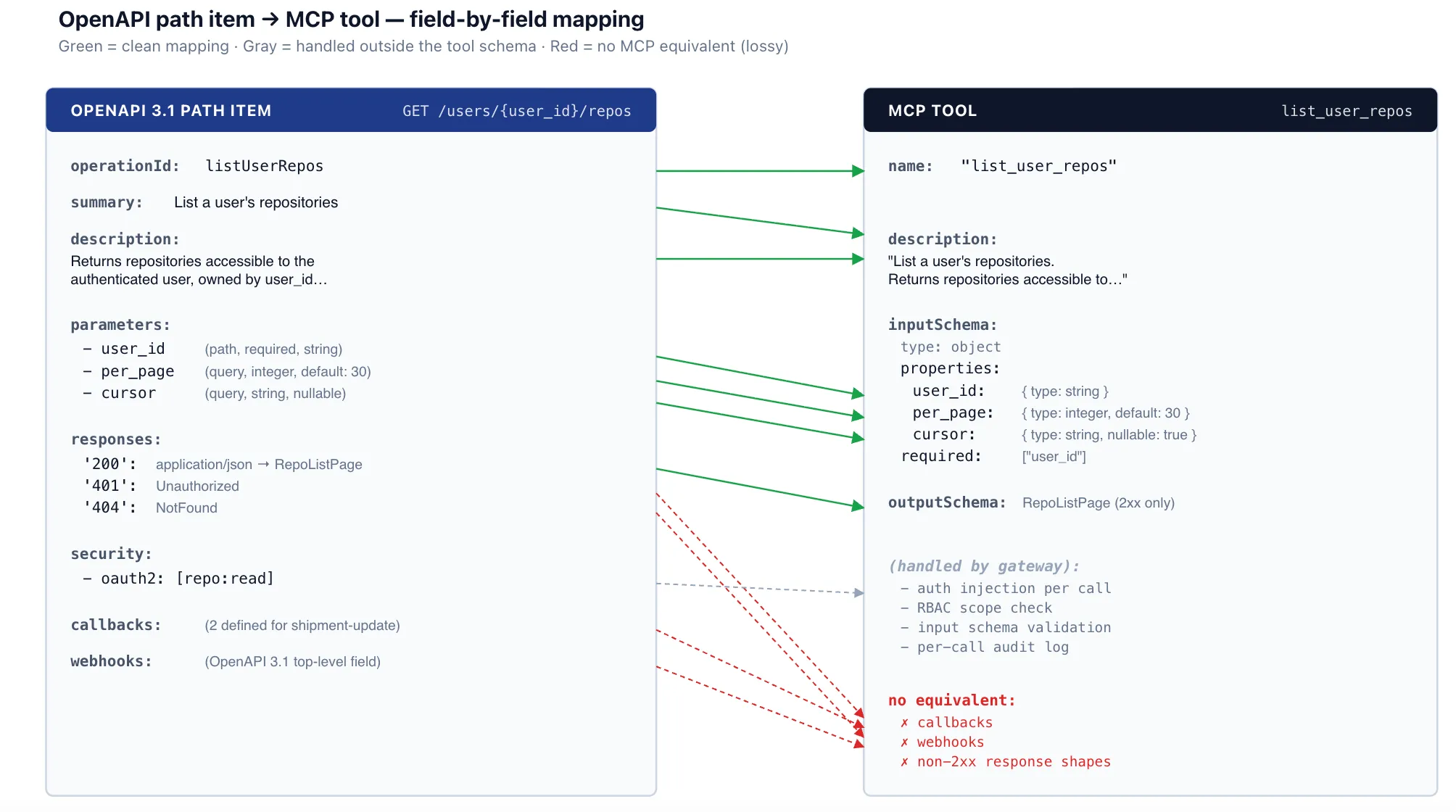
Die Konvertierung durchläuft das OpenAPI-Dokument und erstellt ein MCP-Tool pro (Pfad, Methode)-Paar. Für jedes Paar werden vier Dinge berechnet: der Tool-Name, die Beschreibung, das Eingabe-Schema und (sofern die Ziel-MCP-Revision dies unterstützt) das Ausgabe-Schema.
Tool-Name. Bevorzugen Sie die operationId, falls der Autor der Spezifikation eine angegeben hat – operationIds sind idiomatische Bezeichner, die meist bereits auf gute Lesbarkeit hin gewählt wurden. Falls sie fehlt, synthetisieren Sie diese aus Methode und Pfad: Setzen Sie die Methode in Kleinbuchstaben, hängen Sie den Pfad an, ersetzen Sie nicht-alphanumerische Zeichen durch Unterstriche und fassen Sie doppelte Unterstriche zusammen. GET /users/{user_id}/repos wird zu get_users_user_id_repos. Die synthetisierte Form ist syntaktisch korrekt, aber wortreich; operationIds sind vorzuziehen, sofern sie existieren.
Tool-Beschreibung. Bevorzugen Sie summary, dann description und schließlich einen generierten Stub aus Methode + Pfad. Abschnitt 6 behandelt, warum dieses scheinbar unbedeutende Feld wichtiger ist, als man vermuten würde.
Eingabe-Schema. Eine Zusammenführung von Pfadparametern, Abfrageparametern und dem Schema des Request-Bodys zu einem einzigen JSON-Schema-Objekt, mit den korrekten Markierungen für erforderliche/optionale Felder. Details finden Sie in Abschnitt 2.
Ausgabe-Schema. Das Schema, das an die erste 2xx-Antwort für application/json angehängt ist. Andere Content-Typen und Nicht-2xx-Antworten werden nicht abgebildet. Details finden Sie in Abschnitt 3.
YAML – OpenAPI-Pfadelement (Auszug aus shipment-tracking-svc)
paths:
  /users/{user_id}/repos:
    get:
      operationId: listUserRepos
      summary: List a user's repositories
      description: Returns repositories accessible to the
        authenticated user, owned by user_id, paginated by cursor.
      parameters:
        - name: user_id
          in: path
          required: true
          schema: { type: string }
        - name: per_page
          in: query
          schema: { type: integer, default: 30, maximum: 100 }
        - name: cursor
          in: query
          schema: { type: string, nullable: true }
      responses:
        '200':
          description: OK
          content:
            application/json:
              schema:
                $ref: '#/components/schemas/RepoListPage'
        '401': { $ref: '#/components/responses/Unauthorized' }
        '404': { $ref: '#/components/responses/NotFound' }
      security:
        - oauth2: [repo:read]
JSON – generiertes MCP-Tool
{
  "name": "list_user_repos",
  "description": "List a user's repositories. Returns repositories accessible to the authenticated user, owned by user_id, paginated by cursor.",
  "inputSchema": {
    "type": "object",
    "properties": {
      "user_id":  { "type": "string" },
      "per_page": { "type": "integer", "default": 30, "maximum": 100 },
      "cursor":   { "type": "string", "nullable": true }
    },
    "required": ["user_id"]
  },
  "outputSchema": { "$ref": "#/$defs/RepoListPage" }
}
TrueFoundry AI Gateway bietet eine Latenz von ~3—4 ms, verarbeitet mehr als 350 RPS auf einer vCPU, skaliert problemlos horizontal und ist produktionsbereit, während LiteLM unter einer hohen Latenz leidet, mit moderaten RPS zu kämpfen hat, keine integrierte Skalierung hat und sich am besten für leichte Workloads oder Prototyp-Workloads eignet.





Die neuesten Nachrichten, Artikel und Ressourcen werden in Ihren Posteingang gesendet




.png)
.png)
.png)
.png)
.png)






.png)


