



September 24, 2026
|
Lesedauer: 5 Minuten


Erhalten Sie sofortigen Zugriff auf eine TrueFoundry-Live-Umgebung. Stellen Sie Modelle bereit, leiten Sie den LLM-Verkehr weiter und erkunden Sie die gesamte Plattform — Ihre Sandbox ist in Sekundenschnelle einsatzbereit, ohne dass eine Kreditkarte erforderlich ist.



Published: September 10, 2026

Unglaublich schnelle Methode zum Erstellen, Verfolgen und Bereitstellen Ihrer Modelle!
TrueFoundry AI Gateway emits OpenTelemetry traces for every request it processes and publishes them asynchronously over NATS to an OTEL exporter that forwards them to any OTLP-compatible backend over HTTP or gRPC. Honeycomb is one such backend. It accepts OTLP data at https://api.honeycomb.io/v1/traces over HTTP with protobuf encoding and authenticates using the x-honeycomb-team header. Once traces arrive Honeycomb indexes every span attribute and makes them available for ad hoc queries without requiring any pre-declared schema.
This post covers how the TrueFoundry gateway generates and exports traces and what Honeycomb does with them once they arrive and how the two systems connect at the protocol level.
The TrueFoundry AI Gateway is built on the Hono framework and runs as a stateless gateway pod on 1 vCPU and 1 GB RAM handling 250+ requests per second with approximately 3 ms of added latency. The gateway is OpenTelemetry compliant and generates spans across the full lifecycle of every inbound request.
The span tree covers five stages. The first is the inbound HTTP handler which records the arrival of the request along with client metadata. The second is authentication where the gateway verifies the JWT token against a cached public key downloaded from the identity provider. No external auth call is made during this step. The third is model resolution where the gateway resolves the logical model identifier to a physical provider endpoint using an in-memory routing table synced from the control plane via NATS. The fourth is the outbound provider call where the gateway translates the request from OpenAI-compatible format to the target provider format via an adapter and forwards it. The fifth is streaming response handling where the gateway captures token counts and finish reasons as the response streams back.
Span attributes follow the gen_ai.* semantic conventions alongside TrueFoundry-specific attributes. The gen_ai.request.model attribute records the model identifier. The gen_ai.usage.prompt_tokens and gen_ai.usage.completion_tokens attributes record token consumption. The tfy.input and tfy.output attributes carry the full prompt and response text. The tfy.input_short_hand attribute carries a truncated version for display. The tfy.span_type attribute identifies the span category such as ChatCompletion or MCPGateway.
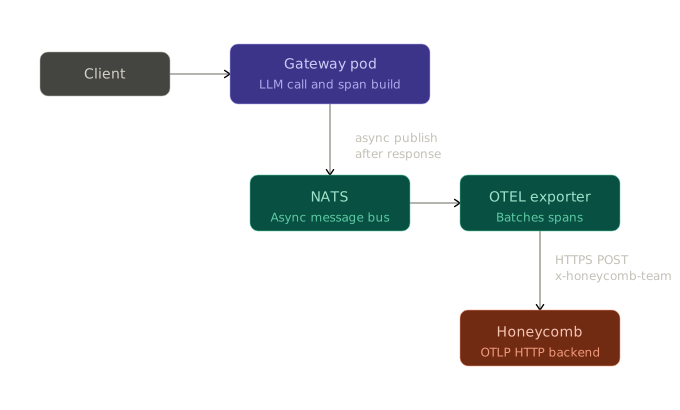
After the request completes the gateway publishes these spans to NATS asynchronously. A background OTEL exporter reads from this async path and forwards the spans to the configured external endpoint. This design means trace export never adds latency to the request path. The gateway does not fail a request if the external OTEL endpoint is unreachable. The export path is additive and does not replace TrueFoundry's own internal trace storage.
For workloads where prompt and response content must not leave the environment the gateway provides an Exclude Request Data toggle. When enabled it strips tfy.input and tfy.output and tfy.input_short_hand from spans before export. All other span attributes including token counts and latencies and model metadata continue to flow.
The MCP Gateway follows the same tracing model. Every tool invocation generates a span recording the calling user and the MCP server and the tool name and the full request and response payload and latency. These spans appear in the same trace tree as the LLM call spans enabling end-to-end trace visibility across agentic workflows.
Honeycomb ingests OTLP data and stores every span as a row with arbitrary columns. There is no fixed schema. Every attribute that TrueFoundry emits whether gen_ai.usage.prompt_tokens or tfy.span_type or http.response.status_code becomes a queryable column in Honeycomb the moment the first span carrying it arrives.
The core query primitive in Honeycomb is the BubbleUp analysis. Given a slow or failed set of traces BubbleUp computes which attribute values are statistically overrepresented in that set compared to the baseline. For LLM gateway traffic this means identifying whether a latency spike is correlated with a specific model or a specific user or a specific MCP server without writing a query by hand.
Honeycomb organizes data into datasets. The TrueFoundry gateway sets service.name to tfy-llm-gateway and Honeycomb routes spans into a dataset of that name by default. To route spans into a different dataset the x-honeycomb-dataset header is added to the exporter configuration alongside x-honeycomb-team. Multiple datasets can be used to separate production and staging traffic or to separate LLM gateway traces from MCP gateway traces.
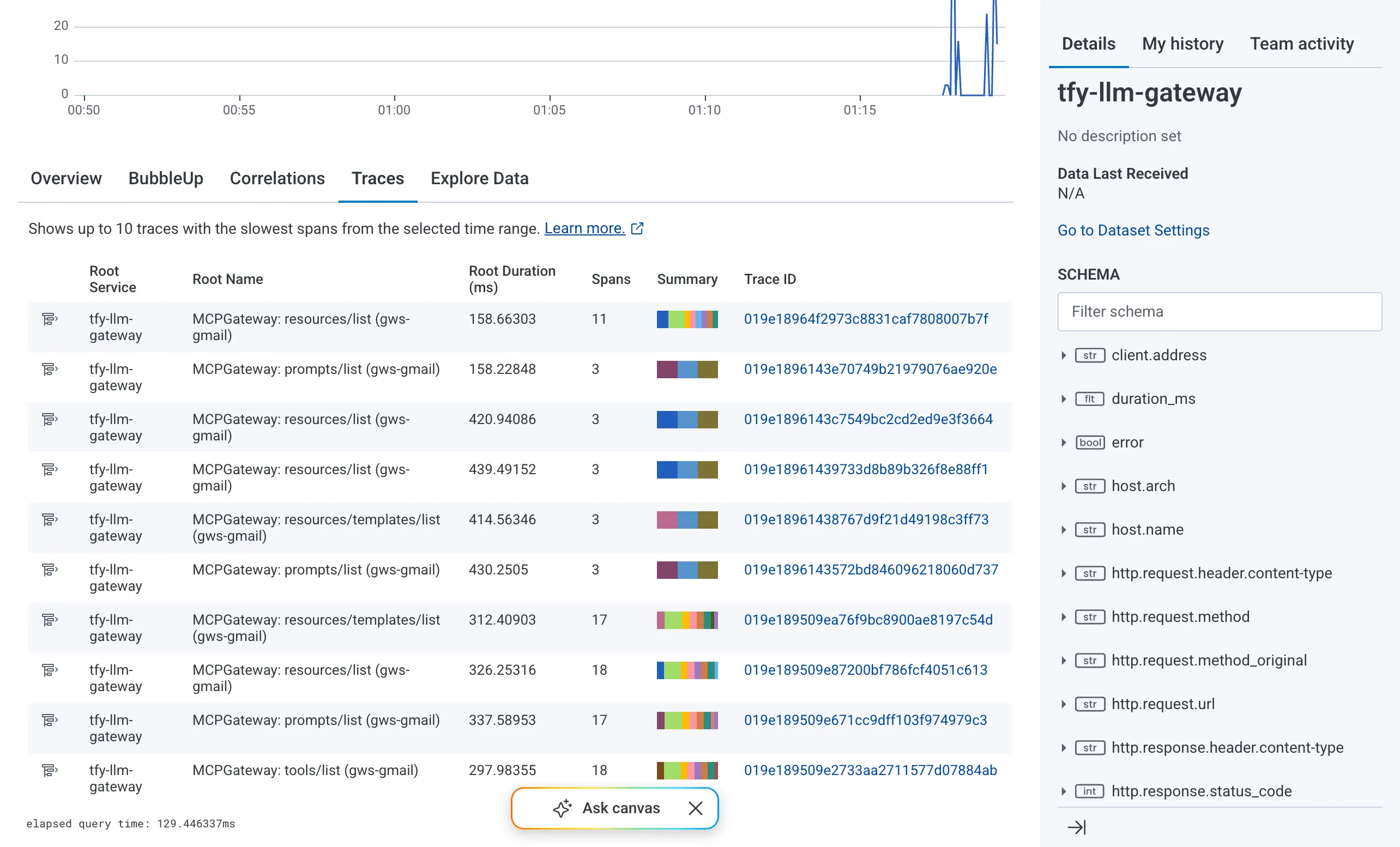
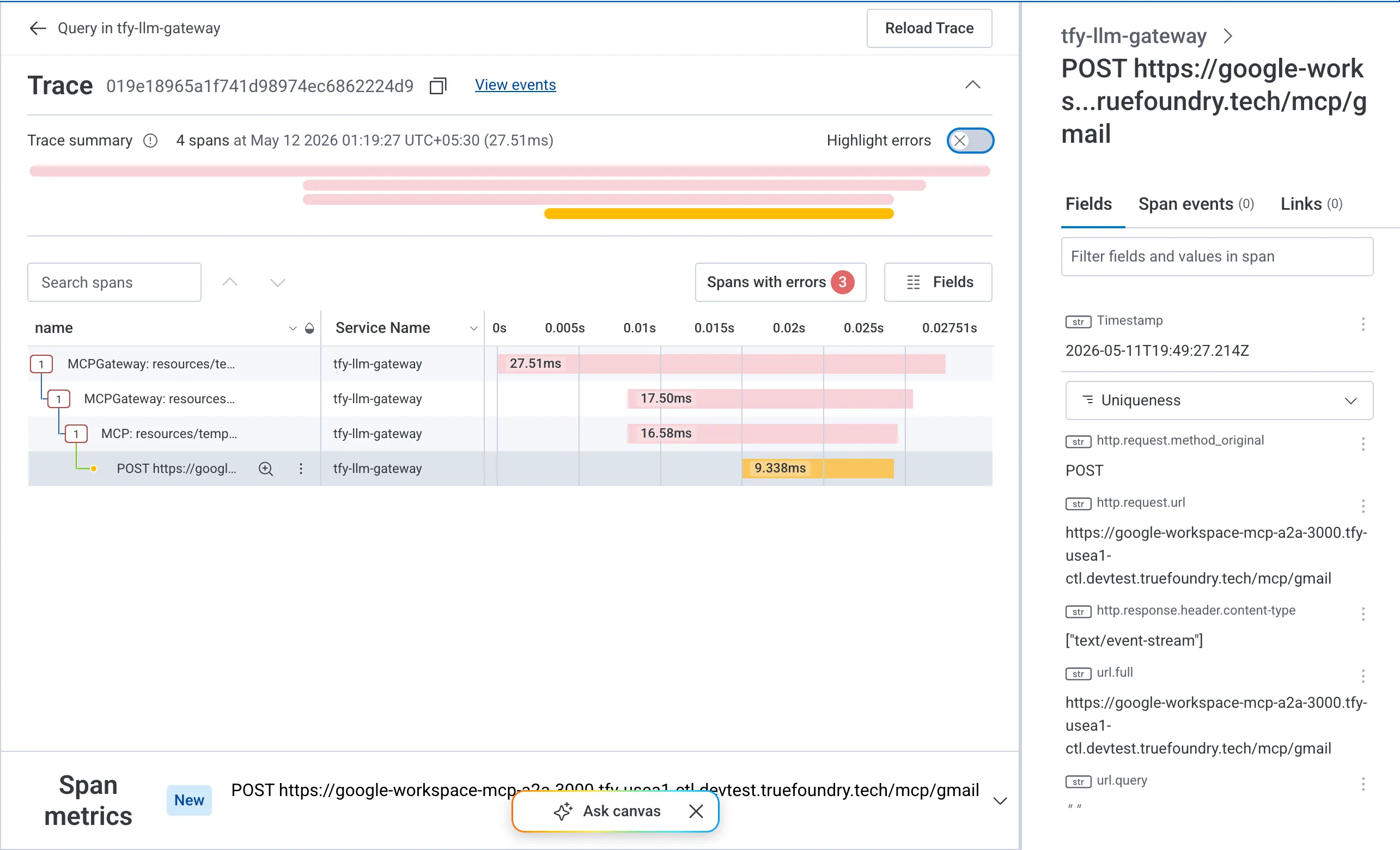
The Traces tab in Honeycomb presents the span waterfall view. Each row is a span. The hierarchy shows parent-child relationships so a root MCPGateway: resources/list span with nested MCP: resources/templates/list spans and an outbound POST https://... span maps directly to what the gateway executed. Duration bars make the latency distribution visible at a glance. The Spans with errors counter isolates fault-bearing traces.
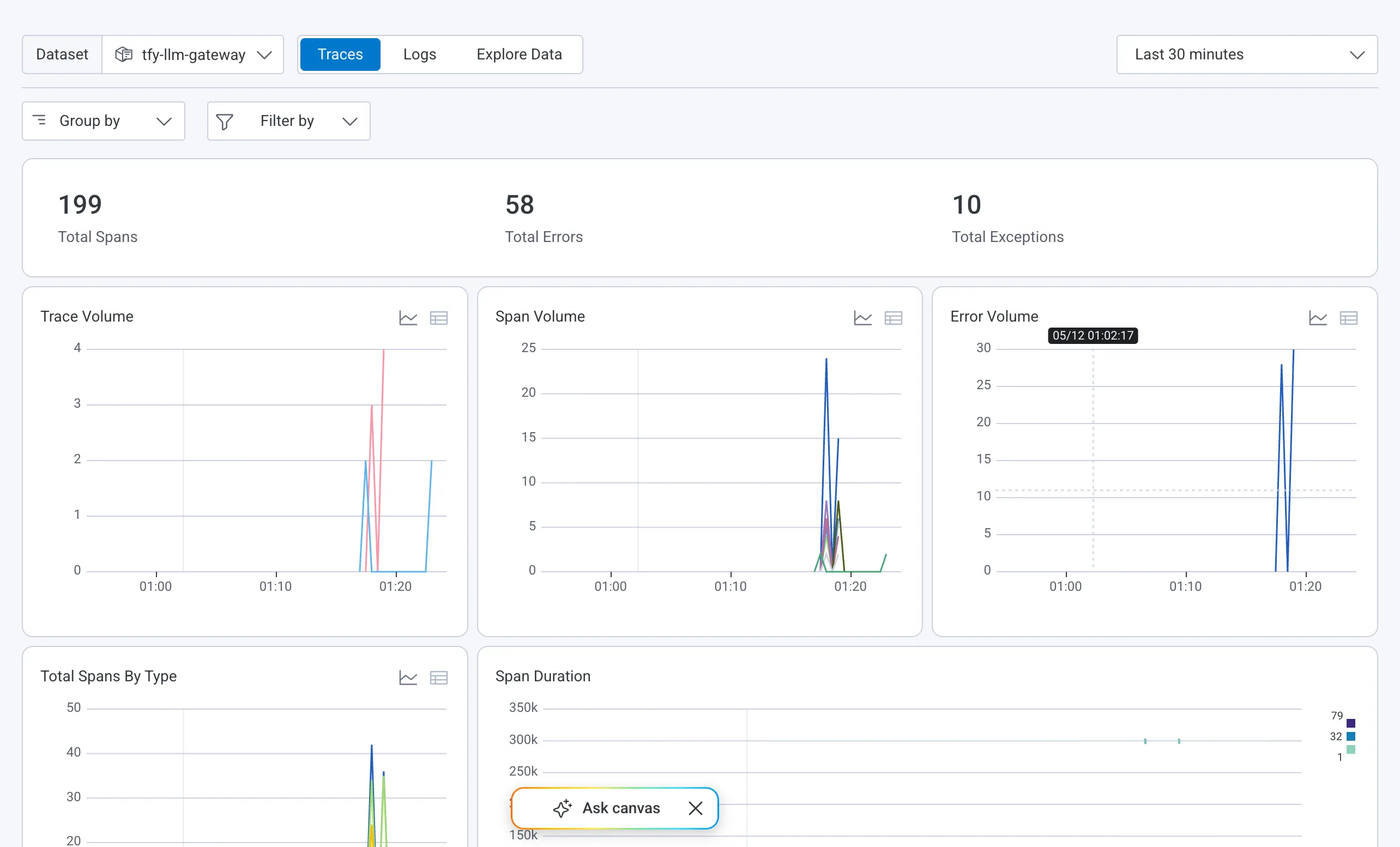
The Overview tab aggregates Total Spans and Total Errors and Total Exceptions over the selected time window and renders Trace Volume and Span Volume and Error Volume as time series charts. This view reflects the health of the gateway at a glance without building a dashboard from scratch.
Clicking any Trace ID expands the full span waterfall for that trace. Each span shows its service name and duration and any error flags. Nested child spans reflect the internal call hierarchy of the gateway making it possible to isolate which stage introduced latency on a per-request basis.
The TrueFoundry gateway exports traces over OTLP HTTP with protobuf encoding. Honeycomb accepts this format at two regional endpoints.
Authentication uses a single header. The x-honeycomb-team header carries the Honeycomb ingest API key. The key must have the Send Events permission scope. There is no OAuth flow and no bearer token exchange. The key is sent as a plain header value on every export request.
x-honeycomb-team: <your-honeycomb-ingest-api-key>
Dataset routing is controlled by a second optional header. When x-honeycomb-dataset is omitted Honeycomb uses service.name from the resource attributes to determine the target dataset. When it is set explicitly all spans in that export batch are written to the named dataset regardless of service.name.
x-honeycomb-dataset: tfy-llm-gateway-production
The TrueFoundry gateway does not auto-append signal paths to the configured endpoint. The full path including /v1/traces must be present in the endpoint field. This differs from the OpenTelemetry Collector's OTLP HTTP exporter which appends /v1/traces automatically based on the pipeline signal type. In the Collector a single base URL like https://api.honeycomb.io:443 ist ausreichend, da der Collector den Pfad aus der Pipeline-Definition auflöst. In TrueFoundry wird der Endpunkt wörtlich verwendet.
Die Konfigurationsoberfläche in TrueFoundry entspricht direkt den Feldern, die Honeycomb benötigt.
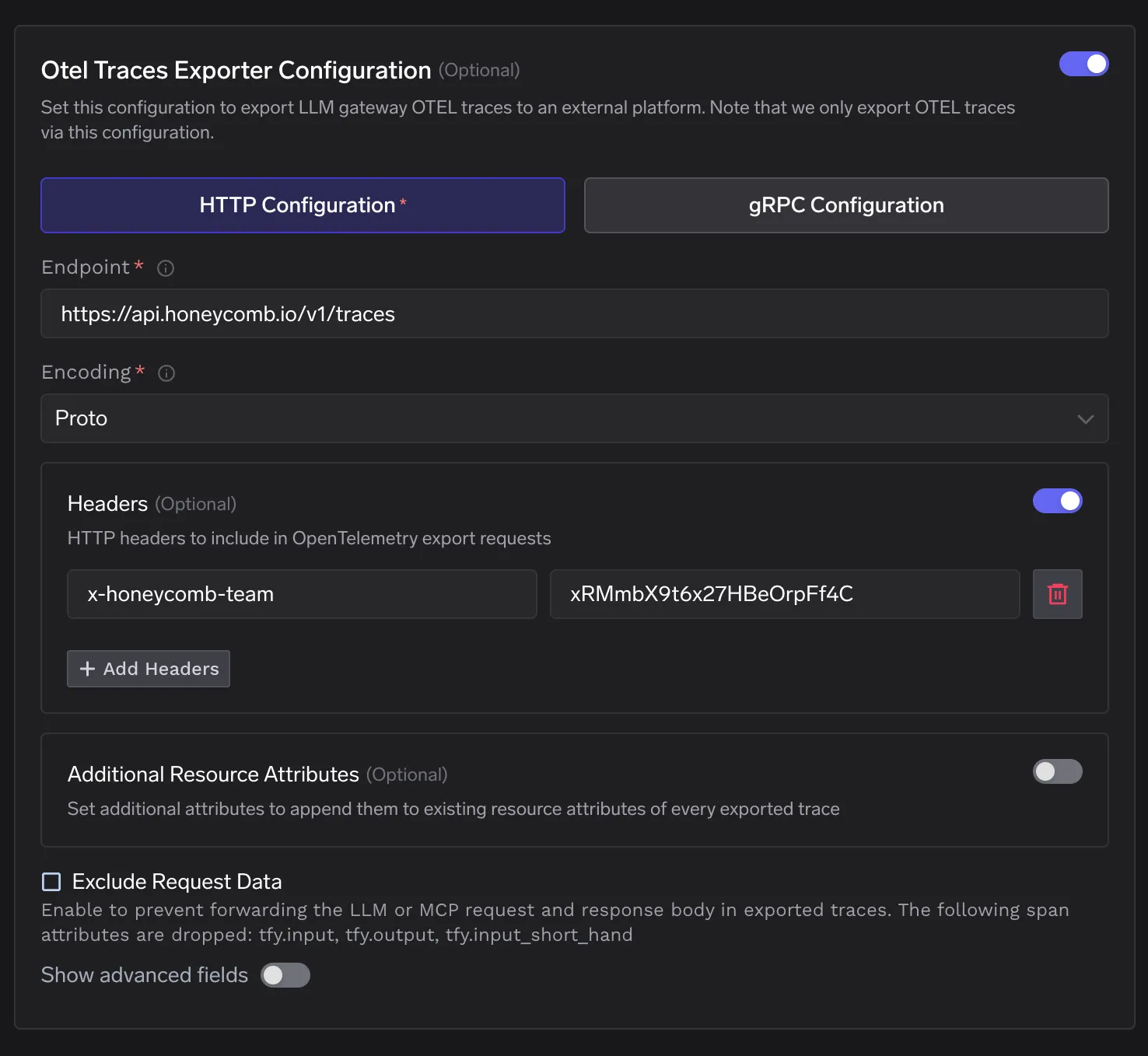
Das Zusätzliche Ressourcenattribute Feld fügt Schlüssel-Wert-Paare zum Ressourcenblock jedes exportierten Spans hinzu. Dies ist nützlich, um einen Tag für die Bereitstellungsumgebung oder einen Cluster-Identifikator hinzuzufügen, der noch nicht in den Span-Attributen vorhanden ist.
Das Anfragedaten ausschließen Kontrollkästchen entfernt tfy.input und tfy.output und tfy.input_short_hand bevor Spans das Gateway verlassen. Honeycomb erhält weiterhin alle strukturellen Attribute, einschließlich Token-Zählungen und Latenzen sowie Modellnamen und Fehler-Flags.
Wenn eine Anfrage das TrueFoundry-Gateway erreicht, wird der vollständige Span-Baum im Speicher während der Anfragenverarbeitung aufgebaut und nach Abschluss der Antwort an NATS veröffentlicht. Der OTEL-Exporter abonniert dieses NATS-Thema und stapelt Spans, bevor er sie an https://api.honeycomb.io/v1/traces über HTTPS mit dem x-honeycomb-team Header vorhanden. Honeycomb schreibt jeden Span als Zeile in die tfy-llm-gateway Datensatz. Die Spans können innerhalb von Sekunden nach ihrer Ankunft abgefragt werden.
Es sind keine Änderungen am Anwendungscode erforderlich. Es werden keine Sidecar-Container neben dem Gateway bereitgestellt. Es ist kein SDK im Client eingebettet. Die Integration ist eine Konfigurationsoberfläche auf dem Gateway: eine Endpunkt-URL und ein Authentifizierungs-Header. Bestehende Clients, die das Gateway über die OpenAI-kompatible API aufrufen, funktionieren weiterhin ohne Änderungen.
Das Prinzip, das diese Integration zuverlässig macht, ist der asynchrone Exportpfad. Der Trace-Export ist über NATS vom Anforderungslebenszyklus entkoppelt. Ein Ausfall der Honeycomb-API oder eine Netzwerkpartition zwischen dem Gateway und dem Ingestion-Endpunkt von Honeycomb beeinträchtigt die Verfügbarkeit der Inferenz nicht. Das Gateway verarbeitet Anfragen und veröffentlicht Spans an NATS, unabhängig davon, ob der nachgelagerte Export erfolgreich ist. Das bedeutet, dass die Observability-Pipeline konfiguriert, rekonfiguriert und neu gestartet werden kann, ohne den Anforderungs-Bereitstellungspfad zu beeinträchtigen.
TrueFoundry AI Gateway bietet eine Latenz von ~3—4 ms, verarbeitet mehr als 350 RPS auf einer vCPU, skaliert problemlos horizontal und ist produktionsbereit, während LiteLM unter einer hohen Latenz leidet, mit moderaten RPS zu kämpfen hat, keine integrierte Skalierung hat und sich am besten für leichte Workloads oder Prototyp-Workloads eignet.





Die neuesten Nachrichten, Artikel und Ressourcen werden in Ihren Posteingang gesendet
.webp)
.webp)

.webp)
.webp)
.webp)
.png)
.png)
.png)
.png)
.png)
.png)
.png)


