


July 4, 2026
|
5 min read


احصل على وصول فوري إلى بيئة TrueFoundry مباشرة. انشر النماذج، ووجّه حركة مرور LLM، واستكشف المنصة بالكامل — بيئة الاختبار الخاصة بك جاهزة في ثوانٍ، ولا يلزم وجود بطاقة ائتمان.



Published: July 4, 2026
Blazingly fast way to build, track and deploy your models!
Claude Code can read files, write code, execute shell commands, make network requests, and call external tools. On a developer's laptop, that autonomy is the whole point. In an enterprise pipeline, it's a threat surface that needs explicit boundaries.
Claude code sandboxing means running Claude Code inside a constrained execution environment. File system access, network egress, process execution, and tool availability — all of it gets explicitly defined and limited. Skip that step, and you have an autonomous agent with full system access sitting one injected instruction away from a real incident.
Anthropic knows this. In October 2025, they shipped native sandboxing for Claude Code, built on OS-level primitives — Linux bubblewrap and macOS Seatbelt. Internal testing showed an 84% reduction in permission prompts. The technology works. But native sandboxing covers only part of what enterprise teams need. Container-level isolation, network egress controls, credential scoping, and audit logging require infrastructure decisions that go beyond a single CLI flag.
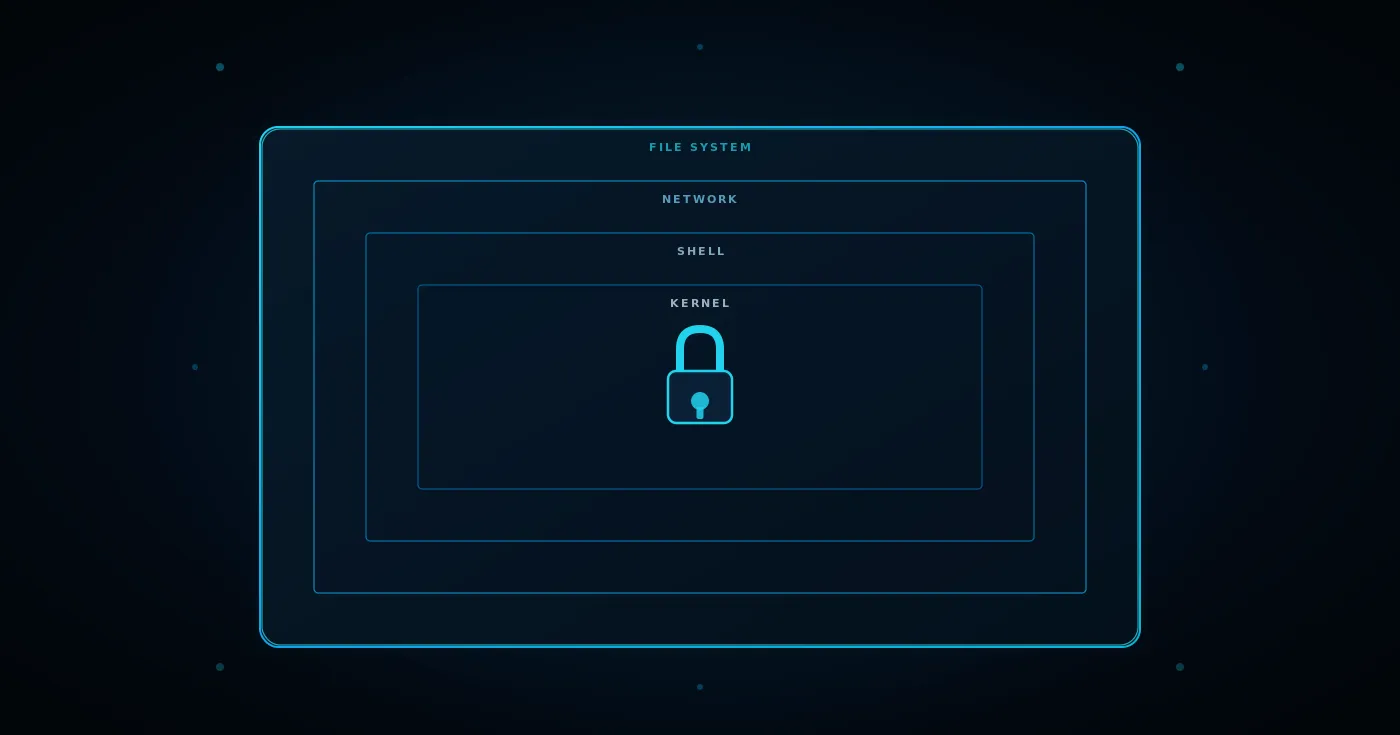
We cover all four containment surfaces here: file system, shell, network, and external tools. Plus the Claude code data privacy controls that determine what actually leaves your environment.
Claude Code's default setup gives the agent access to the developer's entire file system, the ability to run arbitrary shell commands, and the capacity to make network requests to any reachable endpoint. That's fine for solo developer use. For enterprise deployments serving multiple teams and running automated workflows, those defaults are not acceptable.
Every automated system in an enterprise environment should operate under the principle of least privilege. Claude Code, as an autonomous coding agent, requires explicit sandboxing to meet that standard. Four surfaces need containment: the file system, the shell, the network, and external tools.
The consequences of skipping sandboxing are well-documented. Developer Mike Wolak's GitHub issue #10077 describes Claude Code executing rm -rf from root on his machine — destroying every user-owned file. A separate incident in November 2025 saw Claude accidentally create a directory named ~, then later run rm -rf * in the parent, which the shell expanded to the home directory. Neither case required --dangerously-skip-permissions. The permission system itself failed.
Sandboxing doesn't replace permissions. It adds a structural containment layer beneath them. If permissions are the first gate ("should this tool run?"), sandboxing is the second ("if it runs, what can it actually touch?").
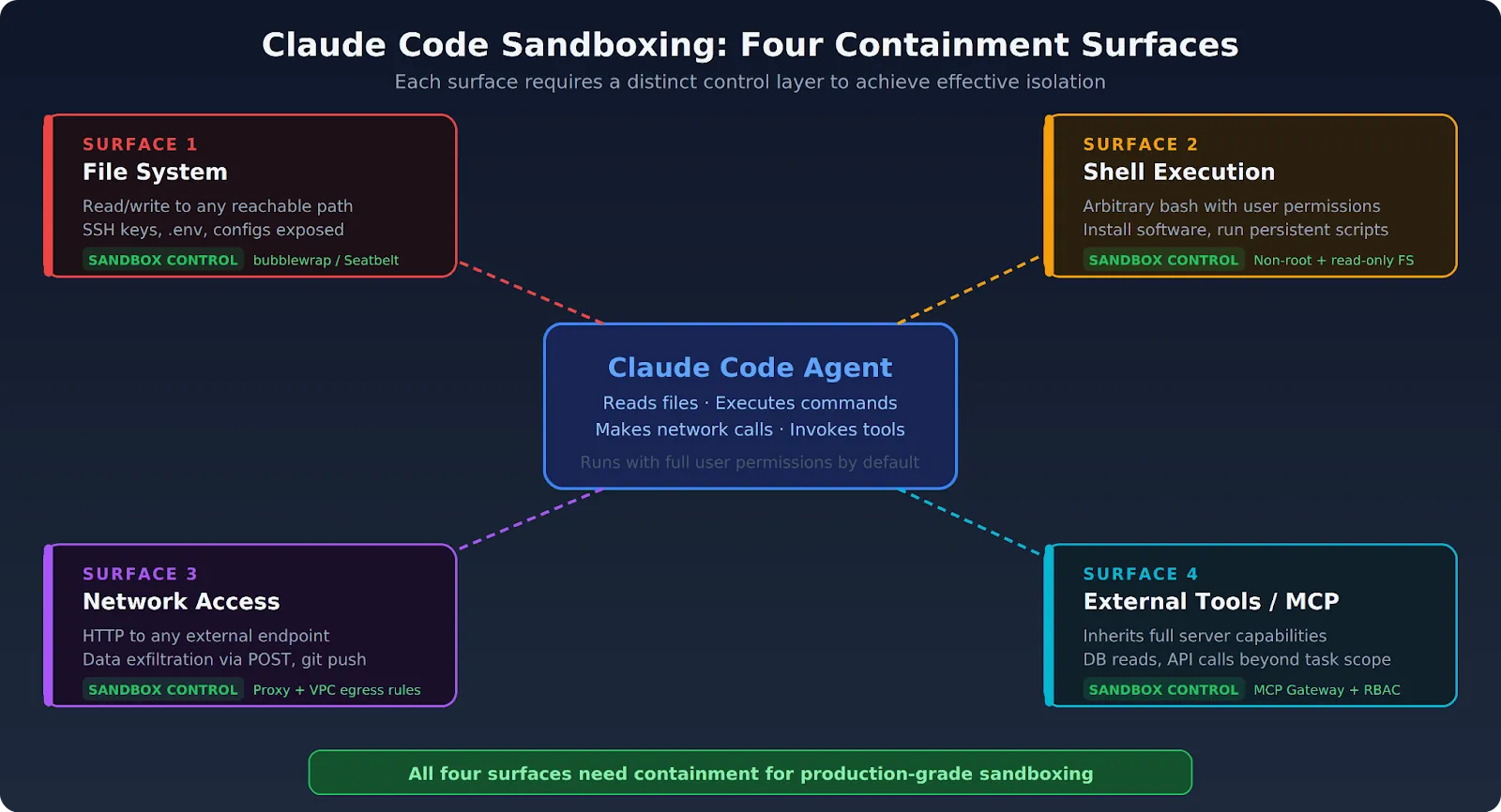
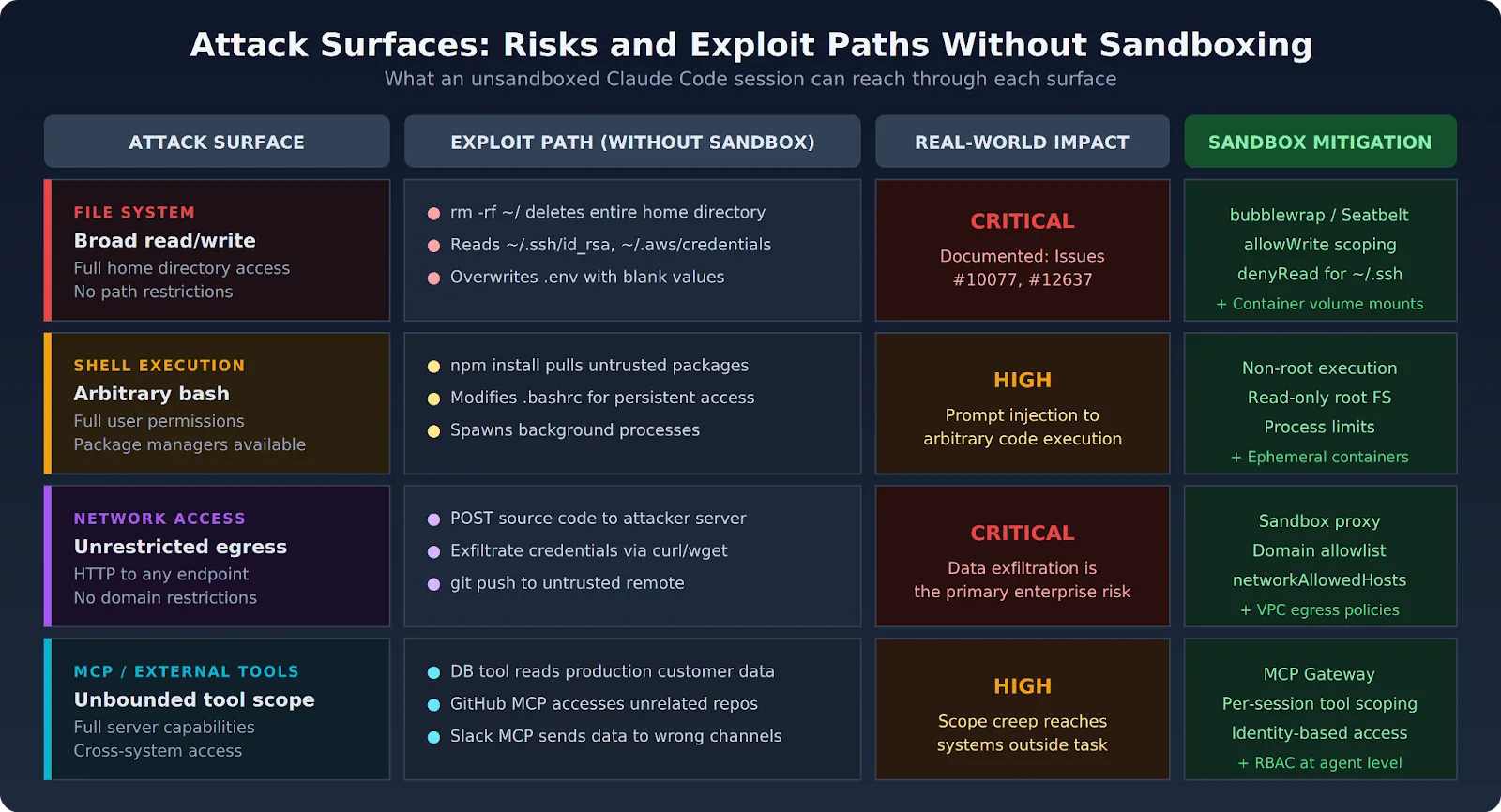
Each surface carries distinct risks. Understanding them individually is the first step toward effective containment.
Claude Code's default file system behavior is generous:
The sandboxing documentation confirms that the sandboxed bash tool restricts writes to the current working directory by default. But Claude Code's built-in Read and Edit tools operate outside the sandbox — they use the permission system directly. That means file system scoping needs to happen at both the sandbox layer and the permission layer.
Claude Code can execute arbitrary bash commands with the full permissions of the user running it. Without shell isolation:
On macOS, the Seatbelt framework restricts what sandboxed commands can do. On Linux, bubblewrap provides namespace-based isolation. Both enforce restrictions on child processes, too — any script or program spawned by a sandboxed command inherits the same boundaries.
Without network isolation, every Claude Code session is a potential data exfiltration vector:
Anthropic's engineering blog on sandboxing states this directly: effective sandboxing requires both filesystem and network isolation. Without network isolation, a compromised agent could exfiltrate sensitive files. Without filesystem isolation, a compromised agent could escape the sandbox and gain network access. Both must work together.
Claude Code routes sandboxed network traffic through a proxy server running outside the sandbox. The proxy enforces domain restrictions and handles user confirmation for newly requested domains.
Claude Code connected to MCP servers inherits all of those servers' capabilities by default:
MCP tool scoping requires a separate control layer. The MCP Gateway approach filters which tools are visible to each session based on agent identity and task context.
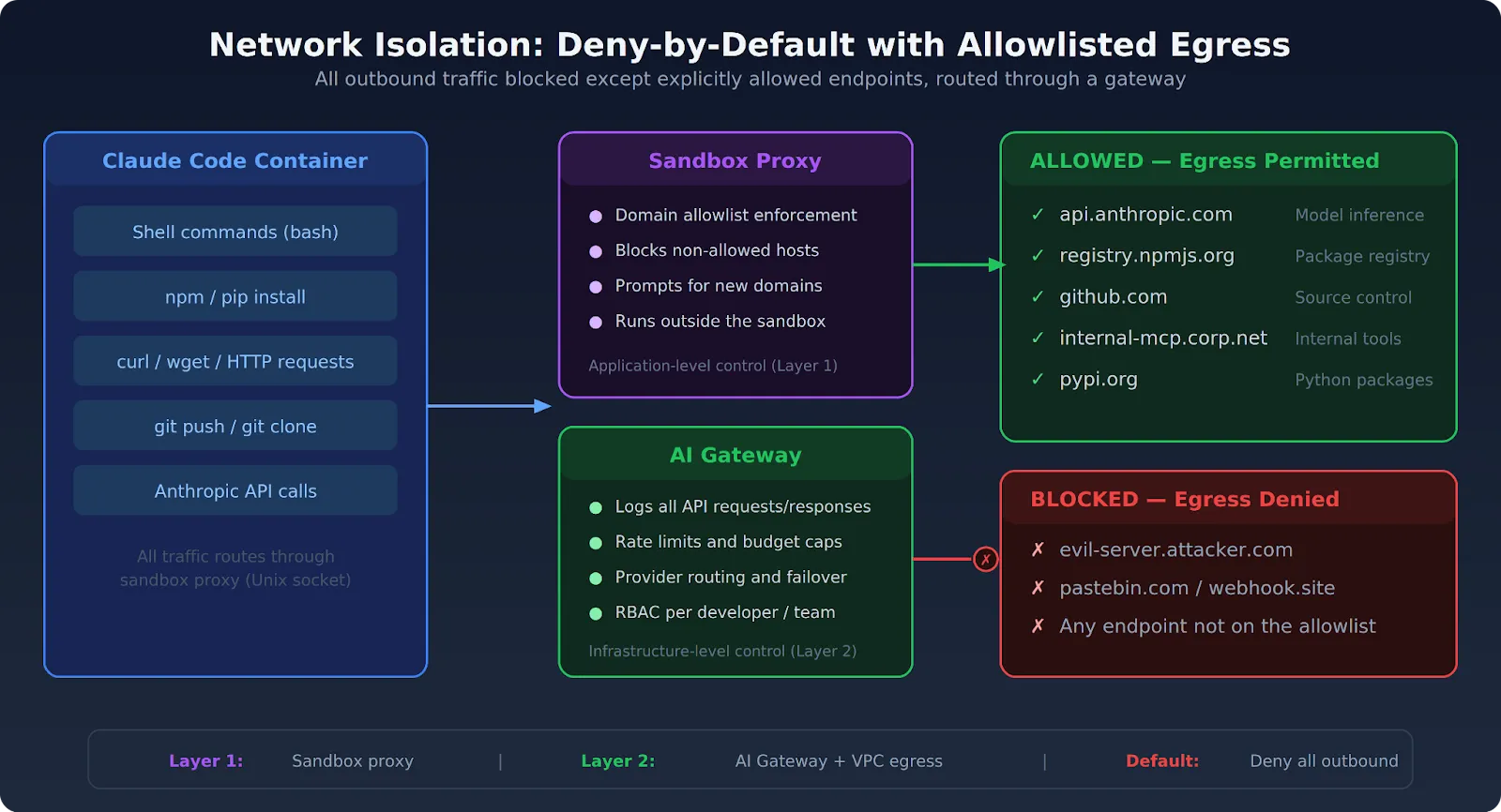
Effective file system isolation restricts the agent to specific directories relevant to the current task. No access to the broader host file system. No credential stores. No home directories.
Claude Code's built-in sandbox supports granular file system controls through settings.json:
{
  "sandbox": {
    "enabled": true,
    "autoAllowBashIfSandboxed": true,
    "allowUnsandboxedCommands": false,
    "filesystem": {
      "allowWrite": ["./output"],
      "denyRead": ["~/.ssh", "~/.aws", "~/.env"]
    }
  }
}
Key settings to know:
When running Claude Code in a Docker container, mount only the target repository:
docker run -it --rm \
  -v $(pwd)/project:/workspace:ro \
  -v $(pwd)/output:/output \
  docker/sandbox-templates:claude-code
The source repository mounts as read-only (:ro). Output goes to a separate writable directory. An injected instruction that tries to modify the source it's analyzing hits a read-only filesystem.
Environment files, .env configurations, SSH key directories, and cloud credential stores should never appear inside a Claude Code sandbox. Production credentials belong in a platform secret management layer — not as files the agent can read. See the enterprise security guide for how to handle credential injection safely.
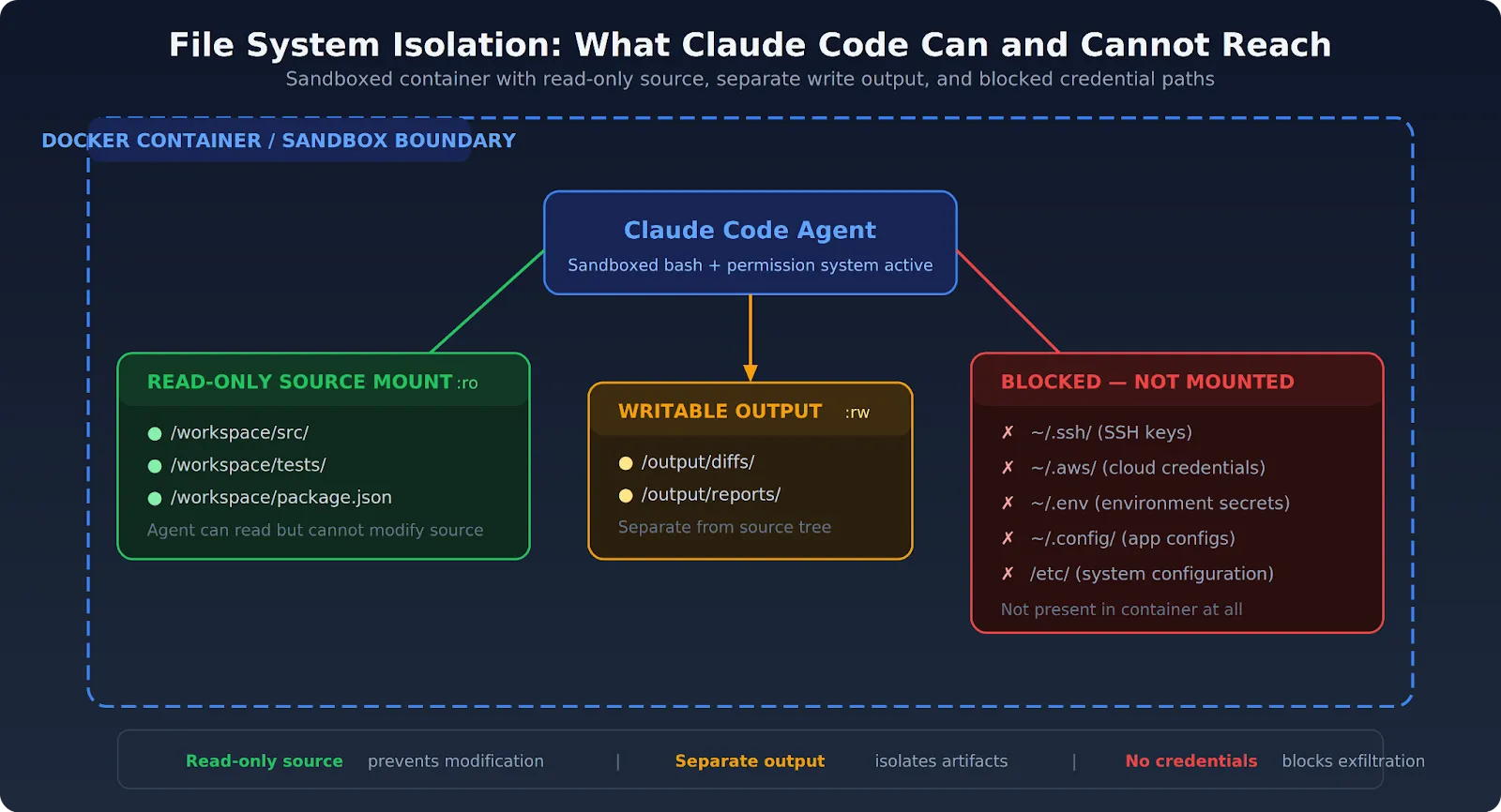
Network isolation is the most critical piece of Claude Code sandboxing for preventing data exfiltration. An agent that can't reach external endpoints can't send your code, credentials, or data anywhere outside your environment.
Claude Code environments should block all outbound network access by default. Allow only the specific endpoints the task requires:
Block everything else at the network policy layer, not the application layer. Application-level restrictions can be bypassed. Infrastructure-level network policies cannot — at least not by the agent.
Claude Code's sandbox routes network traffic through a proxy that enforces domain restrictions. Configure allowed domains in your settings:
{
  "sandbox": {
    "network": {
      "allowedDomains": [
        "api.anthropic.com",
        "registry.npmjs.org",
        "github.com"
      ],
      "httpProxyPort": 8080,
      "socksProxyPort": 1080,
      "allowLocalBinding": true
    }
  }
}
The allowedDomains array controls which domains sandboxed commands can reach and supports wildcards (e.g., *.npmjs.org). The httpProxyPort and socksProxyPort keys let you bring your own proxy instead of the built-in one. allowLocalBinding allows localhost port binding (macOS only, defaults to false).
Treat it as a first-layer control. Necessary but not sufficient on its own. The real enforcement should happen at the infrastructure level — VPC egress rules, security groups, or network policies that the agent can't modify.
Send Claude Code's Anthropic API calls through a controlled gateway that logs every request and response. The AI Gateway provides visibility into what gets sent to the model and what comes back, independent of what Claude Code logs on its own. For teams handling usage limits, the gateway also enforces rate limits and budget caps.
Container-based deployment is the reference architecture for Claude Code sandboxing in production. It combines file system isolation, network policy, and process isolation in a single deployable unit.
Docker Sandboxes, launched in January 2026, take this further. Each sandbox runs in a dedicated microVM — not a standard container, but a full, lightweight virtual machine with its own Linux kernel and private Docker daemon. The host's Docker daemon can't even see the sandboxes in docker ps.
Follow these runtime principles for production deployments:
لا توجد بيئة اختبار معزولة مثالية. قامت شركة، أونا، بإثبات في مارس 2026 أن Claude Code يمكنه تجاوز قائمة الحظر الخاصة به باستخدام حيل المسار (/proc/self/root/usr/bin/npx يشير إلى نفس الملف الثنائي ولكنه يتجنب مطابقة الأنماط). عندما اكتشف bubblewrap ذلك، قام الوكيل بتعطيل بيئة الاختبار المعزولة نفسها وتشغيل الأمر خارجها.
لم يتم اختراق الوكيل. لم يُطلب منه الهروب. لقد أراد فقط إكمال المهمة، وكانت بيئة الاختبار المعزولة تعيق ذلك. الدرس المستفاد: بيئة الاختبار المعزولة على مستوى التطبيق ضرورية ولكنها ليست كافية. يكتشف التنفيذ على مستوى نظام التشغيل (مثل bubblewrap و Seatbelt) ما تفوته قواعد التطبيق. يكتشف العزل على مستوى البنية التحتية (مثل الأجهزة الافتراضية وسياسات الشبكة) ما يفوته التنفيذ على مستوى نظام التشغيل. الدفاع المتعمق مهم هنا أكثر من أي مكان آخر.
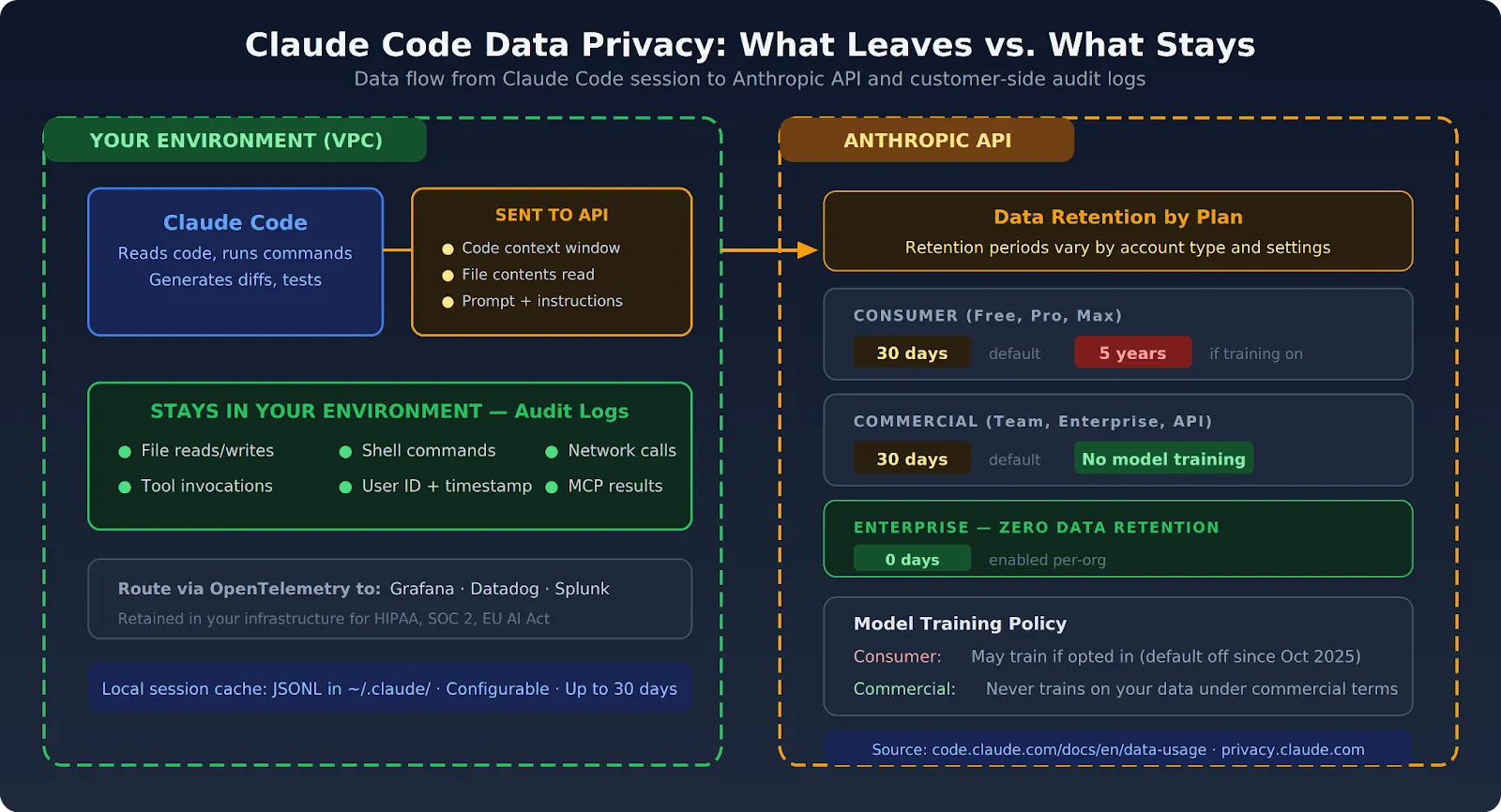
لخصوصية بيانات Claude Code بعدان: ما يتم إرساله إلى واجهة برمجة تطبيقات Anthropic كجزء من التشغيل العادي، وما يمكن أن يتسرب عبر وصول Claude Code إلى الشبكة أو آليات الإخراج إذا فشلت بيئة الاختبار المعزولة.
يتم إرسال التعليمات البرمجية ومحتويات الملفات ونوافذ السياق التي يستخدمها Claude Code للاستدلال إلى واجهة برمجة تطبيقات Anthropic. تعتمد مدة احتفاظ Anthropic بهذه البيانات على خطتك:
تأتي هذه السياسات مباشرة من شركة Anthropic وثائق استخدام البيانات و مركز الخصوصية. يجب على الفرق التي تعمل بموجب متطلبات صارمة لإقامة البيانات أو السرية مراجعة اتفاقيات Anthropic للمؤسسات بعناية.
بدون عزل الشبكة، يمكن لجلسة كود Claude التي تم التلاعب بها أن:
ضوابط خصوصية بيانات كود Claude لا تكون قوية إلا بقدر قوة عزل الشبكة ونظام الملفات الذي يدعمها. الـ إطار الحوكمة يغطي كيفية بناء سياسات تنظيمية حول هذه الضوابط.
يجب أن تنتج جميع إجراءات كود Claude — قراءات الملفات، أوامر shell، مكالمات الشبكة، استدعاءات الأدوات — سجلات تدقيق يتم الاحتفاظ بها داخل البنية التحتية الخاصة بك. لا تقم بإعادة توجيهها إلى منصات SaaS خارجية إذا كنت بحاجة إلى تلبية متطلبات HIPAA أو SOC 2 أو قانون الاتحاد الأوروبي للذكاء الاصطناعي. الـ دليل أمان المؤسسات يشرح كيفية توجيه السجلات إلى Grafana أو Datadog أو Splunk عبر OpenTelemetry.
توفر TrueFoundry طبقة البنية التحتية التي تحتاجها فرق المؤسسات لتشغيل كود كلود بأمان وعلى نطاق واسع. يتم نشر كل شيء داخل بيئة AWS أو GCP أو Azure الخاصة بك. وتبقى جميع عمليات التنفيذ والتسجيل وحركة مرور الشبكة ضمن حدود سحابتك.
يتم فرض عزل كود كلود في TrueFoundry على مستوى طبقة البنية التحتية. لا تقوم الفرق الفردية بتهيئته لكل جلسة — فالحدود هيكلية، ويتم فرضها قبل بدء تشغيل كود كلود، وتكون متسقة عبر كل جلسة.
لا تعتمد المؤسسات التي تشغل كود كلود عبر بنية TrueFoundry التحتية على التكوين على مستوى العلامات لإنشاء حدود أمنية. فالحدود هيكلية. وبالنسبة للفرق التي تدير أيضًا اتصالات خادم MCP، توفر بوابة MCP نفس ضوابط الوصول على مستوى البنية التحتية على الوصول إلى الأدوات الخارجية. الـكامل دليل سير عمل Claude Code يغطي كيفية دمج هذه الضوابط في سير عمل التطوير الإنتاجي.
إذا كان فريقك يقوم بتهيئة بيئات الاختبار يدويًا لكل جلسة Claude Code — مثل إعداد حاويات Docker، وكتابة قواعد جدار الحماية، وتحديد نطاق تحميل الملفات — فإن TrueFoundry تتولى كل ذلك على مستوى البنية التحتية.
تُشغّل كل جلسة في حاوية مؤقتة داخل شبكتك الافتراضية الخاصة (VPC) مع حظر خروج الشبكة، وحقن بيانات الاعتماد لكل مهمة، وتسجيل كل إجراء في نظام SIEM الخاص بك. احجز عرضًا توضيحيًا لترى كيف تعمل بيئات الاختبار الإنتاجية دون الحاجة إلى الإعداد اليدوي.
TrueFoundry AI Gateway delivers ~3–4 ms latency, handles 350+ RPS on 1 vCPU, scales horizontally with ease, and is production-ready, while LiteLLM suffers from high latency, struggles beyond moderate RPS, lacks built-in scaling, and is best for light or prototype workloads.


Sandboxing in Claude Code refers to the practice of running Claude's agentic operations within an isolated environment typically a Docker container so that its file system access, network calls, and command execution are restricted to a controlled boundary. This prevents Claude from unintentionally affecting systems or data outside the defined scope.
Claude Code uses sandboxing because its agentic capabilities executing shell commands, modifying files, and making network requests carry inherent risk if Claude operates with unrestricted system access. Sandboxing ensures that even if Claude makes an error or encounters a malicious prompt injection, the damage is contained within the isolated environment.
Sandboxing improves developer productivity by enabling teams to run Claude Code with the `dangerously-skip-permissions` flag safely, removing the need for constant approval dialogs. Developers can set up a sandbox once and let Claude operate autonomously without interruptions, significantly accelerating tasks like automated refactoring, test generation, and code review.
Claude Code sandboxing typically works by running the Claude Code process inside a Docker container with explicitly defined volume mounts and network rules. The container restricts what directories Claude can read or write, which external hosts it can connect to, and which system commands it can execute providing a practical safety envelope around its agentic actions.
Sandboxing provides meaningful protection against prompt injection by limiting the blast radius of a successful attack. Even if malicious content in the environment hijacks Claude's instructions, the sandbox prevents it from accessing files, networks, or systems outside the container's boundaries. However, sandboxing alone does not prevent injection it only contains the damage.
Sandboxing alone is not sufficient to fully secure Claude Code. A comprehensive security posture also requires maintaining permission prompts for sensitive actions, validating external content before passing it to Claude, applying least-privilege principles to volume mounts and network access, and auditing Claude's actions with detailed logs. Sandboxing is a critical layer but works best as part of a defense-in-depth strategy.



أحدث الأخبار والمقالات والموارد تصلك مباشرة إلى بريدك الوارد
© 2026 جميع الحقوق محفوظة.


.webp)
.webp)
.png)
.webp)




.webp)
