


November 5, 2026
|
5 min read


Obtenha acesso instantâneo a um ambiente TrueFoundry ao vivo. Implante modelos, direcione o tráfego de LLM e explore a plataforma completa — seu sandbox estará pronto em segundos, sem necessidade de cartão de crédito.



.png)
Blazingly fast way to build, track and deploy your models!
O RBAC do Kubernetes é o modo de autorização que decide se uma solicitação autenticada ao servidor da API é permitida. Ele faz parte do grupo de API rbac.authorization.k8s.io/v1 e está habilitado em praticamente todos os clusters gerenciados.
Autenticação e autorização são etapas separadas. O servidor da API primeiro determina quem quem você é – a partir de um certificado de cliente, token OIDC, token de ServiceAccount ou identidade IAM na nuvem – e então pergunta ao RBAC se essa identidade pode executar este verbo neste recurso. O RBAC nunca decide a identidade, apenas a permissão.
Uma regra de RBAC corresponde a um pequeno conjunto de campos de solicitação:
Duas propriedades importam mais do que qualquer detalhe de sintaxe.
O RBAC é aditivo. Não existe negação. Se qualquer binding conceder uma permissão, você a possui, e a única maneira de removê-la é remover todos os bindings que a concedem. Daí o chamado clássico: “Eu removi a função de administrador deles, mas eles ainda conseguem excluir pods.”
O RBAC é de negação por padrão. Um verbo que ninguém concedeu é recusado. Portanto, o risco prático quase nunca é uma regra ausente – é uma regra muito mais ampla do que o pretendido.
Um(a)Role é um objeto com escopo de namespace. Ele concede permissões sobre recursos com escopo de namespace, e apenas dentro do namespace em que reside.
apiVersion: rbac.authorization.k8s.io/v1
kind: Role
metadata:
  name: pod-reader
  namespace: team-alpha
rules:
  - apiGroups: [""]              # "" is the core API group
    resources: ["pods", "pods/log"]
    verbs: ["get", "list", "watch"]
Um(a)ClusterRole não possui escopo de namespace. Ele existe uma única vez para todo o cluster e expressa três coisas que uma Role não pode:
apiVersion: rbac.authorization.k8s.io/v1
kind: ClusterRole
metadata:
  name: node-viewer
rules:
  - apiGroups: [""]
    resources: ["nodes"]          # cluster-scoped
    verbs: ["get", "list", "watch"]
  - nonResourceURLs: ["/healthz"]
    verbs: ["get"]
A questão sobre Role vs ClusterRole no k8s geralmente é feita como se fosse sobre poder. Na verdade, é sobre escopo e reutilização:
Vale a pena conhecer quatro ClusterRoles padrão antes de criar o seu próprio: view (lê a maioria dos recursos com namespace, deliberadamente excluindo Secrets), edit (leitura/escrita na maioria, incluindo Secrets), admin (edit mais a criação de Roles e RoleBindings no namespace), e cluster-admin (* em *, em toda parte).
view, edit e admin são ClusterRoles agregados: o controlador preenche suas regras a partir de qualquer ClusterRole rotulado para corresponder ao seu aggregationRule. Essa é a maneira suportada de estendê-los para seus próprios CRDs.
Uma Role ou ClusterRole por si só não concede nada. Uma vinculação (binding) a associa a sujeitos.
Um(a)RoleBinding é delimitada por namespace e concede seu roleRef aos seus sujeitos dentro do seu próprio namespace.
apiVersion: rbac.authorization.k8s.io/v1
kind: RoleBinding
metadata:
  name: alpha-pod-readers
  namespace: team-alpha
subjects:
  - kind: Group
    name: team-alpha-engineers
    apiGroup: rbac.authorization.k8s.io
roleRef:
  kind: Role
  name: pod-reader
  apiGroup: rbac.authorization.k8s.io
A coisa mais útil a saber sobre RoleBinding no Kubernetes é que seu roleRef pode apontar para um ClusterRole, e as permissões permanecem confinadas ao namespace do RoleBinding. Defina a capacidade uma vez; conceda-a namespace por namespace:
apiVersion: rbac.authorization.k8s.io/v1
kind: RoleBinding
metadata:
  name: alpha-viewers
  namespace: team-alpha
subjects:
  - kind: ServiceAccount
    name: reporting
    namespace: team-alpha
roleRef:
  kind: ClusterRole
  name: view                     # scoped to team-alpha by this binding
  apiGroup: rbac.authorization.k8s.io
Um(a)ClusterRoleBinding remove esse limite, concedendo um ClusterRole em todos os lugares – em cada namespace, além de todos os recursos de escopo de cluster na função.
Três regras que costumam confundir as pessoas:
O RBAC reconhece exatamente três tipos de sujeitos, e o que os diferencia é a sua origem.
Não existe um recurso de Usuário – você não pode executar kubectl create user. O Kubernetes compara o nome de usuário e a lista de grupos declarados pelo autenticador com as vinculações (bindings) como strings simples, portanto um erro de digitação no nome de um sujeito não concede nada silenciosamente, sem gerar erro no momento da aplicação.
ServiceAccounts são a identidade que suas cargas de trabalho utilizam. Um pod que não especifica uma conta é executado com a conta padrão do seu namespace, que não possui permissões, mas cujo token ainda é montado e autenticado – portanto, defina automountServiceAccountToken: false sempre que um pod não precisar chamar o servidor da API.
O Kubernetes também sintetiza grupos que você nunca deve vincular levianamente: system:authenticated (toda identidade autenticada), system:serviceaccounts (todas elas em todo o cluster) e system:masters, que uma vinculação padrão mapeia diretamente para cluster-admin.
A orientação oficial é curta, e quase toda ela trata de escopo.
Prefira Roles com escopo de namespace. Priorize o uso de Role e RoleBinding. Utilize um ClusterRole quando o recurso for genuinamente de escopo de cluster ou quando você desejar uma definição reutilizável – e, mesmo assim, vincule-o com um RoleBinding, a menos que o sujeito realmente precise de acesso a todos os namespaces.
Não distribua permissões de cluster-admin. Ele é * em *, incluindo os próprios objetos RBAC, portanto, quem o possui pode conceder a si mesmo qualquer permissão permanentemente. Reserve-o apenas para situações de emergência.
Evite curingas (wildcards). resources: ["*"] abrange silenciosamente CRDs instalados meses depois, e verbs: ["*"] inclui deletecollection. Liste os recursos explicitamente.
Vincule grupos, não usuários individuais. Uma vinculação por pessoa torna-se um problema no processo de desligamento de funcionários. Mapeie os grupos do seu IdP para dentro do cluster e vincule-os; assim, mudanças na equipe não exigirão edições em arquivos YAML.
Trate a permissão list em Secrets como acesso de leitura a Secrets. O comando list retorna o corpo completo dos objetos, portanto, não é menos abrangente que o get. A leitura de Secrets também expõe as credenciais da ServiceAccount daquele namespace.
Conheça os verbos de escalonamento. create em pods permite que o detentor execute um pod como qualquer ServiceAccount no namespace e herde suas permissões. escalate e bind removem a trava de segurança que impede você de conceder permissões que você mesmo não possui. impersonate permite que você atue como outra identidade.
Audite com a ferramenta, não com o YAML. Como as permissões são aditivas e vêm de várias vinculações, apenas o servidor da API tem a resposta real:
kubectl auth can-i delete pods --namespace team-alpha
kubectl auth can-i --list --namespace team-alpha
kubectl auth can-i list secrets \
--as=system:serviceaccount:team-alpha:reporting -n team-alpha
--as requer permissão de representação (impersonation), que os administradores geralmente possuem. Aplique manifestos RBAC com kubectl auth reconcile, que mescla regras e assuntos em vez de substituí-los.
Usar ClusterRoleBinding quando um RoleBinding seria suficiente. O erro real mais comum. Alguém precisa de permissão de visualização em seu próprio namespace, o ClusterRole já existe e um ClusterRoleBinding é uma linha mais curto – e também concede leitura em todos os namespaces, incluindo onde quer que os Secrets estejam.
Supor que namespaces isolam mais do que realmente isolam. Um namespace é a unidade de escopo para RBAC e nada mais – não é um limite de rede, nó ou recurso. "Eles só têm acesso ao seu namespace" é uma afirmação sobre o servidor da API, não sobre o cluster.
Vincular ao system:authenticated por conveniência. Parece significar "todos na equipe". Na verdade, significa toda identidade que pode se autenticar, incluindo cada ServiceAccount em cada namespace.
Acreditar que o RBAC do cluster cobre a plataforma executada no cluster. Um cientista de dados com permissões zero no Kubernetes ainda pode implantar um serviço, chamar um modelo ou ler um segredo, porque essas ações passam por uma API de plataforma que o RBAC do cluster nunca vê.
O RBAC do Kubernetes responde a uma pergunta com precisão: quem pode executar este verbo neste objeto do Kubernetes? Ele não tem opinião sobre uma segunda pergunta que importa tanto quanto em uma plataforma de IA: quem pode implantar este modelo, usar esta conta de provedor, chamar esta ferramenta MCP ou ler este grupo de segredos? Esses não são objetos do Kubernetes. Eles residem em um plano de controle, acessado por meio de uma API de plataforma, e nenhum Role ou RoleBinding os governa.
TrueFoundry é nativo do Kubernetes – o plano de computação é um ou mais dos seus próprios clusters EKS, GKE, AKS, OpenShift ou on-prem, conectados de saída ao plano de controle por um tfy-agent leve. Ambas as camadas estão presentes ao mesmo tempo, por isso vale a pena ser preciso sobre qual é qual.
Os dois modelos compartilham um vocabulário, e não por coincidência. Nos conceitos-chaveda TrueFoundry, um Cluster é um cluster Kubernetes real e um Workspace é um namespace do Kubernetes. Conceda a alguém Membro do Workspace e você está limitando-os ao mesmo objeto que um RoleBinding faria.
O que você está não fazendo é criar um RoleBinding. As funções da plataforma e os objetos RBAC do cluster são configurados de forma independente, em locais diferentes, e a documentação não descreve nenhum mecanismo que gere, sincronize ou traduza um no outro. Duas camadas, um limite compartilhado. A documentação traça a mesma linha para auditoria: os logs de auditoria da plataforma cobrem a atividade da plataforma e, explicitamente, não substituem os logs de auditoria em nível de infraestrutura do Kubernetes ou da sua nuvem.
O modelo é sujeito + recurso + função = vinculação de função, o que parecerá familiar. Um sujeito é um usuário, equipe, conta virtual ou agente; um recurso é um cluster, workspace, repositório, grupo de segredos, conta de provedor ou servidor MCP. As concessões começam no recurso – abra seu menu de três pontos e escolha Controle de Acesso:

Em seguida, escolha os sujeitos e uma função. A gaveta lista as ações que cada função inclui:
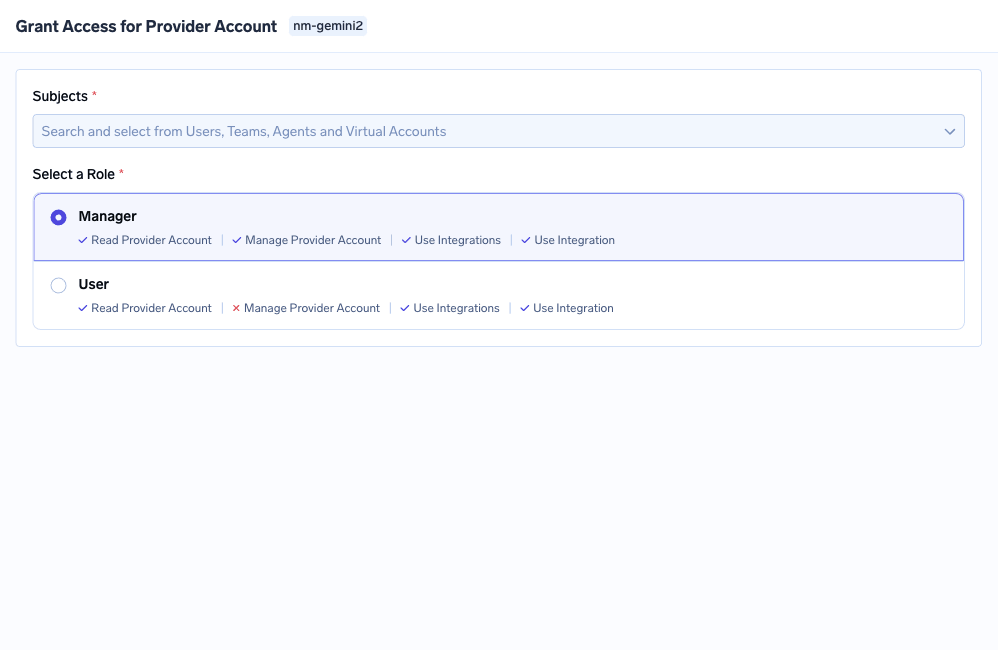
As funções oferecidas dependem do tipo de recurso:Administrador / Membro / Visualizador do Cluster em um cluster, Administrador / Membro / Visualizador do Workspace em um workspace, Gerenciador / Usuário / Aprovador em um servidor MCP. Por baixo, as permissões são chaves no formato recurso:Ação – cluster:ReadCluster, workspace:ManageWorkspace, secret-group:ReadData. O mesmo formato de regra do Kubernetes, objetos diferentes:
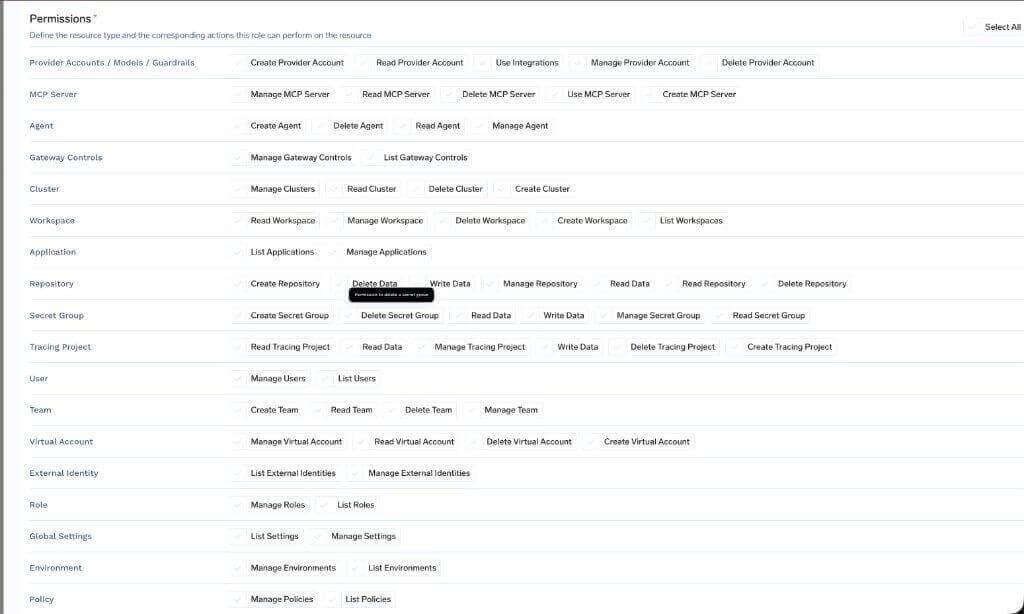
As funções de todo o tenant são o análogo da plataforma a um ClusterRoleBinding e trazem o mesmo aviso. AdministradoreMembro Somente Leitura não pode ser editado. Membro, a base editável que todo usuário recebe, é deliberadamente limitada – cluster:ReadCluster, user:ListUsers, agent:CreateAgent e algumas outras – sem alcançar nenhum workspace, modelo ou servidor MCP individual.
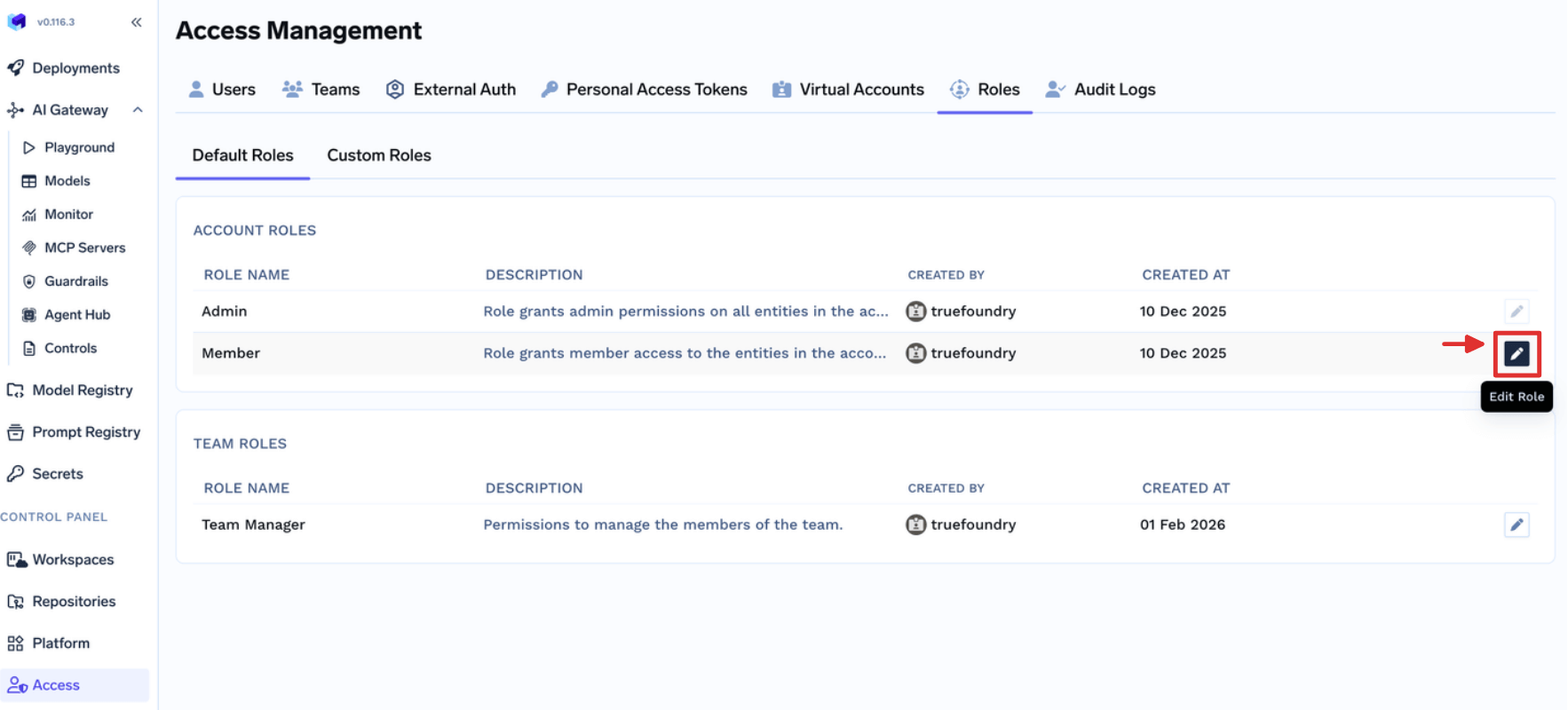
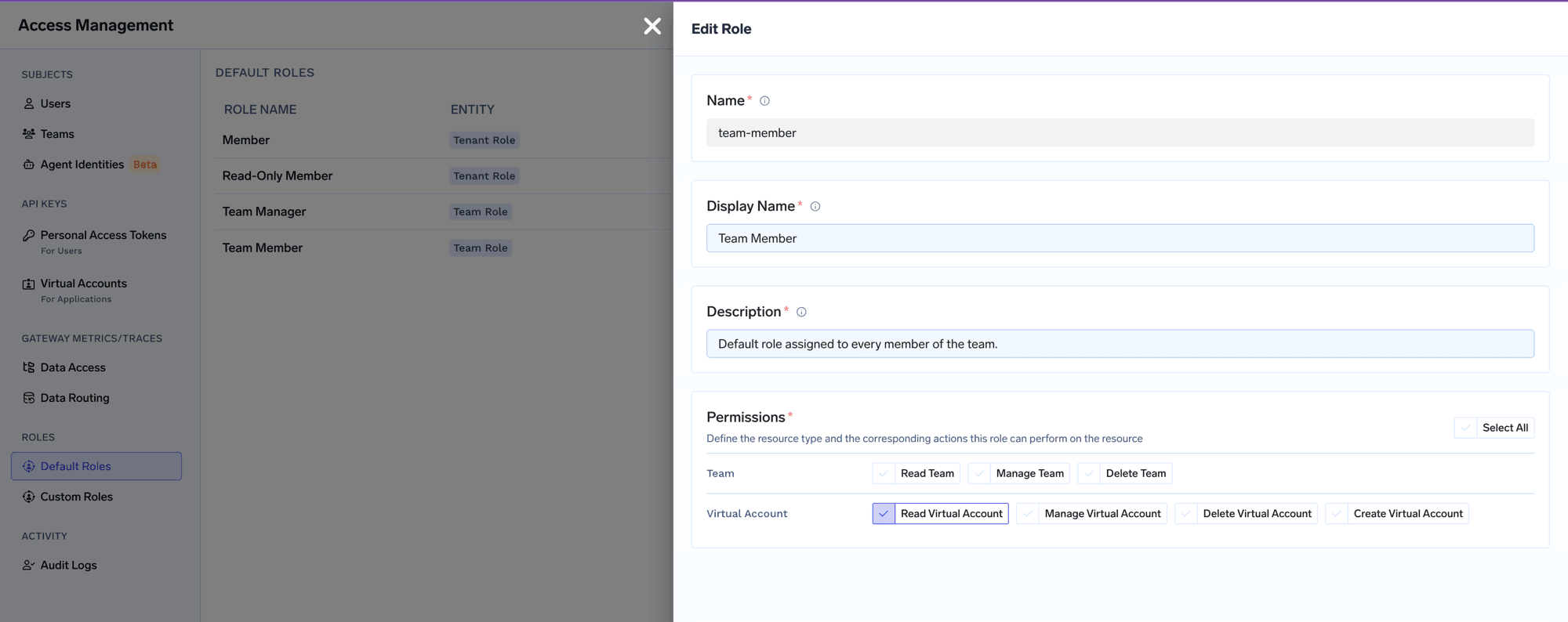
As funções de equipe são paralelas a um RoleBinding com escopo definido pela propriedade: Membro da Equipe possui virtual-account:ReadVirtualAccount, limitado a Contas Virtuais pertencentes às equipes das quais o usuário faz parte.
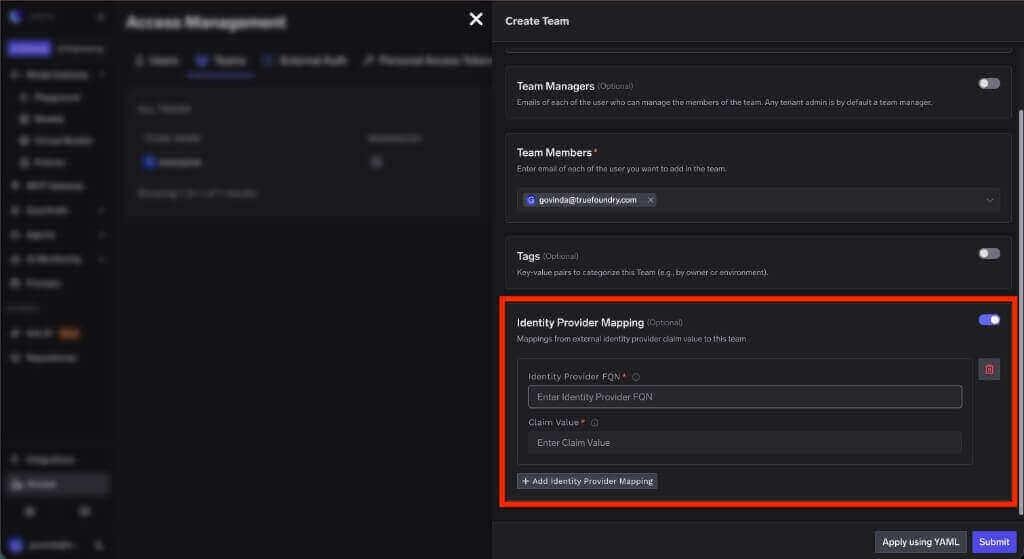
E a prática recomendada de vincular grupos em vez de usuários permanece intacta. Um valor de declaração (claim) do IdP é mapeado para uma equipe do TrueFoundry, portanto, o mesmo grupo de diretório que controla suas vinculações de cluster controla a associação à plataforma:
Uma solicitação realista: permitir que a equipe de ML faça deploy em seu próprio namespace e configure um servidor MCP, sem tornar ninguém administrador de cluster ou administrador de tenant.
No Kubernetes. O namespace é ml-prod. Vincule a edição (edit) a esse namespace com um RoleBinding cujo assunto seja o grupo suportado pelo IdP:
apiVersion: rbac.authorization.k8s.io/v1
kind: RoleBinding
metadata:
  name: ml-team-edit
  namespace: ml-prod
subjects:
  - kind: Group
    name: ml-engineers
    apiGroup: rbac.authorization.k8s.io
roleRef:
  kind: ClusterRole
  name: edit
  apiGroup: rbac.authorization.k8s.io
Verifique isso e confira também o raio de impacto na direção negativa:
# --as-group must be paired with --as
kubectl auth can-i create deployments -n ml-prod \
  --as=priya --as-group=ml-engineers
kubectl auth can-i create deployments -n payments \
  --as=priya --as-group=ml-engineers
Observe que a edição inclui Segredos (Secrets) nesse namespace. Se a equipe não puder lê-los, vincule um ClusterRole personalizado mais restrito.
Na plataforma. Nada disso permite que alguém crie um servidor MCP, porque servidores MCP não são objetos do Kubernetes. O instinto é conceder a função de Administrador. Em vez disso, crie uma função personalizada em Acesso > Funções Personalizadas contendo exatamente mcp-server:CreateMcpServer:
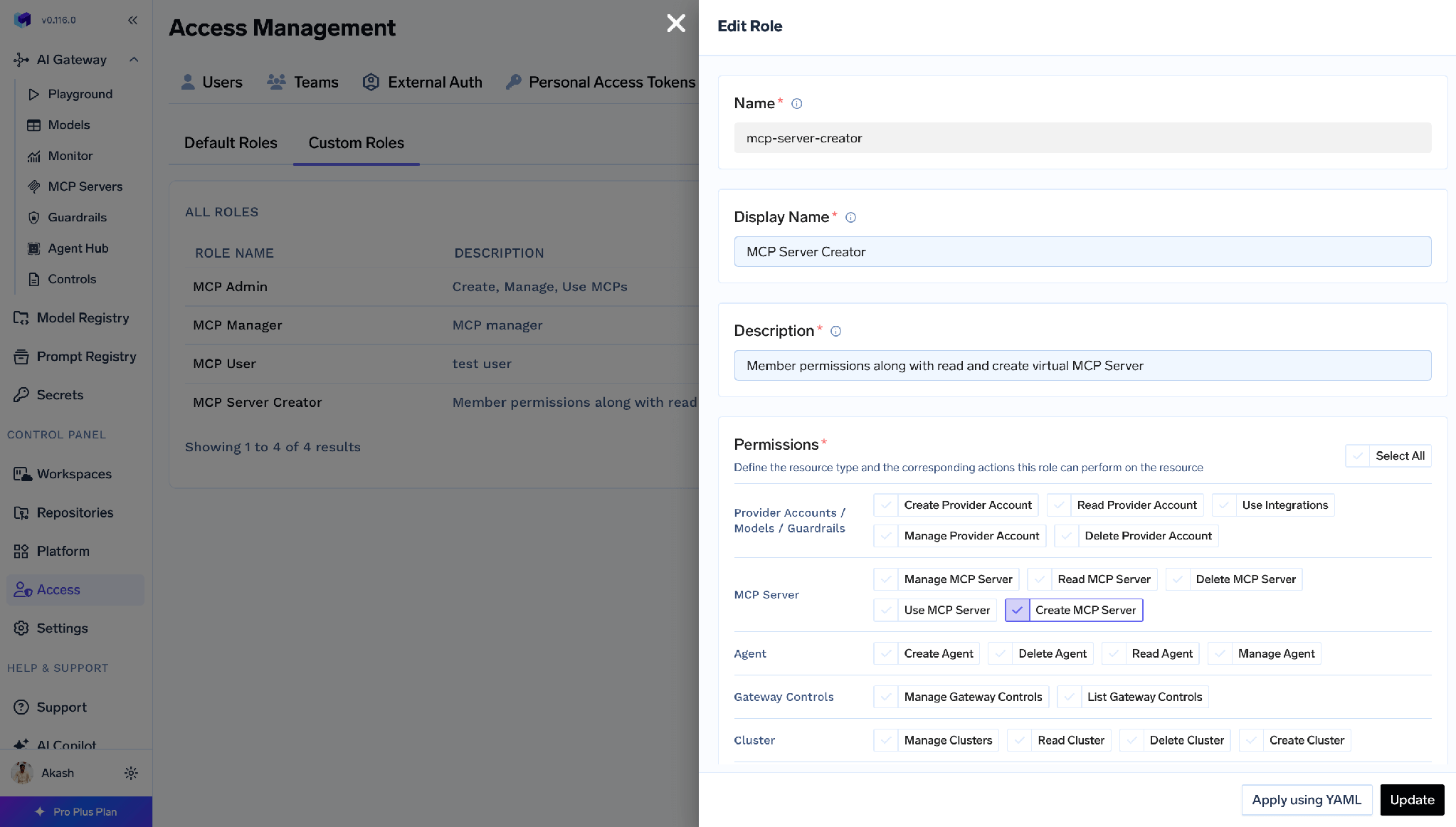
Em seguida, atribua-a a partir de Acesso > UsuáriosouAcesso > Equipes.
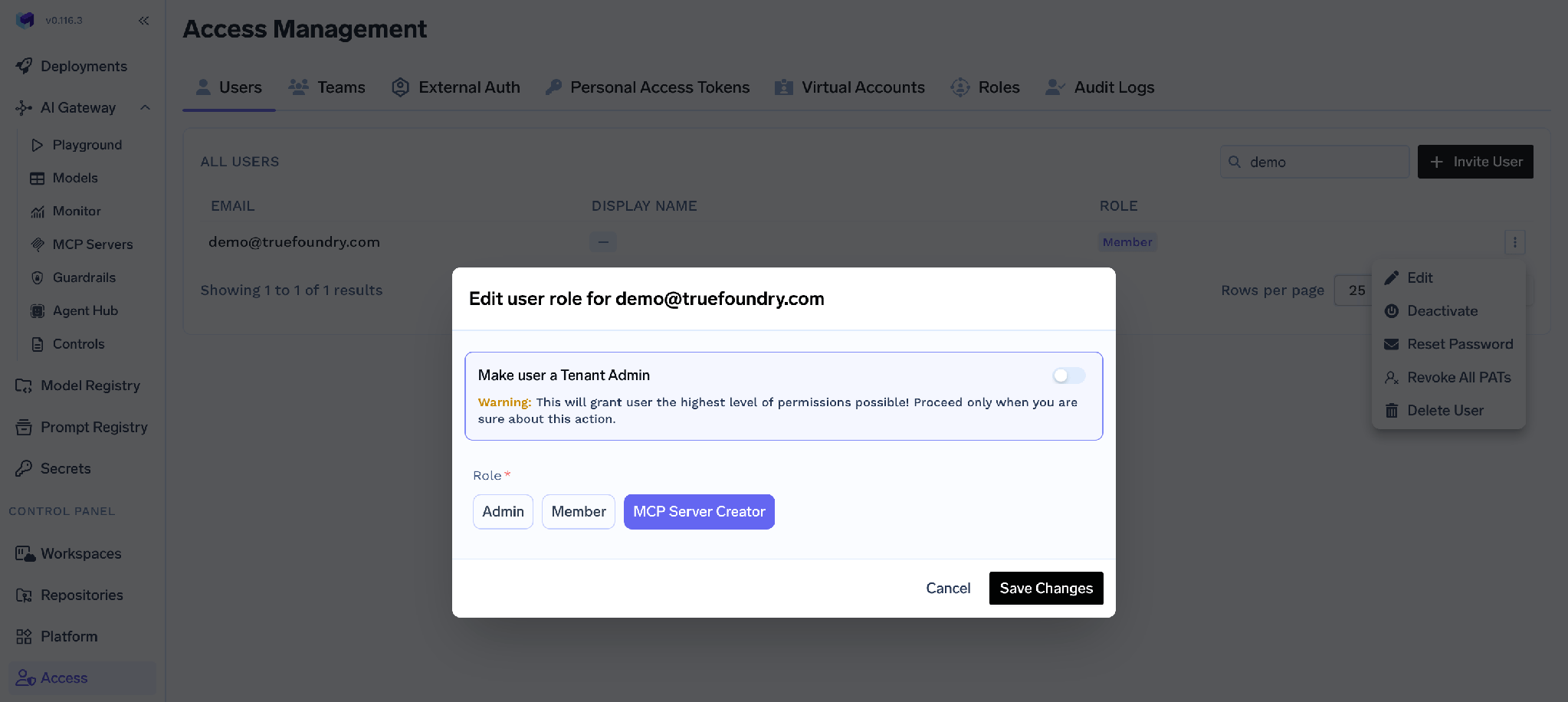
O comportamento espelha o do Kubernetes com precisão. Criar Servidor MCP permite criar um novo servidor e não concede nada em servidores existentes – exatamente como a criação em um recurso do Kubernetes não concede nada em objetos que já existem. O proprietário então concede a si mesmo MCP Server Manager a partir da página de Controle de Acesso do próprio servidor, e Controle de acesso MCP rege quais ferramentas o agente pode chamar.
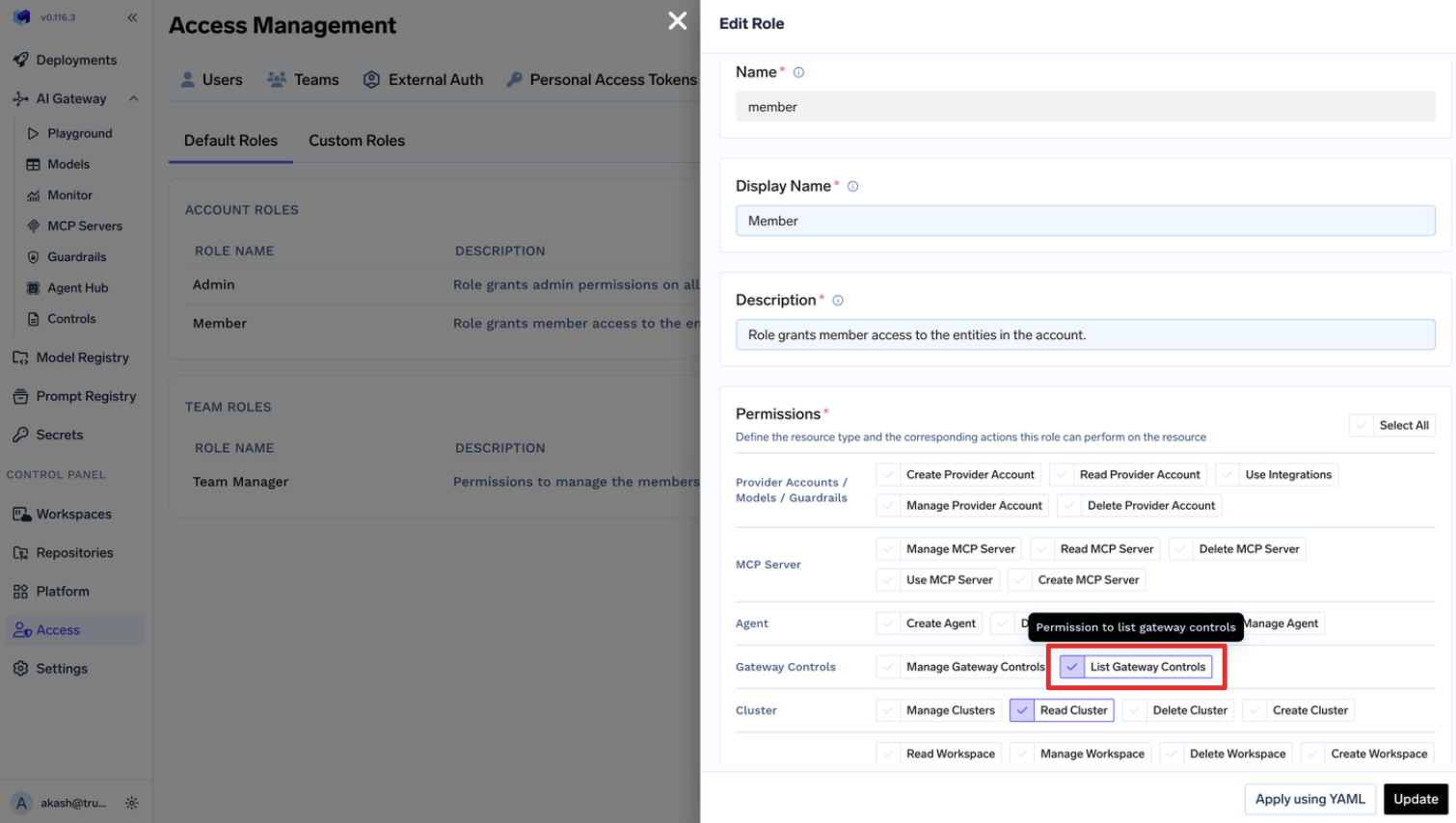
Mais um paralelo: as permissões de funções personalizadas se aplicam a todos os recursos do tipo selecionado, da mesma forma que um ClusterRoleBinding se aplica a todos os namespaces. Para um recurso específico, use a página de Controle de Acesso desse recurso. O mesmo se aplica ao ampliar a base – adicionar gateway-controls:ListGatewayControls a Membro concede isso a todos os usuários:
O agente da própria plataforma é um estudo de caso de Role versus ClusterRole. O tfy-agent precisa de um ClusterRole e um ClusterRoleBinding para executar informers, porque os informers do Kubernetes não conseguem observar um subconjunto de namespaces – portanto, ele é somente leitura e filtra no lado do cliente. O tfy-agent-proxy, que efetivamente realiza gravações, é aquele que você pode restringir: config.allowedNamespaces o alterna para RoleBindings por namespace, e tfyAgentProxy.clusterRole.strictMode: true o reduz a um conjunto mínimo de permissões. Essa é a regra geral em miniatura.
As concessões se combinam em ambas as camadas, e remover uma não remove a outra. No Kubernetes, o acesso efetivo é a união de todas as vinculações correspondentes. No TrueFoundry, um sujeito pode ter acesso diretamente e ou herdá-lo de uma equipe. Verifique todas as fontes antes de concluir que uma remoção falhou.
Editar uma função de equipe padrão da plataforma altera a mesma para todas as equipes. Membro da EquipeeGerente da Equipe são editados em Acesso > Funções Padrão, e a edição é global. Adicionar virtual-account:ManageVirtualAccount para que uma equipe possa recuperar tokens concede essa permissão a todas as equipes. O Kubernetes apresenta o mesmo risco sob uma forma diferente: editar um ClusterRole compartilhado altera a permissão para todos os bindings que o referenciam.
A maioria dos problemas de RBAC no Kubernetes são problemas de escopo, não de sintaxe. Dois tipos de objetos descrevem permissões e dois as distribuem; a habilidade está em escolher o mais restrito quando o mais amplo é mais fácil de digitar. Use Role com namespace primeiro, ClusterRole vinculado por RoleBinding quando precisar de reutilização, e ClusterRoleBinding apenas quando um sujeito realmente precisar de todo o cluster. Vincule grupos, evite curingas e verifique com kubectl auth can-i.
O que é fácil deixar passar é que tudo isso responde a apenas uma pergunta. Tudo o que suas equipes fazem por meio de uma API de plataforma – implantar um modelo, chamar uma ferramenta MCP, ler um grupo de segredos – é invisível para o RBAC do cluster e precisa de sua própria solução.
Na TrueFoundry, essas são duas camadas sobre a mesma infraestrutura: compartilhando um limite porque um workspace é é um namespace, configurado de forma independente porque governam objetos diferentes. Um engenheiro de plataforma precisa de ambos. O modo de falha é presumir que um cobre o outro.
TrueFoundry AI Gateway delivers ~3–4 ms latency, handles 350+ RPS on 1 vCPU, scales horizontally with ease, and is production-ready, while LiteLLM suffers from high latency, struggles beyond moderate RPS, lacks built-in scaling, and is best for light or prototype workloads.



É o modo de autorização que decide se uma identidade autenticada pode executar um verbo sobre um recurso por meio do API server. Você escreve as permissões em um Role (com namespace) ou em um ClusterRole (para todo o cluster) e depois as associa a sujeitos com um RoleBinding (apenas aquele namespace) ou um ClusterRoleBinding (todo o cluster). As regras são aditivas, sem negação, e tudo o que não é concedido é recusado.
Um Role pertence a um namespace e só pode conceder permissões sobre recursos com namespace dentro do seu próprio namespace. Um ClusterRole tem escopo de cluster e pode, além disso, conceder permissões sobre recursos com escopo de cluster, como nós e volumes persistentes, e sobre URLs que não são recursos, como /healthz. A diferença prática é a reutilização: um ClusterRole é definido uma vez e pode ser vinculado a qualquer namespace com um RoleBinding.
Sim, e esse é o padrão recomendado. As permissões ficam limitadas ao namespace do RoleBinding, então você define uma capacidade uma única vez e a concede equipe por equipe. O inverso não é permitido: um ClusterRoleBinding nunca pode referenciar um Role.
Sim. O TrueFoundry é executado na sua VPC, on-prem, em ambiente air-gapped ou híbrido, de modo que os prompts e as respostas nunca saem do seu domínio, mesmo quando você roteia entre muitos provedores.
Sim. Ele inclui um MCP Gateway, um Agent Gateway e um MCP & Agents Registry com controle de acesso em nível de ferramenta. Agentes criados com LangGraph, CrewAI, AutoGen ou um framework próprio podem ser governados de forma centralizada.
Sim. O gateway é compatível com OpenTelemetry e se integra com Grafana, Datadog, Prometheus ou a sua stack preferida. Ele rastreia cada requisição, do prompt à execução da ferramenta e do modelo, para que você obtenha logs unificados sem precisar remover o que você já usa.



As últimas notícias, artigos e recursos enviados para sua caixa de entrada

.png)
.webp)
.webp)
.png)
.png)
.png)
.png)
.png)
.webp)
.webp)

.png)
.png)
.png)


