



May 8, 2024
|
5 minutos de lectura


Obtenga acceso instantáneo a un entorno TrueFoundry en vivo. Implemente modelos, dirija el tráfico de LLM y explore la plataforma completa: su sandbox estará listo en segundos, sin necesidad de tarjeta de crédito.



Published: October 7, 2026
¡Una forma increíblemente rápida de crear, rastrear e implementar sus modelos!
La factura llegó el primer día del mes y era tres veces superior a lo que el equipo había calculado.
Habían hecho los deberes. Alguien había recopilado la página de precios de cada proveedor en una hoja de cálculo, la había ordenado por dólares por millón de tokens y había elegido el modelo más barato que cumplía con los estándares de calidad. Sobre el papel, los cálculos eran impecables.
Entonces llegó la fase de producción. La recuperación de datos se volvió más compleja. Los prompts se hicieron más largos. Los agentes empezaron a utilizar herramientas que añadían más contexto a la siguiente llamada. Y el único número que habían optimizado, el precio de lista, resultó ser el que apenas importaba.
Si alguna vez te has quedado mirando una factura de IA que no coincidía con tu estimación, esta guía es para ti. El coste de los LLM no es aleatorio. Se reduce a cuatro palancas, y las cuatro son identificables y ajustables. Al final, serás capaz de modelar tu propia factura en lugar de intentar adivinarla.
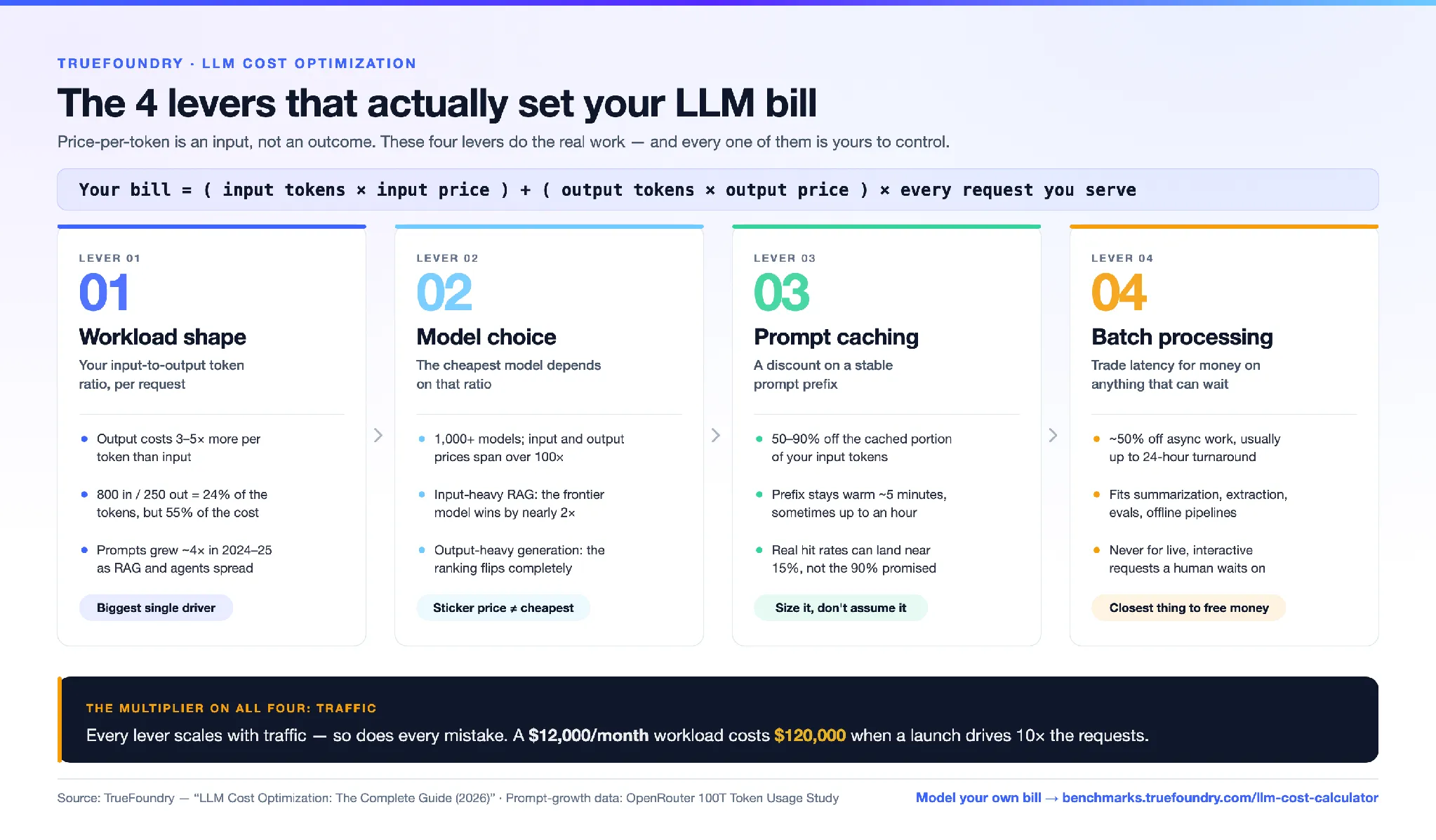
Las cuatro palancas del coste de los LLM. La estructura de la carga de trabajo determina la proporción de tokens de entrada frente a los de salida, y la salida cuesta entre 3 y 5 veces más que la entrada. La elección del modelo solo tiene sentido una vez que conoces esa proporción, ya que el más barato de entre más de 1.000 modelos varía según si el trabajo es intensivo en entrada o en salida. El almacenamiento en caché de prompts reduce entre un 50% y un 90% el coste de un prefijo de prompt estable, pero solo según la tasa de aciertos que permita tu tráfico. El procesamiento por lotes reduce aproximadamente un 50% el coste de cualquier tarea que pueda esperar hasta 24 horas. Y el tráfico multiplica las cuatro: una carga de trabajo de 12.000 $/mes cuesta 120.000 $ ante un pico de 10 veces.
El precio por token es real, es público y es lo más fácil de comparar, que es precisamente por lo que todo el mundo se centra en él. Compararlo da sensación de diligencia.
Pero el precio por token es un dato de entrada, no un resultado. Tu factura real se calcula así:
(tokens de entrada × precio de entrada) + (tokens de salida × precio de salida), multiplicado por cada solicitud que atiendes.
Cada término de esa ecuación, excepto el precio, es algo que tú controlas, y la mayoría de ellos eclipsan la diferencia de precio entre dos modelos comparables. Dos equipos que ejecutan el "mismo" modelo para el "mismo" caso de uso suelen obtener facturas que difieren entre 5 y 10 veces, porque sus cálculos de tokens son completamente distintos.
Así que deja de centrarte en el precio y empieza por los cuatro factores que determinan tus cálculos de tokens.
Cada solicitud tiene dos partes y se cobran por separado.
Entrada es todo lo que envías al modelo: el prompt del sistema, las instrucciones, los documentos recuperados, el historial del chat y la pregunta del usuario. Suele ser la parte más grande y barata.
Salida es lo que el modelo genera como respuesta: la contestación, el código, el resumen. Casi siempre es la parte más cara.
¿Cuánto más cara? En la mayoría de los modelos de vanguardia, la salida cuesta entre 3 y 5 veces más por token que la entrada. GPT-4o, por ejemplo, cobra 2,50 $ por millón de tokens de entrada y 10,00 $ por millón de salida. Eso supone una diferencia de 4 veces en la misma solicitud.
Esa diferencia se nota rápidamente. Tomemos el ejemplo de un chatbot sencillo: 800 tokens de entrada y 250 de salida. La salida representa solo el 24 por ciento de los tokens, pero supone el 55 por ciento del coste. Podrías reducir tu prompt a la mitad y apenas notarías el ahorro en la factura. En cambio, si recortas la respuesta, lo notarías al instante.
Las cargas de trabajo también se han vuelto más pesadas en ambos extremos. El estudio de uso de tokens de OpenRouter 100T muestra que el tamaño medio de los prompts creció aproximadamente 4 veces entre principios de 2024 y 2025, pasando de unos 1.500 tokens a más de 6.000, a medida que la generación aumentada por recuperación (RAG) y el uso de herramientas se generalizaban. Las finalizaciones crecieron unas 3 veces en el mismo periodo.
El centro de costes ha cambiado. Antes dependía casi totalmente de la salida. Ahora, las cargas de trabajo de RAG y agentes añaden miles de tokens de entrada a cada llamada, por lo que el lado de la entrada es una partida de gastos que tampoco puedes ignorar.
Antes de comparar un solo modelo, conoce tu relación entrada-salida. Es el factor que más influye en lo que pagarás y el que determina qué modelo es el más barato para ti.
Dado que la entrada y la salida se cobran por separado, el modelo más barato depende totalmente de la estructura de tu carga de trabajo. La clasificación cambia por completo.
Imagina dos modelos:
El Modelo A parece más barato. Es más económico en la entrada y su precio de referencia es menor. Pero haz el cálculo de tokens:
Los mismos dos modelos, conclusiones opuestas. Lo único que cambió fue la naturaleza del trabajo.
Por eso "¿cuál es el LLM más barato?" es la pregunta equivocada. Hay más de mil modelos en el mercado y sus precios de entrada y salida varían en más de dos órdenes de magnitud. La pregunta correcta es más específica: dada mi relación entrada-salida y mi estándar de calidad, ¿qué modelo tiene el coste total más bajo? Es una consulta que nunca deberías hacer a mano, y es lo primero que hace nuestra calculadora por ti.
La caché de prompts es la palanca más sobrevalorada de esta lista.
La idea es buena. Si la parte inicial de tu prompt es idéntica en todas las solicitudes (por ejemplo, un prompt de sistema grande, un bloque de instrucciones fijo o un conjunto de ejemplos few-shot), el proveedor puede almacenarlo en caché y ofrecerte un descuento importante, a menudo del 50 al 90 por ciento, en esa parte para las llamadas repetidas. Para una carga de trabajo con un prefijo grande y estable, el ahorro se acumula rápidamente.
Pero las afirmaciones sobre tasas de acierto como "¡90 por ciento de aciertos en caché!" asumen un escenario ideal que quizás nunca alcances. Dos factores determinan tu tasa de acierto real:
Haz los cálculos: una carga de trabajo de unos pocos miles de solicitudes al día repartidas entre un par de docenas de variantes de prompts puede terminar con una tasa de acierto de aproximadamente el 15 por ciento en una ventana de 5 minutos, no el 90 por ciento que promete el folleto. El almacenamiento en caché no falla; simplemente se comporta como siempre, en función de tu tráfico y no como un descuento que activas a voluntad.
Por lo tanto, dimensiona el almacenamiento en caché antes de confiar en él. Consolida las variantes de prompts, concentra el tráfico y opta por una ventana más amplia si el proveedor la ofrece. Luego, compara esa cifra con tu volumen real.
Profundizamos en esto en Prompt Caching: Why Your Hit Rate Won't Be 97%, un análisis detallado de lo que realmente te ahorrará el almacenamiento en caché.
Si una solicitud no requiere una respuesta inmediata, el procesamiento por lotes es la palanca con mayor retorno de inversión a tu disposición. Los proveedores ofrecen aproximadamente un 50 por ciento de descuento por el trabajo que estás dispuesto a enviar de forma asíncrona y recibir dentro de un plazo de entrega, generalmente de hasta 24 horas.
Cincuenta por ciento de descuento a cambio de aceptar una demora. Casi no existe nada más en el mundo del software donde puedas reducir el coste a la mitad cambiando únicamente el SLA.
El truco está en el propio SLA. El procesamiento por lotes es ideal para cualquier tarea offline:
Sin embargo, es inviable para cualquier proceso en el que un usuario esté esperando, como chats en vivo, asistentes interactivos o cualquier elemento dentro de una interfaz de solicitud-respuesta. Ese es el trato: latencia a cambio de dinero.
El error más común es olvidar que el procesamiento por lotes existe para esa mitad de la carga de trabajo que podría aprovecharlo. Muchos sistemas de IA "en tiempo real" tienen una gran parte de carga offline, como trabajos de reindexación o procesos de clasificación nocturnos, por los que se paga el precio completo.
Más información sobre dónde es real el descuento y dónde no en LLM Batch Processing: When the 50% Discount Is Real.
El multiplicador que olvidaste: los picos de tráfico
El tráfico es lo que convierte una factura manejable en una emergencia presupuestaria.
Todas las palancas anteriores escalan con el tráfico. Y también lo hace cada error. Una carga de trabajo que cuesta 12.000 dólares al mes con una carga normal no cuesta 12.000 dólares cuando un lanzamiento provoca un pico de 10 veces el volumen. Cuesta 120.000 dólares, y ocurre precisamente en la semana en la que menos atención puedes prestar.
Aquí es donde los ahorros juegan a tu favor. La brecha entre un despliegue optimizado y uno básico se amplía a medida que aumenta el tráfico, por lo que el momento de modelar los casos extremos es antes del pico. Pregúntate ahora: ¿cómo se verá esta factura si se multiplica por 3? ¿O por 10? Si no lo sabes, estás confiando en la suerte en lugar de presupuestar.
Hemos creado una herramienta gratuita Calculadora de costes de LLM que convierte toda esta guía en un ejercicio de un minuto. Introduce tu tráfico y la estructura de tu carga de trabajo, elige entre más de mil modelos, activa el almacenamiento en caché y el procesamiento por lotes, y observa cómo se actualizan en tiempo real tus costes mensuales y tus escenarios de picos de demanda. Sin registros ni llamadas de ventas, solo tus números.
Aquí tienes el método completo, paso a paso:
Si lo haces en una hoja de cálculo, te llevará toda la tarde. Hazlo en la Calculadora de costes de LLM y tardarás un minuto, con gráficos en tiempo real, una comparativa de modelos entre todos los proveedores y una recomendación clara al principio del informe.
Modelar el ahorro es solo el primer paso. Lo difícil es conseguirlo a través de decenas de modelos y equipos, sin tener que reescribir tu aplicación cada vez que cambian los precios.
Eso es lo que la TrueFoundry AI Gateway es para eso. Un único endpoint compatible con OpenAI permite acceder a más de mil modelos de todos los principales proveedores, por lo que cambiar al modelo más económico según la naturaleza de tu carga de trabajo es solo un ajuste de configuración, no una migración. Gracias a los controles de costes integrados, el seguimiento del uso por equipo, los límites de tasa y las alternativas de respaldo, el ahorro que has calculado aquí no se esfumará en producción. Puedes ver a dónde va cada dólar y mantener el control.
La calculadora te indica qué hacer. La pasarela es la forma de hacerlo una vez y seguir haciéndolo a medida que los modelos y los precios cambian bajo tus pies.
La naturaleza de tu carga de trabajo, es decir, la proporción de tokens de entrada frente a los de salida por solicitud, combinada con el modelo que elijas para esa configuración. Esto afecta a la factura mucho más que el precio por token que verías en una página de tarifas.
El culpable habitual es estimar basándose en el precio por token en lugar de hacer cálculos reales. Los tokens de salida cuestan entre 3 y 5 veces más que los de entrada; el uso de herramientas y la recuperación de datos inflan la entrada mucho más allá de un simple prompt, y los picos de tráfico multiplican todo. Modela tus tokens reales de entrada y salida, así como tu tráfico, para cerrar esa brecha.
Sí, pero solo tanto como permita tu tráfico. La caché aplica descuentos a un prefijo de prompt estable en solicitudes repetidas, por lo que el ahorro depende de lo concentrado que esté tu tráfico y de cuántos prompts distintos ejecutes. Un gran volumen en unos pocos prompts compartidos supone un gran ahorro. Un volumen bajo repartido en muchos prompts apenas ahorra nada. Calcúlalo con tus cifras reales antes de contar con ello.
Siempre que el resultado pueda esperar. El procesamiento por lotes suele reducir los costes en torno a un 50 % a cambio de un tiempo de respuesta asíncrono, que a menudo puede llegar a las 24 horas. Esto lo hace ideal para resúmenes, extracción de datos, evaluaciones y procesos offline, pero inadecuado para cargas de trabajo interactivas en tiempo real.
No por el precio de lista. Calcula el coste total por solicitud, que es (tokens de entrada × precio de entrada) + (tokens de salida × precio de salida), según tu carga de trabajo específica, y luego compara. El modelo más barato para una aplicación RAG con mucha entrada a menudo no es el más barato para una aplicación de generación con mucha salida. La Calculadora de costes de LLM hace esto automáticamente con más de mil modelos.
En resumen: el número que aparece en la página de precios es el que menos deberías tener en cuenta. Tu factura depende de la naturaleza de tu carga de trabajo, el modelo que elijas para ella, tu eficiencia con la caché y cuánto proceses por lotes. Todo eso está bajo tu control. Así que deja de estimar y modélalo en aproximadamente un minuto.
TrueFoundry AI Gateway ofrece una latencia de entre 3 y 4 ms, gestiona más de 350 RPS en una vCPU, se escala horizontalmente con facilidad y está listo para la producción, mientras que LitellM presenta una latencia alta, tiene dificultades para superar un RPS moderado, carece de escalado integrado y es ideal para cargas de trabajo ligeras o de prototipos.





Las últimas noticias, artículos y recursos enviados a tu bandeja de entrada


.png)
.png)
.webp)
.webp)


.png)
.png)
.png)


.png)
.png)
.png)
.png)


