


September 30, 2026
|
5 minutos de lectura


Obtenga acceso instantáneo a un entorno TrueFoundry en vivo. Implemente modelos, dirija el tráfico de LLM y explore la plataforma completa: su sandbox estará listo en segundos, sin necesidad de tarjeta de crédito.



Published: September 30, 2026

¡Una forma increíblemente rápida de crear, rastrear e implementar sus modelos!
One week after GPT-6 Sol arrived in the catalog, OpenAI has shipped its successor. GPT-6.1 Sol went out on Tuesday, September 29, and it is already in the TrueFoundry AI Gateway model catalog with pricing, context limits and capabilities filled in.
You call it from the same OpenAI-compatible endpoint you use for everything else. No new SDK, no separate integration, no waiting on a gateway release. Change the model string to gpt-6.1-sol on your OpenAI account (openai/gpt-6.1-sol on OpenRouter) and you are on the new model.
Try GPT-6.1 Sol on the TrueFoundry AI Gateway →
GPT-6.1 Sol replaces GPT-6 Sol at the same sticker price, with cheaper caching and the same limits. The numbers that matter for a production budget:
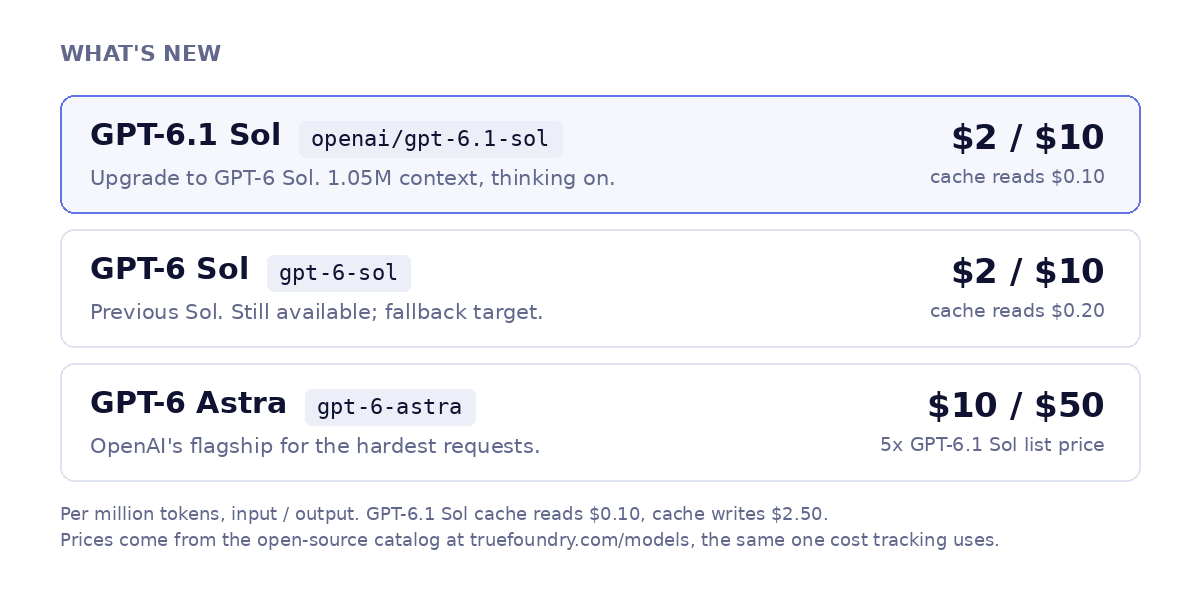
The catalog puts GPT-6 Astra at $10 per million input tokens and $50 per million output. GPT-6.1 Sol lists at $2 and $10, exactly one-fifth on both sides, and its cache reads at $0.10 are one-tenth of Astra's $1.
Put the month's releases side by side: GPT-6 Luna at $0.10 per million input tokens, GPT-6 Sol, GPT-6.1 Sol and Claude Sonnet 5.5 at $2, Claude Opus 5.5 at $4, GPT-6 Astra at $10. GPT-6.1 Sol takes GPT-6 Sol's slot on the ladder at the same price, with the lowest cache-read rate in that $2 row.
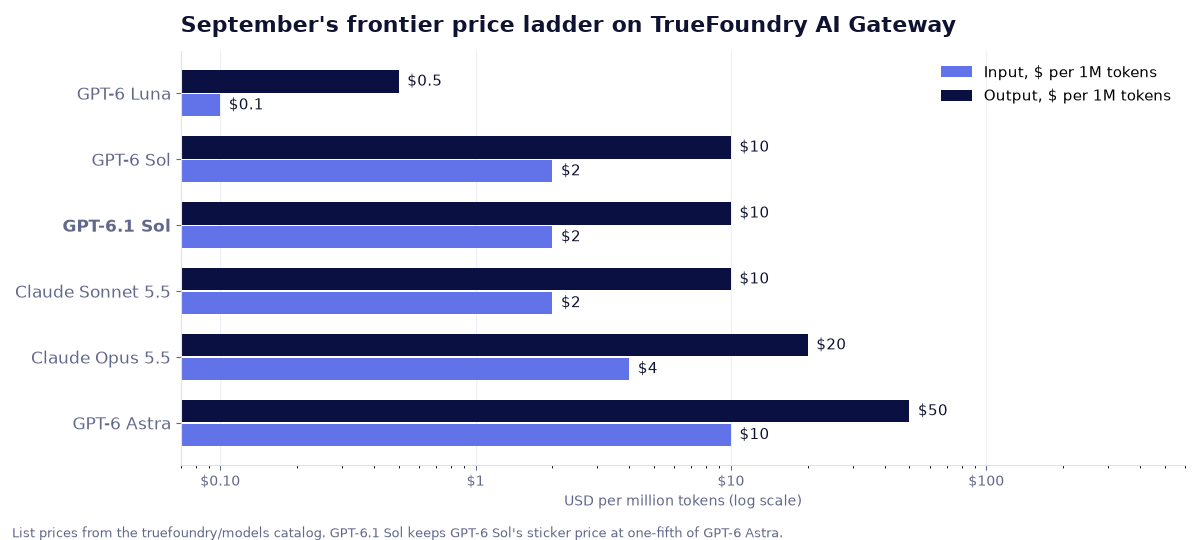
That is the argument for treating model choice as gateway config rather than application code. Most production traffic is a large number of easy requests and a small number of hard ones. If the easy majority goes to Luna, the middle goes to GPT-6.1 Sol and only the hard tail goes to Astra, the blended bill looks nothing like an all-Astra bill. That only works when switching is a config change, which is what the AI Gateway is for.
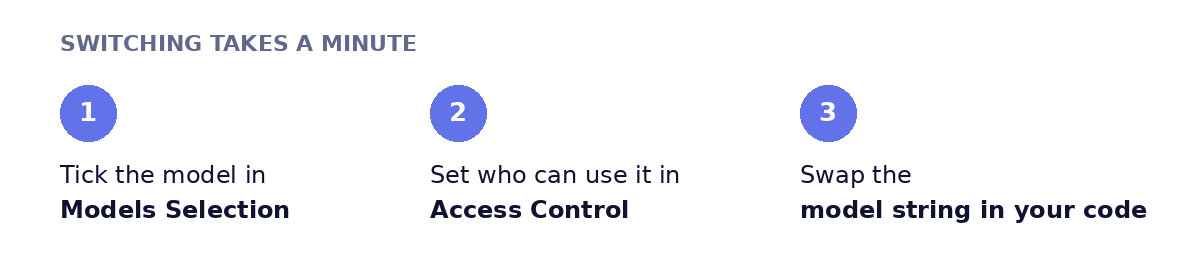
Step 1: Enable the model in your provider account. In the gateway, open Models → your OpenAI account → Models Selection, search for gpt-6.1-sol and tick it. Pricing shows inline ($2 input / $10 output per 1M tokens) because it comes straight from the catalog. Then set Access Control so the model is scoped to the right teams and virtual keys from day one.
OpenAI direct and OpenRouter (openai/gpt-6.1-sol) are both in the catalog today; Microsoft Foundry and AWS Bedrock entries are landing.
Don't see the model in your list? + Add Model at the bottom of the list adds it by hand.
Step 2: Call it. Open the Playground, pick the model, and copy the generated snippet in whichever SDK you use. The OpenAI Python version:
from openai import OpenAI

client = OpenAI(
    api_key="<your-truefoundry-api-key>",
    base_url="https://gateway.truefoundry.ai",  # or your self-hosted gateway URL
)

# Model IDs are <provider-account>/<model>. Swap the string, keep everything else.
r = client.chat.completions.create(
    model="openai-main/gpt-6.1-sol",
    messages=[{"role": "user", "content": "Summarise this incident in three bullets: ..."}],
    extra_headers={"X-TFY-METADATA": '{"team": "platform", "feature": "incident-summary"}'},
)
print(r.choices[0].message.content)
Model IDs are namespaced as <your-provider-account>/<model>, so openai-main/gpt-6-sol and openai-main/gpt-6.1-sol are a one-line swap. The X-TFY-METADATA header tags each call so spend shows up per team or per feature in the metrics view.
Step 3 (optional): Put it behind a virtual model. Create a virtual model and pick Auto Routing. The gateway classifies each request as simple, medium or complex and sends it to the target you assign to that tier. GPT-6 Luna for simple, GPT-6.1 Sol for medium, GPT-6 Astra for complex, with GPT-6 Sol as a fallback while launch-week rate limits settle, is a sensible starting map. In our benchmarks this kind of routing cut cost 50–70% at about 98% of quality. Your application calls one model name throughout.
GPT-6.1 Sol is the model to reach for when a request needs more than Luna but Astra pricing is hard to justify, and when agents resend long context that the $0.10 cache rate makes cheap. Running it through TrueFoundry means the decision about which requests those are lives in gateway config, where you can change it without a deploy.
Try GPT-6.1 Sol on the TrueFoundry AI Gateway →
TrueFoundry AI Gateway ofrece una latencia de entre 3 y 4 ms, gestiona más de 350 RPS en una vCPU, se escala horizontalmente con facilidad y está listo para la producción, mientras que LitellM presenta una latencia alta, tiene dificultades para superar un RPS moderado, carece de escalado integrado y es ideal para cargas de trabajo ligeras o de prototipos.





Las últimas noticias, artículos y recursos enviados a tu bandeja de entrada
.png)
.png)
.png)
.png)
.png)
.png)
.png)
.png)
.png)
.png)
.png)
.webp)


