Configure keyless Workload Identity Federation for Azure OpenAI, Azure AI Foundry models, and Azure guardrails (PII, Content Safety, Prompt Shield).
Azure Workload Identity Federation is only supported on self-hosted deployments of the AI
Gateway (Gateway Plane only, or Control Plane + Gateway Plane). It does not work on the
SaaS version of the AI Gateway.
This guide explains how to configure Workload Identity Federation (WIF) using Microsoft Entra ID
for Azure OpenAI and Azure AI Foundry models in TrueFoundry’s AI Gateway. Workload Identity
Federation lets the AI Gateway authenticate to Azure without any client secrets or certificates. The
gateway’s Kubernetes service account token is exchanged for an Entra ID access token through a
federated identity credential. The same authentication is supported for Azure AI Foundry-based
guardrails: Azure PII,
Azure Content Safety, and
Azure Prompt Shield.If you prefer secret-based or certificate-based authentication instead, see
Azure Entra ID Client Secret Based Authentication
or Azure Entra ID Certificate Based Authentication.
Azure OpenAI or Azure AI Foundry resource deployed
The TrueFoundry AI Gateway running on a Kubernetes cluster with a configured OIDC issuer URL, and
the namespace and service account name used by the AI Gateway pod
The Kubernetes service account used by the AI Gateway must have permission to issue TokenRequest
resources for itself (the TrueFoundry-provided Helm chart configures this RBAC automatically)
Navigate to Azure Portal > Microsoft Entra ID >
App registrations and select your application.From the Overview page, note the following values:
Application (client) ID
Directory (tenant) ID
2
Add a Federated Identity Credential
In your app registration, navigate to Certificates & secrets > Federated credentials >
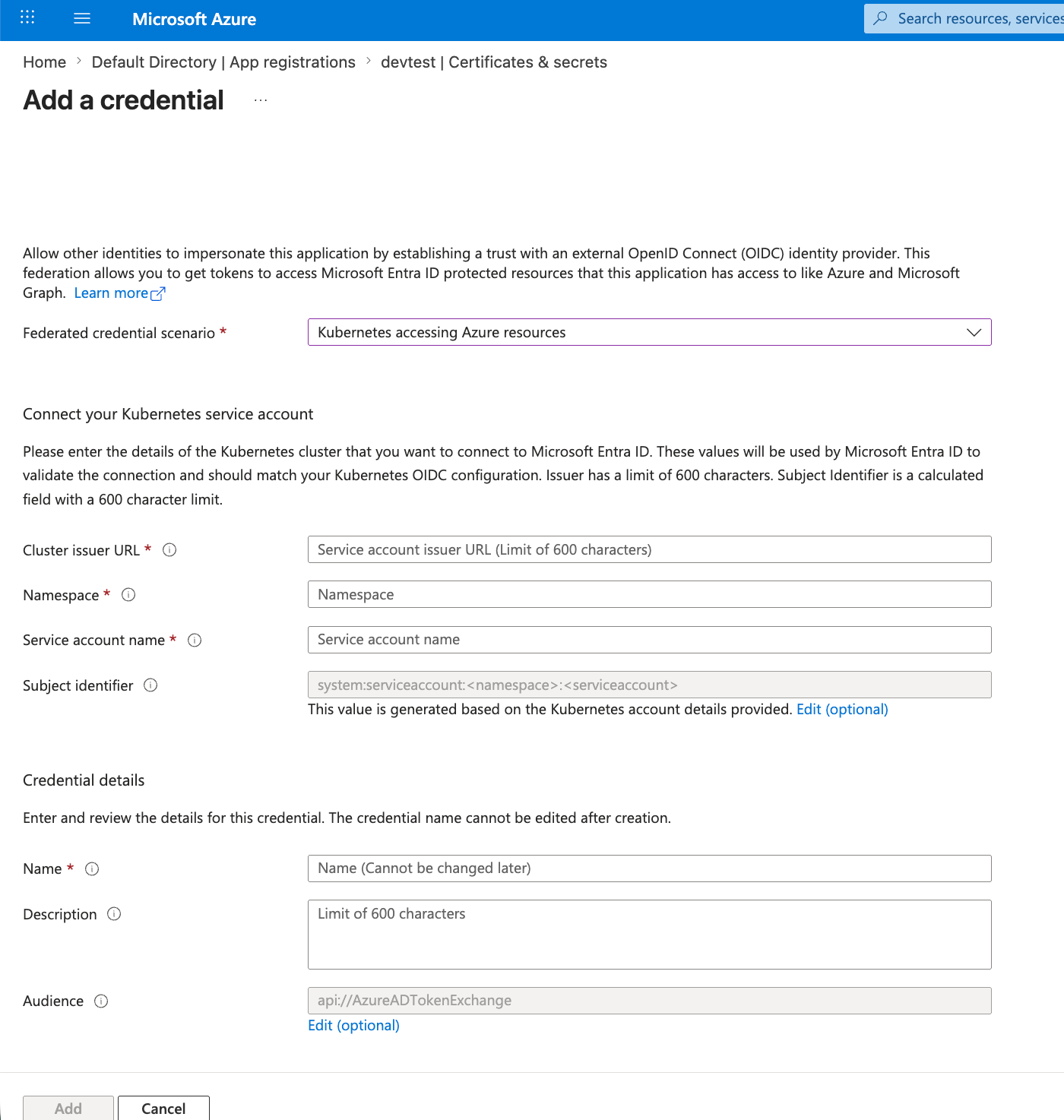
Add credential.For the Federated credential scenario, select Kubernetes accessing Azure resources, then
fill in:
Run these commands to look up the values before filling in the form:
# OIDC issuer URLkubectl get --raw /.well-known/openid-configuration | jq -r .issuer# Service account name: list pods to find the AI Gateway pod, then inspect itkubectl get pods -n <namespace>kubectl get pod <gateway-pod-name> -n <namespace> -o jsonpath='{.spec.serviceAccountName}'
Field
Description
Cluster issuer URL
The OIDC issuer URL of the cluster running the AI Gateway
Namespace
The Kubernetes namespace of the AI Gateway pod
Service account name
The Kubernetes service account name used by the AI Gateway pod
Name
A descriptive name for this federated credential
Azure automatically builds the Subject identifier as
system:serviceaccount:<namespace>:<service-account-name> and uses the audience
api://AzureADTokenExchange.
The namespace and service account name must match the AI Gateway pod’s service account
(the K8S_SERVICE_ACCOUNT_NAME the AI Gateway is deployed with). If they don’t match, the token
exchange will fail.
The Cluster issuer URL is your cluster’s OIDC issuer (on Amazon EKS it looks like
https://oidc.eks.<region>.amazonaws.com/id/EXAMPLED0123456789ABCDEF0123456789). The
Namespace is where the AI Gateway pod runs (commonly truefoundry) and the Service account name
is the K8S_SERVICE_ACCOUNT_NAME it is deployed with (defaults to default).
Add credential form with the Kubernetes accessing Azure resources scenario
3
Assign RBAC Role to App Registration
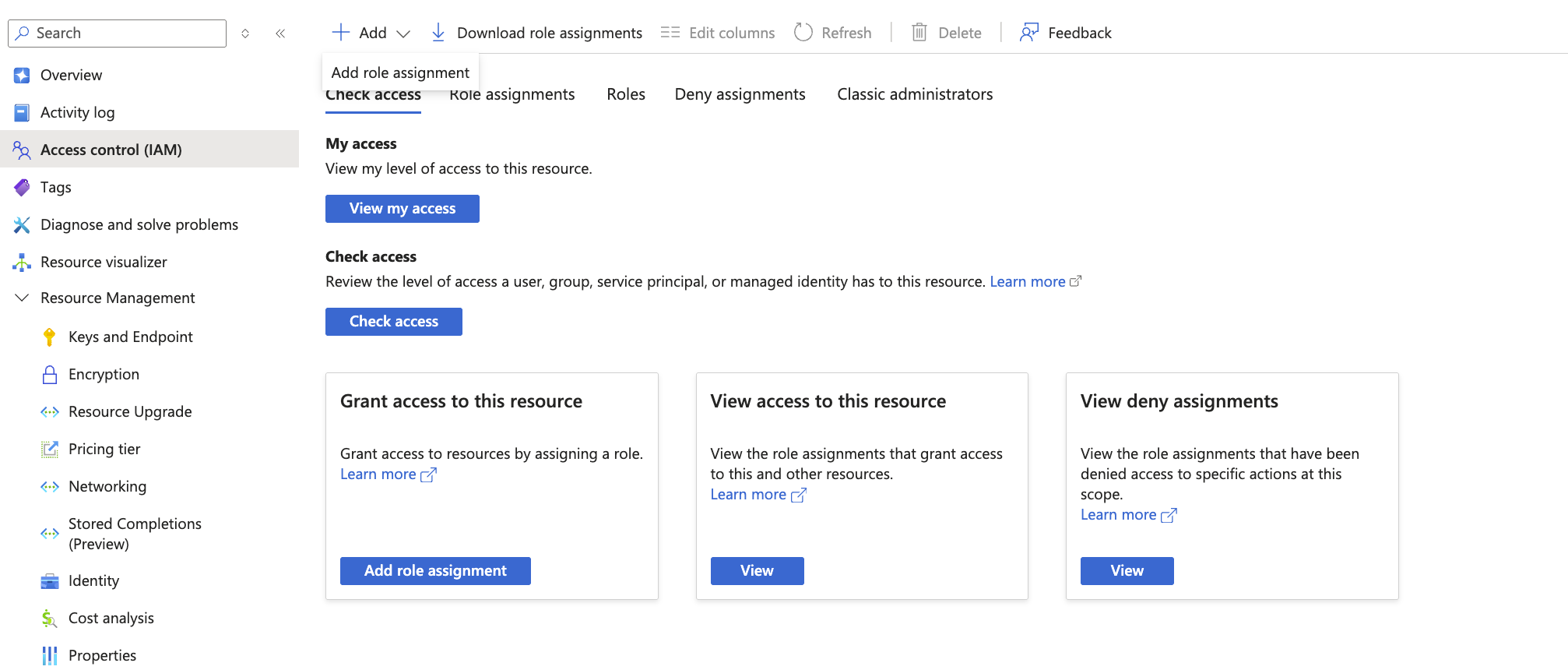
Navigate to your Azure resource > Access control (IAM) > Add role assignment.
Navigate to AI Gateway > Models > Azure OpenAI, then click Add Account and
select Workload Identity Federation. Fill in the following:
Field
Description
Tenant ID
Directory (tenant) ID from app registration overview
Client ID
Application (client) ID from app registration overview
No secret or certificate is required. The AI Gateway exchanges its Kubernetes service account
token for an Entra ID access token using the federated identity credential you configured
above.
For Azure AI Foundry, authentication is configured at the model level, not the account
level. When adding a model under AI Gateway > Models > Azure AI Foundry, select
Workload Identity Federation as the authentication type and fill in:
Field
Description
Tenant ID
Directory (tenant) ID from app registration overview
Client ID
Application (client) ID from app registration overview
No secret or certificate is required. The AI Gateway exchanges its Kubernetes service account
token for an Entra ID access token using the federated identity credential you configured
above.
2
Add Models and Test
Add your models as described in the Azure OpenAI or
Azure AI Foundry documentation.Test the connection using the Playground to verify authentication works.