Control who can view AI Gateway request traces and metrics using data access rules scoped to users, teams, team applications, or roles.
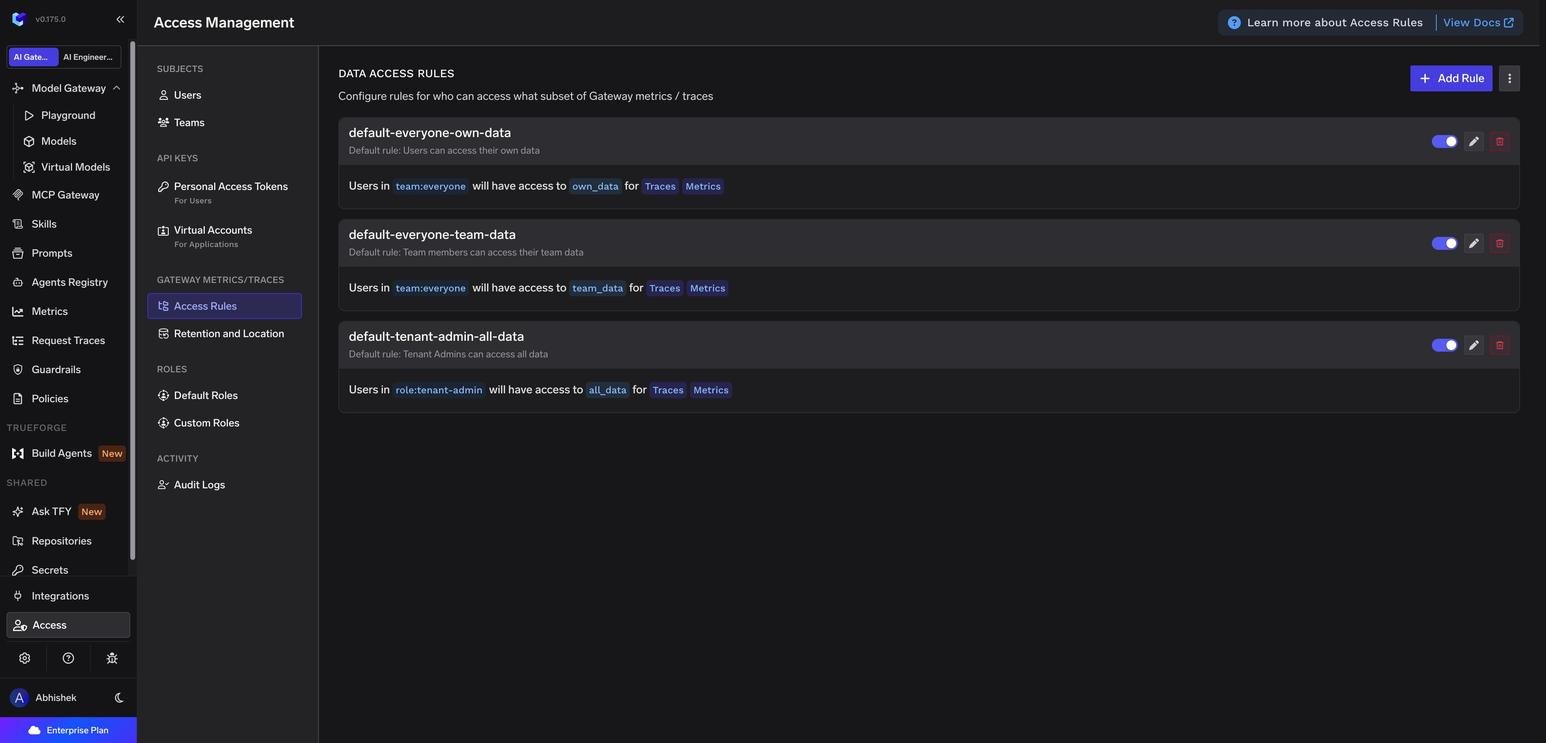
Data access rules control who can view request traces and metrics in the AI Gateway. Each rule grants a set of subjects (users, teams, or roles) access to a scope of data (their own, their team’s, their team’s applications, or everything) for one or both data types (Traces, Metrics).Manage rules from Access > Gateway Metrics/Traces > Access Rules.
Access Rules page with the three default rules
How rules are evaluated
A user can see a record if any enabled rule matches them for that data type. Access is the union of all matching rules, so adding a rule can only widen access.
Rules are evaluated separately for Traces and Metrics. A rule that grants only Metrics does not expose any traces.
Disabled rules are ignored.
Because access is additive, restricting what a group can see means narrowing or disabling the broader rule that currently grants it, not adding a new one.
Default rules
Every tenant starts with three rules. They are regular rules, so you can edit, disable, or delete them.
Rule ID
Subjects
Scope
Data types
Effect
default-everyone-own-data
team:everyone
own_data
Traces, Metrics
Every user sees the requests they made.
default-everyone-team-data
team:everyone
team_data
Traces, Metrics
Every user sees requests made by their teammates and by virtual accounts owned by their teams.
default-tenant-admin-all-data
role:tenant-admin
all_data
Traces, Metrics
Tenant admins see everything.
team:everyone is used to match all users, but it is never treated as a team for data scoping. A team_data rule gives access only to the real teams a user belongs to, not to the whole organization.
Data scopes
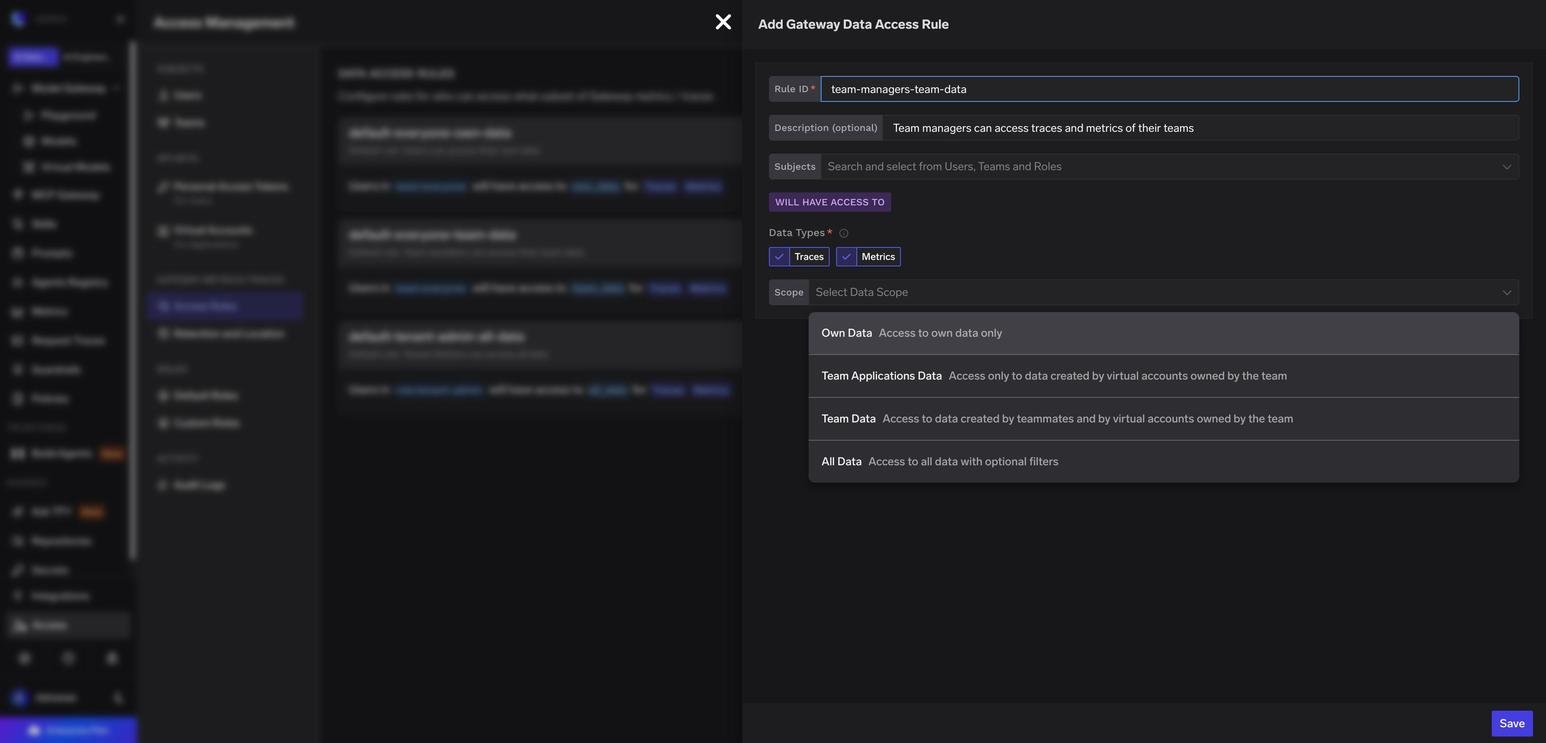
Scope options when adding a rule
Scope (UI)
YAML value
What the subject can see
Own Data
own_data
Requests made by the user themselves (with their personal access token or UI session).
Team Applications Data
team_virtual_account_data
Only requests made by virtual accounts owned by the user’s teams.
Team Data
team_data
Requests made by teammates and by virtual accounts owned by the user’s teams.
All Data
all_data
All requests in the tenant, optionally narrowed with filters.
Team data vs team applications data
Both scopes are resolved from the teams the user belongs to. The difference is whose requests they include:
Team Applications Data covers only traffic from applications, meaning virtual accounts whose owner is the team. Teammates’ personal requests (for example, prompts sent from the Playground or with a personal access token) stay private.
Team Data covers the same application traffic plus every teammate’s personal requests.
Use Team Applications Data when members need to debug and monitor their team’s services but should not read each other’s prompts. Use Team Data when the team is comfortable sharing all activity, or for people who oversee the team, such as team managers.
Team scopes depend on virtual account ownership. When you create a virtual account, set Owner of the Virtual Account to the team that runs the application. See Virtual Account management.
Create a rule
1
Open the form
Go to Access > Gateway Metrics/Traces > Access Rules and click Add Rule.
2
Name the rule
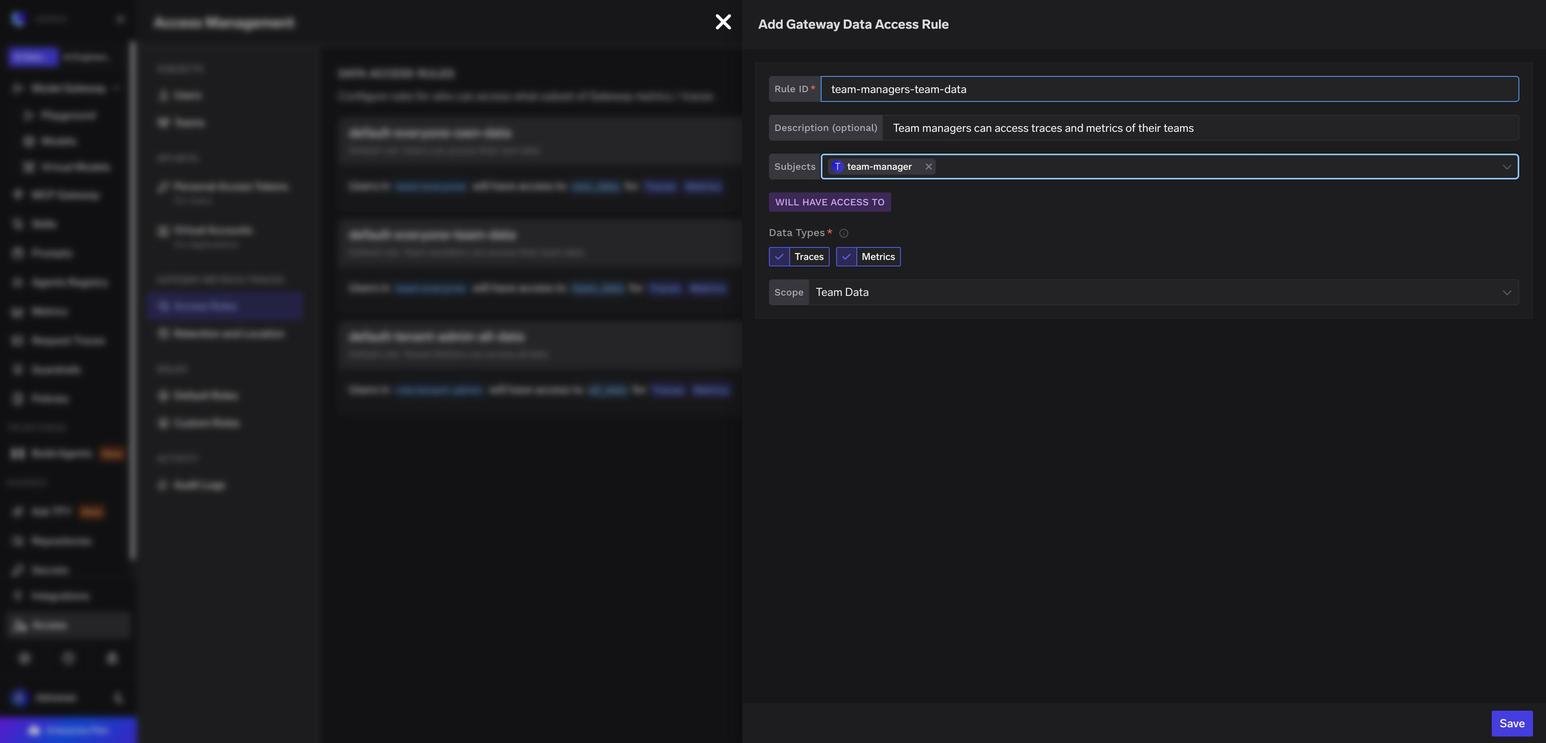
Enter a Rule ID (for example, team-managers-team-data) and an optional description. The ID must be unique and start with a letter. It can contain letters, digits, ., _, and -.
3
Select subjects
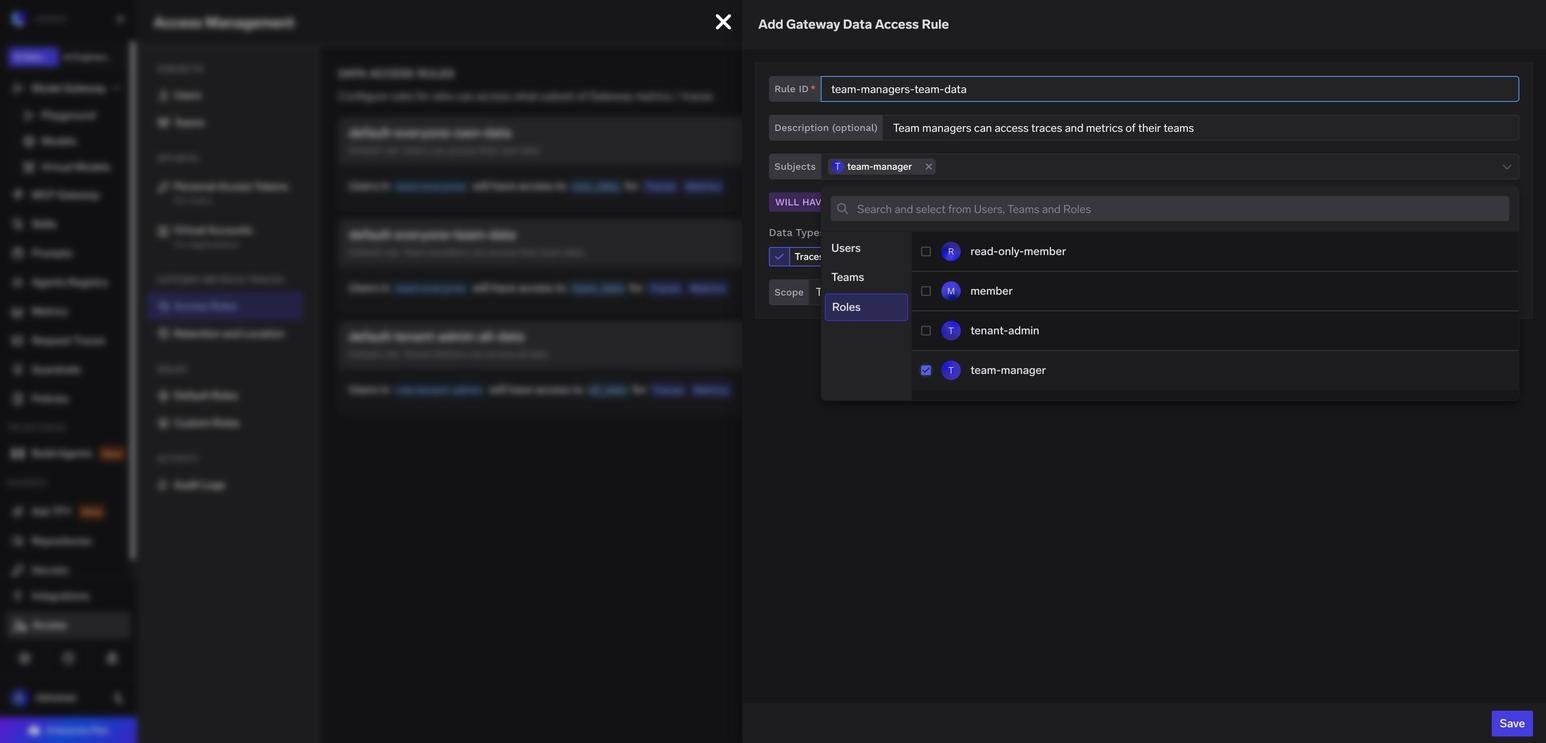
Pick one or more users, teams, or roles. Use the Roles tab to target roles such as tenant-admin or team-manager.
Selecting a role as the rule subject
4
Choose data types and scope
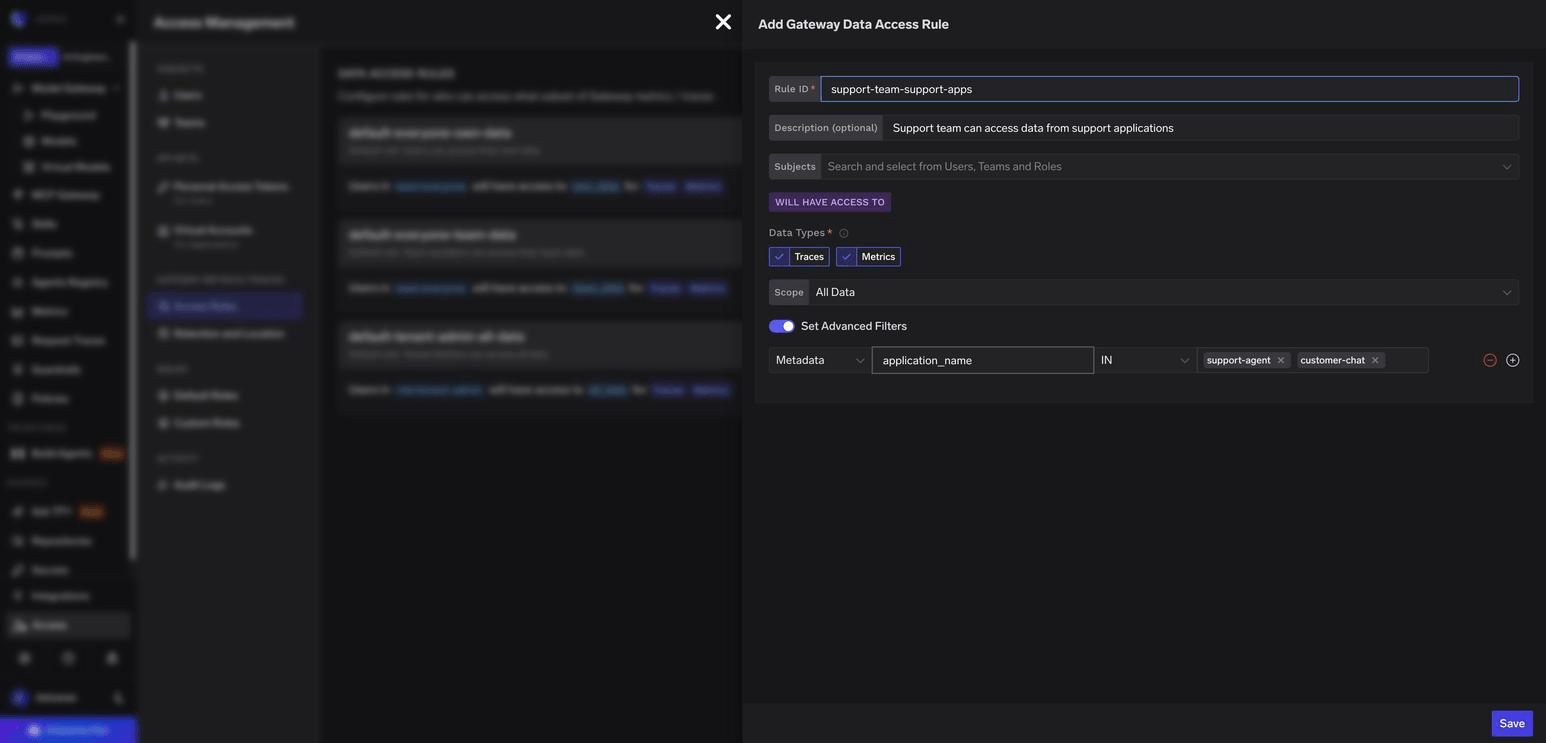
Select Traces, Metrics, or both, then pick a scope. For All Data, you can turn on Set Advanced Filters to narrow access.
5
Save
Click Save. The rule takes effect immediately.
Filters for all data
With the all_data scope, you can add filters to limit access to a slice of traffic. Multiple filters must all match.
Filter
Matches on
Operators
Example
Metadata
A key sent in the X-TFY-METADATA request header
IN, NOT_IN
application_name IN [support-agent, customer-chat]
Created By
The user, team, or virtual account that made the request
IN, NOT_IN
created_by IN [team:support]
All Data scope restricted to two applications with a metadata filter
SaaS gateway location metadata (tfy_gateway_region, tfy_gateway_zone) can also be used in metadata filters. See Metadata Keys.
Common use cases
Give team managers access to their team data
To let team managers review everything their team sends through the gateway, create a rule with the team-manager role as the subject and Team Data as the scope.
Rule granting team managers access to their teams' data
- id: team-managers-team-data
  description: Team managers can access traces and metrics of the teams they manage
  subjects:
    - role:team-manager
  data_types: [traces, metrics]
  scope: team_data
  enabled: true
A team-scoped role only grants data for the teams where the user holds that role. A user who manages payments and is a regular member of platform gets payments team data from this rule, not platform.
Team-scoped roles such as team-manager cannot be combined with the all_data scope. Use team_data, team_virtual_account_data, or own_data.
Keep teammates’ prompts private
The default default-everyone-team-data rule lets every member read their teammates’ traces. To limit members to their team’s application traffic while managers keep full visibility:
Edit default-everyone-team-data and change its scope to Team Applications Data (team_virtual_account_data).
Requests must send the key in the X-TFY-METADATA header, for example X-TFY-METADATA: {"application_name": "support-agent"}.
Let a virtual account read metrics
A service that queries the Metrics API with a virtual account token, such as a usage dashboard, is matched against the rules like any other caller. A virtual account cannot be a rule subject, so you grant it access through a role.
Role, not team. A role:<role-name> subject matches a virtual account that holds that role through a tenant-level role binding. A team:<team-name> subject never matches a virtual account, because a virtual account is not a member of a team.
all_data scope.own_data returns only requests the virtual account itself made, and a dashboard that only reads metrics has made none. The team scopes need team membership. Use all_data and narrow it with filters.
Create or pick a role and bind it to the virtual account at the tenant level:
The API does not return an error when no rule matches the caller. It returns 200 with an empty result, so a missing or disabled rule and an unmatched role look the same as a time range with no traffic.
Manage rules as YAML
Click the menu next to Add Rule and select Edit as YAML to view or edit all rules at once. You can also apply the same manifest through the CLI or GitOps.
type: gateway-data-access-configrules: - id: default-everyone-own-data description: 'Default rule: Users can access their own data' subjects: - team:everyone data_types: [traces, metrics] scope: own_data enabled: true - id: default-everyone-team-data description: 'Default rule: Team members can access their team data' subjects: - team:everyone data_types: [traces, metrics] scope: team_data enabled: true - id: default-tenant-admin-all-data description: 'Default rule: Tenant Admins can access all data' subjects: - role:tenant-admin data_types: [traces, metrics] scope: all_data enabled: true
Field
Required
Description
id
Yes
Unique rule identifier.
description
No
Human-readable purpose of the rule.
subjects
Yes
List of user:<email>, team:<team-name>, or role:<role-name>.
data_types
Yes
traces, metrics, or both. Defaults to both.
scope
Yes
own_data, team_virtual_account_data, team_data, or all_data.
filters
No
Only for all_data. Each filter has field (metadata or created_by), operator (IN or NOT_IN), and value (a list). Metadata filters also need key.
enabled
No
Set to false to keep a rule without applying it. Defaults to true.
Best practices
Review the defaults first. Out of the box, every member can read their teammates’ traces. If prompts can contain sensitive data, switch default-everyone-team-data to team_virtual_account_data or to Metrics only.
Assign virtual account owners. Team scopes only include applications whose virtual accounts are owned by the team.
Use roles instead of individual users.role:tenant-admin and role:team-manager stay correct as people join, leave, or change teams.
Grant the narrowest scope that works. Prefer own_data, team_virtual_account_data, or team_data over all_data, and always add filters to all_data rules for non-admins.
Separate Traces from Metrics. Traces contain request and response content, while Metrics do not. Grant Metrics broadly and Traces only where needed.
Disable before you delete. Toggling a rule off lets you confirm nobody loses needed access, and deleting a rule revokes access immediately.
Use descriptive IDs and descriptions so the purpose of each rule is clear during audits.
Troubleshooting
A user can't see data they expect
Confirm a matching rule is enabled and includes the right data type.
For team scopes, confirm the user is a member of the team and, for application traffic, that the virtual account is owned by that team.
For role:team-manager rules, confirm the user is a manager of that specific team.
For all_data with filters, confirm requests actually carry the metadata key and value.
A virtual account token gets an empty result from the Metrics API
The request succeeds with 200 and no rows when no enabled rule matches the virtual account.
Confirm the rule’s subject is a role: the virtual account holds through a tenant-level role binding. team: subjects never match a virtual account.
Confirm the rule is enabled: true and its scope is all_data. With own_data the virtual account only sees requests it made itself.
A role binding can take a few seconds to apply. Call GET /api/svc/v1/session/get-me with the same token to see the roles the token currently carries.
Access is the union of all matching rules. Check the default rules, especially default-everyone-team-data, and narrow or disable the broader rule instead of adding a new one.
Saving a rule with the team-manager role fails
Team-scoped roles cannot be used with all_data. Change the scope to team_data, team_virtual_account_data, or own_data.
Was this page helpful?
{"docsConfig":{"theme":"mint","$schema":"https://mintlify.com/docs.json","name":"TrueFoundry Docs","description":"TrueFoundry documentation — enterprise-grade AI Gateway combining LLM, MCP, and Agent Gateways to connect, monitor, and govern agentic AI applications across providers from a unified control plane.","colors":{"primary":"#4f46e5","light":"#4f46e5","dark":"#4f46e5"},"logo":{"light":"https://mintcdn.com/truefoundry/e2uUimEwX30qkWxc/logo/light.svg?fit=max\u0026auto=format\u0026n=e2uUimEwX30qkWxc\u0026q=85\u0026s=6068d83664aeda0239bec2422657dd20","dark":"https://mintcdn.com/truefoundry/e2uUimEwX30qkWxc/logo/dark.svg?fit=max\u0026auto=format\u0026n=e2uUimEwX30qkWxc\u0026q=85\u0026s=c1cb26554a546d84500b40f7057bece8"},"favicon":"https://mintcdn.com/truefoundry/6bbtTt95c1iCcyph/favicon.svg?fit=max\u0026auto=format\u0026n=6bbtTt95c1iCcyph\u0026q=85\u0026s=f55bde34214b38034126d05b08ea16c7","appearance":{"default":"light"},"background":{"decoration":"grid"},"navbar":{"links":[{"href":"https://www.truefoundry.com/book-demo","label":"Book Demo"},{"href":"https://www.truefoundry.com/blog","label":"Blog"}],"primary":{"type":"button","label":"Sign Up","href":"https://www.truefoundry.com/register"}},"footer":{"socials":{"x":"https://twitter.com/truefoundry","linkedin":"https://in.linkedin.com/company/truefoundry"}},"seo":{"metatags":{"og:type":"website","og:site_name":"TrueFoundry Docs","og:image":"https://assets.production.truefoundry.com/logo.svg","og:description":"TrueFoundry offers an enterprise-grade AI Gateway combining LLM, MCP, and Agent Gateways—empowering businesses to connect, monitor, and govern agentic AI applications across providers from a unified control plane.","description":"TrueFoundry offers an enterprise-grade AI Gateway combining LLM, MCP, and Agent Gateways—empowering businesses to connect, monitor, and govern agentic AI applications across providers from a unified control plane."}},"icons":{"library":"fontawesome"},"styling":{"codeblocks":"dark","latex":true},"contextual":{"options":["copy","view","chatgpt","claude","mcp","cursor","vscode"],"display":"header"},"navigation":{"pages":[]}},"deployment":{"deploymentMetadataValue":{"subdomain":"truefoundry","hasAudioNarration":false,"actualSubdomain":"truefoundry","customDomains":["www.truefoundry.com"],"gitSource":{"type":"github","owner":"truefoundry","repo":"docs-mintlify","deployBranch":"main","contentDirectory":"","isPrivate":true,"mountPath":"","label":""},"feedback":{"thumbs":true},"entitlements":{"AI_CHAT":{"status":"ENABLED"},"WEB_MCP":{"status":"ENABLED"},"NARRATION":{"status":"ENABLED"}},"buildId":"6afc67850955db4b8f1c496d","clientVersion":"0.0.4177","searchFilterCounts":[{"language":"default","tag":"AI Gateway","count":251},{"language":"default","tag":"API Reference","count":202},{"language":"default","tag":"Platform","count":196},{"language":"default","tag":"Integrations","count":132},{"language":"default","tag":"LLM Gateway","count":117},{"language":"default","tag":"AI Deployment","count":109},{"language":"default","tag":"Integrate Models","count":50},{"language":"default","tag":"Guardrails and Security","count":47},{"language":"default","tag":"Observability","count":47},{"language":"default","tag":"MCP Servers","count":44}]},"assistantConfig":{"enableAskAiButton":true,"enableAskAiSearchBar":true,"deflection":{"enabled":true,"email":"support@truefoundry.com","showHelpButton":true}},"basePath":"","hasChatPermissions":true,"hasWebMcpPermissions":true,"toggles":[{"name":"kill-isr","enabled":true,"variant":{"name":"disabled","enabled":false,"feature_enabled":true},"impressionData":false},{"name":"custom-rbac-roles","enabled":true,"variant":{"name":"disabled","enabled":false,"feature_enabled":true},"impressionData":false},{"name":"agent-mintlify-slack","enabled":true,"variant":{"name":"disabled","enabled":false,"feature_enabled":true},"impressionData":false},{"name":"agent-integrations-settings","enabled":true,"variant":{"name":"disabled","enabled":false,"feature_enabled":true},"impressionData":false},{"name":"rbac-expansion","enabled":true,"variant":{"name":"disabled","enabled":false,"feature_enabled":true},"impressionData":false},{"name":"automations-pr-grouping","enabled":true,"variant":{"name":"disabled","enabled":false,"feature_enabled":true},"impressionData":false},{"name":"custom-prefix","enabled":true,"variant":{"name":"disabled","enabled":false,"feature_enabled":true},"impressionData":false},{"name":"analytics-v7","enabled":true,"variant":{"name":"disabled","enabled":false,"feature_enabled":true},"impressionData":false},{"name":"user-flows-analytics","enabled":true,"variant":{"name":"disabled","enabled":false,"feature_enabled":true},"impressionData":false},{"name":"no-publish-flow","enabled":true,"variant":{"name":"disabled","enabled":false,"feature_enabled":true},"impressionData":false},{"name":"workos-onboarding","enabled":true,"variant":{"name":"disabled","enabled":false,"feature_enabled":true},"impressionData":false},{"name":"snapshot-serving-live","enabled":true,"variant":{"name":"disabled","enabled":false,"feature_enabled":true},"impressionData":false},{"name":"stripTemperatureMiddleware","enabled":true,"variant":{"name":"disabled","enabled":false,"feature_enabled":true},"impressionData":false},{"name":"support-platform-pylon-zendesk","enabled":true,"variant":{"name":"disabled","enabled":false,"feature_enabled":true},"impressionData":false},{"name":"snapshot-serving","enabled":true,"variant":{"name":"disabled","enabled":false,"feature_enabled":true},"impressionData":false},{"name":"instant-rollback","enabled":true,"variant":{"name":"disabled","enabled":false,"feature_enabled":true},"impressionData":false},{"name":"granular-notifications-server","enabled":true,"variant":{"name":"disabled","enabled":false,"feature_enabled":true},"impressionData":false},{"name":"granular-notifications","enabled":true,"variant":{"name":"disabled","enabled":false,"feature_enabled":true},"impressionData":false},{"name":"automations-fable","enabled":true,"variant":{"name":"disabled","enabled":false,"feature_enabled":true},"impressionData":false},{"name":"fixed-ai-action-pricing","enabled":true,"variant":{"name":"disabled","enabled":false,"feature_enabled":true},"impressionData":false},{"name":"automation-resolve-merge-conflict","enabled":true,"variant":{"name":"disabled","enabled":false,"feature_enabled":true},"impressionData":false},{"name":"scoped-publishing","enabled":true,"variant":{"name":"disabled","enabled":false,"feature_enabled":true},"impressionData":false},{"name":"mintql","enabled":true,"variant":{"name":"disabled","enabled":false,"feature_enabled":true},"impressionData":false},{"name":"page-level-analytics","enabled":true,"variant":{"name":"disabled","enabled":false,"feature_enabled":true},"impressionData":false},{"name":"editor-version-history-v2","enabled":true,"variant":{"name":"disabled","enabled":false,"feature_enabled":true},"impressionData":false},{"name":"billing-page-v2","enabled":true,"variant":{"name":"disabled","enabled":false,"feature_enabled":true},"impressionData":false},{"name":"full-page-search","enabled":true,"variant":{"name":"disabled","enabled":false,"feature_enabled":true},"impressionData":false},{"name":"workspace-projects","enabled":true,"variant":{"name":"disabled","enabled":false,"feature_enabled":true},"impressionData":false},{"name":"assistant-v5","enabled":true,"variant":{"name":"disabled","enabled":false,"feature_enabled":true},"impressionData":false},{"name":"fork-pr-previews","enabled":true,"variant":{"name":"disabled","enabled":false,"feature_enabled":true},"impressionData":false},{"name":"revalidation-jwt","enabled":true,"variant":{"name":"disabled","enabled":false,"feature_enabled":true},"impressionData":false},{"name":"workos-sso-scim","enabled":true,"variant":{"name":"disabled","enabled":false,"feature_enabled":true},"impressionData":false},{"name":"hobby-abuse-scan","enabled":true,"variant":{"name":"disabled","enabled":false,"feature_enabled":true},"impressionData":false},{"name":"dashboard-inbox","enabled":true,"variant":{"name":"disabled","enabled":false,"feature_enabled":true},"impressionData":false},{"name":"workos-signup","enabled":true,"variant":{"name":"disabled","enabled":false,"feature_enabled":true},"impressionData":false},{"name":"turbopuffer-dual-write","enabled":true,"variant":{"name":"disabled","enabled":false,"feature_enabled":true},"impressionData":false},{"name":"workos-enabled","enabled":true,"variant":{"name":"disabled","enabled":false,"feature_enabled":true},"impressionData":false},{"name":"approve-review-flow","enabled":true,"variant":{"name":"disabled","enabled":false,"feature_enabled":true},"impressionData":false},{"name":"editor-metadata","enabled":true,"variant":{"name":"disabled","enabled":false,"feature_enabled":true},"impressionData":false},{"name":"sso-setup-deadline-banner","enabled":true,"variant":{"name":"disabled","enabled":false,"feature_enabled":true},"impressionData":false},{"name":"turbopuffer-serve","enabled":true,"variant":{"name":"disabled","enabled":false,"feature_enabled":true},"impressionData":false},{"name":"live-agents","enabled":true,"variant":{"name":"disabled","enabled":false,"feature_enabled":true},"impressionData":false},{"name":"starter-pricing","enabled":true,"variant":{"name":"control","enabled":true,"payload":{"type":"string","value":"control"},"feature_enabled":true},"impressionData":false},{"name":"llms-txt-v2","enabled":true,"variant":{"name":"disabled","enabled":false,"feature_enabled":true},"impressionData":false}],"googleFontsInlined":false},"customCss":[{"filePath":"style.css","content":".line-highlight{background:rgb(var(--primary-light)/.7)!important}.tfy-cat-anchor{scroll-margin-top:6rem;margin-block:1.75rem}.line-highlight:before{background:rgb(var(--primary-light)/.7)!important}.line-highlight:after{background:rgb(var(--primary-light)/.7)!important}"}],"page":{"pagePath":"docs/ai-gateway/data-access","slug":"/docs/ai-gateway/data-access","pageMetadata":{"title":"Configure Data Access","sidebarTitle":"Configure Data Access","description":"Control who can view AI Gateway request traces and metrics using data access rules scoped to users, teams, team applications, or roles.","href":"/docs/ai-gateway/data-access"},"description":{"compiledSource":"\"use strict\";\nconst {jsx: _jsx} = arguments[0];\nconst {useMDXComponents: _provideComponents} = arguments[0];\nfunction _createMdxContent(props) {\n const _components = {\n p: \"p\",\n ..._provideComponents(),\n ...props.components\n };\n return _jsx(_components.p, {\n children: \"Control who can view AI Gateway request traces and metrics using data access rules scoped to users, teams, team applications, or roles.\"\n });\n}\nfunction MDXContent(props = {}) {\n const {wrapper: MDXLayout} = {\n ..._provideComponents(),\n ...props.components\n };\n return MDXLayout ? _jsx(MDXLayout, {\n ...props,\n children: _jsx(_createMdxContent, {\n ...props\n })\n }) : _createMdxContent(props);\n}\nreturn {\n default: MDXContent\n};\n","frontmatter":{},"scope":{}},"pageType":"default","mdx":{"mdxSource":{"compiledSource":"\"use strict\";const{Fragment:_Fragment,jsx:_jsx,jsxs:_jsxs}=arguments[0];const{useMDXComponents:_provideComponents}=arguments[0];function _createMdxContent(props){const _components={a:`a`,code:`code`,li:`li`,ol:`ol`,p:`p`,pre:`pre`,span:`span`,strong:`strong`,tbody:`tbody`,td:`td`,th:`th`,thead:`thead`,tr:`tr`,ul:`ul`,..._provideComponents(),...props.components},{Accordion,AccordionGroup,CodeBlock,Frame,Heading,Note,OptimizedImage,Step,Steps,Table,Tip}=_components;if(!Accordion)_missingMdxReference(`Accordion`,true);if(!AccordionGroup)_missingMdxReference(`AccordionGroup`,true);if(!CodeBlock)_missingMdxReference(`CodeBlock`,true);if(!Frame)_missingMdxReference(`Frame`,true);if(!Heading)_missingMdxReference(`Heading`,true);if(!Note)_missingMdxReference(`Note`,true);if(!OptimizedImage)_missingMdxReference(`OptimizedImage`,true);if(!Step)_missingMdxReference(`Step`,true);if(!Steps)_missingMdxReference(`Steps`,true);if(!Table)_missingMdxReference(`Table`,true);if(!Tip)_missingMdxReference(`Tip`,true);return _jsxs(_Fragment,{children:[_jsxs(_components.p,{children:[`Data access rules control who can view request traces and metrics in the AI Gateway. Each rule grants a set of `,_jsx(_components.strong,{children:`subjects`}),` (users, teams, or roles) access to a `,_jsx(_components.strong,{children:`scope`}),` of data (their own, their team’s, their team’s applications, or everything) for one or both `,_jsx(_components.strong,{children:`data types`}),` (Traces, Metrics).`]}),`\n`,_jsxs(_components.p,{children:[`Manage rules from `,_jsx(_components.strong,{children:`Access`}),` > `,_jsx(_components.strong,{children:`Gateway Metrics/Traces`}),` > `,_jsx(_components.strong,{children:`Access Rules`}),`.`]}),`\n`,_jsx(Frame,{caption:`Access Rules page with the three default rules`,children:_jsx(OptimizedImage,{src:`https://mintcdn.com/truefoundry/6a_21Oi3nEBAbtS6/images/data-access-rules-list.png?fit=max\u0026auto=format\u0026n=6a_21Oi3nEBAbtS6\u0026q=85\u0026s=b1948458249ef205b0c417f0281d383d`,alt:`Access Rules page listing the default-everyone-own-data, default-everyone-team-data, and default-tenant-admin-all-data rules, each with Traces and Metrics enabled`,\"data-og-width\":`1546`,width:`1546`,\"data-og-height\":`743`,height:`743`,\"data-path\":`images/data-access-rules-list.png`,\"data-optimize\":`true`,\"data-opv\":`3`,srcset:`https://mintcdn.com/truefoundry/6a_21Oi3nEBAbtS6/images/data-access-rules-list.png?w=280\u0026fit=max\u0026auto=format\u0026n=6a_21Oi3nEBAbtS6\u0026q=85\u0026s=35efe0c0332605c42249464ceda3878a 280w, https://mintcdn.com/truefoundry/6a_21Oi3nEBAbtS6/images/data-access-rules-list.png?w=560\u0026fit=max\u0026auto=format\u0026n=6a_21Oi3nEBAbtS6\u0026q=85\u0026s=ac3608a36def3db24006a86be7b0c53d 560w, https://mintcdn.com/truefoundry/6a_21Oi3nEBAbtS6/images/data-access-rules-list.png?w=840\u0026fit=max\u0026auto=format\u0026n=6a_21Oi3nEBAbtS6\u0026q=85\u0026s=d56f740667b92f8e59b3681267332d40 840w, https://mintcdn.com/truefoundry/6a_21Oi3nEBAbtS6/images/data-access-rules-list.png?w=1100\u0026fit=max\u0026auto=format\u0026n=6a_21Oi3nEBAbtS6\u0026q=85\u0026s=b469096bdc5d75b9cd63af320ce83496 1100w, https://mintcdn.com/truefoundry/6a_21Oi3nEBAbtS6/images/data-access-rules-list.png?w=1650\u0026fit=max\u0026auto=format\u0026n=6a_21Oi3nEBAbtS6\u0026q=85\u0026s=9e5abd60cec7a67141b23c9de71ca06b 1650w, https://mintcdn.com/truefoundry/6a_21Oi3nEBAbtS6/images/data-access-rules-list.png?w=2500\u0026fit=max\u0026auto=format\u0026n=6a_21Oi3nEBAbtS6\u0026q=85\u0026s=ed572b5488f8336479d2da74925ef537 2500w`})}),`\n`,_jsx(Heading,{level:`2`,id:`how-rules-are-evaluated`,children:`How rules are evaluated`}),`\n`,_jsxs(_components.ul,{children:[`\n`,_jsxs(_components.li,{children:[`A user can see a record if `,_jsx(_components.strong,{children:`any`}),` enabled rule matches them for that data type. Access is the union of all matching rules, so adding a rule can only widen access.`]}),`\n`,_jsx(_components.li,{children:`Rules are evaluated separately for Traces and Metrics. A rule that grants only Metrics does not expose any traces.`}),`\n`,_jsx(_components.li,{children:`Disabled rules are ignored.`}),`\n`]}),`\n`,_jsx(_components.p,{children:`Because access is additive, restricting what a group can see means narrowing or disabling the broader rule that currently grants it, not adding a new one.`}),`\n`,_jsx(Heading,{level:`2`,id:`default-rules`,children:`Default rules`}),`\n`,_jsx(_components.p,{children:`Every tenant starts with three rules. They are regular rules, so you can edit, disable, or delete them.`}),`\n`,_jsxs(Table,{children:[_jsx(_components.thead,{children:_jsxs(_components.tr,{children:[_jsx(_components.th,{style:{textAlign:`left`},children:`Rule ID`}),_jsx(_components.th,{style:{textAlign:`left`},children:`Subjects`}),_jsx(_components.th,{style:{textAlign:`left`},children:`Scope`}),_jsx(_components.th,{style:{textAlign:`left`},children:`Data types`}),_jsx(_components.th,{style:{textAlign:`left`},children:`Effect`})]})}),_jsxs(_components.tbody,{children:[_jsxs(_components.tr,{children:[_jsx(_components.td,{style:{textAlign:`left`},children:_jsx(_components.code,{children:`default-everyone-own-data`})}),_jsx(_components.td,{style:{textAlign:`left`},children:_jsx(_components.code,{children:`team:everyone`})}),_jsx(_components.td,{style:{textAlign:`left`},children:_jsx(_components.code,{children:`own_data`})}),_jsx(_components.td,{style:{textAlign:`left`},children:`Traces, Metrics`}),_jsx(_components.td,{style:{textAlign:`left`},children:`Every user sees the requests they made.`})]}),_jsxs(_components.tr,{children:[_jsx(_components.td,{style:{textAlign:`left`},children:_jsx(_components.code,{children:`default-everyone-team-data`})}),_jsx(_components.td,{style:{textAlign:`left`},children:_jsx(_components.code,{children:`team:everyone`})}),_jsx(_components.td,{style:{textAlign:`left`},children:_jsx(_components.code,{children:`team_data`})}),_jsx(_components.td,{style:{textAlign:`left`},children:`Traces, Metrics`}),_jsx(_components.td,{style:{textAlign:`left`},children:`Every user sees requests made by their teammates and by virtual accounts owned by their teams.`})]}),_jsxs(_components.tr,{children:[_jsx(_components.td,{style:{textAlign:`left`},children:_jsx(_components.code,{children:`default-tenant-admin-all-data`})}),_jsx(_components.td,{style:{textAlign:`left`},children:_jsx(_components.code,{children:`role:tenant-admin`})}),_jsx(_components.td,{style:{textAlign:`left`},children:_jsx(_components.code,{children:`all_data`})}),_jsx(_components.td,{style:{textAlign:`left`},children:`Traces, Metrics`}),_jsx(_components.td,{style:{textAlign:`left`},children:`Tenant admins see everything.`})]})]})]}),`\n`,_jsx(Note,{children:_jsxs(_components.p,{children:[_jsx(_components.code,{children:`team:everyone`}),` is used to match all users, but it is never treated as a team for data scoping. A `,_jsx(_components.code,{children:`team_data`}),` rule gives access only to the real teams a user belongs to, not to the whole organization.`]})}),`\n`,_jsx(Heading,{level:`2`,id:`data-scopes`,children:`Data scopes`}),`\n`,_jsx(Frame,{caption:`Scope options when adding a rule`,children:_jsx(OptimizedImage,{src:`https://mintcdn.com/truefoundry/6a_21Oi3nEBAbtS6/images/data-access-scope-options.png?fit=max\u0026auto=format\u0026n=6a_21Oi3nEBAbtS6\u0026q=85\u0026s=1d1babb2d5d43b9ff0a259d275931825`,alt:`Scope dropdown in the Add Gateway Data Access Rule form showing Own Data, Team Applications Data, Team Data, and All Data`,\"data-og-width\":`1546`,width:`1546`,\"data-og-height\":`743`,height:`743`,\"data-path\":`images/data-access-scope-options.png`,\"data-optimize\":`true`,\"data-opv\":`3`,srcset:`https://mintcdn.com/truefoundry/6a_21Oi3nEBAbtS6/images/data-access-scope-options.png?w=280\u0026fit=max\u0026auto=format\u0026n=6a_21Oi3nEBAbtS6\u0026q=85\u0026s=97f66685be77c124fdc5804fbfc70a17 280w, https://mintcdn.com/truefoundry/6a_21Oi3nEBAbtS6/images/data-access-scope-options.png?w=560\u0026fit=max\u0026auto=format\u0026n=6a_21Oi3nEBAbtS6\u0026q=85\u0026s=ec0914e04d468277c4136e6bdbc6040d 560w, https://mintcdn.com/truefoundry/6a_21Oi3nEBAbtS6/images/data-access-scope-options.png?w=840\u0026fit=max\u0026auto=format\u0026n=6a_21Oi3nEBAbtS6\u0026q=85\u0026s=52e9898493c45cbb5da918224f7b3419 840w, https://mintcdn.com/truefoundry/6a_21Oi3nEBAbtS6/images/data-access-scope-options.png?w=1100\u0026fit=max\u0026auto=format\u0026n=6a_21Oi3nEBAbtS6\u0026q=85\u0026s=f9b94beb5572c274d072918564140c7e 1100w, https://mintcdn.com/truefoundry/6a_21Oi3nEBAbtS6/images/data-access-scope-options.png?w=1650\u0026fit=max\u0026auto=format\u0026n=6a_21Oi3nEBAbtS6\u0026q=85\u0026s=d97edf0dfd15761047d235f518a4f710 1650w, https://mintcdn.com/truefoundry/6a_21Oi3nEBAbtS6/images/data-access-scope-options.png?w=2500\u0026fit=max\u0026auto=format\u0026n=6a_21Oi3nEBAbtS6\u0026q=85\u0026s=0b2b5eedba9f68b74fc6f08161e6a9f4 2500w`})}),`\n`,_jsxs(Table,{children:[_jsx(_components.thead,{children:_jsxs(_components.tr,{children:[_jsx(_components.th,{style:{textAlign:`left`},children:`Scope (UI)`}),_jsx(_components.th,{style:{textAlign:`left`},children:`YAML value`}),_jsx(_components.th,{style:{textAlign:`left`},children:`What the subject can see`})]})}),_jsxs(_components.tbody,{children:[_jsxs(_components.tr,{children:[_jsx(_components.td,{style:{textAlign:`left`},children:`Own Data`}),_jsx(_components.td,{style:{textAlign:`left`},children:_jsx(_components.code,{children:`own_data`})}),_jsx(_components.td,{style:{textAlign:`left`},children:`Requests made by the user themselves (with their personal access token or UI session).`})]}),_jsxs(_components.tr,{children:[_jsx(_components.td,{style:{textAlign:`left`},children:`Team Applications Data`}),_jsx(_components.td,{style:{textAlign:`left`},children:_jsx(_components.code,{children:`team_virtual_account_data`})}),_jsxs(_components.td,{style:{textAlign:`left`},children:[`Only requests made by `,_jsx(_components.strong,{children:`virtual accounts owned by the user’s teams`}),`.`]})]}),_jsxs(_components.tr,{children:[_jsx(_components.td,{style:{textAlign:`left`},children:`Team Data`}),_jsx(_components.td,{style:{textAlign:`left`},children:_jsx(_components.code,{children:`team_data`})}),_jsxs(_components.td,{style:{textAlign:`left`},children:[`Requests made by `,_jsx(_components.strong,{children:`teammates`}),` and by `,_jsx(_components.strong,{children:`virtual accounts owned by the user’s teams`}),`.`]})]}),_jsxs(_components.tr,{children:[_jsx(_components.td,{style:{textAlign:`left`},children:`All Data`}),_jsx(_components.td,{style:{textAlign:`left`},children:_jsx(_components.code,{children:`all_data`})}),_jsxs(_components.td,{style:{textAlign:`left`},children:[`All requests in the tenant, optionally narrowed with `,_jsx(_components.a,{href:`#filters-for-all-data`,children:`filters`}),`.`]})]})]})]}),`\n`,_jsx(Heading,{level:`3`,id:`team-data-vs-team-applications-data`,children:`Team data vs team applications data`}),`\n`,_jsx(_components.p,{children:`Both scopes are resolved from the teams the user belongs to. The difference is whose requests they include:`}),`\n`,_jsxs(_components.ul,{children:[`\n`,_jsxs(_components.li,{children:[_jsx(_components.strong,{children:`Team Applications Data`}),` covers only traffic from applications, meaning virtual accounts whose owner is the team. Teammates’ personal requests (for example, prompts sent from the Playground or with a personal access token) stay private.`]}),`\n`,_jsxs(_components.li,{children:[_jsx(_components.strong,{children:`Team Data`}),` covers the same application traffic `,_jsx(_components.strong,{children:`plus`}),` every teammate’s personal requests.`]}),`\n`]}),`\n`,_jsxs(_components.p,{children:[`Use Team Applications Data when members need to debug and monitor their team’s services but should not read each other’s prompts. Use Team Data when the team is comfortable sharing all activity, or for people who oversee the team, such as `,_jsx(_components.a,{href:`#give-team-managers-access-to-their-team-data`,children:`team managers`}),`.`]}),`\n`,_jsx(Tip,{children:_jsxs(_components.p,{children:[`Team scopes depend on virtual account ownership. When you create a virtual account, set `,_jsx(_components.strong,{children:`Owner of the Virtual Account`}),` to the team that runs the application. See `,_jsx(_components.a,{href:`/docs/platform/virtual-account-management`,children:`Virtual Account management`}),`.`]})}),`\n`,_jsx(Heading,{level:`2`,id:`create-a-rule`,children:`Create a rule`}),`\n`,_jsxs(Steps,{children:[_jsx(Step,{title:`Open the form`,children:_jsxs(_components.p,{children:[`Go to `,_jsx(_components.strong,{children:`Access`}),` > `,_jsx(_components.strong,{children:`Gateway Metrics/Traces`}),` > `,_jsx(_components.strong,{children:`Access Rules`}),` and click `,_jsx(_components.strong,{children:`Add Rule`}),`.`]})}),_jsx(Step,{title:`Name the rule`,children:_jsxs(_components.p,{children:[`Enter a `,_jsx(_components.strong,{children:`Rule ID`}),` (for example, `,_jsx(_components.code,{children:`team-managers-team-data`}),`) and an optional description. The ID must be unique and start with a letter. It can contain letters, digits, `,_jsx(_components.code,{children:`.`}),`, `,_jsx(_components.code,{children:`_`}),`, and `,_jsx(_components.code,{children:`-`}),`.`]})}),_jsxs(Step,{title:`Select subjects`,children:[_jsxs(_components.p,{children:[`Pick one or more users, teams, or roles. Use the `,_jsx(_components.strong,{children:`Roles`}),` tab to target roles such as `,_jsx(_components.code,{children:`tenant-admin`}),` or `,_jsx(_components.code,{children:`team-manager`}),`.`]}),_jsx(Frame,{caption:`Selecting a role as the rule subject`,children:_jsx(OptimizedImage,{src:`https://mintcdn.com/truefoundry/6a_21Oi3nEBAbtS6/images/data-access-select-role-subject.png?fit=max\u0026auto=format\u0026n=6a_21Oi3nEBAbtS6\u0026q=85\u0026s=bbd3e7e577ee4868eab30302059ddaa7`,alt:`Subjects picker with the Roles tab open, listing read-only-member, member, tenant-admin, and team-manager, with team-manager selected`,\"data-og-width\":`1546`,width:`1546`,\"data-og-height\":`743`,height:`743`,\"data-path\":`images/data-access-select-role-subject.png`,\"data-optimize\":`true`,\"data-opv\":`3`,srcset:`https://mintcdn.com/truefoundry/6a_21Oi3nEBAbtS6/images/data-access-select-role-subject.png?w=280\u0026fit=max\u0026auto=format\u0026n=6a_21Oi3nEBAbtS6\u0026q=85\u0026s=86628d72738c6403957362f021fcc597 280w, https://mintcdn.com/truefoundry/6a_21Oi3nEBAbtS6/images/data-access-select-role-subject.png?w=560\u0026fit=max\u0026auto=format\u0026n=6a_21Oi3nEBAbtS6\u0026q=85\u0026s=eaa8e821c02938e6fb0ba16ed17663cc 560w, https://mintcdn.com/truefoundry/6a_21Oi3nEBAbtS6/images/data-access-select-role-subject.png?w=840\u0026fit=max\u0026auto=format\u0026n=6a_21Oi3nEBAbtS6\u0026q=85\u0026s=96d3ee2624f5789d8c85595557157335 840w, https://mintcdn.com/truefoundry/6a_21Oi3nEBAbtS6/images/data-access-select-role-subject.png?w=1100\u0026fit=max\u0026auto=format\u0026n=6a_21Oi3nEBAbtS6\u0026q=85\u0026s=7fbd27ff859c78185a97a7802d5a53bc 1100w, https://mintcdn.com/truefoundry/6a_21Oi3nEBAbtS6/images/data-access-select-role-subject.png?w=1650\u0026fit=max\u0026auto=format\u0026n=6a_21Oi3nEBAbtS6\u0026q=85\u0026s=6f22fb17de1dca78e67f42efbc030836 1650w, https://mintcdn.com/truefoundry/6a_21Oi3nEBAbtS6/images/data-access-select-role-subject.png?w=2500\u0026fit=max\u0026auto=format\u0026n=6a_21Oi3nEBAbtS6\u0026q=85\u0026s=b85bc0fc33aaa8de74aecc72ac2db52e 2500w`})})]}),_jsx(Step,{title:`Choose data types and scope`,children:_jsxs(_components.p,{children:[`Select `,_jsx(_components.strong,{children:`Traces`}),`, `,_jsx(_components.strong,{children:`Metrics`}),`, or both, then pick a scope. For `,_jsx(_components.strong,{children:`All Data`}),`, you can turn on `,_jsx(_components.strong,{children:`Set Advanced Filters`}),` to narrow access.`]})}),_jsx(Step,{title:`Save`,children:_jsxs(_components.p,{children:[`Click `,_jsx(_components.strong,{children:`Save`}),`. The rule takes effect immediately.`]})})]}),`\n`,_jsx(Heading,{level:`3`,id:`filters-for-all-data`,children:`Filters for all data`}),`\n`,_jsxs(_components.p,{children:[`With the `,_jsx(_components.code,{children:`all_data`}),` scope, you can add filters to limit access to a slice of traffic. Multiple filters must all match.`]}),`\n`,_jsxs(Table,{children:[_jsx(_components.thead,{children:_jsxs(_components.tr,{children:[_jsx(_components.th,{style:{textAlign:`left`},children:`Filter`}),_jsx(_components.th,{style:{textAlign:`left`},children:`Matches on`}),_jsx(_components.th,{style:{textAlign:`left`},children:`Operators`}),_jsx(_components.th,{style:{textAlign:`left`},children:`Example`})]})}),_jsxs(_components.tbody,{children:[_jsxs(_components.tr,{children:[_jsx(_components.td,{style:{textAlign:`left`},children:`Metadata`}),_jsxs(_components.td,{style:{textAlign:`left`},children:[`A key sent in the `,_jsx(_components.code,{children:`X-TFY-METADATA`}),` request header`]}),_jsxs(_components.td,{style:{textAlign:`left`},children:[_jsx(_components.code,{children:`IN`}),`, `,_jsx(_components.code,{children:`NOT_IN`})]}),_jsx(_components.td,{style:{textAlign:`left`},children:_jsx(_components.code,{children:`application_name IN [support-agent, customer-chat]`})})]}),_jsxs(_components.tr,{children:[_jsx(_components.td,{style:{textAlign:`left`},children:`Created By`}),_jsx(_components.td,{style:{textAlign:`left`},children:`The user, team, or virtual account that made the request`}),_jsxs(_components.td,{style:{textAlign:`left`},children:[_jsx(_components.code,{children:`IN`}),`, `,_jsx(_components.code,{children:`NOT_IN`})]}),_jsx(_components.td,{style:{textAlign:`left`},children:_jsx(_components.code,{children:`created_by IN [team:support]`})})]})]})]}),`\n`,_jsx(Frame,{caption:`All Data scope restricted to two applications with a metadata filter`,children:_jsx(OptimizedImage,{src:`https://mintcdn.com/truefoundry/6a_21Oi3nEBAbtS6/images/data-access-all-data-filters.png?fit=max\u0026auto=format\u0026n=6a_21Oi3nEBAbtS6\u0026q=85\u0026s=f3988457790d5b351b7d6d6f6f2c2de5`,alt:`Add rule form with All Data scope, Set Advanced Filters enabled, and a Metadata filter where application_name is IN support-agent and customer-chat`,\"data-og-width\":`1546`,width:`1546`,\"data-og-height\":`743`,height:`743`,\"data-path\":`images/data-access-all-data-filters.png`,\"data-optimize\":`true`,\"data-opv\":`3`,srcset:`https://mintcdn.com/truefoundry/6a_21Oi3nEBAbtS6/images/data-access-all-data-filters.png?w=280\u0026fit=max\u0026auto=format\u0026n=6a_21Oi3nEBAbtS6\u0026q=85\u0026s=020e595dfb8ac689fb847ed939b835d8 280w, https://mintcdn.com/truefoundry/6a_21Oi3nEBAbtS6/images/data-access-all-data-filters.png?w=560\u0026fit=max\u0026auto=format\u0026n=6a_21Oi3nEBAbtS6\u0026q=85\u0026s=ed7b1c46ad9bc722d1beac842fab4ae1 560w, https://mintcdn.com/truefoundry/6a_21Oi3nEBAbtS6/images/data-access-all-data-filters.png?w=840\u0026fit=max\u0026auto=format\u0026n=6a_21Oi3nEBAbtS6\u0026q=85\u0026s=33cc63dc150c10709f280174ffaf3587 840w, https://mintcdn.com/truefoundry/6a_21Oi3nEBAbtS6/images/data-access-all-data-filters.png?w=1100\u0026fit=max\u0026auto=format\u0026n=6a_21Oi3nEBAbtS6\u0026q=85\u0026s=09474459292efcaa1f1ebcef2c445c91 1100w, https://mintcdn.com/truefoundry/6a_21Oi3nEBAbtS6/images/data-access-all-data-filters.png?w=1650\u0026fit=max\u0026auto=format\u0026n=6a_21Oi3nEBAbtS6\u0026q=85\u0026s=dc8afc3f23e65adfb6673d1a7c5d1fea 1650w, https://mintcdn.com/truefoundry/6a_21Oi3nEBAbtS6/images/data-access-all-data-filters.png?w=2500\u0026fit=max\u0026auto=format\u0026n=6a_21Oi3nEBAbtS6\u0026q=85\u0026s=b1777fb96fc08724c1f70f47a64f9344 2500w`})}),`\n`,_jsx(Tip,{children:_jsxs(_components.p,{children:[`SaaS gateway location metadata (`,_jsx(_components.code,{children:`tfy_gateway_region`}),`, `,_jsx(_components.code,{children:`tfy_gateway_zone`}),`) can also be used in metadata filters. See `,_jsx(_components.a,{href:`/docs/ai-gateway/globally-distributed-saas#metadata-keys`,children:`Metadata Keys`}),`.`]})}),`\n`,_jsx(Heading,{level:`2`,id:`common-use-cases`,children:`Common use cases`}),`\n`,_jsx(Heading,{level:`3`,id:`give-team-managers-access-to-their-team-data`,children:`Give team managers access to their team data`}),`\n`,_jsxs(_components.p,{children:[`To let team managers review everything their team sends through the gateway, create a rule with the `,_jsx(_components.code,{children:`team-manager`}),` role as the subject and `,_jsx(_components.strong,{children:`Team Data`}),` as the scope.`]}),`\n`,_jsx(Frame,{caption:`Rule granting team managers access to their teams' data`,children:_jsx(OptimizedImage,{src:`https://mintcdn.com/truefoundry/6a_21Oi3nEBAbtS6/images/data-access-team-manager-rule.png?fit=max\u0026auto=format\u0026n=6a_21Oi3nEBAbtS6\u0026q=85\u0026s=ae57c7a5f66c179b6a3cfaf080c740a9`,alt:`Add Gateway Data Access Rule form with Rule ID team-managers-team-data, subject team-manager, Traces and Metrics selected, and scope Team Data`,\"data-og-width\":`1546`,width:`1546`,\"data-og-height\":`743`,height:`743`,\"data-path\":`images/data-access-team-manager-rule.png`,\"data-optimize\":`true`,\"data-opv\":`3`,srcset:`https://mintcdn.com/truefoundry/6a_21Oi3nEBAbtS6/images/data-access-team-manager-rule.png?w=280\u0026fit=max\u0026auto=format\u0026n=6a_21Oi3nEBAbtS6\u0026q=85\u0026s=9b008df75e32d5e901257c7ff7edf59f 280w, https://mintcdn.com/truefoundry/6a_21Oi3nEBAbtS6/images/data-access-team-manager-rule.png?w=560\u0026fit=max\u0026auto=format\u0026n=6a_21Oi3nEBAbtS6\u0026q=85\u0026s=72adb385b262906c6b836912813c5e96 560w, https://mintcdn.com/truefoundry/6a_21Oi3nEBAbtS6/images/data-access-team-manager-rule.png?w=840\u0026fit=max\u0026auto=format\u0026n=6a_21Oi3nEBAbtS6\u0026q=85\u0026s=c601da644e515d8d6d3716c1ec615608 840w, https://mintcdn.com/truefoundry/6a_21Oi3nEBAbtS6/images/data-access-team-manager-rule.png?w=1100\u0026fit=max\u0026auto=format\u0026n=6a_21Oi3nEBAbtS6\u0026q=85\u0026s=807c9f8e0e7ffca5cd984b15d3769244 1100w, https://mintcdn.com/truefoundry/6a_21Oi3nEBAbtS6/images/data-access-team-manager-rule.png?w=1650\u0026fit=max\u0026auto=format\u0026n=6a_21Oi3nEBAbtS6\u0026q=85\u0026s=42705cb360e44d8eb2249ce97890171c 1650w, https://mintcdn.com/truefoundry/6a_21Oi3nEBAbtS6/images/data-access-team-manager-rule.png?w=2500\u0026fit=max\u0026auto=format\u0026n=6a_21Oi3nEBAbtS6\u0026q=85\u0026s=a83062aa0c5cb49f4de607923e66b5c8 2500w`})}),`\n`,_jsx(CodeBlock,{filename:``,numberOfLines:`7`,language:`yaml`,children:_jsx(_components.pre,{className:`shiki shiki-themes dark-plus dark-plus`,style:{backgroundColor:`#0B0C0E`,\"--shiki-dark-bg\":`#0B0C0E`,color:`#D4D4D4`,\"--shiki-dark\":`#D4D4D4`},language:`yaml`,children:_jsxs(_components.code,{language:`yaml`,numberOfLines:`7`,children:[_jsxs(_components.span,{className:`line`,children:[_jsx(_components.span,{style:{color:`#D4D4D4`,\"--shiki-dark\":`#D4D4D4`},children:`- `}),_jsx(_components.span,{style:{color:`#569CD6`,\"--shiki-dark\":`#569CD6`},children:`id`}),_jsx(_components.span,{style:{color:`#D4D4D4`,\"--shiki-dark\":`#D4D4D4`},children:`: `}),_jsx(_components.span,{style:{color:`#CE9178`,\"--shiki-dark\":`#CE9178`},children:`team-managers-team-data`})]}),`\n`,_jsxs(_components.span,{className:`line`,children:[_jsx(_components.span,{style:{color:`#569CD6`,\"--shiki-dark\":`#569CD6`},children:` description`}),_jsx(_components.span,{style:{color:`#D4D4D4`,\"--shiki-dark\":`#D4D4D4`},children:`: `}),_jsx(_components.span,{style:{color:`#CE9178`,\"--shiki-dark\":`#CE9178`},children:`Team managers can access traces and metrics of the teams they manage`})]}),`\n`,_jsxs(_components.span,{className:`line`,children:[_jsx(_components.span,{style:{color:`#569CD6`,\"--shiki-dark\":`#569CD6`},children:` subjects`}),_jsx(_components.span,{style:{color:`#D4D4D4`,\"--shiki-dark\":`#D4D4D4`},children:`:`})]}),`\n`,_jsxs(_components.span,{className:`line`,children:[_jsx(_components.span,{style:{color:`#D4D4D4`,\"--shiki-dark\":`#D4D4D4`},children:` - `}),_jsx(_components.span,{style:{color:`#CE9178`,\"--shiki-dark\":`#CE9178`},children:`role:team-manager`})]}),`\n`,_jsxs(_components.span,{className:`line`,children:[_jsx(_components.span,{style:{color:`#569CD6`,\"--shiki-dark\":`#569CD6`},children:` data_types`}),_jsx(_components.span,{style:{color:`#D4D4D4`,\"--shiki-dark\":`#D4D4D4`},children:`: [`}),_jsx(_components.span,{style:{color:`#CE9178`,\"--shiki-dark\":`#CE9178`},children:`traces`}),_jsx(_components.span,{style:{color:`#D4D4D4`,\"--shiki-dark\":`#D4D4D4`},children:`, `}),_jsx(_components.span,{style:{color:`#CE9178`,\"--shiki-dark\":`#CE9178`},children:`metrics`}),_jsx(_components.span,{style:{color:`#D4D4D4`,\"--shiki-dark\":`#D4D4D4`},children:`]`})]}),`\n`,_jsxs(_components.span,{className:`line`,children:[_jsx(_components.span,{style:{color:`#569CD6`,\"--shiki-dark\":`#569CD6`},children:` scope`}),_jsx(_components.span,{style:{color:`#D4D4D4`,\"--shiki-dark\":`#D4D4D4`},children:`: `}),_jsx(_components.span,{style:{color:`#CE9178`,\"--shiki-dark\":`#CE9178`},children:`team_data`})]}),`\n`,_jsxs(_components.span,{className:`line`,children:[_jsx(_components.span,{style:{color:`#569CD6`,\"--shiki-dark\":`#569CD6`},children:` enabled`}),_jsx(_components.span,{style:{color:`#D4D4D4`,\"--shiki-dark\":`#D4D4D4`},children:`: `}),_jsx(_components.span,{style:{color:`#569CD6`,\"--shiki-dark\":`#569CD6`},children:`true`})]}),`\n`]})})}),`\n`,_jsxs(_components.p,{children:[`A team-scoped role only grants data for the teams where the user holds that role. A user who manages `,_jsx(_components.code,{children:`payments`}),` and is a regular member of `,_jsx(_components.code,{children:`platform`}),` gets `,_jsx(_components.code,{children:`payments`}),` team data from this rule, not `,_jsx(_components.code,{children:`platform`}),`.`]}),`\n`,_jsx(Note,{children:_jsxs(_components.p,{children:[`Team-scoped roles such as `,_jsx(_components.code,{children:`team-manager`}),` cannot be combined with the `,_jsx(_components.code,{children:`all_data`}),` scope. Use `,_jsx(_components.code,{children:`team_data`}),`, `,_jsx(_components.code,{children:`team_virtual_account_data`}),`, or `,_jsx(_components.code,{children:`own_data`}),`.`]})}),`\n`,_jsx(Heading,{level:`3`,id:`keep-teammates’-prompts-private`,children:`Keep teammates’ prompts private`}),`\n`,_jsxs(_components.p,{children:[`The default `,_jsx(_components.code,{children:`default-everyone-team-data`}),` rule lets every member read their teammates’ traces. To limit members to their team’s application traffic while managers keep full visibility:`]}),`\n`,_jsxs(_components.ol,{children:[`\n`,_jsxs(_components.li,{children:[`Edit `,_jsx(_components.code,{children:`default-everyone-team-data`}),` and change its scope to `,_jsx(_components.strong,{children:`Team Applications Data`}),` (`,_jsx(_components.code,{children:`team_virtual_account_data`}),`).`]}),`\n`,_jsxs(_components.li,{children:[`Add the `,_jsx(_components.a,{href:`#give-team-managers-access-to-their-team-data`,children:`team manager rule`}),` above.`]}),`\n`]}),`\n`,_jsxs(_components.p,{children:[`Members still see their own requests through `,_jsx(_components.code,{children:`default-everyone-own-data`}),`.`]}),`\n`,_jsx(Heading,{level:`3`,id:`share-team-dashboards-without-exposing-traces`,children:`Share team dashboards without exposing traces`}),`\n`,_jsxs(_components.p,{children:[`Grant a team `,_jsx(_components.strong,{children:`Metrics`}),` only. Members can see usage and cost dashboards for the team without reading request or response content.`]}),`\n`,_jsx(CodeBlock,{filename:``,numberOfLines:`6`,language:`yaml`,children:_jsx(_components.pre,{className:`shiki shiki-themes dark-plus dark-plus`,style:{backgroundColor:`#0B0C0E`,\"--shiki-dark-bg\":`#0B0C0E`,color:`#D4D4D4`,\"--shiki-dark\":`#D4D4D4`},language:`yaml`,children:_jsxs(_components.code,{language:`yaml`,numberOfLines:`6`,children:[_jsxs(_components.span,{className:`line`,children:[_jsx(_components.span,{style:{color:`#D4D4D4`,\"--shiki-dark\":`#D4D4D4`},children:`- `}),_jsx(_components.span,{style:{color:`#569CD6`,\"--shiki-dark\":`#569CD6`},children:`id`}),_jsx(_components.span,{style:{color:`#D4D4D4`,\"--shiki-dark\":`#D4D4D4`},children:`: `}),_jsx(_components.span,{style:{color:`#CE9178`,\"--shiki-dark\":`#CE9178`},children:`platform-team-metrics`})]}),`\n`,_jsxs(_components.span,{className:`line`,children:[_jsx(_components.span,{style:{color:`#569CD6`,\"--shiki-dark\":`#569CD6`},children:` subjects`}),_jsx(_components.span,{style:{color:`#D4D4D4`,\"--shiki-dark\":`#D4D4D4`},children:`:`})]}),`\n`,_jsxs(_components.span,{className:`line`,children:[_jsx(_components.span,{style:{color:`#D4D4D4`,\"--shiki-dark\":`#D4D4D4`},children:` - `}),_jsx(_components.span,{style:{color:`#CE9178`,\"--shiki-dark\":`#CE9178`},children:`team:platform`})]}),`\n`,_jsxs(_components.span,{className:`line`,children:[_jsx(_components.span,{style:{color:`#569CD6`,\"--shiki-dark\":`#569CD6`},children:` data_types`}),_jsx(_components.span,{style:{color:`#D4D4D4`,\"--shiki-dark\":`#D4D4D4`},children:`: [`}),_jsx(_components.span,{style:{color:`#CE9178`,\"--shiki-dark\":`#CE9178`},children:`metrics`}),_jsx(_components.span,{style:{color:`#D4D4D4`,\"--shiki-dark\":`#D4D4D4`},children:`]`})]}),`\n`,_jsxs(_components.span,{className:`line`,children:[_jsx(_components.span,{style:{color:`#569CD6`,\"--shiki-dark\":`#569CD6`},children:` scope`}),_jsx(_components.span,{style:{color:`#D4D4D4`,\"--shiki-dark\":`#D4D4D4`},children:`: `}),_jsx(_components.span,{style:{color:`#CE9178`,\"--shiki-dark\":`#CE9178`},children:`team_data`})]}),`\n`,_jsxs(_components.span,{className:`line`,children:[_jsx(_components.span,{style:{color:`#569CD6`,\"--shiki-dark\":`#569CD6`},children:` enabled`}),_jsx(_components.span,{style:{color:`#D4D4D4`,\"--shiki-dark\":`#D4D4D4`},children:`: `}),_jsx(_components.span,{style:{color:`#569CD6`,\"--shiki-dark\":`#569CD6`},children:`true`})]}),`\n`]})})}),`\n`,_jsx(Heading,{level:`3`,id:`give-a-team-access-to-specific-applications`,children:`Give a team access to specific applications`}),`\n`,_jsxs(_components.p,{children:[`Use `,_jsx(_components.code,{children:`all_data`}),` with a metadata filter, for example so a support team can see all traffic from support applications regardless of who made the request.`]}),`\n`,_jsx(CodeBlock,{filename:``,numberOfLines:`11`,language:`yaml`,children:_jsx(_components.pre,{className:`shiki shiki-themes dark-plus dark-plus`,style:{backgroundColor:`#0B0C0E`,\"--shiki-dark-bg\":`#0B0C0E`,color:`#D4D4D4`,\"--shiki-dark\":`#D4D4D4`},language:`yaml`,children:_jsxs(_components.code,{language:`yaml`,numberOfLines:`11`,children:[_jsxs(_components.span,{className:`line`,children:[_jsx(_components.span,{style:{color:`#D4D4D4`,\"--shiki-dark\":`#D4D4D4`},children:`- `}),_jsx(_components.span,{style:{color:`#569CD6`,\"--shiki-dark\":`#569CD6`},children:`id`}),_jsx(_components.span,{style:{color:`#D4D4D4`,\"--shiki-dark\":`#D4D4D4`},children:`: `}),_jsx(_components.span,{style:{color:`#CE9178`,\"--shiki-dark\":`#CE9178`},children:`support-team-support-apps`})]}),`\n`,_jsxs(_components.span,{className:`line`,children:[_jsx(_components.span,{style:{color:`#569CD6`,\"--shiki-dark\":`#569CD6`},children:` subjects`}),_jsx(_components.span,{style:{color:`#D4D4D4`,\"--shiki-dark\":`#D4D4D4`},children:`:`})]}),`\n`,_jsxs(_components.span,{className:`line`,children:[_jsx(_components.span,{style:{color:`#D4D4D4`,\"--shiki-dark\":`#D4D4D4`},children:` - `}),_jsx(_components.span,{style:{color:`#CE9178`,\"--shiki-dark\":`#CE9178`},children:`team:support`})]}),`\n`,_jsxs(_components.span,{className:`line`,children:[_jsx(_components.span,{style:{color:`#569CD6`,\"--shiki-dark\":`#569CD6`},children:` data_types`}),_jsx(_components.span,{style:{color:`#D4D4D4`,\"--shiki-dark\":`#D4D4D4`},children:`: [`}),_jsx(_components.span,{style:{color:`#CE9178`,\"--shiki-dark\":`#CE9178`},children:`traces`}),_jsx(_components.span,{style:{color:`#D4D4D4`,\"--shiki-dark\":`#D4D4D4`},children:`, `}),_jsx(_components.span,{style:{color:`#CE9178`,\"--shiki-dark\":`#CE9178`},children:`metrics`}),_jsx(_components.span,{style:{color:`#D4D4D4`,\"--shiki-dark\":`#D4D4D4`},children:`]`})]}),`\n`,_jsxs(_components.span,{className:`line`,children:[_jsx(_components.span,{style:{color:`#569CD6`,\"--shiki-dark\":`#569CD6`},children:` scope`}),_jsx(_components.span,{style:{color:`#D4D4D4`,\"--shiki-dark\":`#D4D4D4`},children:`: `}),_jsx(_components.span,{style:{color:`#CE9178`,\"--shiki-dark\":`#CE9178`},children:`all_data`})]}),`\n`,_jsxs(_components.span,{className:`line`,children:[_jsx(_components.span,{style:{color:`#569CD6`,\"--shiki-dark\":`#569CD6`},children:` filters`}),_jsx(_components.span,{style:{color:`#D4D4D4`,\"--shiki-dark\":`#D4D4D4`},children:`:`})]}),`\n`,_jsxs(_components.span,{className:`line`,children:[_jsx(_components.span,{style:{color:`#D4D4D4`,\"--shiki-dark\":`#D4D4D4`},children:` - `}),_jsx(_components.span,{style:{color:`#569CD6`,\"--shiki-dark\":`#569CD6`},children:`field`}),_jsx(_components.span,{style:{color:`#D4D4D4`,\"--shiki-dark\":`#D4D4D4`},children:`: `}),_jsx(_components.span,{style:{color:`#CE9178`,\"--shiki-dark\":`#CE9178`},children:`metadata`})]}),`\n`,_jsxs(_components.span,{className:`line`,children:[_jsx(_components.span,{style:{color:`#569CD6`,\"--shiki-dark\":`#569CD6`},children:` key`}),_jsx(_components.span,{style:{color:`#D4D4D4`,\"--shiki-dark\":`#D4D4D4`},children:`: `}),_jsx(_components.span,{style:{color:`#CE9178`,\"--shiki-dark\":`#CE9178`},children:`application_name`})]}),`\n`,_jsxs(_components.span,{className:`line`,children:[_jsx(_components.span,{style:{color:`#569CD6`,\"--shiki-dark\":`#569CD6`},children:` operator`}),_jsx(_components.span,{style:{color:`#D4D4D4`,\"--shiki-dark\":`#D4D4D4`},children:`: `}),_jsx(_components.span,{style:{color:`#CE9178`,\"--shiki-dark\":`#CE9178`},children:`IN`})]}),`\n`,_jsxs(_components.span,{className:`line`,children:[_jsx(_components.span,{style:{color:`#569CD6`,\"--shiki-dark\":`#569CD6`},children:` value`}),_jsx(_components.span,{style:{color:`#D4D4D4`,\"--shiki-dark\":`#D4D4D4`},children:`: [`}),_jsx(_components.span,{style:{color:`#CE9178`,\"--shiki-dark\":`#CE9178`},children:`support-agent`}),_jsx(_components.span,{style:{color:`#D4D4D4`,\"--shiki-dark\":`#D4D4D4`},children:`, `}),_jsx(_components.span,{style:{color:`#CE9178`,\"--shiki-dark\":`#CE9178`},children:`customer-chat`}),_jsx(_components.span,{style:{color:`#D4D4D4`,\"--shiki-dark\":`#D4D4D4`},children:`]`})]}),`\n`,_jsxs(_components.span,{className:`line`,children:[_jsx(_components.span,{style:{color:`#569CD6`,\"--shiki-dark\":`#569CD6`},children:` enabled`}),_jsx(_components.span,{style:{color:`#D4D4D4`,\"--shiki-dark\":`#D4D4D4`},children:`: `}),_jsx(_components.span,{style:{color:`#569CD6`,\"--shiki-dark\":`#569CD6`},children:`true`})]}),`\n`]})})}),`\n`,_jsxs(_components.p,{children:[`Requests must send the key in the `,_jsx(_components.code,{children:`X-TFY-METADATA`}),` header, for example `,_jsx(_components.code,{children:`X-TFY-METADATA: {\"application_name\": \"support-agent\"}`}),`.`]}),`\n`,_jsx(Heading,{level:`3`,id:`let-a-virtual-account-read-metrics`,children:`Let a virtual account read metrics`}),`\n`,_jsxs(_components.p,{children:[`A service that queries the `,_jsx(_components.a,{href:`/docs/ai-gateway/fetch-model-metrics`,children:`Metrics API`}),` with a virtual account token, such as a usage dashboard, is matched against the rules like any other caller. A virtual account cannot be a rule subject, so you grant it access through a role.`]}),`\n`,_jsxs(_components.ul,{children:[`\n`,_jsxs(_components.li,{children:[_jsx(_components.strong,{children:`Role, not team.`}),` A `,_jsx(_components.code,{children:`role:\u003crole-name>`}),` subject matches a virtual account that holds that role through a `,_jsx(_components.strong,{children:`tenant-level`}),` role binding. A `,_jsx(_components.code,{children:`team:\u003cteam-name>`}),` subject never matches a virtual account, because a virtual account is not a member of a team.`]}),`\n`,_jsxs(_components.li,{children:[_jsxs(_components.strong,{children:[_jsx(_components.code,{children:`all_data`}),` scope.`]}),` `,_jsx(_components.code,{children:`own_data`}),` returns only requests the virtual account itself made, and a dashboard that only reads metrics has made none. The team scopes need team membership. Use `,_jsx(_components.code,{children:`all_data`}),` and narrow it with `,_jsx(_components.a,{href:`#filters-for-all-data`,children:`filters`}),`.`]}),`\n`]}),`\n`,_jsxs(_components.ol,{children:[`\n`,_jsxs(_components.li,{children:[`\n`,_jsx(_components.p,{children:`Create or pick a role and bind it to the virtual account at the tenant level:`}),`\n`,_jsx(CodeBlock,{filename:``,numberOfLines:`9`,language:`yaml`,children:_jsx(_components.pre,{className:`shiki shiki-themes dark-plus dark-plus`,style:{backgroundColor:`#0B0C0E`,\"--shiki-dark-bg\":`#0B0C0E`,color:`#D4D4D4`,\"--shiki-dark\":`#D4D4D4`},language:`yaml`,children:_jsxs(_components.code,{language:`yaml`,numberOfLines:`9`,children:[_jsxs(_components.span,{className:`line`,children:[_jsx(_components.span,{style:{color:`#569CD6`,\"--shiki-dark\":`#569CD6`},children:`type`}),_jsx(_components.span,{style:{color:`#D4D4D4`,\"--shiki-dark\":`#D4D4D4`},children:`: `}),_jsx(_components.span,{style:{color:`#CE9178`,\"--shiki-dark\":`#CE9178`},children:`role-binding`})]}),`\n`,_jsxs(_components.span,{className:`line`,children:[_jsx(_components.span,{style:{color:`#569CD6`,\"--shiki-dark\":`#569CD6`},children:`name`}),_jsx(_components.span,{style:{color:`#D4D4D4`,\"--shiki-dark\":`#D4D4D4`},children:`: `}),_jsx(_components.span,{style:{color:`#CE9178`,\"--shiki-dark\":`#CE9178`},children:`metrics-dashboard-binding`})]}),`\n`,_jsxs(_components.span,{className:`line`,children:[_jsx(_components.span,{style:{color:`#569CD6`,\"--shiki-dark\":`#569CD6`},children:`subjects`}),_jsx(_components.span,{style:{color:`#D4D4D4`,\"--shiki-dark\":`#D4D4D4`},children:`:`})]}),`\n`,_jsxs(_components.span,{className:`line`,children:[_jsx(_components.span,{style:{color:`#D4D4D4`,\"--shiki-dark\":`#D4D4D4`},children:` - `}),_jsx(_components.span,{style:{color:`#569CD6`,\"--shiki-dark\":`#569CD6`},children:`type`}),_jsx(_components.span,{style:{color:`#D4D4D4`,\"--shiki-dark\":`#D4D4D4`},children:`: `}),_jsx(_components.span,{style:{color:`#CE9178`,\"--shiki-dark\":`#CE9178`},children:`virtualaccount`})]}),`\n`,_jsxs(_components.span,{className:`line`,children:[_jsx(_components.span,{style:{color:`#569CD6`,\"--shiki-dark\":`#569CD6`},children:` name`}),_jsx(_components.span,{style:{color:`#D4D4D4`,\"--shiki-dark\":`#D4D4D4`},children:`: `}),_jsx(_components.span,{style:{color:`#CE9178`,\"--shiki-dark\":`#CE9178`},children:`metrics-dashboard`})]}),`\n`,_jsxs(_components.span,{className:`line`,children:[_jsx(_components.span,{style:{color:`#569CD6`,\"--shiki-dark\":`#569CD6`},children:`permissions`}),_jsx(_components.span,{style:{color:`#D4D4D4`,\"--shiki-dark\":`#D4D4D4`},children:`:`})]}),`\n`,_jsxs(_components.span,{className:`line`,children:[_jsx(_components.span,{style:{color:`#D4D4D4`,\"--shiki-dark\":`#D4D4D4`},children:` - `}),_jsx(_components.span,{style:{color:`#569CD6`,\"--shiki-dark\":`#569CD6`},children:`role`}),_jsx(_components.span,{style:{color:`#D4D4D4`,\"--shiki-dark\":`#D4D4D4`},children:`: `}),_jsx(_components.span,{style:{color:`#CE9178`,\"--shiki-dark\":`#CE9178`},children:`metrics-reader`})]}),`\n`,_jsxs(_components.span,{className:`line`,children:[_jsx(_components.span,{style:{color:`#569CD6`,\"--shiki-dark\":`#569CD6`},children:` resourceType`}),_jsx(_components.span,{style:{color:`#D4D4D4`,\"--shiki-dark\":`#D4D4D4`},children:`: `}),_jsx(_components.span,{style:{color:`#CE9178`,\"--shiki-dark\":`#CE9178`},children:`tenant`})]}),`\n`,_jsxs(_components.span,{className:`line`,children:[_jsx(_components.span,{style:{color:`#569CD6`,\"--shiki-dark\":`#569CD6`},children:` resourceFqn`}),_jsx(_components.span,{style:{color:`#D4D4D4`,\"--shiki-dark\":`#D4D4D4`},children:`: `}),_jsx(_components.span,{style:{color:`#CE9178`,\"--shiki-dark\":`#CE9178`},children:`\u003cyour-tenant-name>`})]}),`\n`]})})}),`\n`]}),`\n`,_jsxs(_components.li,{children:[`\n`,_jsx(_components.p,{children:`Add a rule for that role. Limit it to metrics, and to the traffic the service should see:`}),`\n`,_jsx(CodeBlock,{filename:``,numberOfLines:`10`,language:`yaml`,children:_jsx(_components.pre,{className:`shiki shiki-themes dark-plus dark-plus`,style:{backgroundColor:`#0B0C0E`,\"--shiki-dark-bg\":`#0B0C0E`,color:`#D4D4D4`,\"--shiki-dark\":`#D4D4D4`},language:`yaml`,children:_jsxs(_components.code,{language:`yaml`,numberOfLines:`10`,children:[_jsxs(_components.span,{className:`line`,children:[_jsx(_components.span,{style:{color:`#D4D4D4`,\"--shiki-dark\":`#D4D4D4`},children:`- `}),_jsx(_components.span,{style:{color:`#569CD6`,\"--shiki-dark\":`#569CD6`},children:`id`}),_jsx(_components.span,{style:{color:`#D4D4D4`,\"--shiki-dark\":`#D4D4D4`},children:`: `}),_jsx(_components.span,{style:{color:`#CE9178`,\"--shiki-dark\":`#CE9178`},children:`metrics-dashboard-support-apps`})]}),`\n`,_jsxs(_components.span,{className:`line`,children:[_jsx(_components.span,{style:{color:`#569CD6`,\"--shiki-dark\":`#569CD6`},children:` subjects`}),_jsx(_components.span,{style:{color:`#D4D4D4`,\"--shiki-dark\":`#D4D4D4`},children:`:`})]}),`\n`,_jsxs(_components.span,{className:`line`,children:[_jsx(_components.span,{style:{color:`#D4D4D4`,\"--shiki-dark\":`#D4D4D4`},children:` - `}),_jsx(_components.span,{style:{color:`#CE9178`,\"--shiki-dark\":`#CE9178`},children:`role:metrics-reader`})]}),`\n`,_jsxs(_components.span,{className:`line`,children:[_jsx(_components.span,{style:{color:`#569CD6`,\"--shiki-dark\":`#569CD6`},children:` data_types`}),_jsx(_components.span,{style:{color:`#D4D4D4`,\"--shiki-dark\":`#D4D4D4`},children:`: [`}),_jsx(_components.span,{style:{color:`#CE9178`,\"--shiki-dark\":`#CE9178`},children:`metrics`}),_jsx(_components.span,{style:{color:`#D4D4D4`,\"--shiki-dark\":`#D4D4D4`},children:`]`})]}),`\n`,_jsxs(_components.span,{className:`line`,children:[_jsx(_components.span,{style:{color:`#569CD6`,\"--shiki-dark\":`#569CD6`},children:` scope`}),_jsx(_components.span,{style:{color:`#D4D4D4`,\"--shiki-dark\":`#D4D4D4`},children:`: `}),_jsx(_components.span,{style:{color:`#CE9178`,\"--shiki-dark\":`#CE9178`},children:`all_data`})]}),`\n`,_jsxs(_components.span,{className:`line`,children:[_jsx(_components.span,{style:{color:`#569CD6`,\"--shiki-dark\":`#569CD6`},children:` filters`}),_jsx(_components.span,{style:{color:`#D4D4D4`,\"--shiki-dark\":`#D4D4D4`},children:`:`})]}),`\n`,_jsxs(_components.span,{className:`line`,children:[_jsx(_components.span,{style:{color:`#D4D4D4`,\"--shiki-dark\":`#D4D4D4`},children:` - `}),_jsx(_components.span,{style:{color:`#569CD6`,\"--shiki-dark\":`#569CD6`},children:`field`}),_jsx(_components.span,{style:{color:`#D4D4D4`,\"--shiki-dark\":`#D4D4D4`},children:`: `}),_jsx(_components.span,{style:{color:`#CE9178`,\"--shiki-dark\":`#CE9178`},children:`created_by`})]}),`\n`,_jsxs(_components.span,{className:`line`,children:[_jsx(_components.span,{style:{color:`#569CD6`,\"--shiki-dark\":`#569CD6`},children:` operator`}),_jsx(_components.span,{style:{color:`#D4D4D4`,\"--shiki-dark\":`#D4D4D4`},children:`: `}),_jsx(_components.span,{style:{color:`#CE9178`,\"--shiki-dark\":`#CE9178`},children:`IN`})]}),`\n`,_jsxs(_components.span,{className:`line`,children:[_jsx(_components.span,{style:{color:`#569CD6`,\"--shiki-dark\":`#569CD6`},children:` value`}),_jsx(_components.span,{style:{color:`#D4D4D4`,\"--shiki-dark\":`#D4D4D4`},children:`: [`}),_jsx(_components.span,{style:{color:`#CE9178`,\"--shiki-dark\":`#CE9178`},children:`virtualaccount:support-agent`}),_jsx(_components.span,{style:{color:`#D4D4D4`,\"--shiki-dark\":`#D4D4D4`},children:`]`})]}),`\n`,_jsxs(_components.span,{className:`line`,children:[_jsx(_components.span,{style:{color:`#569CD6`,\"--shiki-dark\":`#569CD6`},children:` enabled`}),_jsx(_components.span,{style:{color:`#D4D4D4`,\"--shiki-dark\":`#D4D4D4`},children:`: `}),_jsx(_components.span,{style:{color:`#569CD6`,\"--shiki-dark\":`#569CD6`},children:`true`})]}),`\n`]})})}),`\n`]}),`\n`]}),`\n`,_jsxs(_components.p,{children:[`The API does not return an error when no rule matches the caller. It returns `,_jsx(_components.code,{children:`200`}),` with an empty result, so a missing or disabled rule and an unmatched role look the same as a time range with no traffic.`]}),`\n`,_jsx(Heading,{level:`2`,id:`manage-rules-as-yaml`,children:`Manage rules as YAML`}),`\n`,_jsxs(_components.p,{children:[`Click the menu next to `,_jsx(_components.strong,{children:`Add Rule`}),` and select `,_jsx(_components.strong,{children:`Edit as YAML`}),` to view or edit all rules at once. You can also apply the same manifest through the CLI or `,_jsx(_components.a,{href:`/docs/setup-gitops-using-truefoundry`,children:`GitOps`}),`.`]}),`\n`,_jsx(CodeBlock,{filename:``,numberOfLines:`23`,language:`yaml`,children:_jsx(_components.pre,{className:`shiki shiki-themes dark-plus dark-plus`,style:{backgroundColor:`#0B0C0E`,\"--shiki-dark-bg\":`#0B0C0E`,color:`#D4D4D4`,\"--shiki-dark\":`#D4D4D4`},language:`yaml`,children:_jsxs(_components.code,{language:`yaml`,numberOfLines:`23`,children:[_jsxs(_components.span,{className:`line`,children:[_jsx(_components.span,{style:{color:`#569CD6`,\"--shiki-dark\":`#569CD6`},children:`type`}),_jsx(_components.span,{style:{color:`#D4D4D4`,\"--shiki-dark\":`#D4D4D4`},children:`: `}),_jsx(_components.span,{style:{color:`#CE9178`,\"--shiki-dark\":`#CE9178`},children:`gateway-data-access-config`})]}),`\n`,_jsxs(_components.span,{className:`line`,children:[_jsx(_components.span,{style:{color:`#569CD6`,\"--shiki-dark\":`#569CD6`},children:`rules`}),_jsx(_components.span,{style:{color:`#D4D4D4`,\"--shiki-dark\":`#D4D4D4`},children:`:`})]}),`\n`,_jsxs(_components.span,{className:`line`,children:[_jsx(_components.span,{style:{color:`#D4D4D4`,\"--shiki-dark\":`#D4D4D4`},children:` - `}),_jsx(_components.span,{style:{color:`#569CD6`,\"--shiki-dark\":`#569CD6`},children:`id`}),_jsx(_components.span,{style:{color:`#D4D4D4`,\"--shiki-dark\":`#D4D4D4`},children:`: `}),_jsx(_components.span,{style:{color:`#CE9178`,\"--shiki-dark\":`#CE9178`},children:`default-everyone-own-data`})]}),`\n`,_jsxs(_components.span,{className:`line`,children:[_jsx(_components.span,{style:{color:`#569CD6`,\"--shiki-dark\":`#569CD6`},children:` description`}),_jsx(_components.span,{style:{color:`#D4D4D4`,\"--shiki-dark\":`#D4D4D4`},children:`: `}),_jsx(_components.span,{style:{color:`#CE9178`,\"--shiki-dark\":`#CE9178`},children:`'Default rule: Users can access their own data'`})]}),`\n`,_jsxs(_components.span,{className:`line`,children:[_jsx(_components.span,{style:{color:`#569CD6`,\"--shiki-dark\":`#569CD6`},children:` subjects`}),_jsx(_components.span,{style:{color:`#D4D4D4`,\"--shiki-dark\":`#D4D4D4`},children:`:`})]}),`\n`,_jsxs(_components.span,{className:`line`,children:[_jsx(_components.span,{style:{color:`#D4D4D4`,\"--shiki-dark\":`#D4D4D4`},children:` - `}),_jsx(_components.span,{style:{color:`#CE9178`,\"--shiki-dark\":`#CE9178`},children:`team:everyone`})]}),`\n`,_jsxs(_components.span,{className:`line`,children:[_jsx(_components.span,{style:{color:`#569CD6`,\"--shiki-dark\":`#569CD6`},children:` data_types`}),_jsx(_components.span,{style:{color:`#D4D4D4`,\"--shiki-dark\":`#D4D4D4`},children:`: [`}),_jsx(_components.span,{style:{color:`#CE9178`,\"--shiki-dark\":`#CE9178`},children:`traces`}),_jsx(_components.span,{style:{color:`#D4D4D4`,\"--shiki-dark\":`#D4D4D4`},children:`, `}),_jsx(_components.span,{style:{color:`#CE9178`,\"--shiki-dark\":`#CE9178`},children:`metrics`}),_jsx(_components.span,{style:{color:`#D4D4D4`,\"--shiki-dark\":`#D4D4D4`},children:`]`})]}),`\n`,_jsxs(_components.span,{className:`line`,children:[_jsx(_components.span,{style:{color:`#569CD6`,\"--shiki-dark\":`#569CD6`},children:` scope`}),_jsx(_components.span,{style:{color:`#D4D4D4`,\"--shiki-dark\":`#D4D4D4`},children:`: `}),_jsx(_components.span,{style:{color:`#CE9178`,\"--shiki-dark\":`#CE9178`},children:`own_data`})]}),`\n`,_jsxs(_components.span,{className:`line`,children:[_jsx(_components.span,{style:{color:`#569CD6`,\"--shiki-dark\":`#569CD6`},children:` enabled`}),_jsx(_components.span,{style:{color:`#D4D4D4`,\"--shiki-dark\":`#D4D4D4`},children:`: `}),_jsx(_components.span,{style:{color:`#569CD6`,\"--shiki-dark\":`#569CD6`},children:`true`})]}),`\n`,_jsxs(_components.span,{className:`line`,children:[_jsx(_components.span,{style:{color:`#D4D4D4`,\"--shiki-dark\":`#D4D4D4`},children:` - `}),_jsx(_components.span,{style:{color:`#569CD6`,\"--shiki-dark\":`#569CD6`},children:`id`}),_jsx(_components.span,{style:{color:`#D4D4D4`,\"--shiki-dark\":`#D4D4D4`},children:`: `}),_jsx(_components.span,{style:{color:`#CE9178`,\"--shiki-dark\":`#CE9178`},children:`default-everyone-team-data`})]}),`\n`,_jsxs(_components.span,{className:`line`,children:[_jsx(_components.span,{style:{color:`#569CD6`,\"--shiki-dark\":`#569CD6`},children:` description`}),_jsx(_components.span,{style:{color:`#D4D4D4`,\"--shiki-dark\":`#D4D4D4`},children:`: `}),_jsx(_components.span,{style:{color:`#CE9178`,\"--shiki-dark\":`#CE9178`},children:`'Default rule: Team members can access their team data'`})]}),`\n`,_jsxs(_components.span,{className:`line`,children:[_jsx(_components.span,{style:{color:`#569CD6`,\"--shiki-dark\":`#569CD6`},children:` subjects`}),_jsx(_components.span,{style:{color:`#D4D4D4`,\"--shiki-dark\":`#D4D4D4`},children:`:`})]}),`\n`,_jsxs(_components.span,{className:`line`,children:[_jsx(_components.span,{style:{color:`#D4D4D4`,\"--shiki-dark\":`#D4D4D4`},children:` - `}),_jsx(_components.span,{style:{color:`#CE9178`,\"--shiki-dark\":`#CE9178`},children:`team:everyone`})]}),`\n`,_jsxs(_components.span,{className:`line`,children:[_jsx(_components.span,{style:{color:`#569CD6`,\"--shiki-dark\":`#569CD6`},children:` data_types`}),_jsx(_components.span,{style:{color:`#D4D4D4`,\"--shiki-dark\":`#D4D4D4`},children:`: [`}),_jsx(_components.span,{style:{color:`#CE9178`,\"--shiki-dark\":`#CE9178`},children:`traces`}),_jsx(_components.span,{style:{color:`#D4D4D4`,\"--shiki-dark\":`#D4D4D4`},children:`, `}),_jsx(_components.span,{style:{color:`#CE9178`,\"--shiki-dark\":`#CE9178`},children:`metrics`}),_jsx(_components.span,{style:{color:`#D4D4D4`,\"--shiki-dark\":`#D4D4D4`},children:`]`})]}),`\n`,_jsxs(_components.span,{className:`line`,children:[_jsx(_components.span,{style:{color:`#569CD6`,\"--shiki-dark\":`#569CD6`},children:` scope`}),_jsx(_components.span,{style:{color:`#D4D4D4`,\"--shiki-dark\":`#D4D4D4`},children:`: `}),_jsx(_components.span,{style:{color:`#CE9178`,\"--shiki-dark\":`#CE9178`},children:`team_data`})]}),`\n`,_jsxs(_components.span,{className:`line`,children:[_jsx(_components.span,{style:{color:`#569CD6`,\"--shiki-dark\":`#569CD6`},children:` enabled`}),_jsx(_components.span,{style:{color:`#D4D4D4`,\"--shiki-dark\":`#D4D4D4`},children:`: `}),_jsx(_components.span,{style:{color:`#569CD6`,\"--shiki-dark\":`#569CD6`},children:`true`})]}),`\n`,_jsxs(_components.span,{className:`line`,children:[_jsx(_components.span,{style:{color:`#D4D4D4`,\"--shiki-dark\":`#D4D4D4`},children:` - `}),_jsx(_components.span,{style:{color:`#569CD6`,\"--shiki-dark\":`#569CD6`},children:`id`}),_jsx(_components.span,{style:{color:`#D4D4D4`,\"--shiki-dark\":`#D4D4D4`},children:`: `}),_jsx(_components.span,{style:{color:`#CE9178`,\"--shiki-dark\":`#CE9178`},children:`default-tenant-admin-all-data`})]}),`\n`,_jsxs(_components.span,{className:`line`,children:[_jsx(_components.span,{style:{color:`#569CD6`,\"--shiki-dark\":`#569CD6`},children:` description`}),_jsx(_components.span,{style:{color:`#D4D4D4`,\"--shiki-dark\":`#D4D4D4`},children:`: `}),_jsx(_components.span,{style:{color:`#CE9178`,\"--shiki-dark\":`#CE9178`},children:`'Default rule: Tenant Admins can access all data'`})]}),`\n`,_jsxs(_components.span,{className:`line`,children:[_jsx(_components.span,{style:{color:`#569CD6`,\"--shiki-dark\":`#569CD6`},children:` subjects`}),_jsx(_components.span,{style:{color:`#D4D4D4`,\"--shiki-dark\":`#D4D4D4`},children:`:`})]}),`\n`,_jsxs(_components.span,{className:`line`,children:[_jsx(_components.span,{style:{color:`#D4D4D4`,\"--shiki-dark\":`#D4D4D4`},children:` - `}),_jsx(_components.span,{style:{color:`#CE9178`,\"--shiki-dark\":`#CE9178`},children:`role:tenant-admin`})]}),`\n`,_jsxs(_components.span,{className:`line`,children:[_jsx(_components.span,{style:{color:`#569CD6`,\"--shiki-dark\":`#569CD6`},children:` data_types`}),_jsx(_components.span,{style:{color:`#D4D4D4`,\"--shiki-dark\":`#D4D4D4`},children:`: [`}),_jsx(_components.span,{style:{color:`#CE9178`,\"--shiki-dark\":`#CE9178`},children:`traces`}),_jsx(_components.span,{style:{color:`#D4D4D4`,\"--shiki-dark\":`#D4D4D4`},children:`, `}),_jsx(_components.span,{style:{color:`#CE9178`,\"--shiki-dark\":`#CE9178`},children:`metrics`}),_jsx(_components.span,{style:{color:`#D4D4D4`,\"--shiki-dark\":`#D4D4D4`},children:`]`})]}),`\n`,_jsxs(_components.span,{className:`line`,children:[_jsx(_components.span,{style:{color:`#569CD6`,\"--shiki-dark\":`#569CD6`},children:` scope`}),_jsx(_components.span,{style:{color:`#D4D4D4`,\"--shiki-dark\":`#D4D4D4`},children:`: `}),_jsx(_components.span,{style:{color:`#CE9178`,\"--shiki-dark\":`#CE9178`},children:`all_data`})]}),`\n`,_jsxs(_components.span,{className:`line`,children:[_jsx(_components.span,{style:{color:`#569CD6`,\"--shiki-dark\":`#569CD6`},children:` enabled`}),_jsx(_components.span,{style:{color:`#D4D4D4`,\"--shiki-dark\":`#D4D4D4`},children:`: `}),_jsx(_components.span,{style:{color:`#569CD6`,\"--shiki-dark\":`#569CD6`},children:`true`})]}),`\n`]})})}),`\n`,_jsxs(Table,{children:[_jsx(_components.thead,{children:_jsxs(_components.tr,{children:[_jsx(_components.th,{style:{textAlign:`left`},children:`Field`}),_jsx(_components.th,{style:{textAlign:`left`},children:`Required`}),_jsx(_components.th,{style:{textAlign:`left`},children:`Description`})]})}),_jsxs(_components.tbody,{children:[_jsxs(_components.tr,{children:[_jsx(_components.td,{style:{textAlign:`left`},children:_jsx(_components.code,{children:`id`})}),_jsx(_components.td,{style:{textAlign:`left`},children:`Yes`}),_jsx(_components.td,{style:{textAlign:`left`},children:`Unique rule identifier.`})]}),_jsxs(_components.tr,{children:[_jsx(_components.td,{style:{textAlign:`left`},children:_jsx(_components.code,{children:`description`})}),_jsx(_components.td,{style:{textAlign:`left`},children:`No`}),_jsx(_components.td,{style:{textAlign:`left`},children:`Human-readable purpose of the rule.`})]}),_jsxs(_components.tr,{children:[_jsx(_components.td,{style:{textAlign:`left`},children:_jsx(_components.code,{children:`subjects`})}),_jsx(_components.td,{style:{textAlign:`left`},children:`Yes`}),_jsxs(_components.td,{style:{textAlign:`left`},children:[`List of `,_jsx(_components.code,{children:`user:\u003cemail>`}),`, `,_jsx(_components.code,{children:`team:\u003cteam-name>`}),`, or `,_jsx(_components.code,{children:`role:\u003crole-name>`}),`.`]})]}),_jsxs(_components.tr,{children:[_jsx(_components.td,{style:{textAlign:`left`},children:_jsx(_components.code,{children:`data_types`})}),_jsx(_components.td,{style:{textAlign:`left`},children:`Yes`}),_jsxs(_components.td,{style:{textAlign:`left`},children:[_jsx(_components.code,{children:`traces`}),`, `,_jsx(_components.code,{children:`metrics`}),`, or both. Defaults to both.`]})]}),_jsxs(_components.tr,{children:[_jsx(_components.td,{style:{textAlign:`left`},children:_jsx(_components.code,{children:`scope`})}),_jsx(_components.td,{style:{textAlign:`left`},children:`Yes`}),_jsxs(_components.td,{style:{textAlign:`left`},children:[_jsx(_components.code,{children:`own_data`}),`, `,_jsx(_components.code,{children:`team_virtual_account_data`}),`, `,_jsx(_components.code,{children:`team_data`}),`, or `,_jsx(_components.code,{children:`all_data`}),`.`]})]}),_jsxs(_components.tr,{children:[_jsx(_components.td,{style:{textAlign:`left`},children:_jsx(_components.code,{children:`filters`})}),_jsx(_components.td,{style:{textAlign:`left`},children:`No`}),_jsxs(_components.td,{style:{textAlign:`left`},children:[`Only for `,_jsx(_components.code,{children:`all_data`}),`. Each filter has `,_jsx(_components.code,{children:`field`}),` (`,_jsx(_components.code,{children:`metadata`}),` or `,_jsx(_components.code,{children:`created_by`}),`), `,_jsx(_components.code,{children:`operator`}),` (`,_jsx(_components.code,{children:`IN`}),` or `,_jsx(_components.code,{children:`NOT_IN`}),`), and `,_jsx(_components.code,{children:`value`}),` (a list). Metadata filters also need `,_jsx(_components.code,{children:`key`}),`.`]})]}),_jsxs(_components.tr,{children:[_jsx(_components.td,{style:{textAlign:`left`},children:_jsx(_components.code,{children:`enabled`})}),_jsx(_components.td,{style:{textAlign:`left`},children:`No`}),_jsxs(_components.td,{style:{textAlign:`left`},children:[`Set to `,_jsx(_components.code,{children:`false`}),` to keep a rule without applying it. Defaults to `,_jsx(_components.code,{children:`true`}),`.`]})]})]})]}),`\n`,_jsx(Heading,{level:`2`,id:`best-practices`,children:`Best practices`}),`\n`,_jsxs(_components.ul,{children:[`\n`,_jsxs(_components.li,{children:[_jsx(_components.strong,{children:`Review the defaults first.`}),` Out of the box, every member can read their teammates’ traces. If prompts can contain sensitive data, switch `,_jsx(_components.code,{children:`default-everyone-team-data`}),` to `,_jsx(_components.code,{children:`team_virtual_account_data`}),` or to Metrics only.`]}),`\n`,_jsxs(_components.li,{children:[_jsx(_components.strong,{children:`Assign virtual account owners.`}),` Team scopes only include applications whose virtual accounts are owned by the team.`]}),`\n`,_jsxs(_components.li,{children:[_jsx(_components.strong,{children:`Use roles instead of individual users.`}),` `,_jsx(_components.code,{children:`role:tenant-admin`}),` and `,_jsx(_components.code,{children:`role:team-manager`}),` stay correct as people join, leave, or change teams.`]}),`\n`,_jsxs(_components.li,{children:[_jsx(_components.strong,{children:`Grant the narrowest scope that works.`}),` Prefer `,_jsx(_components.code,{children:`own_data`}),`, `,_jsx(_components.code,{children:`team_virtual_account_data`}),`, or `,_jsx(_components.code,{children:`team_data`}),` over `,_jsx(_components.code,{children:`all_data`}),`, and always add filters to `,_jsx(_components.code,{children:`all_data`}),` rules for non-admins.`]}),`\n`,_jsxs(_components.li,{children:[_jsx(_components.strong,{children:`Separate Traces from Metrics.`}),` Traces contain request and response content, while Metrics do not. Grant Metrics broadly and Traces only where needed.`]}),`\n`,_jsxs(_components.li,{children:[_jsx(_components.strong,{children:`Disable before you delete.`}),` Toggling a rule off lets you confirm nobody loses needed access, and deleting a rule revokes access immediately.`]}),`\n`,_jsxs(_components.li,{children:[_jsx(_components.strong,{children:`Use descriptive IDs and descriptions`}),` so the purpose of each rule is clear during audits.`]}),`\n`]}),`\n`,_jsx(Heading,{level:`2`,id:`troubleshooting`,children:`Troubleshooting`}),`\n`,_jsxs(AccordionGroup,{children:[_jsx(Accordion,{title:`A user can't see data they expect`,id:`a-user-cant-see-data-they-expect`,children:_jsxs(_components.ul,{children:[`\n`,_jsx(_components.li,{children:`Confirm a matching rule is enabled and includes the right data type.`}),`\n`,_jsx(_components.li,{children:`For team scopes, confirm the user is a member of the team and, for application traffic, that the virtual account is owned by that team.`}),`\n`,_jsxs(_components.li,{children:[`For `,_jsx(_components.code,{children:`role:team-manager`}),` rules, confirm the user is a manager of that specific team.`]}),`\n`,_jsxs(_components.li,{children:[`For `,_jsx(_components.code,{children:`all_data`}),` with filters, confirm requests actually carry the metadata key and value.`]}),`\n`]})}),_jsx(Accordion,{title:`A virtual account token gets an empty result from the Metrics API`,id:`a-virtual-account-token-gets-an-empty-result-from-the-metrics-api`,children:_jsxs(_components.ul,{children:[`\n`,_jsxs(_components.li,{children:[`The request succeeds with `,_jsx(_components.code,{children:`200`}),` and no rows when no enabled rule matches the virtual account.`]}),`\n`,_jsxs(_components.li,{children:[`Confirm the rule’s subject is a `,_jsx(_components.code,{children:`role:`}),` the virtual account holds through a tenant-level role binding. `,_jsx(_components.code,{children:`team:`}),` subjects never match a virtual account.`]}),`\n`,_jsxs(_components.li,{children:[`Confirm the rule is `,_jsx(_components.code,{children:`enabled: true`}),` and its scope is `,_jsx(_components.code,{children:`all_data`}),`. With `,_jsx(_components.code,{children:`own_data`}),` the virtual account only sees requests it made itself.`]}),`\n`,_jsxs(_components.li,{children:[`A role binding can take a few seconds to apply. Call `,_jsx(_components.code,{children:`GET /api/svc/v1/session/get-me`}),` with the same token to see the roles the token currently carries.`]}),`\n`,_jsxs(_components.li,{children:[`See `,_jsx(_components.a,{href:`#let-a-virtual-account-read-metrics`,children:`Let a virtual account read metrics`}),`.`]}),`\n`]})}),_jsx(Accordion,{title:`A user can see more than expected`,id:`a-user-can-see-more-than-expected`,children:_jsxs(_components.p,{children:[`Access is the union of all matching rules. Check the default rules, especially `,_jsx(_components.code,{children:`default-everyone-team-data`}),`, and narrow or disable the broader rule instead of adding a new one.`]})}),_jsx(Accordion,{title:`Saving a rule with the team-manager role fails`,id:`saving-a-rule-with-the-team-manager-role-fails`,children:_jsxs(_components.p,{children:[`Team-scoped roles cannot be used with `,_jsx(_components.code,{children:`all_data`}),`. Change the scope to `,_jsx(_components.code,{children:`team_data`}),`, `,_jsx(_components.code,{children:`team_virtual_account_data`}),`, or `,_jsx(_components.code,{children:`own_data`}),`.`]})})]})]})}function MDXContent(props={}){const{wrapper:MDXLayout}={..._provideComponents(),...props.components};return MDXLayout?_jsx(MDXLayout,{...props,children:_jsx(_createMdxContent,{...props})}):_createMdxContent(props)}return{default:MDXContent};function _missingMdxReference(id,component){throw new Error(`Expected `+(component?`component`:`object`)+\" `\"+id+\"` to be defined: you likely forgot to import, pass, or provide it.\")}","frontmatter":{},"scope":{"codeStyling":"dark","config":{},"pageMetadata":{"title":"Configure Data Access","sidebarTitle":"Configure Data Access","description":"Control who can view AI Gateway request traces and metrics using data access rules scoped to users, teams, team applications, or roles.","href":"/docs/ai-gateway/data-access"}}},"mdxSourceWithNoJs":null},"mdxExtracts":{"tableOfContents":[{"title":"How rules are evaluated","slug":"how-rules-are-evaluated","depth":2,"children":[]},{"title":"Default rules","slug":"default-rules","depth":2,"children":[]},{"title":"Data scopes","slug":"data-scopes","depth":2,"children":[{"title":"Team data vs team applications data","slug":"team-data-vs-team-applications-data","depth":3,"children":[]}]},{"title":"Create a rule","slug":"create-a-rule","depth":2,"children":[{"title":"Filters for all data","slug":"filters-for-all-data","depth":3,"children":[]}]},{"title":"Common use cases","slug":"common-use-cases","depth":2,"children":[{"title":"Give team managers access to their team data","slug":"give-team-managers-access-to-their-team-data","depth":3,"children":[]},{"title":"Keep teammates’ prompts private","slug":"keep-teammates’-prompts-private","depth":3,"children":[]},{"title":"Share team dashboards without exposing traces","slug":"share-team-dashboards-without-exposing-traces","depth":3,"children":[]},{"title":"Give a team access to specific applications","slug":"give-a-team-access-to-specific-applications","depth":3,"children":[]},{"title":"Let a virtual account read metrics","slug":"let-a-virtual-account-read-metrics","depth":3,"children":[]}]},{"title":"Manage rules as YAML","slug":"manage-rules-as-yaml","depth":2,"children":[]},{"title":"Best practices","slug":"best-practices","depth":2,"children":[]},{"title":"Troubleshooting","slug":"troubleshooting","depth":2,"children":[]}],"codeExamples":{}},"jsLinks":["/_mintlify/custom/truefoundry/9e0085f7ed271180/scripts.js"],"dynamicCss":".\\[team\\:support\\] {\n team: support\n}","subdomain":"truefoundry","siteName":"TrueFoundry Docs","title":"Configure Data Access - TrueFoundry Docs","navMaps":{"firstHrefInVersion":{},"firstHrefInLanguage":{}},"lastModified":"2026-11-13T07:27:51.532Z","originalFileLocation":"docs/ai-gateway/data-access.mdx"},"headHtml":"\u003cscript data-mint-head>(function(){var d=document.documentElement,p=null;if(!p){try{p=localStorage.getItem(\"isDarkMode\")}catch(e){}if(p==='true')p='dark';else if(p==='false')p='light';if(p!=='light'\u0026\u0026p!=='dark'\u0026\u0026p!=='system')p=\"light\"}var r=p==='system'?(matchMedia(\"(prefers-color-scheme: dark)\").matches?'dark':'light'):p;d.classList.remove(r==='dark'?'light':'dark');d.classList.add(r);d.setAttribute(\"data-theme-preference\",p)})();\u003c/script>\u003cmeta data-mint-head name=\"description\" content=\"Control who can view AI Gateway request traces and metrics using data access rules scoped to users, teams, team applications, or roles.\">\u003cmeta data-mint-head name=\"application-name\" content=\"TrueFoundry Docs\">\u003cmeta data-mint-head name=\"generator\" content=\"Mintlify\">\u003clink data-mint-head rel=\"icon\" type=\"image/png\" sizes=\"192x192\" href=\"/mintlify-assets/_mintlify/favicons/truefoundry/DMuq4kzeTciVEGUc/_generated/favicon/android-chrome-192x192.png\" media=\"(prefers-color-scheme: light)\">\u003clink data-mint-head rel=\"apple-touch-icon\" type=\"image/png\" sizes=\"180x180\" href=\"/mintlify-assets/_mintlify/favicons/truefoundry/DMuq4kzeTciVEGUc/_generated/favicon/apple-touch-icon.png\">\u003clink data-mint-head rel=\"icon\" type=\"image/png\" sizes=\"16x16\" href=\"/mintlify-assets/_mintlify/favicons/truefoundry/DMuq4kzeTciVEGUc/_generated/favicon/favicon-16x16.png\" media=\"(prefers-color-scheme: light)\">\u003clink data-mint-head rel=\"icon\" type=\"image/png\" sizes=\"32x32\" href=\"/mintlify-assets/_mintlify/favicons/truefoundry/DMuq4kzeTciVEGUc/_generated/favicon/favicon-32x32.png\" media=\"(prefers-color-scheme: light)\">\u003clink data-mint-head rel=\"shortcut icon\" type=\"image/x-icon\" href=\"/mintlify-assets/_mintlify/favicons/truefoundry/DMuq4kzeTciVEGUc/_generated/favicon/favicon.ico\" media=\"(prefers-color-scheme: light)\">\u003clink data-mint-head rel=\"icon\" type=\"image/png\" sizes=\"192x192\" href=\"/mintlify-assets/_mintlify/favicons/truefoundry/DMuq4kzeTciVEGUc/_generated/favicon-dark/android-chrome-192x192.png\" media=\"(prefers-color-scheme: dark)\">\u003clink data-mint-head rel=\"icon\" type=\"image/png\" sizes=\"16x16\" href=\"/mintlify-assets/_mintlify/favicons/truefoundry/DMuq4kzeTciVEGUc/_generated/favicon-dark/favicon-16x16.png\" media=\"(prefers-color-scheme: dark)\">\u003clink data-mint-head rel=\"icon\" type=\"image/png\" sizes=\"32x32\" href=\"/mintlify-assets/_mintlify/favicons/truefoundry/DMuq4kzeTciVEGUc/_generated/favicon-dark/favicon-32x32.png\" media=\"(prefers-color-scheme: dark)\">\u003clink data-mint-head rel=\"shortcut icon\" type=\"image/x-icon\" href=\"/mintlify-assets/_mintlify/favicons/truefoundry/DMuq4kzeTciVEGUc/_generated/favicon-dark/favicon.ico\" media=\"(prefers-color-scheme: dark)\">\u003cmeta data-mint-head property=\"og:title\" content=\"Configure Data Access - TrueFoundry Docs\">\u003cmeta data-mint-head property=\"og:description\" content=\"TrueFoundry offers an enterprise-grade AI Gateway combining LLM, MCP, and Agent Gateways—empowering businesses to connect, monitor, and govern agentic AI applications across providers from a unified control plane.\">\u003cmeta data-mint-head property=\"og:site_name\" content=\"TrueFoundry Docs\">\u003cmeta data-mint-head property=\"og:url\" content=\"https://www.truefoundry.com/docs/ai-gateway/data-access\">\u003cmeta data-mint-head property=\"og:type\" content=\"website\">\u003cmeta data-mint-head property=\"og:image\" content=\"https://assets.production.truefoundry.com/logo.svg\">\u003cmeta data-mint-head property=\"og:image:width\" content=\"1200\">\u003cmeta data-mint-head property=\"og:image:height\" content=\"630\">\u003cmeta data-mint-head name=\"twitter:card\" content=\"summary_large_image\">\u003cmeta data-mint-head name=\"twitter:title\" content=\"Configure Data Access - TrueFoundry Docs\">\u003cmeta data-mint-head name=\"twitter:description\" content=\"TrueFoundry offers an enterprise-grade AI Gateway combining LLM, MCP, and Agent Gateways—empowering businesses to connect, monitor, and govern agentic AI applications across providers from a unified control plane.\">\u003cmeta data-mint-head name=\"twitter:image\" content=\"https://assets.production.truefoundry.com/logo.svg\">\u003cmeta data-mint-head name=\"twitter:image:width\" content=\"1200\">\u003cmeta data-mint-head name=\"twitter:image:height\" content=\"630\">\u003cmeta data-mint-head name=\"msapplication-config\" content=\"/mintlify-assets/_mintlify/favicons/truefoundry/DMuq4kzeTciVEGUc/_generated/favicon/browserconfig.xml\">\u003cmeta data-mint-head name=\"apple-mobile-web-app-title\" content=\"TrueFoundry Docs\">\u003cmeta data-mint-head name=\"msapplication-TileColor\" content=\"#4f46e5\">\u003clink data-mint-head rel=\"canonical\" href=\"https://www.truefoundry.com/docs/ai-gateway/data-access\">\u003clink data-mint-head rel=\"alternate\" type=\"application/xml\" href=\"/sitemap.xml\">\u003clink data-mint-head rel=\"alternate\" type=\"text/markdown\" href=\"/docs/ai-gateway/data-access.md\">\u003cscript data-mint-head type=\"application/ld+json\">{\"@context\":\"https://schema.org\",\"@graph\":[{\"@type\":\"Organization\",\"@id\":\"https://www.truefoundry.com/#organization\",\"name\":\"TrueFoundry Docs\",\"url\":\"https://www.truefoundry.com\",\"logo\":{\"@type\":\"ImageObject\",\"url\":\"https://mintcdn.com/truefoundry/e2uUimEwX30qkWxc/logo/light.svg?fit=max\u0026auto=format\u0026n=e2uUimEwX30qkWxc\u0026q=85\u0026s=6068d83664aeda0239bec2422657dd20\"}},{\"@type\":\"WebSite\",\"@id\":\"https://www.truefoundry.com#website\",\"name\":\"TrueFoundry Docs\",\"url\":\"https://www.truefoundry.com\",\"publisher\":{\"@id\":\"https://www.truefoundry.com/#organization\"}},{\"@type\":\"WebPage\",\"@id\":\"https://www.truefoundry.com/docs/ai-gateway/data-access#webpage\",\"url\":\"https://www.truefoundry.com/docs/ai-gateway/data-access\",\"name\":\"Configure Data Access\",\"description\":\"Control who can view AI Gateway request traces and metrics using data access rules scoped to users, teams, team applications, or roles.\",\"dateModified\":\"2026-11-13T07:27:51.532Z\",\"isPartOf\":{\"@id\":\"https://www.truefoundry.com#website\"},\"breadcrumb\":{\"@id\":\"https://www.truefoundry.com/docs/ai-gateway/data-access#breadcrumb\"}},{\"@type\":\"BreadcrumbList\",\"@id\":\"https://www.truefoundry.com/docs/ai-gateway/data-access#breadcrumb\",\"itemListElement\":[{\"@type\":\"ListItem\",\"position\":1,\"name\":\"Observability\",\"item\":\"https://www.truefoundry.com/docs/ai-gateway/analytics\"},{\"@type\":\"ListItem\",\"position\":2,\"name\":\"Configure Data Access\",\"item\":\"https://www.truefoundry.com/docs/ai-gateway/data-access\"}]},{\"@type\":[\"Article\",\"TechArticle\"],\"@id\":\"https://www.truefoundry.com/docs/ai-gateway/data-access#article\",\"headline\":\"Configure Data Access\",\"name\":\"Configure Data Access\",\"description\":\"Control who can view AI Gateway request traces and metrics using data access rules scoped to users, teams, team applications, or roles.\",\"url\":\"https://www.truefoundry.com/docs/ai-gateway/data-access\",\"mainEntityOfPage\":{\"@id\":\"https://www.truefoundry.com/docs/ai-gateway/data-access#webpage\"},\"image\":\"https://assets.production.truefoundry.com/logo.svg\",\"dateModified\":\"2026-11-13T07:27:51.532Z\",\"publisher\":{\"@id\":\"https://www.truefoundry.com/#organization\"},\"isPartOf\":{\"@id\":\"https://www.truefoundry.com#website\"}}]}\u003c/script>\u003cscript data-mint-head type=\"application/ld+json\">{\"@context\":\"https://schema.org\",\"@type\":\"WebSite\",\"name\":\"TrueFoundry Docs\",\"publisher\":{\"@type\":\"Organization\",\"name\":\"TrueFoundry Docs\"},\"provider\":{\"@type\":\"Organization\",\"name\":\"Mintlify\",\"url\":\"https://mintlify.com\"}}\u003c/script>","agentPointerHref":"/docs/ai-gateway/data-access.md","siteName":"TrueFoundry Docs","nav":{"global":null,"tabs":[{"tab":"AI Gateway","groups":[{"group":"Get Started","pages":[{"title":"Introduction to AI Gateway","sidebarTitle":"AI Gateway Overview","href":"/docs/ai-gateway/intro-to-llm-gateway"},{"title":"Quick Start Guide: Setup \u0026 Integration","sidebarTitle":"Quick Start","href":"/docs/ai-gateway/quick-start"}]},{"group":"LLM Gateway","pages":[{"group":"Integrate Models","pages":[{"title":"TrueFoundry Managed Models","sidebarTitle":"TrueFoundry Managed Models","href":"/docs/ai-gateway/truefoundry-managed"},{"title":"Providers","sidebarTitle":"Supported Providers","href":"/docs/ai-gateway/supported-providers"},{"title":"OpenAI","sidebarTitle":"OpenAI Models","href":"/docs/ai-gateway/openai"},{"title":"Anthropic","sidebarTitle":"Anthropic","href":"/docs/ai-gateway/anthropic"},{"title":"AWS Claude Platform","sidebarTitle":"AWS Claude Platform","href":"/docs/ai-gateway/aws-claude-platform"},{"title":"AWS Bedrock","sidebarTitle":"AWS Bedrock","href":"/docs/ai-gateway/aws-bedrock"},{"title":"AWS Bedrock Mantle","sidebarTitle":"AWS Bedrock Mantle","href":"/docs/ai-gateway/aws-bedrock-mantle"},{"title":"AWS Sagemaker","sidebarTitle":"AWS Sagemaker","href":"/docs/ai-gateway/aws-sagemaker"},{"title":"Google Vertex","sidebarTitle":"Google Vertex AI","href":"/docs/ai-gateway/google-vertex"},{"title":"Google Gemini","sidebarTitle":"Google Gemini","href":"/docs/ai-gateway/google-gemini"},{"group":"Azure Models","pages":[{"title":"Choosing an Azure model integration","sidebarTitle":"Overview","href":"/docs/ai-gateway/azure-models-guide"},{"title":"Microsoft Foundry","sidebarTitle":"Microsoft Foundry","tag":"NEW","href":"/docs/ai-gateway/microsoft-foundry"},{"title":"Migrate to Microsoft Foundry","sidebarTitle":"Migrate to Microsoft Foundry","href":"/docs/ai-gateway/migrate-to-microsoft-foundry"},{"title":"Azure OpenAI","sidebarTitle":"Azure OpenAI","tag":"LEGACY","href":"/docs/ai-gateway/azure-openai"},{"title":"Azure Foundry","sidebarTitle":"Azure AI Foundry","tag":"LEGACY","href":"/docs/ai-gateway/azure-ai-foundry"},{"group":"Authentication","pages":[{"title":"Azure Entra ID Certificate Based Authentication","sidebarTitle":"Azure Certificate Auth","href":"/docs/ai-gateway/azure-entra-certificate-auth"},{"title":"Azure Entra ID Client Secret Based Authentication","sidebarTitle":"Azure Client Secret Auth","href":"/docs/ai-gateway/azure-entra-client-secret-auth"},{"title":"Azure Workload Identity Federation Authentication","sidebarTitle":"Azure Workload Identity","href":"/docs/ai-gateway/azure-entra-wif-auth"}]}]},{"title":"Databricks","sidebarTitle":"Databricks Models","href":"/docs/ai-gateway/databricks-models"},{"title":"Cohere","sidebarTitle":"Cohere Models","href":"/docs/ai-gateway/cohere"},{"title":"AI21","sidebarTitle":"AI21","href":"/docs/ai-gateway/ai21"},{"title":"Deepinfra","sidebarTitle":"Deepinfra Models","href":"/docs/ai-gateway/deepinfra"},{"title":"Groq","sidebarTitle":"Groq Models","href":"/docs/ai-gateway/groq"},{"title":"ElevenLabs","sidebarTitle":"ElevenLabs","href":"/docs/ai-gateway/elevenlabs"},{"title":"Deepgram","sidebarTitle":"Deepgram","href":"/docs/ai-gateway/deepgram"},{"title":"Cartesia","sidebarTitle":"Cartesia","href":"/docs/ai-gateway/cartesia"},{"title":"Smallest AI","sidebarTitle":"Smallest AI","href":"/docs/ai-gateway/smallest-ai"},{"title":"Mistral AI","sidebarTitle":"Mistral AI Models","href":"/docs/ai-gateway/mistral"},{"title":"Cloudera","sidebarTitle":"Cloudera Models","href":"/docs/ai-gateway/cloudera"},{"title":"OpenRouter","sidebarTitle":"OpenRouter","href":"/docs/ai-gateway/openrouter"},{"title":"Perplexity AI","sidebarTitle":"Perplexity Models","href":"/docs/ai-gateway/perplexity-ai"},{"title":"Together AI","sidebarTitle":"Together AI","href":"/docs/ai-gateway/together-ai"},{"title":"xAI","sidebarTitle":"xAI Models","href":"/docs/ai-gateway/xai"},{"title":"SambaNova","sidebarTitle":"SambaNova","href":"/docs/ai-gateway/sambanova"},{"title":"Cerebras","sidebarTitle":"Cerebras","href":"/docs/ai-gateway/cerebras"},{"title":"Wafer","sidebarTitle":"Wafer","href":"/docs/ai-gateway/wafer"},{"title":"Fireworks AI Model Provider for TrueFoundry AI Gateway","sidebarTitle":"Fireworks AI","href":"/docs/ai-gateway/fireworks-ai"},{"title":"Snowflake Cortex","sidebarTitle":"Snowflake Cortex","href":"/docs/ai-gateway/snowflake-cortex"},{"title":"Baseten","sidebarTitle":"Baseten","href":"/docs/ai-gateway/baseten"},{"title":"TypeSafe","sidebarTitle":"TypeSafe","href":"/docs/ai-gateway/typesafe"},{"group":"Custom Endpoints","root":{"title":"Custom Endpoints","sidebarTitle":"Custom Endpoints","href":"/docs/ai-gateway/custom-endpoints"},"expanded":false,"pages":[{"group":"Examples","pages":[{"title":"CoreWeave","sidebarTitle":"CoreWeave Models","href":"/docs/ai-gateway/coreweave-models"},{"title":"PipeShift","sidebarTitle":"PipeShift","href":"/docs/ai-gateway/pipeshift"},{"title":"SiliconFlow","sidebarTitle":"SiliconFlow","href":"/docs/ai-gateway/siliconflow"},{"title":"io.net","sidebarTitle":"io.net","href":"/docs/ai-gateway/io-net"},{"title":"Resemble AI","sidebarTitle":"Resemble AI","href":"/docs/ai-gateway/resemble-ai"},{"title":"Ringg.AI","sidebarTitle":"Ringg.AI","href":"/docs/ai-gateway/ringg-ai"},{"title":"Crusoe","sidebarTitle":"Crusoe","href":"/docs/ai-gateway/crusoe"},{"title":"Jev (TypeSafe)","sidebarTitle":"Jev","href":"/docs/ai-gateway/jev"},{"title":"SCX.ai","sidebarTitle":"SCX.ai","href":"/docs/ai-gateway/scx-ai"}]}]},{"title":"Self-Hosted Models","sidebarTitle":"Self-Hosted Models","href":"/docs/ai-gateway/self-hosted-models"}]},{"group":"Supported APIs","pages":[{"group":"Chat Completions","root":{"title":"Chat Completions API (/chat/completions)","sidebarTitle":"Overview","href":"/docs/ai-gateway/chat-completions-overview"},"expanded":false,"directory":"accordion","pages":[{"title":"Chat Completions API (/chat/completions)","sidebarTitle":"Overview","href":"/docs/ai-gateway/chat-completions-overview"},{"title":"Chat Completions: Multimodal","sidebarTitle":"Multimodal","href":"/docs/ai-gateway/chat-completions-multimodal"},{"title":"Chat Completions: Tools \u0026 Signatures","sidebarTitle":"Tools","href":"/docs/ai-gateway/chat-completions-tools"},{"title":"Chat Completions: Structured Outputs","sidebarTitle":"Structured Outputs","href":"/docs/ai-gateway/chat-completions-structured-outputs"},{"title":"Chat Completions: Caching \u0026 Reasoning","sidebarTitle":"Caching \u0026 Reasoning","href":"/docs/ai-gateway/chat-completions-advanced"},{"title":"Chat Completions: Extended Thinking","sidebarTitle":"Extended Thinking","href":"/docs/ai-gateway/chat-completions-extended-thinking"}]},{"title":"Embeddings API (/embeddings)","sidebarTitle":"Embeddings","href":"/docs/ai-gateway/embed"},{"title":"Batch API (/batches)","sidebarTitle":"Batch Predictions","href":"/docs/ai-gateway/batch-predictions-with-truefoundry-llm-gateway"},{"title":"Finetune API (/fine_tuning)","sidebarTitle":"Finetuning","href":"/docs/ai-gateway/finetune"},{"title":"Responses API (/responses)","sidebarTitle":"Responses API","href":"/docs/ai-gateway/responses-api"},{"title":"Image Generation API (/images/generations)","sidebarTitle":"Image Generation","href":"/docs/ai-gateway/image-generation"},{"title":"Image Edit API (/images/edits)","sidebarTitle":"Image Edit","href":"/docs/ai-gateway/image-edit"},{"title":"Image Variation API (/images/variations)","sidebarTitle":"Image Variation","href":"/docs/ai-gateway/image-variation"},{"title":"Video Generation API (/videos-proxy)","sidebarTitle":"Video Generation","href":"/docs/ai-gateway/video-generation"},{"title":"Text to Speech API","sidebarTitle":"Text to Speech","href":"/docs/ai-gateway/text-to-speech"},{"title":"Audio Translation API","sidebarTitle":"Audio Translation","href":"/docs/ai-gateway/audio-translation"},{"title":"Speech to Text API","sidebarTitle":"Speech to Text","href":"/docs/ai-gateway/audio-transcription"},{"group":"Live / Realtime API","root":{"title":"Live / Realtime API (/live)","sidebarTitle":"Overview","href":"/docs/ai-gateway/live-api"},"expanded":false,"directory":"accordion","pages":[{"title":"Live / Realtime API (/live)","sidebarTitle":"Overview","href":"/docs/ai-gateway/live-api"},{"title":"Live API: Code Snippets","sidebarTitle":"Code Snippets","href":"/docs/ai-gateway/live-api-code-snippets"},{"title":"Live API: Tool Calling","sidebarTitle":"Tool Calling","href":"/docs/ai-gateway/live-api-tool-calling"},{"title":"OpenAI Realtime with WebRTC","sidebarTitle":"WebRTC (OpenAI)","href":"/docs/ai-gateway/live-api-webrtc"},{"title":"Amazon Nova Sonic (Bedrock)","sidebarTitle":"Nova Sonic (Bedrock)","href":"/docs/ai-gateway/live-api-nova-sonic"}]},{"title":"Files API (/files)","sidebarTitle":"Files API","href":"/docs/ai-gateway/file-endpoints"},{"title":"Rerank API (/rerank)","sidebarTitle":"Rerank API","href":"/docs/ai-gateway/rerank"},{"title":"Moderation API (/moderations)","sidebarTitle":"Moderation API","href":"/docs/ai-gateway/moderation"},{"title":"Compaction API (/responses/compact)","sidebarTitle":"Compaction API","href":"/docs/ai-gateway/compaction"},{"title":"Messages API (/messages)","sidebarTitle":"Messages API","href":"/docs/ai-gateway/messages-overview"},{"title":"Decisions API (/v1/decisions, /v1/systemone)","sidebarTitle":"Decisions API","href":"/docs/ai-gateway/decisions"},{"title":"Proxy API (/proxy)","sidebarTitle":"Proxy API","href":"/docs/ai-gateway/proxy-api"}]},{"group":"Making LLM Requests","pages":[{"title":"Making Your First Request","sidebarTitle":"Making Your First Request","href":"/docs/ai-gateway/making-llm-requests-via-gateway"},{"title":"Authentication","sidebarTitle":"Authentication","href":"/docs/ai-gateway/authentication"},{"title":"Custom Metadata and Headers","sidebarTitle":"Metadata \u0026 Headers","href":"/docs/ai-gateway/request-headers"},{"title":"Native SDK Support","sidebarTitle":"Native SDK Support","href":"/docs/ai-gateway/native-sdk-support"},{"title":"Model Discovery","sidebarTitle":"Model Discovery","href":"/docs/ai-gateway/model-discovery"}]},{"group":"Set Up Your IDEs","pages":[{"title":"Set Up Your IDEs","sidebarTitle":"Overview","href":"/docs/ai-gateway/personal-setup"},{"title":"Claude Code","href":"/docs/ai-gateway/ide-setup/claude-code"},{"title":"Codex (CLI \u0026 Desktop)","href":"/docs/ai-gateway/ide-setup/codex"},{"title":"Claude Desktop","href":"/docs/ai-gateway/ide-setup/claude-desktop"},{"title":"Cursor","href":"/docs/ai-gateway/ide-setup/cursor"},{"title":"VS Code","href":"/docs/ai-gateway/ide-setup/vscode"},{"title":"GitHub Copilot CLI","href":"/docs/ai-gateway/ide-setup/copilot-cli"},{"title":"Gemini CLI","href":"/docs/ai-gateway/ide-setup/gemini-cli"},{"title":"OpenCode","href":"/docs/ai-gateway/ide-setup/opencode"},{"title":"Goose","href":"/docs/ai-gateway/ide-setup/goose"},{"title":"Qwen Code","href":"/docs/ai-gateway/ide-setup/qwen-code"},{"title":"Grok Build","href":"/docs/ai-gateway/ide-setup/grok-build"},{"title":"Pi","href":"/docs/ai-gateway/ide-setup/pi"}]},{"group":"Deploy with MDM","pages":[{"title":"Deploy coding agents with MDM","sidebarTitle":"Overview","href":"/docs/ai-gateway/mdm-setup"},{"title":"Claude Code and Claude Desktop with MDM","sidebarTitle":"Claude Code \u0026 Desktop","href":"/docs/ai-gateway/mdm/claude"},{"title":"Codex with MDM","sidebarTitle":"Codex","href":"/docs/ai-gateway/mdm/codex"},{"title":"MDM configuration reference","sidebarTitle":"Configuration reference","href":"/docs/ai-gateway/mdm/configuration-reference"}]},{"title":"TrueFoundry AI Gateway Playground","sidebarTitle":"AI Gateway Playground","href":"/docs/ai-gateway/playground-overview"},{"group":"Virtual Models","pages":[{"title":"Virtual Models","sidebarTitle":"Overview","href":"/docs/ai-gateway/virtual-model"},{"title":"Create a Virtual Model","sidebarTitle":"Create a Virtual Model","href":"/docs/ai-gateway/virtual-model-advanced"},{"title":"Auto Routing","sidebarTitle":"Auto Routing","href":"/docs/ai-gateway/auto-routing"}]},{"title":"Access Control","sidebarTitle":"Access Control","href":"/docs/ai-gateway/gateway-access-control"},{"group":"Policies","pages":[{"title":"Rate Limiting","sidebarTitle":"Rate Limiting","href":"/docs/ai-gateway/ratelimiting-v2"},{"title":"Rate Limiting (V1, deprecated)","sidebarTitle":"Rate Limiting (V1)","hidden":true,"href":"/docs/ai-gateway/ratelimiting"},{"title":"Budget Limiting","sidebarTitle":"Budget Limiting","href":"/docs/ai-gateway/budget-limiting-v2"},{"title":"Budget Usage Recovery","sidebarTitle":"Budget Usage Recovery","href":"/docs/ai-gateway/budget-usage-recovery"},{"title":"Budget Limiting (V1, deprecated)","sidebarTitle":"Budget Limiting (V1)","hidden":true,"href":"/docs/ai-gateway/budgetlimiting"},{"title":"Logging Configuration","sidebarTitle":"Logging Config","href":"/docs/ai-gateway/logging-config"}]},{"title":"Caching (Exact and Semantic)","sidebarTitle":"Caching (Exact and Semantic)","href":"/docs/ai-gateway/caching"},{"title":"Cost Tracking","sidebarTitle":"Cost Tracking","href":"/docs/ai-gateway/cost-tracking"},{"title":"Cost Savings","sidebarTitle":"Cost Savings","href":"/docs/ai-gateway/cost-savings"},{"group":"Extras","pages":[{"title":"Session Management","sidebarTitle":"Session Management","href":"/docs/ai-gateway/session-management"},{"title":"Log Feedback on Requests","sidebarTitle":"Log Feedback","href":"/docs/ai-gateway/feedback-for-traces"},{"title":"First Chunk Gate for Streaming","sidebarTitle":"First Chunk Gate","href":"/docs/ai-gateway/first-chunk-gate"},{"title":"Anthropic Stream Overload Fallback","sidebarTitle":"Anthropic Stream Fallback","href":"/docs/ai-gateway/anthropic-stream-overload-fallback"}]}]},{"group":"MCP Registry and Gateway","pages":[{"title":"TrueFoundry MCP Gateway","sidebarTitle":"Overview","href":"/docs/ai-gateway/mcp/mcp-overview"},{"title":"MCP Server: Getting Started","sidebarTitle":"Getting Started","href":"/docs/ai-gateway/mcp/mcp-server-getting-started"},{"title":"MCP Protocol Support","sidebarTitle":"Protocol Support","href":"/docs/ai-gateway/mcp/mcp-protocol-support"},{"group":"Authentication and Security","root":{"title":"Authentication and Security","sidebarTitle":"Authentication and Security","href":"/docs/ai-gateway/mcp/mcp-gateway-auth-security"},"pages":[{"title":"Authentication and Security","sidebarTitle":"Authentication and Security","href":"/docs/ai-gateway/mcp/mcp-gateway-auth-security"},{"title":"Auth Overrides","sidebarTitle":"Auth Overrides","href":"/docs/ai-gateway/mcp/mcp-server-auth-overrides"},{"group":"Outbound auth integrations","pages":[{"title":"Okta app setup","sidebarTitle":"Okta App Setup","href":"/docs/ai-gateway/mcp/okta-app-setup"},{"title":"Microsoft Entra app setup","sidebarTitle":"Microsoft Entra App Setup","href":"/docs/ai-gateway/mcp/entra-app-setup"},{"title":"Microsoft Entra On-Behalf-Of (OBO) for MCP","sidebarTitle":"Microsoft Entra OBO App Setup","href":"/docs/ai-gateway/mcp/mcp-server-oauth-azure-obo"},{"title":"Register an AWS Bedrock AgentCore MCP Server","sidebarTitle":"AgentCore (AWS SigV4)","href":"/docs/ai-gateway/mcp/mcp-server-agentcore-sigv4"}]}]},{"title":"MCP Troubleshooting Guide","sidebarTitle":"Troubleshooting Guide","href":"/docs/ai-gateway/mcp/mcp-troubleshooting-guide"},{"title":"MCP Tool Approvals","sidebarTitle":"Tool Approvals","href":"/docs/ai-gateway/mcp/mcp-tool-approval"},{"title":"MCP Tool Management","sidebarTitle":"Tool Management","href":"/docs/ai-gateway/mcp/mcp-tool-management"},{"title":"Connect MCP Servers from Your IDE","sidebarTitle":"Connect MCP Servers from Your IDE","href":"/docs/ai-gateway/mcp/connect-mcp-from-ide"},{"title":"TrueFoundry Managed MCPs","sidebarTitle":"TrueFoundry Managed MCPs","href":"/docs/ai-gateway/mcp/tfy-managed-mcp-server"},{"title":"Virtual MCP Server","sidebarTitle":"Virtual MCP Server","href":"/docs/ai-gateway/mcp/virtual-mcp-server"},{"title":"OpenAPI to MCP Server","sidebarTitle":"OpenAPI to MCP Server","href":"/docs/ai-gateway/mcp/openapi-mcp-server"},{"title":"Hosted Stdio-based MCP Server","sidebarTitle":"Hosted Stdio-based MCP Server","href":"/docs/ai-gateway/mcp/stdio-mcp-server"},{"group":"MCP Server Guides","pages":[{"group":"Creating MCP Servers","pages":[{"title":"Create a Basic Calculator MCP Server","sidebarTitle":"Basic Calculator MCP Server","href":"/docs/ai-gateway/mcp/create-calculator-mcp-server"},{"title":"Add Okta OAuth to a Calculator MCP Server","sidebarTitle":"Okta OAuth MCP server","href":"/docs/ai-gateway/mcp/mcp-server-oauth-okta"},{"title":"Create an OAuth MCP Server with Azure Entra ID","sidebarTitle":"Azure Entra ID OAuth MCP Server","href":"/docs/ai-gateway/mcp/mcp-server-oauth-azure"}]}]}]},{"group":"Skills Registry","pages":[{"title":"AI Gateway Skills Registry","sidebarTitle":"Overview","href":"/docs/ai-gateway/skills/skills-registry"},{"title":"Create, Manage, and Use Skills","sidebarTitle":"Create, Manage and Use Skills","href":"/docs/ai-gateway/skills/getting-started"}]},{"group":"Prompt Registry","pages":[{"title":"Prompt Management","sidebarTitle":"Create, Manage and Use Prompts","href":"/docs/ai-gateway/prompt-management"}]},{"group":"Guardrails and Security","pages":[{"title":"AI Gateway Guardrails Overview","sidebarTitle":"Overview","href":"/docs/ai-gateway/guardrails-overview"},{"title":"AI Gateway Guardrails: Quick Start","sidebarTitle":"Getting Started","href":"/docs/ai-gateway/guardrails-getting-started"},{"title":"Configure Guardrail Policies","sidebarTitle":"Configure Guardrail Policies","href":"/docs/ai-gateway/guardrails-configuration"},{"title":"Guardrails Best Practices","sidebarTitle":"Best Practices","href":"/docs/ai-gateway/guardrails-best-practices"},{"group":"TrueFoundry Guardrails","root":{"title":"TrueFoundry Guardrails","sidebarTitle":"Overview","href":"/docs/ai-gateway/truefoundry-guardrails"},"pages":[{"title":"TrueFoundry Guardrails","sidebarTitle":"Overview","href":"/docs/ai-gateway/truefoundry-guardrails"},{"title":"Secrets Detection Guardrail","sidebarTitle":"Secrets Detection","href":"/docs/ai-gateway/secrets-detection"},{"title":"Code Safety Linter Guardrail","sidebarTitle":"Code Safety Linter","href":"/docs/ai-gateway/code-safety-linter"},{"title":"SQL Sanitizer Guardrail","sidebarTitle":"SQL Sanitizer","href":"/docs/ai-gateway/sql-sanitizer"},{"title":"Regex Pattern Match Guardrail","sidebarTitle":"Regex Pattern Match","href":"/docs/ai-gateway/regex-pattern-matching"},{"title":"Prompt Injection Guardrail","sidebarTitle":"Prompt Injection","href":"/docs/ai-gateway/tfy-prompt-injection"},{"title":"PII/PHI Detection Guardrail","sidebarTitle":"PII/PHI","href":"/docs/ai-gateway/tfy-pii"},{"title":"Content Moderation Guardrail","sidebarTitle":"Content Moderation","href":"/docs/ai-gateway/tfy-content-moderation"},{"title":"Metadata Validation Guardrail","sidebarTitle":"Metadata Validation","href":"/docs/ai-gateway/metadata-validation"},{"title":"Cedar Guardrails","sidebarTitle":"Cedar Guardrails","href":"/docs/ai-gateway/cedar-guardrails"},{"title":"OPA Guardrails","sidebarTitle":"OPA Guardrails","href":"/docs/ai-gateway/opa-guardrails"}]},{"group":"External Providers","pages":[{"title":"Akto Integration","sidebarTitle":"Akto","href":"/docs/ai-gateway/akto"},{"title":"Arthur AI","sidebarTitle":"Arthur AI","href":"/docs/ai-gateway/arthur-ai"},{"title":"AWS Bedrock Guardrail Integration","sidebarTitle":"AWS Bedrock Guardrail","href":"/docs/ai-gateway/bedrock-guardrails"},{"title":"Azure Content Safety Guardrail Integration","sidebarTitle":"Azure Content Safety","href":"/docs/ai-gateway/azure-content-safety"},{"title":"Azure PII Guardrail Integration","sidebarTitle":"Azure PII","href":"/docs/ai-gateway/azure-pii"},{"title":"Azure Prompt Shield Guardrail Integration","sidebarTitle":"Azure Prompt Shield","href":"/docs/ai-gateway/azure-prompt-shield"},{"title":"CrowdStrike AIDR Integration","sidebarTitle":"CrowdStrike AIDR","href":"/docs/ai-gateway/crowdstrike"},{"title":"Cato Networks","sidebarTitle":"Cato Networks","href":"/docs/ai-gateway/cato-networks"},{"title":"Cisco AI Defense Integration","sidebarTitle":"Cisco AI Defense","href":"/docs/ai-gateway/cisco-ai-defense"},{"title":"DeepKeep AI Firewall","sidebarTitle":"DeepKeep","href":"/docs/ai-gateway/deepkeep"},{"title":"Enkrypt AI Guardrail Integration","sidebarTitle":"Enkrypt AI","href":"/docs/ai-gateway/enkrypt-ai"},{"title":"F5 AI Security (CalypsoAI) Integration","sidebarTitle":"F5 AI Security","href":"/docs/ai-gateway/f5-calypsoai"},{"title":"Fiddler Integration","sidebarTitle":"Fiddler","href":"/docs/ai-gateway/fiddler"},{"title":"Fireworks Safety Model Guardrail for TrueFoundry AI Gateway","sidebarTitle":"Fireworks","href":"/docs/ai-gateway/fireworks"},{"title":"Google Model Armor Guardrail Integration","sidebarTitle":"Google Model Armor","href":"/docs/ai-gateway/google-model-armor"},{"title":"Gray Swan Cygnal","sidebarTitle":"Gray Swan Cygnal","href":"/docs/ai-gateway/grayswan-cygnal"},{"title":"Guardrails AI Integration","sidebarTitle":"Guardrails AI","href":"/docs/ai-gateway/guardrails-ai"},{"title":"HiddenLayer Integration","sidebarTitle":"HiddenLayer","href":"/docs/ai-gateway/hiddenlayer"},{"title":"CoreWeave Weave Guardrails Integration","sidebarTitle":"CoreWeave Guardrails","href":"/docs/ai-gateway/coreweave-weave-guardrails"},{"title":"Lasso Security","sidebarTitle":"Lasso Security","href":"/docs/ai-gateway/lasso-security"},{"title":"Noma Security","sidebarTitle":"Noma Security","href":"/docs/ai-gateway/noma-security"},{"title":"NVIDIA NeMo Guardrails Integration","sidebarTitle":"NVIDIA NeMo","href":"/docs/ai-gateway/nvidia-nemo"},{"title":"OpenAI Moderation Integration","sidebarTitle":"OpenAI Moderation","href":"/docs/ai-gateway/openai-moderations"},{"title":"Onyx Security","sidebarTitle":"Onyx Security","href":"/docs/ai-gateway/onyx-security"},{"title":"Palo Alto Prisma AIRS Integration","sidebarTitle":"Palo Alto Prisma AIRS","href":"/docs/ai-gateway/palo-alto-airs"},{"title":"Patronus AI Integration","sidebarTitle":"Patronus AI","href":"/docs/ai-gateway/patronus"},{"title":"Pillar Security Integration","sidebarTitle":"Pillar Security","href":"/docs/ai-gateway/pillar-security"},{"title":"Straiker","sidebarTitle":"Straiker","href":"/docs/ai-gateway/straiker"},{"title":"TrojAI DEFEND Integration","sidebarTitle":"TrojAI","href":"/docs/ai-gateway/trojai"},{"title":"Verra","sidebarTitle":"Verra","href":"/docs/ai-gateway/verra"},{"title":"Zscaler AI Guard guardrail for prompts and responses","sidebarTitle":"Zscaler AI Guard","href":"/docs/ai-gateway/zscaler-ai-guard"}]},{"title":"Custom Guardrail/Plugins Configuration","sidebarTitle":"Bring your own Guardrail / Plugin","href":"/docs/ai-gateway/custom-guardrails"}]},{"group":"Observability","pages":[{"title":"Metrics Dashboard","sidebarTitle":"Metrics Dashboard","href":"/docs/ai-gateway/analytics"},{"title":"Request Logging","sidebarTitle":"Request Logging","description":"Control which requests are logged, view request logs in the AI Gateway, and manage data access rules.","href":"/docs/ai-gateway/request-logging"},{"title":"Configure Data Access","sidebarTitle":"Configure Data Access","href":"/docs/ai-gateway/data-access"},{"title":"Configure Data Routing","sidebarTitle":"Configure Data Routing","description":"Configure storage destinations for AI Gateway request logs and metrics. Route traces to custom object stores based on Enterprise plan.","href":"/docs/ai-gateway/data-routing"},{"group":"Export Logs and Metrics","pages":[{"title":"Export OpenTelemetry Data","sidebarTitle":"Export via OpenTelemetry","href":"/docs/ai-gateway/export-opentelemetry-data"},{"title":"Prometheus Grafana Integration","sidebarTitle":"Prometheus \u0026 Grafana","href":"/docs/ai-gateway/prometheus-grafana-integration"}]},{"group":"API Access to Metrics","expanded":false,"pages":[{"title":"Model Metrics","sidebarTitle":"Model Metrics","href":"/docs/ai-gateway/fetch-model-metrics"},{"title":"MCP Metrics","sidebarTitle":"MCP Metrics","href":"/docs/ai-gateway/fetch-mcp-metrics"},{"title":"Guardrail Metrics","sidebarTitle":"Guardrail Metrics","href":"/docs/ai-gateway/fetch-guardrail-metrics"},{"title":"Cache Metrics","sidebarTitle":"Cache Metrics","href":"/docs/ai-gateway/fetch-cache-metrics"},{"title":"Routing Metrics","sidebarTitle":"Routing Metrics","href":"/docs/ai-gateway/fetch-routing-metrics"},{"title":"Agent Metrics","sidebarTitle":"Agent Metrics","href":"/docs/ai-gateway/fetch-agent-metrics"}]},{"group":"API Access to Logs","root":{"title":"API Access to Logs","sidebarTitle":"Overview","href":"/docs/ai-gateway/fetch-request-logs"},"expanded":false,"directory":"accordion","pages":[{"title":"API Access to Logs","sidebarTitle":"Overview","href":"/docs/ai-gateway/fetch-request-logs"},{"title":"Request Logs: Trace Inspection","sidebarTitle":"Trace Inspection","href":"/docs/ai-gateway/fetch-request-logs-trace-inspection"},{"title":"Request Logs: Filtering","sidebarTitle":"Filtering","href":"/docs/ai-gateway/fetch-request-logs-filtering"},{"group":"Use Cases","expanded":false,"pages":[{"title":"Request Logs: Common Use Cases","sidebarTitle":"Basic Queries","href":"/docs/ai-gateway/fetch-request-logs-use-cases"},{"title":"Request Logs: Advanced Queries","sidebarTitle":"Advanced Queries","href":"/docs/ai-gateway/fetch-request-logs-use-cases-advanced"}]},{"group":"Span Attributes","expanded":false,"pages":[{"title":"Request Logs: Span Attributes","sidebarTitle":"TrueFoundry Attributes","href":"/docs/ai-gateway/fetch-request-logs-span-attributes"},{"title":"GenAI Span Attributes","sidebarTitle":"GenAI Attributes","href":"/docs/ai-gateway/fetch-request-logs-span-attributes-genai"}]}]}]},{"group":"Deployment","pages":[{"title":"Gateway Architecture","sidebarTitle":"Architecture","href":"/docs/ai-gateway/gateway-architecture"},{"title":"Deployment Options","sidebarTitle":"Deployment Options","href":"/docs/ai-gateway/modes-of-deployment"},{"title":"Globally Distributed SAAS Gateway","sidebarTitle":"Globally Distributed SAAS","href":"/docs/ai-gateway/globally-distributed-saas"},{"title":"Connect Private Models and MCP Servers","sidebarTitle":"Connect Private Endpoints","href":"/docs/ai-gateway/connect-private-models-mcp-servers"},{"title":"Install LLM Gateway (Standalone)","sidebarTitle":"Install AI Gateway","href":"/docs/ai-gateway/install-only-llm-gateway"}]},{"group":"Admin Guide","pages":[{"title":"Setup AI Gateway in Your Organization","sidebarTitle":"Setup AI Gateway in Org","href":"/docs/ai-gateway/setup-ai-gateway-in-org"},{"title":"Govern All AI Traffic Through the AI Gateway","sidebarTitle":"Govern All AI Traffic","href":"/docs/ai-gateway/govern-traffic-through-ai-gateway"},{"title":"Setup Dev, Staging and Prod Environments","sidebarTitle":"Setup Multiple Environments","href":"/docs/ai-gateway/setup-multiple-environments"},{"title":"Use Secret Manager in Integrations","sidebarTitle":"Use Secret Manager","href":"/docs/ai-gateway/secret-manager-in-ai-gateway"}]},{"group":"Chat","pages":[{"title":"Chat Completions","deprecated":null,"version":null,"openapi":"/gateway-openapi.json post /chat/completions","href":"/docs/api-reference/chat/chat-completions"}]},{"group":"Messages","pages":[{"title":"Messages","deprecated":null,"version":null,"openapi":"/gateway-openapi.json post /messages","href":"/docs/api-reference/messages/messages"},{"title":"Count Tokens","deprecated":null,"version":null,"openapi":"/gateway-openapi.json post /messages/count_tokens","href":"/docs/api-reference/messages/count-tokens"}]},{"group":"Embeddings","pages":[{"title":"Generate Embeddings","deprecated":null,"version":null,"openapi":"/gateway-openapi.json post /embeddings","href":"/docs/api-reference/embeddings/generate-embeddings"}]},{"group":"Rerank","pages":[{"title":"Rerank Documents","deprecated":null,"version":null,"openapi":"/gateway-openapi.json post /v2/rerank","href":"/docs/api-reference/rerank/rerank-documents"}]},{"group":"Responses","pages":[{"title":"List Model Response Input Items","deprecated":null,"version":null,"openapi":"/gateway-openapi.json get /responses/{id}/input_items","href":"/docs/api-reference/responses/list-model-response-input-items"},{"title":"Get Model Response","deprecated":null,"version":null,"openapi":"/gateway-openapi.json get /responses/{id}","href":"/docs/api-reference/responses/get-model-response"},{"title":"Delete Model Response","deprecated":null,"version":null,"openapi":"/gateway-openapi.json delete /responses/{id}","href":"/docs/api-reference/responses/delete-model-response"},{"title":"Model Responses","deprecated":null,"version":null,"openapi":"/gateway-openapi.json post /responses","href":"/docs/api-reference/responses/model-responses"},{"title":"Model Responses Compact","deprecated":null,"version":null,"openapi":"/gateway-openapi.json post /responses/compact","href":"/docs/api-reference/responses/model-responses-compact"}]},{"group":"Image","pages":[{"title":"Generate Images","deprecated":null,"version":null,"openapi":"/gateway-openapi.json post /images/generations","href":"/docs/api-reference/image/generate-images"},{"title":"Edit Images","deprecated":null,"version":null,"openapi":"/gateway-openapi.json post /images/edits","href":"/docs/api-reference/image/edit-images"},{"title":"Create Image Variation","deprecated":null,"version":null,"openapi":"/gateway-openapi.json post /images/variations","href":"/docs/api-reference/image/create-image-variation"}]},{"group":"Audio","pages":[{"title":"Transcribe Audio","deprecated":null,"version":null,"openapi":"/gateway-openapi.json post /audio/transcriptions","href":"/docs/api-reference/audio/transcribe-audio"},{"title":"Translate Audio","deprecated":null,"version":null,"openapi":"/gateway-openapi.json post /audio/translations","href":"/docs/api-reference/audio/translate-audio"},{"title":"Generate Speech","deprecated":null,"version":null,"openapi":"/gateway-openapi.json post /audio/speech","href":"/docs/api-reference/audio/generate-speech"}]},{"group":"Batch","pages":[{"title":"List Batches","deprecated":null,"version":null,"openapi":"/gateway-openapi.json get /batches","href":"/docs/api-reference/batch/list-batches"},{"title":"Create Batch","deprecated":null,"version":null,"openapi":"/gateway-openapi.json post /batches","href":"/docs/api-reference/batch/create-batch"},{"title":"Get Batch","deprecated":null,"version":null,"openapi":"/gateway-openapi.json get /batches/{id}","href":"/docs/api-reference/batch/get-batch"},{"title":"Get Batch Output","deprecated":null,"version":null,"openapi":"/gateway-openapi.json get /batches/{id}/output","href":"/docs/api-reference/batch/get-batch-output"},{"title":"Cancel Batch","deprecated":null,"version":null,"openapi":"/gateway-openapi.json post /batches/{id}/cancel","href":"/docs/api-reference/batch/cancel-batch"}]},{"group":"Files","pages":[{"title":"List Files","deprecated":null,"version":null,"openapi":"/gateway-openapi.json get /files","href":"/docs/api-reference/files/list-files"},{"title":"Upload File","deprecated":null,"version":null,"openapi":"/gateway-openapi.json post /files","href":"/docs/api-reference/files/upload-file"},{"title":"Get File","deprecated":null,"version":null,"openapi":"/gateway-openapi.json get /files/{id}","href":"/docs/api-reference/files/get-file"},{"title":"Delete File","deprecated":null,"version":null,"openapi":"/gateway-openapi.json delete /files/{id}","href":"/docs/api-reference/files/delete-file"},{"title":"Get File Content","deprecated":null,"version":null,"openapi":"/gateway-openapi.json get /files/{id}/content","href":"/docs/api-reference/files/get-file-content"}]},{"group":"Fine-tuning","pages":[{"title":"List Fine-tuning Jobs","deprecated":null,"version":null,"openapi":"/gateway-openapi.json get /fine_tuning/jobs","href":"/docs/api-reference/fine-tuning/list-fine-tuning-jobs"},{"title":"Create Fine-tuning Job","deprecated":null,"version":null,"openapi":"/gateway-openapi.json post /fine_tuning/jobs","href":"/docs/api-reference/fine-tuning/create-fine-tuning-job"},{"title":"Retrieve Fine-tuning Job","deprecated":null,"version":null,"openapi":"/gateway-openapi.json get /fine_tuning/jobs/{fine_tuning_job_id}","href":"/docs/api-reference/fine-tuning/retrieve-fine-tuning-job"},{"title":"Cancel Fine-tuning Job","deprecated":null,"version":null,"openapi":"/gateway-openapi.json post /fine_tuning/jobs/{fine_tuning_job_id}/cancel","href":"/docs/api-reference/fine-tuning/cancel-fine-tuning-job"}]},{"group":"Moderations","pages":[{"title":"Create Moderation","deprecated":null,"version":null,"openapi":"/gateway-openapi.json post /moderations","href":"/docs/api-reference/moderations/create-moderation"}]},{"group":"Video","pages":[{"title":"Poll or Download Video","deprecated":null,"version":null,"openapi":"/gateway-openapi.json get /videos-proxy/{providerAccountName}/{nativePath}","href":"/docs/api-reference/video/poll-or-download-video"},{"title":"Generate Video","deprecated":null,"version":null,"openapi":"/gateway-openapi.json post /videos-proxy/{providerAccountName}/{nativePath}","href":"/docs/api-reference/video/generate-video"}]},{"group":"Models","pages":[{"title":"List available models","deprecated":null,"version":null,"openapi":"/gateway-openapi.json get /models","href":"/docs/api-reference/models/list-available-models"}]}]},{"tab":"Agent Platform","pages":[{"title":"Agent Platform","href":"/docs/agent-platform/agent-harness/overview"}]},{"tab":"Platform","pages":[{"title":"Platform","href":"/docs/platform/overview"}]},{"tab":"AI Deployment","pages":[{"title":"AI Deployment","href":"/docs/ai-deployment-overview"}]},{"tab":"API Reference","pages":[{"title":"API Reference","href":"/docs/truefoundry_sdk"}]},{"tab":"Integrations","pages":[{"title":"Integrations","href":"/docs/ai-gateway/ecosystem"}]},{"tab":"Changelog","groups":[{"group":" ","pages":[{"title":"Changelog","href":"/docs/changelog"},{"group":"Announcements","pages":[{"title":"Deprecation of Rate Limiting V1 — 2nd November, 2026","href":"/docs/change-announcements/deprecation-of-rate-limiting-v1"},{"title":"Move to Named Guardrail Policies — v0.179","href":"/docs/change-announcements/named-guardrails-config-v0.179"},{"title":"Perplexity Models Move to the Agent API","href":"/docs/change-announcements/perplexity-agent-api-migration"},{"title":"Plan-Based Feature Gating — v0.174.0","href":"/docs/change-announcements/plan-based-feature-gating-v0.174.0"},{"title":"Agent Builder Moving to Trueforge \u0026 Agent APIs Deprecated — v0.172","href":"/docs/change-announcements/agents-moving-to-trueforge"},{"title":"Removing Collaborators from Resources — v0.172.0","href":"/docs/change-announcements/removing-collaborators-from-resources"},{"title":"Deprecation of MCP tool_settings — 26th October, 2026","href":"/docs/change-announcements/deprecation-of-mcp-tool-settings"},{"title":"Deprecation of truefoundry \u003c 0.17.0 and truefoundry-sdk \u003c 0.4.0 packages","sidebarTitle":"Deprecation of truefoundry \u003c 0.17.0 and truefoundry-sdk \u003c 0.4.0 packages - 19th August 2026","href":"/docs/change-announcements/deprecation-of-truefoundry-below-0.17-and-api-ml"},{"title":"Minimum Python Version Raised to 3.10 — truefoundry v0.17.0","href":"/docs/change-announcements/python-3.10-minimum-truefoundry-cli-v0.17.0"},{"title":"Budget Limiting V2 — v0.158.0","href":"/docs/change-announcements/budget-limiting-v2-v0.158.0"},{"title":"Deprecation of MCP Servers APIs — 30th September, 2026","href":"/docs/change-announcements/deprecation-of-mcp-servers-v1-apis"},{"title":"Deprecation of Images and Plots in Job Runs — v0.156.0","href":"/docs/change-announcements/deprecation-of-images-and-plots-in-job-runs-v0.156.0"},{"title":"Moving to External Secrets Operator for Secrets Management — v0.151.5","href":"/docs/change-announcements/moving-to-eso-for-secret-management-v0.151.5"},{"title":"MCP DCR client_id \u0026 Redirect URL Validation — v0.148","href":"/docs/change-announcements/mcp-dcr-client-id-validation-v0.148"},{"title":"Deprecation of Routing Config","href":"/docs/change-announcements/deprecation-of-routing-config"},{"title":"Identity and Access Revamp — v0.143","href":"/docs/change-announcements/identity-and-access-revamp-v0.143"},{"title":"AI Gateway Metrics Rename — v0.136","href":"/docs/change-announcements/refactoring-of-ai-gateway-metrics"},{"title":"Deprecation of MCP Servers in Prompts","href":"/docs/change-announcements/deprecation-of-mcp-servers-in-prompts"},{"title":"Deprecation of Common Tools in Playground and Settings — v0.135","href":"/docs/change-announcements/deprecation-of-common-tools-v0-135-0"},{"title":"x-tfy-routing-config Header Removal — v0.133","href":"/docs/change-announcements/routing-config-header-removal-v0.133"},{"title":"Simplified GitOps CI/CD with tfy apply — v0.132","href":"/docs/change-announcements/simplified-gitops-cicd-v0.132"},{"title":"Legacy MCP OAuth Routes Removal — v0.134","href":"/docs/change-announcements/legacy-mcp-oauth-routes-removal"},{"title":"MCP Gateway URL and Transport Changes — v0.130","href":"/docs/change-announcements/mcp-gateway-url-transport-v0.130"},{"title":"Gemini CLI Model Registration Requirement — v0.118","href":"/docs/change-announcements/gemini-cli-model-registration-v0.118"},{"title":"Guardrails YAML Schema Change — v0.116","href":"/docs/change-announcements/guardrails-yaml-schema-change-v0.116"},{"title":"MCP Server Groups Removal — v0.112","href":"/docs/change-announcements/mcp-server-groups-removal-v0.112"}]}]}]}]},"basePath":"","title":"Configure Data Access - TrueFoundry Docs","deploymentId":"dpl_HhUetB7eHHDAmK9T1Teip38TgFx9","buildId":"dpl_HhUetB7eHHDAmK9T1Teip38TgFx9","dynamics":["07c022d89b","a74be98ba7"],"chunks":["Frame-DevImLcx.js","DynamicMarkdown-BGHukeRM.js","zoom-image-lightbox-DQG3o8Eu.js","lightbox-handle-r17bVUz3.js"]}