AWS Bedrock Mantle is the OpenAI-compatible endpoint of Amazon Bedrock, powered by Mantle, AWS’s distributed inference engine. It exposes the Responses API, Chat Completions API, and Anthropic’s Messages API for a broad catalog of open and third-party models (OpenAI GPT-OSS, Qwen, GLM, DeepSeek, Mistral, Gemma, Kimi, Nemotron, and more) served from your AWS account, reachable at bedrock-mantle.{region}.api.aws.
AWS Bedrock Mantle vs AWS Bedrock — both serve models from your AWS account (and bill through it), but they are different endpoints:
  • APIs: Mantle speaks the OpenAI-compatible Responses and Chat Completions APIs plus the Messages API. Bedrock (bedrock-runtime) speaks AWS-native InvokeModel / Converse.
  • Endpoint: bedrock-mantle.{region}.api.aws vs bedrock-runtime.{region}.amazonaws.com, each with its own quotas.
  • Migration: Mantle is a drop-in for existing OpenAI SDK code — change only the base URL and API key.
  • Best for: Mantle for OpenAI-style apps, stateful/agentic workflows (server-side tools, previous_response_id), and the open-weight catalog. Bedrock for InvokeModel/Converse, non-text modalities (embeddings, images), and models not yet on Mantle.
AWS recommends Mantle for new applications. See AWS’s endpoint comparison for which endpoint each model supports.

Adding Models

This section explains the steps to add AWS Bedrock Mantle models and configure the required access controls.
1

Navigate to AWS Bedrock Mantle Models in AI Gateway

From the TrueFoundry dashboard, navigate to AI Gateway > Models and select AWS Bedrock Mantle.
Navigating to AWS Bedrock Mantle Provider Account in AI Gateway
2

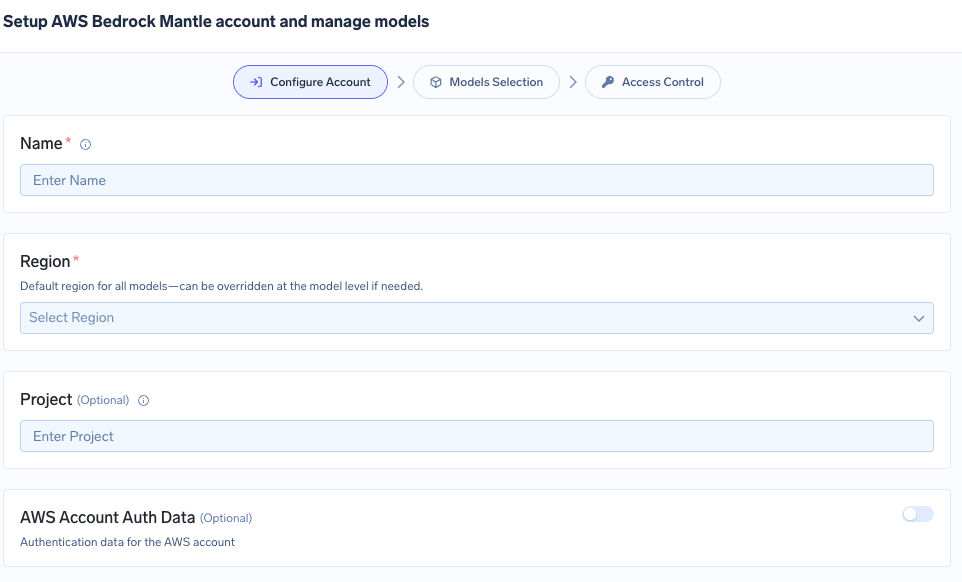
Add Account Name and Collaborators

Give a unique name for the account which will be used to refer to it later in the models. The models in the account are referred to as @providername/@modelname. Add collaborators to your account — you can decide which users/teams have access to the models (User Role) and who can add/edit/remove models (Manager Role). Read more about access control here.
3

Add Region and Authentication

Select the default AWS region for the models in this account. The account-level region serves as the default for all models unless explicitly overridden at the model level. The region must be one where the bedrock-mantle endpoint is available (see the supported regions). Then provide the authentication details the gateway uses to reach Bedrock Mantle. Three methods are supported: AWS Access Key / Secret, Assumed Role (both use SigV4), and API Key.
AWS Bedrock Mantle authentication form with region and auth type selector
Bedrock Mantle authorizes every request through AWS IAM. The SigV4 service name and IAM action namespace is bedrock-mantle (actions look like bedrock-mantle:CreateInference). You attach a policy to the IAM principal (user or role) the gateway uses.You can choose one of two approaches for the IAM policy.

Option A — Quickstart (AWS managed policy)

The fastest path is to attach the AWS-managed AmazonBedrockMantleInferenceAccess policy to your principal. It is the narrowest managed policy sufficient for inference and covers both SigV4 and API key authentication, plus the AWS Marketplace subscription action needed for third-party models.AWS ships three managed policies for Bedrock Mantle:
Managed policyUse it for
AmazonBedrockMantleInferenceAccessRunning inference (recommended quickstart). Grants Get*/List*/CreateInference, CallWithBearerToken, and Marketplace subscribe.
AmazonBedrockMantleFullAccessFull access to all Bedrock Mantle operations.
AmazonBedrockMantleReadOnlyRead-only visibility (no inference).
See AWS managed policies for Amazon Bedrock for the exact actions each one grants.

Option B — Least-privilege (production hardening)

For production, attach a scoped policy granting only the actions the gateway uses. Bedrock Mantle resources are scoped to a Project, whose ARN follows this format:
arn:aws:bedrock-mantle:{region}:{account-id}:project/*
The gateway only calls the inference route, so SigV4 principals (access key / assumed role) need a single action:
IAM policy (least-privilege, SigV4)
{
  "Version": "2012-10-17",
  "Statement": [
    {
      "Sid": "BedrockMantleInference",
      "Effect": "Allow",
      "Action": ["bedrock-mantle:CreateInference"],
      "Resource": "arn:aws:bedrock-mantle:*:<aws-account-id>:project/*"
    }
  ]
}
If you authenticate with an API key, also grant bedrock-mantle:CallWithBearerToken on "Resource": "*":
{
  "Sid": "BedrockMantleCallWithBearerToken",
  "Effect": "Allow",
  "Action": ["bedrock-mantle:CallWithBearerToken"],
  "Resource": "*"
}
CallWithBearerToken is a route-less, authentication-layer action that does not bind to a Project ARN. SigV4 principals (access key / assumed role) do not need it.
Third-party (Marketplace) models — open/third-party models on Mantle (for example Qwen, GLM, Mistral) are delivered through AWS Marketplace. To let the principal subscribe to them on first use, add the Marketplace actions, or simply use the AmazonBedrockMantleInferenceAccess managed policy which already includes them:
{
  "Sid": "MarketplaceSubscribe",
  "Effect": "Allow",
  "Action": ["aws-marketplace:Subscribe", "aws-marketplace:ViewSubscriptions"],
  "Resource": "*",
  "Condition": {
    "StringEquals": { "aws:CalledViaLast": "bedrock-mantle.amazonaws.com" }
  }
}

Once you have a policy, attach it to a principal and configure credentials in TrueFoundry using one of the methods below.Using AWS Access Key and Secret (SigV4)
  1. Create an IAM user (or choose an existing one) following these steps.
  2. Attach the IAM policy (Option A or B) to this user.
  3. Create an access key for this user as per this doc.
  4. Use this access key and secret while adding the provider account.
Using Assumed Role (SigV4)The gateway role assumes your role, which in turn accesses Bedrock Mantle.
  1. Create an IAM role in your AWS account and attach the IAM policy (Option A or B) to it.
  2. Configure the trust policy so the gateway role can assume it. Use the appropriate role ARN based on your deployment:
For SAAS deployments:
  • Gateway role ARN: arn:aws:iam::416964291864:role/tfy-ctl-production-ai-gateway-deps
For on-prem deployments:
  • Your gateway role ARN will look like: arn:aws:iam::<your-aws-account-id>:role/<account-prefix>-truefoundry-deps
Trust policy
{
  "Version": "2012-10-17",
  "Statement": [
    {
      "Sid": "Statement1",
      "Effect": "Allow",
      "Principal": {
        // for SAAS deployments:
        "AWS": "arn:aws:iam::416964291864:role/tfy-ctl-production-ai-gateway-deps"
        // or for on-prem deployments:
        // "AWS": "arn:aws:iam::<your-aws-account-id>:role/<account-prefix>-truefoundry-deps"
      },
      "Action": "sts:AssumeRole",
      // (Optional) For additional security use external ID.
      "Condition": {
        "StringEquals": {
          "sts:ExternalId": "your-external-id"
        }
      }
    }
  ]
}
You can optionally configure an external ID in the trust policy for additional security. If you use one, provide the same external ID when creating the integration in TrueFoundry.
Using AWS Bedrock API KeyAPI keys provide a simpler Bearer-token authentication method, ideal for exploration and development.
  1. Navigate to the AWS Management Console and open the Amazon Bedrock console at https://console.aws.amazon.com/bedrock.
  2. In the left navigation pane, select API keys.
  3. Choose Generate long-term API keys in the Long-term API keys tab and pick an expiry.
  4. Choose Generate and copy the API key value.
  5. Make sure the principal the key belongs to has bedrock-mantle:CallWithBearerToken (see the warning under Option B).
  6. Use this API key while adding the provider account.
For more information on generating API keys, see the AWS Bedrock API key generation documentation.
4

Add Models

Select the models from the list that you want to add. You can use Select All to select all the models.
If the model you are looking for is not present in the options, you can add it using + Add Model at the end of the list and entering the model ID.
Commonly available models:
ModelModel ID
OpenAI GPT-5.5openai.gpt-5.5
OpenAI GPT-5.4openai.gpt-5.4
Anthropic Claude Opus 4.8anthropic.claude-opus-4-8
Anthropic Claude Opus 4.7anthropic.claude-opus-4-7
xAI Grok 4.3xai.grok-4.3
Moonshot Kimi K2.5moonshotai.kimi-k2.5
Google Gemma 3 27Bgoogle.gemma-3-27b-it
For the authoritative, up-to-date list of models and their supported APIs, see the AWS Amazon Bedrock model cards and the Bedrock Mantle (Responses API) overview.

Inference

After adding the models, you can perform inference using an OpenAI-compatible API via the Playground or by integrating with your own application.
Code Snippet and Try in Playground Buttons for each model

Supported APIs

Once your AWS Bedrock Mantle provider account is configured, the following API surfaces are available through the gateway. The table below summarizes each endpoint alongside platform feature support (tracing, cost tracking).
Legend:
  • Supported by Provider and Truefoundry
  • Supported by Provider, but not by Truefoundry
  • Provider does not support this feature
APIEndpointTracingCost Tracking
Chat Completions/chat/completions
Responses API/responses
Messages API/messages
Not supported for Bedrock Mantle: Embeddings, Image Generation, Image Edit, Batch API, Files API, Text-to-Speech, Speech-to-Text, and Realtime API. Bedrock Mantle has no upstream for these surfaces. If you need embeddings, image, batch, or files support on AWS, see AWS Bedrock.
The chat completions endpoint is the most widely used — it supports streaming, tools, structured JSON outputs, and (where the model supports it) reasoning. Full provider capability matrix: Chat Completions API.
Python
from openai import OpenAI

client = OpenAI(
    api_key="your-truefoundry-api-key",
    base_url="{GATEWAY_BASE_URL}",
)

response = client.chat.completions.create(
    model="aws-bedrock-mantle-main/openai-gpt-oss-120b",
    messages=[
        {"role": "user", "content": "What is TrueFoundry in one line?"},
    ],
)
print(response.choices[0].message.content)
Set stream=True to start streaming responses and iterate over delta chunks. You may defensively check that chunk.choices is non-empty and delta.content is not None.
Python
stream = client.chat.completions.create(
    model="aws-bedrock-mantle-main/openai-gpt-oss-120b",
    messages=[{"role": "user", "content": "Count from 1 to 5."}],
    stream=True,
)
for chunk in stream:
    if (
        chunk.choices
        and len(chunk.choices) > 0
        and chunk.choices[0].delta.content is not None
    ):
        print(chunk.choices[0].delta.content, end="", flush=True)
Advertise a tool, hand the model’s tool_calls back as a tool role message, then request the final response. Use tool_choice to force the model to call a specific tool when you need deterministic behaviour.
Python
import json

tools = [{
    "type": "function",
    "function": {
        "name": "get_weather",
        "description": "Get the current weather for a city.",
        "parameters": {
            "type": "object",
            "properties": {"city": {"type": "string"}},
            "required": ["city"],
        },
    },
}]

messages = [{"role": "user", "content": "Weather in Bengaluru?"}]
first = client.chat.completions.create(
    model="aws-bedrock-mantle-main/openai-gpt-oss-120b",
    messages=messages,
    tools=tools,
    tool_choice={"type": "function", "function": {"name": "get_weather"}},
)

assistant_msg = first.choices[0].message
tool_calls = assistant_msg.tool_calls or []
if tool_calls:
    tool_call = tool_calls[0]
    messages.append(assistant_msg)
    messages.append({
        "role": "tool",
        "tool_call_id": tool_call.id,
        "content": json.dumps({"city": "Bengaluru", "temp_c": 28, "summary": "partly cloudy"}),
    })
    second = client.chat.completions.create(
        model="aws-bedrock-mantle-main/openai-gpt-oss-120b",
        messages=messages,
        tools=tools,
    )
    print(second.choices[0].message.content)
Use response_format={"type": "json_schema", ...} to force the model to return data matching a JSON schema.
Python
import json

schema = {
    "name": "person",
    "schema": {
        "type": "object",
        "properties": {
            "name": {"type": "string"},
            "age": {"type": "integer"},
            "hobbies": {"type": "array", "items": {"type": "string"}},
        },
        "required": ["name", "age", "hobbies"],
        "additionalProperties": False,
    },
    "strict": True,
}

response = client.chat.completions.create(
    model="aws-bedrock-mantle-main/openai-gpt-oss-120b",
    messages=[{"role": "user", "content": "Invent a fictional person with name, age, and three hobbies."}],
    response_format={"type": "json_schema", "json_schema": schema},
)

message = response.choices[0].message
if message.content:
    print(json.dumps(json.loads(message.content), indent=2))
Reasoning-capable models on Mantle (for example GPT-OSS, GLM, Qwen, DeepSeek) accept the reasoning_effort parameter. The gateway returns the model’s reasoning as reasoning_content on the message.
Python
response = client.chat.completions.create(
    model="aws-bedrock-mantle-main/openai-gpt-oss-120b",
    messages=[{"role": "user", "content": "A bat and ball cost $1.10. The bat costs $1.00 more than the ball. How much is the ball?"}],
    reasoning_effort="high",
)

msg = response.choices[0].message
print("answer:", msg.content)
print("reasoning:", getattr(msg, "reasoning_content", None))
Reasoning support varies by model. Check the model card for the specific model you are using.
The Responses API is the native surface of the Bedrock Mantle endpoint. It supports streaming, background processing, and stateful multi-turn conversations via previous_response_id. Full docs: Responses API.
Python
from openai import OpenAI

client = OpenAI(
    api_key="your-truefoundry-api-key",
    base_url="{GATEWAY_BASE_URL}",
)

response = client.responses.create(
    model="aws-bedrock-mantle-main/openai-gpt-oss-120b",
    input=[{"role": "user", "content": "What is TrueFoundry in one line?"}],
)
print(response.output_text)
Set stream=True and iterate over the emitted events.
Python
stream = client.responses.create(
    model="aws-bedrock-mantle-main/openai-gpt-oss-120b",
    input=[{"role": "user", "content": "Tell me a short story."}],
    stream=True,
)
for event in stream:
    if event.type == "response.output_text.delta":
        print(event.delta, end="", flush=True)
When store is true (the default), Bedrock Mantle retains the response for 30 days in the request’s source region, so you can chain follow-up turns by passing previous_response_id. Set store=False if you do not want AWS to retain conversation data.
Python
first = client.responses.create(
    model="aws-bedrock-mantle-main/openai-gpt-oss-120b",
    input=[{"role": "user", "content": "My name is Alex."}],
)

second = client.responses.create(
    model="aws-bedrock-mantle-main/openai-gpt-oss-120b",
    input=[{"role": "user", "content": "What is my name?"}],
    previous_response_id=first.id,
)
print(second.output_text)
Not all models support the Responses API. Check the model card to confirm Responses support before using this surface.
For Anthropic-family models served on the Mantle endpoint, the gateway also exposes Anthropic’s native Messages API (/messages), letting you use the official anthropic SDK directly. Full docs: Messages API, Native SDK Support.
The gateway accepts both Anthropic SDK auth patterns and translates internally:
  • api_key=TFY_API_KEY — SDK sends the x-api-key header
  • auth_token=TFY_API_KEY — SDK sends the Authorization: Bearer header
Python
from anthropic import Anthropic

client = Anthropic(
    api_key="your-truefoundry-api-key",
    base_url="{GATEWAY_BASE_URL}",
)

message = client.messages.create(
    model="aws-bedrock-mantle-main/<anthropic-model-id>",
    max_tokens=256,
    system="You answer in one short sentence.",
    messages=[
        {"role": "user", "content": "What is TrueFoundry in one line?"}
    ],
)
print(message.content[0].text)
The companion Count Tokens endpoint (/messages/count_tokens) is also supported for sizing a request before sending it:
Python
counted = client.messages.count_tokens(
    model="aws-bedrock-mantle-main/<anthropic-model-id>",
    messages=[{"role": "user", "content": "What is TrueFoundry in one line?"}],
)
print(counted.input_tokens)
The Messages API only applies to Anthropic-family models that are available on the Bedrock Mantle endpoint. For Anthropic models on AWS’s Converse surface, use AWS Bedrock instead.

Supported Regions

The bedrock-mantle endpoint is available in the following AWS regions. The region you set on the provider account (or override per model) must be one of these.
RegionRegion code
US East (N. Virginia)us-east-1
US East (Ohio)us-east-2
US West (Oregon)us-west-2
Asia Pacific (Mumbai)ap-south-1
Asia Pacific (Jakarta)ap-southeast-3
Asia Pacific (Sydney)ap-southeast-2
Asia Pacific (Tokyo)ap-northeast-1
Europe (Frankfurt)eu-central-1
Europe (Ireland)eu-west-1
Europe (London)eu-west-2
Europe (Milan)eu-south-1
Europe (Stockholm)eu-north-1
South America (São Paulo)sa-east-1
For the authoritative, up-to-date list, see the AWS Bedrock Mantle supported regions and endpoints.

FAQ

Use Bedrock Mantle when you want the OpenAI Responses API or the open/third-party model catalog (GPT-OSS, Qwen, GLM, DeepSeek, Mistral, etc.) exposed on the Mantle endpoint. Use AWS Bedrock for the Converse / InvokeModel surface, Amazon/Anthropic first-party models, embeddings, image generation, batch, and the Files API. Both bill through your AWS account.
The IAM principal the gateway uses is missing a Bedrock Mantle permission. Ensure it has bedrock-mantle:CreateInference on arn:aws:bedrock-mantle:*:<aws-account-id>:project/*. If you authenticate with an API key, also grant bedrock-mantle:CallWithBearerToken on "Resource": "*". For third-party (Marketplace) models, add the Marketplace subscribe actions, or attach the AmazonBedrockMantleInferenceAccess managed policy which covers all of these. See Option B.
Not every model on Mantle supports the Responses API. Use the Chat Completions endpoint for those models, or check the model card to confirm Responses support.
Some models are served on an /openai-prefixed path — /openai/v1/responses and /openai/v1/chat/completions — instead of the standard /v1/responses and /v1/chat/completions paths. When such a model is routed to the unprefixed path, Bedrock Mantle rejects it with Berm is not enabled for this account; the same request to the /openai-prefixed path succeeds.To confirm whether a model needs the prefix, check its AWS model card for this note:
This model is available on the openai/v1/responses path on the bedrock-mantle endpoint. This is different from the v1/responses path used by other models on the responses endpoint.
This routing can’t be derived from the model catalog, so the gateway reads it from an environment variable. Add the affected model ID to the comma-separated AWS_BEDROCK_MANTLE_OPENAI_V1_PREFIX_MODELS env var on your gateway deployment and restart — the gateway then prepends /openai to both the Responses and Chat Completions paths for those models:
AWS_BEDROCK_MANTLE_OPENAI_V1_PREFIX_MODELS=openai.gpt-5.5,openai.gpt-5.4,google.gemma-4-31b,google.gemma-4-e2b,google.gemma-4-26b-a4b,xai.grok-4.3,<your-model-id>
This list is set by default, so the models above already route correctly — extend it when you add another model that requires the prefix.
Yes. Provide a top-level default region for the account, and optionally override it at the model level. The region must be one of the supported regions.
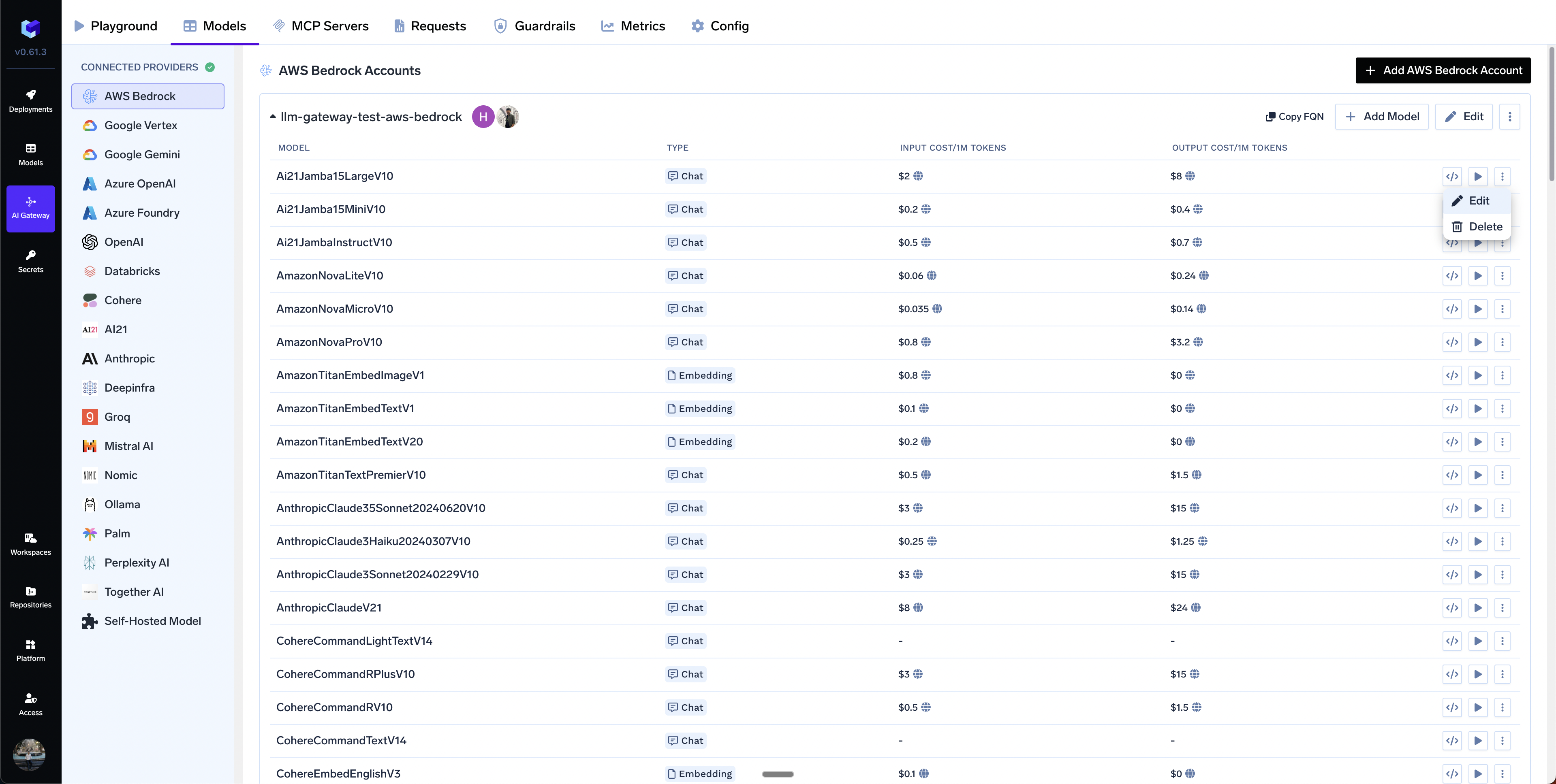
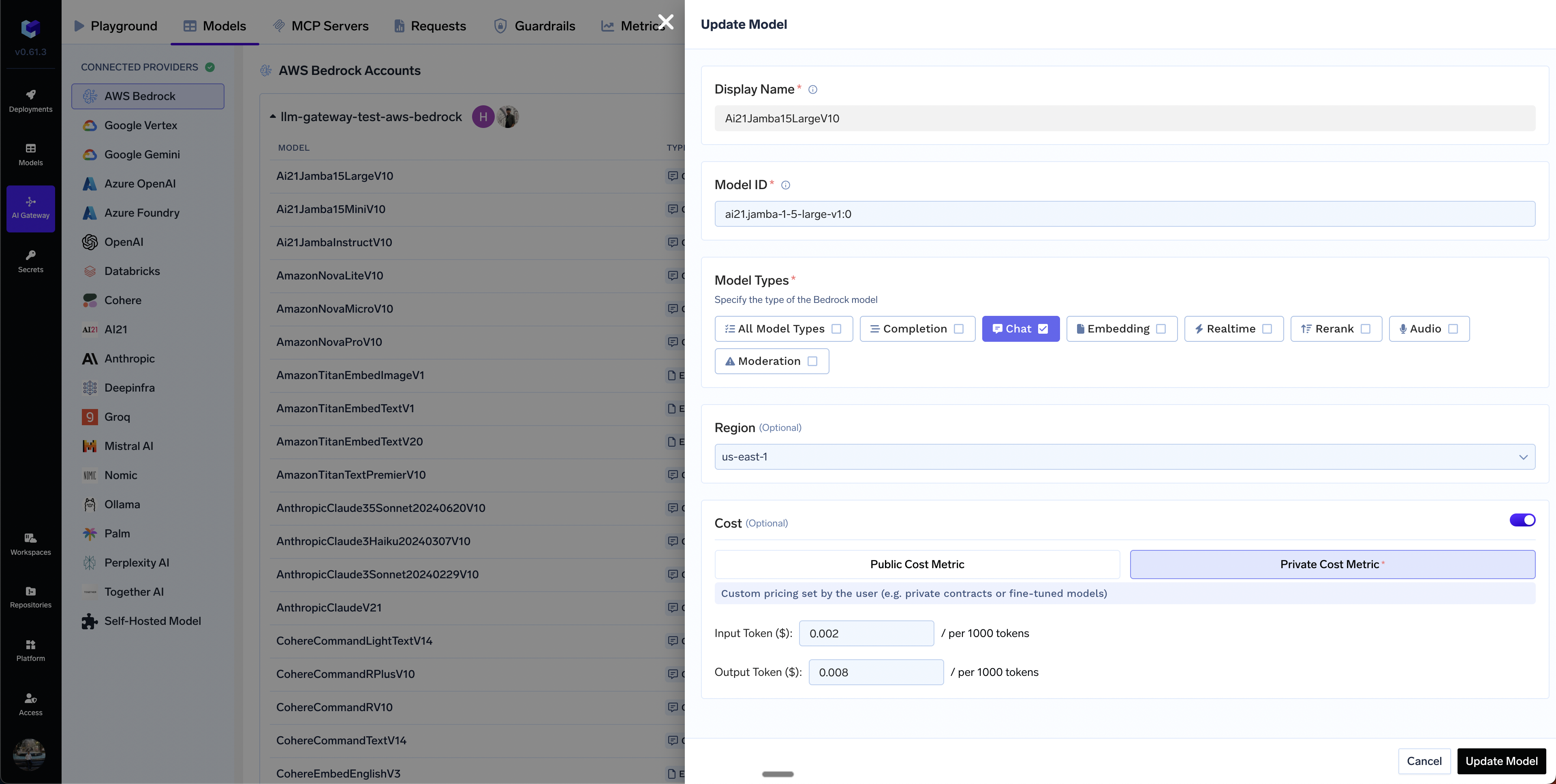
In case you have custom pricing for your models, you can override the default cost by clicking on the Edit Model button and then choosing the Private Cost Metric option.
Edit model button and interface
Custom cost metric configuration form with input fields for pricing