

- The AI your teams build — the applications, services, and agents your engineers write themselves with prompts, the OpenAI SDK, LangGraph, Google ADK, and similar frameworks.
- The AI your employees use — third-party tools they run on their own laptops, from Cursor and Claude Code to the ChatGPT app and claude.ai.
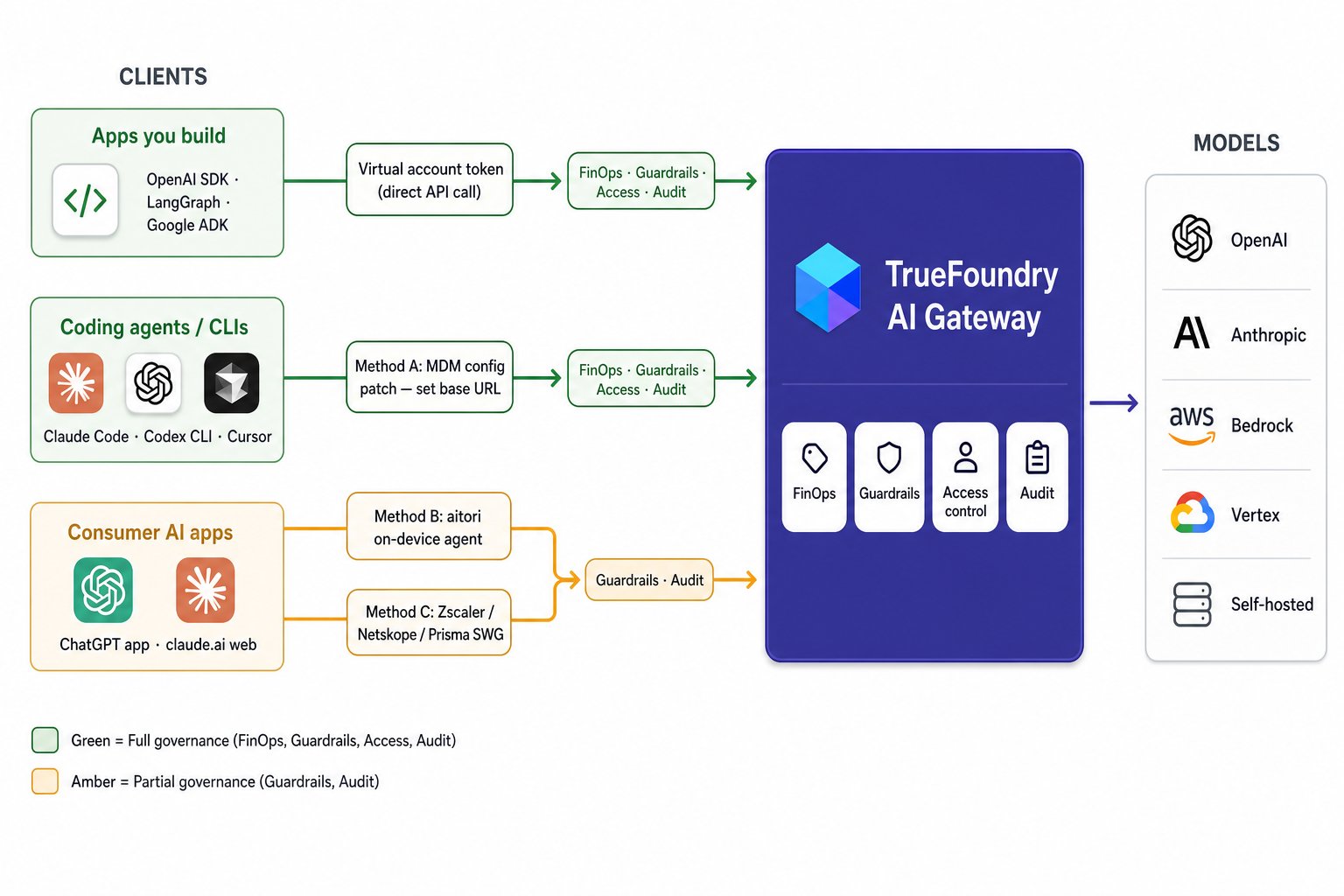
Every category of AI client reaches the TrueFoundry AI Gateway through a different path — and gets a different level of governance depending on how cooperative the tool is.
What you actually want to govern
Governance comes down to four questions every organization wants answered about its AI usage, wherever it comes from:- Cost (FinOps). What are we spending on AI, broken down per user, per team, and per model — and can we cap it before a runaway agent burns the budget? → spend and budgets
- Safety (Guardrails). Is sensitive data leaving the building, and are prompts and responses safe? This is PII detection, prompt-injection and jailbreak defense, moderation, and DLP, applied to both what goes in and what comes back.
- Access. Who is allowed to call which models, and how often? → access control and rate limits
- Audit. Do we keep a complete, durable record of every AI call — who made it, what they sent, and what came back — so that months later we can investigate an incident or answer a compliance review? → request logs
One place every call passes through
The way to answer those four questions consistently is to funnel every model call through one chokepoint: the AI Gateway. A call that passes through it gets FinOps, guardrails, access control, and audit applied in one place. The strategy: send everything through the AI Gateway, make that the easiest path to take, and integrate it with the tools already on your devices. The hard part is that not every kind of AI traffic is equally willing to be routed.MCP traffic is the easy win. Most AI tools that support agents also let users add MCP servers. Point any tool’s MCP configuration at the MCP Gateway and you get all four capabilities over every MCP call — regardless of how that tool’s model traffic is routed. The rest of this guide focuses on the harder problem: governing the model calls themselves.
Not all AI traffic is equally governable
How much you can govern depends on how cooperative each tool is. It runs along a spectrum, from traffic you fully control to traffic you can’t reach: 1 · Apps your teams build — fully governable. You own the code, so you point it at the AI Gateway and stop handing out raw provider keys. All four capabilities. 2 · Third-party agents that let you set the endpoint — fully governable once routed. Tools like Cursor, Claude Code, and Codex CLI expose a model-endpoint setting; point it at the AI Gateway and their calls go through it. All four capabilities, for calls that route through. How you get traffic there splits in two:- 2a · Enforceable via MDM — Claude Code, Claude Desktop / Cowork, Codex CLI, Gemini CLI. Push the AI Gateway config fleet-wide and every device uses it automatically.
- 2b · Manual per user — tools like Cursor where only some features honor a custom endpoint. Configured users are governed; the rest aren’t.
*Only for users who configure the AI Gateway; you cannot enforce it company-wide.
How each category reaches the AI Gateway
Each category reaches the AI Gateway a different way, with the approach described under each one below. Category 1 calls it directly; categories 2 and 3 route from the device using methods A, B, or C; category 4 never reaches it. Category 1 · Apps you build — call the AI Gateway directly. Your code calls the AI Gateway API with a virtual account token, so every request goes to the AI Gateway URL instead ofapi.openai.com or api.anthropic.com. No device tooling, no interception — and once you stop handing out raw provider keys, the AI Gateway becomes the only way to reach a model. All four capabilities.
Category 2 · Agents with a gateway setting — Method A: point the app at the AI Gateway. Third-party agents that expose a model-endpoint setting. Push a managed configuration over MDM that points them at the AI Gateway — no interception, no certificates, the app just makes its normal call to a URL you chose. Because these are real model calls you get all four capabilities, enforced fleet-wide over MDM where supported (2a) or set per user (2b). How far this reaches depends on the product — the key split is whether you can enforce the setting fleet-wide:
Tools that support a custom gateway endpoint (Method A)
Tools that support a custom gateway endpoint (Method A)







Method B: aitori, the open-source on-device agent
For category 3 — third-party agents that won’t point at a gateway — TrueFoundry ships aitori, an open-source (Apache-2.0) agent you deploy over MDM. These are mostly apps employees use on their devices where the vendor handles model calls on their backend: the ChatGPT app, claude.ai, and similar. How it works in one line: aitori runs as the machine’s HTTP(S) proxy. For an allowlist of AI hosts it terminates TLS with a certificate authority that exists only on that device, identifies the LLM and MCP calls, and reroutes those to the AI Gateway. Everything else — and every other host — is passed straight through, never decrypted. What this gives you:- Selective interception. Only the hosts you list are decrypted; unrelated traffic stays private and pinned apps are left alone.
- Fail-open by default. If the AI Gateway is unreachable, the request still goes to its original destination (and the gap is recorded), so nothing breaks. You can switch this to fail-closed.
- A live view. Run with
--uito watch governed calls stream in athttp://127.0.0.1:9100. - Built-in profiles. Claude (Code, Desktop, web) and ChatGPT are covered out of the box — no rules to write to get started.
Try it on one machine
aitori works with no gateway and no config — install it, run it, and watch the traffic to confirm what’s flowing before you wire in the AI Gateway:Connect it to the TrueFoundry AI Gateway
Point aitori at the AI Gateway and it starts rerouting model and MCP calls through it. You need two values:- Gateway URL — your Gateway Base URL with
/api/llm/ai-proxy/appended (keep the trailing slash). On TrueFoundry SaaS that’shttps://gateway.truefoundry.ai/api/llm/ai-proxy/. - API key — a TrueFoundry Personal Access or Virtual Account Token.
What aitori does to a request
For a call worth governing, aitori keeps the original request intact — same method, path, body, and the app’s own provider credentials — and only redirects the upstream connection to the AI Gateway. It adds three headers:x-tfy-* header, restores the original Host, and forwards to the original URL with the app’s own credentials still attached. The response streams straight back, and the app notices nothing.
This buys guardrails, DLP, and audit for apps that would otherwise be invisible. The limit is structural: these apps don’t call a model directly. The ChatGPT app, claude.ai, and similar consumer surfaces call their own backend, which calls the model server-side. aitori sees what the app sends that backend and what comes back (enough for content guardrails and audit), but the token-metered model call happens in the vendor’s cloud.
Method C: Reuse the SWG you already deployed
If your fleet already runs a Secure Web Gateway, the interception layer is already on every device and already decrypting traffic. You point its forwarding at the AI Gateway and install nothing new. This is another way to handle category 3 traffic. The per-vendor mechanics are covered in the next section.Integrating with what’s already on the device
Enterprises already run two kinds of agent on every device, and they do different jobs:- Traffic-redirection tools — Secure Web Gateways like Zscaler, Netskope, and Prisma Access sit in the network path and can forward AI traffic to your gateway.
- Endpoint-control tools — EDR and MDM like CrowdStrike, Jamf, and Intune sit on the device and decide which apps run and what’s deployed. They are not web proxies and cannot redirect a model call.
Use a Secure Web Gateway to route a model call to the AI Gateway. Use CrowdStrike and MDM to deploy the routing and to block what you don’t sanction. Asking CrowdStrike to redirect traffic, or asking Zscaler to manage endpoint posture, is using the wrong tool for the job.
Traffic redirection: the Secure Web Gateways
All three majors implement the same pattern: forward matched AI domains to a third-party upstream proxy (your gateway) and inject the user’s identity in theX-Authenticated-User header. The AI Gateway runs an SWG-mode listener that reads that header, performs its own inspection, governs, and forwards. One contract covers all of them.
Two requirements are common to every vendor:
- SSL trust. Because the SWG hands the AI Gateway a re-encrypted tunnel, the AI Gateway does its own SSL inspection on the chained traffic, and the SWG must be configured to trust the AI Gateway’s CA. Each product has a field for exactly this.
- Identity must be trusted.
X-Authenticated-Useris an unauthenticated assertion of who the user is, so the AI Gateway must accept it only from your SWG — locked down with mTLS or a strict source-IP allowlist plus a shared secret. Otherwise anyone could spoof the header and impersonate any user.
- Zscaler (ZIA)
- Netskope
- Prisma Access
- Cisco Umbrella
Zscaler uses Third-Party Proxy Chaining, acting as the child proxy that forwards to your gateway. Up to eight proxy objects are supported.
1
Enable SSL Inspection
Enable SSL Inspection for the AI-provider domains so Zscaler can decrypt and forward the traffic.
2
Add the AI Gateway as a proxy
Go to Forwarding Control → Proxies & Gateways → Proxies → Add Proxy. Set the name, the AI Gateway’s IP/FQDN and port, optionally the AI Gateway’s root certificate, and enable Insert X-Authenticated-User (base64 optional).
3
Create a Gateway object
Create a Gateway object that references the proxy you added (primary/secondary).
4
Add a Forwarding Control rule
Add a Forwarding Control rule matching the AI domains / URL categories, with the forward method set to that gateway.
Endpoint control and deployment: EDR and MDM
EDR and MDM can’t reroute a model call, but they’re already on every endpoint, which makes them the right tools for deploying aitori and for blocking what you won’t allow. No model traffic flows through them. MDM (Jamf, Intune, Kandji, Workspace ONE) is how you roll out the device-side pieces:- Install aitori fleet-wide when you use Method B for category 3 traffic, and enforce that it keeps running (so a
kill -9is followed by a cleanaitori downon restart). - Distribute and trust aitori’s per-device CA (or the SWG-chain CA) so TLS inspection works.
- Apply Method A configuration patches that point category 2 agents at the AI Gateway — especially category 2a tools where MDM enforcement is supported.
- Falcon Firewall Management provides centralized, application- and location-aware host firewall policy across Windows, macOS, and Linux. Use it to block unsanctioned AI apps and destinations outright and to allowlist the ones you’ve routed through the AI Gateway.
- Falcon Secure Access applies Zero Trust controls inside the browser session across any browser. Use it for category 3 web surfaces (like claude.ai) and category 4 SaaS AI that can’t be proxied as model traffic.
Don’t confuse Falcon’s endpoint controls with CrowdStrike Falcon AIDR, which is a guardrail the AI Gateway calls inline once traffic arrives — not a device tool. It’s covered under Guardrails, alongside the other guardrail providers the AI Gateway integrates with.
Device tooling summary
The tools that get device traffic to the AI Gateway or control what runs on the device:Guardrails: securing traffic on the AI Gateway
Routing gets traffic to the AI Gateway. What protects it there is guardrails — and these run inside the AI Gateway, independent of how the traffic arrived. Once a call lands, the AI Gateway can inspect prompts before they reach a model and block, redact, or rewrite risky responses in real time, for threats like prompt injection, jailbreaks, PII leakage, and data exposure. The AI Gateway applies guardrails by calling guardrail providers inline. You can use TrueFoundry’s built-in guardrails or integrate external providers — including CrowdStrike Falcon AIDR, Palo Alto AIRS, Azure Content Safety, AWS Bedrock Guardrails, and many others. For the CrowdStrike AIDR integration specifically, see the CrowdStrike AIDR guardrail. Because every governed call passes through the AI Gateway, it’s also the natural export point for AI telemetry: stream the AI Gateway’s request logs (who called which model, with what prompt and response) into your SIEM — such as CrowdStrike Falcon Next-Gen SIEM — so AI activity sits alongside endpoint, identity, and cloud signals.The governability spectrum
The governance matrix above shows what each category gets. This table adds the mechanism for each path:
Categories 1, 2, and MCP pass through the AI Gateway with all four capabilities. Category 3 gets guardrails and audit on visible content, but no FinOps. Category 4 can’t be reached by device-side tools at all.
Known limitations
No on-device approach is complete. Plan around these limits:- Backend-proxied FinOps (category 3). If the app calls its own backend, the token count lives in the vendor’s cloud. Content governance survives; cost accounting does not.
- Certificate-pinned apps. Some clients pin their TLS certificate and refuse inspection by aitori or the SWG. A pinned app with no endpoint setting can’t be governed transparently; the realistic control is allow-or-block via CrowdStrike’s firewall and browser controls.
- stdio MCP. Many MCP servers run as local subprocesses over stdio, which is not network traffic. Interceptors see remote (HTTP/SSE) MCP servers but are blind to stdio ones. For remote MCP, point tools at the MCP Gateway instead — that path is always governable.
- QUIC and real-time transports. Browsers may use HTTP/3 over QUIC (UDP), which a TCP proxy won’t see — block QUIC so clients fall back to TCP. Voice/realtime features that use WebRTC ride DTLS over UDP, a different problem entirely; treat them as out of scope.
Putting it together
Governing every token isn’t one mechanism — it’s a chokepoint plus a set of integrations matched to how much each app and tool will cooperate:- Stand up the AI Gateway and route everything you build (category 1) through it with virtual account tokens.
- Patch every third-party agent that accepts a gateway URL to point at it — enforce fleet-wide over MDM where supported (category 2a), or document the per-user setup where it isn’t (category 2b).
- For agents that don’t accept a gateway URL (category 3), redirect their traffic with the SWG you already run — Zscaler, Netskope, or Prisma — or drop aitori where there’s no SWG (Methods B and C).
- For AI embedded in SaaS (category 4), use the vendor’s native controls or a CASB; device-side tools won’t reach those model calls.
- Point MCP server configurations at the MCP Gateway in any tool that supports MCP — this path works regardless of category.
- Use MDM to install aitori and push config patches, and CrowdStrike to block what you won’t sanction.
- Apply guardrails on the AI Gateway — TrueFoundry’s built-in ones or external providers like CrowdStrike AIDR — and export the AI Gateway’s logs to your SIEM so AI activity sits alongside the rest of your security signal.
Set up the control plane first with Setup AI Gateway in Your Organization, then return here to route device and SaaS traffic into it.