October 16, 2026
|
Lesedauer: 5 Minuten


Erhalten Sie sofortigen Zugriff auf eine TrueFoundry-Live-Umgebung. Stellen Sie Modelle bereit, leiten Sie den LLM-Verkehr weiter und erkunden Sie die gesamte Plattform — Ihre Sandbox ist in Sekundenschnelle einsatzbereit, ohne dass eine Kreditkarte erforderlich ist.



Published: October 16, 2026
.png)
Unglaublich schnelle Methode zum Erstellen, Verfolgen und Bereitstellen Ihrer Modelle!
Nobody means to send a credential to a model provider. It happens anyway, because prompts are assembled from messy, real-world text:
A developer debugging an integration pastes a config snippet — with a live API key in it — and asks the model to find the bug. A coding agent, told to “fix the failing test,” reads the repo’s .env file into its context. A RAG pipeline retrieves a document that happens to contain a database connection string. An agent calls a tool that returns an object with an embedded OAuth token, and that result goes straight back into the model’s context.
In every case the secret has now been transmitted to a third-party provider, logged somewhere, and possibly used in training or retained. The developer did nothing obviously wrong; the system had no checkpoint. That checkpoint is what a secrets-detection guardrail provides — and the right place for it is the gateway every call already passes through.
Credentials come in recognizable shapes, and a good detector knows the patterns.
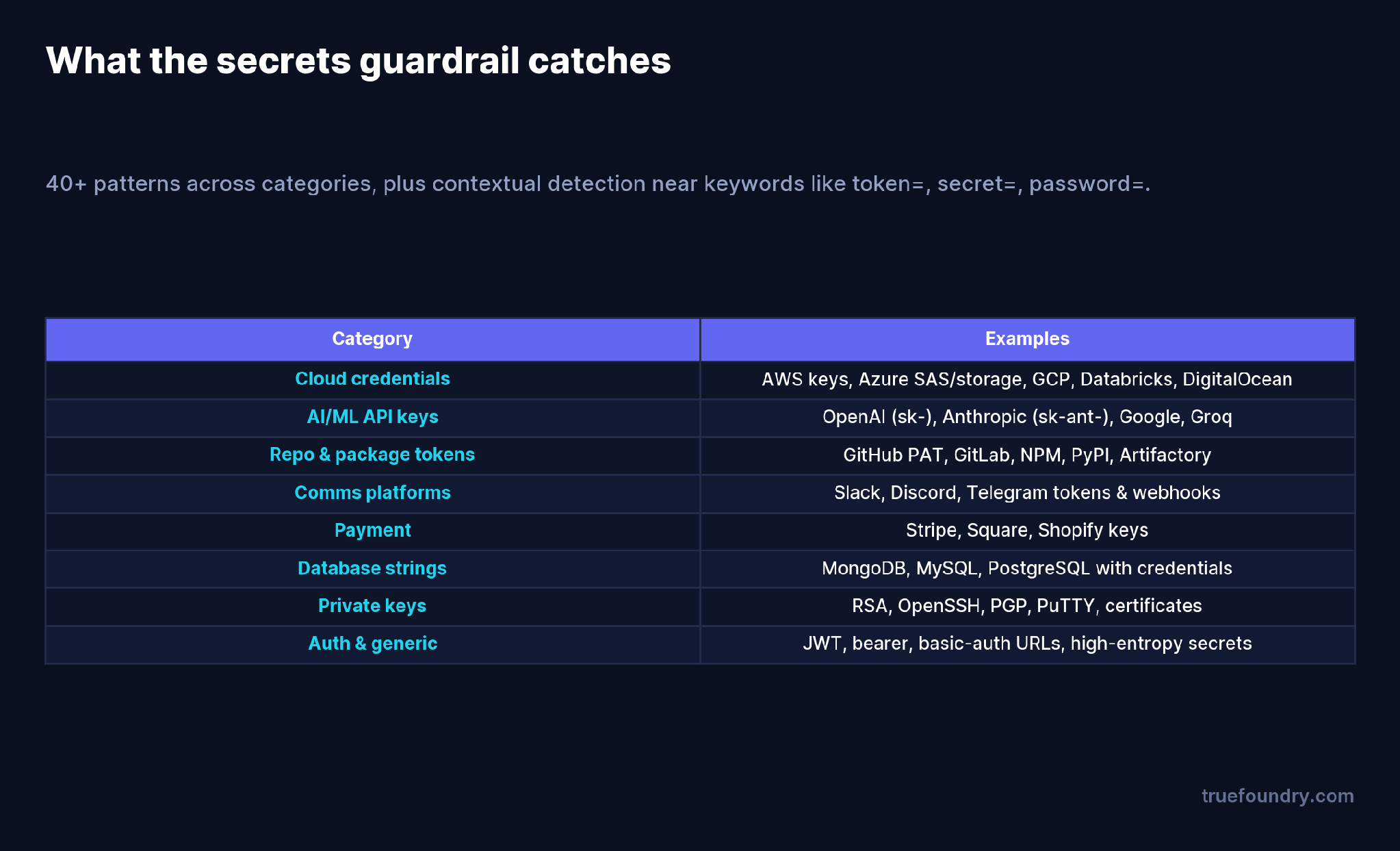
What the secrets guardrail catches
TrueFoundry’s built-in Secrets Detection guardrail recognizes 40-plus credential patterns across cloud providers (AWS, Azure, GCP), AI/ML API keys (OpenAI’s sk-, Anthropic’s sk-ant-), repository and package tokens (GitHub, GitLab, NPM, PyPI), communication platforms (Slack, Discord, Telegram), payment keys (Stripe, Square, Shopify), database connection strings, and private keys and certificates (RSA, OpenSSH, PGP). Beyond fixed patterns, it does contextual detection — flagging high-entropy hex or base64 strings that appear near keywords like token=, secret=, or password=, which catches credentials that don’t follow a standard format.
Because it runs inside the gateway rather than calling an external service, detection is fast and adds no extra per-request cost.
A secret can enter the conversation from three directions — the user, the model, or a tool — so the guardrail runs at four points.
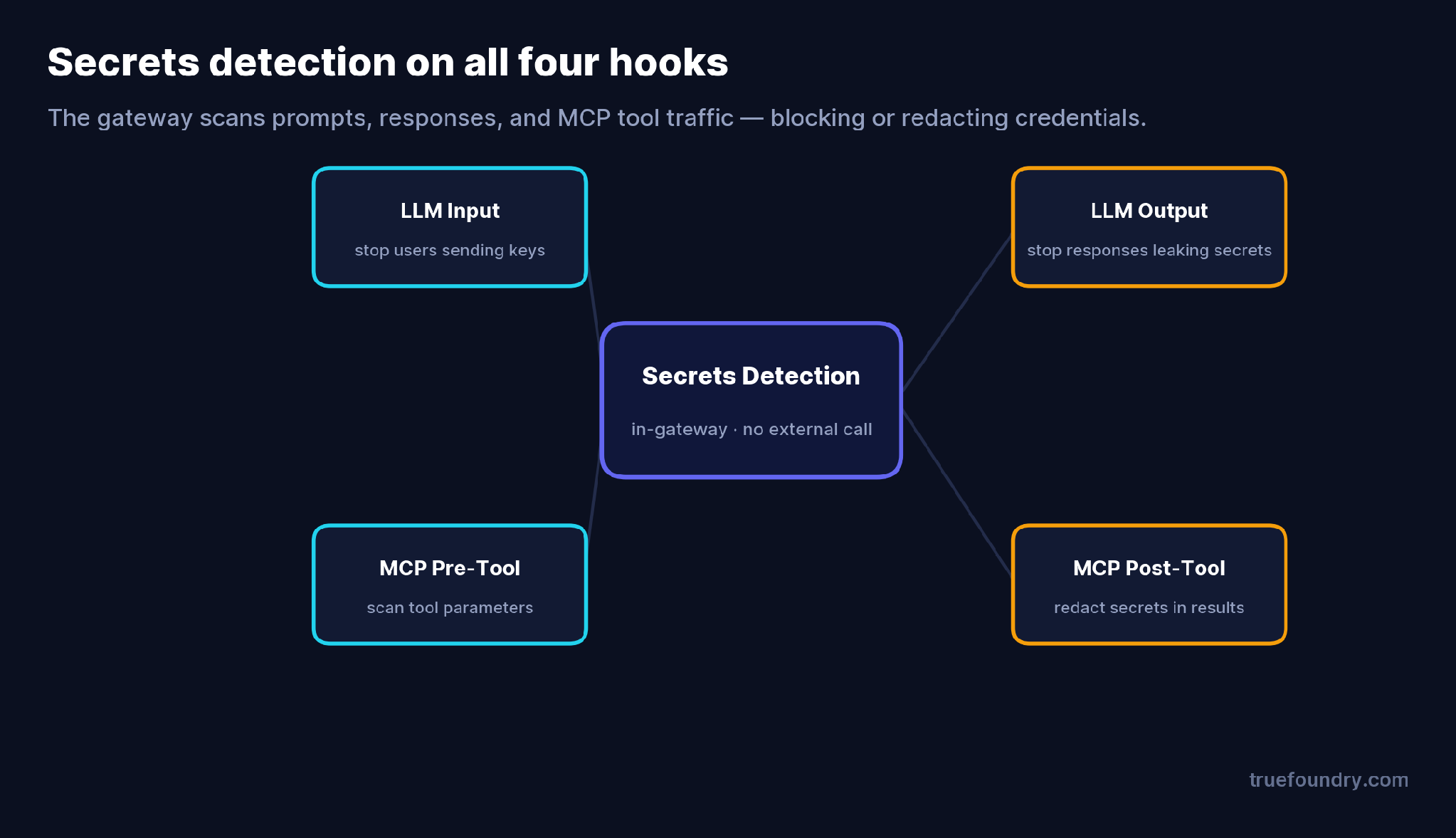
Secrets detection on all four hooks
LLM Input stops a user or app from sending credentials to the model in the first place. LLM Output catches a model that generates or echoes a secret (for example, producing a sample config with a real-looking key). MCP Pre-Tool scans tool parameters before a tool runs, and MCP Post-Tool redacts secrets in tool results — the file contents and API responses an agent pulls back into its context. For agentic systems, the MCP hooks matter as much as the LLM ones, because the agent is reading files and calling APIs on its own.
You choose what happens when a secret is found.
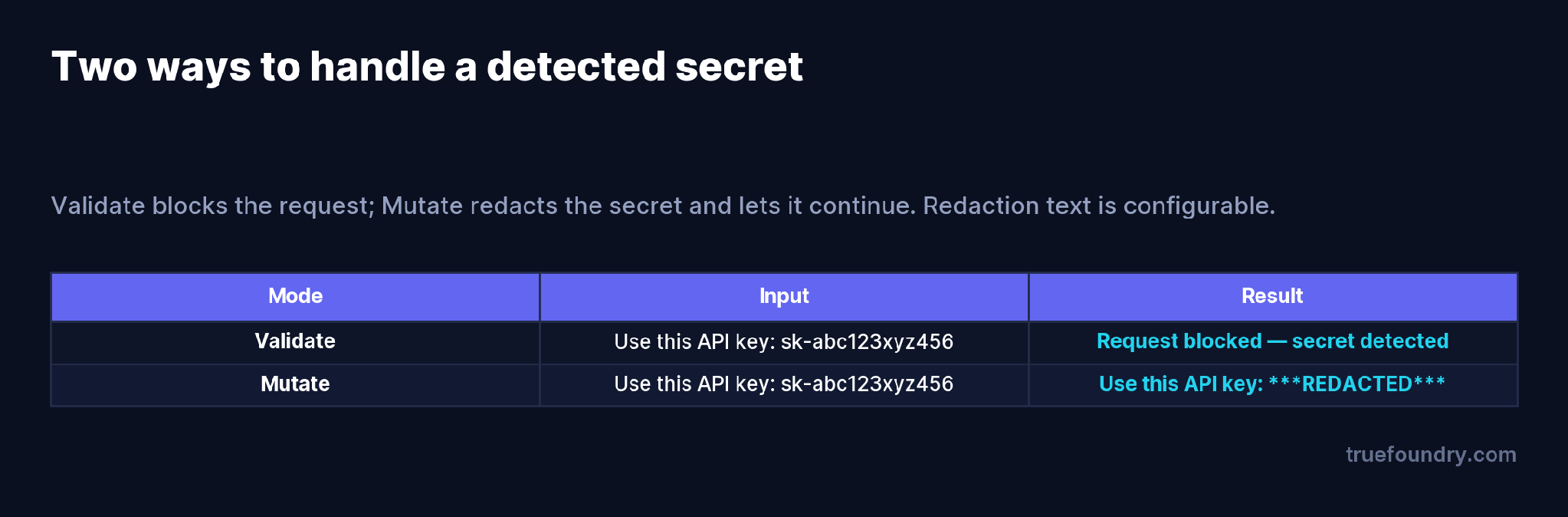
Validate blocks; Mutate redacts
Validate mode blocks the request outright when a secret is detected — the right choice when a credential in the content is a hard policy violation. Mutate mode redacts the secret, replacing it with configurable text (***REDACTED*** by default) and letting the request continue — useful when you want the agent to keep working on the non-sensitive part of the content, and when you want clean text in your logs. Many teams run Mutate on input (so work continues with the secret stripped) and consider Validate where a leak must hard-stop.
They only guard user input. Secrets leak from model output and tool results too. Guard all four hooks, not just the prompt.
They forget output guardrails skip streaming. With stream: true, output scanning doesn’t run — there’s no complete response to check. Use stream: false where output redaction matters.
They rely on developers to be careful. “Don’t paste secrets” is not a control. The whole point of a gateway guardrail is that it doesn’t depend on anyone remembering.
They don’t tune for false positives. High-entropy strings like UUIDs or encoded blobs can trip detection. Test against your real traffic and adjust before enforcing hard blocks.
TrueFoundry AI Gateway bietet eine Latenz von ~3—4 ms, verarbeitet mehr als 350 RPS auf einer vCPU, skaliert problemlos horizontal und ist produktionsbereit, während LiteLM unter einer hohen Latenz leidet, mit moderaten RPS zu kämpfen hat, keine integrierte Skalierung hat und sich am besten für leichte Workloads oder Prototyp-Workloads eignet.




A guardrail that scans prompts, responses, and tool traffic for credentials — API keys, AWS keys, JWTs, private keys, database strings — and blocks the request or redacts the secret before it reaches a model provider.
40-plus patterns across cloud credentials, AI/ML API keys, repository and package tokens, communication-platform tokens, payment keys, database connection strings, and private keys — plus contextual detection of high-entropy strings near keywords like token= or secret=.
Minimal. TrueFoundry’s Secrets Detection runs inside the gateway with no external API call, so it’s fast and adds no per-request charge.
Redact (Mutate) when you want work to continue with the secret stripped and clean logs; block (Validate) when a credential in the content must hard-stop the request. Many teams redact on input and block where policy requires.
Yes. It runs on MCP pre-tool and post-tool hooks as well as LLM input and output, so secrets in tool parameters and tool results are caught — important for agents that read files and call APIs.
Yes. As a built-in, in-gateway guardrail it runs wherever your TrueFoundry data plane runs, including VPC and on-prem, so secrets never leave your environment.



Die neuesten Nachrichten, Artikel und Ressourcen werden in Ihren Posteingang gesendet
.png)
.png)
.png)
.png)
.png)
.png)
.png)