November 5, 2026
|
5 min read


Blazingly fast way to build, track and deploy your models!
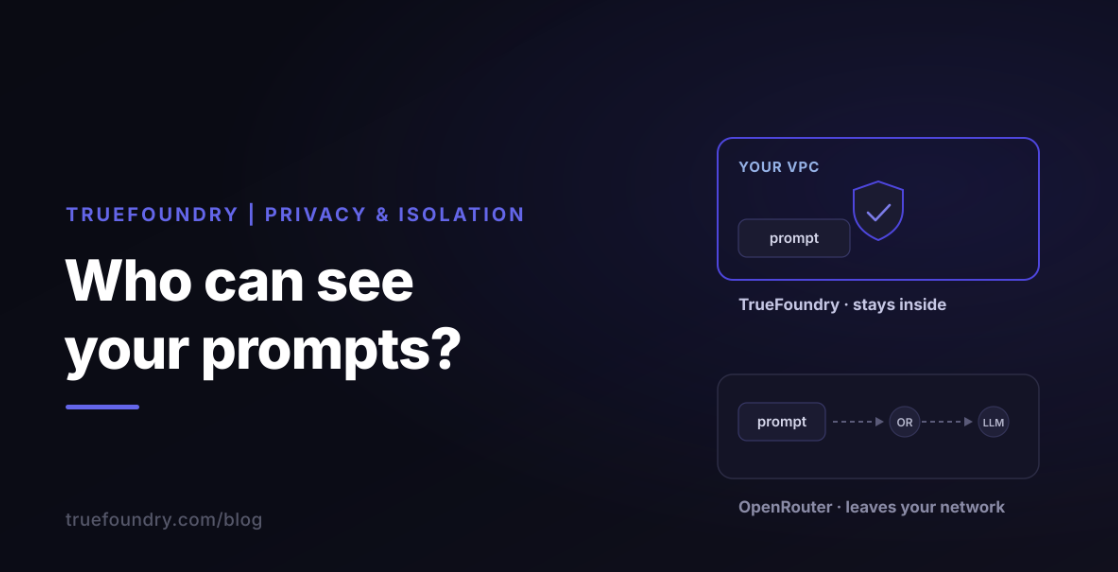
“Is OpenRouter safe?” is the question we hear most often from teams who have adopted it for one project and are now being asked by security to justify it for the company. The honest answer is that OpenRouter's privacy posture is better than its reputation on one axis and weaker than its reputation on three others, and which of those matters depends entirely on whether you are a team of five or an organisation of fifty.
This post covers the tenancy and isolation heading of our TrueFoundry vs OpenRouter series: what each product stores, who can see it, how teams are partitioned inside one deployment, what is forced global, whether infrastructure is shared or dedicated, and the practical limits. It is written for the platform engineer or security lead doing that justification, and every claim is drawn from the two vendors' public documentation. If you want the broader picture first, our LLM gateway primer explains where a gateway sits in the stack.
Start with the part OpenRouter gets right. OpenRouter does not log prompts or completions out of the box. Only request metadata (timestamps, model, token counts, latency) is retained, for billing and operations. There is nothing for an administrator to read unless someone opts in.
The opt-in is Input & Output Logging, currently in beta, toggled in a workspace's Observability settings. Once enabled, prompts and completions appear on the Logs page; in an organisation only admins can view or toggle it, non-admin members cannot access stored content, storage sits in an isolated Google Cloud Storage project with separate access controls, and only generations made after enabling it are stored. It does not apply to requests through the EU or US regional endpoints, which are processed normally with logging skipped. Two separate opt-ins exist and should not be confused: Input & Output Logging, which stores content and shows it back to your admin, and a privacy-settings opt-in that trades prompt logging for a usage discount.
That is the OpenRouter data privacy story on OpenRouter's own infrastructure, and for a team that wants “nothing stored unless we say so” it is a genuinely good default. Three things sit on the other side of the ledger. Prompts always leave your network, and cross two boundaries (yours to OpenRouter, OpenRouter to the provider); zero-data-retention routing and in-region routing constrain what providers keep and where processing happens, not whether data leaves. The regional endpoints exclude content logging, so EU residency and prompt-level audit are mutually exclusive. And isolation between customer organisations is largely undocumented; the one explicit guarantee is that server-tool containers are scoped per account and workspace and never shared across tenants.
So: is OpenRouter secure for a solo developer? Its default is one of the cleanest in the market. Is it private in the sense an enterprise means, where data stays inside a boundary and a policy decides what is kept? No, and no configuration makes it so.
OpenRouter for teams means two levels: an organisation (the account) and workspaces inside it. There are no teams, projects or environment objects. All organisation members automatically get member access to the Default workspace, members can belong to several workspaces with their keys in each governed by that workspace's settings, and only organisation admins can create or delete workspaces or control who accesses each one. Environment separation is workspace-by-convention: a “prod” workspace and a “dev” workspace, with nothing in the product that knows the difference.
Per workspace you get API keys, guardrails, BYOK, routing, presets, plugins, observability, members and settings. Forced global at the account level: billing and credits (one bill, one pool), organisation membership and roles, management API keys, and account-level data policies plus allowed providers and models. The inheritance rule is good design and a real constraint at once: the account-level policy is the ceiling, and a workspace can only be more restrictive, so a platform team can set a global safety floor but cannot grant one workspace something the account forbids.
Three findings deserve a security reviewer's attention. First, OpenRouter's own documentation conflicts on key isolation: the Workspaces page says members create and manage their own keys, while the Organization Management page says keys created by any member can be used by all members, billed to the organisation's pool, with admins able to view every key. If the latter is current, “view your own, use anyone's” is a meaningful isolation weakness; the older page may simply predate workspaces, but it is worth asking. Second, an OpenRouter organization caps at 10 members, available by contacting support, so a fifty-engineer evaluation starts with a support ticket. Third, noisy-neighbour behaviour is not addressed, and because rate limits scale with account credit balance and credits sit above workspaces, one workspace's traffic plausibly consumes headroom shared by the rest.
Keys are scoped to one workspace and belong to the user who created them, with a spend limit, an optional reset interval, and guardrails assignable to individual keys or members. Budgets never pool: the same daily budget applied to three members gives each their own. Everything finer than workspace-plus-owner arrives through attached policy rather than being a property of the key.
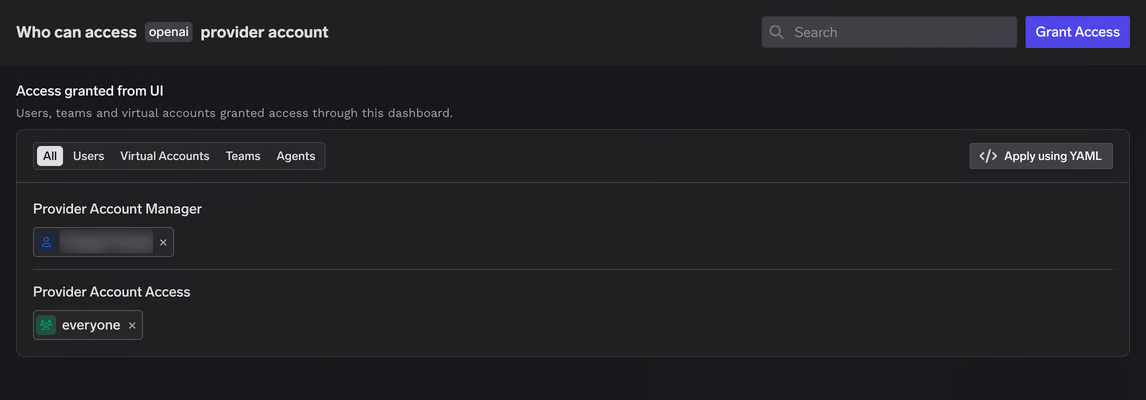
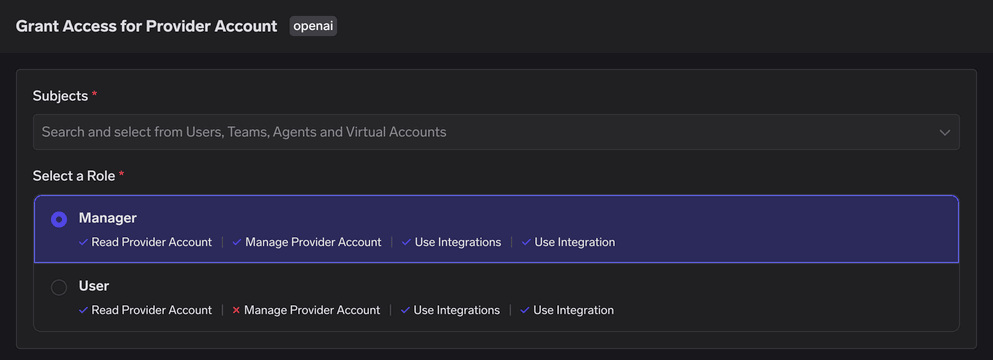
TrueFoundry nests Control plane → Tenants → Users, Teams, Virtual Accounts and resources. The tenant is the hard boundary: each has its own users, teams, virtual accounts, SSO configuration, identity providers, roles and resources (models, MCP servers, prompts, workspaces), and our documentation states flatly that there is no interaction between data in different tenants; users log in to each tenant separately, and each tenant can run its own SSO (user, team and account management). Teams group users for access grants, and virtual accounts give services and agents identities of their own.
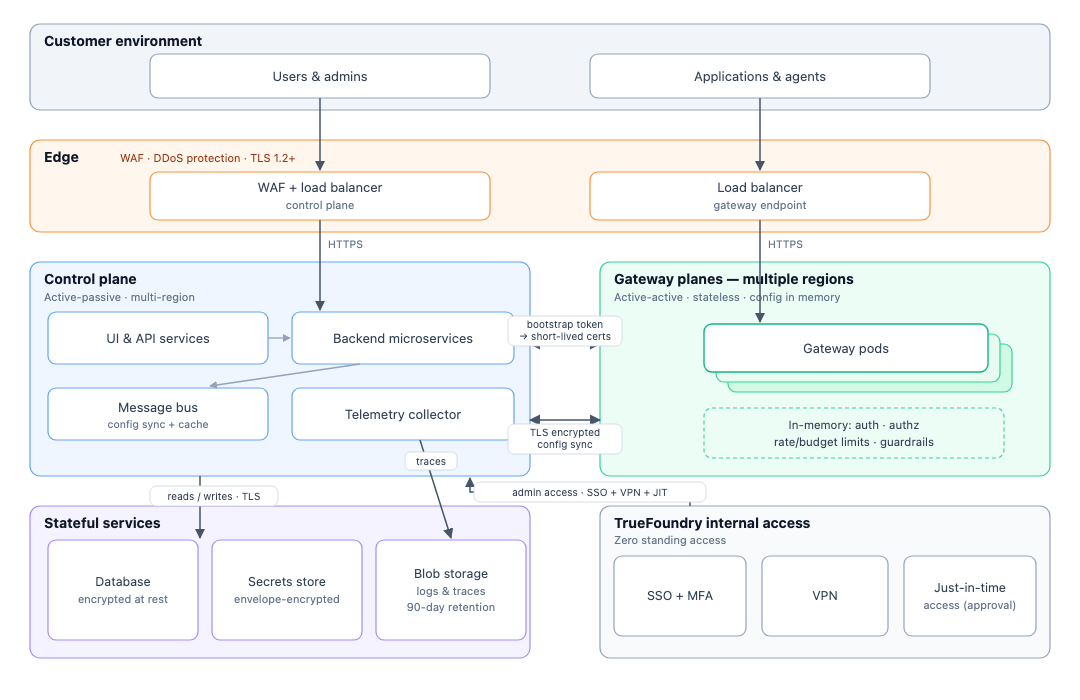
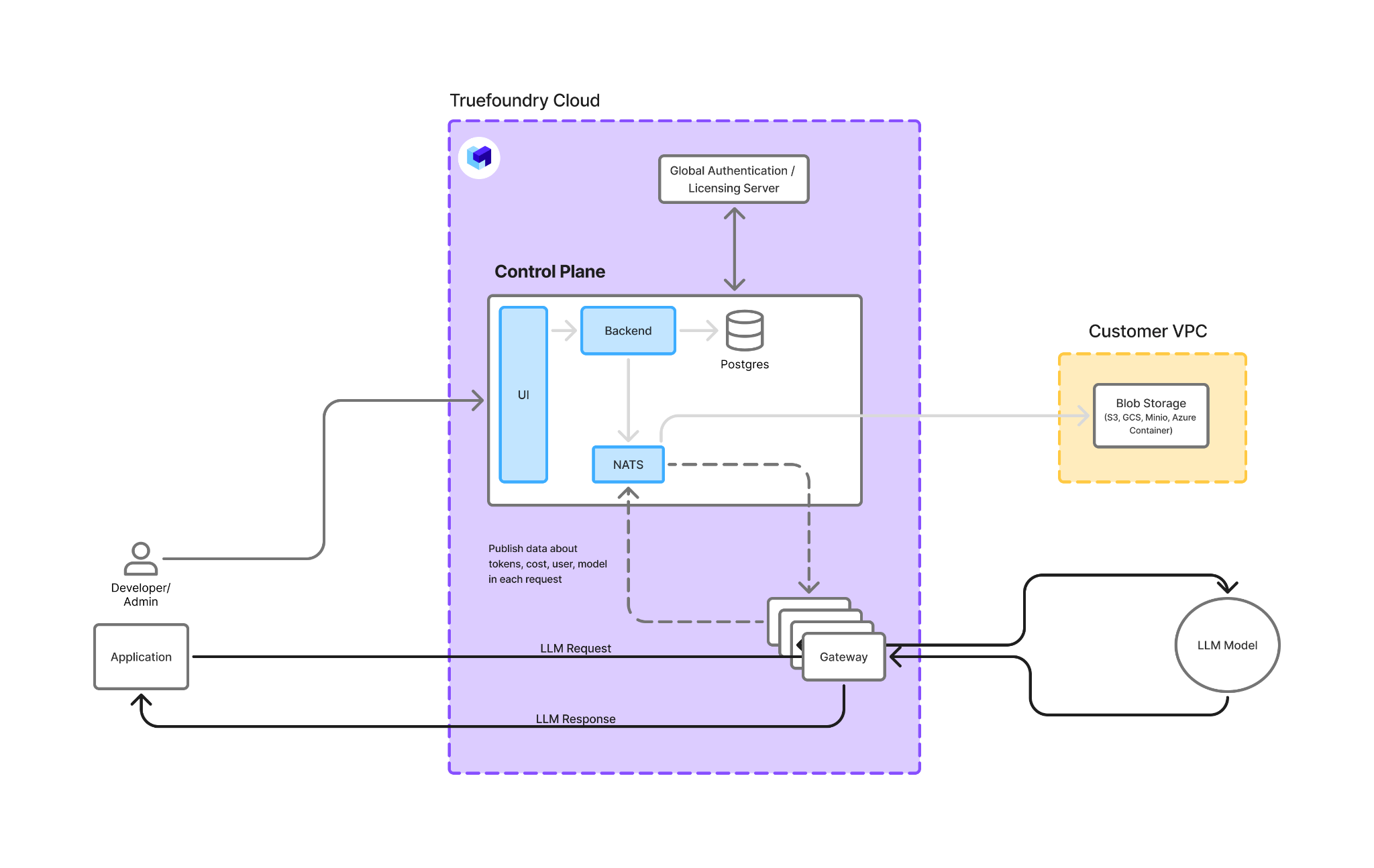
There is no separate environment object either, but we document the recommendation rather than leaving it to convention: per-environment virtual accounts inside one tenant for light separation, separate tenants (company-dev, company-prod) for config separation, or separate gateway or control planes for infrastructure separation, depending on deployment mode (setting up multiple environments). What is forced global: the control plane's own infrastructure (Postgres, NATS and ClickHouse are shared in a multi-tenant control plane), the platform version (all tenants on one control plane upgrade together, which is why we recommend two control planes for prod and non-prod), and the licensing dependency (multi-tenant control plane).
Key scoping is identity-mediated. A token resolves to a principal (a virtual account or a user), and RBAC on that principal decides what it reaches: model-account level, individual models, MCP servers and individual tools, with rate and budget limits attached at user, team, virtual-account or model level. You scope the principal, not the token, which keeps the lifecycle clean. No maximum number of tenants, teams, virtual accounts or keys is documented, and authorisation checks run in memory at the gateway plane, which is also what keeps the gateway at roughly 3–4 ms of added latency and 350+ requests per second per vCPU across 1,000+ LLMs.
This is the row where the two products are mirror images, and it is worth being exact.
On OpenRouter, cross-workspace visibility is total for organisation admins, who hold admin permissions everywhere; non-admin members see Activity and Logs at account level. But prompt content is invisible to everyone by default, because it is not stored. Privacy is a default, enforced by absence. The control is a workspace-level toggle: no per-request decision, no masking before storage, no variation by developer, model, environment or pattern.
On TrueFoundry, cross-tenant visibility is none; the boundary is absolute, and a self-hosted control-plane operator manages tenants without their data co-mingling. Within a tenant, admins automatically have access to all models, and request and response logs are browsable, so an in-tenant admin can see prompt content wherever logging is enabled (gateway access control). We state that plainly because the answer is a policy, not an absence. Logging Configs are named rules with conditions on subjects, models and metadata; each carries a log on/off toggle and redaction patterns (email, US SSN, credit card, India Aadhaar and PAN, plus custom regex with custom replacement text) applied to the stored copy only; deny wins across matching rules, redactions merge, a per-request header acts as a fallback, and each trace records which rule decided (logging config). So a platform team can log nothing for the legal team, log but mask for customer support, and log everything for the evaluation pipeline, and prove which rule applied to any trace.
Privacy by default is better for a team that will never configure anything. Privacy by policy is better for an organisation that has to answer “who could have seen this, and what was masked” to an auditor.
OpenRouter is shared infrastructure for everyone at every tier. No dedicated or single-tenant option is documented; in-region routing is the only infrastructure-level differentiation and it is geographic, not dedicated, so every enterprise customer in the EU shares the EU endpoint. The isolated GCS project used for stored prompts is component isolation, not per-tenant infrastructure.
TrueFoundry covers the spectrum. Managed SaaS is shared multi-tenant infrastructure, with an own-bucket variant for your traces. Hybrid gives you a dedicated gateway plane in your VPC with a shared TrueFoundry control plane, so prompts never leave your network. Fully self-hosted is dedicated to everything, and a self-hosted control plane can itself run multi-tenant with per-tenant subdomains for a platform team serving many internal tenants (modes of deployment). Multiple gateway planes under one control plane give VPC-level separation, with dev and prod VPCs documented. If you are already running models inside your own environment, our guide to on-premise LLM deployment covers how the gateway sits alongside them.
Within a shared TrueFoundry gateway plane, noisy-neighbour protection is rate and budget limits per team or virtual account; tenant-level quality of service is not documented, which is the same honest gap OpenRouter has, and the same question to ask either vendor.
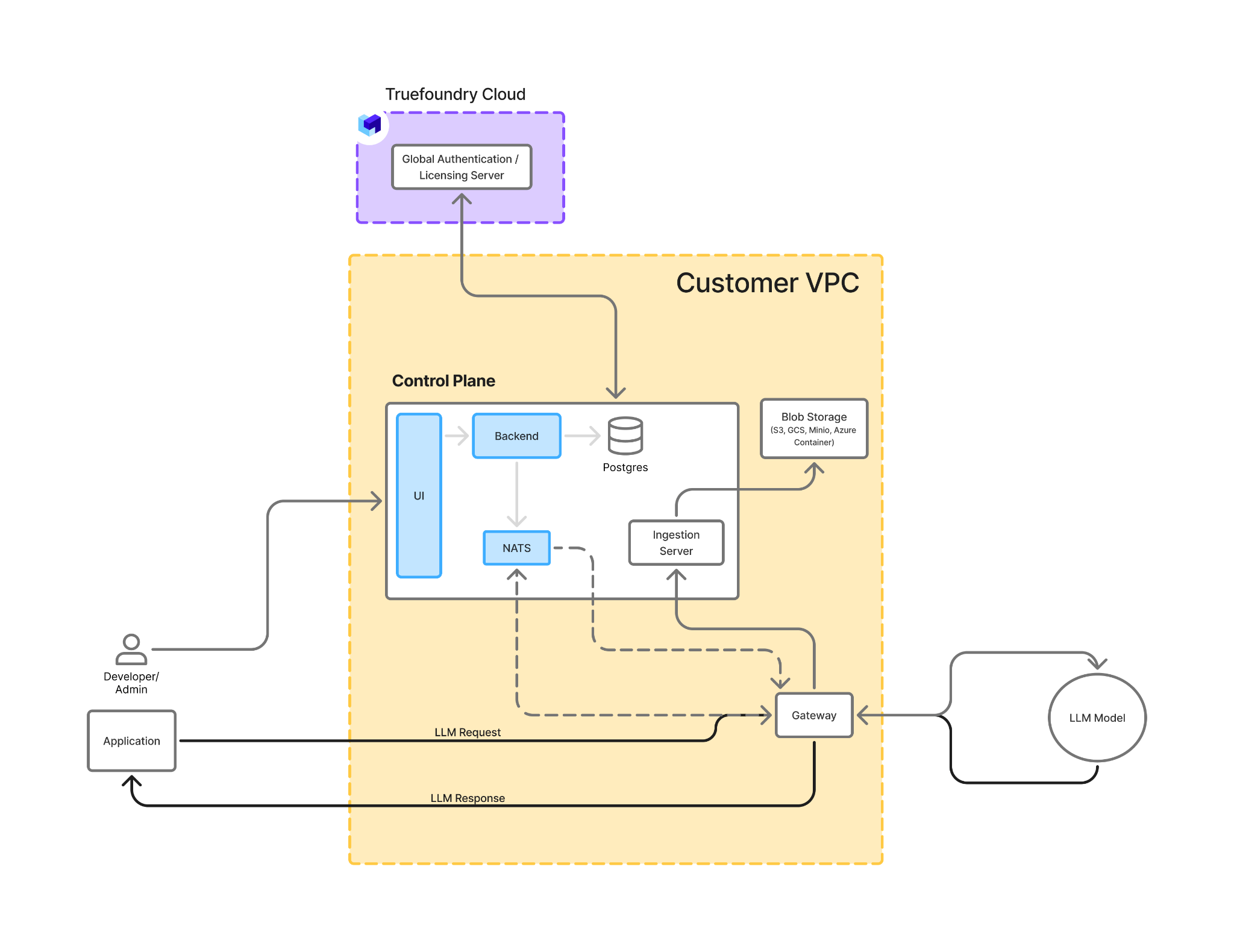
TrueFoundry capabilities are from our documentation; OpenRouter capabilities reflect its publicly documented functionality at the time of writing.
For the wider field of gateways that offer tenants, masking policy and dedicated infrastructure, see our guide to OpenRouter alternatives.
OpenRouter privacy is a strong default inside a shallow structure: nothing is stored unless you ask, but everything leaves your network, everyone shares the infrastructure, and the organisation model stops at workspaces, two roles and ten members. TrueFoundry's tenancy is deep and its privacy is deliberate: hard tenant boundaries, teams and virtual accounts, a logging policy that decides per team and per request what is stored and what is masked, and infrastructure that can be shared or entirely yours. For a small team, OpenRouter's default is hard to argue with. For an organisation that has to answer an auditor, the policy wins.
To see how a tenant, a logging policy and a dedicated gateway plane fit together, explore the TrueFoundry AI Gateway, or book a demo if you are sizing a multi-team rollout now.
TrueFoundry AI Gateway delivers ~3–4 ms latency, handles 350+ RPS on 1 vCPU, scales horizontally with ease, and is production-ready, while LiteLLM suffers from high latency, struggles beyond moderate RPS, lacks built-in scaling, and is best for light or prototype workloads.


By default, yes for storage: OpenRouter does not log prompts or completions unless an organisation admin opts in, and opt-in content is stored in an isolated project visible only to admins. It is not private in the network sense: every prompt leaves your environment, transits OpenRouter and then the provider, and infrastructure is shared at every tier. OpenRouter privacy is a default; TrueFoundry privacy is a policy you set per team, model and request.
Not by default. Only request metadata (timestamps, model, token counts, latency) is retained for billing. Prompts and completions are stored only if Input & Output Logging (beta) is enabled for a workspace, and even then not for requests sent through the EU or US regional endpoints.
Ten by default, accessible by contacting OpenRouter support. Workspaces and keys have no documented maximum.
Yes. TrueFoundry runs as managed SaaS, in hybrid mode with the gateway plane in your VPC, or fully self-hosted including air-gapped environments, on one control plane. In hybrid and self-hosted modes, prompt and response traffic never leaves your network.
TrueFoundry documents SOC 2 Type II, HIPAA and GDPR for its managed infrastructure, with RBAC, SSO and audit logging built in; current attestations are available through the Trust Center at trust.truefoundry.com.
Yes. The gateway is OpenTelemetry-compliant and exports traces and metrics to Grafana, Datadog, Prometheus and other OTLP backends, and the logging policy that decides what is stored also governs what is exported.



The latest news, articles, and resources sent to your inbox