



October 1, 2026
|
5 min read


Published: July 4, 2026
Blazingly fast way to build, track and deploy your models!
Claude Code ships locked to Anthropic's API by default. That's fine for solo developers but the moment you have a team, you need cost controls, usage visibility, and access to models beyond Anthropic's catalog. That's exactly what an AI gateway gives you.
LiteLLM is the most popular open-source option for this. Point Claude Code at a LiteLLM proxy and you can route to Bedrock, Vertex AI, Azure OpenAI, or any provider without touching how Claude Code behaves in the terminal. But LiteLLM's self-managed architecture creates real overhead at scale, and its enterprise feature gaps show up fast.
This guide covers both paths: how to set up Claude Code with LiteLLM today, and when switching to TrueFoundry AI Gateway makes more sense for your team.
Claude Code exposes a single environment variable - ANTHROPIC_BASE_URL that redirects all its API traffic to any endpoint that speaks the Anthropic Messages API. Set that variable to a gateway URL and every request Claude Code makes flows through your infrastructure instead of going directly to api.anthropic.com.
That one variable unlocks four things individual API keys can't give you:
.bash_profile files on developer laptops. The gateway holds provider credentials; developers authenticate to the gateway with scoped virtual keys.The question isn't whether to use a gateway. It's which one.
The mechanism is the same regardless of whether you're using LiteLLM, TrueFoundry, or any other Anthropic-compatible proxy. Two environment variables control everything:
# The gateway URL — must serve the Anthropic Messages API (/v1/messages)
export ANTHROPIC_BASE_URL="https://<your-gateway-url>"

# Your gateway's authentication token (NOT your Anthropic API key)
export ANTHROPIC_AUTH_TOKEN="<your-gateway-key>"
For persistent configuration across sessions, write these into Claude Code's settings.json:
{
  "env": {
    "ANTHROPIC_BASE_URL": "https://<your-gateway-url>",
    "ANTHROPIC_AUTH_TOKEN": "<your-gateway-key>"
  }
}
The settings file lives at ~/.claude/settings.json (user-global) or .claude/settings.json at the root of your project (team-shared). For team deployments, the project-level file is the right choice - it ensures every developer on the project uses the same gateway configuration without any per-machine setup.
From this point on, Claude Code has no idea it's talking to a gateway rather than Anthropic directly. Everything - streaming, tool use, model aliases, multi-turn conversations - works exactly as before.
LiteLLM runs as a local or self-hosted proxy that translates the Anthropic Messages API into whatever format each upstream provider expects. Here's the standard setup.
pip install litellm[proxy]Create a litellm-config.yaml that defines your model list. A minimal configuration with Anthropic direct and AWS Bedrock as a fallback looks like this:
model_list:
  - model_name: claude-opus-4-6
    litellm_params:
      model: anthropic/claude-opus-4-6
      api_key: os.environ/ANTHROPIC_API_KEY

  - model_name: claude-sonnet-4-6
    litellm_params:
      model: anthropic/claude-sonnet-4-6
      api_key: os.environ/ANTHROPIC_API_KEY

  - model_name: claude-haiku-4-5
    litellm_params:
      model: anthropic/claude-haiku-4-5-20251001
      api_key: os.environ/ANTHROPIC_API_KEY

litellm_settings:
  master_key: os.environ/LITELLM_MASTER_KEY
Export your keys and start the proxy:
export ANTHROPIC_API_KEY="sk-ant-..."
export LITELLM_MASTER_KEY="sk-1234567890"

litellm --config litellm-config.yaml
# Proxy running on http://0.0.0.0:4000
export ANTHROPIC_BASE_URL="http://localhost:4000"
export ANTHROPIC_AUTH_TOKEN="sk-1234567890"   # your LITELLM_MASTER_KEY
Or for permanent team configuration in .claude/settings.json:
{
  "env": {
    "ANTHROPIC_BASE_URL": "http://localhost:4000",
    "ANTHROPIC_AUTH_TOKEN": "sk-1234567890",
    "ANTHROPIC_MODEL": "claude-sonnet-4-6"
  }
}
Run claude in your terminal. Claude Code connects through LiteLLM, and LiteLLM forwards the request to Anthropic (or whichever provider you've configured).
The main reason teams add LiteLLM is to route to AWS Bedrock (for VPC-resident inference) or Google Vertex AI (for GCP-native workflows). Add providers to your model list:
model_list:
  # Primary: Anthropic direct
  - model_name: claude-sonnet-4-6
    litellm_params:
      model: anthropic/claude-sonnet-4-6
      api_key: os.environ/ANTHROPIC_API_KEY

  # Fallback: Bedrock
  - model_name: bedrock-claude-sonnet
    litellm_params:
      model: bedrock/us.anthropic.claude-sonnet-4-5-20250929-v1:0
      aws_region_name: us-east-1

  # Alternative: Vertex AI
  - model_name: vertex-claude
    litellm_params:
      model: vertex_ai/claude-3-5-sonnet@20241022
      vertex_project: your-gcp-project
      vertex_location: us-central1
Note on Bedrock and experimental headers: Claude Code attaches anthropic-beta experimental headers on every request. Bedrock doesn't accept all of them and can return a 400 invalid beta flag error. Set CLAUDE_CODE_DISABLE_EXPERIMENTAL_BETAS=1 in your ~/.claude/settings.json env block when routing through Bedrock.
LiteLLM works well for individual developers and small teams. As organizations grow, several gaps become significant:
Latency overhead. LiteLLM adds measurable proxy overhead under concurrent load. For Claude Code sessions, where a single coding task generates dozens of sequential API calls - this accumulates. At high RPS, LiteLLM struggles without horizontal scaling that requires manual Kubernetes configuration.
No native RBAC. LiteLLM's virtual key system is basic. Enforcing that Team A can only access Claude models while Team B can use any provider, or that a contractor's key expires after 30 days, requires custom middleware on top of LiteLLM.
Self-managed infrastructure burden. LiteLLM is open source. Every upgrade, Postgres migration, Redis cache configuration, and SSL certificate is your team's responsibility. For platform teams already stretched thin, this becomes a meaningful maintenance tax.
Budget enforcement is limited. LiteLLM supports budget limits per key, but proactive per-developer caps with real-time alerting before the limit is hit require additional tooling.
Compliance gaps. SOC 2, HIPAA, and GDPR-regulated workloads need audit logs, immutable request history, and data residency controls. These are not built into LiteLLM's open-source tier.
For teams running LiteLLM in production and bumping into these limits, the LiteLLM alternatives post covers the full landscape. The short version: TrueFoundry AI Gateway is purpose-built for the enterprise use case LiteLLM was never designed for.
TrueFoundry AI Gateway is a drop-in Anthropic-compatible endpoint. The same ANTHROPIC_BASE_URL mechanism that connects Claude Code to LiteLLM connects it to TrueFoundry - no changes to how Claude Code works, no new SDK, no client-side rewrites.
The difference is what happens at the gateway layer. TrueFoundry runs in your VPC, handles ~3–4 ms of gateway overhead at 350+ RPS on a single vCPU, and ships with RBAC, budget enforcement, audit logging, and multi-provider routing out of the box not as add-ons requiring custom configuration.
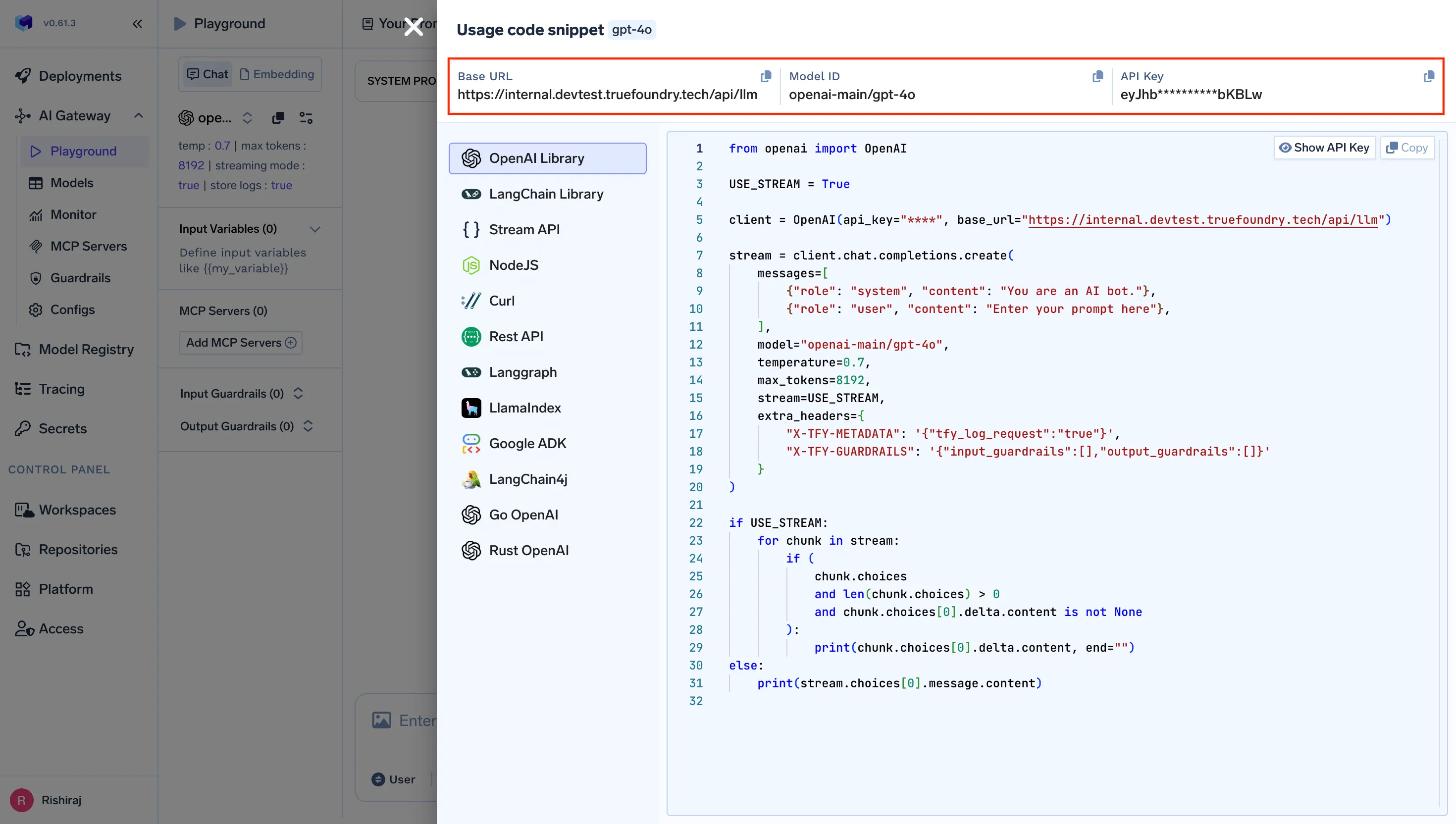
Log into your TrueFoundry control plane. Navigate to AI Gateway → Virtual Keys and create a scoped key for your team or project. You'll get:
https://<your-org>.truefoundry.cloud/api/llm/v1
export ANTHROPIC_BASE_URL="https://<your-org>.truefoundry.cloud/api/llm/v1"
export ANTHROPIC_AUTH_TOKEN="<your-truefoundry-virtual-key>"
プロジェクトレベルの永続的な設定には、以下に追加します .claude/settings.json:
{
  "env": {
    "ANTHROPIC_BASE_URL": "https://<your-org>.truefoundry.cloud/api/llm/v1",
    "ANTHROPIC_CUSTOM_HEADERS": "Authorization: Bearer <your-virtual-key>\nx-tfy-provider-name: <your-provider-name>",
    "ANTHROPIC_MODEL": "anthropic/claude-sonnet-4-6"
  }
}
実行 claude - Claude CodeはTrueFoundryを経由するようになりました。すべてのリクエストはログに記録され、属性が付けられ、その仮想キーに設定したポリシーによって管理されます。
LiteLLMのYAMLファイル設定とは異なり、TrueFoundryのプロバイダー設定はGatewayダッシュボードで行われます。Anthropicアカウントの追加、AWS BedrockまたはGoogle Vertexの認証情報の接続、モデルエイリアスの定義はすべて、プラットフォームチームが集中管理するUIから実行できます。
Claude Codeの組み込みモデルエイリアス(opus、 sonnet、 haiku) はTrueFoundryの仮想モデルにきれいにマッピングされます。ダッシュボードで一度マッピングを設定すれば、プロジェクトを使用するすべての開発者は .claude/settings.json 個々のマシンで環境変数を変更することなく、正しいモデルルーティングを自動的に取得できます。
Claude CodeがTrueFoundryを経由するようになると、Anthropicへの直接アクセスや基本的なLiteLLMでは存在しない5つの機能が利用可能になります。
コスト管理。 開発者ごとまたはチームごとの1日のトークン予算を仮想キーに直接設定できます。ゲートウェイは積極的に制限を適用し、予算を超えるリクエストは費用が発生する前にエラーを返すため、請求書が届いた後に通知されることはありません。
可観測性。 すべてのClaude Codeリクエストはエンドツーエンドで追跡されます。どの開発者が送信したか、どのモデルが処理したか、消費されたトークン数、費用などです。TrueFoundryはOpenTelemetryに準拠しており、追加の計測なしでGrafana、Datadog、またはPrometheusにデータを提供します。
セキュリティとガバナンス。 仮想キーは、開発者のマシン上の生のAnthropic APIキーを置き換えます。エンジニアが組織を離れる際、1箇所でそのキーを失効させることができます。基盤となるAnthropicの認証情報は、ゲートウェイのシークレットマネージャーから決して外に出ることはありません。SSOおよびMDM強制構成とのClaude Code統合を必要とする企業にとって、TrueFoundryのゲートウェイは強制レイヤーとなります。
マルチプロバイダーアクセス。 Claude Codeは1つのエンドポイントと通信します。そのエンドポイントの背後で、TrueFoundryは定義したポリシーに基づいて、Anthropic直接、AWS Bedrock、Google Vertex AI、Azure OpenAI、またはオンプレミスモデルにルーティングします。開発者のマシンに一切手を加えることなくプロバイダーを切り替えることができます。
信頼性。 自動フォールバックルーティングは、Anthropicのレート制限を透過的に処理します。プライマリプロバイダーが429または503を返した場合、Claude Codeがエラーを認識する前に、ゲートウェイは設定されたフォールバックに対して再試行します。中断を許容できない開発ワークフローにとって、これは軽微な不便とスプリントのブロックとの違いです。
LiteLLMは、個人開発者や小規模チームが実験を行うのに優れたプロキシです。TrueFoundryは、Claude Codeがチーム全体のツールであり、プラットフォームチームがガバナンスレイヤーを自ら構築することなく管理する必要があるシナリオのために構築されています。
LiteLLMをインストールするには、 pip install litellm[proxy]を実行し、 litellm-config.yaml でモデルを定義し、 litellm --configでプロキシを起動します。次に、 ANTHROPIC_BASE_URL=http://localhost:4000 と ANTHROPIC_AUTH_TOKEN をLiteLLMマスターキーに設定してから、 claudeを実行します。完全なセットアップについては、上記のステップバイステップセクションで説明しています。
はい。TrueFoundry AI GatewayはAnthropic互換のエンドポイントを公開しているため、LiteLLMからTrueFoundryへの切り替えは1行の変更で済みます。つまり、 ANTHROPIC_BASE_URL をTrueFoundryゲートウェイのURLに更新し、認証トークンを交換するだけです。Claude Codeは違いを認識しません。変わるのは、ゲートウェイの背後にあるすべて、つまり可観測性、コスト管理、RBAC、マネージドインフラストラクチャです。
シングルvCPUで350以上のRPSを処理し、ゲートウェイのオーバーヘッドは約3~4ミリ秒です。Claude Codeの応答時間(ミリ秒ではなく秒単位で測定)を考慮すると、ゲートウェイが開発者体験に知覚できる遅延を追加することはありません。
はい。TrueFoundryは、お客様のVPC、オンプレミス、エアギャップ環境、ハイブリッド環境、または複数のクラウドで動作し、データがお客様のインフラストラクチャから出ることはありません。これが、規制対象企業がSaaS専用ゲートウェイや自己管理型LiteLLMではなくTrueFoundryを選ぶ主な理由です。
LiteLLMは、Claude Codeを複数のAIプロバイダーに接続するための実績ある第一歩です。ソロ開発者や実験を行っている小規模チームであれば、数行のYAML設定でマルチプロバイダールーティングを実現できる堅実な選択肢となるでしょう。
Claude Codeがチームツールとなり、予算の適用、使用状況の監査、アクセス管理、コンプライアンス要件への対応を、インフラストラクチャを自社で構築することなく行う必要がある場合、自己管理型LiteLLMのセットアップの複雑さと機能のギャップは、実際のコストとなります。TrueFoundry AI Gatewayは、環境変数を1つ変更するだけで、これらすべてを処理するドロップインのAnthropic互換エンドポイントです。
TrueFoundry AI Gateway経由でClaude Codeのルーティングを開始 → truefoundry.com/ai-gateway
TrueFoundry AI Gateway delivers ~3–4 ms latency, handles 350+ RPS on 1 vCPU, scales horizontally with ease, and is production-ready, while LiteLLM suffers from high latency, struggles beyond moderate RPS, lacks built-in scaling, and is best for light or prototype workloads.



.png)



.png)
.png)
.png)

.png)
.png)
.png)
.png)
.png)
.png)
.png)





