


.png)
October 31, 2026
|
5 min de lecture


Accédez instantanément à un environnement TrueFoundry en direct. Déployez des modèles, acheminez le trafic LLM et explorez la plateforme complète : votre sandbox est prête en quelques secondes, aucune carte de crédit n'est requise.



.png)
Une méthode incroyablement rapide pour créer, suivre et déployer vos modèles !
Le serveur MCP Salesforce transforme votre CRM en outils appelables. Le Model Context Protocol est le standard ouvert qui permet à un agent IA de découvrir et d'invoquer des outils sur un système externe ; l'implémentation de Salesforce permet d'exposer des sObjects standard et personnalisés via ce protocole.
Ce qui le différencie de la plupart des serveurs MCP distants , c'est son emplacement : Salesforce héberge ses serveurs MCP depuis votre propre organisation, activés via le package géré TrueFoundry Salesforce — aucun hôte tiers intermédiaire, aucune application OAuth à configurer.
Ce que vous activez détermine ce à quoi les agents peuvent accéder :
Ces deux options correspondent à la seule décision qui compte : cet agent doit-il modifier des enregistrements ou simplement les lire ? L'onglet Serveurs Salesforce dans la configuration liste ce que votre édition peut activer. [VÉRIFIER] Il n'est pas documenté si d'autres variantes que ces deux-là peuvent y apparaître.
Au sein de chaque serveur, la surface d'exposition correspond à votre modèle de données. La documentation décrit les outils par capacité et par type d'objet plutôt que par des noms de fonctions fixes ; l'onglet Outils sur la page de détails du serveur constitue donc l'inventaire réel pour votre organisation.
La chaîne de workflows utiles lit, et écrit occasionnellement :
Trois de ces quatre cas sont purement en lecture, et c'est là la tendance. La plupart des besoins des équipes vis-à-vis d'un serveur MCP CRM concernent la lecture. La distinction entre lecture et écriture n'est donc pas un principe abstrait ici ; c'est une question concrète qui se règle au moment de l'activation, et la plupart des agents doivent rester en lecture seule.
Qu'un analyste RevOps connecte Salesforce à Claude Desktop, c'est très bien. Que cette même intégration soit déployée auprès de trente personnes dans les ventes, le support et la finance, c'est une autre histoire.
Un agent disposant d'un accès en écriture peut modifier les chiffres présentés au conseil d'administration. Les montants des opportunités, les dates de clôture et les étapes alimentent les prévisions ; les champs des comptes servent aux rapports sur les territoires et l'ARR. Un agent qui « nettoie » une étape ou supprime un doublon suspect ne se contente pas d'une fuite de données : il corrompt le système de référence sur lequel la finance s'appuie pour clôturer le trimestre, et un historique écrasé n'est pas un commit que l'on peut annuler. L'injection de prompt aggrave la situation : une instruction glissée dans la description d'un dossier atteint un agent de triage qui possède les mêmes droits d'écriture qu'un agent dédié à l'hygiène des données.
Un agent disposant d'un accès en lecture peut intégrer l'intégralité du pipeline dans le contexte d'un modèle. Une requête large sur les opportunités renvoie chaque affaire ouverte, son montant et son propriétaire — et avec un compte de service partagé, cette requête n'est limitée par aucune règle de partage. Vos prévisions deviennent alors un prompt.
Les identifiants partagés annulent le modèle de permissions propre à Salesforce. Profils, ensembles d'autorisations, sécurité au niveau du champ, règles de partage : les équipes passent des années à les configurer. Puis, une intégration s'authentifie avec un seul identifiant de niveau administrateur, chaque requête hérite des droits administrateur, et tout ce travail est réduit à néant.
Aucune attribution en cas de modification. L'historique des champs vous indique qu'un enregistrement a été modifié et quel utilisateur l'a fait, mais pas qu'un agent l'a modifié suite à une demande dans un fil de discussion Slack.
Rien de tout cela ne remet en cause la connexion à Salesforce. Cela plaide en faveur d'un plan de contrôle en amont, ce à quoi sert une passerelle MCP .
Comme le serveur réside dans votre organisation, cette intégration comporte de véritables prérequis, contrairement à la plupart des MCP gérés.
Prévoyez environ dix minutes, principalement pour l'installation et l'activation.
TrueFoundry provisionne Salesforce en tant que MCP géré par TrueFoundry: la plateforme gère l'URL du serveur, l'authentification sortante, les portées et les identifiants, et les maintient à jour au gré des changements de Salesforce :
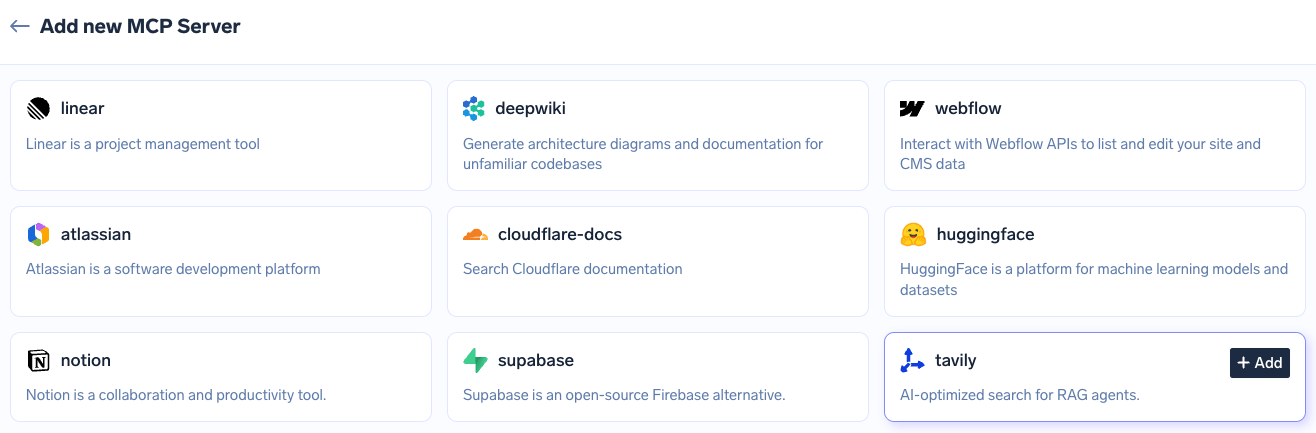
Catalogue des MCP gérés par TrueFoundry affichant les tuiles des fournisseurs avec un bouton Ajouter, où la plateforme fournit chaque URL, détail d'authentification, portée et identifiant
Comme le serveur vous appartient, Salesforce ajoute trois étapes côté organisation en amont.
Étape 1 — Installez le package TrueFoundry Salesforce MCP. Connectez-vous à votre organisation en tant qu'administrateur, puis ouvrez le lien d'installation dans la même session de navigateur :
https://login.salesforce.com/packaging/installPackage.apexp?p0=04ta7000001FUejAAG
Sur l'écran d'installation, choisissez Installer pour tous les utilisateurs, cliquez sur Installer, et attendez la confirmation de réussite.
Étape 2 — Activez le service MCP. Dans Configuration, recherchez Interface utilisateur dans la recherche rapide, trouvez Activer le service MCP, activez-le, puis Enregistrer.
Étape 3 — Activez le serveur MCP. Toujours dans Configuration, recherchez Serveurs MCP et ouvrez l'onglet Serveurs Salesforce . Trouvez le serveur souhaité — sobject-all pour un accès complet en lecture/écriture, sobject-reads pour un accès en lecture seule — puis cliquez sur Activer; cela peut prendre jusqu'à deux minutes. Lisez la section suivante avant de faire votre choix.
Étape 4 — Connexion dans TrueFoundry. Allez dans Serveurs MCP, trouvez Salesforce MCP, et cliquez sur Connecter. Vous êtes redirigé vers une page de connexion et d'autorisation Salesforce : connectez-vous, examinez les autorisations demandées et cliquez sur Autoriser.
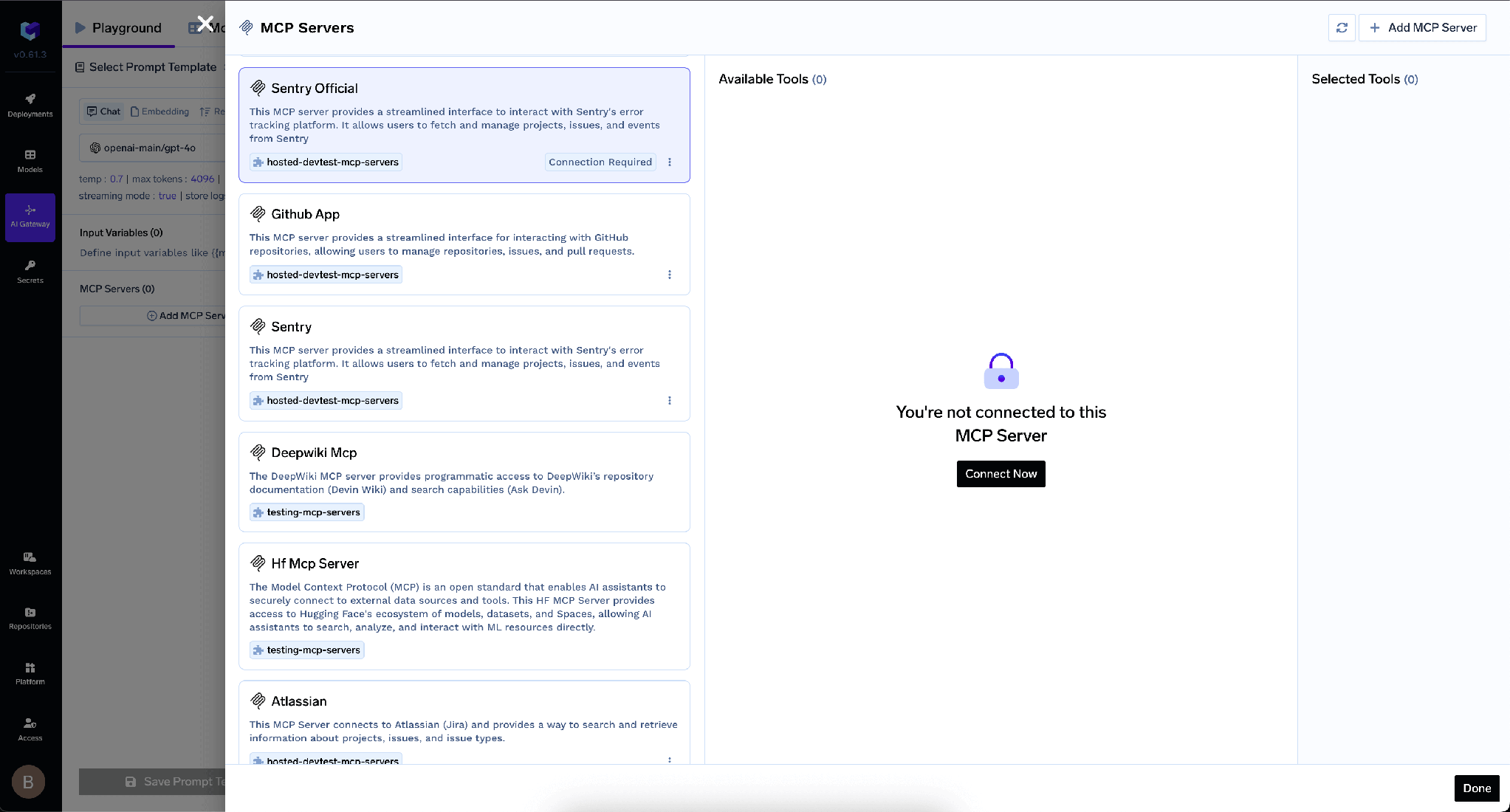
Panneau Serveurs MCP affichant l'état non connecté pour un serveur MCP avec un bouton Connecter maintenant qui lance le flux d'autorisation OAuth
Étape 5 — Vérification. Le serveur devrait indiquer Connecté et l'onglet Outils devrait afficher ses outils. Cliquez sur Essayer sur n'importe quel outil, ou exécutez une commande telle que « lister tous les comptes », pour confirmer l'aller-retour.
Notez ce que vous n'avez pas fait : aucune application client externe, aucune application connectée, aucun identifiant ou secret client, aucune portée OAuth, aucune URL de rappel.
TrueFoundry sépare l'authentification entrante — la manière dont un client s'authentifie auprès de la passerelle — de l'authentification sortante, la manière dont la passerelle s'authentifie auprès de Salesforce.
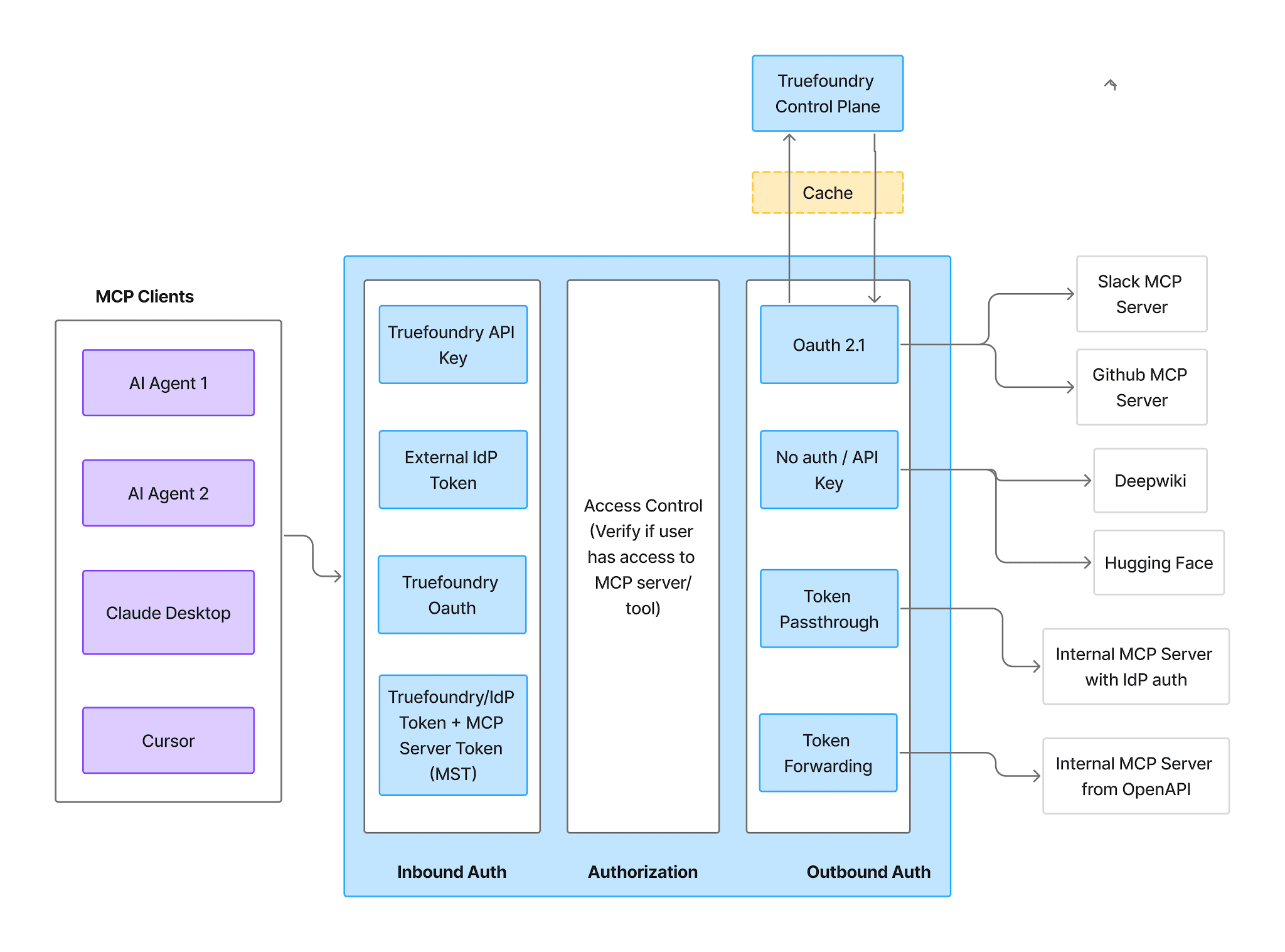
Flux d'authentification et d'autorisation de la passerelle MCP illustrant l'authentification entrante, le contrôle d'accès et l'authentification sortante comme trois étapes distinctes
Entrant — les clients s'authentifient auprès de l'AI Gateway via l'une des méthodes suivantes :
TrueFoundry AI Gateway offre une latence d'environ 3 à 4 ms, gère plus de 350 RPS sur 1 processeur virtuel, évolue horizontalement facilement et est prête pour la production, tandis que LiteLM souffre d'une latence élevée, peine à dépasser un RPS modéré, ne dispose pas d'une mise à l'échelle intégrée et convient parfaitement aux charges de travail légères ou aux prototypes.




C'est un serveur Model Context Protocol qui expose les données du CRM Salesforce — comptes, contacts, opportunités, requêtes et objets personnalisés — sous forme d'outils qu'un agent d'IA peut appeler. Salesforce le sert depuis votre propre org : installez le package managé TrueFoundry Salesforce, activez le MCP Service dans Setup, puis activez sobject-reads pour un accès en lecture seule ou sobject-all pour un accès complet en lecture et en écriture.
Cela dépend du serveur que vous activez. sobject-reads expose des outils de lecture sur vos sObjects ; sobject-all ajoute la création, la mise à jour et la suppression. Les outils sont paramétrés par type d'objet et par filtres de requête plutôt que publiés sous forme de liste fixe : l'onglet Tools est donc l'inventaire de référence pour votre org — et chaque outil qui y figure peut être activé, désactivé, redécrit ou annoté.
C'est l'une des intégrations les plus faciles à gouverner : l'OAuth par utilisateur signifie que chaque action s'exécute en tant qu'utilisateur authentifié, avec ses permissions CRUD, sa sécurité au niveau des champs et ses règles de partage. Le risque résiduel est le chemin d'écriture — activez sobject-reads lorsque les écritures ne sont pas nécessaires, désactivez les outils d'écriture lorsqu'elles le sont, et soumettez le reste à une approbation humaine de validité Once.
Oui. TrueFoundry s'exécute dans votre VPC, on-premise, en environnement air-gapped ou en hybride, de sorte que les prompts et les réponses ne quittent jamais votre domaine, même lorsque vous routez vers de nombreux fournisseurs.
Oui. Il comprend une MCP Gateway, une Agent Gateway et un MCP & Agents Registry avec un contrôle d'accès au niveau des outils. Les agents construits avec LangGraph, CrewAI, AutoGen ou un framework maison peuvent tous être gouvernés de manière centralisée.
Oui. La passerelle est compatible OpenTelemetry et s'intègre à Grafana, Datadog, Prometheus, ou à votre pile technologique préférée. Elle trace chaque requête, du prompt à l'exécution de l'outil et du modèle, vous offrant ainsi une journalisation unifiée sans avoir à remplacer ce que vous utilisez déjà.



Les dernières nouvelles, articles et ressources envoyés dans votre boîte de réception
.png)
.png)
.webp)
.webp)

.png)
.png)
.png)
.png)
.png)
.png)
.png)

.png)


