


.png)
October 31, 2026
|
5 min de lecture


Accédez instantanément à un environnement TrueFoundry en direct. Déployez des modèles, acheminez le trafic LLM et explorez la plateforme complète : votre sandbox est prête en quelques secondes, aucune carte de crédit n'est requise.



.png)
Une méthode incroyablement rapide pour créer, suivre et déployer vos modèles !
Le serveur MCP Atlassian est le serveur MCP Rovo d'Atlassian : un point de terminaison Model Context Protocol distant qui expose Jira, Confluence et Compass en tant qu'outils exploitables par un agent IA. Il est accessible via https://mcp.atlassian.com/v1/mcp et utilise l'authentification OAuth2.
Il couvre trois produits :
La documentation décrit les fonctionnalités en termes de recherche de tickets, de lecture de pages et de création de demandes, plutôt que par le nom des fonctions d'outils. La liste officielle est celle qui apparaît sous l'onglet Outils après votre autorisation, car la passerelle reflète la liste en temps réel provenant de la source.
Comme il s'agit d'un service distant, rien n'est à exécuter localement — pas de conteneur Docker, ni de processus npx par ordinateur. Il suffit de pointer un client MCP vers une URL et de s'authentifier, ce qui constitue l'avantage des serveurs MCP distants en général.
Les cas d'usage intéressants combinent des outils à travers différents produits :
La distinction importante ne réside pas seulement dans la lecture par rapport à l'écriture, mais dans le public par rapport au confidentiel. Lire un ticket Jira est sans risque. En créer un est réversible. La lecture de Confluence mérite la plus grande attention : c'est là que les entreprises stockent les présentations pour le conseil d'administration, les grilles de salaires, les post-mortems nommant des individus et l'architecture de sécurité. Un agent en lecture seule avec un accès illimité à Confluence a un rayon d'action bien plus large qu'un agent capable d'écrire mais limité à un seul projet Jira.
Cette asymétrie est propre à Atlassian, et c'est pourquoi conseiller de « désactiver les outils d'écriture » est insuffisant dans ce contexte.
Qu'un ingénieur connecte cela à Cursor, c'est acceptable. Mais trente ingénieurs, plus un agent de support et un agent de documentation, c'est une tout autre histoire.
La liste d'autorisation est une décision à l'échelle de l'organisation. Elle est définie par organisation, et non par équipe. Quiconque détient les droits d'administrateur sur admin.atlassian.com décide si cette intégration doit exister ou non. Connecter des outils de manière ponctuelle conduit à accumuler des domaines autorisés que personne ne contrôle.
Absence de piste d'audit sur l'intention. Atlassian enregistre qu'un appel API a été effectué via le compte d'un utilisateur. Il n'enregistre pas que votre agent de triage l'a effectué en répondant à une sollicitation issue d'un fil de discussion Slack. Lorsqu'un ticket apparaît sans que personne ne se souvienne l'avoir créé, il est impossible de reconstituer la chaîne des événements.
La portée de lecture de Confluence correspond à « tout ce que l'utilisateur peut voir ». Les autorisations par utilisateur sont une conception pertinente, mais la plupart des instances ont des permissions d'espace Confluence permissives par héritage historique. Ce qu'un utilisateur peut voir est généralement bien plus vaste que ce dont une tâche a besoin, et l'agent ne peut pas faire la distinction.
L'injection de prompt a un terrain où s'exécuter. Les descriptions Jira et les pages Confluence sont des textes lus par un agent, mais qui peuvent avoir été rédigés par quelqu'un d'autre. Un ticket soumis par un utilisateur externe via un portail de service, contenant des instructions, et lu lors du triage avec un accès Confluence actif dans la même session : voilà un exemple de passage d'une entrée non fiable à une sortie sensible. Le problème n'est pas que l'agent a mal agi, mais que ses autorisations étaient plus étendues que sa tâche.
Rien de tout cela ne justifie d'éviter le serveur. Ce sont des raisons d'y ajouter un plan de contrôle, ce à quoi sert une passerelle MCP .
C'est l'étape qui bloque les équipes, elle est donc prioritaire. Il s'agit d'un prérequis côté Atlassian et aucun paramètre TrueFoundry ne peut s'y substituer.
Vous avez besoin : d'une autorisation pour ajouter des serveurs MCP dans TrueFoundry, d'une organisation Atlassian Cloud avec Jira, Confluence ou Compass, et d'un accès administrateur d'organisation sur admin.atlassian.com.
Dans l'administration Atlassian, sélectionnez votre organisation et ouvrez Applications → Paramètres IA → Serveur Rovo MCP. Sous Domaines autorisés, ajoutez le domaine de votre plan de contrôle TrueFoundry :
https://<tfy-control-plane-base-url>/**
Il n'y a aucun client OAuth à créer. Atlassian gère l'enregistrement dynamique des clients pour les domaines figurant sur la liste blanche. Pour la plupart des serveurs MCP distants auto-enregistrés, vous devriez créer une application OAuth dans le portail du fournisseur, définir un URI de redirection et stocker un identifiant client ainsi qu'un secret. Ici, ce n'est pas nécessaire : l'entrée dans la liste blanche suffit la relation de confiance.
La liste d'autorisation est votre coupe-circuit. La suppression du domaine révoque les nouvelles connexions OAuth. L'arrêt de cette intégration à l'échelle de l'organisation se fait en une seule modification dans l'administration Atlassian, indépendamment de la passerelle. Peu d'intégrations offrent un contrôle aussi net ; notez bien où il se trouve.
Une mise en garde concernant le réseau : si la liste d'autorisation IP Atlassian est activée, autorisez également le trafic provenant de l'environnement où TrueFoundry se connecte au serveur MCP distant.
Étape 1 — Ouvrez le sélecteur. Dans TrueFoundry, ouvrez la passerelle MCP, cliquez sur Ajouter un serveur MCP, puis sélectionnez Atlassian.
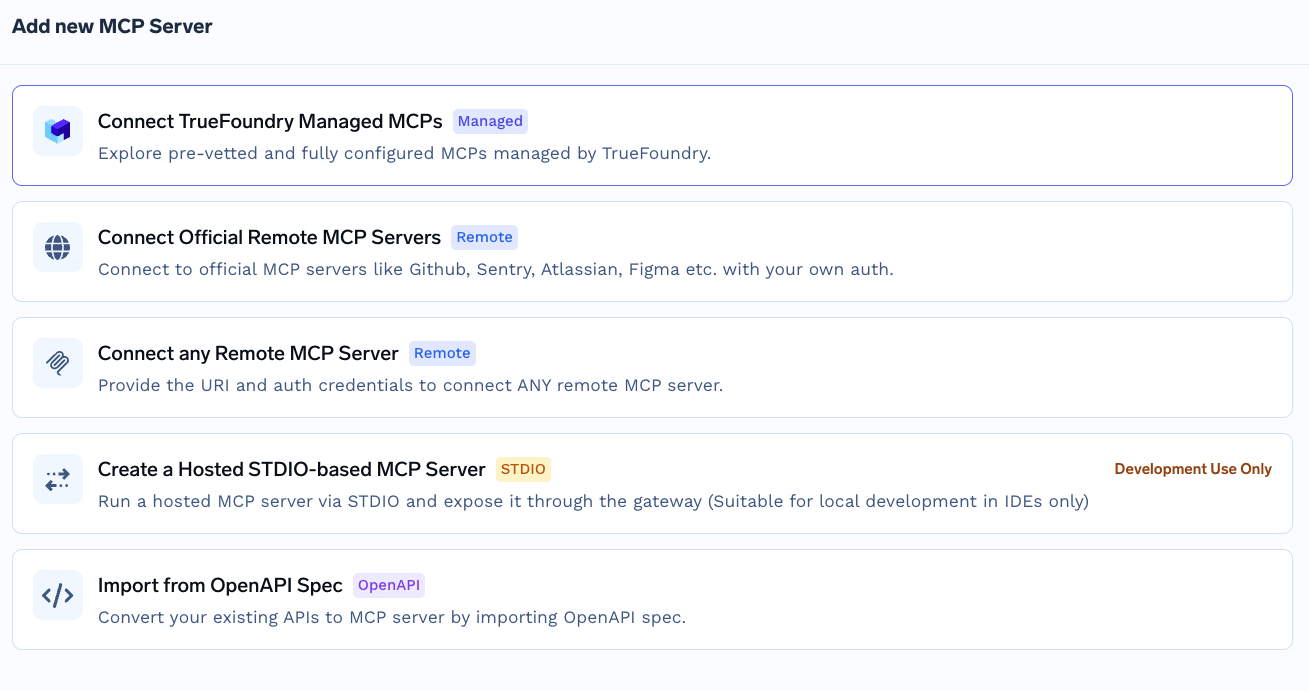
Sélecteur « Ajouter un serveur MCP » affichant les chemins d'enregistrement disponibles, notamment les serveurs distants officiels, tout serveur MCP distant, les MCP gérés par TrueFoundry, STDIO hébergé et l'importation depuis une spécification OpenAPI
Il ne s'agit pas du flux de catalogue MCP géré par TrueFoundry, où vous fournissez uniquement un nom et où la plateforme gère tous les champs. Atlassian nécessite des valeurs explicites, car la relation de confiance provient de la liste d'autorisation plutôt que d'identifiants détenus par la plateforme.
Étape 2 — Configurez le serveur. Utilisez ces valeurs :
Champ
Valeur
Nom
atlassian
Description
Atlassian est une plateforme de développement logiciel
URL
https://mcp.atlassian.com/v1/mcp
Authentification
OAuth2
Activez Données d'authentification et sélectionnez l'onglet OAuth2 . Comme votre domaine est sur liste blanche, vous n'avez pas besoin d'identifiant client ni de secret — laissez ces champs vides.
Étape 3 — Ajouter des collaborateurs. Ajoutez les utilisateurs ou les équipes qui doivent utiliser les outils Atlassian. Attribuez Gestionnaire de serveur MCP aux administrateurs et Utilisateur du serveur MCP aux consommateurs.
Étape 4 — Enregistrer et autoriser. Cliquez sur Ajouter un serveur MCP. Chaque utilisateur ouvre ensuite la section Outils du serveur et clique sur Connecter maintenant pour terminer l'authentification OAuth Atlassian. Les outils apparaissent alors et peuvent être testés depuis le Terrain de jeu des agents.
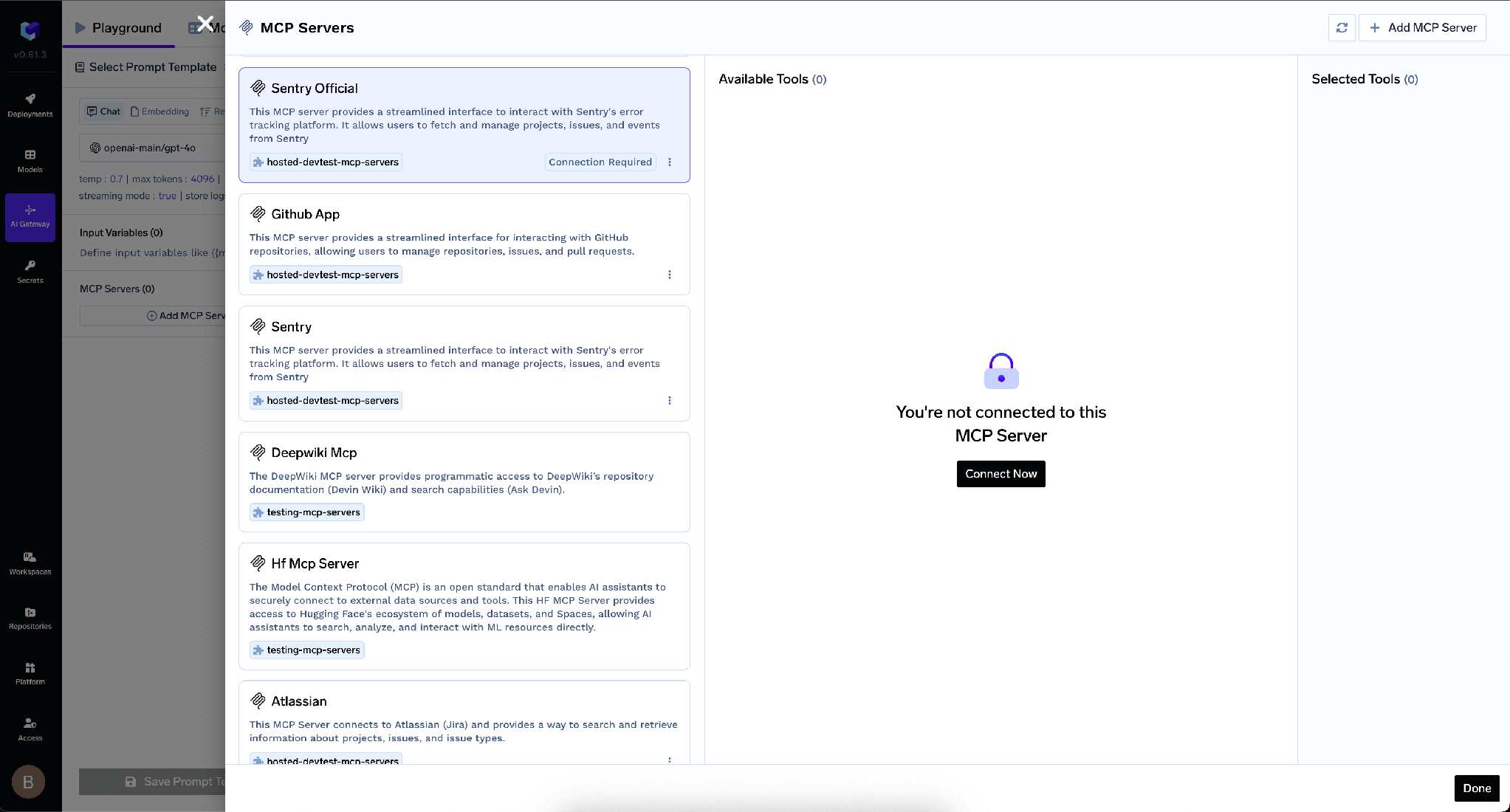
Panneau des serveurs MCP affichant un serveur non autorisé dans l'état « Vous n'êtes pas connecté à ce serveur MCP » avec un bouton Connecter maintenant
TrueFoundry sépare l'authentification entrante — la manière dont un client s'authentifie auprès de la passerelle — de l'authentification sortante, la manière dont la passerelle s'authentifie auprès d'Atlassian. Ces couches sont indépendantes.
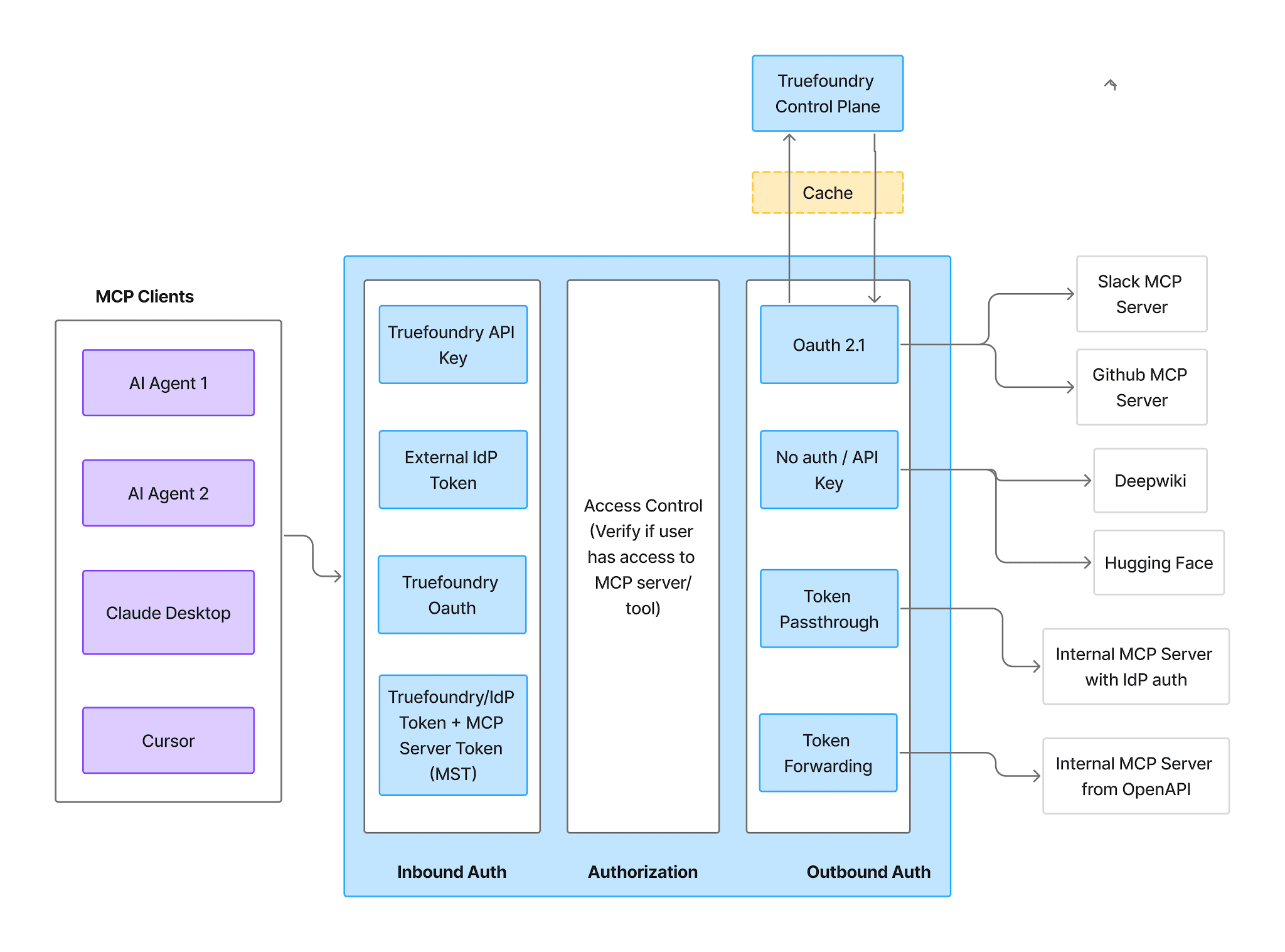
Flux d'authentification et d'autorisation de la passerelle MCP montrant l'authentification entrante, le contrôle d'accès et l'authentification sortante comme trois étapes distinctes
Entrant — quatre méthodes prises en charge :
TrueFoundry AI Gateway offre une latence d'environ 3 à 4 ms, gère plus de 350 RPS sur 1 processeur virtuel, évolue horizontalement facilement et est prête pour la production, tandis que LiteLM souffre d'une latence élevée, peine à dépasser un RPS modéré, ne dispose pas d'une mise à l'échelle intégrée et convient parfaitement aux charges de travail légères ou aux prototypes.




Le serveur Rovo MCP d'Atlassian — un serveur Model Context Protocol distant à l'adresse https://mcp.atlassian.com/v1/mcp qui expose Jira, Confluence et Compass sous forme d'outils qu'un agent peut appeler : rechercher des tickets, lire des pages, créer des tickets. Il utilise OAuth2, et un administrateur de l'organisation doit d'abord ajouter votre domaine de connexion à la liste d'autorisation.
En deux phases. Un administrateur de l'organisation ajoute le domaine de votre plan de contrôle TrueFoundry sous Apps → AI settings → Rovo MCP server → Allowed domains. Ensuite, dans TrueFoundry, ouvrez MCP Gateway → Add MCP Server → Atlassian, définissez l'URL sur https://mcp.atlassian.com/v1/mcp et l'authentification sur OAuth2 (sans client ID ni secret), ajoutez des collaborateurs, enregistrez, puis demandez à chaque utilisateur de cliquer sur Connect Now.
Oui. Chaque utilisateur opère avec ses permissions Jira, Confluence et Compass existantes, de sorte qu'un agent agissant pour quelqu'un voit exactement ce que cette personne peut voir. C'est le plancher, pas le plafond — restreignez davantage avec des interrupteurs par outil et des politiques d'approbation.
Oui. TrueFoundry s'exécute dans votre VPC, on-premise, en environnement air-gapped ou en hybride, de sorte que les prompts et les réponses ne quittent jamais votre domaine, même lorsque vous routez vers de nombreux fournisseurs.
Oui. Il comprend une MCP Gateway, une Agent Gateway et un MCP & Agents Registry avec un contrôle d'accès au niveau des outils. Les agents construits avec LangGraph, CrewAI, AutoGen ou un framework maison peuvent tous être gouvernés de manière centralisée.
Oui. La passerelle est compatible OpenTelemetry et s'intègre à Grafana, Datadog, Prometheus, ou à votre pile technologique préférée. Elle trace chaque requête, du prompt à l'exécution de l'outil et du modèle, vous offrant ainsi une journalisation unifiée sans avoir à remplacer ce que vous utilisez déjà.



Les dernières nouvelles, articles et ressources envoyés dans votre boîte de réception
.png)
.png)
.webp)
.webp)

.png)
.png)
.png)
.png)
.png)
.png)
.png)

.png)


