


September 22, 2026
|
5 minutos de lectura


Obtenga acceso instantáneo a un entorno TrueFoundry en vivo. Implemente modelos, dirija el tráfico de LLM y explore la plataforma completa: su sandbox estará listo en segundos, sin necesidad de tarjeta de crédito.



Published: June 23, 2026
¡Una forma increíblemente rápida de crear, rastrear e implementar sus modelos!
Claude Code ships locked to Anthropic's API by default. That's fine for solo developers but the moment you have a team, you need cost controls, usage visibility, and access to models beyond Anthropic's catalog. That's exactly what an AI gateway gives you.
LiteLLM is the most popular open-source option for this. Point Claude Code at a LiteLLM proxy and you can route to Bedrock, Vertex AI, Azure OpenAI, or any provider without touching how Claude Code behaves in the terminal. But LiteLLM's self-managed architecture creates real overhead at scale, and its enterprise feature gaps show up fast.
This guide covers both paths: how to set up Claude Code with LiteLLM today, and when switching to TrueFoundry AI Gateway makes more sense for your team.
Claude Code exposes a single environment variable - ANTHROPIC_BASE_URL that redirects all its API traffic to any endpoint that speaks the Anthropic Messages API. Set that variable to a gateway URL and every request Claude Code makes flows through your infrastructure instead of going directly to api.anthropic.com.
That one variable unlocks four things individual API keys can't give you:
.bash_profile files on developer laptops. The gateway holds provider credentials; developers authenticate to the gateway with scoped virtual keys.The question isn't whether to use a gateway. It's which one.
The mechanism is the same regardless of whether you're using LiteLLM, TrueFoundry, or any other Anthropic-compatible proxy. Two environment variables control everything:
# The gateway URL — must serve the Anthropic Messages API (/v1/messages)
export ANTHROPIC_BASE_URL="https://<your-gateway-url>"

# Your gateway's authentication token (NOT your Anthropic API key)
export ANTHROPIC_AUTH_TOKEN="<your-gateway-key>"
For persistent configuration across sessions, write these into Claude Code's settings.json:
{
  "env": {
    "ANTHROPIC_BASE_URL": "https://<your-gateway-url>",
    "ANTHROPIC_AUTH_TOKEN": "<your-gateway-key>"
  }
}
The settings file lives at ~/.claude/settings.json (user-global) or .claude/settings.json at the root of your project (team-shared). For team deployments, the project-level file is the right choice - it ensures every developer on the project uses the same gateway configuration without any per-machine setup.
From this point on, Claude Code has no idea it's talking to a gateway rather than Anthropic directly. Everything - streaming, tool use, model aliases, multi-turn conversations - works exactly as before.
LiteLLM runs as a local or self-hosted proxy that translates the Anthropic Messages API into whatever format each upstream provider expects. Here's the standard setup.
pip install litellm[proxy]Create a litellm-config.yaml that defines your model list. A minimal configuration with Anthropic direct and AWS Bedrock as a fallback looks like this:
model_list:
  - model_name: claude-opus-4-6
    litellm_params:
      model: anthropic/claude-opus-4-6
      api_key: os.environ/ANTHROPIC_API_KEY

  - model_name: claude-sonnet-4-6
    litellm_params:
      model: anthropic/claude-sonnet-4-6
      api_key: os.environ/ANTHROPIC_API_KEY

  - model_name: claude-haiku-4-5
    litellm_params:
      model: anthropic/claude-haiku-4-5-20251001
      api_key: os.environ/ANTHROPIC_API_KEY

litellm_settings:
  master_key: os.environ/LITELLM_MASTER_KEY
Export your keys and start the proxy:
export ANTHROPIC_API_KEY="sk-ant-..."
export LITELLM_MASTER_KEY="sk-1234567890"

litellm --config litellm-config.yaml
# Proxy running on http://0.0.0.0:4000
export ANTHROPIC_BASE_URL="http://localhost:4000"
export ANTHROPIC_AUTH_TOKEN="sk-1234567890"   # your LITELLM_MASTER_KEY
Or for permanent team configuration in .claude/settings.json:
{
  "env": {
    "ANTHROPIC_BASE_URL": "http://localhost:4000",
    "ANTHROPIC_AUTH_TOKEN": "sk-1234567890",
    "ANTHROPIC_MODEL": "claude-sonnet-4-6"
  }
}
Run claude in your terminal. Claude Code connects through LiteLLM, and LiteLLM forwards the request to Anthropic (or whichever provider you've configured).
The main reason teams add LiteLLM is to route to AWS Bedrock (for VPC-resident inference) or Google Vertex AI (for GCP-native workflows). Add providers to your model list:
model_list:
  # Primary: Anthropic direct
  - model_name: claude-sonnet-4-6
    litellm_params:
      model: anthropic/claude-sonnet-4-6
      api_key: os.environ/ANTHROPIC_API_KEY

  # Fallback: Bedrock
  - model_name: bedrock-claude-sonnet
    litellm_params:
      model: bedrock/us.anthropic.claude-sonnet-4-5-20250929-v1:0
      aws_region_name: us-east-1

  # Alternative: Vertex AI
  - model_name: vertex-claude
    litellm_params:
      model: vertex_ai/claude-3-5-sonnet@20241022
      vertex_project: your-gcp-project
      vertex_location: us-central1
Note on Bedrock and experimental headers: Claude Code attaches anthropic-beta experimental headers on every request. Bedrock doesn't accept all of them and can return a 400 invalid beta flag error. Set CLAUDE_CODE_DISABLE_EXPERIMENTAL_BETAS=1 in your ~/.claude/settings.json env block when routing through Bedrock.
LiteLLM works well for individual developers and small teams. As organizations grow, several gaps become significant:
Latency overhead. LiteLLM adds measurable proxy overhead under concurrent load. For Claude Code sessions, where a single coding task generates dozens of sequential API calls - this accumulates. At high RPS, LiteLLM struggles without horizontal scaling that requires manual Kubernetes configuration.
No native RBAC. LiteLLM's virtual key system is basic. Enforcing that Team A can only access Claude models while Team B can use any provider, or that a contractor's key expires after 30 days, requires custom middleware on top of LiteLLM.
Self-managed infrastructure burden. LiteLLM is open source. Every upgrade, Postgres migration, Redis cache configuration, and SSL certificate is your team's responsibility. For platform teams already stretched thin, this becomes a meaningful maintenance tax.
Budget enforcement is limited. LiteLLM supports budget limits per key, but proactive per-developer caps with real-time alerting before the limit is hit require additional tooling.
Compliance gaps. SOC 2, HIPAA, and GDPR-regulated workloads need audit logs, immutable request history, and data residency controls. These are not built into LiteLLM's open-source tier.
For teams running LiteLLM in production and bumping into these limits, the LiteLLM alternatives post covers the full landscape. The short version: TrueFoundry AI Gateway is purpose-built for the enterprise use case LiteLLM was never designed for.
TrueFoundry AI Gateway is a drop-in Anthropic-compatible endpoint. The same ANTHROPIC_BASE_URL mechanism that connects Claude Code to LiteLLM connects it to TrueFoundry - no changes to how Claude Code works, no new SDK, no client-side rewrites.
The difference is what happens at the gateway layer. TrueFoundry runs in your VPC, handles ~3–4 ms of gateway overhead at 350+ RPS on a single vCPU, and ships with RBAC, budget enforcement, audit logging, and multi-provider routing out of the box not as add-ons requiring custom configuration.
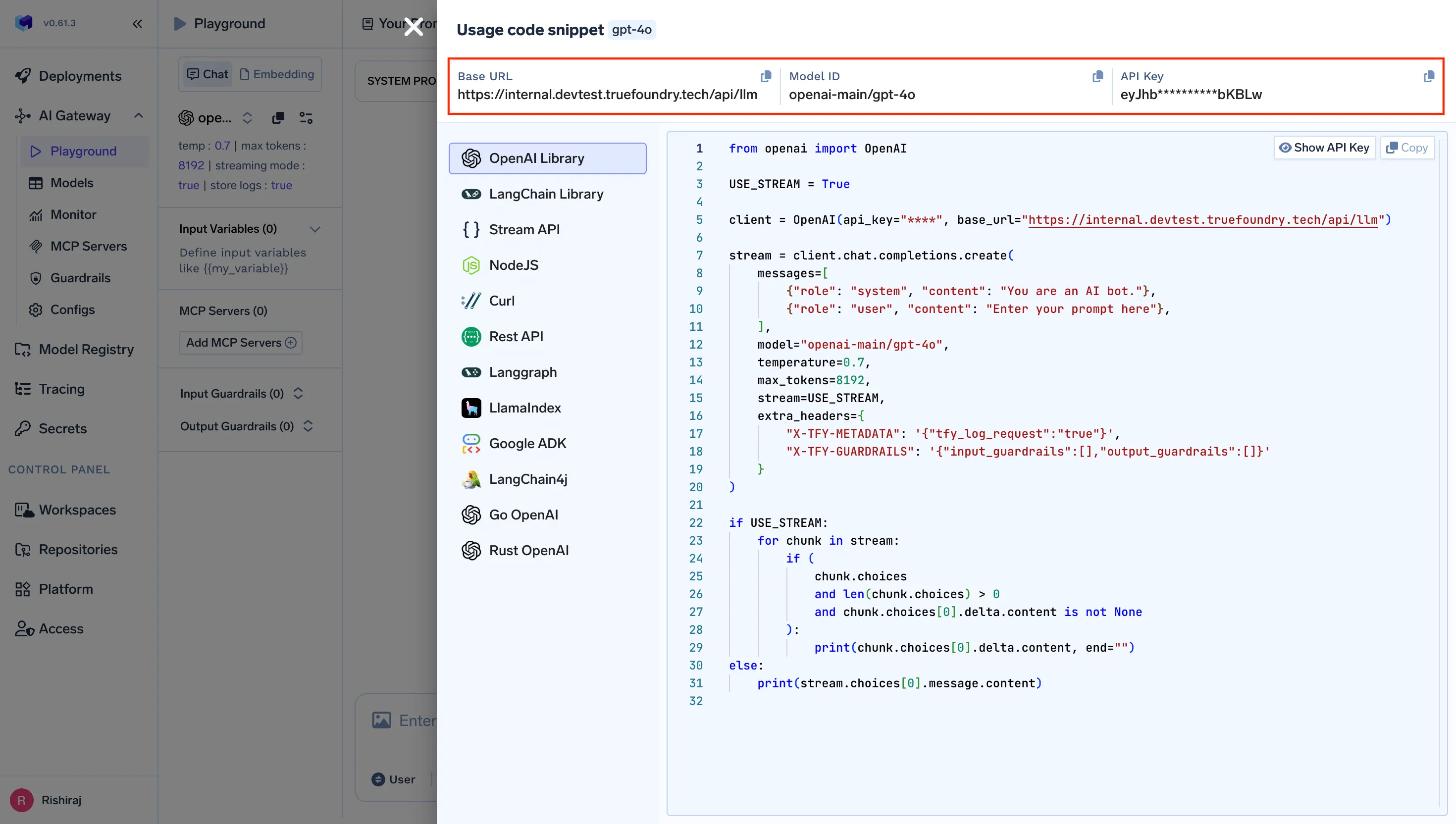
Log into your TrueFoundry control plane. Navigate to AI Gateway → Virtual Keys and create a scoped key for your team or project. You'll get:
https://<your-org>.truefoundry.cloud/api/llm/v1
export ANTHROPIC_BASE_URL="https://<your-org>.truefoundry.cloud/api/llm/v1"
export ANTHROPIC_AUTH_TOKEN="<your-truefoundry-virtual-key>"
For persistent project-level config, add to .claude/settings.json:
{
  "env": {
    "ANTHROPIC_BASE_URL": "https://<your-org>.truefoundry.cloud/api/llm/v1",
    "ANTHROPIC_CUSTOM_HEADERS": "Authorization: Bearer <your-virtual-key>\nx-tfy-provider-name: <your-provider-name>",
    "ANTHROPIC_MODEL": "anthropic/claude-sonnet-4-6"
  }
}
Run claude - Claude Code now flows through TrueFoundry. Every request is logged, attributed, and governed by the policies you've set on that virtual key.
Unlike LiteLLM's YAML-file configuration, TrueFoundry's provider setup happens in the Gateway dashboard. Add your Anthropic account, connect AWS Bedrock or Google Vertex credentials, and define model aliases, all from a UI that your platform team manages centrally.
Claude Code's built-in model aliases (opus, sonnet, haiku) map cleanly to TrueFoundry virtual models. Set up the mapping once in the dashboard and every developer using the project .claude/settings.json gets the correct model routing automatically, without touching environment variables on individual machines.
Once Claude Code routes through TrueFoundry, five capabilities become available that don't exist with direct Anthropic access or basic LiteLLM:
Cost control. Set per-developer or per-team daily token budgets directly on virtual keys. The gateway enforces limits proactively - requests beyond the budget return an error before they generate spend, rather than notifying you after the invoice arrives.
Observability. Every Claude Code request is traced end-to-end: which developer sent it, which model handled it, how many tokens were consumed, what it cost. TrueFoundry is OpenTelemetry-compliant and feeds into Grafana, Datadog, or Prometheus without additional instrumentation.
Security and governance. Virtual keys replace raw Anthropic API keys on developer machines. When an engineer leaves the organization, you revoke their key in one place. The underlying Anthropic credentials never leave the gateway's secrets manager. For enterprises requiring Claude Code integration with SSO and MDM-enforced configuration, TrueFoundry's gateway is the enforcement layer.
Multi-provider access. Claude Code talks to one endpoint. Behind that endpoint, TrueFoundry routes to Anthropic direct, AWS Bedrock, Google Vertex AI, Azure OpenAI, or on-premise models, based on the policies you define. Switch providers without touching a single developer machine.
Reliability. Automatic fallback routing handles Anthropic rate limits transparently. If the primary provider returns a 429 or 503, the gateway retries against a configured fallback before Claude Code sees an error. For developer workflows that can't afford interruption, this is the difference between a minor inconvenience and a blocked sprint.
LiteLLM is an excellent proxy for individual developers or small teams running experiments. TrueFoundry is built for the scenario where Claude Code is a team-wide tool and the platform team needs to govern it without building that governance layer themselves.
Install LiteLLM with pip install litellm[proxy], write a litellm-config.yaml defining your models, and start the proxy with litellm --config. Then set ANTHROPIC_BASE_URL=http://localhost:4000 and ANTHROPIC_AUTH_TOKEN to your LiteLLM master key before running claude. The full setup is covered in the step-by-step section above.
Yes. TrueFoundry AI Gateway exposes an Anthropic-compatible endpoint, so switching from LiteLLM to TrueFoundry is a one-line change: update ANTHROPIC_BASE_URL to your TrueFoundry gateway URL and swap the auth token. Claude Code sees no difference. What changes is everything behind the gateway - observability, cost controls, RBAC, and managed infrastructure.
Roughly ~3–4 ms of gateway overhead, handling 350+ RPS on a single vCPU. At Claude Code response times (measured in seconds, not milliseconds), the gateway adds no perceptible latency to the developer experience.
Yes. TrueFoundry runs in your VPC, on-prem, air-gapped, hybrid, or across multiple clouds no data leaves your infrastructure. This is the primary reason regulated enterprises choose TrueFoundry over SaaS-only gateways or self-managed LiteLLM.
LiteLLM is a proven first step for connecting Claude Code to multiple AI providers. If you're a solo developer or a small team running experiments, it's a solid choice that gets you multi-provider routing with a few lines of YAML config.
When Claude Code becomes a team tool - when you need to enforce budgets, audit usage, govern access, and meet compliance requirements without building that infrastructure yourself - the setup complexity and feature gaps of self-managed LiteLLM become a real cost. TrueFoundry AI Gateway is the drop-in Anthropic-compatible endpoint that handles all of it, with one environment variable change.
Start routing Claude Code through TrueFoundry AI Gateway → truefoundry.com/ai-gateway
TrueFoundry AI Gateway ofrece una latencia de entre 3 y 4 ms, gestiona más de 350 RPS en una vCPU, se escala horizontalmente con facilidad y está listo para la producción, mientras que LitellM presenta una latencia alta, tiene dificultades para superar un RPS moderado, carece de escalado integrado y es ideal para cargas de trabajo ligeras o de prototipos.





Las últimas noticias, artículos y recursos enviados a tu bandeja de entrada
.png)
.png)
.png)
.png)
.png)
.png)


