

What is Future AGI?
Future AGI is an end-to-end platform for evaluating, observing, and improving LLM and AI agent applications. Its Observe workspace ingests OTLP traces so you can monitor gateway traffic, debug agent workflows, analyze latency and token usage, and run evaluations on production spans.Key capabilities
- LLM tracing & observability: End-to-end traces for LLM calls, tools, MCP invocations, and agent steps with latency, status, and token details
- OpenTelemetry ingestion: Accepts OTLP/HTTP traces authenticated with API and secret keys
- Evaluations & alerts: Run evals on traced spans, build dashboards, and set up alerts on top of gateway traffic
Prerequisites
Before integrating Future AGI with TrueFoundry, ensure you have:- TrueFoundry account: Create a TrueFoundry account and follow our Gateway Quick Start Guide
- Future AGI account: Sign up at Future AGI and access your project dashboard
- API credentials: Obtain your API key and secret key from the Future AGI dashboard under Build → Keys
The TrueFoundry OTEL Config export sends traces only for the AI
Gateway. It does not export OTEL metrics from this screen.
OTLP traces endpoint
Future AGI exposes a dedicated OTLP/HTTP traces endpoint:Integration steps
TrueFoundry AI Gateway supports exporting OpenTelemetry traces to Future AGI over OTLP/HTTP so you can monitor LLM gateway traffic in the Future AGI Observe dashboard.Get your Future AGI API credentials
- Log in to your Future AGI dashboard.
- Go to Build → Keys.
- Copy your API key and secret key, and store them securely — you will use them as
X-Api-KeyandX-Secret-Keyin TrueFoundry.
Configure OTEL export in TrueFoundry
- Go to AI Gateway → Controls → Settings in the TrueFoundry dashboard.
- Scroll to OTEL Config and click the edit (pencil) control.
- Enable Otel Traces Exporter Configuration.
- Select HTTP Configuration.
- Set Endpoint to
https://api.futureagi.com/tracer/v1/traces. - Set Encoding to Json.
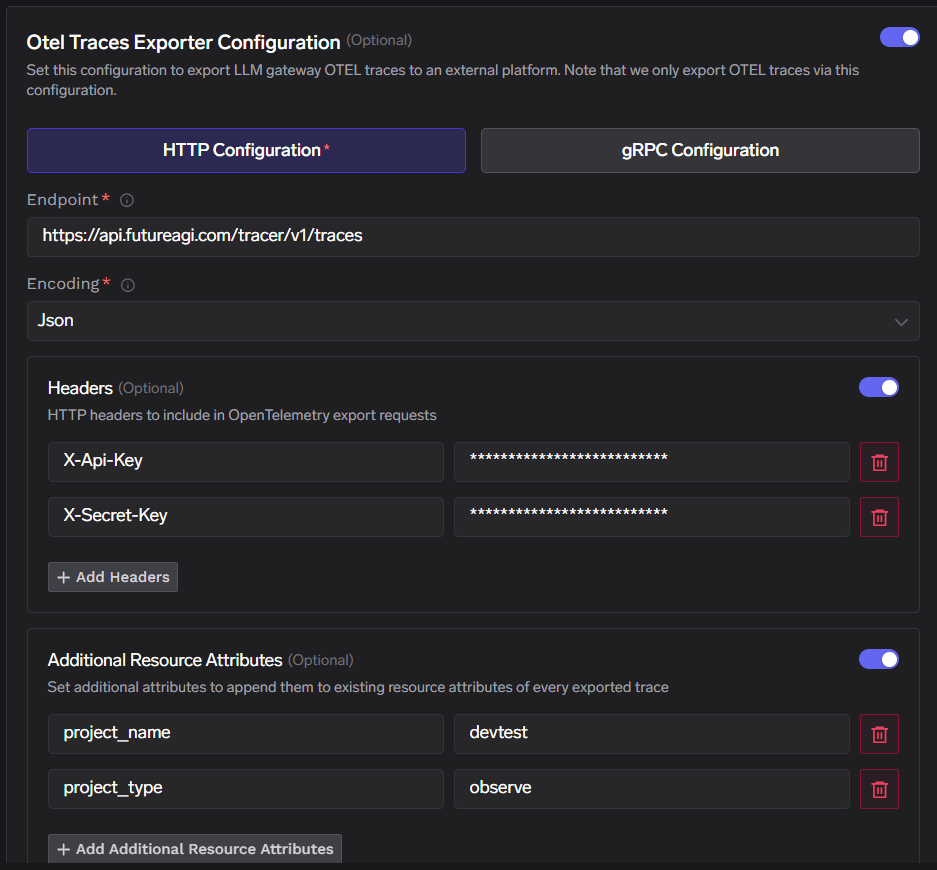
Configure headers, resource attributes, and save
Enable Headers and add:
Enable Additional Resource Attributes and add:
Click Save to apply the configuration.
| Header | Value |
|---|---|
X-Api-Key | Your Future AGI API key |
X-Secret-Key | Your Future AGI secret key |
| Attribute | Value |
|---|---|
project_name | Your Future AGI project name (for example devtest) |
project_type | observe |
project_type must be set to observe so traces are routed to the Future AGI Observe workspace. project_name can be any name you choose — it determines which project the gateway traces appear under in Future AGI.Verify the integration
- Send a few requests through the TrueFoundry AI Gateway.
- In TrueFoundry, open Monitor to confirm gateway traffic is flowing.
- In Future AGI, open your project and go to Observe → Tracing.
- Confirm new traces appear with trace names, latency, status, and timestamps for your gateway requests.
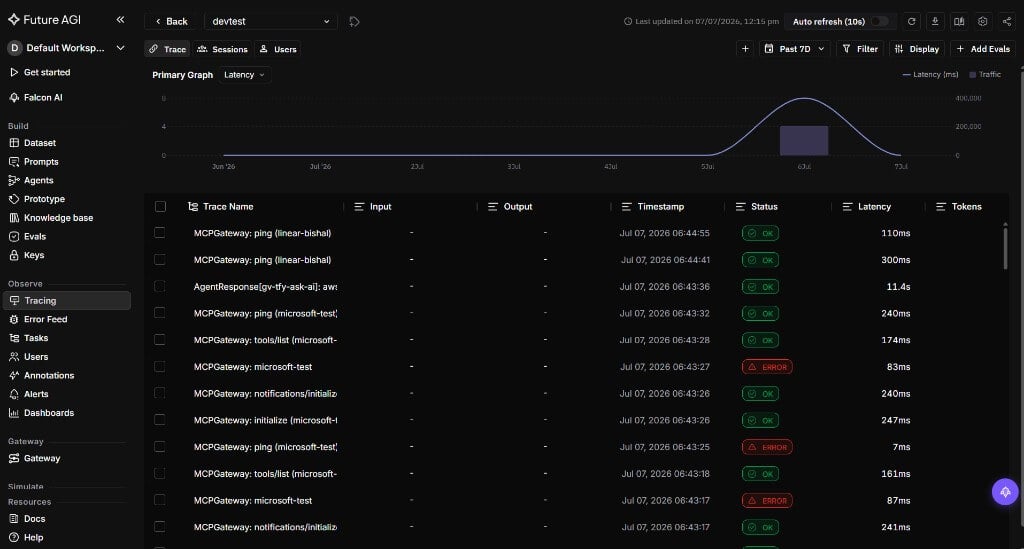
Configuration reference
| Configuration | Value |
|---|---|
| Traces endpoint | https://api.futureagi.com/tracer/v1/traces |
| Protocol | HTTP (OTLP) |
| Encoding | Json |
| Headers | X-Api-Key set to your API key; X-Secret-Key set to your secret key |
| Resource attributes | project_name set to your project name; project_type set to observe |