

What is Laminar?
Laminar is an observability platform for LLM applications. It helps teams capture traces, inspect requests and spans, and monitor behavior across prompts, tools, and model calls.Key Features of Laminar
- LLM and agent tracing: End-to-end visibility into chains, agents, tool calls, and model responses
- OpenTelemetry ingestion: Compatible with OTLP so you can send traces from gateways, SDKs, and custom instrumentation
- Evaluation and experimentation: Analyze runs and iterate on prompts and pipelines with measurable feedback loops
8443 on Laminar Cloud), metadata, and SDK examples, see Laminar’s OpenTelemetry tracing documentation.
If you use a gRPC exporter or need help diagnosing OTLP connection or auth issues with Laminar, read the gRPC and Getting started sections on that page, and use Laminar’s dedicated guide for problems with OpenTelemetry ingestion: Troubleshooting OpenTelemetry.
Prerequisites
Before integrating Laminar with TrueFoundry, ensure you have:- TrueFoundry Account: Create a TrueFoundry account and follow the instructions in our Gateway Quick Start Guide
- Laminar Account: Sign up at lmnr.ai
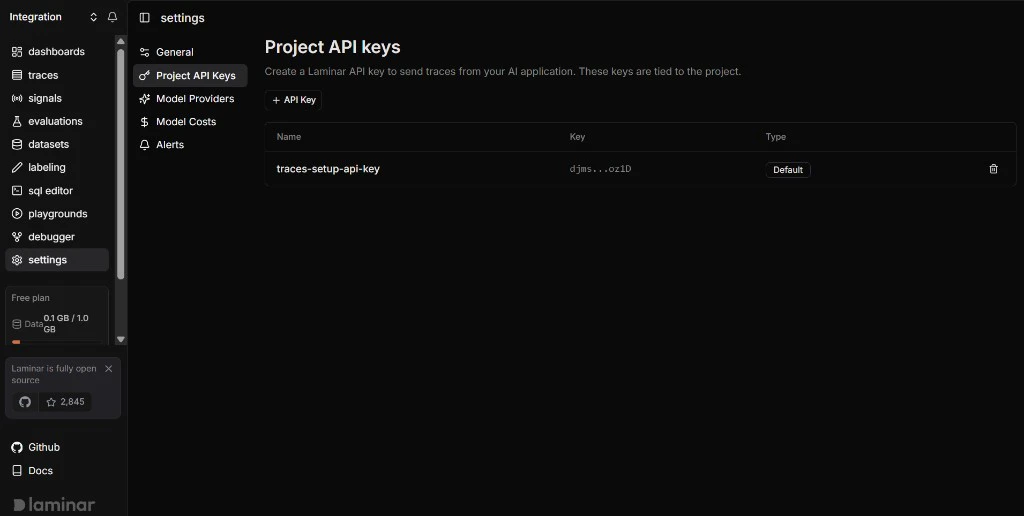
- Laminar project API key: Create or copy an API key for the project where traces should appear (your Laminar workspace / project settings)
Integration Steps
TrueFoundry AI Gateway can export OpenTelemetry traces to Laminar over HTTP so you can analyze gateway traffic alongside the rest of your stack.1
Get your Laminar project API key
- Log into the Laminar app.
- Open your project and go to the API key or project settings area (wording may vary by UI version).
- Create or copy a project API key used for trace ingestion. Store it securely — treat it like a secret.
2
Configure OTEL export in TrueFoundry
- In the TrueFoundry dashboard, go to AI Engineering → Settings → OTEL Config (under Organisation, in the AI Gateway section).
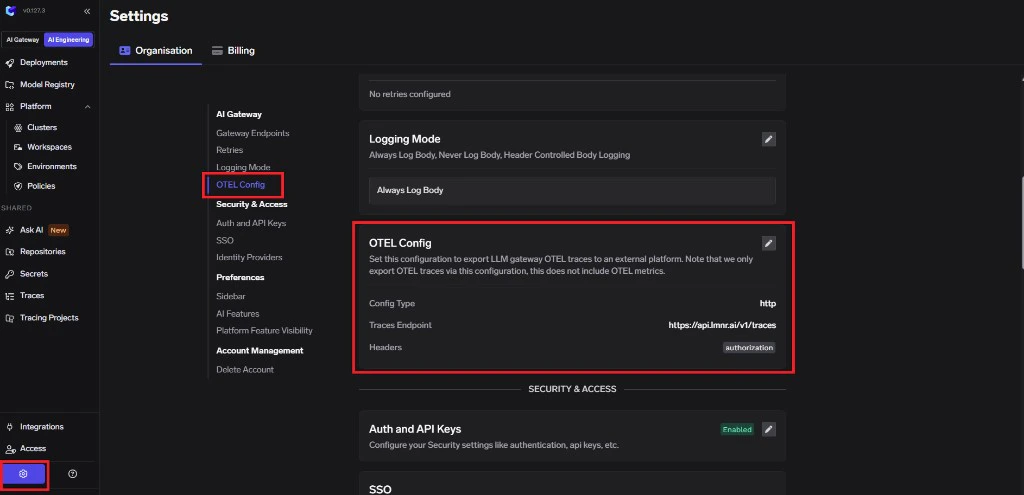
- Click edit on the OTEL Config section to open the exporter form (if it is not already open).
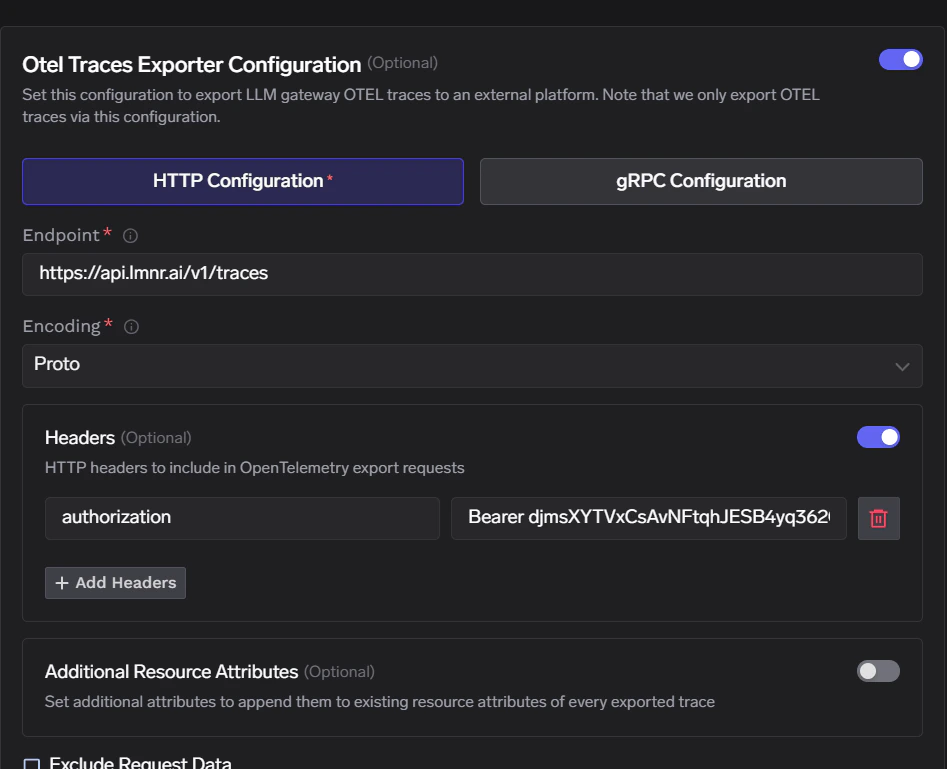
- Enable the OTEL Traces Exporter Configuration toggle.
- Select HTTP Configuration.
- Enter the Laminar traces endpoint:
https://api.lmnr.ai/v1/traces - Set Encoding to
Proto.
3
Configure headers
Laminar expects a single authentication header. No additional custom headers are required for basic ingestion.
Replace
<YOUR_LAMINAR_PROJECT_API_KEY> with the key from the first step. Click Save to apply your configuration.4
Verify the integration
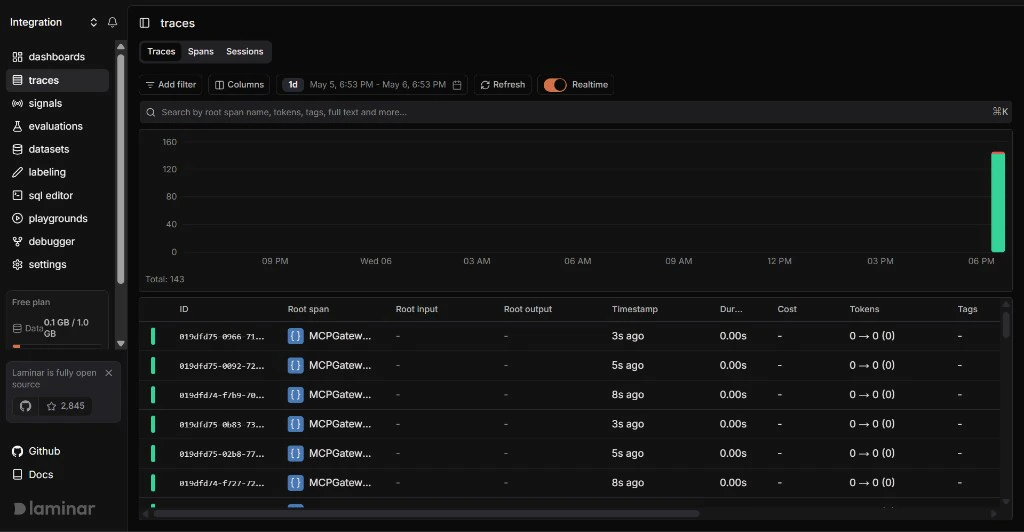
- Send a few requests through the TrueFoundry AI Gateway.
- In TrueFoundry, open Monitor and confirm traces are being generated for those requests.
- In Laminar, open the project tied to that API key and confirm new traces appear with the expected spans and attributes.
Configuration summary
The table above matches HTTP OTLP fields in TrueFoundry. For gRPC endpoints and SDK-specific setup, use Laminar’s OTLP documentation; for ingestion issues, see Troubleshooting OpenTelemetry.