

What is Axiom?
Axiom is a serverless observability and log analytics platform built for timestamped event data at scale. It accepts logs, traces, and metrics through standard OTLP endpoints and stores them in its proprietary EventDB architecture, enabling sub-second query latency on petabyte-scale datasets. Teams query and visualize this data using Axiom Processing Language (APL) or the point-and-click query builder in the Axiom Console.Key Features of Axiom
- OpenTelemetry Native Ingestion: Accepts traces, logs, and metrics over OTLP/HTTP with API token authentication and dataset routing via request headers.
- Axiom Processing Language (APL): A powerful query language for filtering, aggregating, and summarizing event data across logs and traces in a unified interface.
- Datasets: Namespaced containers for event data. Each OTel signal (traces, metrics, logs) is routed to a dedicated dataset via the
X-Axiom-Datasetheader. - Dashboards and Alerts: Build visualizations and threshold-based alerts directly on top of ingested trace and metric data.
Prerequisites
Before integrating Axiom with TrueFoundry, ensure you have:- TrueFoundry Account: Create a TrueFoundry account and follow the instructions in our Gateway Quick Start Guide.
- Axiom Account: Sign up at app.axiom.co. A free tier is available with 0.5 TB of storage.
- Axiom Dataset: Create at least one dataset in Axiom for traces. When creating the dataset select Events as the type (not Metrics). Optionally create a second dataset for metrics.
- Axiom API Token: Create an API token with Ingest permission scoped to your dataset.
Understanding the Axiom Endpoint
Axiom uses a single fixed base URL for all OTLP ingestion:https://api.axiom.co. The signal path is appended to this base:
- Traces:
https://api.axiom.co/v1/traces - Metrics:
https://api.axiom.co/v1/metrics - Logs:
https://api.axiom.co/v1/logs
X-Axiom-Dataset header on every request — not by the URL. This means traces and metrics can go to different datasets by using different header values in each exporter config.
Integration Steps
1
Create a Dataset and API Token in Axiom
- Log in to app.axiom.co.
- In the left sidebar click Datasets then click New Dataset.
- Name the dataset (for example
tfy-gateway-traces), select Events as the type, and click Create. - If you also want to export metrics, create a second dataset (for example
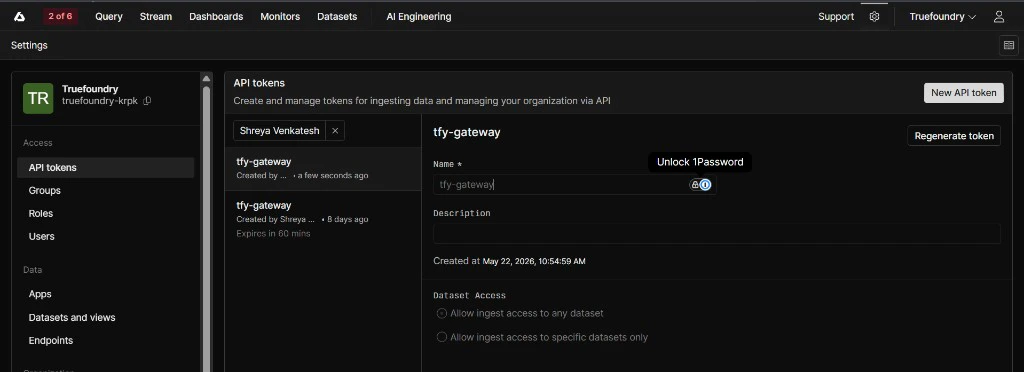
tfy-gateway-metrics) and select Metrics as the type. - Go to Settings → API Tokens and click New API Token.
- Give the token a name (for example
tfy-gateway), select Ingest as the permission, and scope it to the dataset(s) you just created. - Click Create and copy the token immediately — Axiom will not show it again.
2
Configure OTEL Export in TrueFoundry
- Go to AI Gateway → Controls → Settings in the TrueFoundry dashboard.
- Scroll down to the OTEL Config section and click the edit (✏️) button.
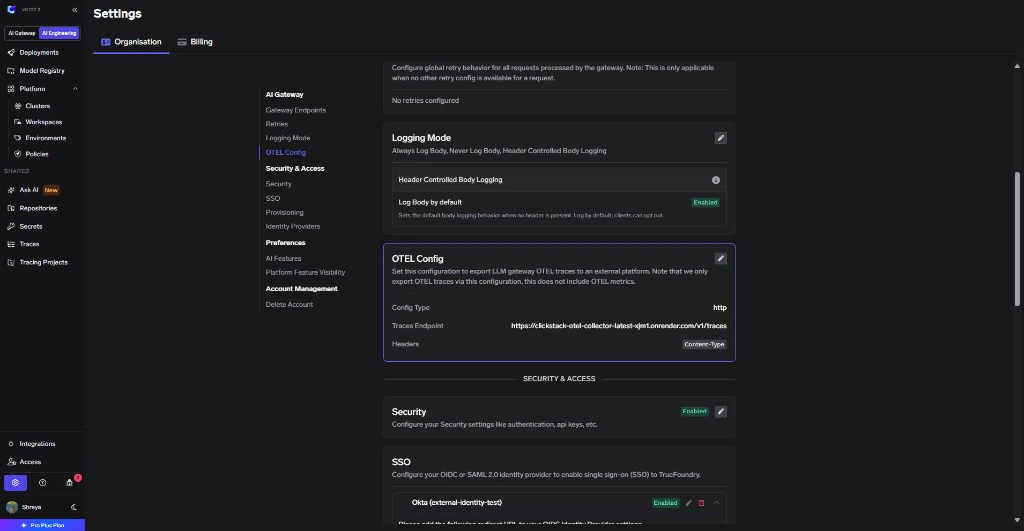
- Enable the Otel Traces Exporter Configuration toggle and fill in:
| Field | Value |
|---|---|
| Toggle | Enabled |
| Protocol | HTTP Configuration |
| Endpoint | https://api.axiom.co/v1/traces |
| Encoding | Proto |
| Header Key 1 | Authorization |
| Header Value 1 | Bearer <your-axiom-api-token> |
| Header Key 2 | X-Axiom-Dataset |
| Header Value 2 | tfy-gateway-traces (or your dataset name) |
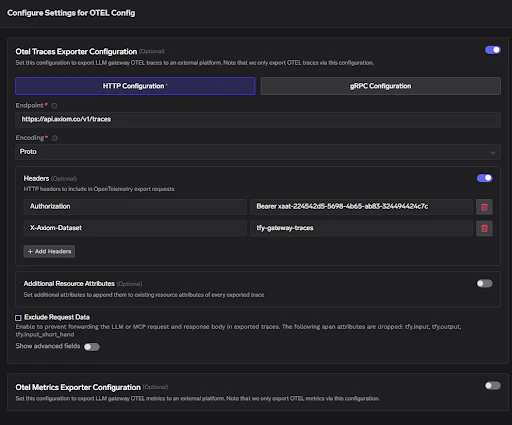
- Enable the Otel Metrics Exporter Configuration toggle and fill in:
| Field | Value |
|---|---|
| Toggle | Enabled |
| Protocol | HTTP Configuration |
| Endpoint | https://api.axiom.co/v1/metrics |
| Encoding | Proto |
| Header Key 1 | Authorization |
| Header Value 1 | Bearer <your-axiom-api-token> |
| Header Key 2 | X-Axiom-Dataset |
| Header Value 2 | tfy-gateway-metrics (or your metrics dataset name) |
- Click Save to apply the configuration.
Axiom requires two headers for every exporter: the
Authorization header with your Bearer token and the X-Axiom-Dataset header with the target dataset name. If the X-Axiom-Dataset header is missing, Axiom will reject the request. Traces and metrics can be routed to different datasets by using different dataset names in each exporter’s config.3
Verify the Integration
- Make a request through the TrueFoundry AI Gateway (for example from the Playground).
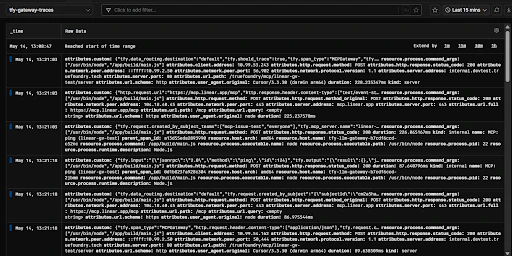
- Log into app.axiom.co and click Stream in the top navigation.
- Select your traces dataset (
tfy-gateway-traces) from the dataset selector. - Click Run — you should see spans from
tfy-llm-gatewayappearing with attributes likeservice.name,tfy.input,tfy.output, and standardgen_ai.*fields.
- To verify metrics, switch the dataset selector to your metrics dataset (
tfy-gateway-metrics) and click Run. Metrics appear in the same Stream view — no separate metrics dashboard is needed.
Configuration Reference
| Configuration | Value |
|---|---|
| Traces Endpoint | https://api.axiom.co/v1/traces |
| Metrics Endpoint | https://api.axiom.co/v1/metrics |
| Protocol | HTTP |
| Encoding | Proto |
| Auth Header Key | Authorization |
| Auth Header Value | Bearer <your-axiom-api-token> |
| Dataset Header Key | X-Axiom-Dataset |
| Dataset Header Value | Your Axiom dataset name |