


October 16, 2026
|
5 min read


Published: October 16, 2026
Blazingly fast way to build, track and deploy your models!
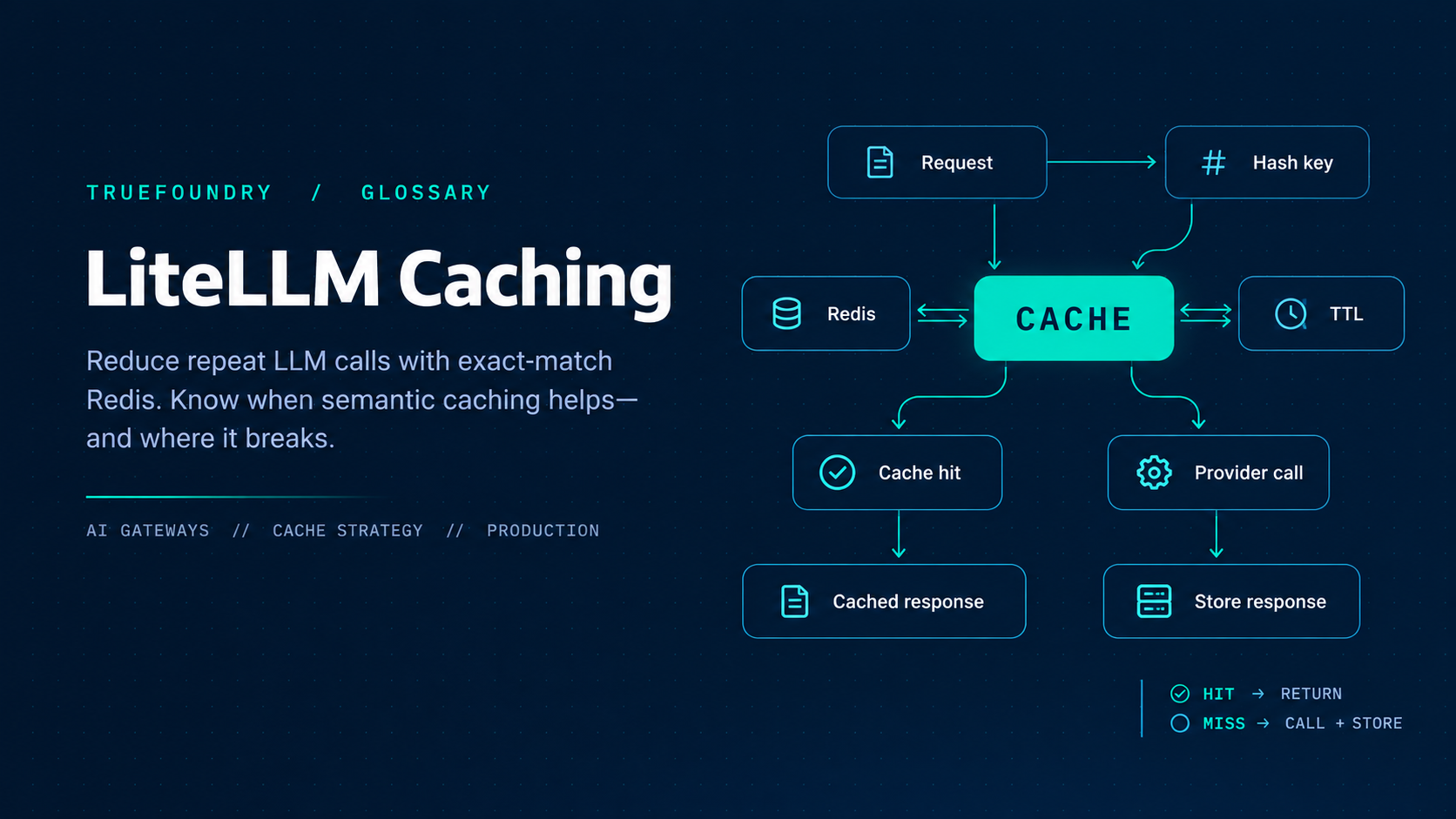
A LiteLLM cache stores LLM responses so a later identical (or, for semantic mode, similar) request can skip the provider call. That cuts latency and provider spend when traffic is repetitive—and creates correctness bugs when it is not. This article covers exact-match caches (in-memory, Redis/Valkey, S3/GCS, disk), semantic caches (Redis, Valkey, Qdrant), TTL and keys, multi-replica requirements, invalidation, and the failure modes platform engineers hit in production. Scope note: this is LiteLLM’s application-level response cache, not OpenAI/Anthropic provider-side prompt caching (a separate feature with its own configuration). Caching is one of several controls an LLM gateway applies on the request path, alongside auth, rate limits, and routing.
Official proxy caching docs list: redis (also Valkey/ElastiCache/Memorystore via Redis protocol), redis-semantic, valkey-semantic, qdrant-semantic, s3, gcs, local (in-memory), and disk. Redis is the right default past a single worker. Exact-match caches key on a hash of the whole request. Semantic caches embed the prompt and serve the closest match above a similarity threshold—suited to single-shot prompts and a poor fit for agentic traffic.
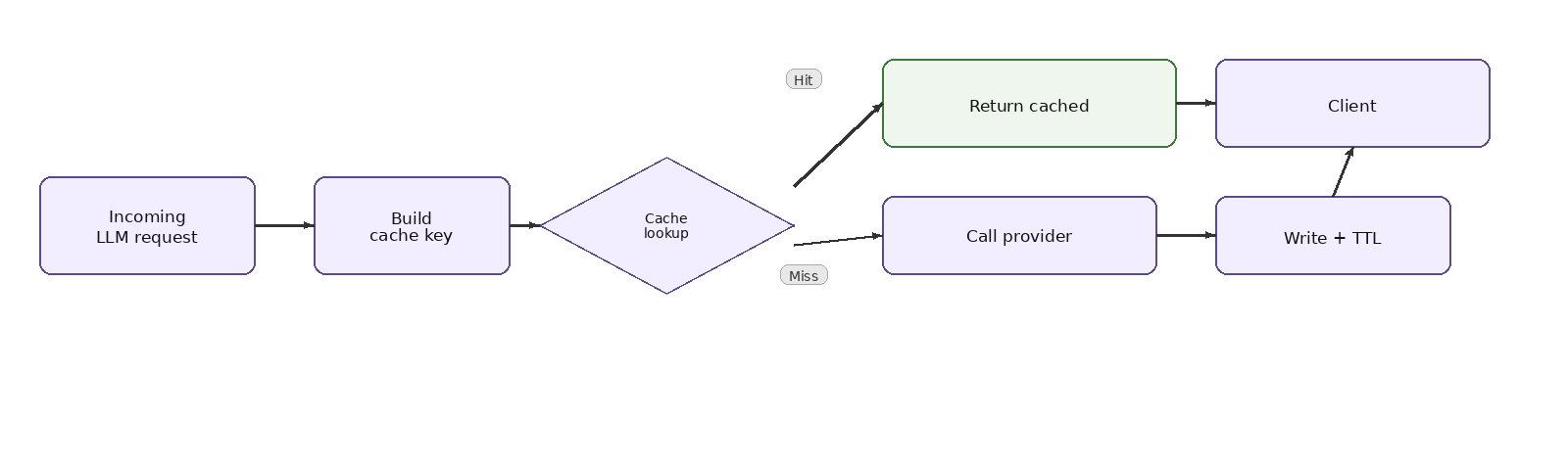
On a hit, responses can carry an x-litellm-cache-key header useful for debugging and for /cache/delete. With cache: True and no supported_call_types override, caching applies to /chat/completions, /completions, /embeddings, /audio/transcriptions, /rerank, /v1/responses, and /v1/messages (confirm on your version). On /v1/responses, exact-match keys on the request body—so previous_response_id versus an inlined conversation are different keys, and each multi-turn step is its own entry.
Minimal enable (defaults toward Redis when credentials exist):
litellm_settings:
  cache: True
Then set REDIS_URL or REDIS_HOST / REDIS_PORT / REDIS_PASSWORD, and preferably explicit cache_params.type: redis. Debug with:
curl --location 'http://0.0.0.0:4000/cache/ping' \
  -H "Authorization: Bearer $LITELLM_API_KEY"
A healthy response reports cache_type, ping_response, and redis client metadata. Use this in readiness checks for multi-replica rollouts.
Laptop / single-process:
litellm_settings:
  cache: True
  cache_params:
    type: local
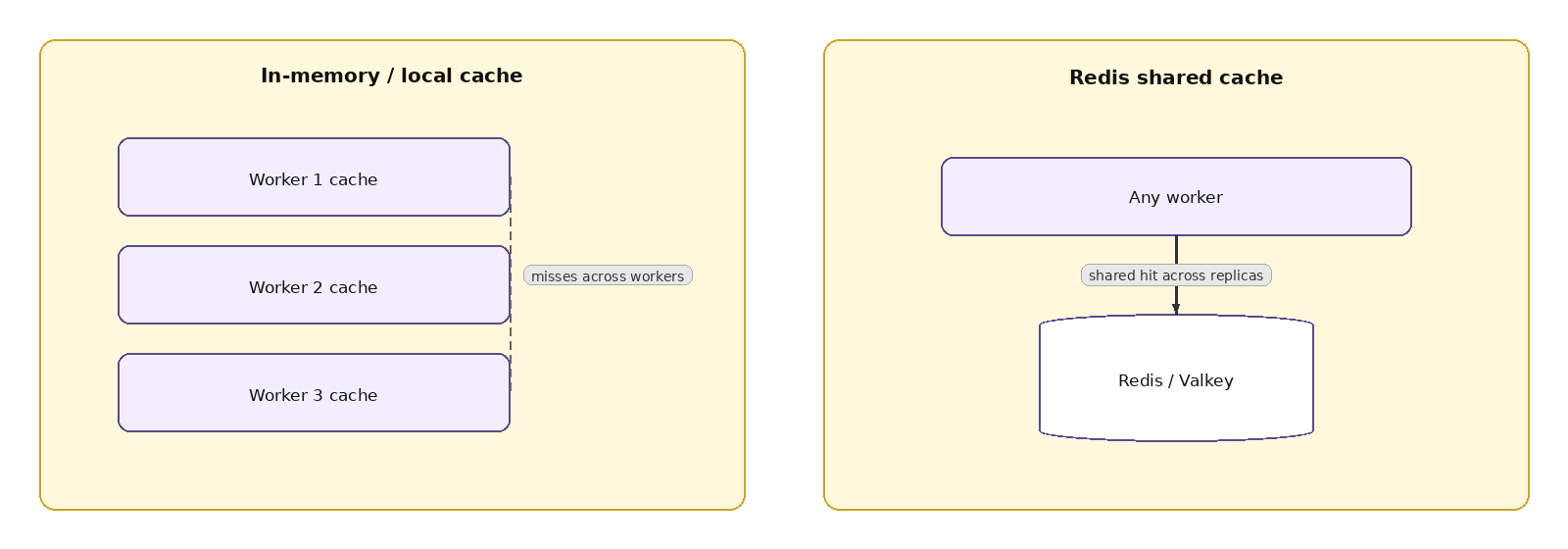
Disk: type: disk with optional disk_cache_dir. Neither is shared between workers or replicas—docs say use them for local development, not production.
Production Redis example with TTL:
litellm_settings:
  cache: True
  cache_params:
    type: redis
    ttl: 600
    host: os.environ/REDIS_HOST
    port: os.environ/REDIS_PORT
    password: os.environ/REDIS_PASSWORD
Four workers without Redis means roughly four independent caches—hit rate collapses by about the worker count. Also configure router_settings Redis for shared RPM/TPM, cooldowns, and routing state. “What Needs Redis” covers rate limits, budgets coordination, cache invalidation, and pod locks. REDIS_HOST alone without YAML pointers will not enable sharing.
ttl under cache_params sets entry lifetime in seconds. Per-request cache object fields: ttl, s-maxage (only accept entries younger than N seconds), no-cache (skip read), no-store (skip write), namespace. Attach the same controls on virtual-key metadata so a class of traffic opts out without client changes—standard pattern for agent keys.
Narrow participation with cache_params.supported_call_types (empty list disables). By default only standard OpenAI-shaped parameters enter the cache key; set enable_caching_on_provider_specific_optional_params: True if Vertex-style optional fields must distinguish entries. Custom get_cache_key functions exist on the SDK Cache object for advanced cases—prefer documented controls on the proxy before custom code.
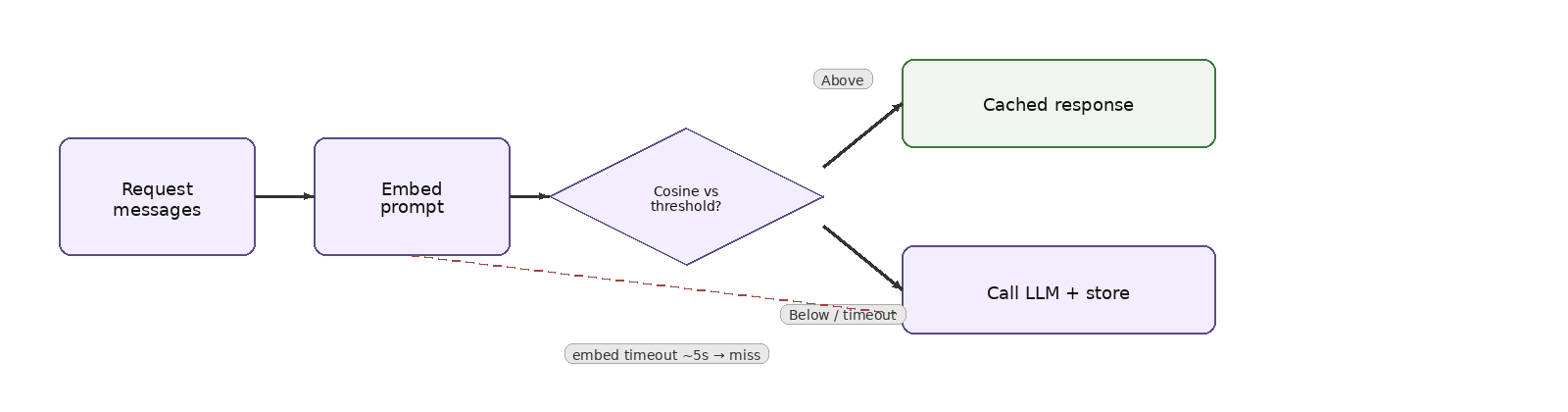
A semantic cache embeds the prompt (messages text, system included) and serves the closest cached response whose cosine similarity clears similarity_threshold. Backends: redis-semantic, valkey-semantic, qdrant-semantic. Configure an embedding model LiteLLM can call—usually a model_name from model_list. Hits may include x-litellm-semantic-similarity.
Example Redis semantic shape:
litellm_settings:
  cache: True
  cache_params:
    type: redis-semantic
    similarity_threshold: 0.8
    redis_semantic_cache_embedding_model: azure-embedding-model
Valkey semantic needs the valkey-search module (ElastiCache: node-based Valkey 8.2+, cluster-mode-disabled recommended; Serverless and multi-shard cluster-mode-enabled are called out as unsupported for this backend). Qdrant needs collection name, vector size matching the embedding dimensionality, and API credentials.
Embedding runs inline before the LLM. Default timeout is 5 seconds; past that the lookup is abandoned (similarity 0.0) and the request misses through. Tune semantic_cache_embedding_timeout or SEMANTIC_CACHE_EMBEDDING_TIMEOUT_SECONDS carefully—a higher deadline is also how long every request waits when embeddings hang.
semantic_cache_scope defaults to key (virtual key / team / org bucket). Set end_user to isolate by authenticated end-user id (x-litellm-customer-id, configured user_header_name, or request user). Otherwise similar prompts on a shared key can cross-serve responses between end users—including tool-call payloads.
Exact-match Redis is the safe default for most platform gateways: predictable keys, no embedding dependency on the hot path, and natural correctness for multi-turn traffic because any message change misses. Semantic cache is an optimization for high-volume, paraphrased, single-shot workloads where you accept approximate reuse. Do not enable semantic mode “because it sounds smarter” on a shared gateway that also serves agents—split traffic with virtual-key metadata or separate gateways if product needs both.
Helps:
Hurts or is risky:
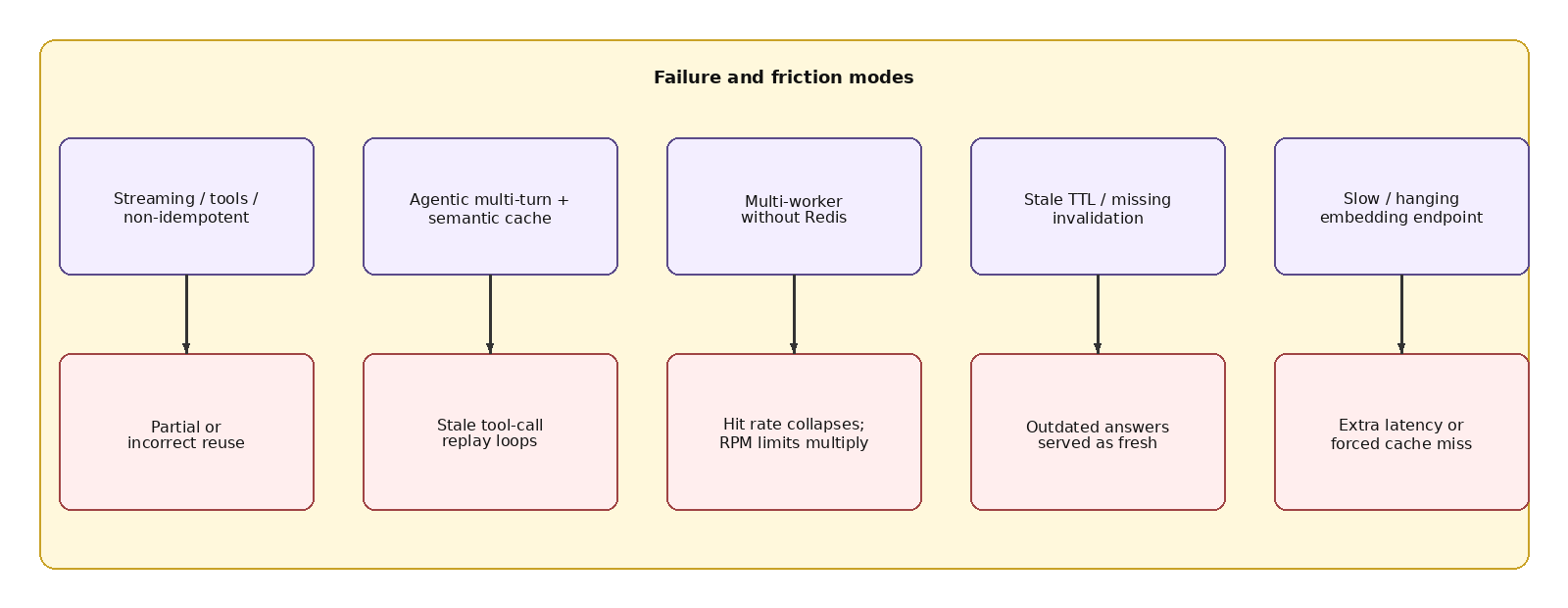
Official semantic-caching docs are direct: designed for single-shot prompts; on multi-turn or agentic traffic it will replay stale responses. Each new turn is previous text plus a small delta, so embeddings stay ~0.99 similar; at practical thresholds every turn matches the previous entry. Raising similarity_threshold does not reliably fix it. Assistant tool_calls are not part of the embedded text, which makes consecutive agent turns even harder to tell apart—symptoms include agents repeating the same tool call.
Mitigations from those docs: keep semantic caching for single-shot traffic; exclude agentic traffic with key metadata cache.no-cache true, or mode default_off, or per-request controls. If agents still need caching, use exact-match type: redis so any conversation change misses cleanly.
TTL is the blunt instrument. Namespaces segment environments or tenants. no-store / no-cache suppress write/read. /cache/ping verifies the backend. On hits, x-litellm-cache-key can feed /cache/delete for targeted invalidation—confirm the delete API on your version before automating. Success callbacks can read kwargs["cache_hit"] for metrics pipelines. Track hit rate, embedding latency (semantic), Redis errors (no connection available → raise max_connections), and authenticity of answers after config changes.
More than one worker process or replica ⇒ Redis (or compatible) for a coherent cache and for shared rate limits / router state. Semantic backends need their vector store healthy on every request path. Production docs also use Redis for the spend transaction buffer at very high QPS (~1000+ RPS or 10+ instances)—adjacent to caching but the same shared-state theme. Optional enable_redis_auth_cache mirrors virtual-key auth into Redis so replicas share auth entries; pair with general_settings.user_api_key_cache_ttl (default 60s) so revocations converge.
LiteLLM can point coordination at a different Redis than the response cache via general_settings.coordination_redis. If you split them, size and alert both. If you keep one cluster, still configure both router_settings and litellm_settings.cache_params—environment variables alone do not attach every subsystem. Cluster/Sentinel/IAM topologies are documented under Redis and Valkey pages. Per-command cache client timeout is cache_params.socket_timeout (default 5s), distinct from REDIS_SOCKET_TIMEOUT.
Start with exact-match Redis, conservative TTL, and caching limited to known-safe call types. Opt agent virtual keys out via metadata. Only introduce semantic cache for clearly single-shot workloads with a tested similarity threshold, embedding SLOs inside the timeout budget, and end_user scope if keys are shared. Load-test hit rate with your real prompt distribution—synthetic identical jokes in demos overstate savings. Ground every change in /cache/ping, response headers, and spend dashboards rather than hope. Pair cache metrics with LLM cost tracking so savings are measured per team and model, not assumed.
LiteLLM caching can meaningfully cut latency and provider spend—when traffic is genuinely repetitive and the cache is shared through Redis. Start with exact-match Redis and a conservative TTL, scope semantic caching narrowly to single-shot workloads, and keep agents out.
For a gateway that brings caching together with routing, rate limits, and observability inside your own infrastructure, learn how TrueFoundry’s AI Gateway approaches it →
TrueFoundry AI Gateway delivers ~3–4 ms latency, handles 350+ RPS on 1 vCPU, scales horizontally with ease, and is production-ready, while LiteLLM suffers from high latency, struggles beyond moderate RPS, lacks built-in scaling, and is best for light or prototype workloads.




LiteLLM cache is the response cache built into the LiteLLM proxy and SDK: it stores LLM responses so a later identical request—or a similar one in semantic mode—skips the provider call. You enable it with litellm_settings.cache: true and choose a backend in cache_params (local, disk, redis, s3, gcs, or a semantic backend). It cuts latency and provider spend on repetitive traffic, and it is separate from provider-side prompt caching.
Use the in-memory (local) or disk cache only for local development or a single process, because neither is shared between workers or replicas. Use Redis—or a Redis-protocol service such as Valkey, ElastiCache, or Memorystore—as soon as you run more than one worker or pod. Four workers with local caches behave like four separate caches, and hit rates drop roughly by the worker count.
Semantic cache is designed for single-shot prompts; on multi-turn traffic it replays stale responses. Each new turn is the previous conversation plus a small delta, so embeddings stay around 0.99 similar, and assistant tool_calls are not part of the embedded text—agents end up repeating the same tool call. Raising similarity_threshold does not reliably fix it; exclude agent keys with "cache": {"no-cache": true} metadata or use exact-match type: redis.
Roughly 3–4 ms of overhead, handling 350+ RPS on a single vCPU. That matters more as model calls get faster: a routing layer that adds hundreds of milliseconds would erase the advantage of a sub-second decision model.
Yes. The gateway is OpenTelemetry-compliant and plugs into Grafana, Datadog, Prometheus, or your preferred stack. Every request is traced from prompt to model execution, so metrics such as latency, cost, and errors land next to your existing dashboards.



The latest news, articles, and resources sent to your inbox
.webp)
.png)
.png)
.png)

.png)
.png)



.png)
.png)
.png)


