


October 15, 2026
|
5 min read


Published: October 15, 2026
.png)
Blazingly fast way to build, track and deploy your models!
The service that has been launched by Amazon to apply safeguards to generative AI is AWS Bedrock Guardrails. Instead of creating your own moderation system, you set up the guardrails inside the Bedrock console, where they apply to a specific set of rules regarding the content inside your application.
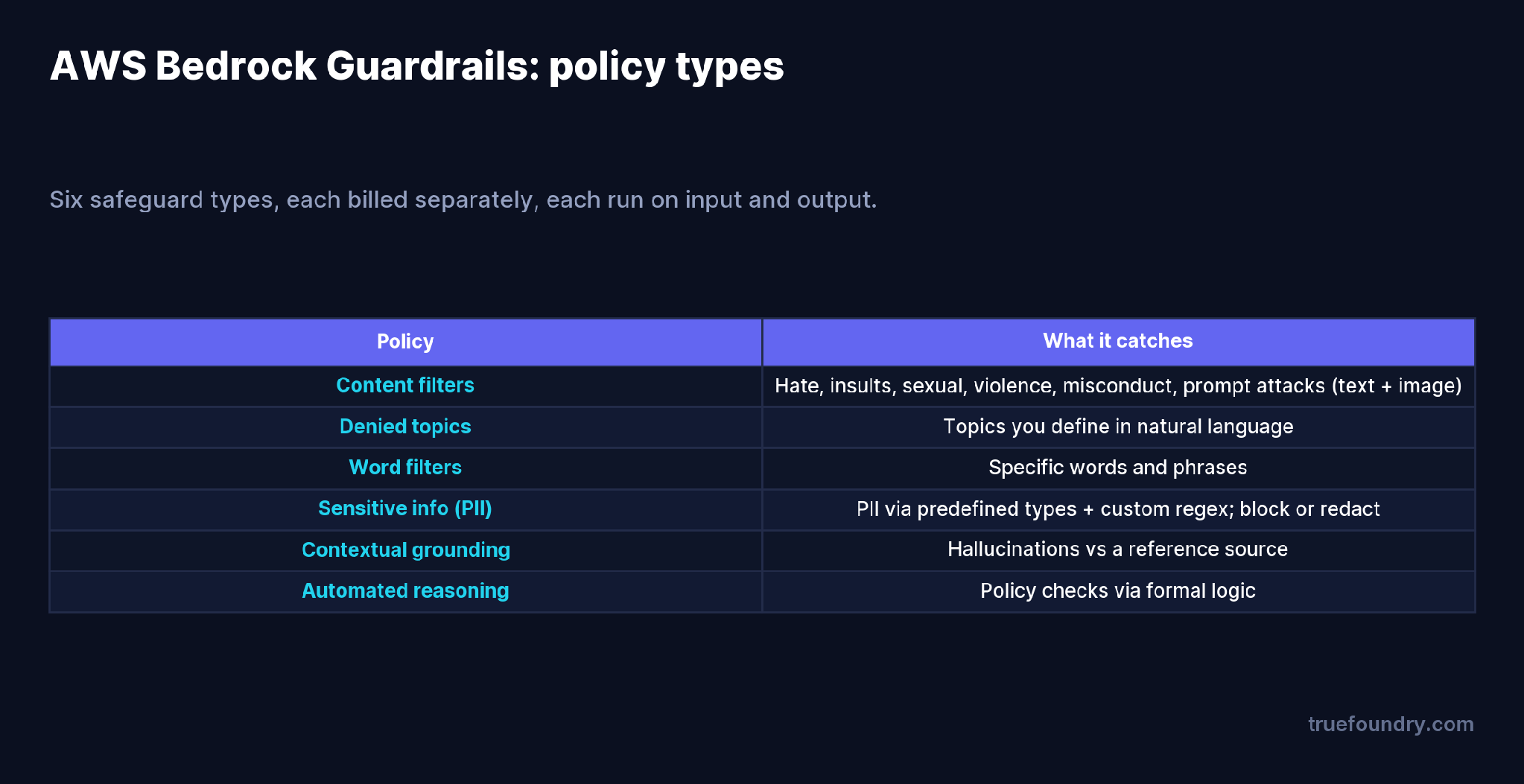
There are six policy types: content filters (hate, insults, sexual, violence, misconduct, and prompt attacks, across text and image), denied topics you describe in natural language, word filters, sensitive information filters that detect and redact PII via predefined types or custom regex, contextual grounding checks that flag hallucinations against a reference source, and automated reasoning checks. You can block offending content outright, or redact it and let the request through.
It is a good, well-kept service. One limitation in its structure is quite clear: it resides within the world of Bedrock. Your request goes straight to Anthropic or OpenAI and doesn’t pass through Bedrock Guardrails. This is the difference that a gateway bridges.
Most teams don’t run one model. They run a few, across providers, and they change which ones over time. If your safety policy is bolted to one provider’s inference, every other model call is unguarded — and re-implementing moderation per provider is exactly the duplicated, drifting work you want to avoid.
Routing Bedrock Guardrails through the TrueFoundry AI Gateway decouples the policy from the model. The gateway calls Bedrock’s ApplyGuardrail API as a guardrail step around any model request, so:
The gateway runs guardrails on two hooks around the model: input (before the prompt reaches the model) and output (after the response).
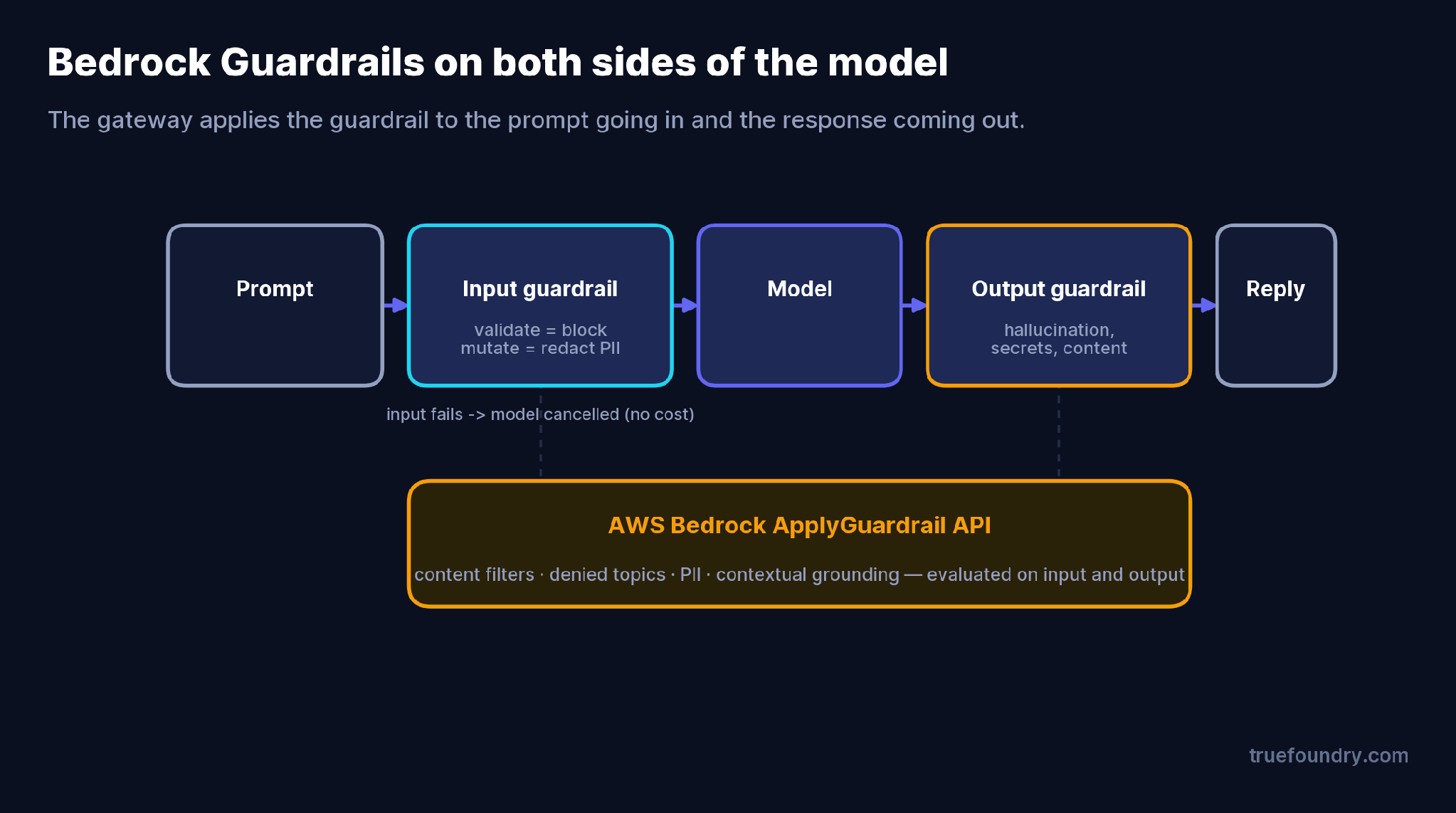
The sequence is deliberate. Input mutation (for example, redacting PII) runs first and blocks until done. Input validation then runs in parallel with the model request — so a content check adds no latency on the happy path, and if it fails while the model is still generating, the gateway cancels the model request so you don’t pay for a response you’d throw away. After the model responds, output mutation and output validation run before anything reaches the client.
You control two things per guardrail:
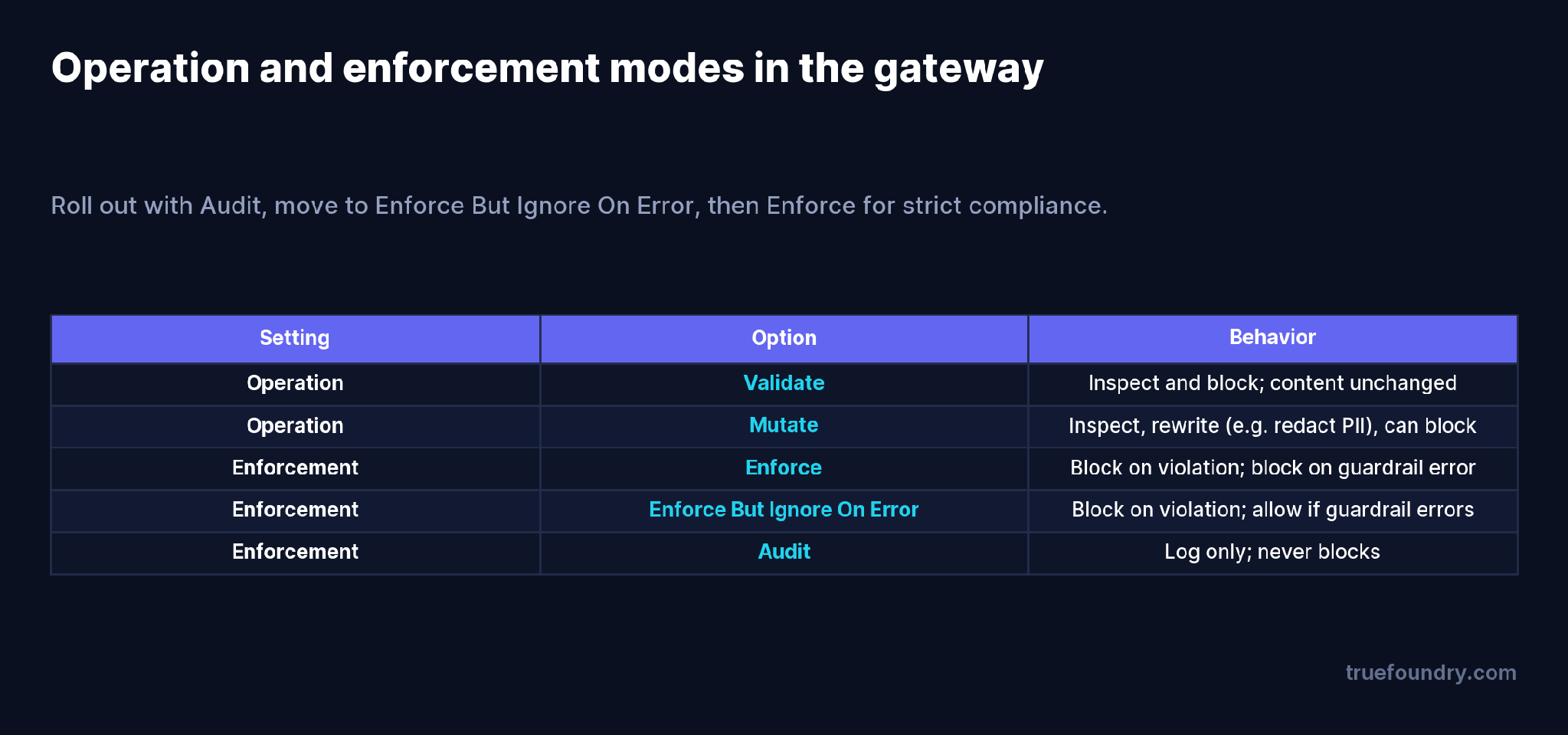
Operation is Validate (inspect and block, content unchanged) or Mutate (inspect and rewrite — e.g. anonymize a detected name to {NAME} — and optionally block). Enforcement decides what happens on a violation and on a guardrail error: Enforce blocks both; Enforce-but-ignore-on-error blocks violations but lets traffic through if the guardrail itself times out; Audit logs only. The gateway sends the content to Bedrock’s ApplyGuardrail API and acts on the response — if Bedrock returns GUARDRAIL_INTERVENED, the gateway blocks (Validate) or substitutes the redacted text (Mutate).
They guard one provider and forget the rest. Bedrock Guardrails on Bedrock models is half a policy if half your traffic goes elsewhere. Enforce it at the gateway so coverage is uniform.
They jump straight to Enforce. Turning on hard blocking in production with no baseline causes false-positive outages. Start in Audit, watch what it would catch, then tighten.
They forget output guardrails don’t run on streaming. With stream: true, output checks are skipped — there’s no complete response to evaluate. If you need output moderation, set stream: false or validate client-side.
They ignore the cost of guarding. Each policy is billed, on both input and output, so every request is evaluated twice. Stacking several policies on high-volume traffic can make the guardrail line rival the inference line — track it.
First, create the guardrail in the AWS Bedrock console — define your policies, then note its Guardrail Identifier and Version, which you’ll need to connect it.
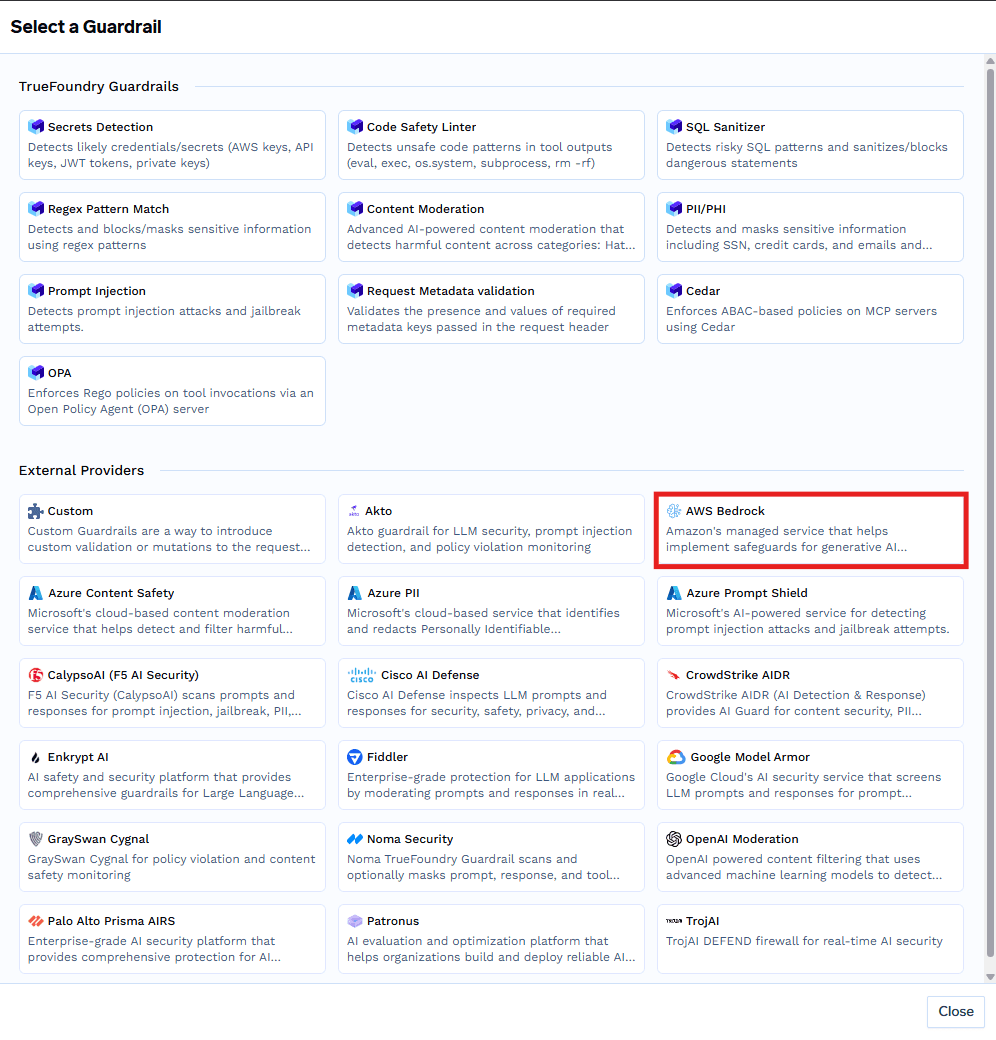
In TrueFoundry, create a guardrails group and select AWS Bedrock as the provider.
Fill in the config: a name, the operation (Validate or Mutate), the Guardrail Identifier and Version from AWS, and your AWS authentication — either an access key pair or an assumed IAM role with External ID and region. The IAM entity needs the bedrock:ApplyGuardrail permission.
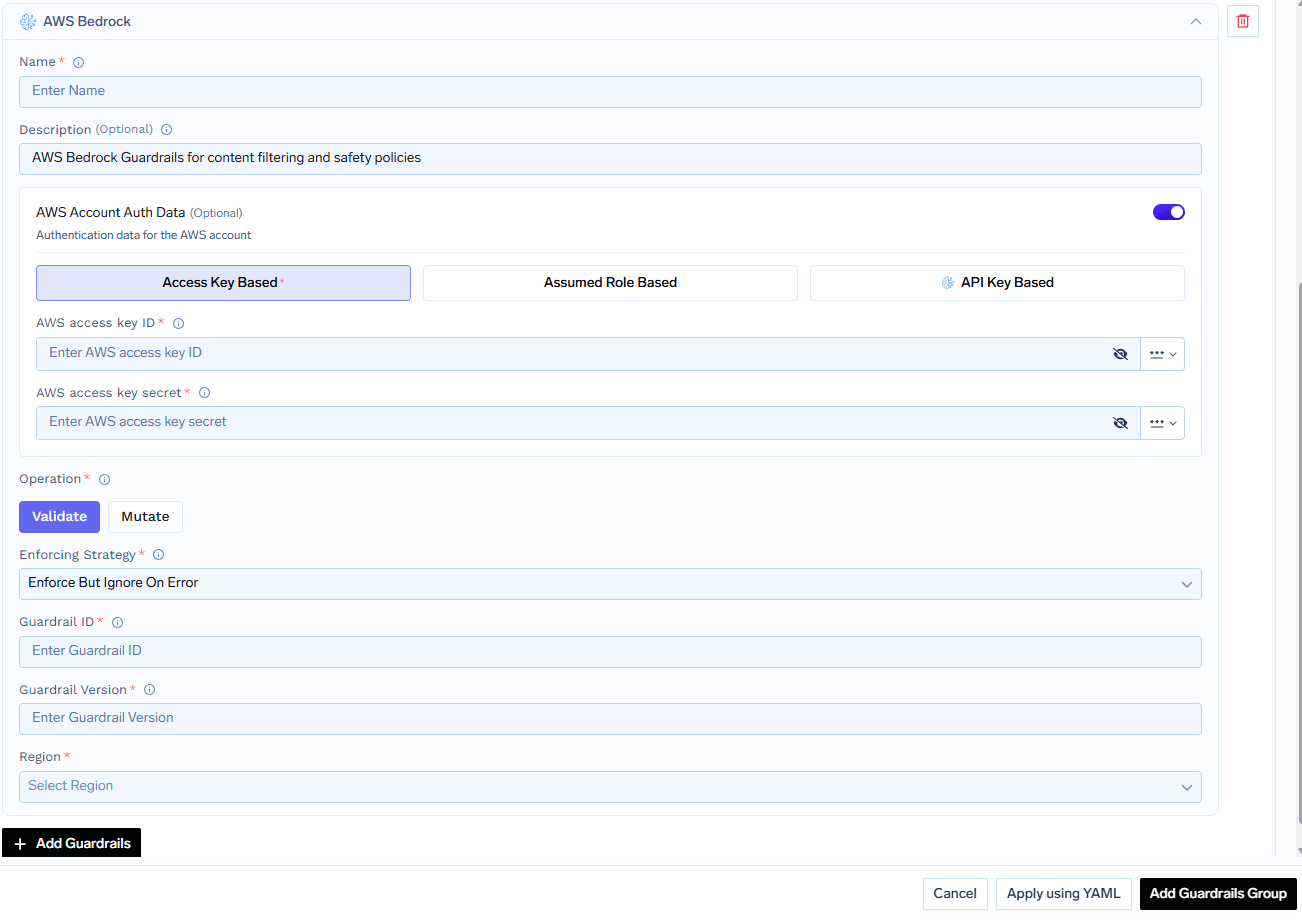
Apply it org-wide through AI Gateway → Policies → Guardrails, or per request with the X-TFY-GUARDRAILS header:
{
  "llm_input_guardrails": ["my-group/bedrock-pii"],
  "llm_output_guardrails": ["my-group/bedrock-content"]
}
When Bedrock intervenes, the gateway sees a structured response and acts on it — here, a PII block:
{
  "action": "GUARDRAIL_INTERVENED",
  "actionReason": "Guardrail blocked.",
  "assessments": [{
    "sensitiveInformationPolicy": {
      "piiEntities": [{"action": "BLOCKED", "detected": true, "type": "NAME"}]
    }
  }],
  "blockedResponse": "Sorry, the model cannot answer this question."
}
Every guardrail run shows up in Monitor → Request Traces with its latency, result, and what it caught.
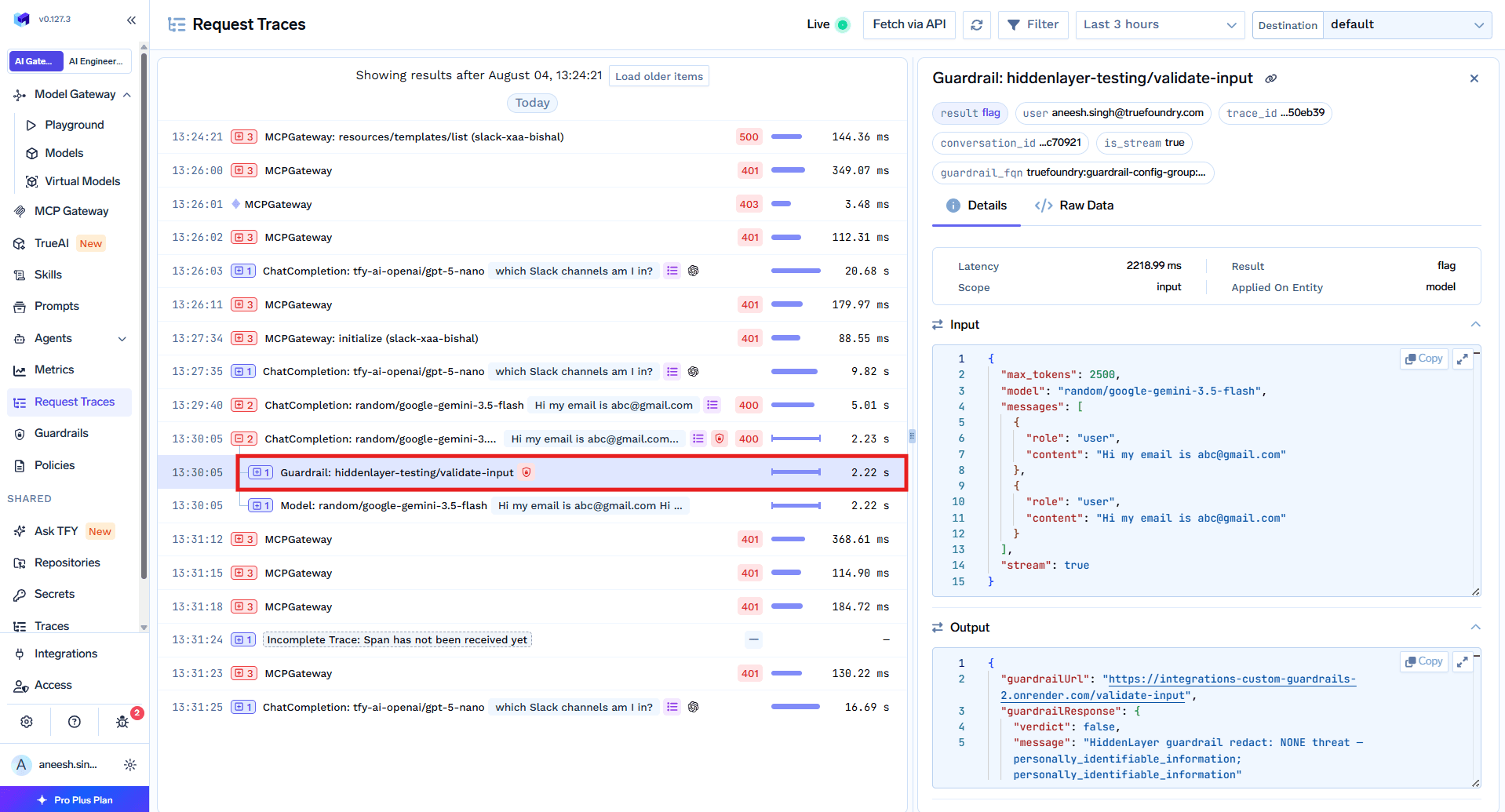
Bedrock Guardrails is billed per policy type, per 1,000 text units — and because the guardrail runs on both the prompt and the response, each request is evaluated twice. Post-2024 pricing put content filters and denied topics around $0.15 per 1,000 text units, with PII and contextual grounding lower; third-party 2026 figures vary, so confirm against the Amazon Bedrock pricing page before budgeting [VERIFY current Bedrock Guardrails rates]. The practical warning: enabling three or four policies at high volume can push guardrail spend past your inference spend. Running it through the gateway means that cost — and the latency each check adds — is visible per request rather than buried in an AWS bill.
A support assistant routes to Claude for quality but must enforce the same PII and content policy the company already built in Bedrock. Instead of rebuilding moderation for Anthropic, the team attaches the existing Bedrock guardrail at the gateway in Mutate mode for PII and Validate mode for content.
Now every Claude call is checked by Bedrock’s ApplyGuardrail on the way in (PII redacted before the prompt is sent) and on the way out (content validated before the reply ships). The same guardrail also covers the team’s GPT-based internal tools, with no extra integration. One policy, defined once in AWS, enforced across two providers — and every decision visible in request traces.
AWS Bedrock Guardrails is a capable safety service with one structural limit: it guards Bedrock. Most teams run more than Bedrock, which means a policy defined once should apply everywhere — not be reimplemented per provider and left to drift.
Routing Bedrock Guardrails through the TrueFoundry AI Gateway makes one policy cover every model, enforced on both sides of each call, rolled out safely from Audit to Enforce, and fully observable down to per-request latency and cost. You keep the guardrail you already built in AWS and extend it across your whole model fleet.
TrueFoundry AI Gateway delivers ~3–4 ms latency, handles 350+ RPS on 1 vCPU, scales horizontally with ease, and is production-ready, while LiteLLM suffers from high latency, struggles beyond moderate RPS, lacks built-in scaling, and is best for light or prototype workloads.




A managed AWS service that applies safety policies — content filters, denied topics, word filters, PII detection, contextual grounding, and automated reasoning — to generative AI prompts and responses.
Yes, through the TrueFoundry AI Gateway. The gateway calls Bedrock’s ApplyGuardrail API as a guardrail step around any model, so the same policy covers OpenAI, Anthropic, Gemini, and open models.
They’re billed per policy type per 1,000 text units, and run on both input and output, so each request is evaluated twice. Rates have changed over time and 2026 third-party figures vary — confirm on the Amazon Bedrock pricing page.
Input validation runs in parallel with the model request, so it usually adds no wait on the happy path; input mutation and output guardrails run synchronously. The gateway shows each guardrail’s latency in request traces.
It depends on the enforcement strategy: Enforce blocks, Enforce-but-ignore-on-error lets the request through, and Audit always allows. Enforce-but-ignore-on-error is the safest default.
Yes. TrueFoundry’s data plane runs in your VPC or on-prem, so DSPy’s prompts and optimization data stay in your environment.



The latest news, articles, and resources sent to your inbox
.png)

.png)
.png)
.png)


.png)
.png)
.png)
.png)
.png)


