


October 14, 2026
|
5 min read


Published: October 14, 2026
Blazingly fast way to build, track and deploy your models!
Roo Code was an intelligent code-generation and refactoring system that worked within VS Code using natural language commands and context information from your coding activity. It was popular, open-source, and powerful.
In May 2026, Roo Code’s vendor announced it was shutting the extension down and directed users to Cline, a closely related agent. Existing installs keep working, but there are no new releases. That makes this a two-audience topic: teams still running Roo Code who need to keep it under control, and teams moving to Cline who want to set governance up correctly from day one. The good news is that both are governed the same way, because both connect through a standard OpenAI-compatible endpoint.
Whichever way you operate, the fundamental issue is basically the same – although not because of the extension.
An IDE coding agent is one of the least-governed LLM clients in most companies. Think about what it does by default:
Multiply that across a fifty-person engineering org and you have real spend, real data-exposure risk, and zero visibility. The agent is useful; the lack of a control point is the problem.
Governance here is not about restricting the agent — it’s about putting a control point between it and the model providers. That control point is the gateway.
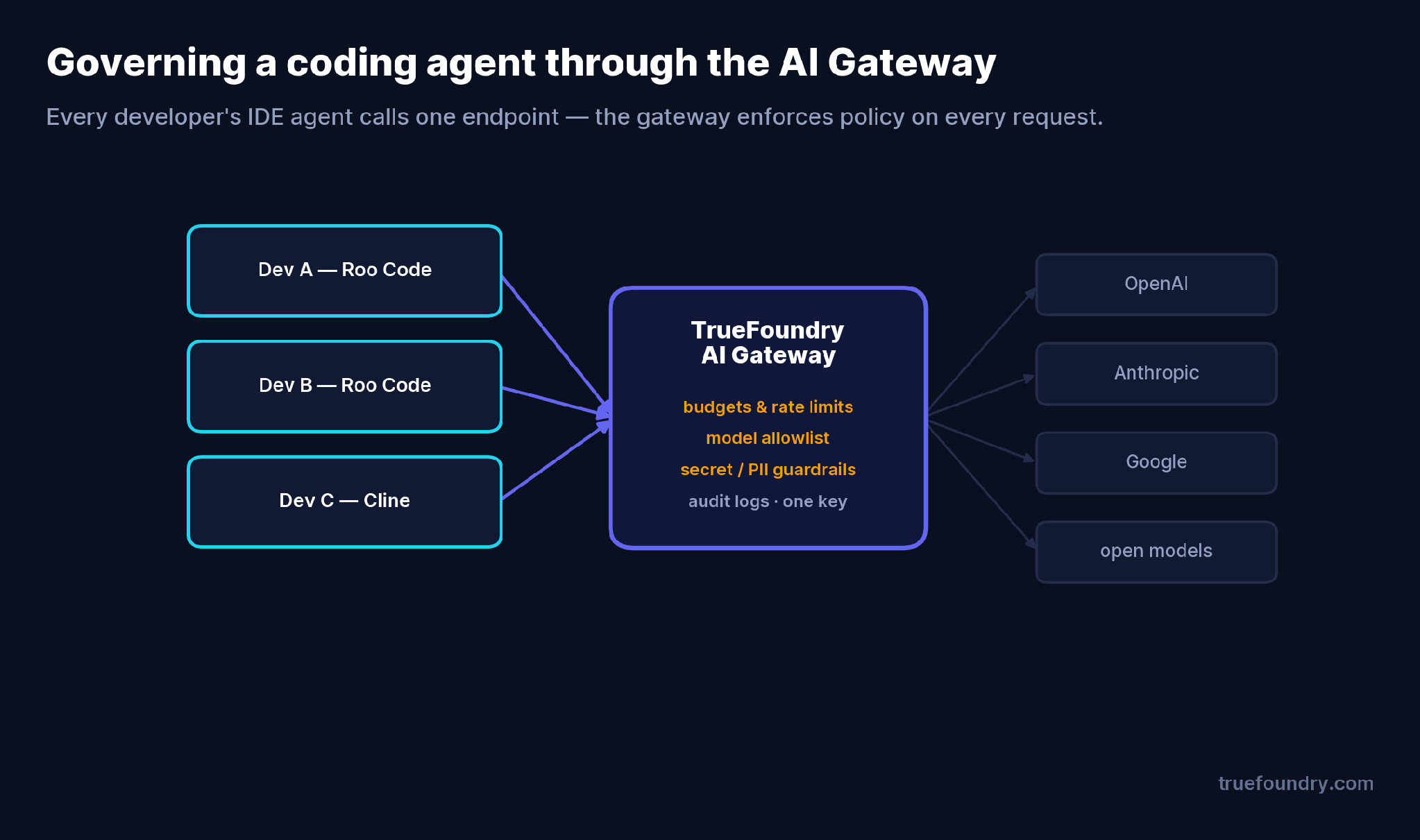
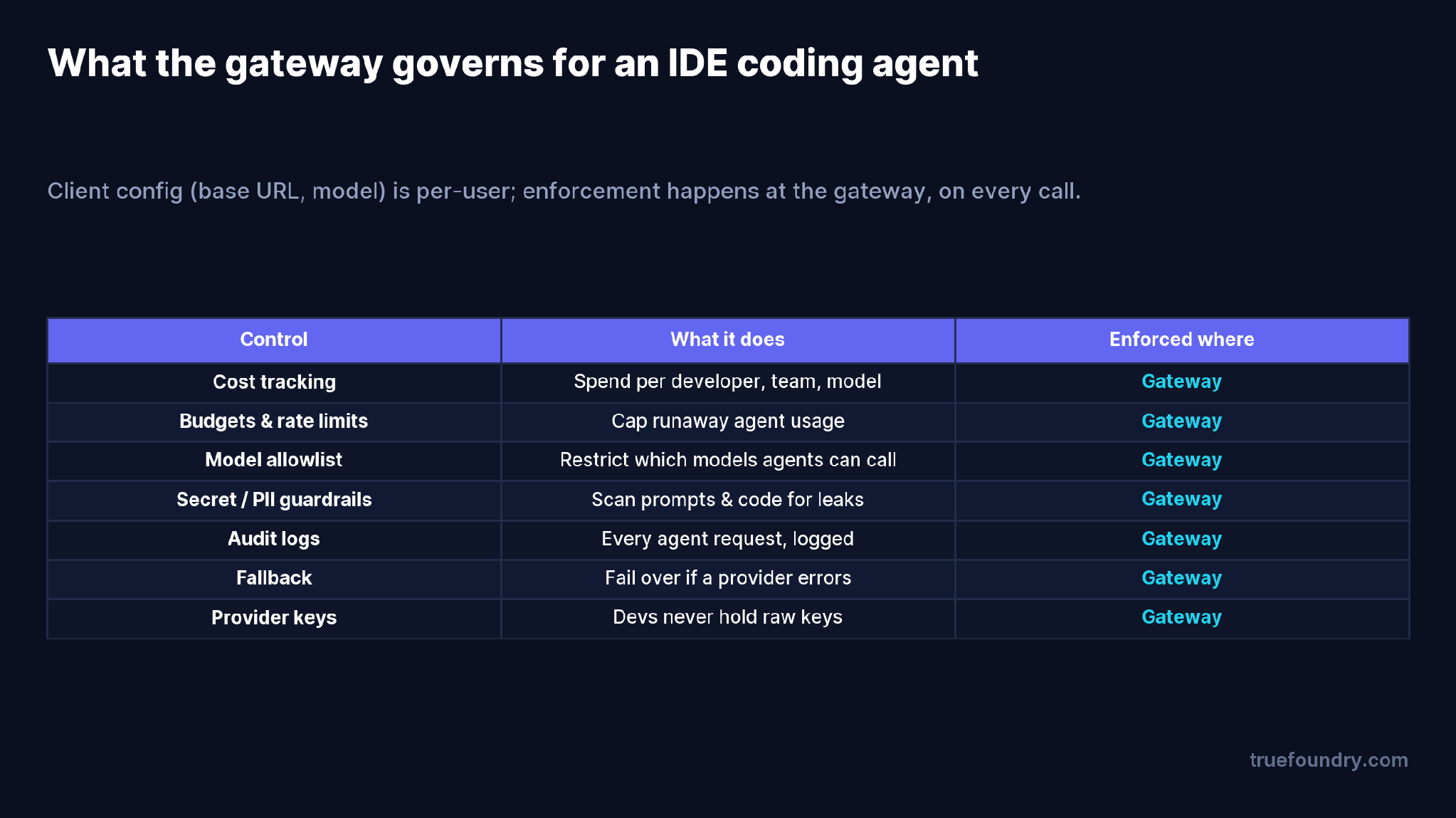
Every Roo Code (or Cline) instance points at one gateway endpoint instead of a provider directly. The gateway then enforces policy on every request:
They hand out provider keys to developers. Every laptop with a raw OpenAI or Anthropic key is a rotation headache and a leak waiting to happen. Issue gateway tokens instead.
They govern production LLM calls but ignore the IDE. The coding agent often sends more sensitive data than production — your actual source — yet runs with none of the guardrails. Bring it under the same gateway.
They assume the IDE can be locked down. Roo Code’s provider settings are per-user; there’s no documented admin lockout. Chasing client-side enforcement is the wrong layer. Enforce at the gateway, where it actually holds.
They skip code/secret scanning. A coding agent will happily paste an .env file into a prompt. Without guardrails, that secret leaves your perimeter.
The setup uses the agent’s OpenAI-compatible provider. First, grab your gateway base URL and model name from the TrueFoundry playground’s unified code snippet.
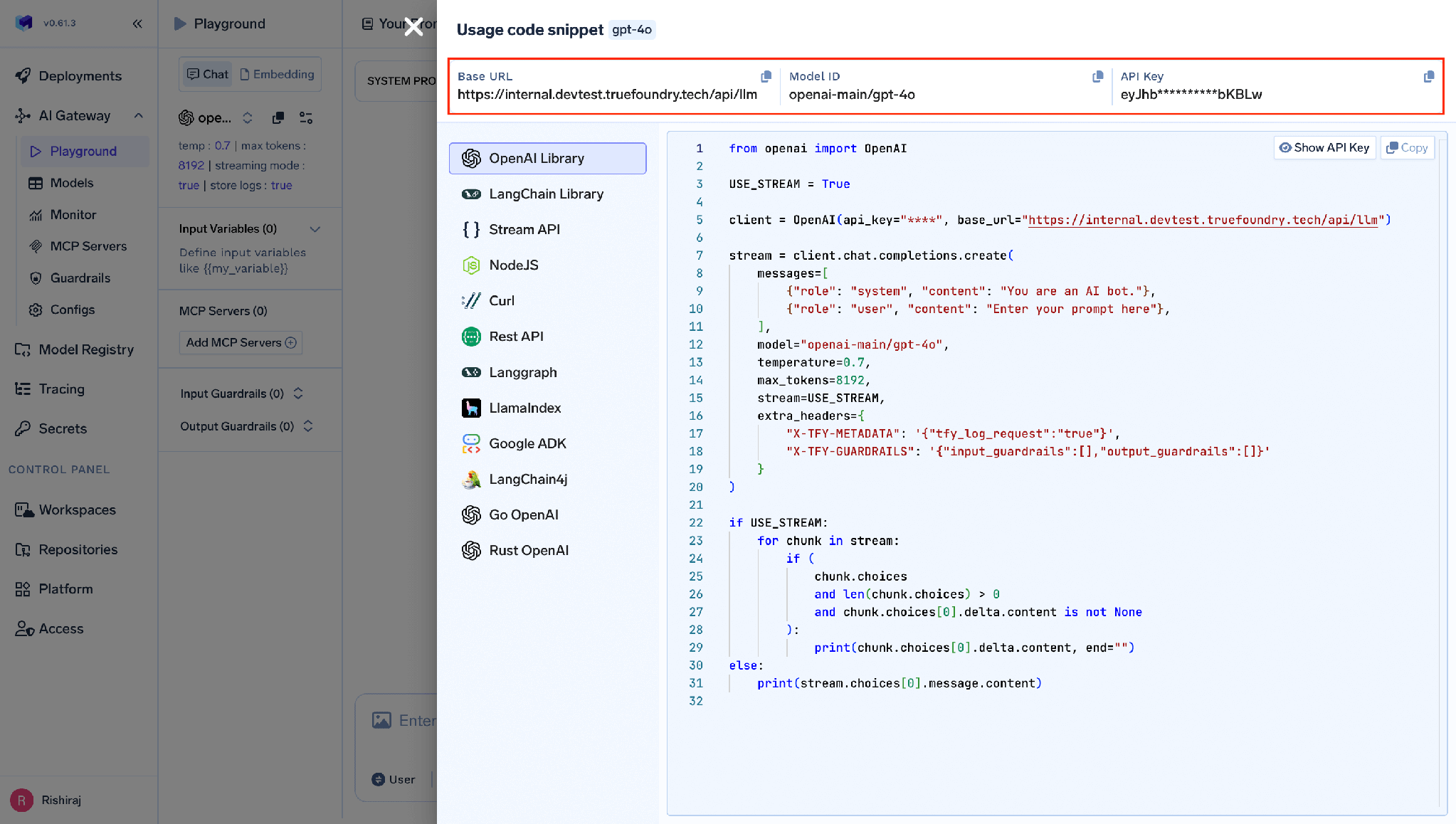
In Roo Code, open the sidebar, choose “OpenAI Compatible” (or “Custom”) as the API provider, and enter your gateway base URL, the model name, and your TrueFoundry token.
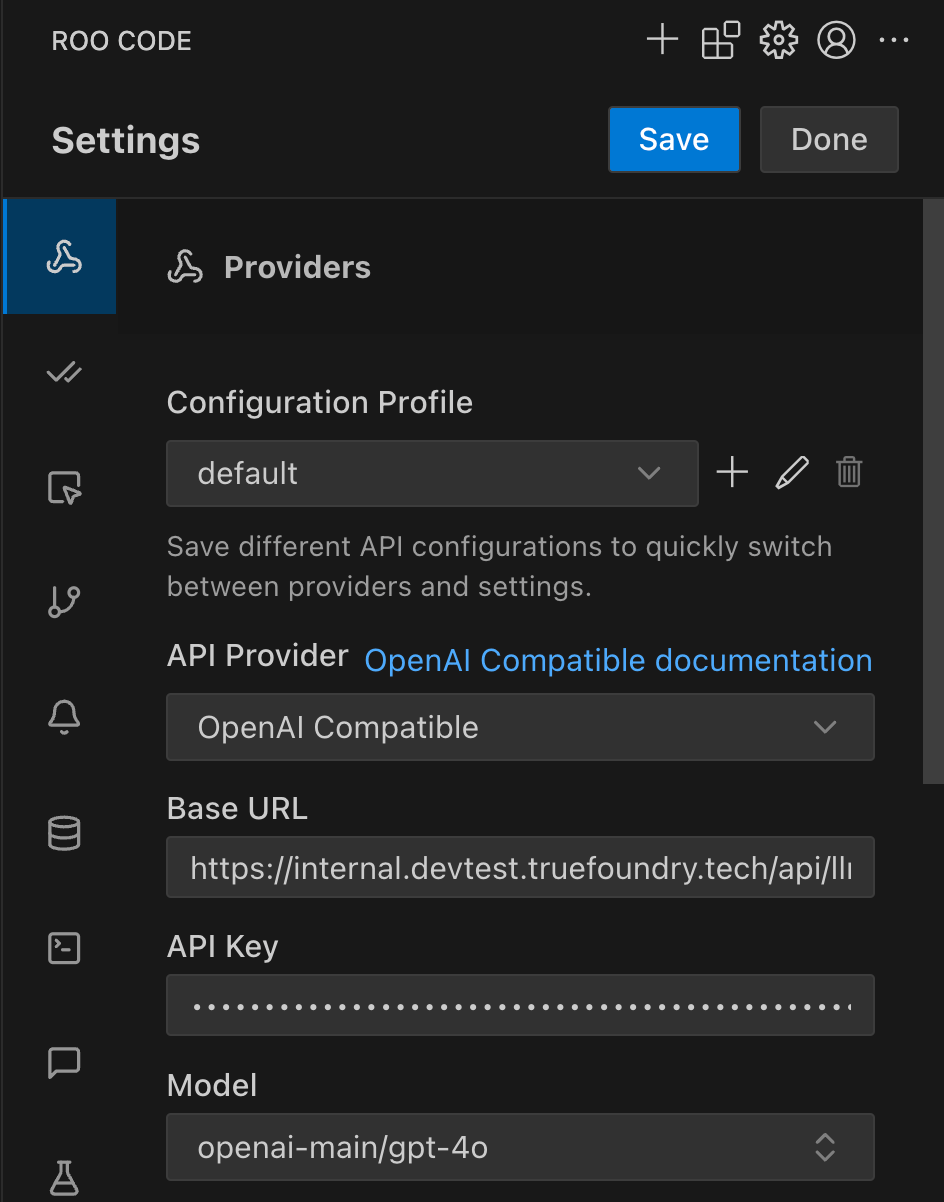
Save, then test by asking the agent to work on a file — the response now flows through the gateway.
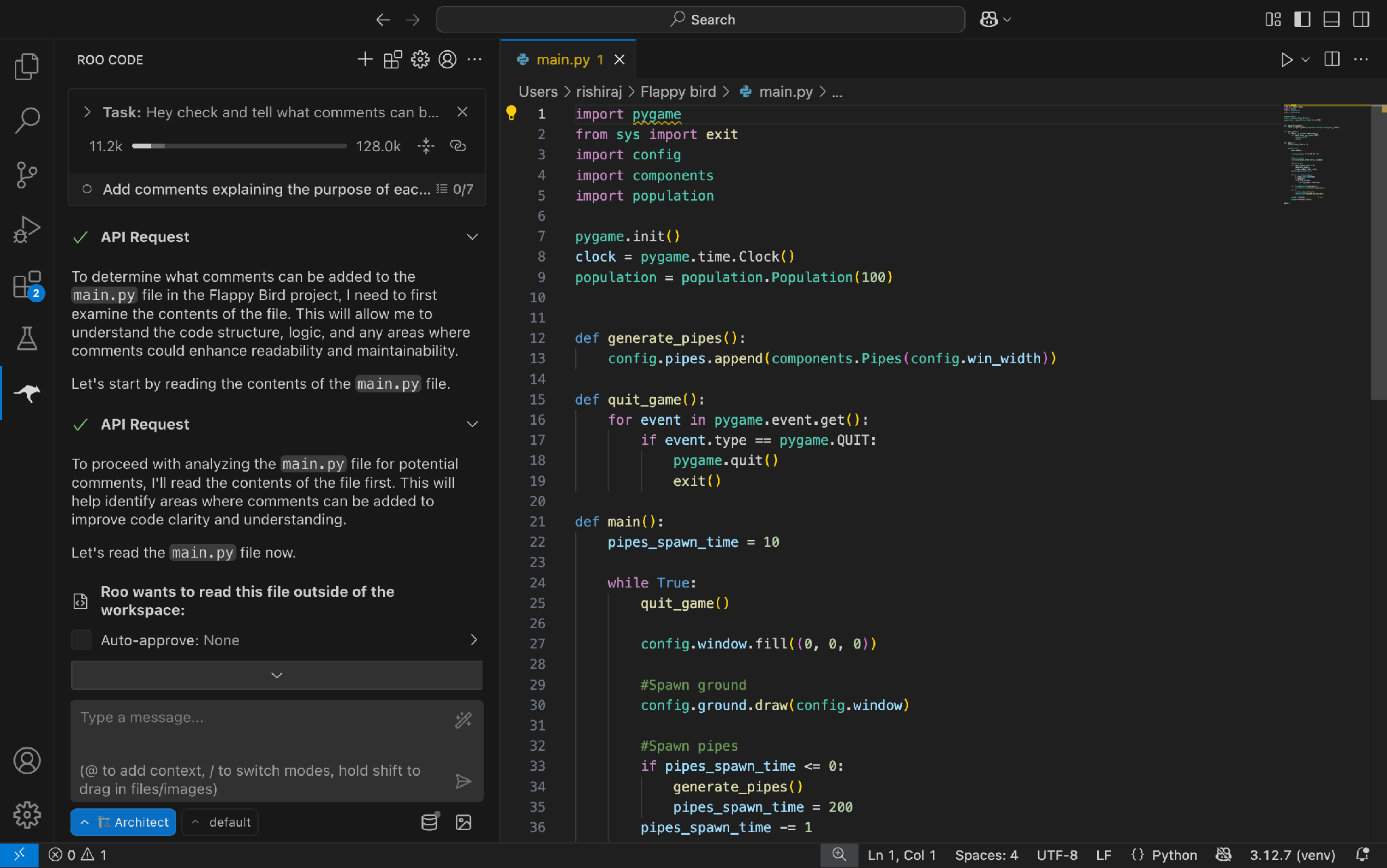
You can define multiple profiles for different tasks — a high-quality model for complex generation, a cheaper one for quick edits — all through the same gateway:
{
  "roocode.apiProfiles": [
    {
      "name": "TrueFoundry — high quality",
      "baseUrl": "{GATEWAY_BASE_URL}",
      "apiKey": "your-truefoundry-token",
      "model": "anthropic-account/your-strong-model",
      "description": "Complex code generation"
    },
    {
      "name": "TrueFoundry — fast",
      "baseUrl": "{GATEWAY_BASE_URL}",
      "apiKey": "your-truefoundry-token",
      "model": "openai-account/your-fast-model",
      "description": "Quick edits"
    }
  ]
}
Cline configures identically — same OpenAI-compatible provider, same base URL, same token — so a migration from Roo Code to Cline keeps your governance exactly as-is.
One thing worth stating plainly: Roo Code’s gateway settings live in user-editable API configuration profiles, and there is no documented admin or managed-config lockout. autoImportSettingsPath can seed a shared profile, but it doesn’t enforce one. MCP server settings are likewise per-user.
That sounds like a gap, but it points to the right mental model: you don’t govern a coding agent by locking the IDE — you govern it at the gateway. Whatever a developer types into their settings, their calls still hit your gateway, where budgets, the model allowlist, guardrails, and audit apply unconditionally. Client config is convenience; the gateway is control. Build your policy there and the per-user settings stop mattering.
A 50-engineer org rolls out an AI coding agent. Without a gateway, each developer holds a provider key, picks their own model, and generates uncapped spend. Finance sees one large provider invoice with no breakdown; security has no record of what code left the building.
Route all 50 through the gateway and the picture inverts:
None of that required locking a single IDE. It required one control point.
The coding agent in your developers’ editors is one of the most powerful — and least governed — LLM clients you run. Roo Code’s shutdown is a good moment to fix that: whether you’re keeping existing installs alive or moving to Cline, the answer isn’t to lock down the IDE, it’s to route every call through a gateway that enforces cost, policy, guardrails, and audit on its own terms.
Point the agent at the TrueFoundry AI Gateway and the ungoverned client becomes a governed one — one key, one view of spend, one place where your rules actually hold.
TrueFoundry AI Gateway delivers ~3–4 ms latency, handles 350+ RPS on 1 vCPU, scales horizontally with ease, and is production-ready, while LiteLLM suffers from high latency, struggles beyond moderate RPS, lacks built-in scaling, and is best for light or prototype workloads.




Roo Code’s vendor announced a shutdown in May 2026 and now points users to Cline. Existing installs keep working, but there are no new releases. New teams should adopt Cline, which integrates with a gateway the same way.
Use Roo Code’s “OpenAI Compatible” provider. Set the base URL to your gateway URL, enter the model name from the gateway playground, and use your TrueFoundry token as the API key.
Yes — at the gateway. The gateway enforces a model allowlist on every call, so even if a developer types a different model into the IDE, only allowed models are served.
It can. Secret and PII guardrails scan prompts (and code) at the gateway and block or redact leaks before they reach a provider.
The gateway tracks cost per developer, team, and model, so agent spend is attributed and visible rather than buried in one provider invoice.
With TrueFoundry’s data plane running in your VPC or on-prem, prompts and code pass through a gateway you control, and usage data stays in your environment.



The latest news, articles, and resources sent to your inbox
.png)
.png)


.png)
.png)
.png)
.png)
.png)






