


.png)
November 1, 2026
|
5 min read


احصل على وصول فوري إلى بيئة TrueFoundry مباشرة. انشر النماذج، ووجّه حركة مرور LLM، واستكشف المنصة بالكامل — بيئة الاختبار الخاصة بك جاهزة في ثوانٍ، ولا يلزم وجود بطاقة ائتمان.



.png)
Blazingly fast way to build, track and deploy your models!
إن خادم Databricks MCP ليس خادماً واحداً. توفر Databricks مجموعة من نقاط نهاية MCP المُدارة من مساحة عمل، ولكل منها عنوان URL خاص بها. بروتوكول سياق النموذج (Model Context Protocol) هو المعيار المفتوح الذي يسمح للوكيل باكتشاف واستدعاء الأدوات على نظام خارجي، وتقوم Databricks بنشر واجهتها كعدة خوادم متخصصة بدلاً من خادم واحد شامل.
في Databricks، توجد عناوين URL تحت الوكلاء > خوادم MCP. خمسة أشكال:
يقع كل مسار تحت https://<workspace-hostname>. لاحظ مدى دقة تحديد عنوان URL: نقطة نهاية الوظائف مرتبطة بكتالوج ومخطط واحد، والبحث المتجهي بفهرس واحد، وGenie بمساحة واحدة. هذا هو أرخص نطاق يمكنك الحصول عليه، ويتم تطبيقه قبل التفاوض على أي قائمة أدوات — فتسجيل analytics.reporting لا يمنح الوكيل أي مسار للوصول إلى finance.raw.
نقطتا النهاية اللتان تفتقران إلى هذا الحد هما /mcp/sql و /mcp/functions/system/ai: فهما على مستوى مساحة العمل بالكامل، وكلاهما قابل للتنفيذ. معظم ما يرد في هذا المنشور يعتمد على هذه النقطة.
الأنماط المفيدة تربط نقاط النهاية ببعضها البعض.
الفصل بين القراءة والكتابة واضح، والوثائق صريحة بهذا الشأن. نقاط نهاية Genie مخصصة للقراءة فقط. يمكن لـ Databricks SQL تنفيذ عمليات الكتابة بناءً على الصلاحيات الممنوحة. يأتي البحث المتجه ودوال UC في المنتصف: يمكن للدالة المسجلة تغيير الحالة إذا تمت كتابتها بهذا الشكل. لذا، فإن نقطتي نهاية آمنتان بطبيعتهما، واثنتان آمنتان فقط إذا كانت الكائنات الأساسية كذلك، بينما تقوم الأخيرة بتنفيذ أي شيء.
وجود محلل واحد على مساحة Genie أمر مقبول، لكن ربط الفريق بأكمله لـ SQL في كل وكيل ليس كذلك.
تكلفة الحوسبة ليس لها سقف طبيعي. تتم محاسبة الوظائف والمجموعات والمستودعات بناءً على وقت تشغيلها، ويمكن للوكيل الذي يمتلك صلاحية استدعاء نقطة نهاية SQL أن يطلق عملية مسح عبر جدول ضخم، ثم يكرر ذلك في حلقة إعادة محاولة عند انتهاء مهلة المحاولة الأولى. إن تنفيذ استعلام SELECT * غير مدروس على جدول Delta واسع ليس خطأً تكتشفه أثناء المراجعة، بل هو بند تكلفة ستلاحظه في نهاية الشهر. من بين جميع خوادم MCP التي قد يربطها فريق المنصة، يعد هذا أقوى حجة لفرض بوابات الموافقة.
نطاق التأثير يمتد إلى بيانات الإنتاج. يمكن لنقطة النهاية التي تجيب على الأسئلة، في حال وجود صلاحيات غير مناسبة، تنفيذ أوامر DELETE أو INSERT. يقوم الوكيل بالمصادقة كهوية Databricks، لذا فإن كل ما يمكن لتلك الهوية القيام به، يمكن للوكيل القيام به أيضاً، بما في ذلك الحقوق التي حصل عليها مدير الخدمة منذ سنوات لأغراض الترحيل.
الرموز الشخصية (PATs) المشتركة تلغي نموذج الحوكمة. يصل كل طلب بهوية واحدة، مما يجعل فلاتر الصفوف، وأقنعة الأعمدة، وصلاحيات الكتالوج تتوقف عن تتبع المستخدم البشري الفعلي.
لا يمكن لأحد إعادة بناء ما تم تنفيذه. يسجل Databricks الاستعلام، لكنه لا يسجل حقيقة أن وكيل الفرز الخاص بك قد أصدره بناءً على نص تم لصقه في محادثة Slack. عندما يرتفع استهلاك المستودع في الساعة الثالثة صباحاً، يخبرك سجل الاستعلام بما تم تنفيذه، وليس السبب وراء ذلك.
لا شيء مما سبق يمنع ربط Databricks، بل هو في الواقع يبرر الحاجة إلى وجود مستوى تحكم (control plane) أمامه، وهو ما صُممت من أجله بوابة MCP .
لا يتم توفير Databricks من خلال كتالوج TrueFoundry المُدار، بل تقوم بتسجيله عبر ربط أي خادم MCP عن بُعد باستخدام تطبيق OAuth تقوم بإنشائه بنفسك؛ وهذا يتطلب جهداً أكبر مقارنة بالخادم المُدار بضغطة زر واحدة، ولكنه يمنحك السيطرة الكاملة على النطاقات (scopes). ستحتاج إلى مساحة عمل (workspace) تم تفعيل خوادم MCP المُدارة فيها.
الخطوة 1 — إنشاء تطبيق OAuth. في وحدة تحكم الحسابفي Databricks، انتقل إلى الإعدادات > اتصالات التطبيقات وقم بتسجيل عميل سري (confidential client). اختر النطاقات الخاصة بك — تذكر الوثائق نطاقات all-apis و genie و unity-catalog — ثم انسخ معرف العميل (Client ID) و سر العميل (Client Secret)واضبط عنوان URI لإعادة التوجيه على:
https://<tfy-control-plane-base-url>/api/svc/v1/llm-gateway/mcp-servers/oauth2/callback
هذا هو رابط الاستدعاء (callback) المسجل ذاتياً، وليس الرابط الذي تستخدمه خوادم الكتالوج المُدارة، لذا لا تنسخ القيمة من دليل آخر. اختر النطاقات (scopes) بدقة: إذا كان الوكيل يحتاج فقط إلى Genie، فإن genie تكفي.
الخطوة 2 — افتح أداة الاختيار. انتقل إلى بوابة MCP، وانقر على إضافة خادم، واختر اتصال بأي خادم MCP عن بُعد.
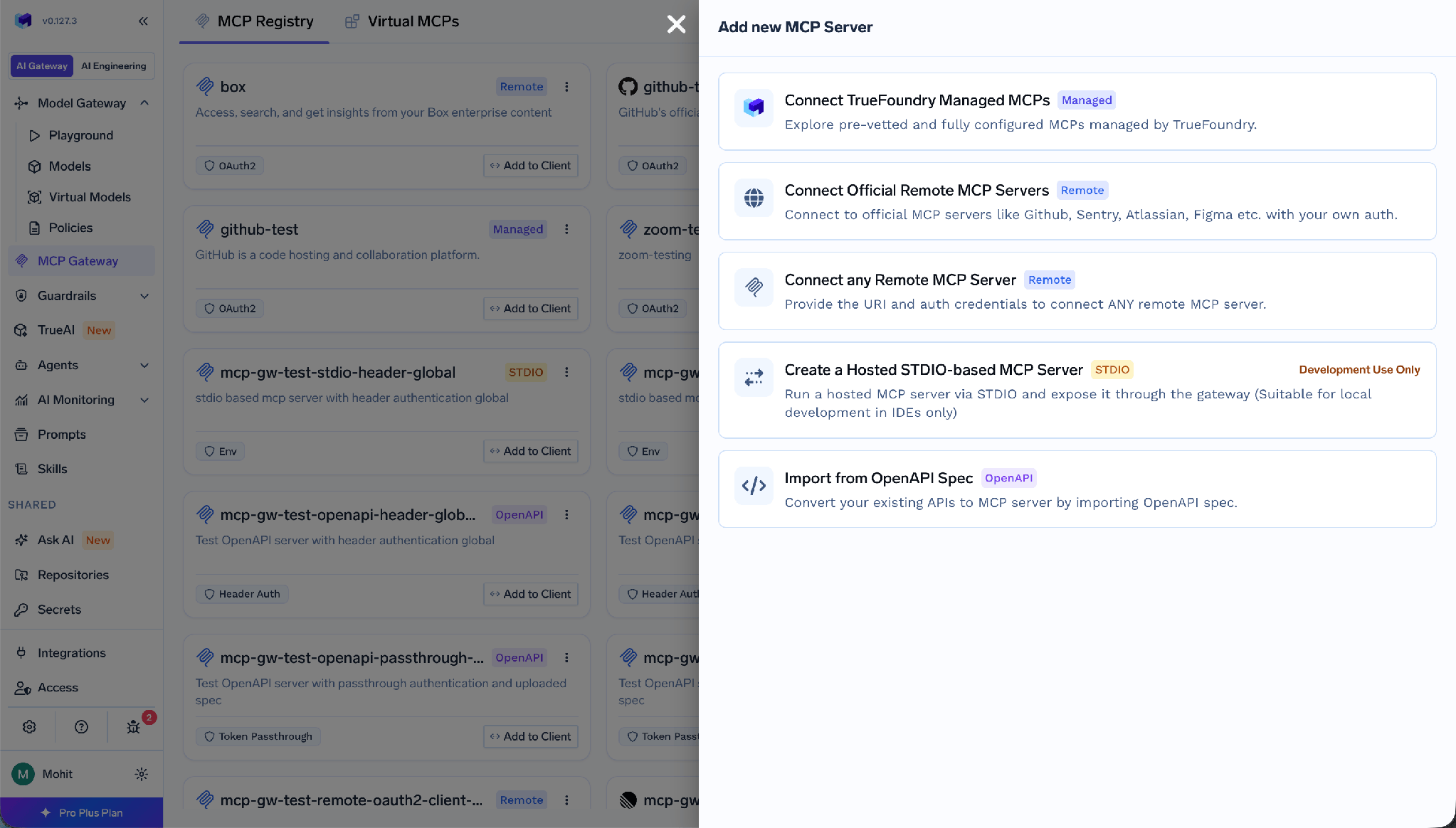
الخطوة 3 — املأ بيانات الخادم. امنحه اسماً بحروف صغيرة ومفصولاً بشرطات — لنقطة النهاية، وليس للمورد، لأن databricks-genie-revenue تعطي معلومات أكثر من databricks — ثم الصق رابط URLالخاص بـ MCP.
الخطوة 4 — تكوين OAuth2. تحت بيانات المصادقة، اختر OAuth2 و رمز التفويض ، ثم أدخل معرف العميل، سر العميل، و رابط الرمز المميز.
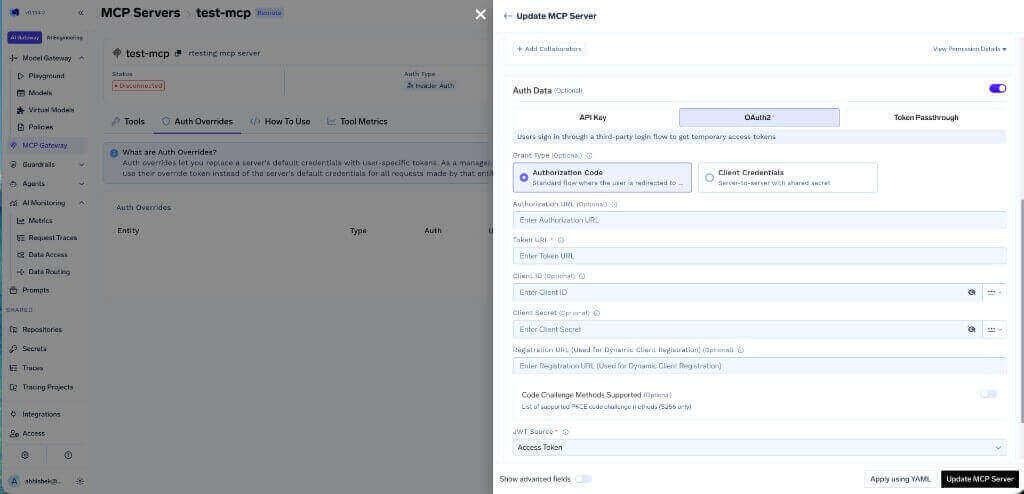
رمز التفويض هو ما يجعل الوصول لكل مستخدم على حدة ممكناً. بيانات اعتماد العميل مخصصة للاتصال بين الخوادم، لذا يتم تنفيذ كل طلب بهوية واحدة — وهي نفس مشكلة الرمز المميز الشخصي (PAT) المشترك. قم بتخزين السر في مخزن أسرار TrueFoundry وأشر إلى اسمه المؤهل بالكامل (FQN).
الخطوة 5 — احفظ، ثم اتصل. افتح الأدوات section and click Connect Now. After OAuth succeeds, the Databricks tools appear.
Then repeat per endpoint. Two Genie spaces, one index, and SQL is four MCP servers — not overhead, but the governance boundary.
TrueFoundry separates inbound authentication, how a client proves itself to the gateway, from outbound, how the gateway reaches Databricks.
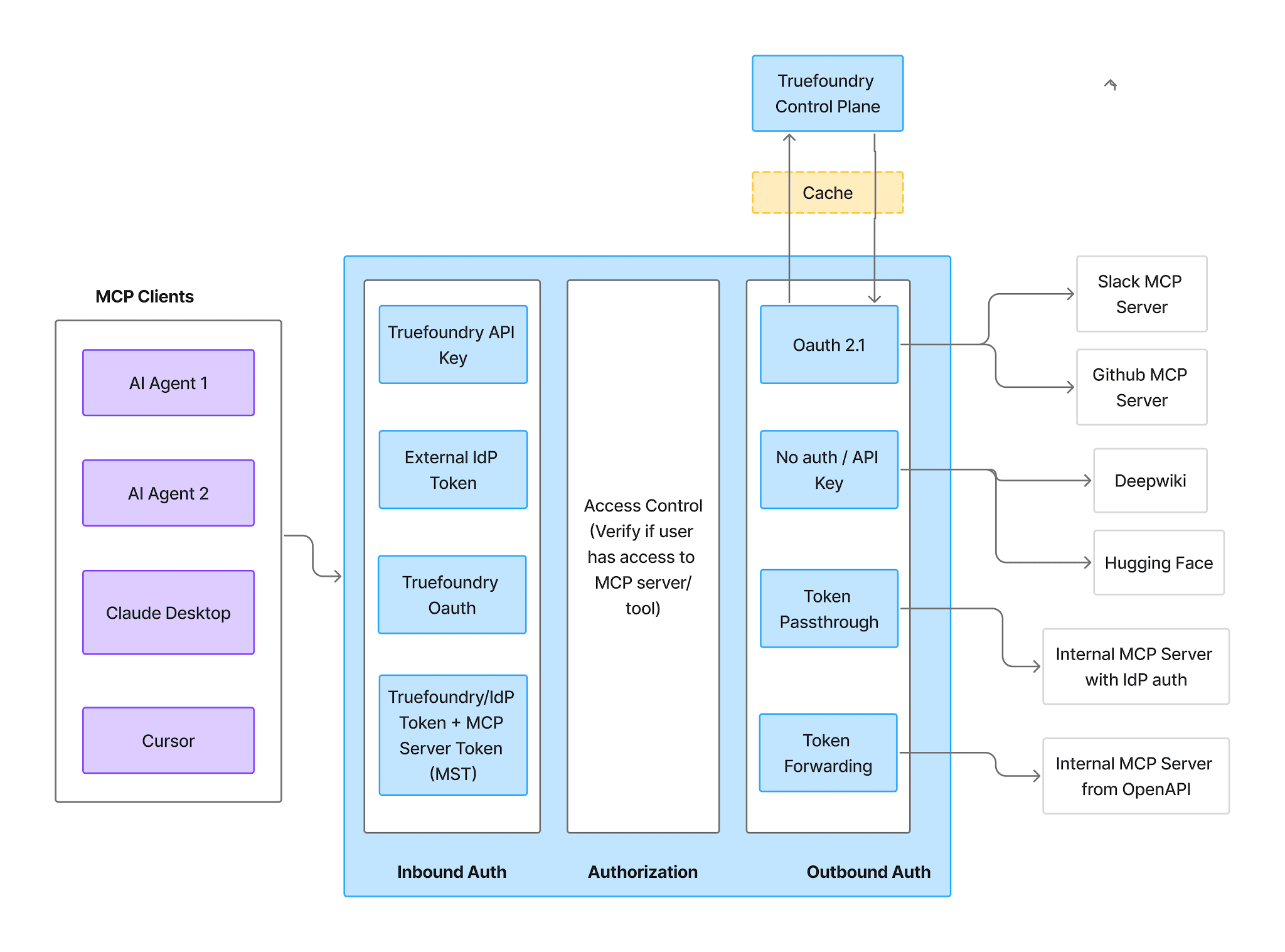
Inbound supports four methods:
Virtual Account tokens give every request identical access, so they cannot express per-user Databricks identity. Where grants differ by person, use a PAT or IdP token.
Outbound for Databricks is one of two options:
This is where the second thread lands. Unity Catalog permissions still apply to each Databricks identity. The gateway decides which tools exist; Unity Catalog decides which objects the authorizing identity may read or write. Choose Authorization Code and the two compose: an agent acting for an analyst inherits that analyst’s grants, row filters, and column masks — governance your data team already built, applied to agent traffic for free. Choose a shared PAT and the rules still apply, just to a principal unrelated to the asker.
Once authorized, the Tools tab lists what the endpoint exposes.
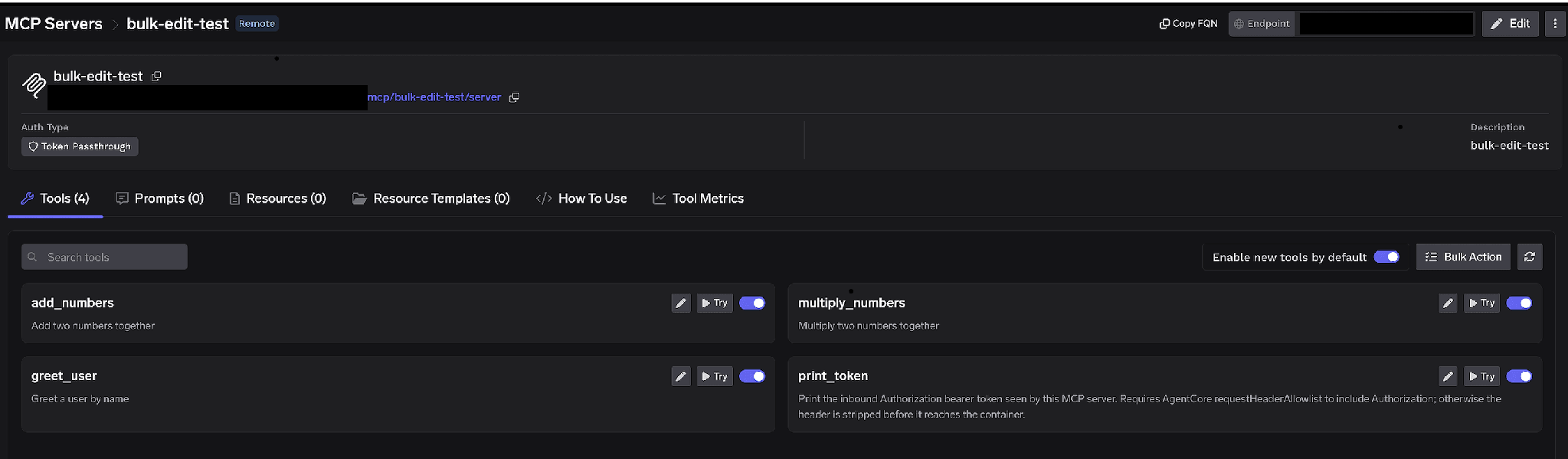
Per-tool toggles. Turn a tool off and it is omitted from tools/list entirely — structural, not prompt-layer filtering. It is how you publish four reviewed functions out of thirty.
Enable new tools by default. Left on, upstream additions appear automatically. Turned off, only tools you enabled are available — clearly right for a UC functions endpoint, where a function an analyst registers should not silently become callable.
Bulk Action. Turns every row into a checkbox with Select all, so a schema full of functions becomes a short allowlist in one save.
Clicking the pencil opens Edit Tool:
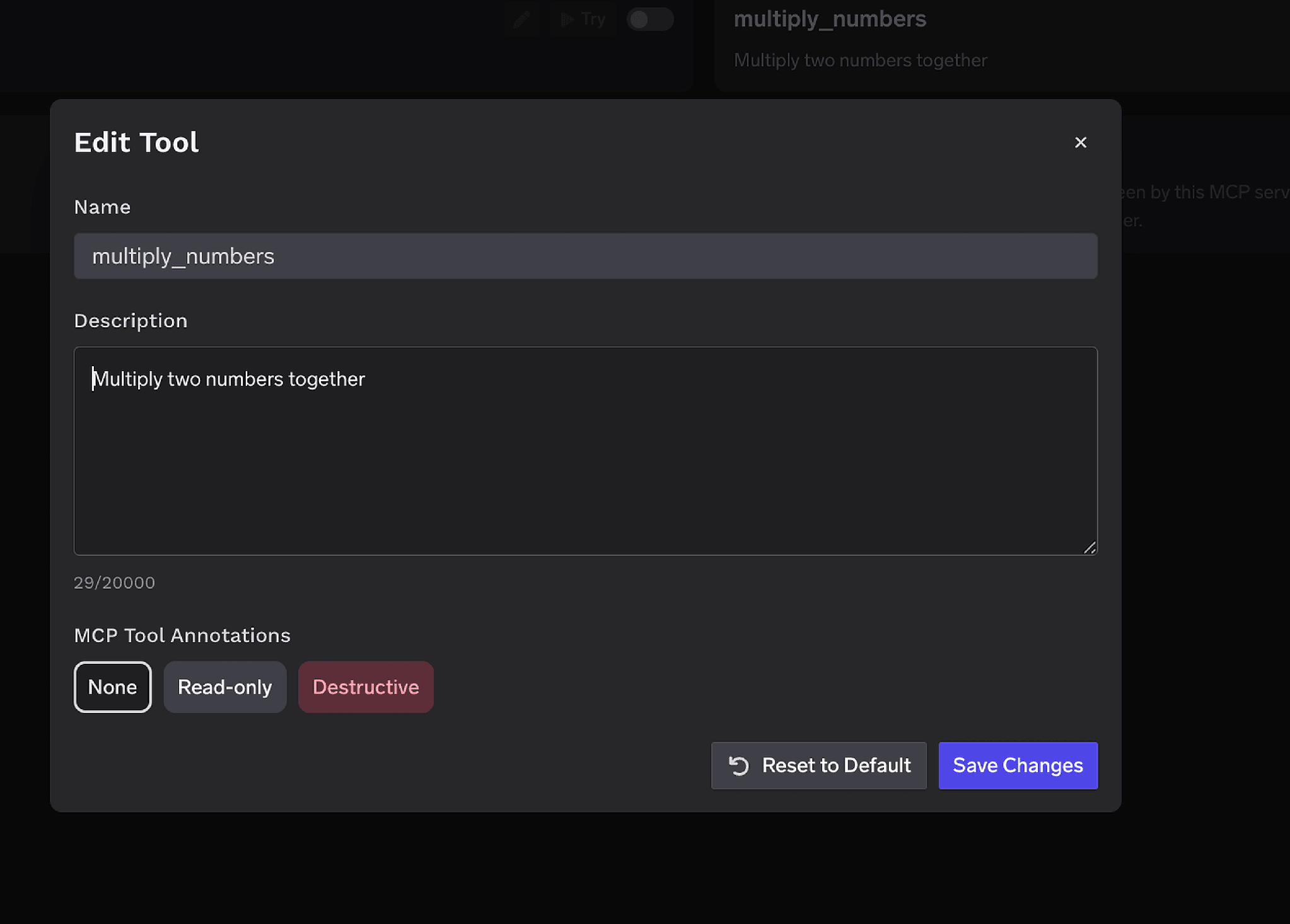
The Description override takes up to 20,000 characters and steers tool selection when a name is opaque: get_cust_agg_v3 means nothing to a model, while one naming its grain and cost profile means a lot.
MCP Tool Annotations mark a tool Read-only or Destructive, setting readOnlyHint or destructiveHint. Mark Genie read-only and SQL and Python destructive, and the policies below gate a whole class without naming every tool.
Access control attaches to users, teams, or virtual accounts on two dimensions: which servers an identity reaches, and which tools it can call.
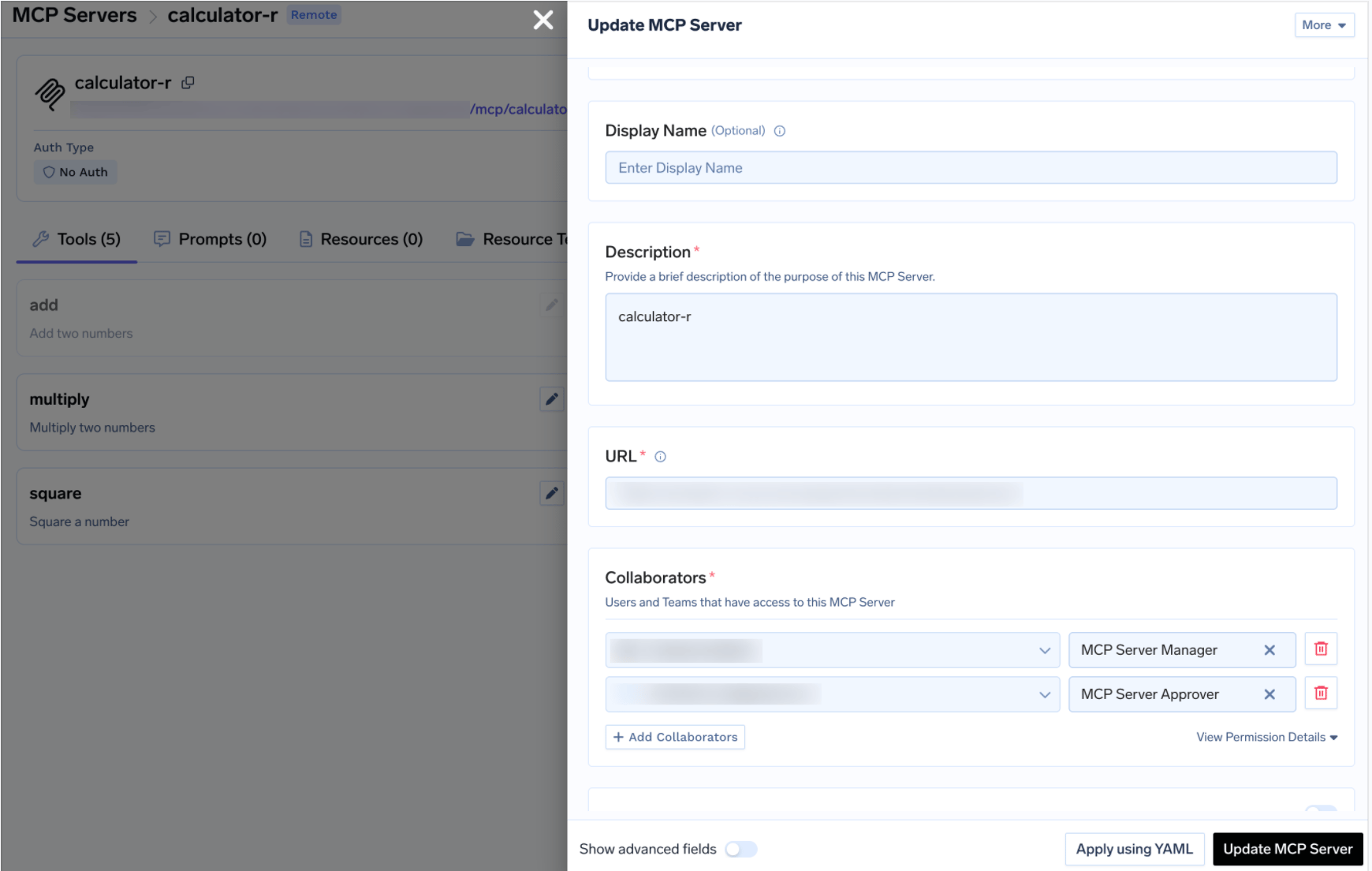
Because each endpoint is its own server, these roles slice naturally. Give the analytics org User on the Genie servers; keep User on the SQL server to the few who should issue ad-hoc queries at all, and put a data platform engineer in the Approver seat there — the same MCP access control model as the rest of your registry.
Disabling the SQL endpoint outright is the blunt instrument. Sometimes you do want an agent able to run a query — just not unattended. Databricks is the clearest case for approval policies in any MCP estate, because what you gate costs money every second it runs.
When a gated tool is called, the gateway holds the call, raises a request, and notifies approvers; once a human approves, calls succeed for a configurable window. Create a policy under AI Gateway → Policies → MCP Tool Approval, marked Beta in the console:
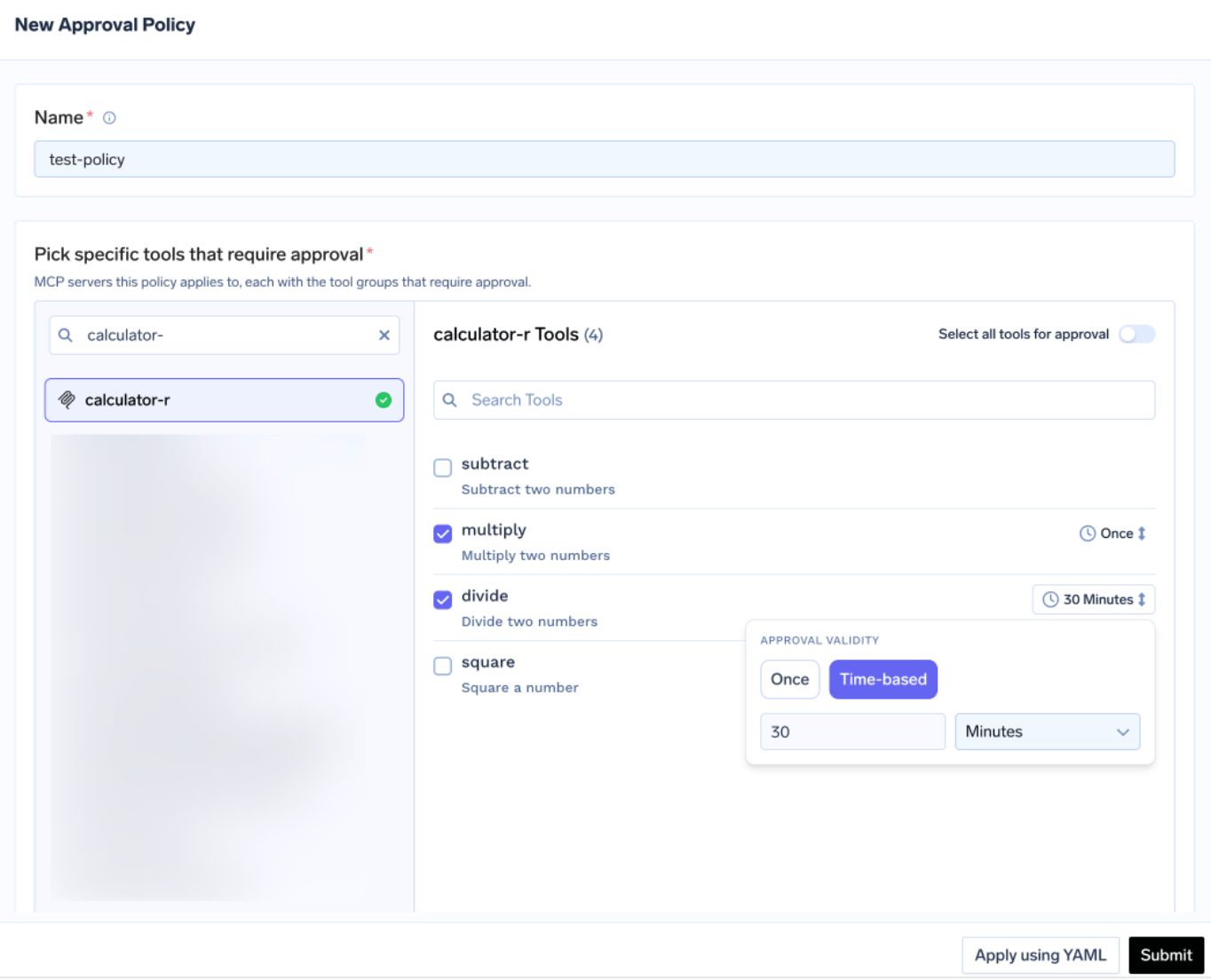
Each policy names the servers it gates and picks an approval scope:
For SQL and Python, all is defensible — there is no harmless tool on a general execution surface. For UC functions, annotate the writers Destructive and use destructive. Overlaps resolve most-specific-first: named > destructive > all.
Validity is Once or time-based in minutes. For execution endpoints Once matches the risk: a thirty-minute window is thirty minutes in which a retry loop can rerun the same expensive query on one approval. The most restrictive policy wins. Approvers are notified over Email, Slack, PagerDuty, or MS Teams:
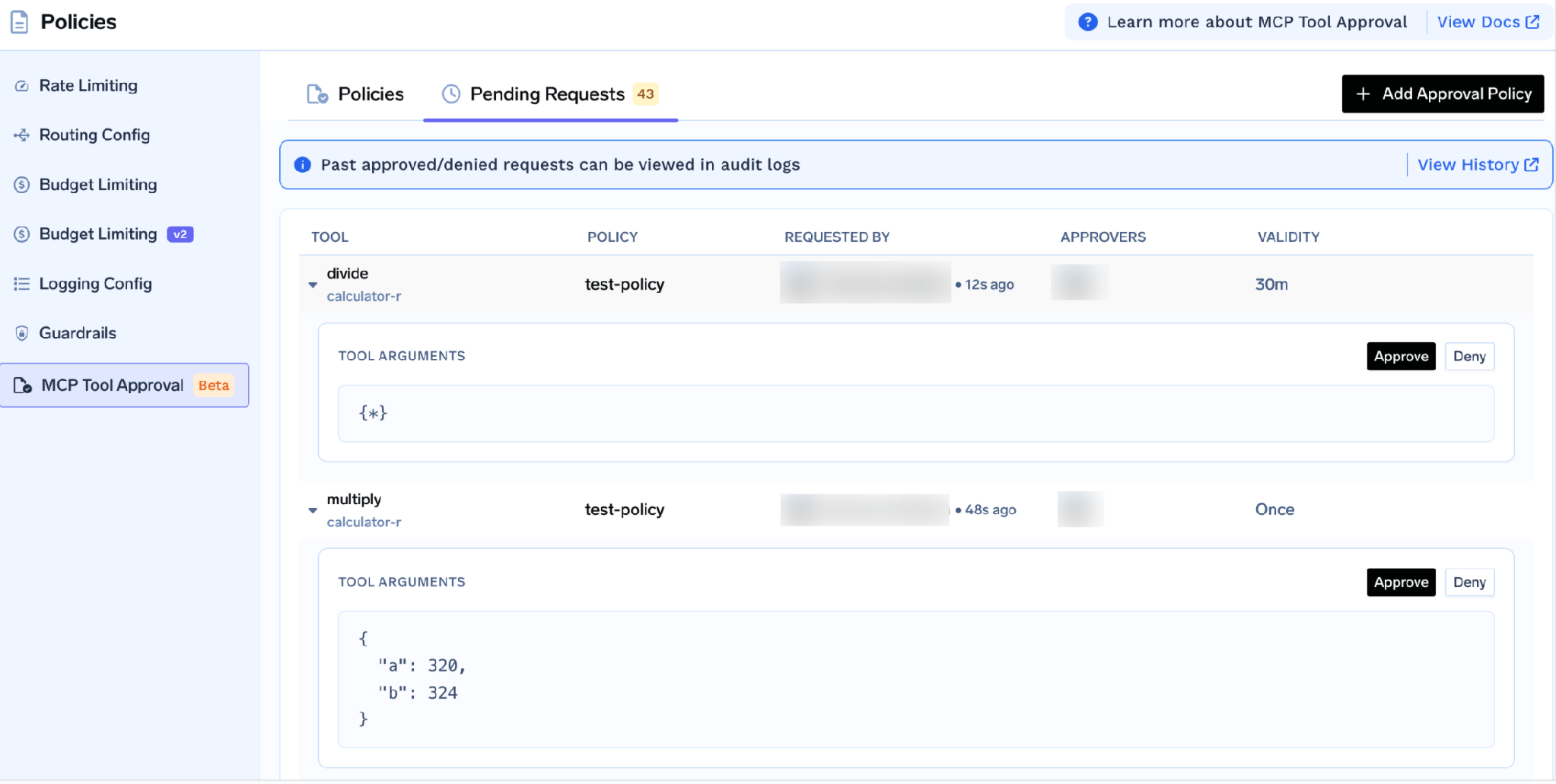
Each request shows the tool, the policy, the requester, and the actual tool arguments — so the approver sees the SQL text or Python body before it runs. That is the most valuable detail here: a reviewer spots an unbounded scan or a missing partition predicate in seconds, exactly what a model misses.
While pending, the caller gets a JSON-RPC result carrying _meta.approval_status: "pending" rather than an error, so a well-behaved agent waits and retries. Grants are per requester, and a denial blocks nobody permanently — to block durably, disable the tool or remove the user.
Run the tools by hand first. Click Try next to any tool, fill in the parameters, and read the JSON response; Try is disabled for tools you turned off. This catches what is painful to debug later: a missing scope, a catalog the identity cannot see, a Genie space id from another workspace, or a mismatched index name.
The How To Use tab carries your tenant-specific Gateway URL and ready-to-paste snippets.
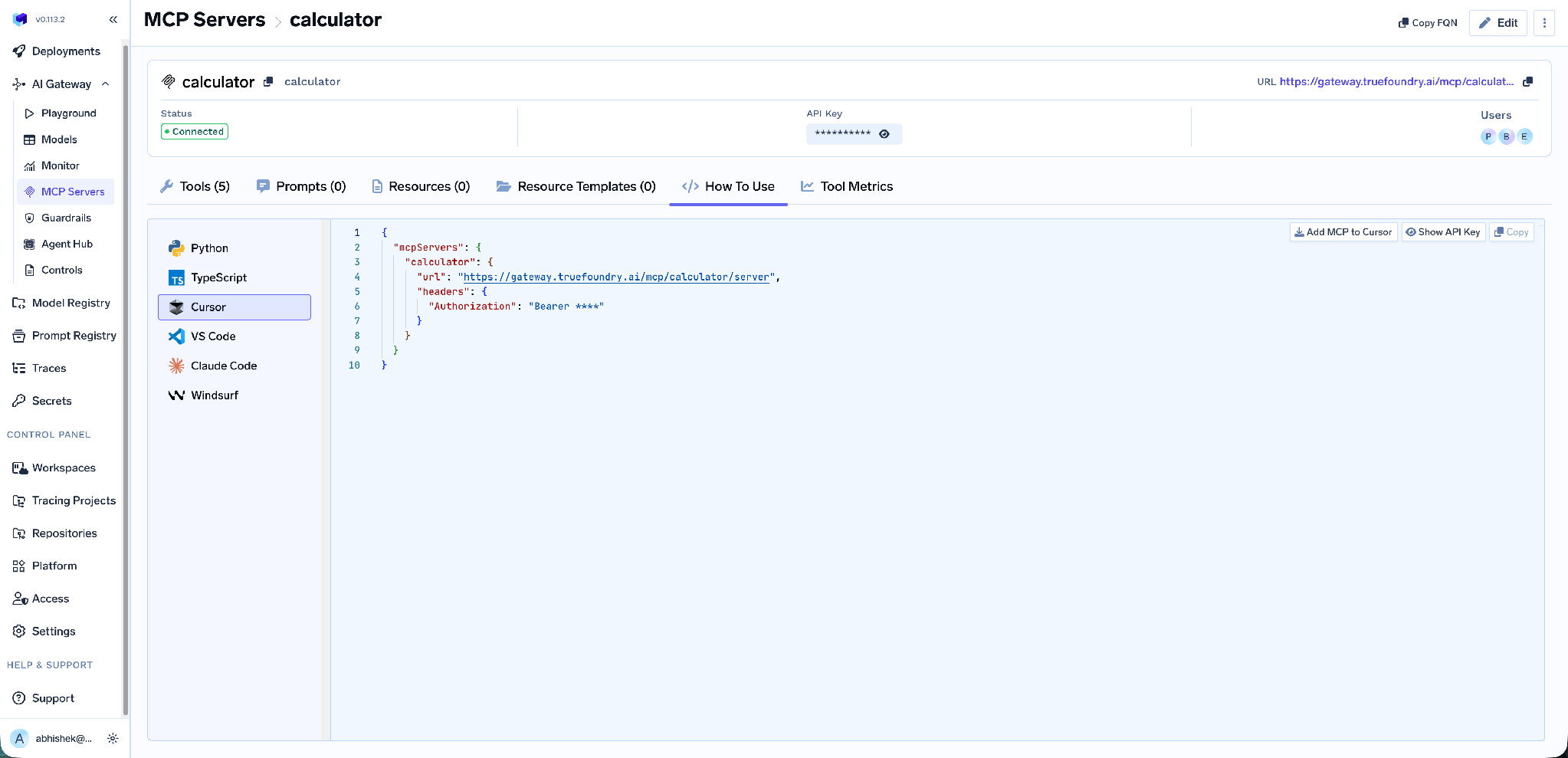
It covers Claude Code, VS Code, Cursor, Windsurf, Codex, and the Python and TypeScript SDKs. Add MCP to Cursor writes the config; Show API Key reveals the token if a client needs one in a header. Take the URL from this tab rather than building it — a hand-built endpoint is the usual cause of a client that connects but lists no tools.
Tool-level metrics. The MCP Metrics dashboard breaks down requests per second, latency at P50 through P99, failure rate by error type, and request count per tool.
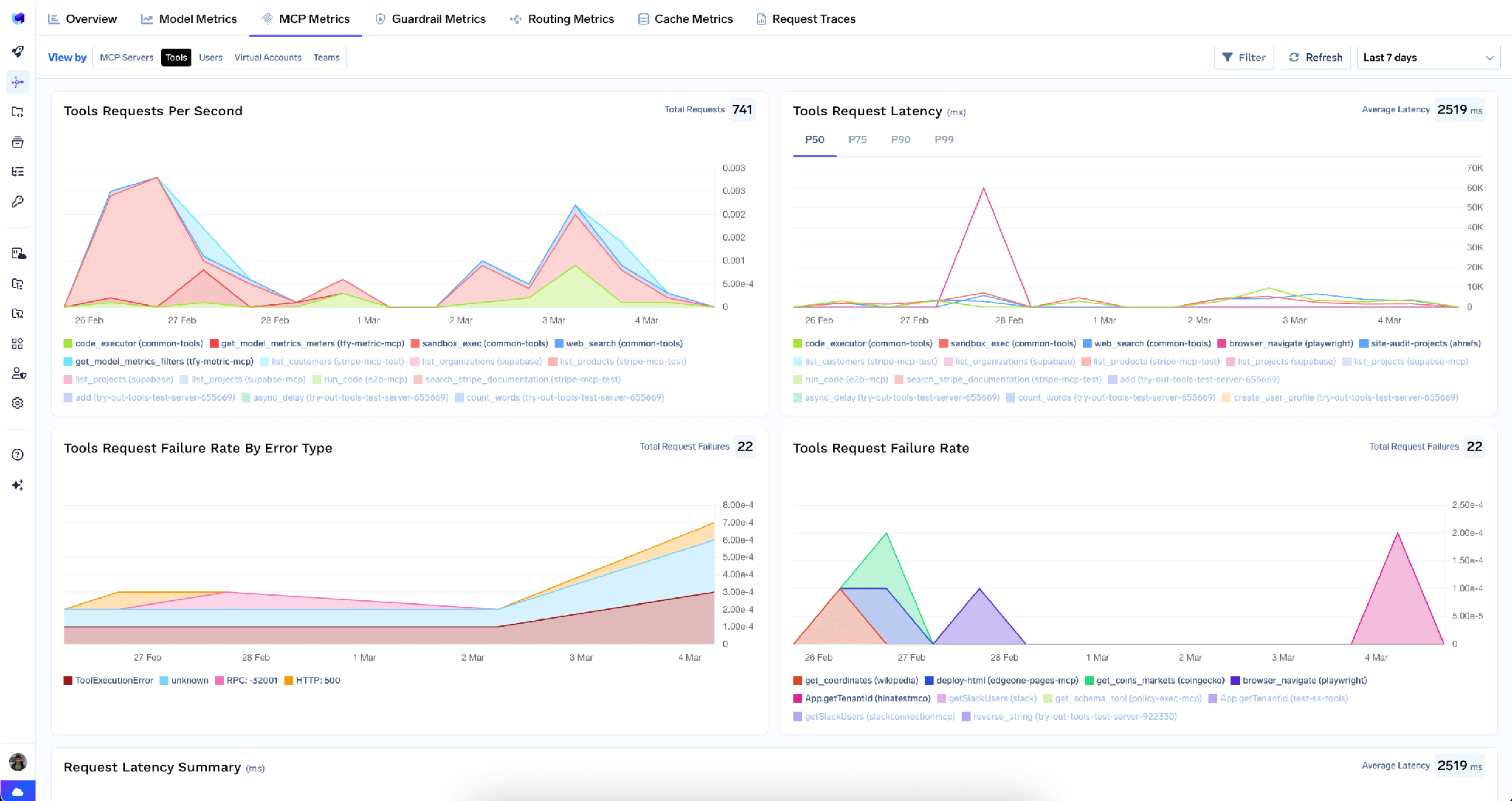
Latency here is a proxy for cost: a tool whose P99 has quietly tripled is usually a query that outgrew its warehouse, and a dashboard is a better place to learn that than an invoice.
Full-request observability. يتم تتبع كل استدعاء مع هوية المتصل، واسم الأداة، والمدخلات، وزمن الاستجابة، وتصديرها عبر OpenTelemetry. وهذا يسد فجوة الإسناد: فسجل الاستعلامات يوضح أن استعلاماً قد تم تنفيذه، بينما يوضح التتبع الوكيل الذي نفذه، ولصالح أي مستخدم. كما تقوم حواجز الحماية قبل وبعد الأداة بتطبيق السياسات على الاستدعاءات، مما يتيح رصد معلومات التعريف الشخصية (PII) في النتائج قبل وصولها إلى النموذج.
عبء تشغيلي منخفض. تضيف البوابة حوالي 3-4 مللي ثانية من زمن الاستجابة وتتعامل مع أكثر من 350 طلباً في الثانية على وحدة معالجة مركزية افتراضية (vCPU) واحدة — وهو أمر لا يكاد يُذكر مقارنة بزمن الرحلة ذهاباً وإياباً إلى مستودع البيانات.
سجل واحد. يقوم خادم MCP افتراضي بتجميع الأدوات من عدة خوادم خلف نقطة نهاية واحدة، بحيث لا يحصل وكيل التقارير إلا على أداتي Genie وفهرس واحد فقط، ولا شيء غير ذلك.
يمكن لمسؤولي المستأجر مسح جميع بيانات الاعتماد المخزنة من قائمة النقاط الثلاث بجوار تحرير.
إلغاء جميع الرموز المميزة يحذف كل تجاوز للمصادقة ورمز OAuth مخزن لجميع المستخدمين والحسابات الافتراضية على ذلك الخادم، ويسري مفعوله في الطلب التالي، ويتم تسجيله في السجلات. هذا الإجراء لا رجعة فيه؛ حيث سيتعين على الجميع إعادة منح الموافقة.
قيد واحد: يتم مسح الرموز المميزة عند البوابة فقط، وليس المنح في Databricks. في حالة وقوع حادث فعلي، قم أيضاً بإلغاء اتصال التطبيق في وحدة تحكم حساب Databricks.
قيود عنوان IP الخاصة بمساحة العمل قد تسبب مشاكل. إذا كانت مساحة العمل تحتوي على قوائم وصول لعناوين IP، فقم بالسماح بالخروج من أي مكان يتصل منه بوابة MCP. هذا هو السبب الأكثر شيوعاً لعدم ظهور نتائج رغم صحة الإعدادات، حيث يبدو الأمر كفشل في المصادقة بينما هو في الواقع مشكلة في الشبكة.
نقطة نهاية Python للذكاء الاصطناعي في النظام هي أداة لتنفيذ الأكواد. يقع المسار /mcp/functions/system/ai بجانب نقاط نهاية البيانات، مما يسهل تسجيله دون تدقيق. تعامل معه كأنه وصول إلى واجهة الأوامر (shell): استخدم خادماً منفصلاً، وقائمة متعاونين محدودة جداً، واطلب الموافقة على كل شيء. وفي الحالات التي يمكن فيها لمساحة Genie الإجابة على سؤال، قم بتوجيهه إليها بدلاً من استخدام SQL.
توسع النطاق في تطبيق OAuth. يعتبر all-apis الحل الأسهل عند حدوث خلل، وبمجرد ضبطه لا يقوم أحد بتقييده. ابدأ باستخدام genie أو unity-catalog وقم بالتوسيع فقط عند فشل الاستدعاء. [تحقق] النطاق المطلوب لكل نوع من نقاط النهاية غير مفصل في وثائق TrueFoundry، لذا راجع مرجع النطاقات الخاص بـ Databricks قبل تقييد تطبيق الإنتاج.
توفر معظم خوادم MCP المعلومات للوكيل، بينما يمنحه خادم Databricks MCP منصة حوسبة، وهذا يغير مفهوم الحذر. إن أداة تتبع المشكلات ذات النطاق غير الدقيق تسبب ضجيجاً، أما نقطة نهاية SQL ذات النطاق غير الدقيق فتسبب تكاليف إضافية، وربما تعديلات غير مقصودة في بيئة الإنتاج.
كلا المسارين لهما إجابة واحدة. قم بتسجيل كل نقطة نهاية (endpoint) على حدة ليكون عنوان URL هو المسؤول عن تحديد النطاق. استخدم رمز تفويض OAuth2 لضمان بقاء Unity Catalog هو المرجع الأساسي لما يمكن للوكيل قراءته. ثم قم بحماية واجهات التنفيذ من خلال نظام الموافقة باستخدام بمجرد التحقق من الصلاحية، بحيث يراجع العنصر البشري الاستعلام قبل تشغيل مستودع البيانات. توفر لك TrueFoundry كل هذه المزايا الثلاث دون الحاجة إلى بناء أي شيء.
TrueFoundry AI Gateway delivers ~3–4 ms latency, handles 350+ RPS on 1 vCPU, scales horizontally with ease, and is production-ready, while LiteLLM suffers from high latency, struggles beyond moderate RPS, lacks built-in scaling, and is best for light or prototype workloads.



هو مجموعة من نقاط نهاية Model Context Protocol المُدارة التي تُتاح من workspace في Databricks، ولكل منها عنوان URL خاص: دوال Unity Catalog، ومفسّر Python في system AI، ومساحات Genie، وSQL، والبحث المتجهي. وتوجد العناوين ضمن Agents > MCP Servers، ويُسجَّل كل منها على حدة.
يعتمد ذلك على نقطة النهاية. نقطة نهاية دوال Unity Catalog تتيح الدوال الموجودة في مخطط واحد، وGenie يوفر استعلاماً باللغة الطبيعية للقراءة فقط عن مساحة واحدة، وSQL ينفّذ SQL، والبحث المتجهي يجري بحث تشابه على فهرس واحد، وsystem AI يشغّل Python. وبعد التصريح تظهر القائمة الكاملة في تبويب Tools، حيث يمكن تفعيل كل أداة أو تعطيلها أو إعادة وصفها أو إضافة توصيف لها.
نعم، مع تحديد واضح للنطاق. الخطران الخاصان بـ Databricks هما الإنفاق على الحوسبة وصلاحية الكتابة، وكلاهما يتركز في SQL وPython. سجّل نقاط النهاية كلاً على حدة، واستخدم OAuth2 Authorization Code حتى يطبّق Unity Catalog الصلاحيات الخاصة بكل مستخدم، واجعل التنفيذ خلف موافقة بصلاحية Once، وتتبّع كل استدعاء.
نعم. تعمل TrueFoundry في VPC الخاصة بك أو محلياً أو في بيئة معزولة عن الشبكة أو هجينة، فلا تغادر التعليمات والردود نطاقك أبداً حتى وأنت توجّه الطلبات عبر مزوّدين كثيرين.
نعم. تتضمن MCP Gateway وAgent Gateway وMCP & Agents Registry مع تحكم في الوصول على مستوى الأدوات. ويمكن حوكمة الوكلاء المبنيين على LangGraph أو CrewAI أو AutoGen أو إطار عمل مخصص مركزياً.
نعم. البوابة متوافقة مع OpenTelemetry وتتكامل مع Grafana أو Datadog أو Prometheus أو حزمتك المفضلة. فهي تتتبع كل طلب من المطالبة إلى تنفيذ الأداة والنموذج، لتحصل على تسجيل موحد دون الحاجة إلى تغيير ما تستخدمه حاليًا.



أحدث الأخبار والمقالات والموارد تصلك مباشرة إلى بريدك الوارد
.png)
.png)
.png)
.png)
.webp)
.webp)

.png)
.png)
.png)
.png)
.png)
.png)
.png)


