


.png)
November 1, 2026
|
5 min read


احصل على وصول فوري إلى بيئة TrueFoundry مباشرة. انشر النماذج، ووجّه حركة مرور LLM، واستكشف المنصة بالكامل — بيئة الاختبار الخاصة بك جاهزة في ثوانٍ، ولا يلزم وجود بطاقة ائتمان.



.png)
Blazingly fast way to build, track and deploy your models!
إن خادم Airtable MCP هو خادم بروتوكول سياق النموذج (Model Context Protocol) عن بُعد، تستضيفه Airtable على الرابط https://mcp.airtable.com. بروتوكول سياق النموذج (Model Context Protocol) هو المعيار المفتوح الذي يتيح للوكيل اكتشاف الأدوات واستدعاءها في نظام خارجي، ويقوم تطبيق Airtable بتحويل القواعد والجداول والسجلات والمخططات إلى أدوات قابلة للاستدعاء.
تصف وثائق TrueFoundry هذا الخادم من خلال القدرات ونطاق OAuth بدلاً من اسم الأداة، وهي الطريقة الصحيحة للتفكير في الأمر. فالنطاق الذي تمنحه هو ما يحدد صلاحيات الوكيل.
بما أنه خادم عن بُعد، فلا توجد حاوية تحتاج إلى مراقبة ولا عملية npx على كل جهاز كمبيوتر؛ إذ يمكنك توجيه العميل إلى رابط URL والمصادقة، تماماً مثل غيره من خوادم MCP عن بُعد.
ما يميز Airtable هو مصدر البيانات: فهي المكان الذي تبني فيه فرق العمليات أنظمة السجلات التي لم توفرها أقسام تكنولوجيا المعلومات، مثل قوائم الموردين، وخطوط أنابيب التوظيف، ومتتبعات الإعداد، وجداول الميزانية. وهذا يؤدي إلى نتيجتين.
إنها ذات قيمة عالية للوكيل. البيانات منظمة بشكل حقيقي - جداول، حقول ذات أنواع محددة، سجلات مرتبطة - لذا يمكن للوكيل الاستعلام عنها وتعديلها دون الحاجة إلى مشروع هندسة بيانات مسبق. يخبره schema.bases:read بماهية الحقول، ويمنحه data.records:read الصفوف.
من الصعب التفكير في الأمر. نظراً لأنها نمت بشكل عضوي، فلا يوجد سجل جرد. فقاعدة بيانات تتبع أسعار المقاولين اليومية توجد بجانب قاعدة بيانات تتبع طلبات وجبات خفيفة للمكتب، وبنفس إعدادات المشاركة. غالباً ما تكون هذه السجلات هي الحقيقة التشغيلية التي تعتمد عليها العمليات البشرية، دون وجود نظام صارم لتاريخ الإصدارات. والسجل الذي يتم استبداله لا يرسل تنبيهاً بذلك.
لذا فإن مسألة الحوكمة محددة: ما هي القواعد المسموح بها، وهل يُسمح لهذا الوكيل بالكتابة؟
الاستخدامات التي تبرر ربط الأدوات ببعضها:
ثلاثة من هذه الأربعة للقراءة فقط؛ والرابع يكتب تعليقات، لا سجلات.
الفرق الجوهري يكمن في القراءة مقابل الكتابة. قراءة قائمة الموردين أمر غير ضار. أما تحديث سجل في متعقب الإعداد فيغير ما يراه الموظف يوم الاثنين وما يبني عليه عمله. كما أن تعديل المخطط قد يؤدي إلى تعطيل عرض أو أتمتة أو علاقة سجلات مرتبطة تعتمد عليها ثلاث قواعد بيانات أخرى. لذا، فإن نطاقات data.records:read و data.records:write منفصلة لسبب وجيه.
أن يقوم محلل واحد بربط هذا بـ Claude Desktop أمر مقبول، لكن أن يقوم عشرون شخصاً عبر أربعة فرق بذلك، فهذا أمر غير مقبول.
لا أحد يعرف قواعد البيانات المشمولة في النطاق. أثناء تدفق OAuth الخاص بـ Airtable، يختار المستخدم قواعد البيانات التي يمكن للتكامل الوصول إليها. هذا تحكم جيد، لكنه يُمارس من قبل أي شخص يقوم بالتفويض، عبر المتصفح، في اللحظة التي يريد فيها عمل الوكيل. الطريق الأسهل هو اختيار كل شيء، ولا أحد يراجع ذلك لاحقاً.
رموز الوصول الشخصية (PAT) تدوم طويلاً بعد رحيل الشخص. الفرق التي تتخطى OAuth وتستخدم رمز وصول شخصي (PAT) من Airtable ينتهي بها الأمر ببيانات اعتماد طويلة الأمد في إعدادات محلية، ذات نطاق واسع لأن تضييق نطاقها أمر ممل.
حق الوصول للكتابة يُمنح افتراضياً. إذا تم تسجيل التكامل بنطاقات الكتابة لأن ذلك بدا أسهل، فيمكن لكل وكيل يستخدمه تعديل السجلات. الفشل هنا صامت: وكيل طُلب منه تلخيص متعقب يقرر أن تنظيف حقل غير منسق بشكل صحيح أمر مفيد، فيقوم بإعادة كتابة اثني عشر صفاً.
غياب سجل التدقيق بالمستوى المطلوب من الدقة. تحتفظ Airtable بسجل مراجعة للسجلات، لكنها لا تسجل أن وكيل الإعداد الخاص بك قد أجرى التغيير بناءً على طلب من محادثة على Slack.
لا شيء مما سبق يقلل من أهمية ربط Airtable، بل يؤكد على ضرورة وجود مستوى التحكم الذي توفره بوابة MCP .
يتم تسجيل Airtable كـ خادم MCP عن بُعد باستخدام تكامل OAuth الخاص بك، وليس من خلال كتالوج MCP المُدار من TrueFoundry. لا يوجد خيار بنقرة واحدة؛ بل يتعين عليك إنشاء تكامل OAuth في Airtable، واختيار النطاقات (scopes)، ثم إدخال بيانات الاعتماد. هذه الخطوة الإضافية هي حيث يتم تطبيق معظم إجراءات الحوكمة.
الخطوة 1 - تسجيل تكامل OAuth في Airtable. في airtable.com/create/oauth، قم بإنشاء تكامل واضبط رابط إعادة التوجيه (redirect URL) على:
https://<tfy-control-plane-base-url>/api/svc/v1/llm-gateway/mcp-servers/oauth2/callback
استبدل <tfy-control-plane-base-url> برابط مستوى التحكم الخاص بك. هذا هو رابط الاستدعاء (callback) المسجل ذاتياً وليس الرابط المُدار؛ فاستخدام رابط auth.truefoundry.com سيؤدي إلى أخطاء في تطابق إعادة التوجيه.
الخطوة 2 - أضف فقط النطاقات التي يحتاجها وكلاؤك. هذا هو القرار الأكثر أهمية في الإعداد. امنح صلاحيات data.records:read و schema.bases:read و workspacesAndBases:read لوكيل إعداد التقارير وتوقف عند هذا الحد. أضف data.recordComments:write إذا كان الهدف هو التعليق بدلاً من التعديل. لا تفعّل نطاقات الكتابة (write) أو خطافات الويب (webhook) إلا إذا كانت سير العمل تتطلب ذلك.
الخطوة 3 - افتح أداة الاختيار. انتقل إلى بوابة MCP في الشريط الجانبي الأيسر وانقر على إضافة خادم.
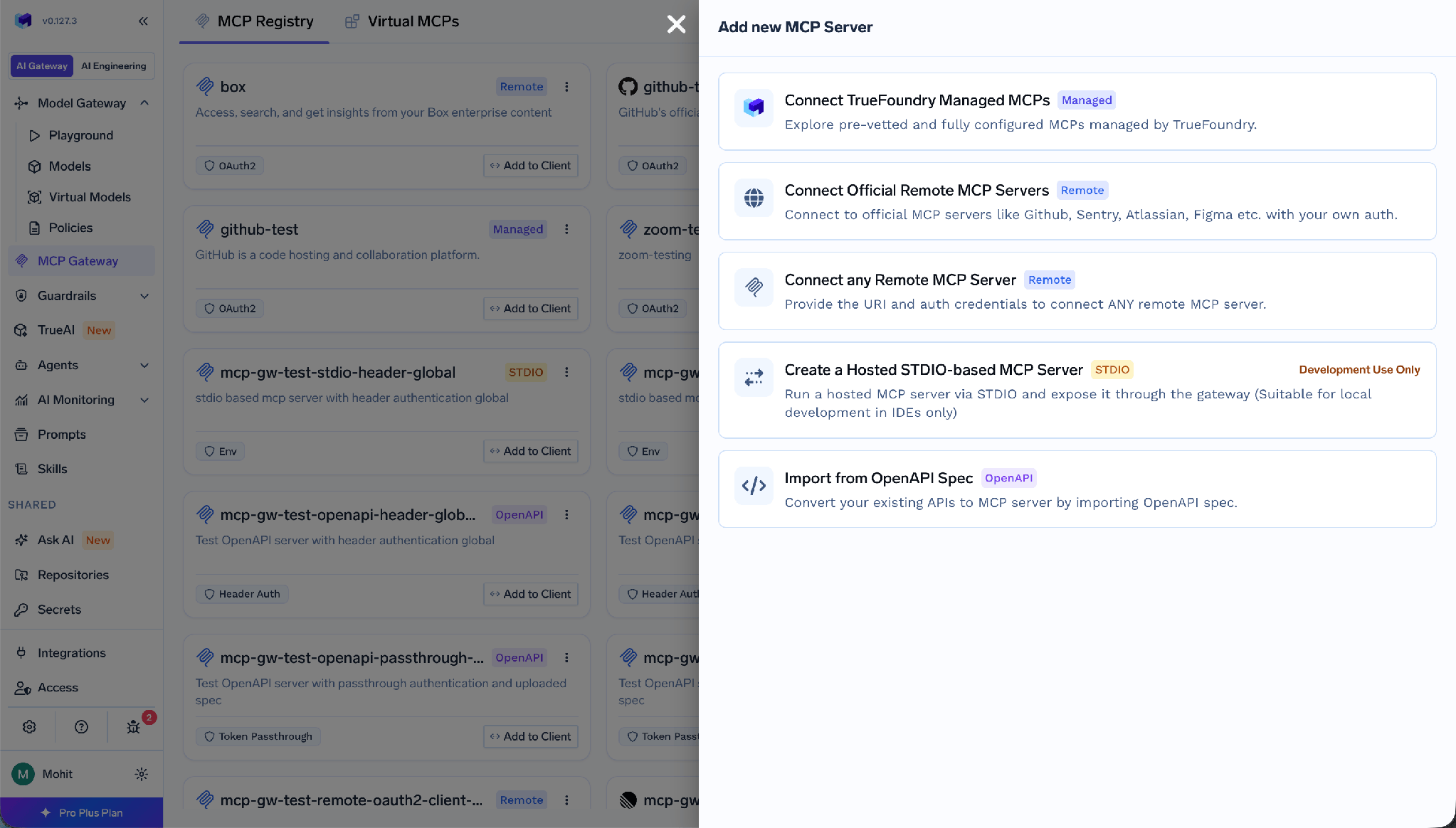
مُنتقي خادم MCP الذي يعرض خيار توصيل أي خادم MCP عن بُعد
حدد توصيل أي خادم MCP عن بُعد.
الخطوة 4 - أدخل تفاصيل الخادم.
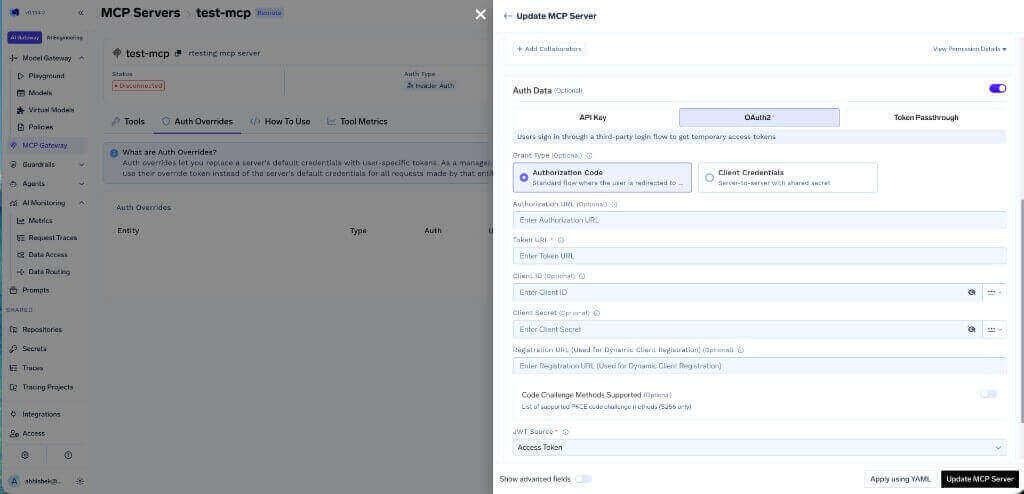
قم بتخزين بيانات الاعتماد في مخزن أسرار TrueFoundry وأشر إليها باستخدام الاسم المؤهل بالكامل (FQN) بدلاً من لصق السر في النموذج.
الخطوة 5 - أضف المتعاونين واحفظ التغييرات.
الخطوة 6 - الاتصال. يفتح كل مستخدم قسم الأدوات الخاص بالخادم وينقر على اتصل الآن. تظهر شاشة موافقة Airtable، ومن هنا يختار المستخدم قواعد البيانات التي يمكن للتكامل الوصول إليها.
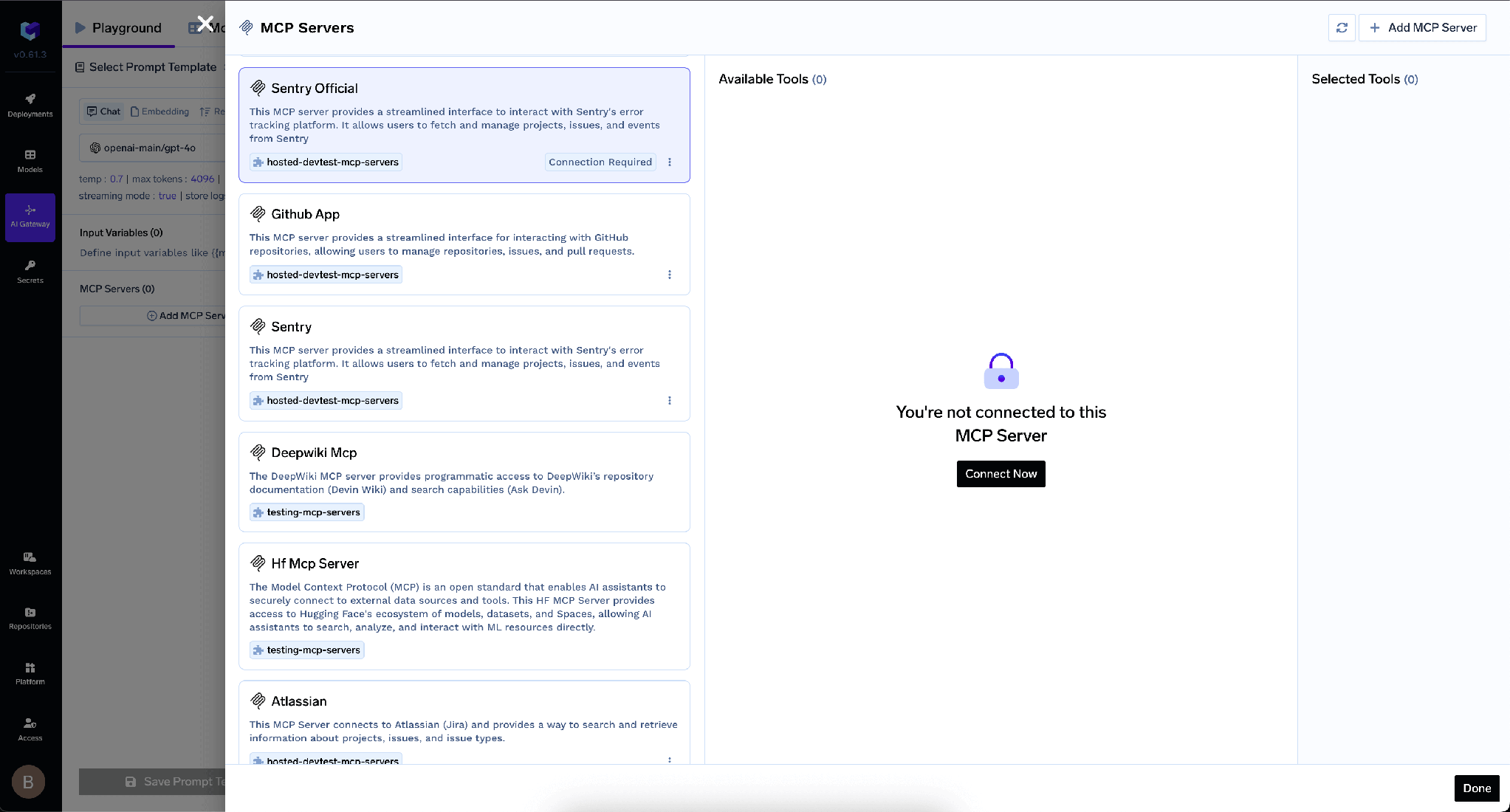
بعد نجاح عملية OAuth، تظهر أدوات Airtable ويمكن تجربتها من خلال ساحة تجربة الوكلاء.
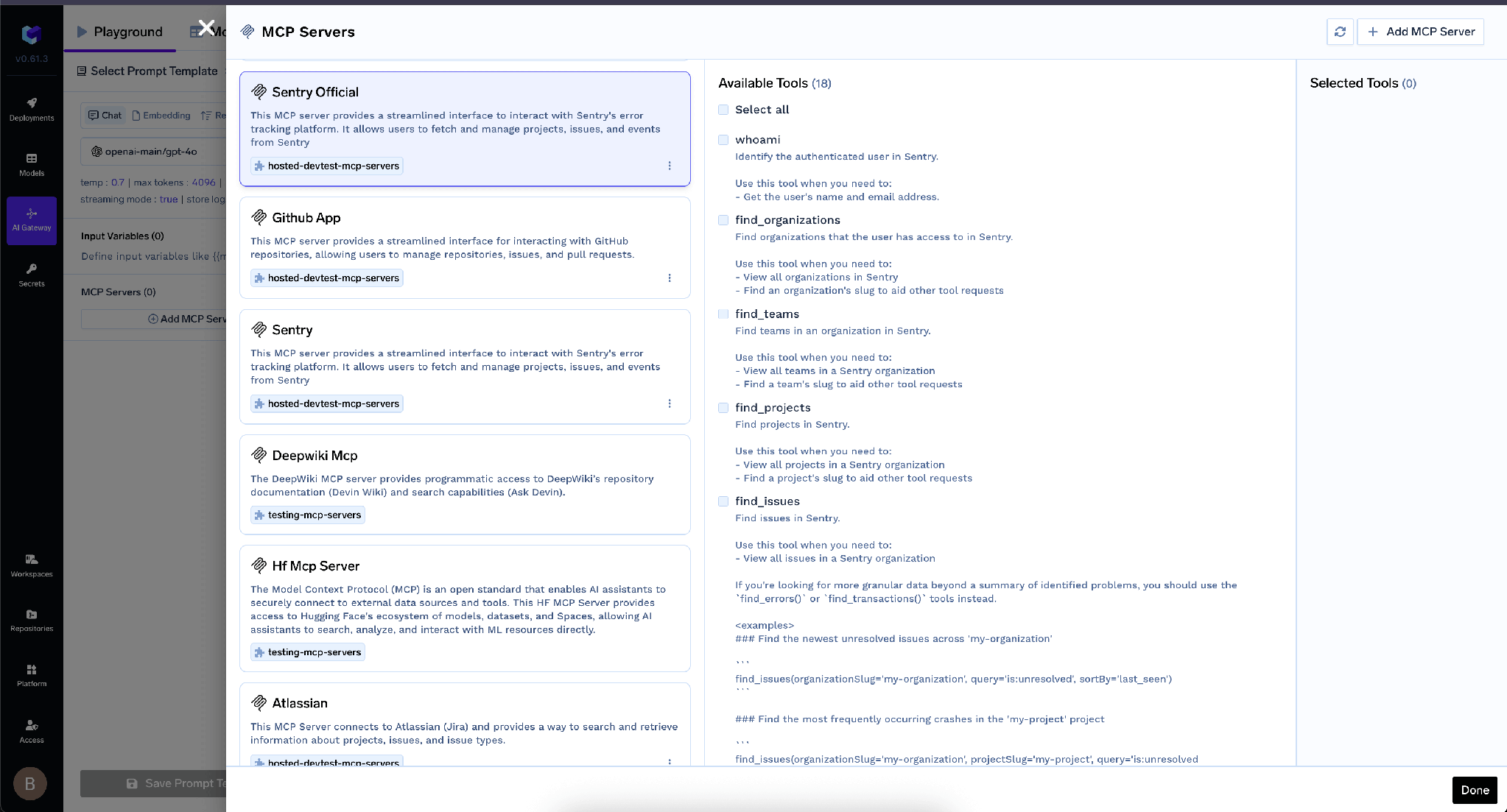
عرض تفصيلي لخادم MCP يسرد الأدوات المتاحة بعد المصادقة عبر OAuth2
تفصل TrueFoundry بين المصادقة الواردة -كيف يثبت العميل هويته للبوابة- وبين المصادقة الصادرة، وهي كيفية إثبات البوابة لهويتها لدى Airtable. هذه الطبقات مستقلة، والخلط بينها هو الخطأ الشائع.
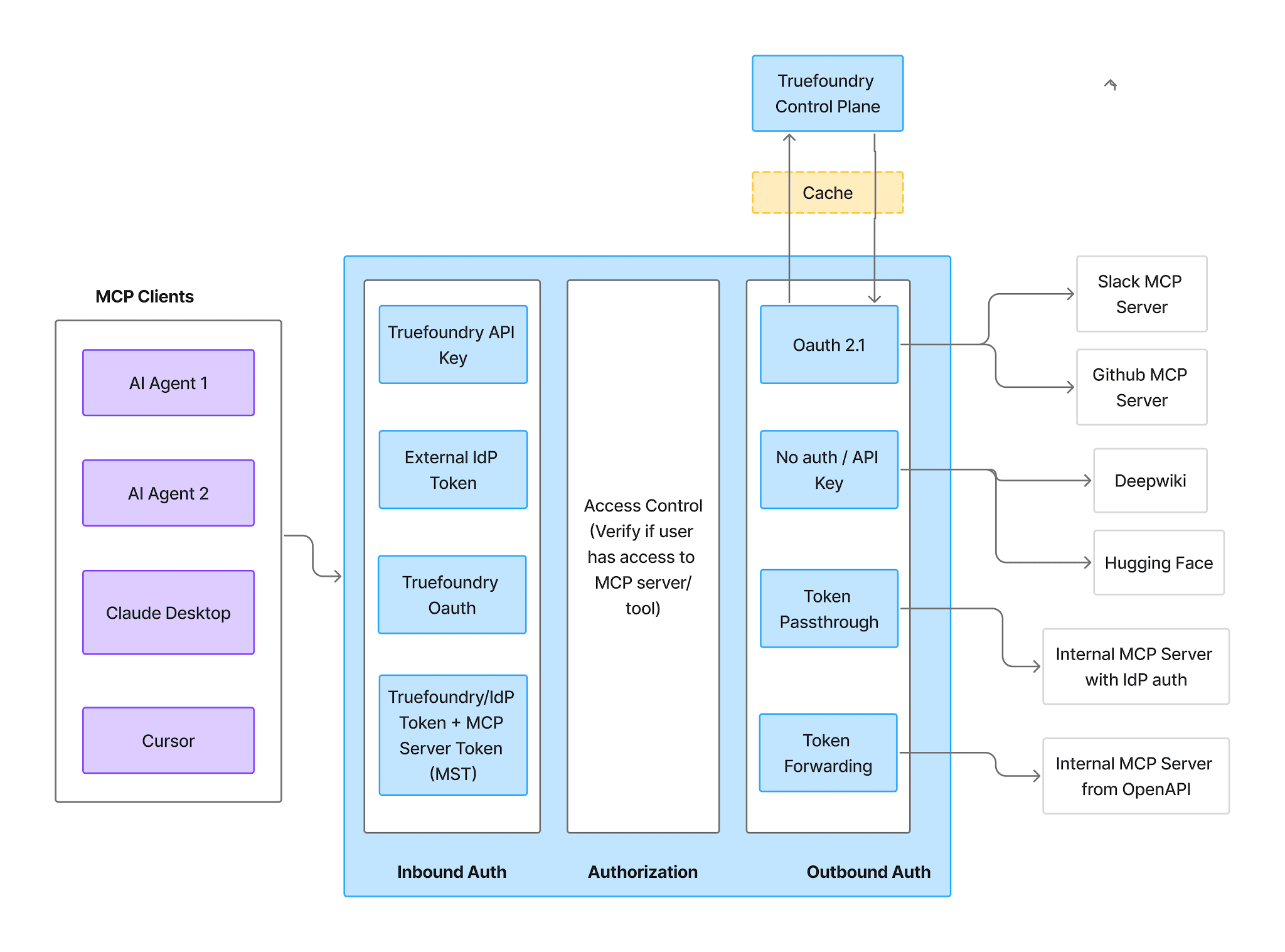
رسم تخطيطي لبوابة MCP يوضح مراحل المصادقة الواردة، والتحكم في الوصول، والمصادقة الصادرة
تدعم المصادقة الواردة أربع طرق:
TrueFoundry AI Gateway delivers ~3–4 ms latency, handles 350+ RPS on 1 vCPU, scales horizontally with ease, and is production-ready, while LiteLLM suffers from high latency, struggles beyond moderate RPS, lacks built-in scaling, and is best for light or prototype workloads.





أحدث الأخبار والمقالات والموارد تصلك مباشرة إلى بريدك الوارد
.png)
.png)
.png)
.png)
.webp)
.webp)

.png)
.png)
.png)
.png)
.png)
.png)
.png)


