


.png)
October 31, 2026
|
5 min read


احصل على وصول فوري إلى بيئة TrueFoundry مباشرة. انشر النماذج، ووجّه حركة مرور LLM، واستكشف المنصة بالكامل — بيئة الاختبار الخاصة بك جاهزة في ثوانٍ، ولا يلزم وجود بطاقة ائتمان.



.png)
Blazingly fast way to build, track and deploy your models!
إن خادم Atlassian MCP هو خادم Rovo MCP من Atlassian: وهو نقطة نهاية عن بُعد لـ بروتوكول سياق النموذج (Model Context Protocol) تكشف عن Jira وConfluence وCompass كأدوات يمكن لوكيل الذكاء الاصطناعي استدعاؤها. يعمل الخادم عبر الرابط https://mcp.atlassian.com/v1/mcp ويتم المصادقة عليه باستخدام OAuth2.
وهو يغطي ثلاثة منتجات:
تصف الوثائق الواجهة من حيث البحث عن المشكلات، وقراءة الصفحات، وإنشاء التذاكر بدلاً من تسمية وظائف الأدوات. القائمة المعتمدة هي كل ما يظهر في علامة التبويب الأدوات (Tools) بعد المصادقة، حيث تعكس البوابة القائمة المباشرة من المصدر.
نظرًا لأنه يعمل عن بُعد، فلا يوجد شيء لتشغيله محليًا — لا حاجة لحاوية Docker، ولا لعملية npx لكل جهاز كمبيوتر محمول. أنت فقط توجه عميل MCP إلى عنوان URL وتقوم بالمصادقة، وهذا هو الجانب الجذاب في خوادم MCP عن بُعد بشكل عام.
تتضمن الاستخدامات المثيرة للاهتمام ربط الأدوات عبر المنتجات:
الانقسام المهم ليس مجرد القراءة مقابل الكتابة، بل هو العام مقابل الحساس. قراءة تذكرة Jira أمر غير ضار، وإنشاء واحدة منها يمكن تداركه. أما قراءة Confluence فتستحق أقصى درجات الحذر؛ فهي المكان الذي تضع فيه الشركات عروض مجالس الإدارة، ونطاقات الرواتب، وتقارير ما بعد الحوادث التي تذكر أسماء الأفراد، والبنية التحتية الأمنية. إن الوكيل الذي يمتلك صلاحية القراءة فقط مع وصول غير مقيد إلى Confluence يمتلك نطاق تأثير أوسع من وكيل يمتلك صلاحية الكتابة ومقيد بمشروع Jira واحد.
هذا التفاوت خاص بشركة Atlassian، وهو السبب في أن نصيحة "تعطيل أدوات الكتابة" غير كافية هنا.
أن يقوم مهندس واحد بربط هذا في Cursor هو أمر مقبول، لكن وجود ثلاثين مهندساً بالإضافة إلى وكيل دعم ووكيل وثائق يمثل مشكلة مختلفة تماماً.
قائمة السماح هي قرار على مستوى المؤسسة بالكامل. يتم تعيينها لكل مؤسسة، وليس لكل فريق. فمن يمتلك صلاحية مسؤول المؤسسة في admin.atlassian.com هو من يقرر ما إذا كان هذا التكامل موجوداً من الأساس. إذا قمت بربط الأدوات بشكل عشوائي، فستتراكم لديك نطاقات مسموح بها لا يراجعها أحد.
غياب سجل تدقيق للنوايا. تسجل Atlassian حدوث استدعاء لواجهة برمجة التطبيقات (API) مقابل حساب المستخدم، لكنها لا تسجل أن وكيل الفرز الخاص بك هو من قام بذلك أثناء تنفيذ أمر من سلسلة محادثات Slack. عندما تظهر تذكرة لا يتذكر أحد إنشائها، لا توجد سلسلة أحداث يمكن إعادة بنائها.
نطاق قراءة Confluence هو "كل ما يمكن للمستخدم رؤيته". تعد الأذونات لكل مستخدم هي التصميم الصحيح، لكن معظم المستأجرين لديهم أذونات مساحة Confluence متساهلة بسبب تراكمات تاريخية. ما يمكن للمستخدم رؤيته عادة ما يكون أكثر بكثير مما تحتاجه المهمة، ولا يمكن للوكيل التمييز بينهما.
حقن الأوامر (Prompt injection) يجد مكاناً ليستقر فيه. تعد أوصاف Jira وصفحات Confluence نصوصاً يقرؤها الوكيل وقد يكون كتبها شخص آخر. إن تذكرة بلاغ مقدمة من جهة خارجية عبر بوابة مكتب الخدمة، وتحتوي على تعليمات، وتتم قراءتها أثناء عملية الفرز مع إتاحة الوصول إلى Confluence في نفس الجلسة، تمثل مساراً من مدخلات غير موثوقة إلى مخرجات حساسة. لا يكمن الخلل في سوء تصرف الوكيل، بل في أن صلاحياته كانت أوسع من نطاق مهمته.
لا شيء من هذا يعد سبباً لتجنب الخادم، بل هي أسباب لوضع مستوى تحكم (control plane) أمامه، وهو ما صُمم من أجله بوابة MCP .
هذه هي الخطوة التي تعيق الفرق، لذا فهي تأتي في البداية. إنها متطلب أساسي من جانب Atlassian ولا يمكن لأي إعداد في TrueFoundry أن يغني عنها.
أنت بحاجة إلى: صلاحية إضافة خوادم MCP في TrueFoundry، ومؤسسة Atlassian Cloud مع Jira أو Confluence أو Compass، و صلاحية مسؤول المؤسسة في admin.atlassian.com.
في لوحة تحكم مسؤول Atlassian، اختر مؤسستك وافتح Apps → AI settings → Rovo MCP server. تحت Allowed domains، أضف نطاق مستوى التحكم الخاص بـ TrueFoundry:
https://<tfy-control-plane-base-url>/**
لا يوجد عميل OAuth لإنشائه. تتولى Atlassian التسجيل الديناميكي للعميل للنطاقات المدرجة في القائمة المسموح بها. بالنسبة لمعظم خوادم MCP البعيدة المسجلة ذاتياً، سيتعين عليك إنشاء تطبيق OAuth في بوابة المزود، وتعيين عنوان URI لإعادة التوجيه، وتخزين معرف العميل وسر العميل. هنا لست بحاجة لذلك، فإدخال القائمة المسموح بها هو علاقة الثقة.
القائمة المسموح بها هي مفتاح الإيقاف الفوري لديك. تؤدي إزالة النطاق إلى إلغاء اتصالات OAuth الجديدة. إن إيقاف هذا التكامل على مستوى المؤسسة بالكامل يتطلب تغييراً واحداً فقط في Atlassian Admin، وهو إجراء مستقل عن البوابة. نادراً ما تمنحك عمليات التكامل تحكماً بهذه السهولة؛ لذا احتفظ بمكان الوصول إليه.
تنبيه واحد بخصوص الشبكة: إذا كانت قائمة عناوين IP المسموح بها في Atlassian مُفعلة، فيجب أيضاً السماح بحركة المرور من البيئة التي يتصل منها TrueFoundry بخادم MCP البعيد.
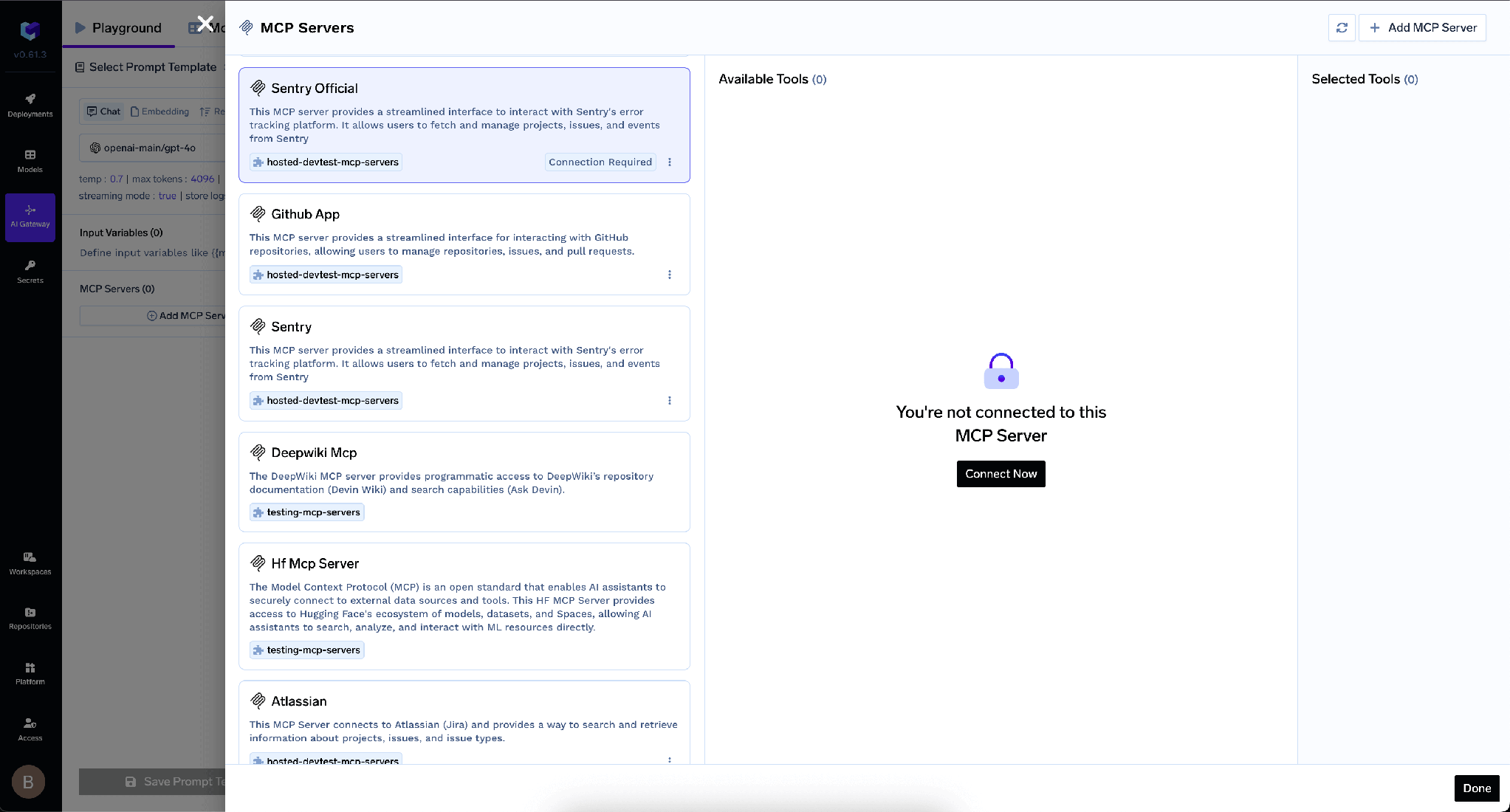
الخطوة 1 — افتح أداة الاختيار. في TrueFoundry، افتح بوابة MCP، وانقر على إضافة خادم MCP، ثم اختر Atlassian.
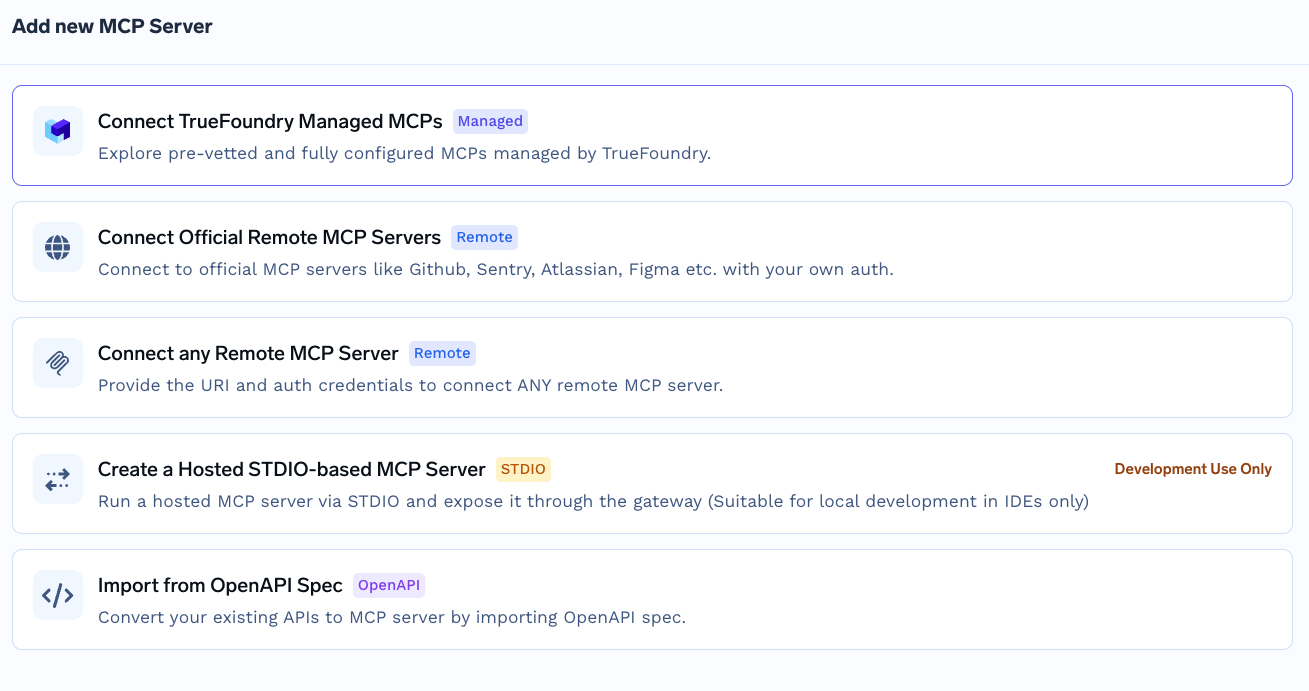
هذا ليس مسار كتالوج MCP المُدار من TrueFoundry، حيث تقدم اسماً فقط وتتولى المنصة مسؤولية كافة الحقول الأخرى. يتطلب Atlassian قيماً صريحة، لأن علاقة الثقة نشأت من القائمة المسموح بها بدلاً من الاعتماد على بيانات اعتماد تحتفظ بها المنصة.
الخطوة 2 — قم بتهيئة الخادم. استخدم هذه القيم:
قم بتفعيل بيانات المصادقة واختر علامة التبويب OAuth2 . نظرًا لأن نطاقك مدرج في القائمة المسموح بها، فلن تحتاج إلى معرف عميل أو سر - اتركهما فارغين.
الخطوة 3 — إضافة المتعاونين. أضف المستخدمين أو الفرق التي يجب أن تستخدم أدوات Atlassian. قم بتعيين مدير خادم MCP للمسؤولين و مستخدم خادم MCP للمستهلكين.
الخطوة 4 — الحفظ والترخيص. انقر على إضافة خادم MCP. بعد ذلك، يفتح كل مستخدم قسم الأدوات في الخادم وينقر على اتصل الآن لإكمال مصادقة Atlassian OAuth. ستظهر الأدوات بعد ذلك ويمكن تجربتها من ساحة تجربة الوكيل.
تفصل TrueFoundry بين المصادقة الواردة — وهي كيفية إثبات العميل لهويته أمام البوابة — وبين المصادقة الصادرة، وهي كيفية إثبات البوابة لهويتها أمام Atlassian. هذه الطبقات مستقلة عن بعضها البعض.
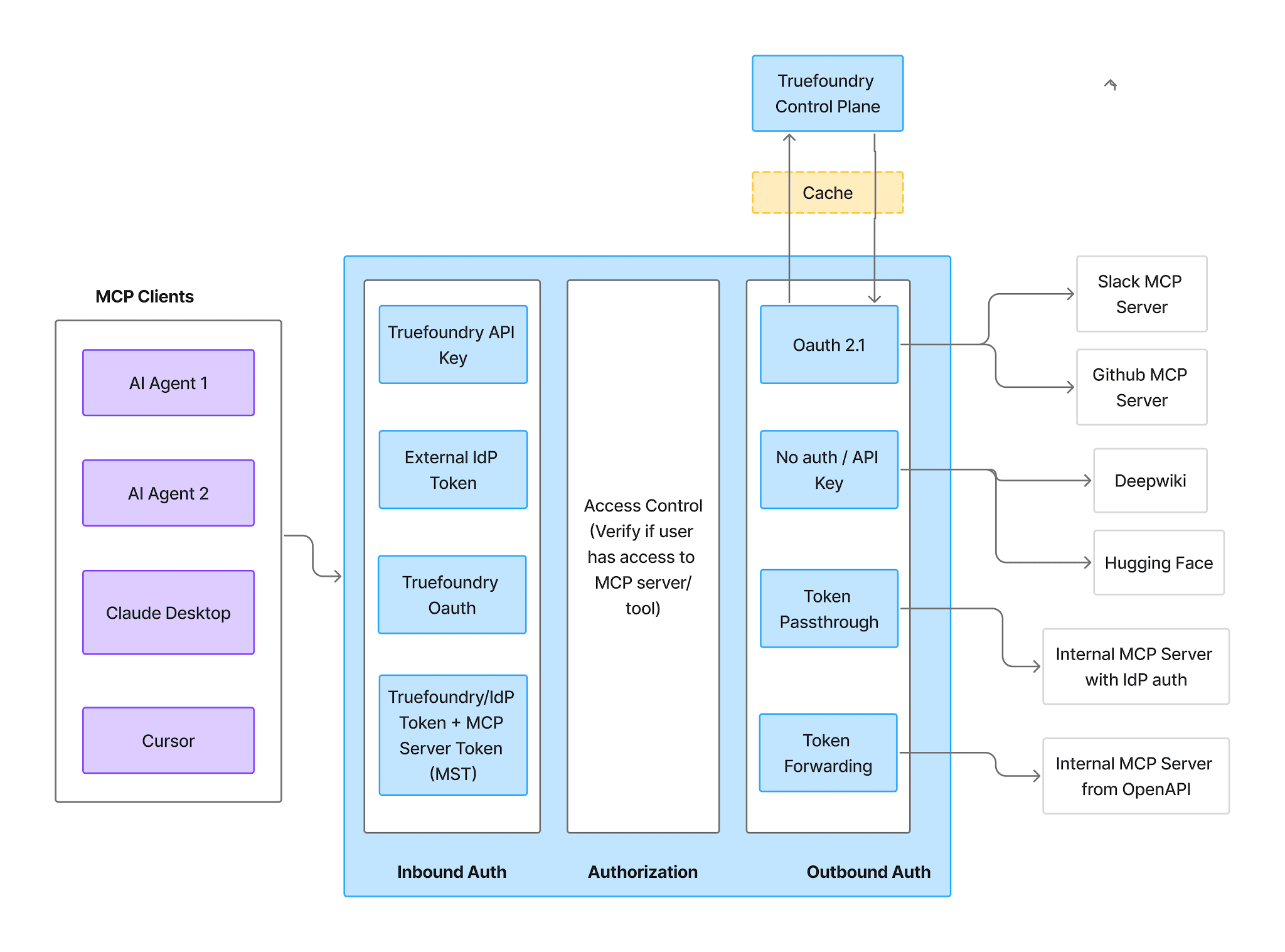
الواردة — أربع طرق مدعومة:
هناك تحذير واحد مهم هنا: تمنح رموز الحساب الافتراضي (Virtual Account tokens) كل طلب نفس مستوى الوصول، لذا فهي لا تستطيع التعبير عن أذونات Atlassian الخاصة بكل مستخدم على حدة — فهي تختزل نموذج الأذونات بالكامل في نطاق ما يمكن لتلك الهوية الواحدة الوصول إليه. استخدم رمز الوصول الشخصي (PAT) أو رمز موفر الهوية (IdP token) للمصادقة الواردة.
الصادرة — بالنسبة لـ Atlassian، يتم ذلك عبر OAuth2. يقوم كل مستخدم بتفويض حسابه الخاص من خلال اتصل الآن، وتتولى TrueFoundry إدارة الموافقة وتخزين الرموز وتحديثها، مع إدراج الرموز لكل مستخدم في كل طلب. لا تتلقى TrueFoundry أبدًا بيانات اعتماد Atlassian الخاصة بك.
الأثر العملي، كما هو موضح بوضوح في الوثائق: يعمل كل مستخدم وفقاً لصلاحياته الحالية في Jira وConfluence وCompass. لا يوجد حساب خدمة مشترك يمتلك صلاحية قراءة Confluence على مستوى المستأجر، وعند إلغاء وصول أي شخص إلى Atlassian، تنتهي صلاحية الوكيل الخاص به معه.
يتم مصادقة المستخدمين مرتين؛ الأولى عبر البوابة، والثانية عبر Atlassian. وهذا ما يجعل إسناد الإجراءات لكل مستخدم على حدة أمراً ممكناً.
علامة التبويب الأدوات تعرض كل ما يكشفه الخادم.
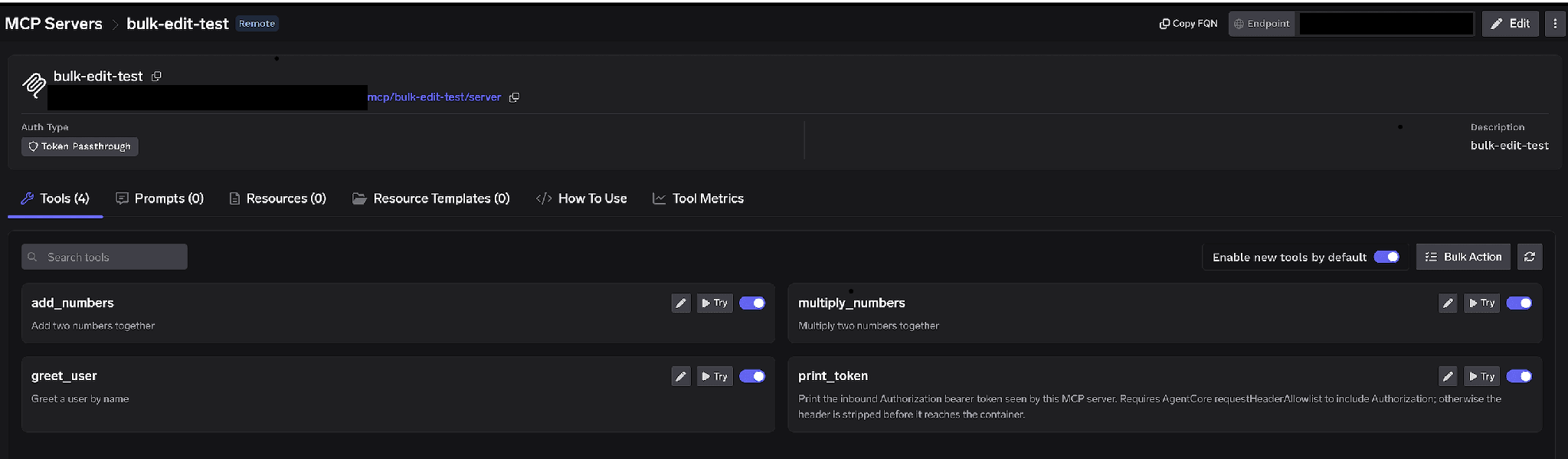
مفاتيح تبديل لكل أداة. أوقف تشغيل الأداة وسيتم استبعادها تماماً من قائمة الأدوات (tools/list)؛ فلن تراها العملاء ولن يمكن استدعاؤها. هذا ليس مجرد تصفية على مستوى الأوامر (prompt-layer). يتم حفظ التغييرات فوراً مع ظهور إشعار تم تحديث إعدادات الأداة .
بالنسبة لـ Atlassian، فإن الخطوة الأكثر قيمة عادةً ليست "تعطيل جميع عمليات الكتابة"، بل هي تعطيل أدوات Confluence للوكلاء الذين يعملون في Jira فقط. يحتاج وكيل فرز المهام (sprint-triage) إلى البحث في Jira وقراءة التذاكر، وليس إلى القدرة على البحث في كل مساحة Confluence الخاصة بالمستأجر؛ والأداة التي لا يمكن للوكيل استدعاؤها هي أداة لا يمكن لأي وصف تذكرة ملغوم أن يدفعه لاستخدامها.
تمكين الأدوات الجديدة افتراضياً. يحدد هذا الخيار ما يحدث عند إطلاق Atlassian لأداة جديدة. إذا تُرك مفعلاً، ستظهر الأدوات الجديدة تلقائياً وتتوسع قدراتك من تلقاء نفسها. أما إذا تم إيقافه فستظل معطلةلا تتوفر سوى الأدوات التي قمت بتمكينها صراحةً. بالنسبة لخادم يغطي ثلاثة منتجات ذات مستويات حساسية مختلفة، فإن إيقاف التشغيل هو الخيار الأكثر أماناً.
إجراء جماعي. يحول كل صف إلى مربعات اختيار مع تحديد الكل، لإنشاء قائمة مسموح بها منسقة بسرعة.
انقر على أيقونة القلم بجانب أي أداة لتجاوز كيفية عرضها للنموذج:
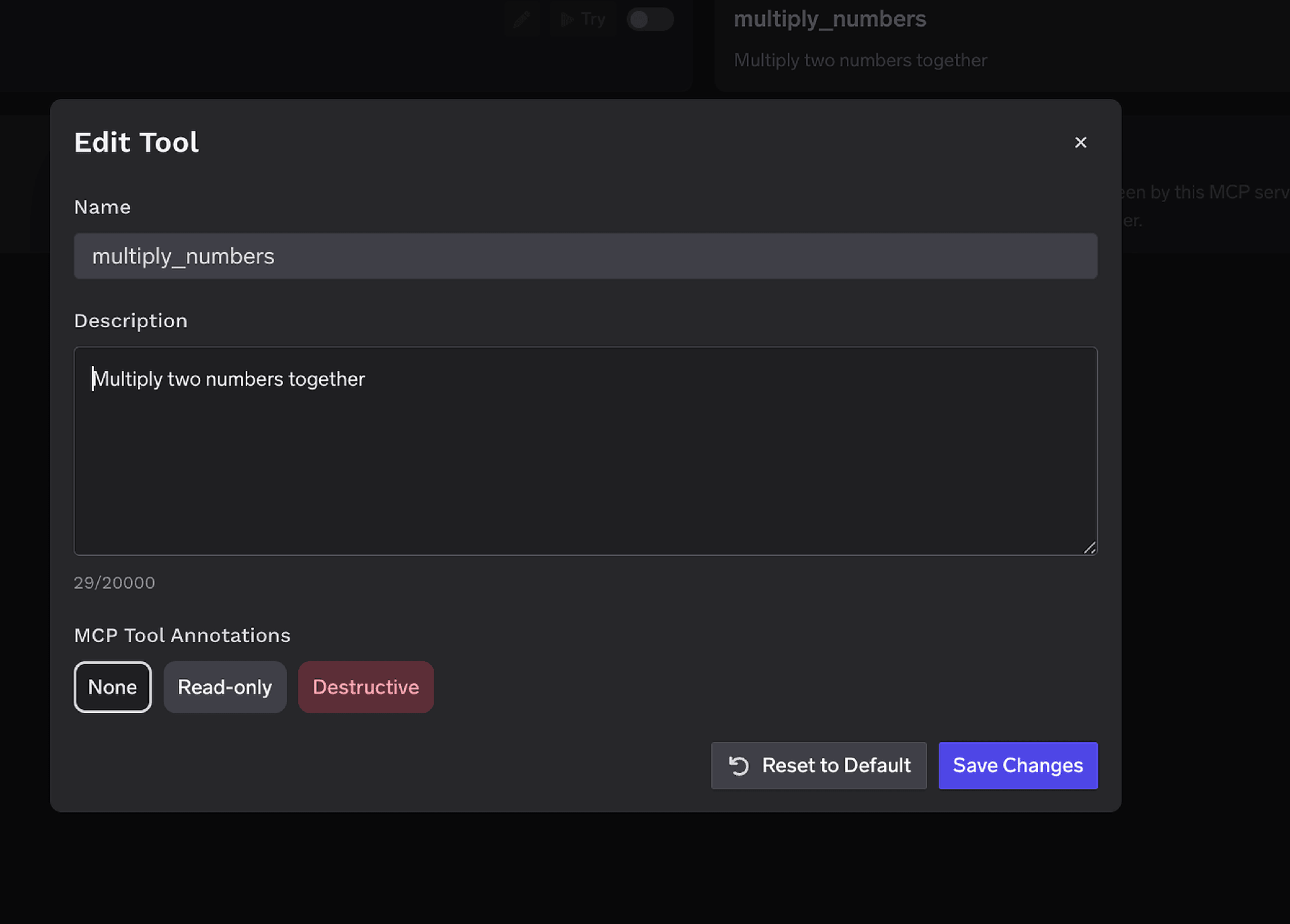
نافذة تعديل الأداة مع حقل لتجاوز الوصف ومحدد لتعليقات أداة MCP يوفر خيارات: بلا، للقراءة فقط، وتدميري
إن الوصف البديل (حتى 20,000 حرف) يوجه عملية اختيار الأداة عندما تكون الصياغة الأصلية غامضة — وهو أمر مفيد عبر Jira وConfluence، حيث تعني كلمة "بحث" شيئين مختلفين. تعليقات أداة MCP تحدد الأداة كـ للقراءة فقط أو تدميري، مما يضبط readOnlyHint أو destructiveHint. التعليق التوضيحي الصحيح هو ما يسمح لسياسات الموافقة أدناه بتقييد فئة كاملة من الأدوات دون الحاجة إلى تسمية كل منها على حدة.
يتم ربط التحكم في الوصول بالمستخدمين أو الفرق أو الحسابات الافتراضية، وذلك عبر بُعدين: الخوادم التي يمكن للهوية الوصول إليها، والأدوات التي يمكنها استدعاؤها.
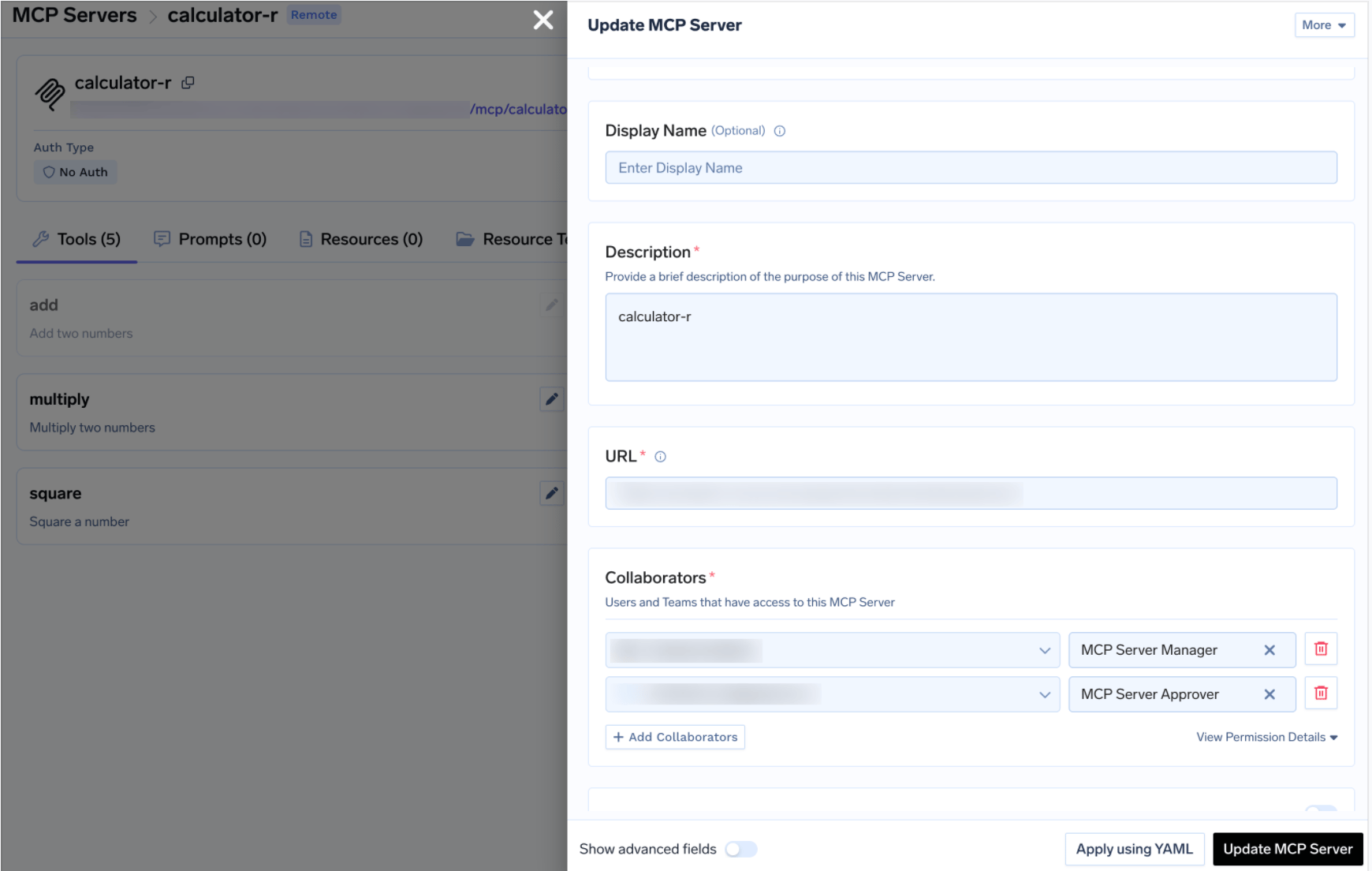
درج تحديث خادم MCP يظهر قسم المتعاونين مع تعيين أدوار مدير خادم MCP وموافق خادم MCP
TrueFoundry AI Gateway delivers ~3–4 ms latency, handles 350+ RPS on 1 vCPU, scales horizontally with ease, and is production-ready, while LiteLLM suffers from high latency, struggles beyond moderate RPS, lacks built-in scaling, and is best for light or prototype workloads.



خادم Rovo MCP من Atlassian: خادم Model Context Protocol بعيد على العنوان https://mcp.atlassian.com/v1/mcp يتيح Jira وConfluence وCompass كأدوات يستطيع الوكيل استدعاءها: البحث في المشكلات، وقراءة الصفحات، وإنشاء التذاكر. يستخدم OAuth2، ويجب أن يضيف مسؤول المؤسسة أولاً النطاق الذي تتصل منه إلى قائمة السماح.
على مرحلتين. يضيف مسؤول المؤسسة نطاق مستوى التحكم الخاص بـ TrueFoundry لديك ضمن Apps → AI settings → Rovo MCP server → Allowed domains. ثم في TrueFoundry افتح MCP Gateway → Add MCP Server → Atlassian، واضبط عنوان URL على https://mcp.atlassian.com/v1/mcp والمصادقة على OAuth2 (دون client ID أو secret)، وأضف المتعاونين، واحفظ، واطلب من كل مستخدم النقر على Connect Now.
نعم. يعمل كل مستخدم بأذوناته الحالية في Jira وConfluence وCompass، فالوكيل الذي يتصرف بالنيابة عن شخص يرى بالضبط ما يستطيع ذلك الشخص رؤيته. وهذا هو الحد الأدنى لا الأقصى، فضيّق أكثر بمفاتيح تفعيل لكل أداة وسياسات موافقة.
نعم. تعمل TrueFoundry في VPC الخاصة بك أو محلياً أو في بيئة معزولة عن الشبكة أو هجينة، فلا تغادر التعليمات والردود نطاقك أبداً حتى وأنت توجّه الطلبات عبر مزوّدين كثيرين.
نعم. تتضمن MCP Gateway وAgent Gateway وMCP & Agents Registry مع تحكم في الوصول على مستوى الأدوات. ويمكن حوكمة الوكلاء المبنيين على LangGraph أو CrewAI أو AutoGen أو إطار عمل مخصص مركزياً.
نعم. البوابة متوافقة مع OpenTelemetry وتتكامل مع Grafana أو Datadog أو Prometheus أو حزمتك المفضلة. فهي تتتبع كل طلب من المطالبة إلى تنفيذ الأداة والنموذج، لتحصل على تسجيل موحد دون الحاجة إلى تغيير ما تستخدمه حاليًا.



أحدث الأخبار والمقالات والموارد تصلك مباشرة إلى بريدك الوارد
.png)
.png)
.webp)
.webp)

.png)
.png)
.png)
.png)
.png)
.png)
.png)

.png)


