


November 2, 2026
|
5 min read


احصل على وصول فوري إلى بيئة TrueFoundry مباشرة. انشر النماذج، ووجّه حركة مرور LLM، واستكشف المنصة بالكامل — بيئة الاختبار الخاصة بك جاهزة في ثوانٍ، ولا يلزم وجود بطاقة ائتمان.



.png)
Blazingly fast way to build, track and deploy your models!
يقوم خادم MongoDB MCP بعرض قاعدة بيانات MongoDB كأدوات يمكن لوكيل الذكاء الاصطناعي استدعاؤها. بروتوكول سياق النموذج (Model Context Protocol) هو المعيار المفتوح الذي يتيح للوكلاء اكتشاف واستدعاء الأدوات في الأنظمة الخارجية؛ ويقوم هذا الخادم بتحويل عمليات قاعدة البيانات إلى تلك الأدوات.
تصف وثائق TrueFoundry هذا الخادم بناءً على القدرات وليس أسماء الوظائف، وهذا هو النهج الذي سنتبعه في وصفنا:
يختلف هذا الخادم هيكلياً عن خوادم MCP الخاصة بـ GitHub أو Notion؛ فبينما تقوم تلك الخوادم بتغليف واجهة برمجة تطبيقات (SaaS) بنموذج أذونات خاص بها وتوفر إمكانية التراجع عن الإجراءات، يقوم هذا الخادم بتغليف اتصال برنامج تشغيل قاعدة البيانات: أي أن الأدوات يمكنها تنفيذ كل ما يسمح به سلسلة الاتصال. كما أن MongoDB ليس مدرجاً في الكتالوج المُدار لـ TrueFoundry، لذا فإن إعداد mongodb mcp يتطلب جهداً أكبر مقارنة بعمليات التكامل التي تتم بنقرة واحدة.
تكمن القيمة الحقيقية في ربط الأدوات ببعضها البعض:
لاحظ شيئاً مهماً: جميع هذه المهام الأربع للقراءة فقط. هذه هي الحجة بأكملها. في معظم خوادم MCP، يعد الفصل بين القراءة والكتابة قراراً يعتمد على الموازنة بين الراحة والمخاطر. هنا، تغطي عمليات القراءة القيمة الأساسية بالكامل تقريباً، بينما تغطي عمليات الكتابة مهاماً ينبغي على العنصر البشري القيام بها بوعي وتأنٍ.
أن يقوم مهندس واحد بتوجيه عميل MCP محلي إلى بيئة الاختبار (staging) هو أمر مقبول، لكن تكرار النمط نفسه في بيئة الإنتاج ليس كذلك.
أدوات الكتابة لا توفر خيار التراجع. إذا قام وكيل (agent) بحذف جدول في مستودع بيانات، يمكنك إعادة تشغيل خط المعالجة. أما إذا حذف مجموعة بيانات يعتمد عليها MongoDB في حركة المرور المباشرة، فسيتعين عليك الاستعادة من نسخة احتياطية، وقبول فقدان البيانات منذ آخر لقطة، وتبرير الانقطاع. حذف الفهرس أكثر دقة وضرراً على المدى القصير: لا تظهر أي أخطاء، لكن أداء التطبيق يتدهور بشكل مفاجئ وصامت.
قيام الوكيل بكتابة استعلاماته الخاصة يمثل مخاطرة على الأداء. الوكلاء لا يعرفون فهارسك. عند سؤال النموذج "كم عدد المستخدمين الذين سجلوا في الربع الأخير؟"، سيقوم النموذج بكل سرور بالتصفية بناءً على حقل غير مفهرس، وسيقوم MongoDB بمسح المجموعة بالكامل للإجابة. في مجموعة بيانات صغيرة، لا يذكر هذا التأثير، لكن في مجموعة كبيرة وعلى خادم مخصص لحركة مرور الإنتاج، فإنه يتنافس مع الطلبات الحقيقية على موارد الإدخال والإخراج (IOPS) والذاكرة. استعلام سيئ في مستودع البيانات يكلف زيادة في الفاتورة، أما هنا فإنه يكلف تأخيراً يلمسه المستخدم.
سلسلة الاتصال هي نموذج الصلاحيات. لا توجد شاشة موافقة، ولا تحديد نطاق لكل مستخدم، ولا صلاحيات يمكن إلغاؤها؛ هو اعتماد واحد يستخدمه كل استدعاء. إذا كان لديه صلاحية الكتابة، فإن كل طلب من الوكيل يمتلك صلاحية الكتابة.
حقن الأوامر (Prompt injection) يصل إلى أبعد من المعتاد. الوكيل الذي يقرأ المستندات ويمتلك أدوات الكتابة يمكن توجيهه من خلال تلك المستندات نفسها. إذا قرأ الوكيل حقلاً يحتوي على تعليمات أثناء مهمة تصحيح أخطاء، فقد يُطلب منه تعديل سجل بدلاً من شرحه. الخطأ يكمن في منح أدوات الكتابة لاتصال مخصص لمهام القراءة.
لا شيء مما سبق يعارض ربط MongoDB، بل هو حجة لوجود طبقة تحكم أمامه — أي بوابة MCP.
توضح المستندات كيفية تشغيل خادم ذاتي مسجل كـ MCP عن بُعد، وذلك عبر أربع خطوات.
الخطوة 1 — إنشاء سلسلة اتصال مخصصة لـ Atlas. في Atlas، افتح قاعدة البيانات (Database) ← اتصال (Connect) ← برامج التشغيل (Drivers) وانسخها. أنشئ مستخدم قاعدة بيانات مخصص تحت الوصول إلى قاعدة البيانات (Database Access) مع منح الحد الأدنى من الصلاحيات. توضح المستندات بدقة ما يعنيه الحد الأدنى لعمل الوكيل: وصول للقراءة فقط لسير عمل الاستكشاف. يُعد هذا أقوى إجراء تحكم في الإعداد، لأن MongoDB هي من تفرض هذه القيود وليس حزمة الوكيل؛ فالمستخدم الذي يمتلك صلاحية القراءة فقط لا يمكنه حذف مجموعة بيانات حتى في حال فشل جميع عناصر التحكم في البوابة.
الخطوة 2 — تشغيل خادم MCP. قم بنشره على TrueFoundry أو على بنيتك التحتية الخاصة مع ضبط سلسلة الاتصال كـ MDB_MCP_CONNECTION_STRING. بالنسبة لإصدار stdio المستضاف، اضبط نفس المتغير واحتفظ ببيانات الاعتماد في مخزن سري، وليس بشكل مباشر داخل الكود.
الخطوة 3 — السماح بالوصول إلى الشبكة. تحظر Atlas المصادر غير المعروفة، لذا أضف عنوان IP الخاص بالخروج (egress IP) لنشرك تحت الأمان (Security) ← الوصول إلى الشبكة (Network Access). الخادم الذي يبدأ تشغيله بشكل سليم ولكنه يواجه مهلة زمنية (timeout) عند كل استدعاء، يكون السبب في الغالب هو هذا الإعداد.
الخطوة 4 — تسجيل الرابط (URL). في بوابة MCP (MCP Gateway)، انقر على إضافة خادم واختر اتصل بأي خادم MCP عن بُعد.
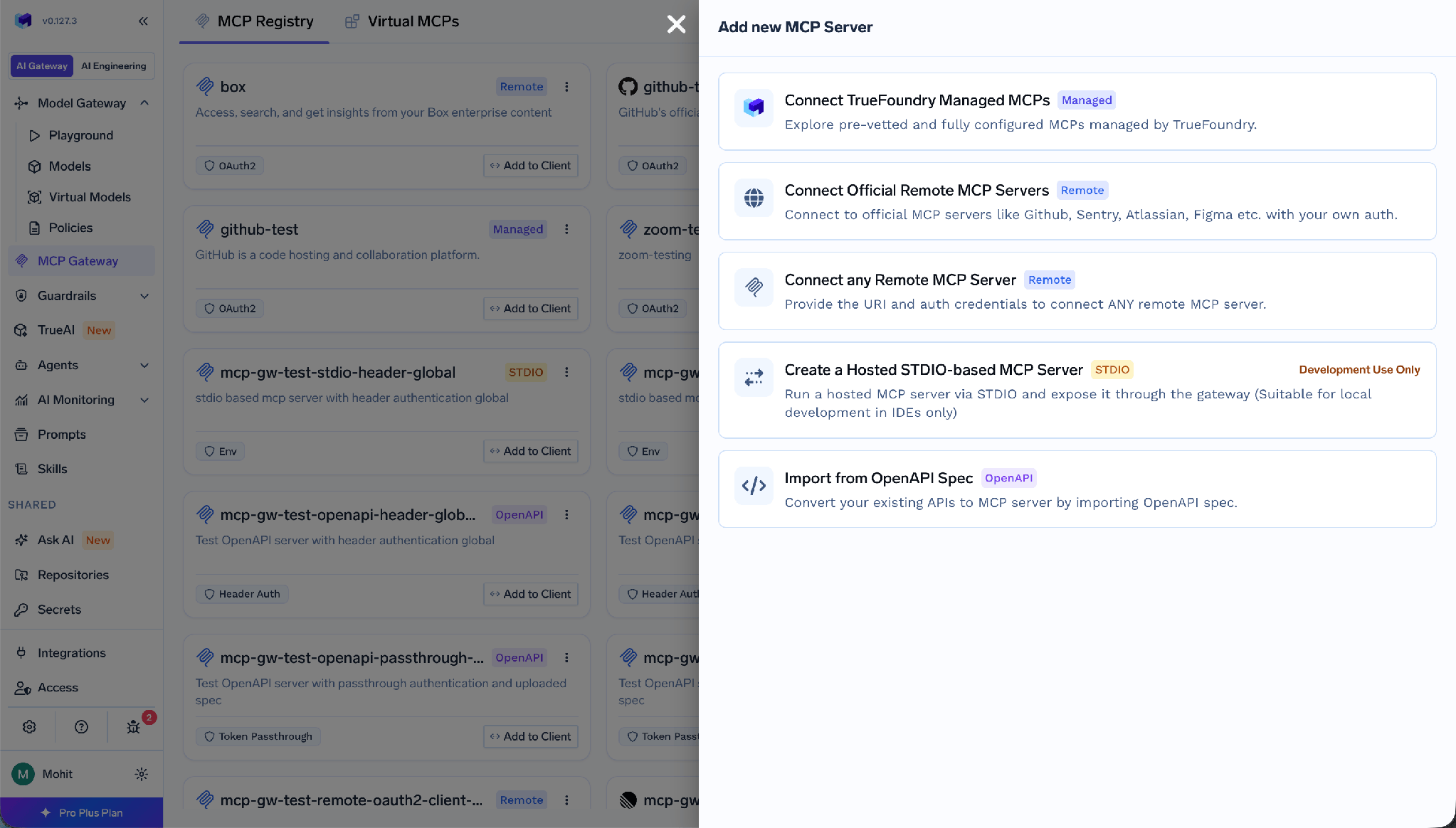
املأ الاسم (أحرف صغيرة، أرقام، شرطات — يظهر في عناوين URL)، و اسم العرضالاختياري، و الوصف، و رابط URL الخاص بخادمك قيد التشغيل، و المتعاونون، و بيانات المصادقة.
من المهم توخي الدقة، لأن MongoDB لا يتبع نمط OAuth الذي تفترضه معظم منشورات MCP. تفصل TrueFoundry بين واردة المصادقة (كيف يثبت العميل هويته للبوابة) من صادرة المصادقة (كيف تثبت البوابة هويتها للجهة الأعلى).
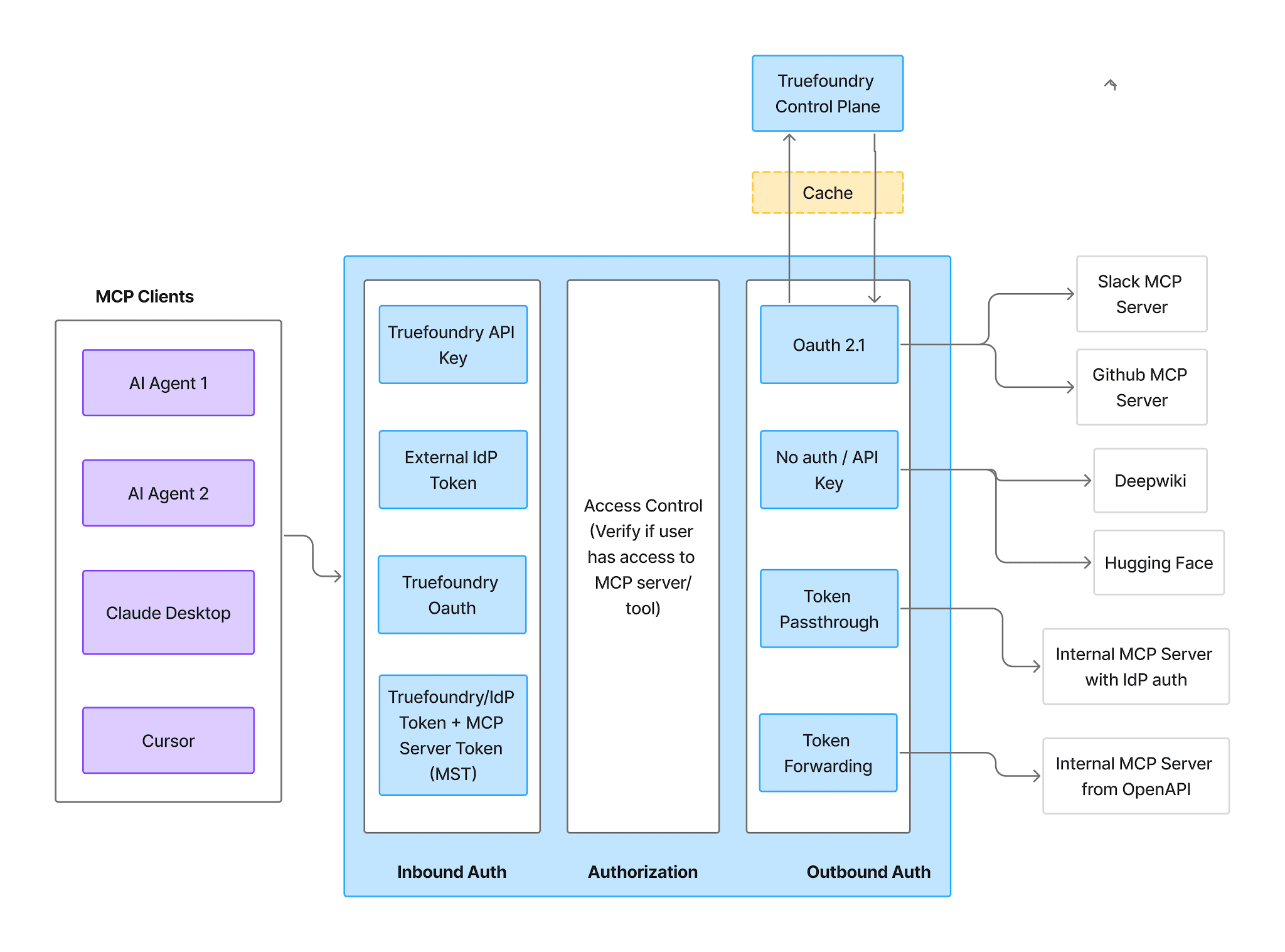
الواردة — أربع طرق:
الصادرة — هنا يختلف MongoDB عن MCP المُدار. نظرًا لأن بيانات اعتماد قاعدة البيانات موجودة في بيئة خادم MCP نفسه كـ MDB_MCP_CONNECTION_STRING، فلا يوجد تدفق رمز تفويض OAuth ولا يوجد عنوان URI لإعادة التوجيه لتسجيله. لا أحد ينقر على اتصل الآن، ولا توجد شاشة موافقة، ولا يوجد منح من جانب المستخدم لإلغائه.
بالنسبة للقفزة من البوابة إلى الخادم، فإن أنواع المصادقة هي مفتاح API، OAuth2، AWS SigV4، و تمرير الرموز المميزةيُعد مفتاح واجهة برمجة التطبيقات (API Key) الخيار العملي للخوادم ذاتية التشغيل.
وضعان. بيانات الاعتماد المشتركة — مفتاح واحد للجميع، يتم تعيينه كترويسة (header):
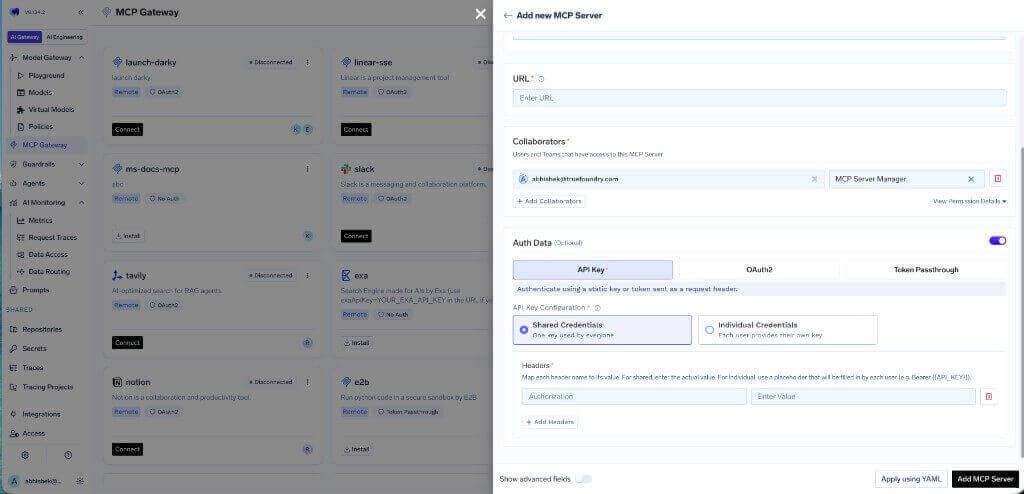
بيانات الاعتماد الفردية — يقدم كل مستخدم بياناته الخاصة عبر عنصر نائب Bearer {{API_KEY}} وعلامة التبويب تجاوزات المصادقة :
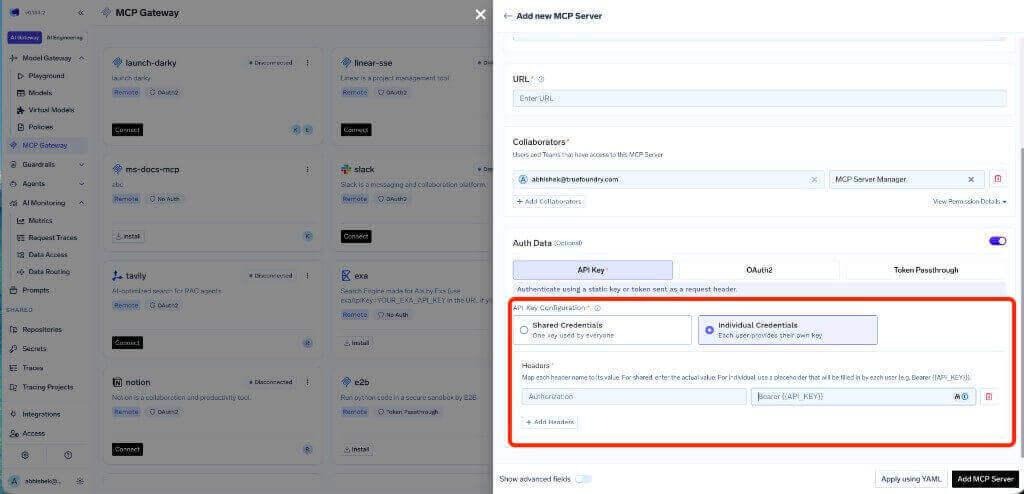
توفر بيانات الاعتماد الفردية هويات واردة متميزة — وهو أمر مفيد للإسناد وتحديد نطاق الأدوات لكل مستخدم — ولكنها لا توفر أذونات قاعدة بيانات لكل مستخدم. لا يزال كل طلب يصل إلى نفس سلسلة الاتصال وبنفس دور Atlas. للوصول إلى بيانات منفصلة حقاً، قم بتشغيل مثيلات خادم منفصلة مع مستخدمي Atlas مختلفين.
تعرض علامة التبويب الأدوات كل ما يكشفه الخادم. بالنسبة لـ MongoDB، تُعد هذه أهم شاشة في وحدة التحكم.
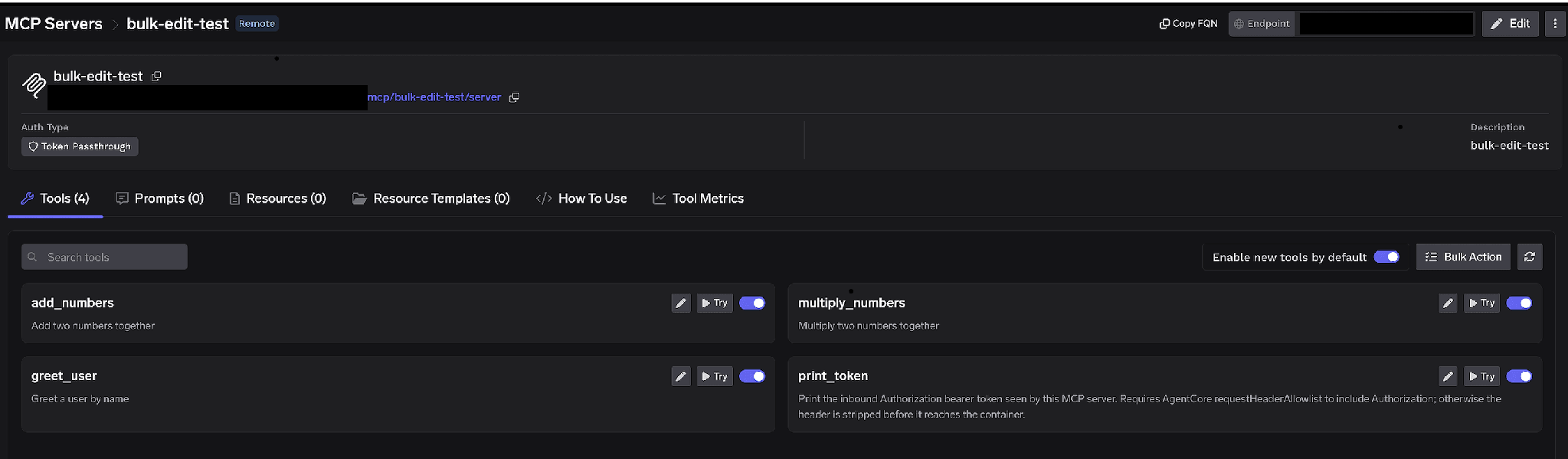
علامة تبويب أدوات خادم MCP مع مفاتيح تبديل لكل أداة، وعناصر تحكم للتجربة والتعديل، وتفعيل الأدوات الجديدة افتراضياً، والإجراءات المجمعة
مفاتيح تبديل لكل أداة. قم بإيقاف تشغيل أداة ما وسيتم حذفها من قائمة الأدوات (tools/list) تماماً — لن يراها العملاء ولن يمكن استدعاؤها. هذا ليس مجرد تصفية على مستوى المطالبة (prompt)؛ بل الأداة تختفي تماماً.
توصيتنا هنا أكثر صراحةً مما هي عليه بالنسبة لمعظم الخوادم: عطّل إدارة المجموعات والفهارس تماماً. لا تكتفِ بوضع قيود الموافقة، بل عطّلها. فقيود الموافقة تناسب العمليات التي تُعد جزءاً مشروعاً من سير العمل وتحتاج إلى مراجعة إضافية، أما حذف مجموعة في بيئة الإنتاج فلا يُعد جزءاً من أي سير عمل للوكيل (Agent) نعتمد استخدامه. فالوكيل الذي لا يمكنه استدعاء أداة الحذف لا يمكن إقناعه بذلك، ولا يمكن توجيهه إليه عبر مستند ملغوم، ولا يمكنه الوصول إليه حتى لو قام شخص ما بالموافقة على الطلب في الساعة الثانية صباحاً.
إذا كنت بحاجة إلى مسار للكتابة، فلا تقم بتمكينه على الخادم المشترك. قم بإنشاء خادم MCP افتراضي منفصل يحتوي فقط على تلك الأدوات وامنحه صلاحيات محدودة. تؤكد ملاحظات أمان MongoDB الخاصة بـ TrueFoundry على الأمر نفسه: لا تعرض الأدوات القادرة على الكتابة إلا من خلال خوادم MCP افتراضية مخصصة.
تمكين الأدوات الجديدة افتراضياً. إذا تركت هذا الخيار مفعلاً، فستظهر الإضافات الجديدة تلقائياً. قم بإيقاف تشغيله off. فظهور أداة كتابة جديدة بصمت على خادم تستخدمه وكلاؤك بالفعل هو آخر مفاجأة قد ترغب في حدوثها على قاعدة بيانات حية.
الإجراء المجمع. يحول الصفوف إلى مربعات اختيار لتتمكن من تعديل العديد من الأدوات دفعة واحدة. أسرع طريق للوصول إلى وضع القراءة فقط: حدد الكل، ثم ألغِ تحديد أدوات الاستعلام والفحص، واحفظ التغييرات.
انقر على أيقونة القلم بجانب أي أداة لتجاوز طريقة عرضها:
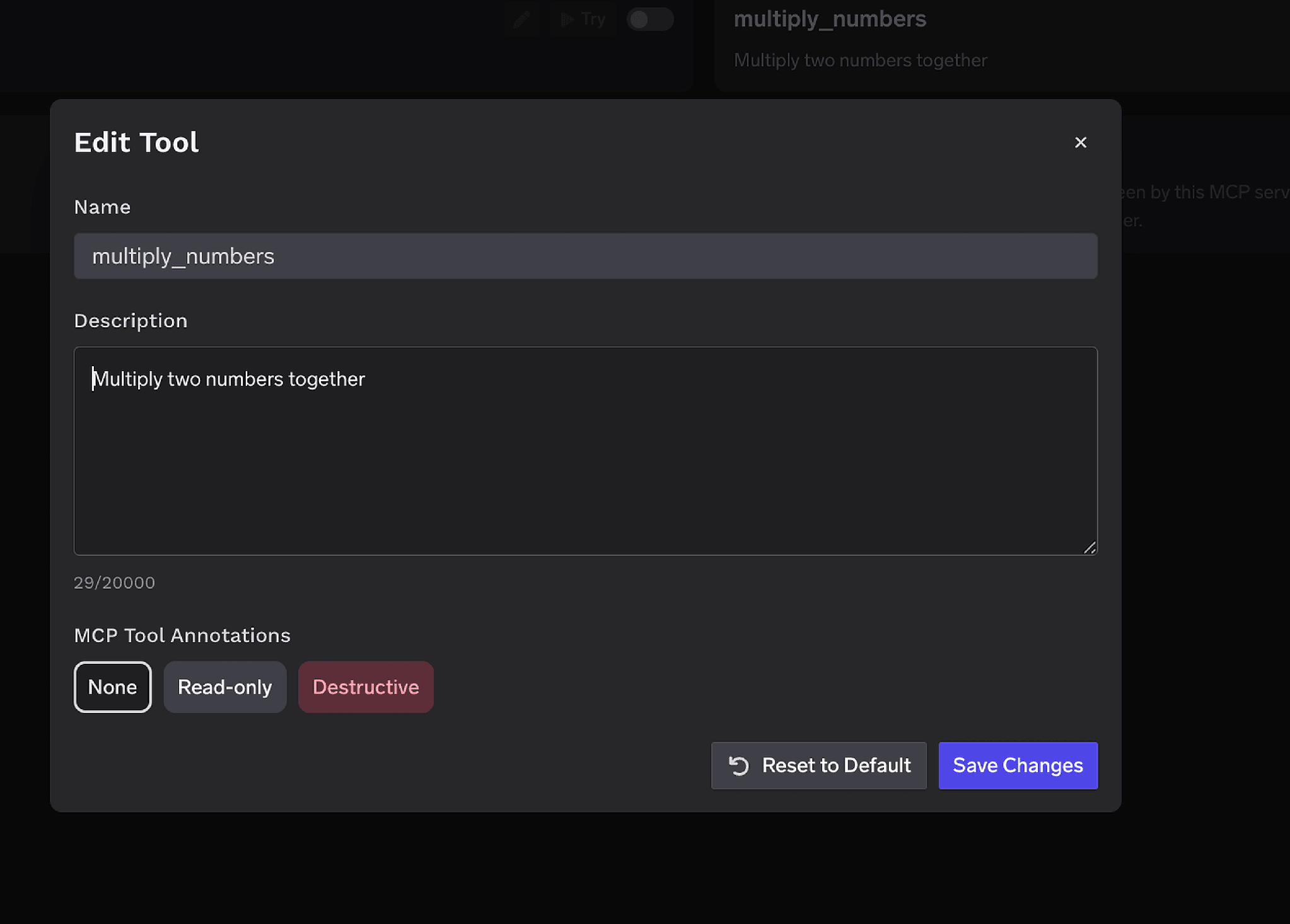
نافذة تعديل الأداة المنبثقة مع حقل لتجاوز الوصف ومحدد لتعليقات أداة MCP لتعيينها كـ "للقراءة فقط" أو "تدميرية"
تعد الوصف (الذي يصل إلى 20,000 حرف) ميزة قيّمة للغاية هنا: أخبر النموذج أي المجموعات كبيرة وأي الحقول مفهرسة، حتى يقوم بالتصفية بناءً عليها. هذا هو أقل الحلول تكلفةً لتجنب مشكلة المسح بدون فهارس. تعليقات أداة MCP لتمييز أداة ما بـ للقراءة فقط أو تدميري، مع تعيين readOnlyHint أو destructiveHint للعملاء الذين يدعمونها.
يرتبط التحكم في الوصول بالمستخدمين أو الفرق أو الحسابات الافتراضية عبر بُعدين: الخوادم التي يمكن للهوية الوصول إليها، والأدوات التي يمكنها استدعاؤها.
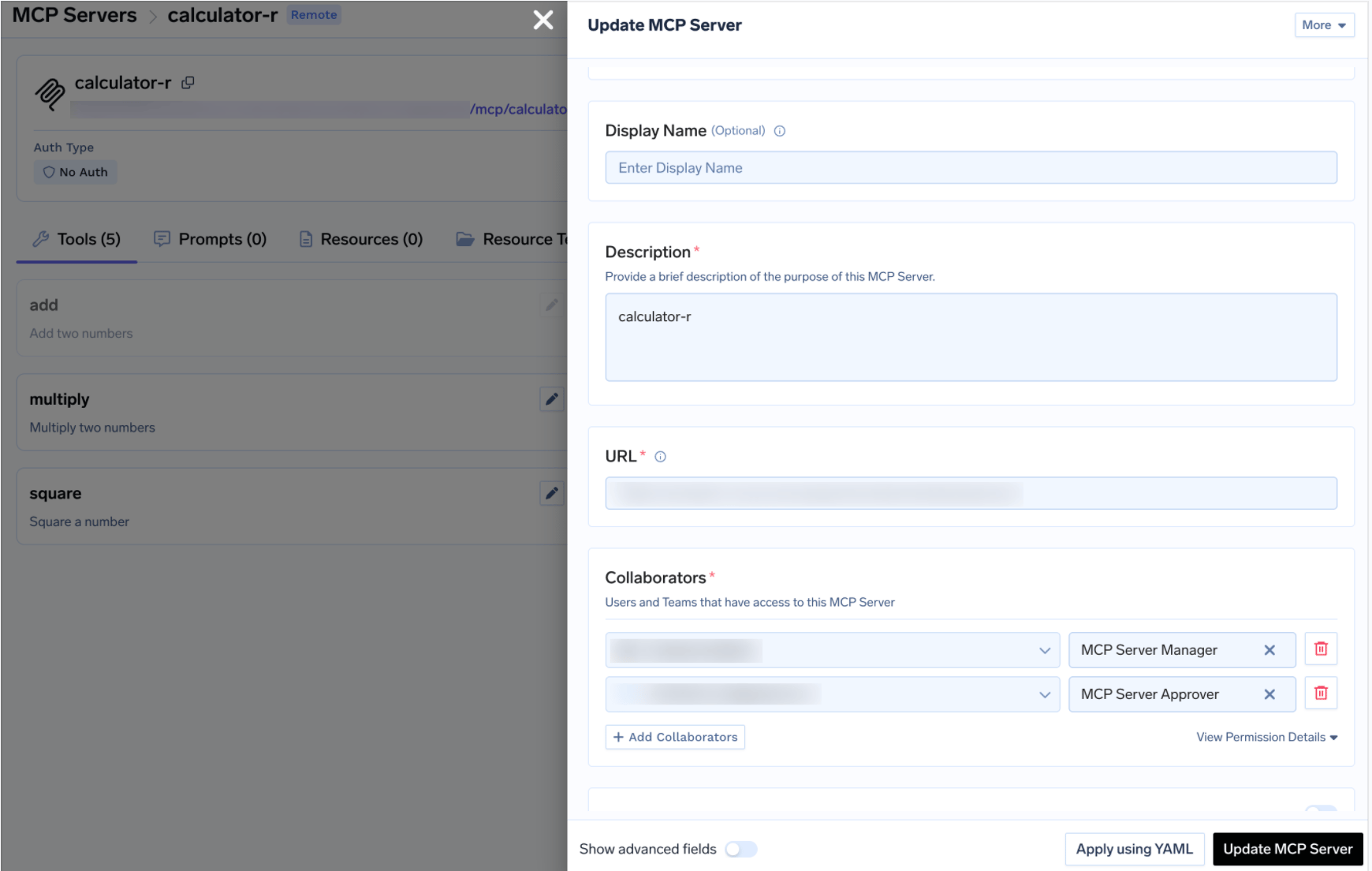
تحديث درج خادم MCP الذي يعرض المتعاونين الحاصلين على أدوار مدير خادم MCP وموافق خادم MCP
TrueFoundry AI Gateway delivers ~3–4 ms latency, handles 350+ RPS on 1 vCPU, scales horizontally with ease, and is production-ready, while LiteLLM suffers from high latency, struggles beyond moderate RPS, lacks built-in scaling, and is best for light or prototype workloads.



خادم MCP يتيح نشر MongoDB كأدوات يستطيع الوكيل استدعاءها: الاستعلام عن قواعد البيانات، وفحص المخططات، وإدارة المجموعات والفهارس. وعلى TrueFoundry تشغّله بنفسك مع سلسلة اتصال Atlas مخصصة تُضبط في MDB_MCP_CONNECTION_STRING، ثم تسجّل عنوان URL الخاص به في MCP Gateway.
أربعة مجالات للقدرات: الاستعلام عن البيانات، وفحص المخططات، وإدارة المجموعات، وإدارة الفهارس. وتظهر القائمة الكاملة في تبويب Tools بعد التسجيل، ويمكن تفعيل كل أداة أو تعطيلها أو إعادة وصفها أو توصيفها بأنها read-only أو destructive.
نعم، كتكامل للقراءة فقط. الخطران هما أن يغيّر وكيل الحالة الحية، وأن يُضعف استعلام بلا فهرس أداء عنقود تحت الضغط. ويُعالَج الاثنان بالطريقة نفسها: مستخدم Atlas للقراءة فقط، وتعطيل إدارة المجموعات والفهارس عند البوابة، ووضع أي مسار كتابة خلف Virtual MCP Server منتقى، وتتبّع كل استدعاء.
نعم. تعمل TrueFoundry في VPC الخاصة بك أو محلياً أو في بيئة معزولة عن الشبكة أو هجينة، فلا تغادر التعليمات والردود نطاقك أبداً حتى وأنت توجّه الطلبات عبر مزوّدين كثيرين.
نعم. تتضمن MCP Gateway وAgent Gateway وMCP & Agents Registry مع تحكم في الوصول على مستوى الأدوات. ويمكن حوكمة الوكلاء المبنيين على LangGraph أو CrewAI أو AutoGen أو إطار عمل مخصص مركزياً.
نعم. البوابة متوافقة مع OpenTelemetry وتتكامل مع Grafana أو Datadog أو Prometheus أو حزمتك المفضلة. فهي تتتبع كل طلب من المطالبة إلى تنفيذ الأداة والنموذج، لتحصل على تسجيل موحد دون الحاجة إلى تغيير ما تستخدمه حاليًا.



أحدث الأخبار والمقالات والموارد تصلك مباشرة إلى بريدك الوارد
.png)
.png)
.png)
.png)
.png)
.webp)
.webp)

.png)
.png)
.png)
.png)
.png)
.png)
.png)


