



October 29, 2026
|
5 min read


احصل على وصول فوري إلى بيئة TrueFoundry مباشرة. انشر النماذج، ووجّه حركة مرور LLM، واستكشف المنصة بالكامل — بيئة الاختبار الخاصة بك جاهزة في ثوانٍ، ولا يلزم وجود بطاقة ائتمان.


Blazingly fast way to build, track and deploy your models!
قد تعيد الأداة البيانات الصحيحة ولكن بتنسيق غير مناسب لاستنتاج النموذج. تعمل معالجة الاستجابات الكبيرة على الفصل بين امتلاك البيانات وبين الحاجة إلى معالجة كل بايت منها بشكل فوري.
يمكن لأداة MCP أن تقدم إجابة ناجحة ومع ذلك تتسبب في تعطيل سير العمل. فقد تعيد واجهة برمجة تطبيقات المستودع مئات طلبات السحب مع أوصاف طويلة، أو قد تصدر أداة المقاييس كل سلسلة زمنية، أو قد يرفق بحث CRM سجلات متداخلة بكل حساب. تكون البيانات ذات صلة من حيث المبدأ، لكن النموذج قد يحتاج إلى ثلاثة حقول فقط.
إذا دخلت النتيجة الكاملة في سياق النموذج، تحدث عدة أمور في وقت واحد: يزداد حجم المدخلات، وترث عمليات الاستنتاج اللاحقة هذا الحجم الكبير، وتتنافس الحقائق المهمة مع الحقول غير ذات الصلة، وقد تؤدي الاستدعاءات اللاحقة إلى دفع سير العمل نحو حدود النموذج. يُفضل طلب كمية أقل من البيانات من الأداة عندما تدعم واجهة برمجة التطبيقات الخاصة بها الإسقاط أو الترقيم أو التصفية. ومع ذلك، لا يزال وقت التشغيل يحتاج إلى آلية احتياطية لأن العديد من الأدوات لا توفر عناصر تحكم كافية.
تكتب خاصية معالجة الاستجابات في TrueForge النتيجة الضخمة في ملف بيئة اختبار (sandbox) وتضع معاينة قصيرة بالإضافة إلى مسار الملف في السياق. يحتفظ الوكيل بإمكانية الوصول دون أن يضطر إلى معالجة الحمولة الكاملة.
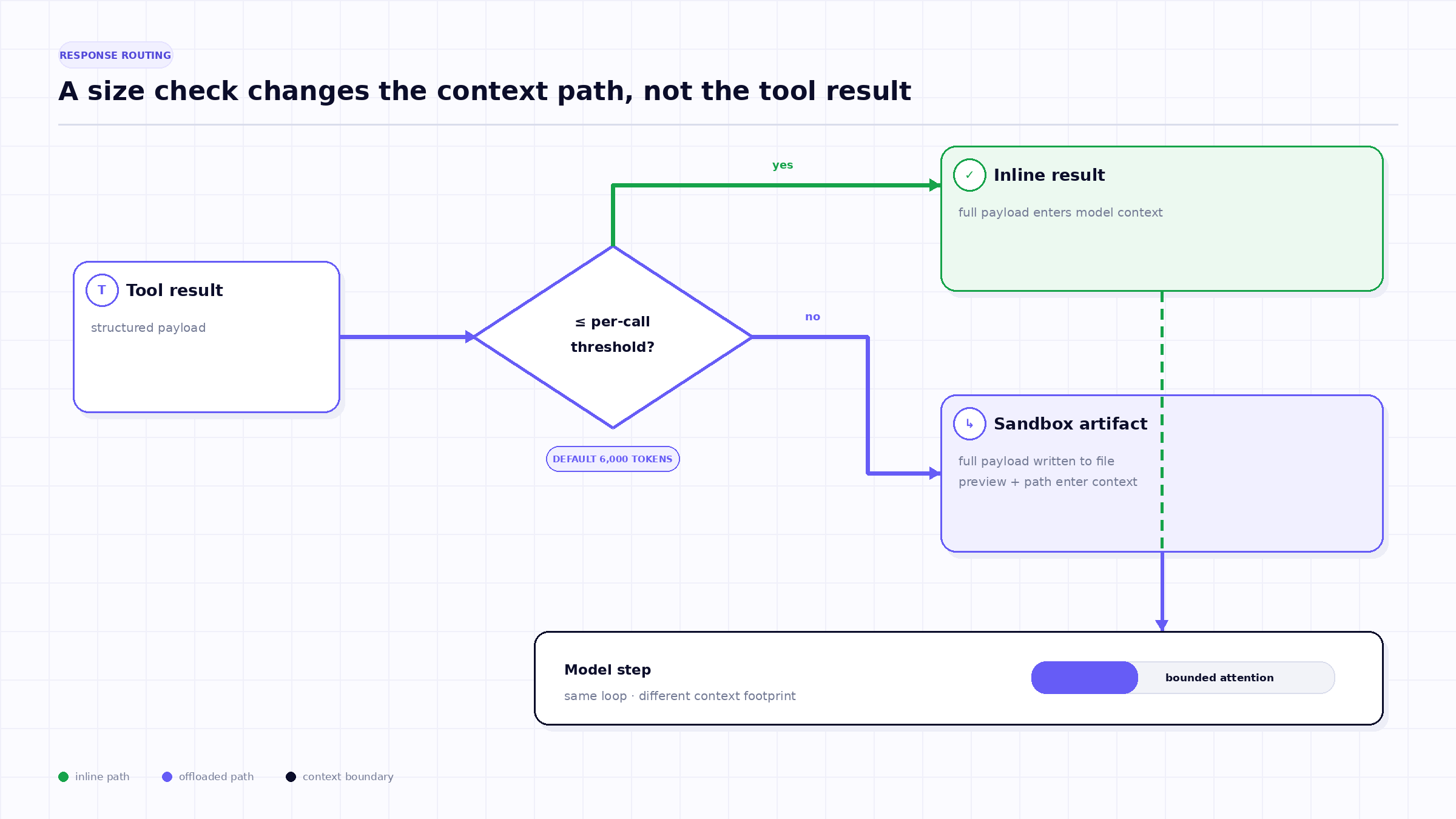
تطبق القاعدة الأولى على نتيجة أداة واحدة. إذا تجاوزت الاستجابة المقدرة الحد الأقصى المكون لكل استدعاء، تقوم TrueForge بكتابة النتيجة الكاملة في بيئة الاختبار. يتلقى السياق إشعاراً ومسار ملف ومعاينة محدودة. الحد الأقصى الافتراضي الحالي هو 6,000 رمز (token)؛ وتحتوي المعاينة الافتراضية الحالية على أول وآخر 100 حرف.
المعاينة هي وسيلة للتنقل وليست ملخصاً. قد تكشف الأحرف الحدودية عن نوع الكائن، أو المفاتيح ذات المستوى الأعلى، أو العدد الإجمالي، أو البيانات الوصفية النهائية، لكنها قد تغفل السجلات الدقيقة التي تحتاجها المهمة. الخطوة التالية الصحيحة هي فحص البنية، أو البحث عن هدف، أو تشغيل محلل صغير، وليس استنتاج المحتويات الكاملة من المعاينة.
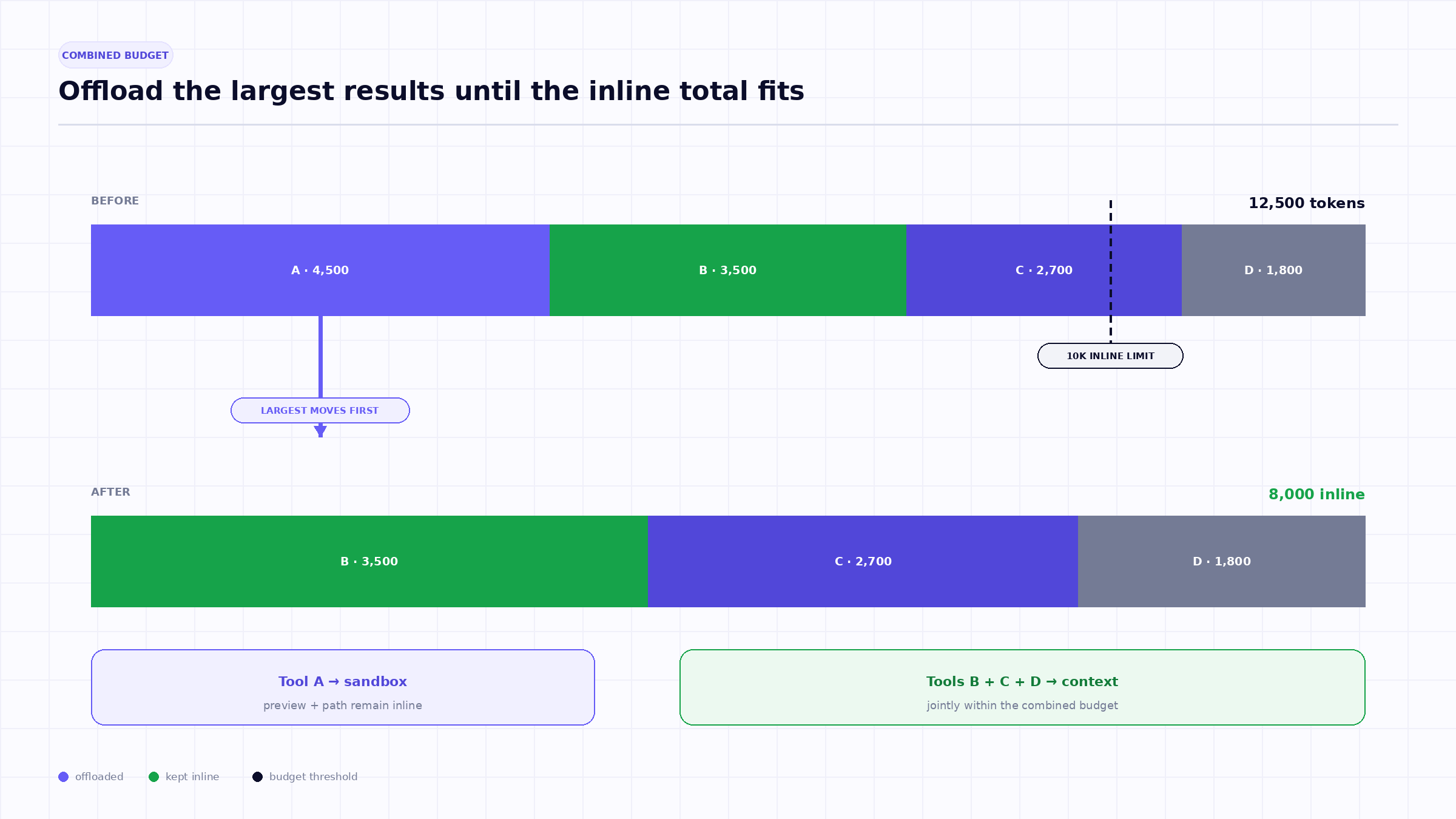
لا تكفي الحدود لكل استدعاء عندما يصدر الوكيل أدوات بشكل متزامن. فأربع نتائج بحجم 4,000 رمز لكل منها تجتاز فحص الـ 6,000 رمز، لكنها معاً تحقن 16,000 رمز في خطوة نموذج واحدة.
لذلك، توثق TrueForge حداً ثانياً لمحتوى استدعاءات الأدوات المجمعة التي يتم إرجاعها معاً. الحد الافتراضي الحالي هو 10,000 رمز. عندما يتجاوز المجموع هذا الحد، يقوم النظام بتفريغ الاستجابات واحدة تلو الأخرى، بدءاً من الأكبر، حتى ينخفض المحتوى المتبقي المضمن عن الحد الأقصى.
تحافظ سياسة "الأكبر أولاً" هذه على المزيد من النتائج الصغيرة مضمنة مع إزالة المساهمين الأكبر حجماً بسرعة. إنها استدلال سياقي وليست حكماً على الأهمية. قد تحتوي الاستجابة الأكبر على أهم الأدلة؛ ويضمن مسار الملف بقاءها قابلة للاسترجاع.
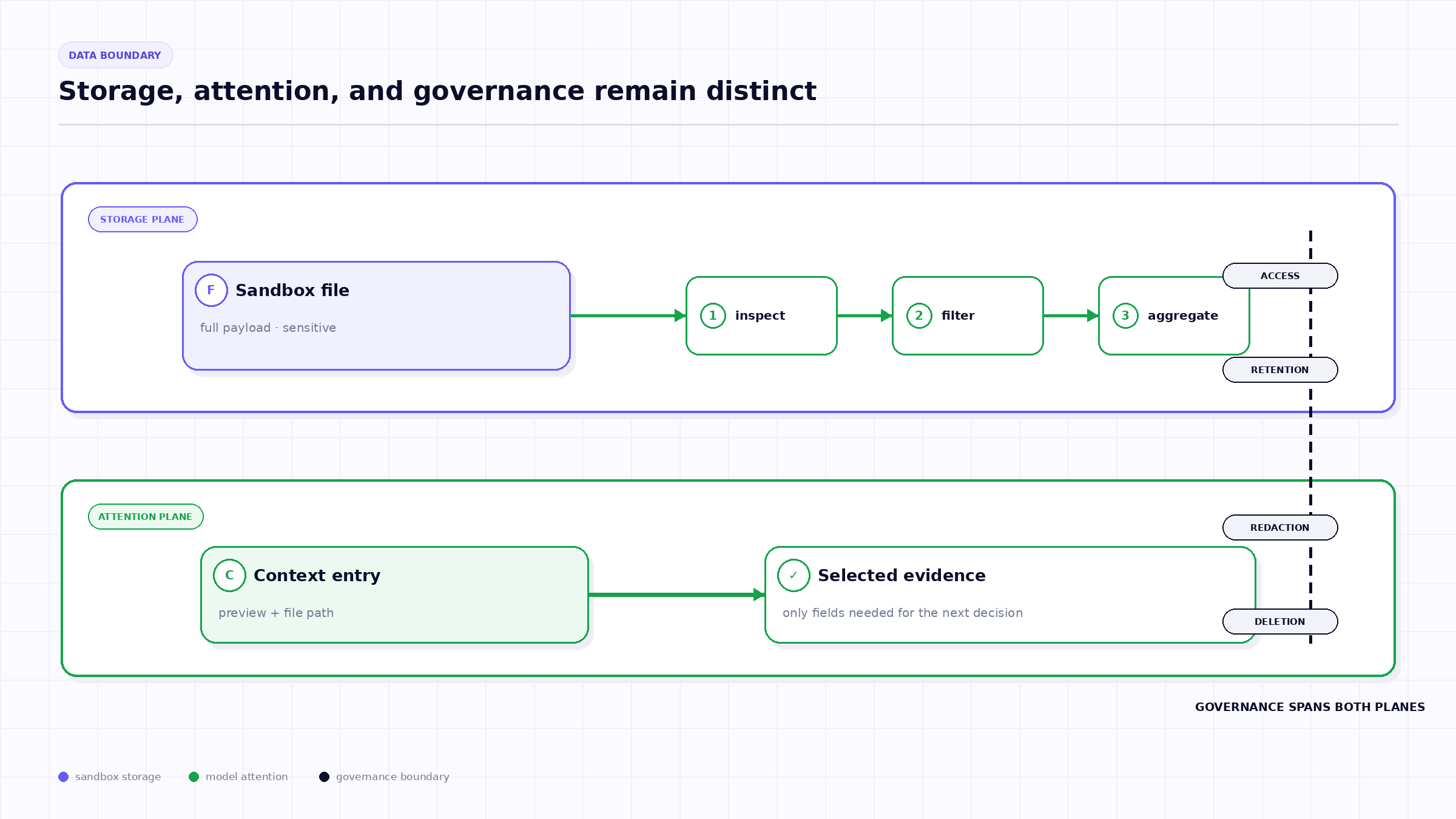
تحتاج الحمولة الكاملة إلى مساحة تنفيذ متينة يمكن للوكيل فحصها. يتم تمكين هذه الميزة في TrueForge افتراضياً ولكنها تتطلب تفعيل بيئة اختبار الوكيل لأن النتيجة التي يتم تفريغها تُخزن كملف في بيئة الاختبار.
لا يتم تشغيل حلقة الوكيل بالكامل داخل بيئة الاختبار (Sandbox). تصف وثائق TrueForge هذه البيئة بأنها مساحة معزولة تُستخدم للتعامل مع الأكواد والملفات وأوامر النظام، ويتم توفيرها عند الحاجة. يتلقى النموذج مساراً للملف ويمكنه استخدام عمليات بيئة الاختبار لفحصه أو تعديله.
يوفر هذا التصميم فصلاً مفيداً للمهام: حيث يتحكم "نظام التشغيل" (harness) في عملية التنفيذ وبيانات الاعتماد، بينما تتولى بيئة الاختبار معالجة البيانات. يطرح هذا أيضاً تساؤلات حول دورة حياة البيانات؛ فإذا كانت المهمة أو المستخدم أو سياسة الاحتفاظ بالبيانات تتطلب خصوصية عالية، يجب على الفرق معرفة مدة بقاء الملف، ومن يمكنه تنزيله، وما هي سجلات القياس (telemetry) التي تشير إليه، وكيفية تنفيذ عملية الحذف.
بمجرد نقل الاستجابة إلى خارج سياق النموذج، يجب على الوكيل تضييق نطاقها بعناية:
تربط وثائق TrueForge هذا النمط صراحةً بـ "وضع الكود" (Code Mode). يمكن لبرنامج نصي قراءة الملف المنقول، وحساب النتيجة، وإرجاع الأسطر المطبوعة فقط إلى سياق النموذج.
TrueFoundry AI Gateway delivers ~3–4 ms latency, handles 350+ RPS on 1 vCPU, scales horizontally with ease, and is production-ready, while LiteLLM suffers from high latency, struggles beyond moderate RPS, lacks built-in scaling, and is best for light or prototype workloads.





أحدث الأخبار والمقالات والموارد تصلك مباشرة إلى بريدك الوارد
.webp)

.png)
.png)
.png)
.png)
.png)
.png)
.png)

.png)
.png)
.png)
.png)




