


.png)
October 31, 2026
|
5 min read


احصل على وصول فوري إلى بيئة TrueFoundry مباشرة. انشر النماذج، ووجّه حركة مرور LLM، واستكشف المنصة بالكامل — بيئة الاختبار الخاصة بك جاهزة في ثوانٍ، ولا يلزم وجود بطاقة ائتمان.



.png)
Blazingly fast way to build, track and deploy your models!
The Notion MCP server is a remote Model Context Protocol server for Notion. MCP is the open standard that lets an agent discover and call tools on an external system; Notion’s implementation exposes workspace search, page and database reads and writes, and comments as callable tools.
TrueFoundry’s docs describe the surface as search, fetch, create and update pages, databases, and comments, with tools named in the notion-* convention — notion-search, notion-fetch, notion-create-pages, notion-update-page. Grouped by capability:
That Resources tab matters: most MCP servers expose tools only, so Resources is a second retrieval path that’s easy to miss when auditing what an agent can reach.
Being a remote server, there’s no container to run and no npx process per laptop — you point a client at a URL and authenticate, the pattern now standard across remote MCP servers.
The valuable uses chain tools, and lean on search because Notion content is unstructured by nature:
The read-versus-write split is sharper here than in most tools. Reads are the point — retrieval is why you connect it. Writes are convenient but rarely load-bearing, and they’re what can overwrite a page a human spent a week on. Usefully, Notion’s tools arrive already labeled Read-only or Destructive, so the Tools tab tells you which is which without any inspection.
Notion’s risk profile differs from a code host’s. The dangerous failure isn’t an agent maliciously rewriting a page — it’s an agent legitimately reading far more than anyone intended.
Permission inheritance makes scope invisible. Notion access is page-tree shaped: grant a parent page and the grant flows down to every child, grandchild, and database beneath it. When someone shares “the Engineering wiki” with an integration, they’re picturing the landing page. What they’ve actually granted is whatever accumulated under that node over three years — including the compensation planning page a manager nested there in a hurry. Nobody sets out to hand an agent HR data. Inheritance does it for them.
Workspace-level consent is coarse. Notion’s OAuth screen asks you to pick a workspace, then shows the categories granted — page and database access, search, workspace users. It never asks you to enumerate pages. The unit of consent is far bigger than the unit of need, so the honest default is “the agent can see a lot” unless something narrows it.
Search amplifies it. An over-broad grant would be survivable if an agent had to guess page URLs. It doesn’t. notion-search is a discovery tool: point an agent at a workspace and it will find the sensitive pages, because that’s its job. Retrieval quality and blast radius scale together.
Nobody can reconstruct what was read. Notion logs API activity. It doesn’t log that your internal support agent searched for “severance” while answering a question from a Slack thread. Reads are the risk surface, and reads are the least likely thing to get noticed after the fact.
None of this is a reason to skip the Notion MCP server. It’s a reason to put a control plane in front of it — what an MCP gateway exists to do.
On TrueFoundry, Notion is a TrueFoundry Managed MCP. TrueFoundry publishes platform-verified server definitions to a managed catalogue; to provision one you supply only a Name, and the platform handles every URL, auth detail, scope, and credential — keeping them current as the upstream provider changes them.
Step 1 — Open the catalogue. Go to MCP Servers in the sidebar, click Add new MCP Server, and select Connect TrueFoundry Managed MCPs. Find notion — catalogued as “Notion is a collaboration and productivity tool” — and click + Add. TrueFoundry registers the server and opens its detail page.
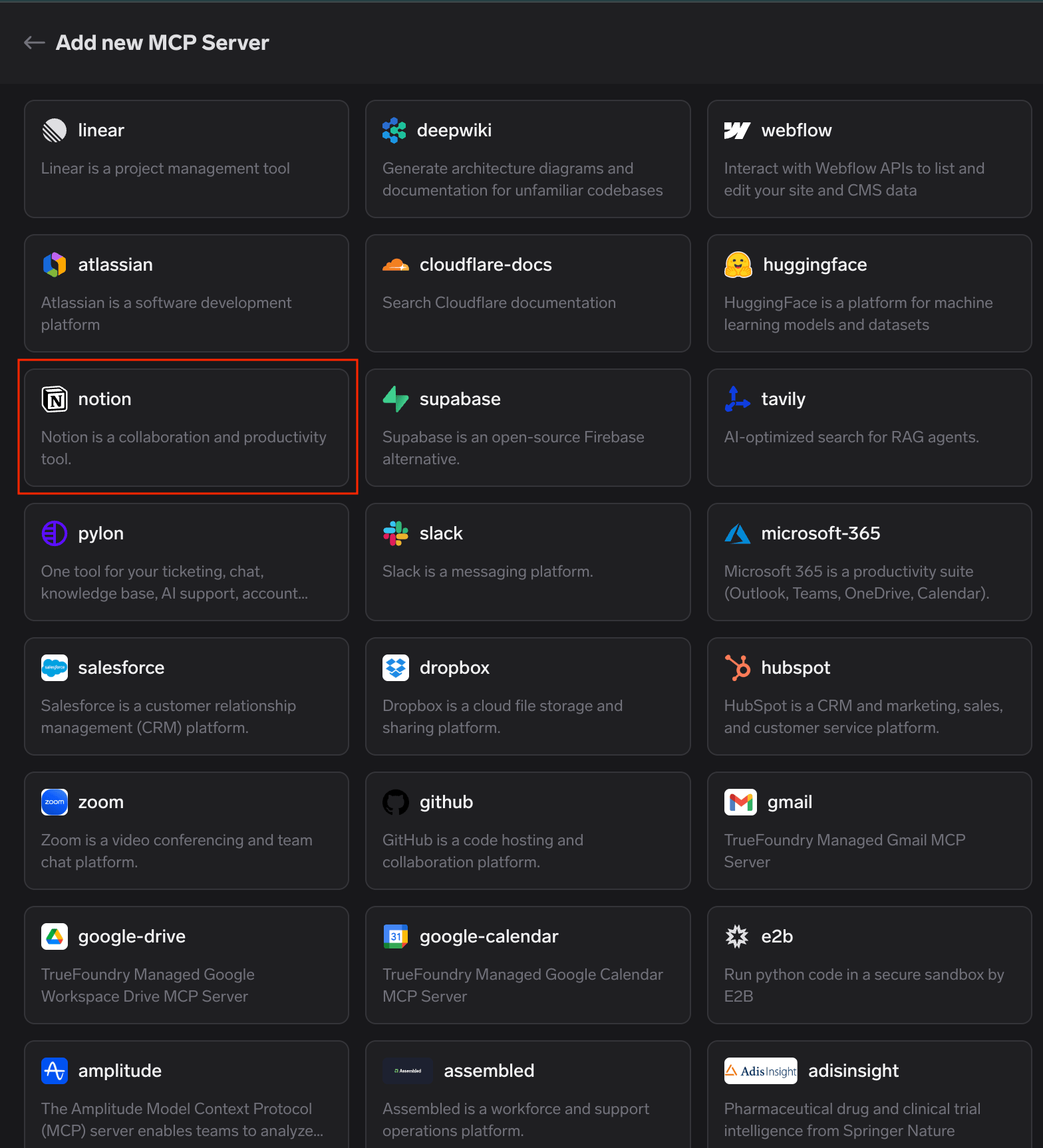
TrueFoundry managed MCP catalogue with the notion card highlighted among the available platform-verified MCP servers
That’s the entire registration — no URL to paste, no Notion integration to create, no client secret to store.
Step 2 — Start the connection. The Tools tab opens on “You’re not connected to this MCP Server.” Click Connect Now to begin OAuth2 authorization; the detail page shows the auth type before you click anything.
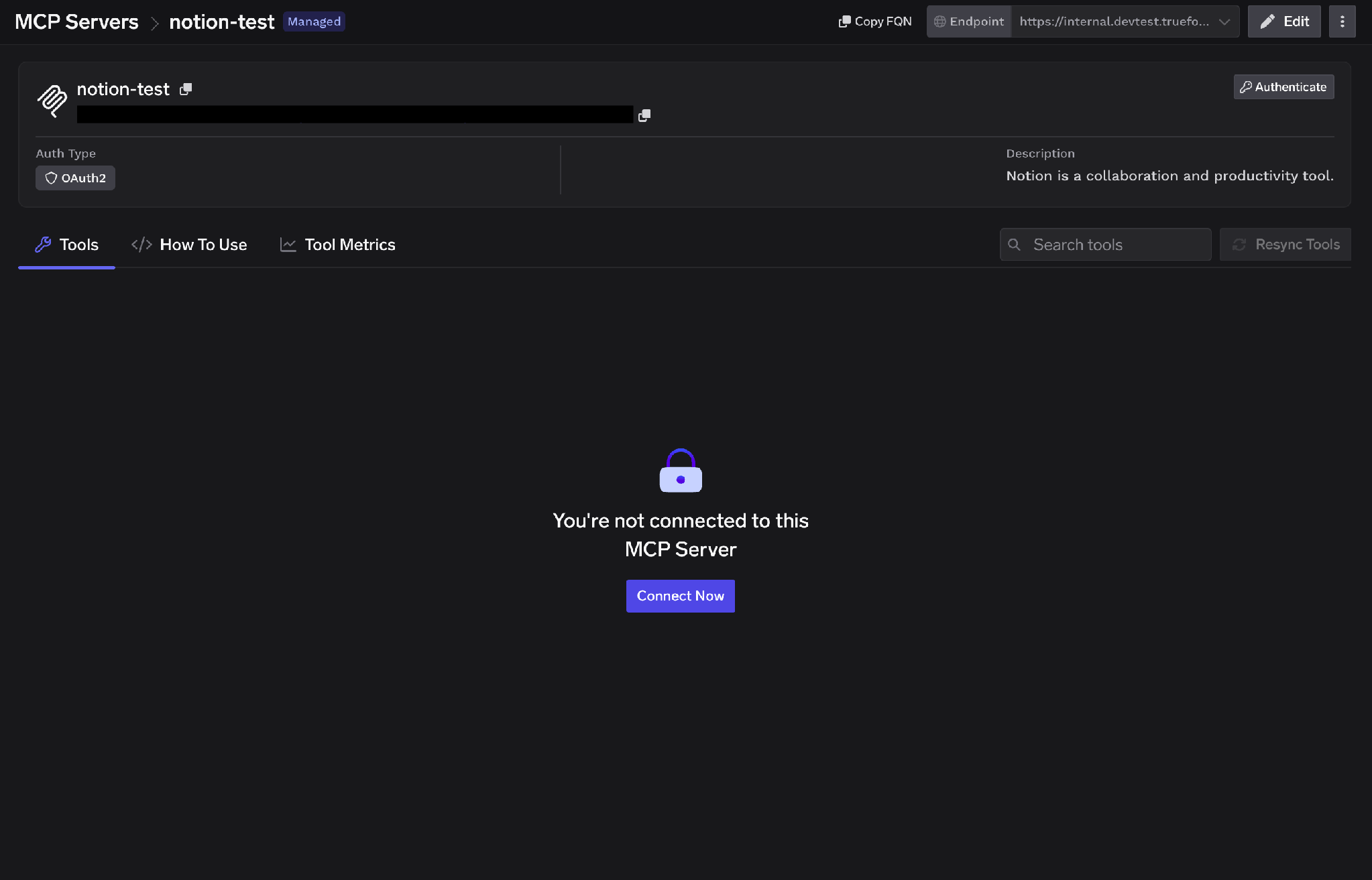
Notion MCP server detail page showing the OAuth2 auth type and the Connect Now button on the not-connected Tools tab
Step 3 — Approve at the gateway. A “Connect via TrueFoundry AI Gateway” popup shows the MCP Gateway URL, the redirect URL, and the servers to authorize. Review it and click Approve. You’re then redirected to each MCP server in sequence — worth knowing if you’re authorizing several at once, because the flow is a chain rather than one hop.
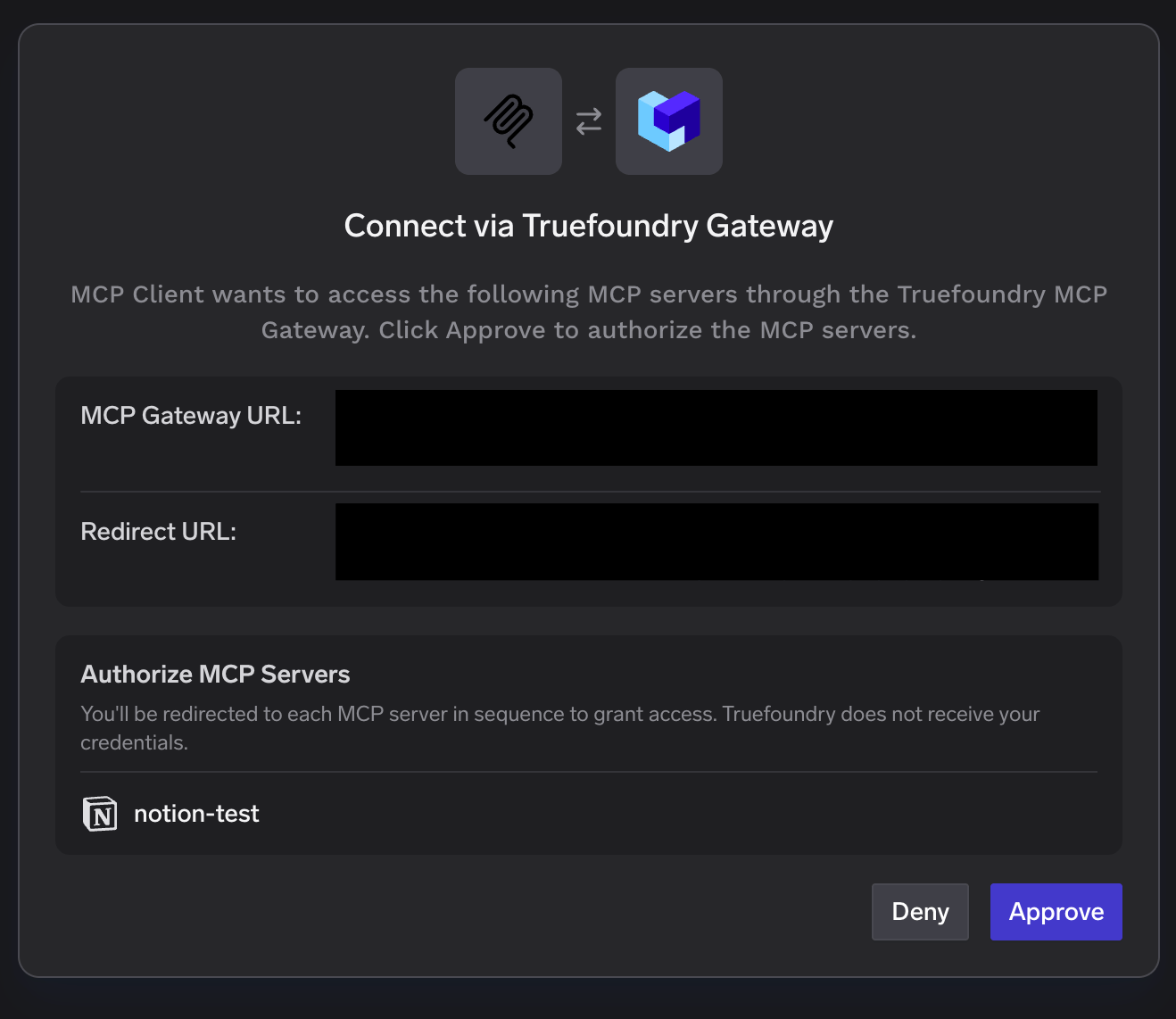
Connect via TrueFoundry AI Gateway popup listing the Notion server under Authorize MCP Servers with Deny and Approve buttons
Step 4 — Authorize your Notion workspace. Notion’s consent screen opens. Select the workspace, review the access being granted — page and database access, search, workspace users — confirm you trust the redirect URL, and click Continue.
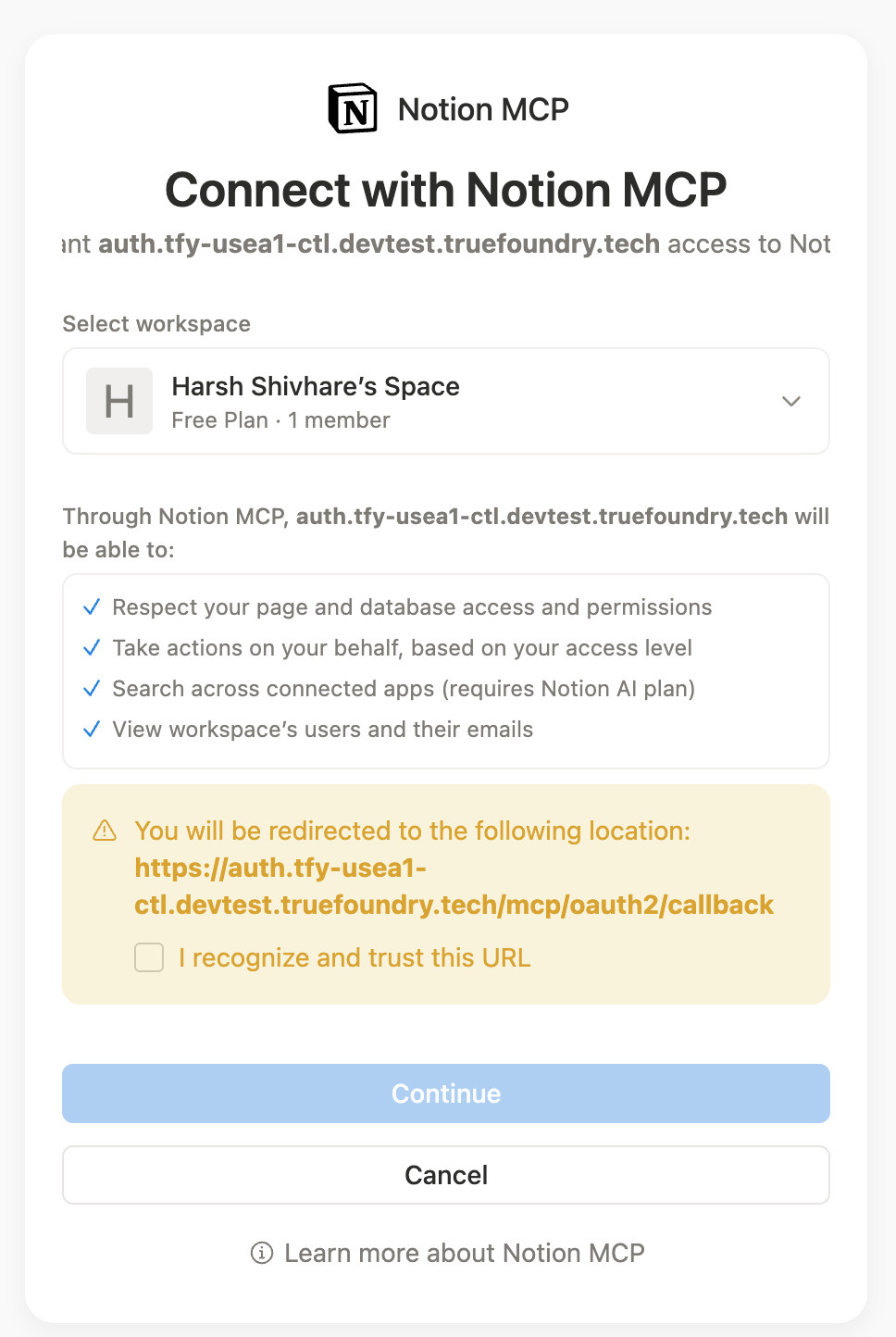
Connect with Notion MCP consent screen showing workspace selection, the list of granted permissions, and the Continue button
Read this screen slowly — it’s where the inheritance problem becomes a decision. Whoever clicks Continue is choosing how much of the workspace an agent can search.
Step 5 — Verify tools. The Tools tab populates with Notion’s tools, each with a description, a Try button, and a Read-only or Destructive label. Resources appear on their own tab.
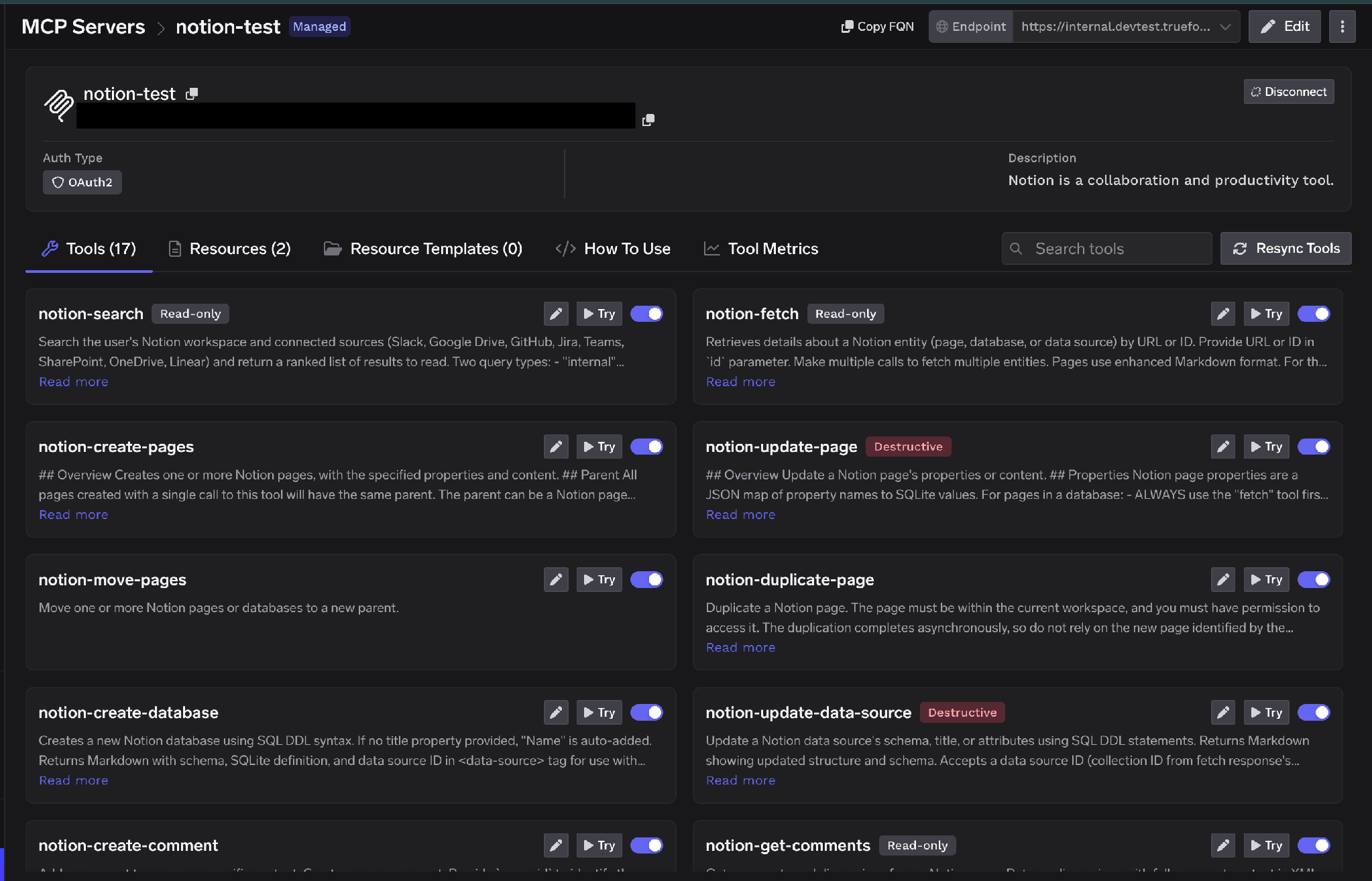
Notion Tools tab populated with tools including notion-search, notion-fetch, notion-create-pages and notion-update-page, each labeled Read-only or Destructive
TrueFoundry separates inbound authentication (how a client proves itself to the gateway) from outbound (how the gateway proves itself to Notion). The layers are independent, and that distinction is what makes per-user scoping possible.
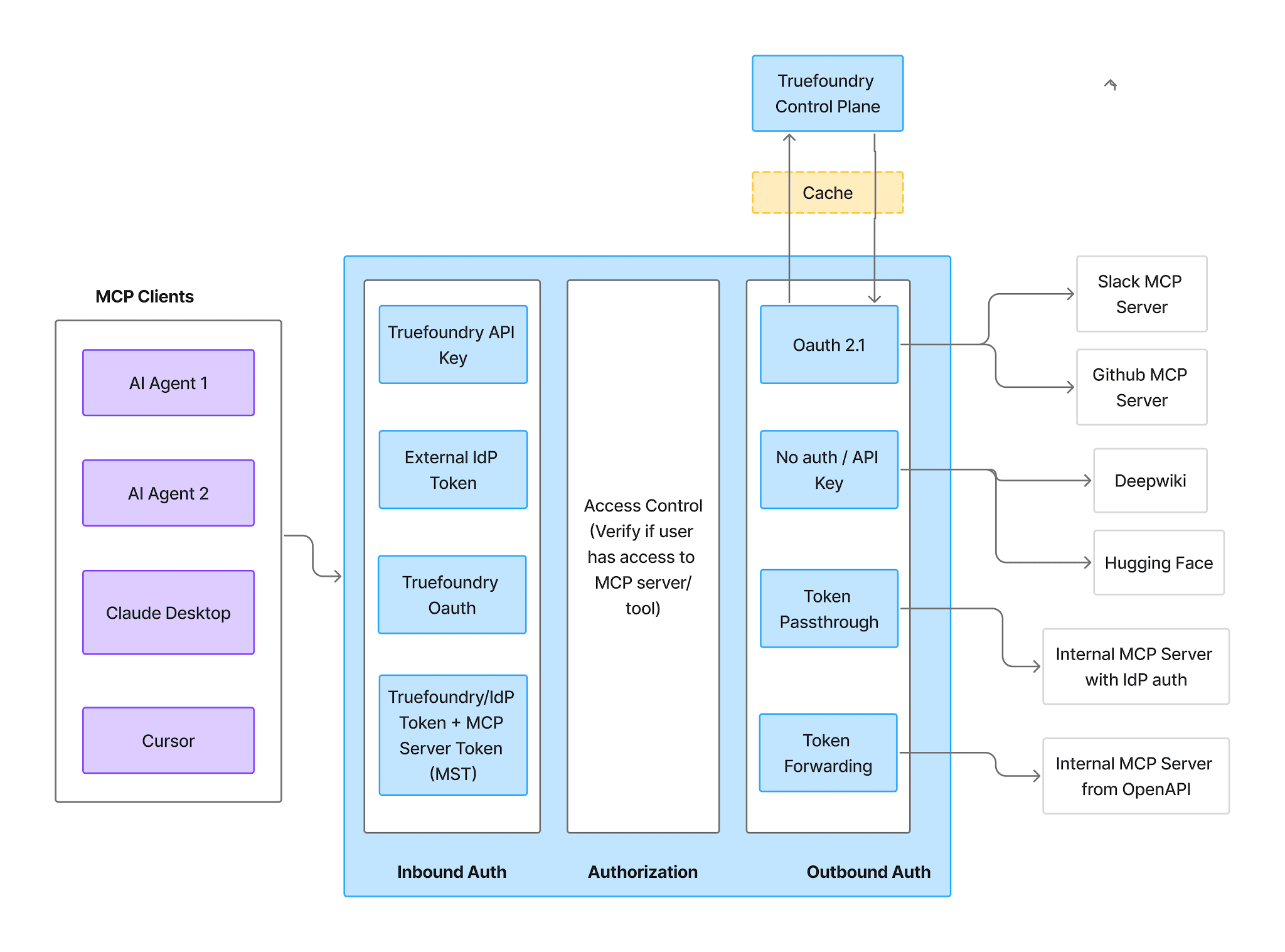
MCP Gateway authentication and authorization flow showing inbound authentication, access control, and outbound authentication as three distinct stages
Inbound — four supported methods:
TrueFoundry AI Gateway delivers ~3–4 ms latency, handles 350+ RPS on 1 vCPU, scales horizontally with ease, and is production-ready, while LiteLLM suffers from high latency, struggles beyond moderate RPS, lacks built-in scaling, and is best for light or prototype workloads.



خادم Model Context Protocol بعيد لـ Notion يتيح workspace كأدوات قابلة للاستدعاء: البحث، وجلب الصفحات وقواعد البيانات، وإنشاء الصفحات وتحديثها، وقراءة التعليقات ونشرها. ويتصل الوكلاء عبر عنوان URL ويحصلون على التصريح باستخدام OAuth2 بدلاً من تشغيل أي شيء محلياً. ويتيح Notion أيضاً MCP Resources كعنصر أساسي مستقل.
البحث، وجلب المحتوى، وإنشاء الصفحات وتحديثها، والقراءة والكتابة في قواعد البيانات، والتعليقات، وتُسمّى وفق نمط notion-*، مثل notion-search وnotion-fetch وnotion-create-pages وnotion-update-page. وتظهر القائمة الكاملة في تبويب Tools بعد التصريح، وكل أداة تحمل تسمية Read-only أو Destructive ويمكن إعدادها على حدة.
نعم، مع تحديد واضح للنطاق، والمسألة هي اتساع القراءة لا الكتابة الخبيثة. أذونات Notion تُورَّث نزولاً عبر أشجار الصفحات، فمنحة واحدة قد تكشف أكثر بكثير من المقصود. شغّله خلف بوابة تفرض OAuth لكل مستخدم بدلاً من رمز تكامل مشترك، وعطّل أدوات الكتابة التي لا يحتاج إليها الوكيل، واجعل الباقي خلف موافقة بشرية، وتتبّع كل استدعاء مع المستخدم الذي أجراه.
نعم. تعمل TrueFoundry في VPC الخاصة بك أو محلياً أو في بيئة معزولة عن الشبكة أو هجينة، فلا تغادر التعليمات والردود نطاقك أبداً حتى وأنت توجّه الطلبات عبر مزوّدين كثيرين.
نعم. تتضمن MCP Gateway وAgent Gateway وMCP & Agents Registry مع تحكم في الوصول على مستوى الأدوات. ويمكن حوكمة الوكلاء المبنيين على LangGraph أو CrewAI أو AutoGen أو إطار عمل مخصص مركزياً.
نعم. البوابة متوافقة مع OpenTelemetry وتتكامل مع Grafana أو Datadog أو Prometheus أو حزمتك المفضلة. فهي تتتبع كل طلب من المطالبة إلى تنفيذ الأداة والنموذج، لتحصل على تسجيل موحد دون الحاجة إلى تغيير ما تستخدمه حاليًا.



أحدث الأخبار والمقالات والموارد تصلك مباشرة إلى بريدك الوارد
.png)
.png)
.webp)
.webp)

.png)
.png)
.png)
.png)
.png)
.png)
.png)

.png)


