



October 1, 2026
|
5 min read


Obtenha acesso instantâneo a um ambiente TrueFoundry ao vivo. Implante modelos, direcione o tráfego de LLM e explore a plataforma completa — seu sandbox estará pronto em segundos, sem necessidade de cartão de crédito.



Published: May 21, 2026
Blazingly fast way to build, track and deploy your models!
If you're building AI agents that need to interact with external tools and APIs, you've likely hit the same wall we did: the N×M integration problem. As the number of agents (N) and tools (M) increases, each agent ends up implementing its own connection, authentication, and error handling for each tool. This creates an N×M matrix of point-to-point integrations that becomes difficult to manage, secure, and observe.Every agent connecting directly to every tool creates a tangled web of point-to-point connections.
Today, we're excited to announce the TrueFoundry MCP Gateway: an enterprise-ready platform that centralizes access to AI development tools using the Model Context Protocol (MCP). Instead of managing hundreds of individual tool configurations across your development teams, you can provide secure, governed access to curated AI tools through a single platform.
When agents connect directly to tools, every agent becomes its own miniature integration hub. This works fine for one agent talking to one tool, but it quickly falls apart as your application grows.
In a direct-connect model, each agent stores and manages credentials for every tool it accesses. This creates a massive attack surface. You've got API keys, OAuth tokens, and database connection strings scattered across multiple agent codebases, configuration files, and environment variables. This credential sprawl makes secure rotation nearly impossible and dramatically increases your risk of a leak. If one agent gets compromised, it could expose credentials for dozens of critical internal and external services.
Without a central point of traffic control, you can't get a unified view of agent-tool interactions. Is a specific tool slow? Is an agent making too many calls? Which user action triggered a cascade of five different tool calls? To answer these questions, you'd need to stitch together logs from N different agents, which is often impractical. You end up with an observability black hole where debugging is reactive and performance tuning is based on guesswork, not data.
Each external tool has its own failure modes, rate limits, and transient error conditions. In a decentralized model, every single agent developer has to implement robust error handling like exponential backoff, retries for idempotent operations, and circuit breakers. This results in inconsistent and often incomplete implementations. One agent might retry a failed call aggressively, accidentally launching a denial-of-service attack on a struggling tool, while another might fail silently and derail a critical business process.
Every new tool integration becomes a significant development effort, repeated across multiple agents. Developers waste time writing boilerplate code for authentication, request signing, and response parsing instead of focusing on core agent logic. When a tool's API changes, you have to identify and update every agent that uses it individually. This high maintenance overhead slows down development velocity and makes it difficult to expand an agent's capabilities.
MCP is an open protocol that standardizes how applications provide context to LLMs. Think of MCP like a USB-C port for AI applications—it provides a standardized way to connect AI models to different data sources and tools.
MCP Servers are programs that expose data and capabilities to LLMs via the MCP protocol. For example:
An MCP Gateway is a specialized reverse proxy that sits between your AI agents (the clients) and your tools (the MCP servers). In practice, it functions as a centralized MCP hub, consolidating tool discovery, authentication, routing, and observability into a single control point for all agent-tool interactions. Instead of agents connecting directly to dozens of different tool endpoints, they all connect to a single, unified gateway endpoint. The gateway then securely routes requests to the appropriate upstream tools. This architecture solves critical problems for developers building agentic systems:
Centralized Security & Governance: The gateway becomes a single chokepoint for all agent-tool interactions. You can enforce authentication, authorization (like role-based access control), and create detailed audit logs in one place.
Unified Observability: An MCP Gateway centralizes logging, metrics, and tracing. You can monitor latency, track error rates, and trace a complex agent task across multiple tool calls from a single dashboard.
Operational Efficiency: A gateway simplifies tool management. It maintains a central registry of available tools, so agents can discover them dynamically. It manages credentials for all upstream tools, securely injecting them into requests as needed.
Cost Management: AI agents can be expensive, making many calls to LLMs and paid tool APIs. A gateway gives you the control to manage these costs through caching, rate limiting, and budget controls.
Key Metrics for Evaluating Gateway
| Criteria | What should you evaluate ? | Priority | TrueFoundry |
|---|---|---|---|
| Latency | Adds <10ms p95 overhead for time-to-first-token? | Must Have | ✅ Supported |
| Data Residency | Keeps logs within your region (EU/US)? | Depends on use case | ✅ Supported |
| Latency-Based Routing | Automatically reroutes based on real-time latency/failures? | Must Have | ✅ Supported |
| Key Rotation & Revocation | Rotate or revoke keys without downtime? | Must Have | ✅ Supported |
| Key Rotation & Revocation | Rotate or revoke keys without downtime? | Must Have | ✅ Supported |
| Key Rotation & Revocation | Rotate or revoke keys without downtime? | Must Have | ✅ Supported |
| Key Rotation & Revocation | Rotate or revoke keys without downtime? | Must Have | ✅ Supported |
| Key Rotation & Revocation | Rotate or revoke keys without downtime? | Must Have | ✅ Supported |

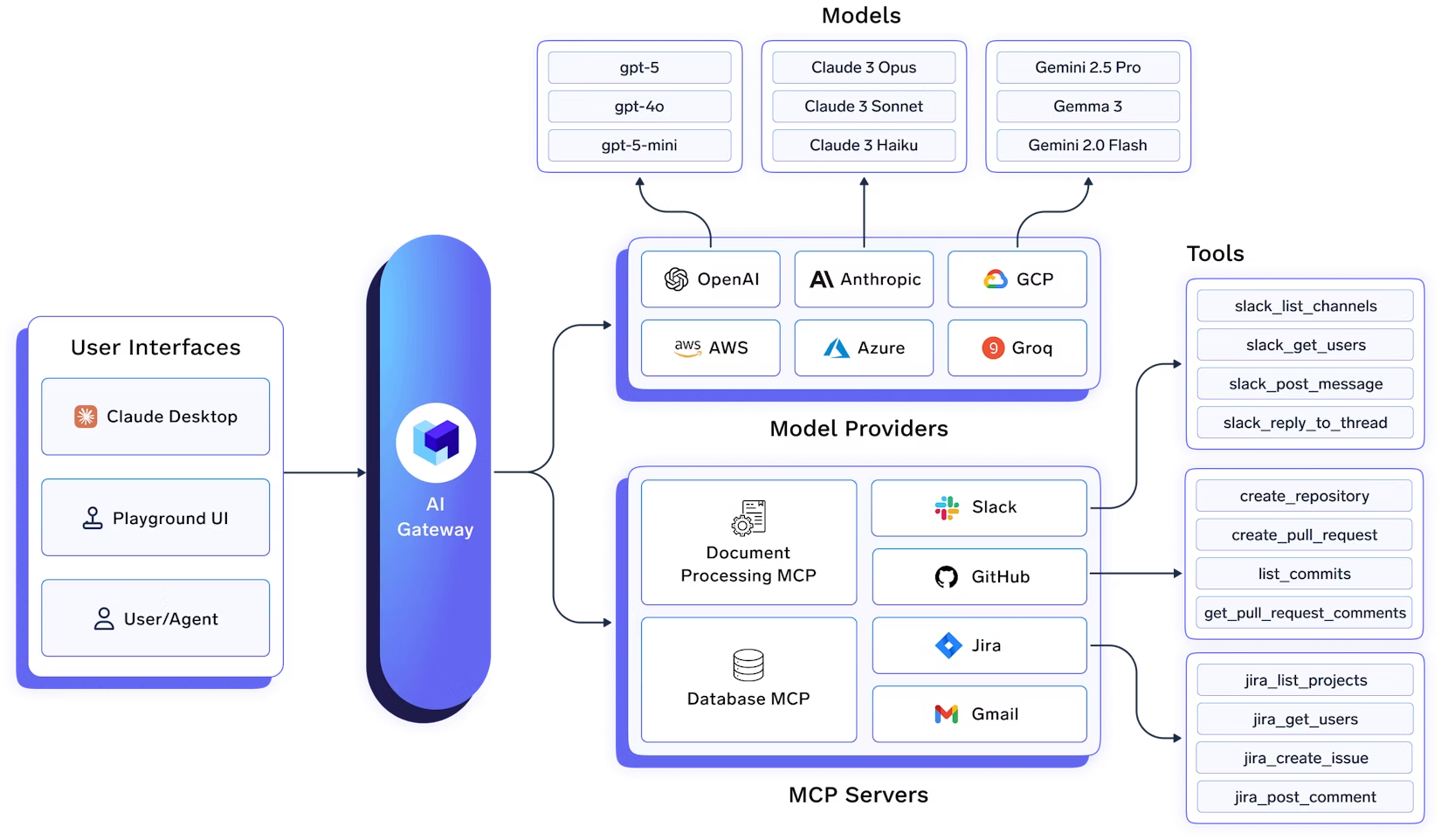
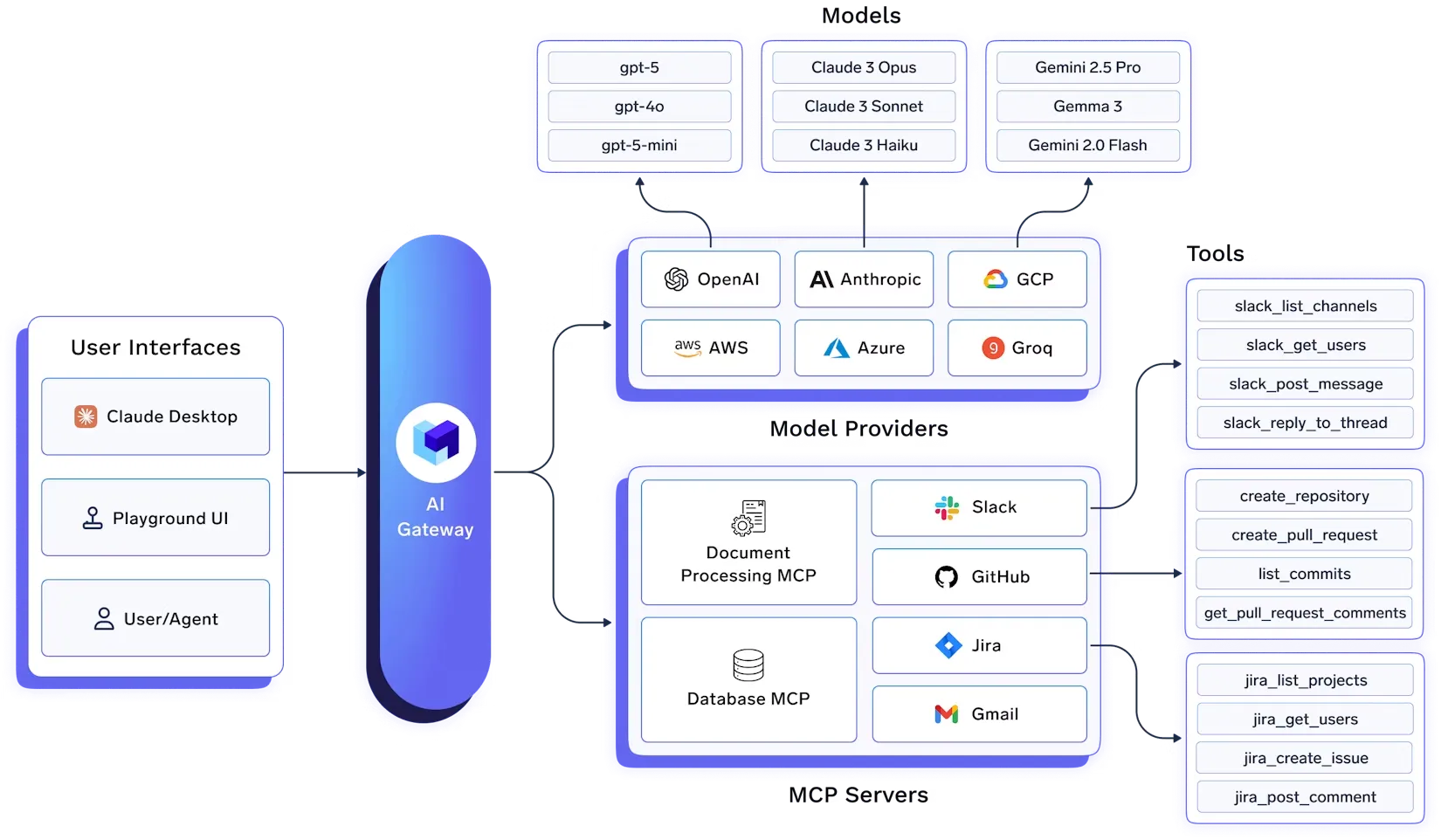
The TrueFoundry AI Gateway is an enterprise-ready platform that centralizes access to AI development tools using MCP. It provides an MCP registry, centralized authentication, and a built-in MCP client that orchestrates the agentic loop between the LLM and the MCP servers.
Agents authenticate once to the MCP Gateway, which routes their MCP requests to registered MCP servers (Slack, GitHub, internal tools), with the Control Plane managing tokens, OAuth flows, and access policies.

1. Centralized MCP Registry
You can add public as well as your self-hosted MCP servers which are registered in the TrueFoundry Control Plane. The Control Plane maintains the centralized registry of all the MCP servers and their authentication mechanisms. It handles user-specific OAuth2 flows, securely storing and refreshing access tokens and ensuring users can only access resources they are authorized for.
This solves the credential sprawl problem: instead of every developer managing their own API keys and OAuth tokens for each tool, the gateway manages them centrally. Users authenticate once with the gateway, and the gateway handles all downstream authentication.
2. Fine-Grained Access Control
While registering an MCP server, you can specify the list of users/teams that have access to it. This allows fine-grained access control at an enterprise level. This is done via MCP Server Groups, wherein you can define managers who can manage and give others access to the MCP servers.
For example, you might have:
Each group only sees the tools they're authorized to use, reducing the attack surface and preventing accidental misuse.
3. Unified Authentication
Any user can generate a single Personal Access Token (PAT) using which they can access all the models and MCP servers that they have access to. You can also generate a Virtual Account Token (VAT) to provide access to a specific set of MCP servers to an application.
The gateway supports multiple authentication methods:
The gateway handles the complexity of OAuth2 flows, including:
4. Virtual MCP Servers
One of the most powerful features is the ability to create Virtual MCP Servers. These allow you to combine tools from multiple MCP servers into a single, curated MCP server that your application can connect to.
For example, suppose you have integrated MCP servers for GitHub and Slack. A team in your company is working on an Agent that requires access to these two MCP servers, but you don't want to expose dangerous tools like `delete_project`, `delete_pr`, etc.
A Virtual MCP Server allows you to create a new MCP server by taking a subset of safe tools from GitHub and Slack MCP servers. This new Virtual MCP Server can be accessed like any other remote MCP server and does not require a deployment. It's managed entirely by the gateway.
This is particularly useful for:
5. Agent Playground
TrueFoundry AI Gateway provides a playground where users can experiment with prompts and different tools of MCP servers to build agents. The gateway comes with commonly used tools like Websearch, WebScraping, document extraction, and code execution.
The gateway comprises an MCP client that orchestrates executing the tools decided by the LLM providers. The Gateway also streams the progress of the request back to the UI so that the user can see the LLM responses, tool calls, and the tool responses in real-time.
This makes it easy for developers to:
6. Use MCP Servers in Code
The Gateway provides code snippets showing how you can start using the MCP servers in your code. You can use the MCP Gateway API directly or integrate with popular MCP client libraries.
Here's an example of using the gateway from Python:
import asyncio
from fastmcp import Client
from fastmcp.client.transports import StreamableHttpTransport

async def main():
    # Connect to the gateway using your Personal Access Token
    transport = StreamableHttpTransport(
        url="https://{controlPlaneURL}/mcp/{groupName}/{mcpServerName}/server",
        auth="Bearer your-tfy-token"
    )

    async with Client(transport=transport) as client:
        # List available tools
        tools = await client.list_tools()
        print(f"Available tools: {tools}")

        # Call a tool
        result = await client.call_tool(
            name="github_list_repositories",
            arguments={"org": "my-org"}
        )
        print(f"Result: {result}")

asyncio.run(main())
6. Four-Layer Authentication & Authorization
The gateway implements a comprehensive four-layer authentication and authorization system:
Layer 1: Gateway Authentication
Any user/application requires a token to talk to the gateway - either a TrueFoundry API key or your own IDP token. TrueFoundry AI Gateway can verify your own IDP token and extract the user's email from the token based on the SSO settings.
This means you can integrate with your existing identity provider (Okta, Azure AD, Google Workspace, etc.) without requiring users to create separate TrueFoundry accounts.
Layer 2: Gateway Access Control
You can define at the gateway layer which users have access to which MCP servers. This allows fine-grained access control at an enterprise level. This is done via MCP Server Groups, wherein you can define managers who can manage and give others access to the MCP servers.
Layer 3: External Service Authorization (MCP Server Auth)
This is the authorization implemented by the MCP Server for accessing the external service. TrueFoundry allows MCP servers to be integrated with the following auth mechanisms:
The gateway handles the complexity of OAuth2 flows:
Layer 4: Custom Headers
You can pass any custom headers to MCP servers using the `x-tfy-mcp-headers` header. Isso é útil para tokens de autenticação, metadados ou quaisquer cabeçalhos que o seu servidor MCP necessite. Cabeçalhos personalizados sempre substituem a autenticação padrão configurada para o servidor MCP.
Uma grande organização de engenharia deseja conceder a todos os desenvolvedores acesso ao GitHub, JIRA e Slack através de agentes de IA, mas com diferentes níveis de permissão:
Com o Gateway MCP da TrueFoundry:
Uma plataforma SaaS deseja permitir que seus clientes criem agentes de IA que interagem com as próprias ferramentas do cliente (por exemplo, seu GitHub, seu Slack):
Uma organização deseja expor ferramentas internas (bancos de dados, APIs) a agentes de IA, mas com requisitos de segurança rigorosos:
Começar a usar o TrueFoundry MCP Gateway é simples:
O gateway suporta tanto a autenticação de usuário (via fluxos OAuth2) quanto a autenticação máquina a máquina (via concessão de Credenciais de Cliente), tornando-o adequado tanto para agentes interativos quanto para fluxos de trabalho automatizados.
Vamos ver como construir um servidor MCP completo com autenticação OAuth2 e sua integração com o TrueFoundry MCP Gateway. Criaremos um servidor MCP de calculadora simples que demonstra tanto a autenticação de usuário (via Gateway) quanto a autenticação máquina a máquina.
Para o tutorial completo, consulte esta documentação - https://docs.truefoundry.com/docs/ai-gateway/mcp-server-oauth-okta
O código completo para este tutorial está disponível em nosso [repositório GitHub]
Este tutorial demonstra:
O gateway lida com a complexidade dos fluxos OAuth, gerenciamento de tokens e atualização, permitindo que os usuários acessem todos os seus servidores MCP autorizados com um único Token de Acesso Pessoal.
À medida que os agentes de IA passam de protótipos para produção, a arquitetura de integração torna-se crítica. O problema de integração N×M não é apenas uma preocupação teórica — é uma barreira real para a construção de sistemas de agentes confiáveis, seguros e escaláveis.
Um Gateway MCP não é mais um componente de nicho. É uma infraestrutura crítica para qualquer equipe que esteja construindo agentes de IA de nível de produção. Ele fornece o plano de controle essencial para gerenciar a segurança, a observabilidade e a complexidade operacional das interações agente-ferramenta em escala.
Ao centralizar o acesso a ferramentas através de um gateway, você não está apenas resolvendo os problemas de hoje — você está estabelecendo uma base escalável para o futuro. À medida que seu ecossistema de agentes cresce, o gateway cresce junto, fornecendo segurança, observabilidade e padrões operacionais consistentes em todas as suas interações agente-ferramenta.
O TrueFoundry MCP Gateway resolve os desafios fundamentais de integração que toda equipe que constrói agentes de IA enfrenta. Ao fornecer uma plataforma centralizada, segura e observável para interações agente-ferramenta, ele permite que as equipes:
Se você está construindo agentes de IA e enfrentando o problema de integração N×M, gostaríamos muito de saber de você. O TrueFoundry MCP Gateway está disponível agora, e estamos ansiosos para ver o que você construirá com ele.
Para mais informações, confira nossa documentação ou entre em contato para discutir seu caso de uso específico.
Quais são as suas opiniões sobre os Gateways MCP? Você já enfrentou desafios de integração semelhantes? Gostaríamos muito de ouvir suas experiências nos comentários.
TrueFoundry AI Gateway delivers ~3–4 ms latency, handles 350+ RPS on 1 vCPU, scales horizontally with ease, and is production-ready, while LiteLLM suffers from high latency, struggles beyond moderate RPS, lacks built-in scaling, and is best for light or prototype workloads.





As últimas notícias, artigos e recursos enviados para sua caixa de entrada
.png)



.png)
.png)
.png)

.png)
.png)
.png)
.png)
.png)
.png)
.png)


