



October 1, 2026
|
5 min read


Published: July 4, 2026
Blazingly fast way to build, track and deploy your models!
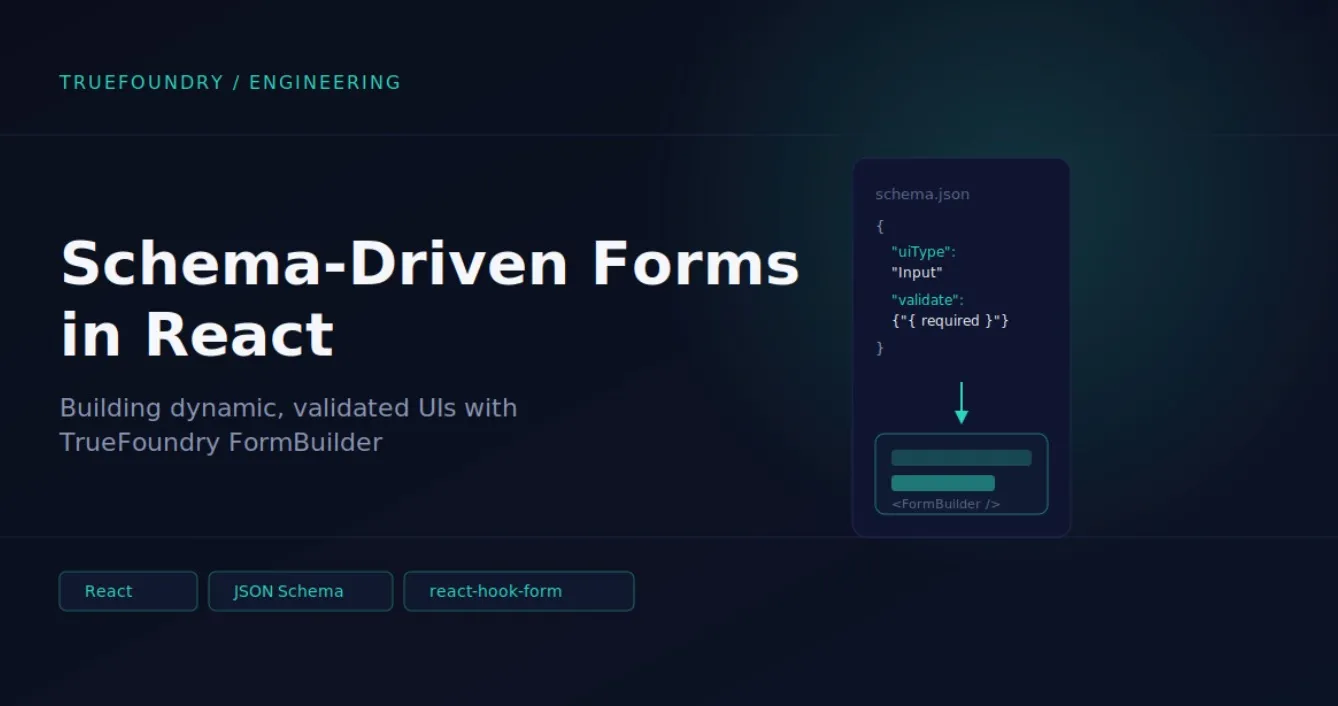
TrueFoundryを使ってサービスをデプロイしたり、クラスターを作成したり、LLMモデルを設定したり、シークレットを管理したことがあるなら、通常のUIのように見えるフォームを操作したことがあるでしょう。しかし、それらは一般的なウェブフォームとは全く異なる方法で構築されています。
TrueFoundryのフォームは、多くの場合マニフェスト(CLI(tfy apply -f ...)でも適用できるYAML/JSONオブジェクト)を表します。同じオブジェクトがUIで編集されたり、YAMLとしてダウンロードされたり、APIに送信されたりする可能性があります。
スキーマ駆動型のアプローチは、TrueFoundryに以下のものをもたらします。
メンタルモデル:スキーマはデータの形状と編集方法を記述し、FormBuilderはその記述を機能するフォームに変換します。
フォームスキーマはフィールド定義の配列です。各フィールドは、いくつかの重要なプロパティを持つオブジェクトです。
ここに簡略化された一般的な例を示します(実際のTrueFoundryスキーマではありませんが、製品が設定についてどのように考えているかに近いものです):
[
  {
    "sort": 1,
    "jsonKey": "name",
    "label": "Service Name",
    "uiType": "Input",
    "validate": { "required": true, "pattern": "^[a-z0-9-]+$" }
  },
  {
    "sort": 2,
    "jsonKey": "image",
    "label": "Image",
    "uiType": "Group",
    "subParameters": [
      {
        "jsonKey": "type",
        "label": "Source",
        "uiType": "Radio",
        "validate": {
          "required": true,
          "defaultValue": "build",
          "options": [
            { "label": "Build", "value": "build" },
            { "label": "Existing image", "value": "existing" }
          ]
        }
      },
      {
        "jsonKey": "uri",
        "label": "Image URI",
        "uiType": "Input",
        "conditions": [
 		{ "jsonKey": "image.type", "op": "==", "value": "existing"  }
  ],
        "validate": { "required": true }
      }
    ]
  }
]
送信時のマニフェスト/設定:
{
  "name": "my-service",
  "image": { "type": "existing", "uri": "registry.io/app:v1" }
}
レンダリングは小さなパイプラインで行われます。その流れは次のとおりです。
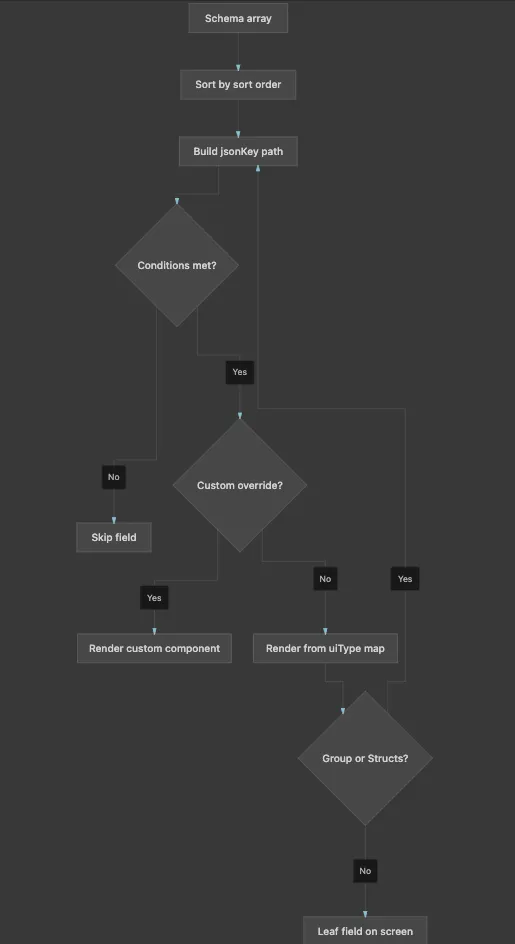
FormBuilderはスキーマツリーを走査し、uiTypeに基づいてノードごとにReactコンポーネントを選択します。
コンポーネントの種類:
条件: image.type が "existing" でない場合、URIフィールドはマウントされません。shouldUnregister: true の場合、フォームの状態からも削除されるため、隠された値がペイロードに漏れることはありません。
コード内のマッピングロジック:
// FormComponentMap
const ComponentType = FormComponents[schema.uiType]
const CustomComp = CustomComponentsMap?.[schema.uiType]

if (!enabledByCondition) return null

return CustomComp
  ? <CustomComp schema={schema} />
  : <ComponentType schema={schema} />
FormBuilder は状態管理エンジンとして react-hook-form を使用しています。この選択は、製品の動作に影響を与えます。
初期化/コンポーネントの使用 - 作成と編集:
<FormBuilder
  schema={schema}
  defaultValues={existingManifest}   // edit: pre-fill; create: empty/template
  onSubmit={(manifest) => createOrUpdate({ manifest })}
/>
フォームの設定:
const methods = useForm({
  mode: 'onChange',          // validate as user types
  defaultValues,
  shouldUnregister: true,    // hidden fields drop out of state
})
フィールドの登録 - 各入力はそれぞれのパスにバインドされます:
// Inside a text field component
const { register } = useFormContext()

<input
  {...register(schema.jsonKey, registerProps)}
  defaultValue={defaultValue}
/>
追加のコンテキスト - 特定のフォームは、フィールド値とは別にランタイムデータを渡します:
<FormBuilder
  schema={schema}
  extraContext={{
    workspace,
    cluster,
    serviceAccountOptions,  // dynamic dropdown options
    dataTestPrefix: 'create-cluster',
  }}
/>
すべてのフィールド値は単一のフォームオブジェクト内に存在します。各フィールドは、その完全な jsonKey パスで登録されます:
フィールドを編集すると、この共有オブジェクトが変更されます。送信時、FormBuilder はオブジェクト全体を読み取り、フォームのハンドラーに渡します(通常、TrueFoundry API を呼び出すか、YAML を生成します)。
何かを作成するためにフォームを開く際、defaultValues は空であるか、テンプレートから取得される場合があります。
編集時には、defaultValuesは通常、既存のマニフェストとなります。フォームの各フィールドにはそのオブジェクトから値が事前入力されます。一部のフィールドは編集モードで変更不可(例:リソース名)とマークされており、読み取り専用として表示されます。
TrueFoundryのフォームではshouldUnregister: trueが使用されます。これは次のことを意味します。
これは条件付きフォームにとって重要です。ユーザーが実際に見て編集できたものだけが送信されます。
TrueFoundryフォームでのバリデーションは、2つのレイヤーで行われます。
各フィールドのvalidateブロックでは、以下を指定できます。
これらのルールはreact-hook-formのバリデーションルールに変換されます。エラーはフィールドの横にインラインで表示されます。バリデーションは変更時(mode: 'onChange')に実行されるため、ユーザーは送信時だけでなく、入力中にもフィードバックを得られます。
スキーマにはカスタムのvalidate関数をアタッチすることもでき、これは一般的に以下のような用途で使用されます。
useAttachValidation(schema, {
  name: async (name) => {
    const taken = await checkNameExists(name)
    return taken ? 'Name already exists' : true
  },
})「クラスターの作成」、「サービスのデプロイ」、「モデルの追加」、または「シークレットの管理」を開くと:
このため、TrueFoundryは、すべての画面が使い捨てのフォームになることなく、非常に複雑な設定UIをサポートできます。複雑さはスキーマとフィールドコンポーネントのライブラリにあり、これらは1つの共有ランタイムによって統合的に管理されます。
TrueFoundry AI Gateway delivers ~3–4 ms latency, handles 350+ RPS on 1 vCPU, scales horizontally with ease, and is production-ready, while LiteLLM suffers from high latency, struggles beyond moderate RPS, lacks built-in scaling, and is best for light or prototype workloads.



スキーマ駆動型フォームは、設定マニフェストにとって単一の信頼できる情報源となります。これにより、一貫したUI動作が保証され、コードの重複なしにネストされた/条件付きロジックがサポートされ、バックエンドがフォーム構造を動的に駆動できるようになります。
検証は2つの層で行われます。1つは宣言型スキーマ検証(必須、パターン、最小/最大などのルールを使用)、もう1つはAPI連携によるチェック(一意のリソース名の確認など)のためのカスタム/非同期検証です。
TrueFoundryのFormBuilderは、react-hook-formをコアのステートエンジンとして採用しており、標準的なReactパターンとの互換性があり、カスタムコンポーネントによる拡張も容易です。
.png)



.png)
.png)
.png)

.png)
.png)
.png)
.png)
.png)
.png)
.png)





