Blank white background with no objects or features visible.

TrueFoundryはSeldon AIの買収を発表し、エンタープライズAI向けコントロールプレーンを拡張します。プレスリリース全文はこちら→

Cursor vs GitHub Copilot: 2026年に使うべきAIコーディングツールは?

By アシシュ・ドゥベイ

Published: July 4, 2026

⚡ TL;DR

Cursor and GitHub Copilot both bring AI into your editor, but they differ in depth: Cursor is an AI-first IDE built for multi-file edits, while Copilot layers onto existing editors.

Key takeaways
  • Cursor is a standalone AI-native IDE built for codebase-wide context and multi-file edits; Copilot augments VS Code, JetBrains, and more.
  • Copilot wins on ecosystem reach and enterprise rollout; Cursor wins on deep, agentic in-editor workflows.
  • Pricing and model choice differ — and many teams end up using both for different tasks.
  • At scale, the real question is governing AI coding tools: access, cost, and audit across whatever developers use.

過去6ヶ月間、私たちが参加したあらゆるエンジニアリングのSlackチャンネルで、おそらく同じ議論が交わされてきました。CursorかCopilotか?この問いが消えないのは、遠目には両ツールがほとんど同じに見えるからです。どちらもコードを生成し、最先端のLLMで動作し、昨年にはエージェント機能をリリースしました。

しかし、よく見るとその類似性は崩れます。CursorはスタンドアロンのIDEであり、AnysphereはVS Codeをフォークし、AIを中心にエディタ全体を再構築しました。一方、Copilotはあなたがすでに使っているエディタに組み込む拡張機能です。VS Code、JetBrains、Visual Studio、Neovim、Xcode、Eclipseなど、Copilotはあなたが使っている環境に合わせます。
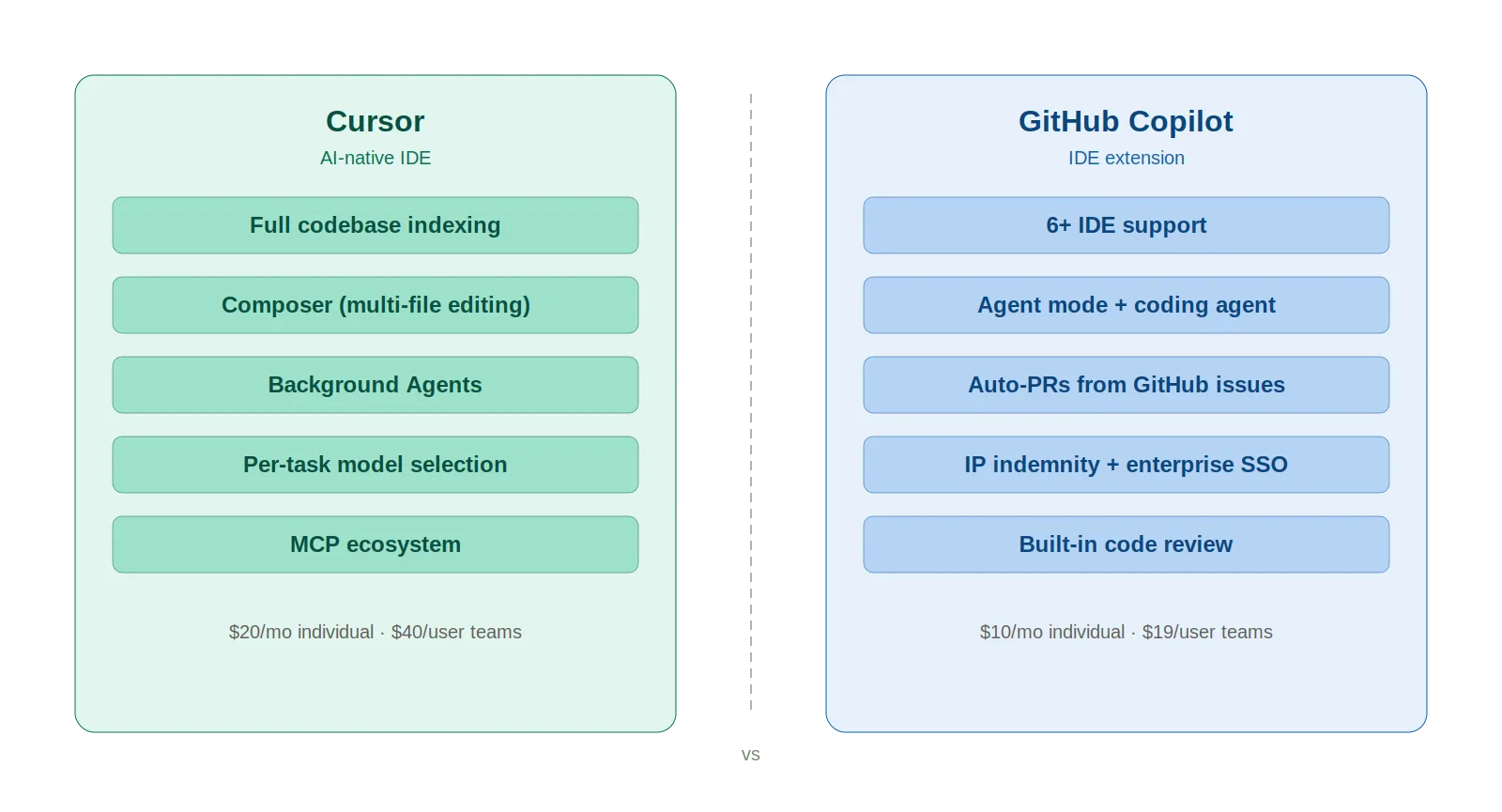
Cursor and GitHub Copilot key features and pricing displayed side by side with a vertical divider separating the two tools.

このアーキテクチャの違いは、コンテキスト処理、複数ファイル編集、チームのスケーリング、コストなど、あらゆる側面に波及します。ここで勝者を決めることはしません。それはあなたのワークフローが決定します。私たちがするのは、あなたが自分で判断できるよう、違いを正直に提示することです。

Cursorとは?

Cursorは、YCが支援するスタートアップAnysphereが開発したAIファーストのコードエディタです。コアはVS Codeのフォークであるため、インターフェースはすぐに馴染み深く感じられます。拡張機能、キーバインディング、設定はすべて引き継がれます。違いは、AIがサイドバープラグインとしてではなく、製品全体に組み込まれている点です。

2026年3月の主要機能:

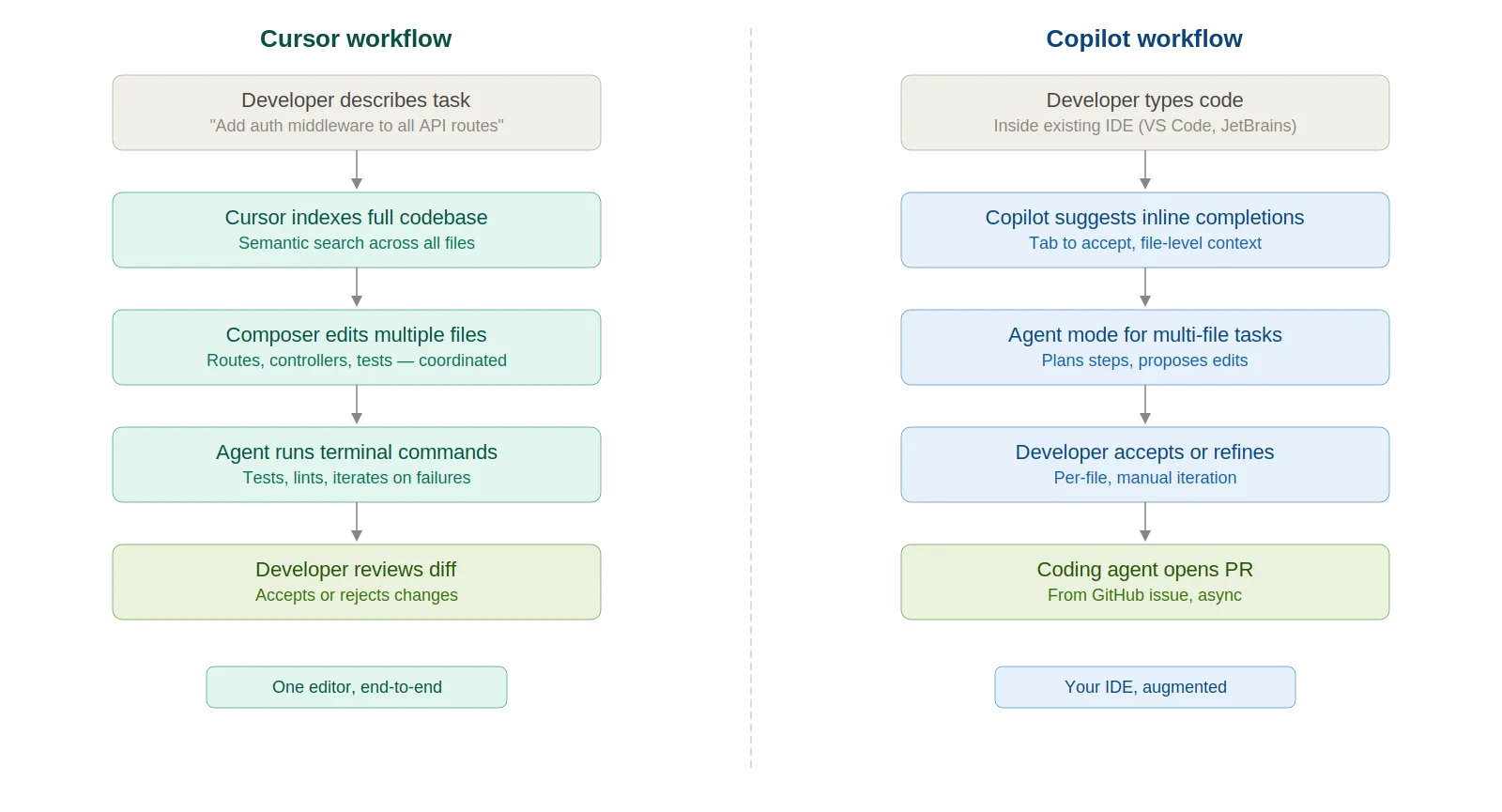
  • エージェントモード — ファイルを選択し、ターミナルコマンドを実行し、タスクが完了するまで自律的に反復処理を行います
  • コンポーザー — コードベース全体を認識した複数ファイル編集。プロジェクトの慣例を尊重しながら、ファイル間の変更を調整します
  • バックグラウンドエージェント — Gitワークツリーまたはリモートマシンを介した並行タスク。Cursor自身のマージされたPRの35%は、これらによるものと報告されています
  • BugBot — マージ前に問題を検出する自動PRレビューア
  • MCP連携 — Cursor Marketplaceを介したDatadog、PagerDuty、Slack、Linear、Stripeとの連携
  • モデルアクセス — GPT-5.2、Claude Opus 4.6、Claude Sonnet 4.6、Gemini 3 Pro、Grok Code。タスクごとに切り替え可能

急速に成長しており、2025年には年間経常収益(ARR)5億ドル、2026年初頭には20億ドルに迫ると報じられています。現在、Salesforceの開発者の90%以上が利用しています。

GitHub Copilotとは?

Copilotは2022年6月に、GitHubとOpenAIの共同プロジェクトとしてリリースされました。最初のバージョンは基本的にオートコンプリート機能で、コメントを書くとコードが自動入力されるというものでした。クリーンで、シンプルで、効果的でした。2026年現在、その原型はほとんど残っていません。

現在提供されているのは、1つの名称のもとに統合された一連のツールです。

  • インライン補完 — 元祖オートコンプリート。単一ファイルの迅速な作業に今も最適です。
  • Copilot Chat — 質問、説明、コード生成に対応する、IDE内で利用できる対話型AI
  • エージェントモード — VS Codeで一般提供(GA)されており、JetBrainsにも展開中。ランタイムエラー発生時に自己修復しながら、複数ステップの編集を処理します。
  • コーディングエージェント — GitHub Actions VMを起動し、リポジトリをクローンし、イシューから自律的にPRを作成します。2026年2月以降は、モデルとしてClaude、Codex、Copilotのいずれかを選択できます。
  • プランモード — エージェントが何かを書き始める前に、その戦略を確認します。
  • 次の編集候補 — 次の論理的な編集を予測し、ワンクリックで承認できます。
  • カスタムエージェントとスキル — さまざまなタスク向けに特殊なCopilotバージョンを構築します。
  • MCPサポート — Model Context Protocolを介して外部ツールを接続します。

2026年1月時点で有料サブスクライバーは470万人、前年比75%増。サティア・ナデラ氏は、Copilotが現在、Microsoftが75億ドルで買収した当時のGitHubよりも大きなビジネスになっていると述べた。

Copilotが持つ構造的な優位性とは?IDEサポート。6つ以上のエディタに対応。Cursorは独自のエディタでのみ動作する。
Cursor vs GitHub Copilot: 主な違い

Feature Cursor Claude Code
Interface IDE (AI-native code editor) Terminal (CLI-based agent)
Interaction Style Interactive, human-in-the-loop Autonomous, agent-driven
Code Changes Inline edits within files Multi-file, task-level changes
Scope File-level to codebase-aware Full codebase orchestration
Execution Capability Suggests and applies code changes Runs commands, tests, and scripts
Workflow Type Iterative development Task-based automation
Learning Curve Low (familiar IDE experience) Moderate (agent + CLI mental model)
Best Use Cases Feature development, debugging, refactoring Automation, migrations, large-scale changes
Architecture Standalone AI-native IDE (VS Code fork) Extension for existing IDEs
IDE support Cursor only (JetBrains coming) VS Code, JetBrains, Visual Studio, Neovim, Xcode, Eclipse
Context awareness Full codebase indexing + semantic search File-level + growing project awareness
Multi-file editing Composer — deeply integrated Agent mode — GA in VS Code
Cloud agents Computer use, video demos, UI testing GitHub Actions VMs, auto-PRs from issues
Models GPT-5.2, Claude Opus 4.6, Sonnet 4.6, Gemini 3 Pro, Grok, BYOK GPT-4o default; Claude Sonnet 4.6, Gemini 2.5 Pro; Opus on Pro+
Code review BugBot (add-on) Built-in Copilot code review
Individual price $20/mo (Pro) $10/mo (Pro)
Team price $40/user/mo $19/user/mo (Business)
Two parallel five-step workflow diagrams showing Cursor's codebase-wide Composer approach on

機能比較

コード生成

Copilotのインラインオートコンプリートは、単一ファイルの作業において高速かつ信頼性が高い。関数シグネチャを入力すれば、実装が得られる。定型的なコードやよく使われるパターンにおいては、その速度は他に類を見ない。

Cursorは異なるアプローチを取る。Composerは自然言語による記述を受け入れ、ルート、コントローラー、サービスレイヤー、テストなど、複数のファイルにわたる変更を一度に自動的に連携させる。迅速で集中的なタスクならCopilotが速い。複数のファイルにまたがる認識が必要な大規模なタスクでは、Cursorが優位に立つ。

コンテキスト理解

おそらく、現時点でのこれら2つのツール間の最大の技術的ギャップだろう。Cursorはコードベース全体をインデックス化し、その上にセマンティック検索を構築する。「認証ミドルウェアはどこで定義されているか?」と尋ねれば、ファイルを見つけてくれる。事前にファイルを開く必要はない。

公平に見て、Copilotのコンテキスト処理は2024年以降、大幅に改善された。エージェントモードは現在、複数のファイルにわたって機能する。 Copilot Spaces 関連するコード、ドキュメント、仕様をピン留めできる。しかし、その範囲はまだ狭い。Copilotはアクティブなワークスペースと、明示的にアタッチしたものしか認識しない。Cursorはインデックス化したすべてを認識する。このギャップはアップデートごとに縮まっているが、まだ完全に埋まってはいない。

リファクタリング

CursorのComposerは、複数のファイルにわたる協調的な変更のために構築された。型名を変更すれば、プロジェクト全体でその参照がすべて更新される。サービスを抽出すれば、インポートが再配線される。15以上のファイルに影響するリファクタリングでは、Composerが今日ではより強力なツールである。

Copilotのエージェントモードは複数ファイルのリファクタリングを処理するが、その体験にはより多くの手助けが必要だ。時には初回で完璧にスコープを捉えることもある。また、ファイルを見落としたり、レビューで発見するような不整合を生じさせたりすることもある。

デバッグ

ここではそれぞれ異なる強みがある。Cursorには Datadog MCP連携があり、エージェントがエディタを離れることなく本番環境のログ、メトリクス、トレースを取得できる。スタックトレースを貼り付ければ、完全なプロジェクトコンテキストでコードパスを追跡する。

Copilotのデバッグ機能は、よりGitHubネイティブだ。コーディングエージェントはCIの失敗を検知し、修正を繰り返し、PRに自動的に更新をプッシュする。エージェントモードは、ランタイムエラーをループで自己修復する。日常のワークフローがGitHubのPRやCIパイプラインを中心に展開しているなら、Copilotの方が自然にフィットするだろう。

DevOpsのユースケース

どちらもTerraform、Kubernetes、Helmチャートに対応しています。Cursorは、プロジェクトレベルでモジュール参照、変数ファイル、プロバイダー設定を追跡するため、大規模なIaCコードベースで優れた性能を発揮する傾向があります。Copilotは迅速な修正や範囲が明確なタスクには堅実ですが、モジュールチェーンを深く辿ることはありません。

Rolling AI coding tools out across your team?

Whichever tool wins, TrueFoundry's AI Gateway governs the models behind it — scoped access, cost controls, guardrails, and full audit logs across every developer, in your own VPC.

Book a 30-min DemoExplore AI Gateway

メリットとデメリット

Cursor

メリット:

  • 深いコードベースのコンテキスト — エージェントは開いているファイルだけでなく、プロジェクト全体を把握します
  • 連携した複数ファイルの編集に対応するコンポーザー
  • タスクごとのモデル選択(オートコンプリートには安価なモデル、推論には強力なモデル)
  • 強力なMCPエコシステム:Datadog、PagerDuty、Linear、Slack
  • 並行して自律的に作業を行うためのバックグラウンドエージェント

デメリット:

  • エディタの切り替えを強制する。JetBrainsでの操作に慣れている場合、大きな抵抗がある
  • 2025年6月のクレジット料金変更が多くのユーザーの不満を買った — 一部のユーザーは、同じ20ドルでより少ないリクエストしか得られないと感じている
  • リアルタイムコラボレーションなし。シングルプレイヤーツール
  • Copilotと比較してコミュニティとエコシステムが小さい
  • プライバシーモードではバックグラウンドエージェントが無効になる

GitHub Copilot

メリット:

  • エディタの切り替えを強制することなく、6つ以上のIDEで動作する
  • 邪魔にならない高速なインライン補完
  • コーディングエージェントはGitHubのIssueから自律的にPRを作成します。これはCursorにはないワークフローです。
  • エンタープライズ対応:知的財産権補償、SAML SSO、監査ログ、ナレッジベース
  • 充実した無料プラン(2,000回の補完、月50回のプレミアムリクエスト)

短所:

  • 大規模な複数ファイルプロジェクトにおけるコンテキスト認識は、まだCursorに劣ります
  • モデル選択はタスクごとではなく、グローバル設定です
  • VS Code以外のIDEにおけるエージェントモードは、まだ発展途上です
  • プレミアムリクエストシステムはわかりにくい場合があります。機能によってリクエストの消費量が異なります

CursorとCopilot、どちらを使うべきか

Cursorが有効なのは次の場合です。

  • ファイルをまたいだコンテキストが提案の品質に影響を与えるような、大規模なコードベースでほとんどの時間を費やす場合
  • ワークフローに複雑な複数ファイルのコードリファクタリングや大規模なIaCの変更が含まれる場合
  • DevOpsスタックにMCP連携機能付きのDatadogまたはPagerDutyが含まれる場合
  • どのAIモデルを実行するかをタスクごとに制御したい場合
  • エディタの切り替えに抵抗がない場合

Copilotが有効なのは次の場合です。

  • 現在のIDEを使い続けることが何よりも重要な場合
  • ディープなエージェントワークフローよりも、個々の開発者のスピードが優先される場合
  • チームがGitHubを主に使用しており、コーディングエージェント、PRベースのパイプライン、ネイティブプラットフォーム統合を求める場合
  • 予算が大きな制約となる場合。月額10ドルと20ドルの差は、30人のエンジニアでは無視できない金額になります。
  • 企業コンプライアンス(知的財産権補償、SAML、監査ログ)は譲れません
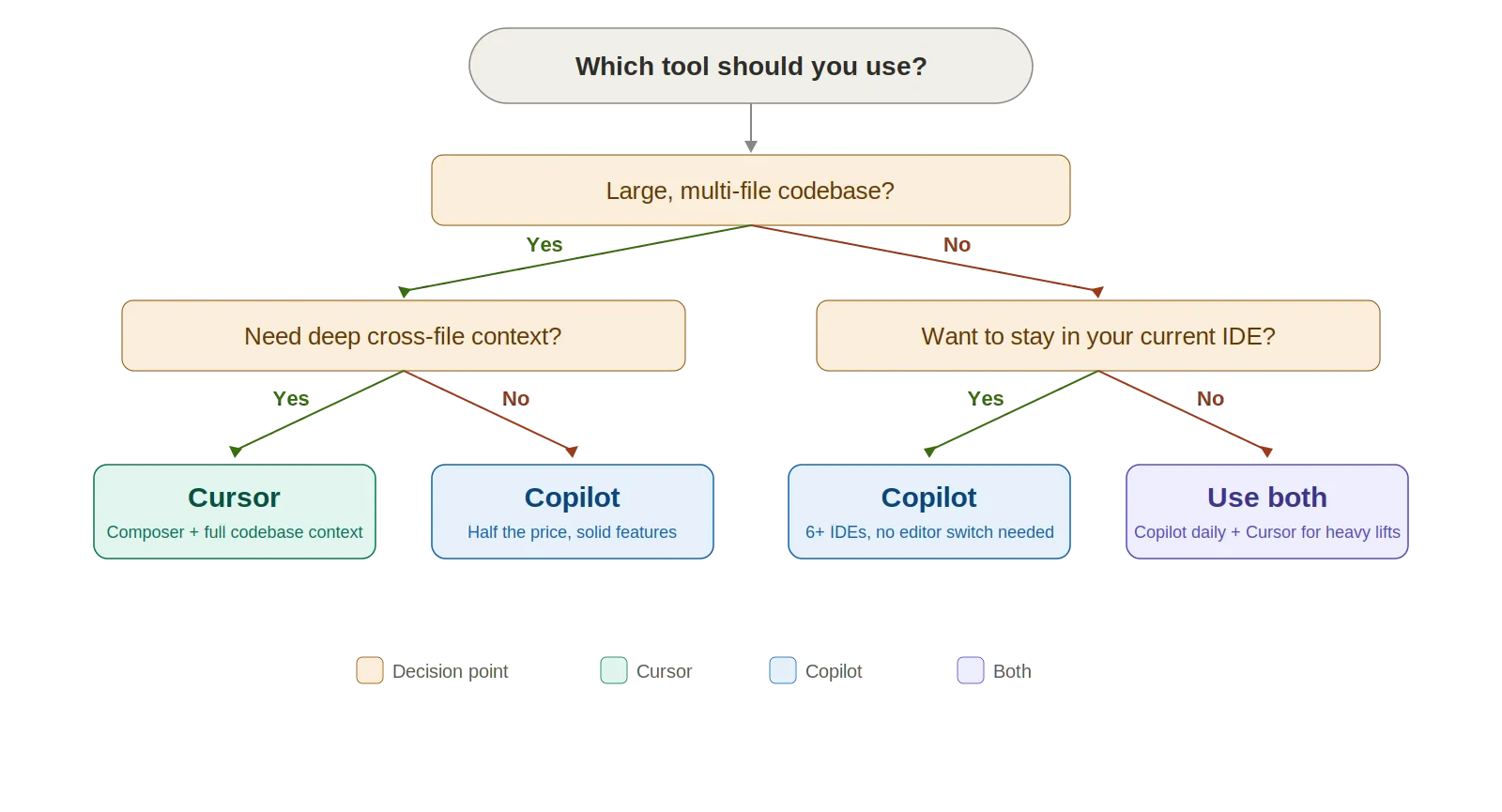
Decision tree flowchart that guides developers to Cursor, Copilot, or both based on codebase size, context needs, IDE preference, budget, and GitHub usage.

Here's The Evaluation Framework for Proposal Template

Criteria What should you evaluate ? Priority TrueFoundry
Gateway & Developer Experience
Unified model access Does the platform provide one consistent interface for hosted models, self-hosted models, and provider-native requests? Must have Supported: unified access to 1000+ LLMs.
OpenAI-compatible API Can teams keep existing OpenAI, Anthropic, or provider-compatible client code while moving traffic behind a governed gateway? Must have Supported: OpenAI-compatible API plus native SDK support.
Prompt lifecycle management Can prompts be created, versioned, A/B tested, and reused with a built-in playground for rapid iteration? Should have Supported: versioned prompts, playground, and experimentation.
Playground and experimentation Is there a playground UI for non-developers to test prompts, models, and tools without code? Should have Supported: playground with model and tool experimentation.
Enterprise AI Platform Buyer's Guide
A practical guide used by platform & infra teams

両方を一緒に使えますか?

もちろんです。多くの開発者がすでにそうしています。一般的な設定は、JetBrainsやVS CodeでCopilotを動かし、高速なインライン補完(素早く、邪魔にならない)を利用し、その後、Composerやより深いコードベースのコンテキストが必要な複雑な複数ファイルタスクにはCursorに切り替える、というものです。合わせて月額30ドル。時給100ドル以上の開発者にとって、1日たった5分の時間短縮でも、両方のサブスクリプションの費用を何倍も上回ります。

料金比較

Tier Cursor GitHub Copilot
Free 50 slow premium requests, limited completions 2,000 completions, 50 premium requests
Individual Pro — $20/mo ($16 annual) Pro — $10/mo ($100/yr)
Power user Pro+ $60/mo; Ultra $200/mo Pro+ — $39/mo
Teams $40/user/mo Business — $19/user/mo
Enterprise Custom pricing $39/user/mo

Cursorはクレジットベースの課金を採用しています(2025年6月に変更)。各プランのクレジットプールはサブスクリプション料金と同額です。「Auto」モードは無制限です。Claude Opus 4.6のようなプレミアムモデルを選択すると、クレジットの消費が速くなります。

Copilotは「プレミアムリクエスト」を使用します。チャット、エージェントモード、コードレビュー、モデル選択はすべてこれを消費します。有料プランでは基本的な補完は無制限です。追加のリクエストは1回あたり0.04ドルです。

計算すると、CopilotはどのティアでもCursorの約半分の費用です。Cursorのより深い機能がそのプレミアムに見合うかどうかは、あなたの働き方によります。毎日大量の複数ファイル編集を行いますか?それならROI(投資収益率)はあります。主に高速なオートコンプリートが必要ですか?それならCopilotの方が費用対効果が高いでしょう。
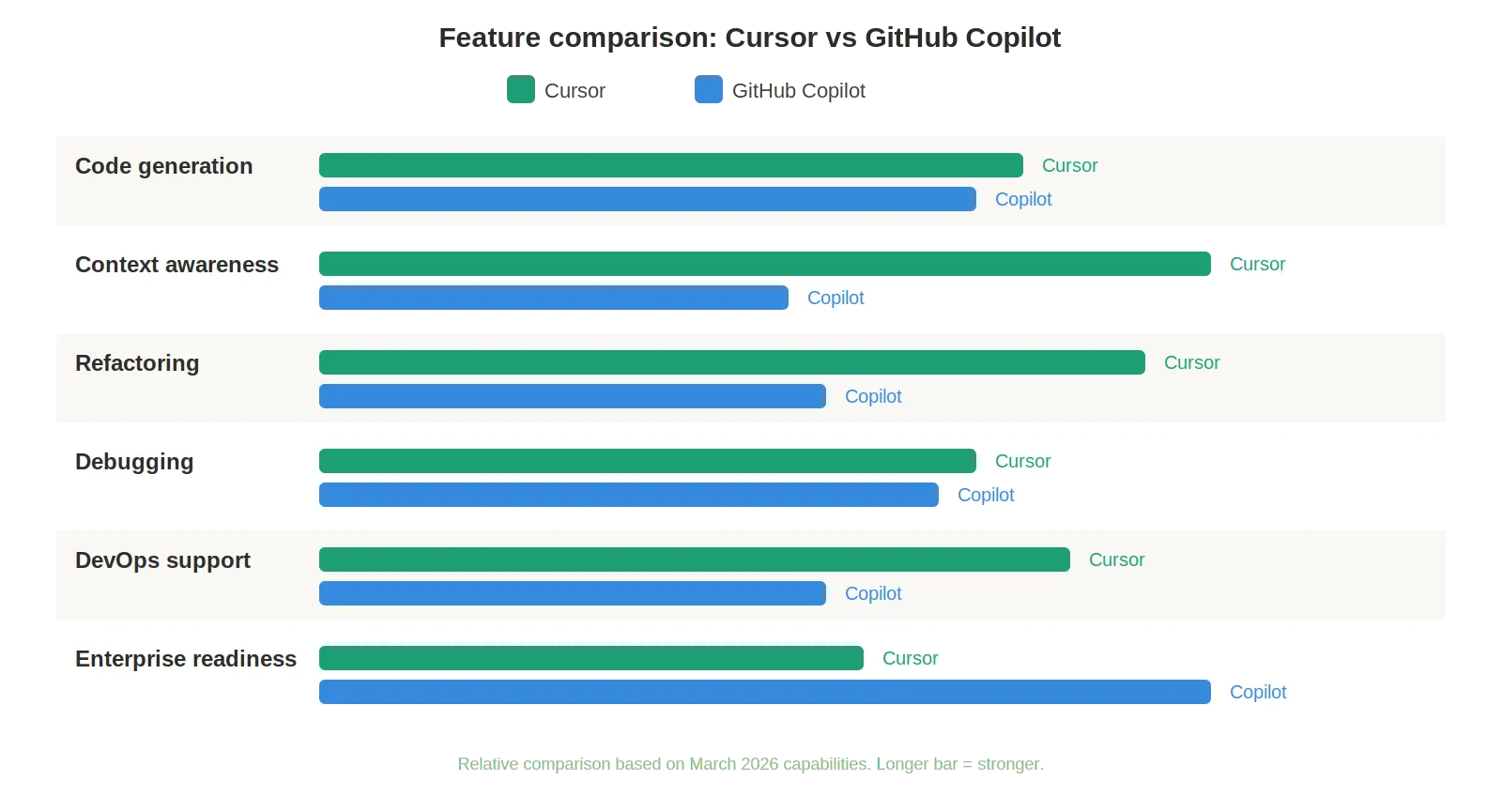
Horizontal bar chart comparing Cursor and Copilot across six dimensions, with Cursor leading on context awareness and refactoring, and Copilot leading on enterprise readiness.

Cursor, Copilot, or both — who's governing the AI?

Give every AI coding tool one governed front door: unified model access, per-team budgets, and audit trails from a single control plane. See how TrueFoundry's AI Gateway does it.

Book a 30-min DemoExplore AI Gateway

最終的な評価

ここに唯一の勝者はいませんし、そう主張する人には懐疑的です。ほとんどのチームにとって、Copilotはより安全な選択肢です。費用が安く、すでに使用しているIDEで動作します。無料ティアで試してから導入を決められます。エンタープライズ向けの制御機能は長年かけて成熟してきました。50人規模の組織全体で1つのツールを標準化する必要がある場合、Copilotは導入が容易でリスクの低い選択肢です。

Cursorは、実践的で複雑な作業に強いです。コードベース全体のコンテキスト、Composer、バックグラウンドエージェントといった機能は、大規模なプロジェクトに深く関わっているときに真の優位性をもたらします。エディタの切り替えをいとわない上級エンジニアは、これを使うことで目に見えて生産性が向上する傾向があります。

正直なところ、多くの開発者は結局両方を使っています。日常的なコーディングにはCopilotを、重い作業にはCursorを。それがかなり堅実な使い分けとなっています。

The fastest way to build, govern and scale your AI

Sign Up
Table of Contents

One Gateway for Every LLM, Agent and MCP Server

Book a 30-min with our AI expert

Book a Demo

The fastest way to build, govern and scale your AI

Book Demo
Summarize with
ChatGPT logo by OpenAI
Perplexity AI logo
Blurry red snowflake on white background, symmetrical frosty design with soft edges and abstract shape.

Discover More

No items found.
OpenRouter vs AI Gateway
July 4, 2026
|
5 min read

OpenRouter 対 AIゲートウェイ:どちらがあなたに最適ですか?

comparison
July 4, 2026
|
5 min read

プロンプトエンジニアリング:LLMとの対話方法を学ぶ

Thought Leadership
LLMs & GenAI
July 4, 2026
|
5 min read

True ML Talks #12 - Llama-Index共同創設者

True ML Talks
July 4, 2026
|
5 min read

AIワークロードがクラウド料金を膨らませていませんか?

Thought Leadership
No items found.

Recent Blogs

Black left pointing arrow symbol on white background, directional indicator.

Frequently asked questions

Is Cursor better than GitHub Copilot?

Cursor is generally considered more capable than GitHub Copilot for complex, context-aware coding tasks. Cursor's ability to index an entire codebase, use multi-file context, and perform agentic edits gives it a significant advantage for large projects. GitHub Copilot, however, excels in its tight integration with GitHub workflows, broader IDE support, and enterprise adoption making it the preferred choice for teams deeply embedded in the GitHub ecosystem.

Does GitHub Copilot have rules like Cursor?

GitHub Copilot does not yet offer the same level of customizable rules as Cursor's Rules feature. Cursor allows developers to define persistent instructions that guide the AI's behavior across sessions, such as enforcing coding standards or restricting the tools it uses. Copilot's customization is more limited, though GitHub has been expanding its configuration options through the Copilot Instructions feature.

Can I use GitHub Copilot on Cursor?

GitHub Copilot is designed for use within GitHub's supported IDE extensions (VS Code, JetBrains, etc.) and is not directly available as a model backend within Cursor. Cursor uses its own AI infrastructure and model integrations. Developers who want both tools must run them in their respective environments rather than combining them in a single IDE.

Can GitHub Copilot replace Cursor?

GitHub Copilot cannot fully replace Cursor, particularly for users who rely on Cursor's deep codebase indexing, multi-file agentic edits, and flexible model selection. Copilot is a strong tool for inline completions and chat-based code assistance within the GitHub-supported editor experience, but it lacks the agentic autonomy and customization depth that Cursor provides.

What are the disadvantages of GitHub Copilot and Cursor?

GitHub Copilot's main disadvantages include limited model choice, weaker multi-file context understanding, and relatively restricted customization compared to Cursor. Cursor's disadvantages include a higher cost for power users, occasional context window limitations on very large codebases, and the fact that it is a separate application rather than a plugin for an existing IDE which can disrupt established developer workflows.

Which is better for coding Cursor or Copilot?

Cursor is generally better for complex, project-level coding tasks that require understanding large codebases, making multi-file edits, and performing agentic workflows. GitHub Copilot is better for straightforward completions, single-file edits, and teams that prioritize GitHub ecosystem integration and familiar IDE plugins. The right choice depends on the complexity of work and the team's existing toolchain.

Is GitHub Copilot better than Cursor in 2026?

As of 2026, Cursor maintains an edge over GitHub Copilot for advanced agentic coding tasks, primarily due to its superior codebase indexing, customizable rules system, and flexible model selection. GitHub Copilot has significantly improved its capabilities and remains the dominant choice by adoption volume particularly in enterprise settings but Cursor continues to lead in raw capability for complex development workflows.

Take a quick product tour
Start Product Tour
Product Tour