


.png)
October 17, 2026
|
5 min de lecture


Accédez instantanément à un environnement TrueFoundry en direct. Déployez des modèles, acheminez le trafic LLM et explorez la plateforme complète : votre sandbox est prête en quelques secondes, aucune carte de crédit n'est requise.



Published: October 17, 2026
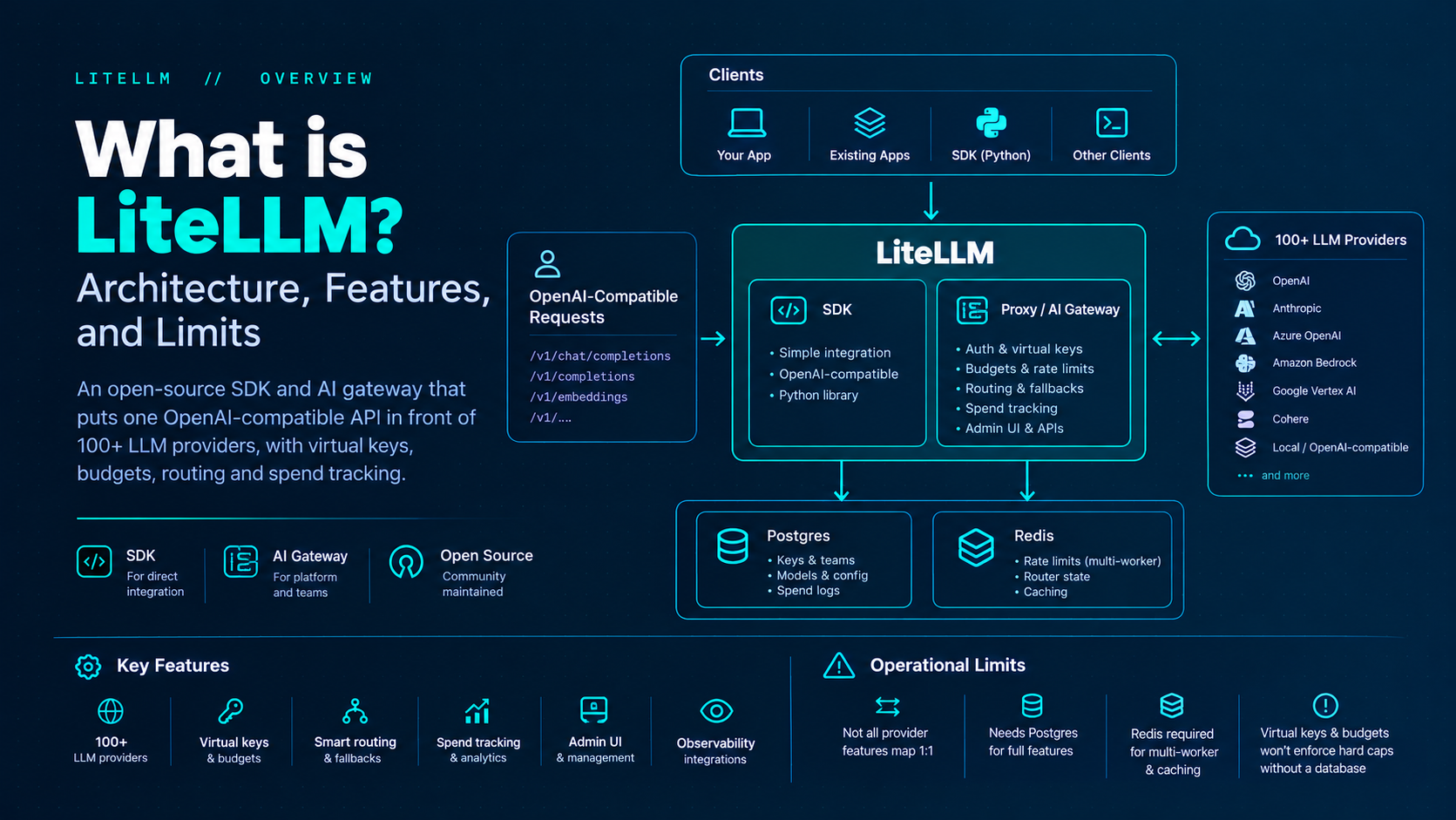
Une méthode incroyablement rapide pour créer, suivre et déployer vos modèles !
LiteLLM is an open-source library and AI gateway that gives applications a single, OpenAI-compatible interface to call 100+ LLM providers—OpenAI, Anthropic, Azure OpenAI, Amazon Bedrock, Google Vertex AI, Cohere, local OpenAI-compatible servers, and many others. You can use it in two modes: as a Python SDK inside one application, or as a centralized proxy (AI Gateway) that your whole platform points at.
That distinction matters. The SDK is a developer dependency. The proxy is infrastructure: authentication, virtual keys, budgets, rate limits, routing, spend logs, an Admin UI, and integrations for observability. Official docs and the BerriAI/litellm GitHub README frame the product this way—SDK for direct library integration; AI Gateway for GenAI enablement and ML platform teams.
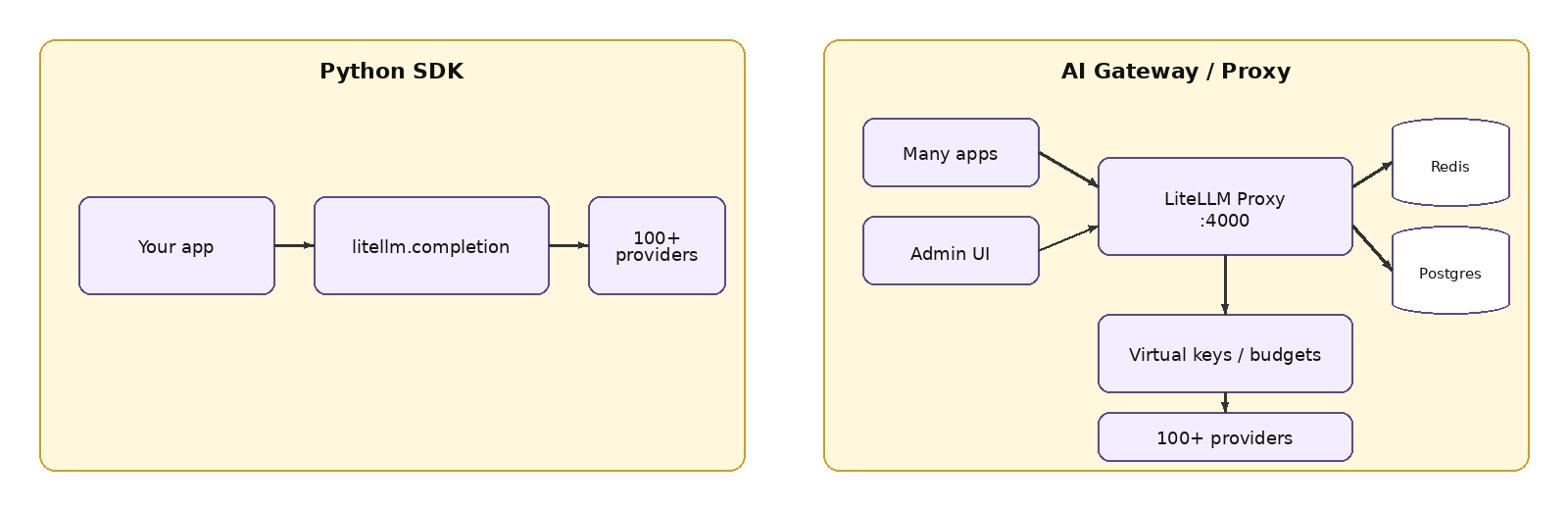
Figure 1. LiteLLM as a Python SDK versus as a shared AI Gateway (proxy).
The proxy accepts requests in OpenAI API shapes (for example /v1/chat/completions and related endpoints) and translates them to the underlying provider. Clients typically set the OpenAI SDK base_url to the proxy (commonly http://localhost:4000 or your ingress) and pass a LiteLLM master key or virtual key as the API key. The response comes back in OpenAI-style JSON so application code does not branch on every vendor SDK.
This is the main product promise: one client integration, many backends. It is not a claim that every provider feature maps 1:1. Provider-specific optional parameters, streaming edge cases, and tool schemas still need careful testing for your critical paths.
At a minimum production topology you run LiteLLM behind a load balancer, with Postgres for durable state and Redis once you have more than one worker or replica. Clients and admins hit the same gateway host; LLM traffic goes through auth, budget, and routing; management operations and the Admin UI depend on the database.
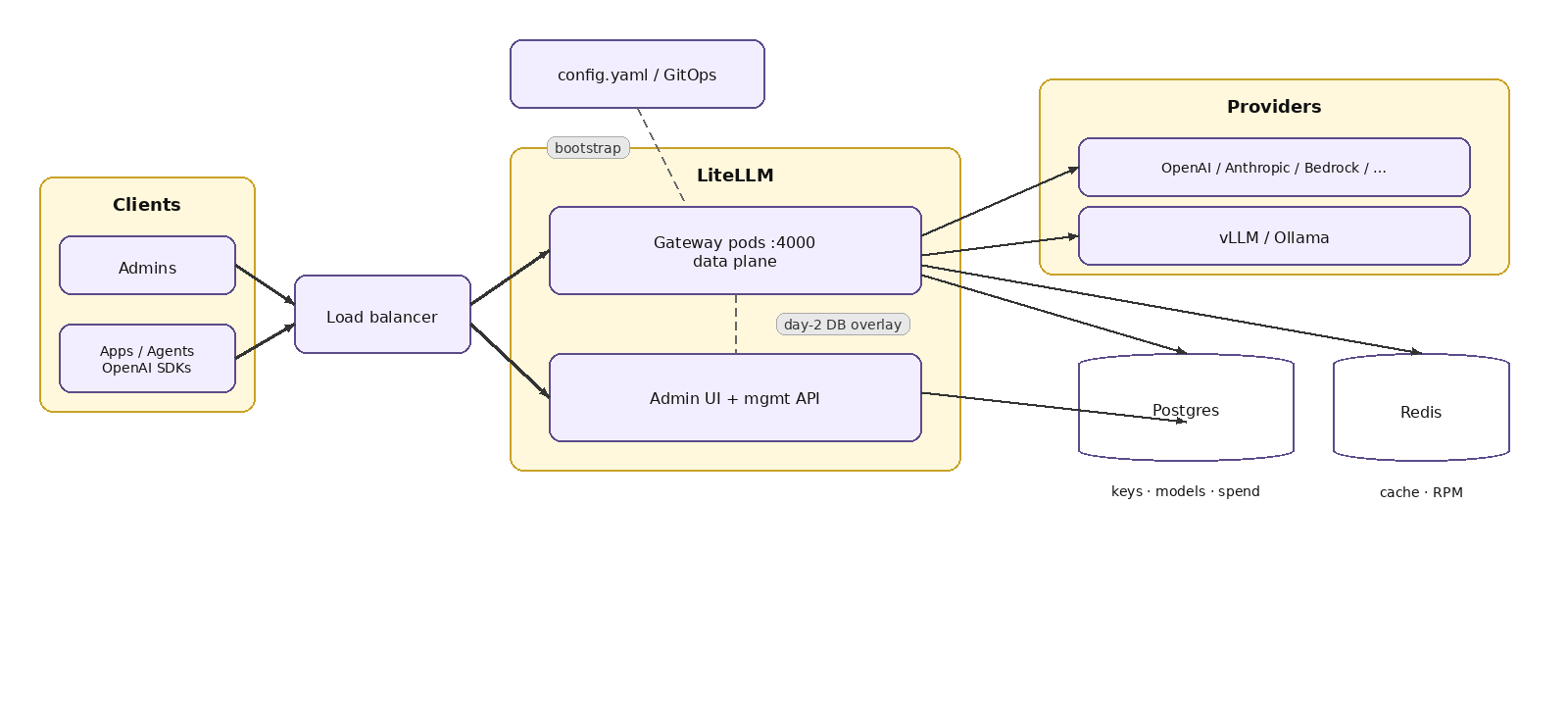
Figure 2. Minimum production-style topology: clients, gateway/UI, Postgres, Redis, providers.
It is useful to think in two planes. The data plane is the hot path: authenticate the virtual key, enforce ACL and budgets, pick a deployment, translate the request, call the provider, return the response, and enqueue spend logging. The control plane is the Admin UI and management APIs: keys, teams, models, budgets, and day-2 config overlays stored in Postgres.
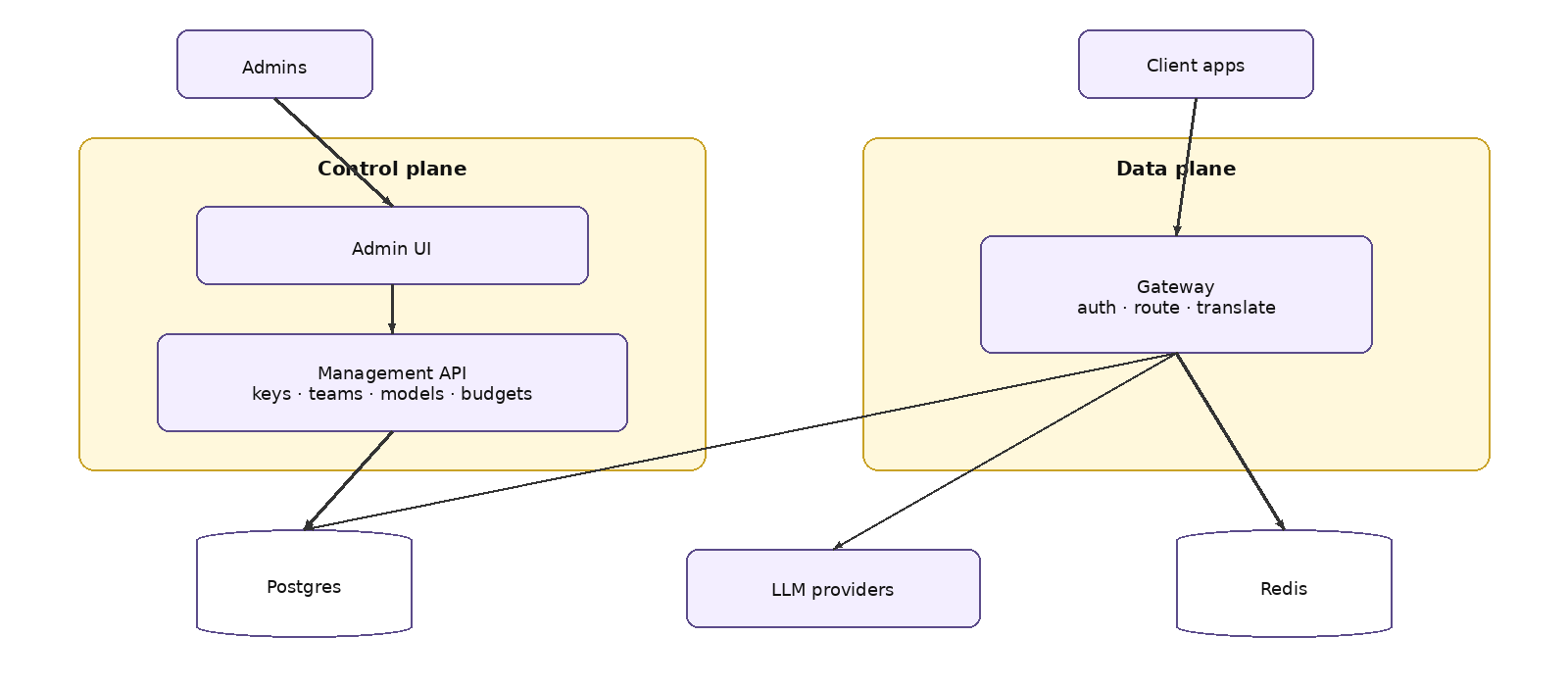
Figure 3. Control plane (UI / management API) versus data plane (gateway request path).
LiteLLM can run as a monolithic image (one process serves LLM traffic, management APIs, and UI)—what the litellm-helm chart typically runs—or as microservices: a gateway for LLM traffic (port 4000), a backend for management APIs and UI backend (port 4001), and a UI (port 3000). Official production deployment docs describe both. The componentized chart and published Terraform modules deploy the microservices form so you can scale many gateway replicas against a smaller backend. Component images (litellm-gateway, -backend, -ui, -migrations) are documented as published from v1.89.0 onward—pin chart and image tags; do not assume :latest in production.
Supporting components called out in those docs: PostgreSQL for keys, teams, users, spend logs, and config; Redis for rate limiting, router state, and caching across instances; and a migrations job that applies schema changes while proxy pods can set DISABLE_SCHEMA_UPDATE=true.
Postgres is required for Admin UI model management, virtual keys, and spend tracking. Without a database, you can still run an OpenAI-compatible API from config.yaml, but budgets are not enforced the way teams expect: official quickstart docs warn that litellm_settings.max_budget does not act as a hard spend cap without a DB client, and virtual keys themselves need a connected database.
Redis (7.0+ is called out in production best practices) is recommended as soon as you run more than one proxy instance or more than one Uvicorn worker. Official “What Needs Redis” guidance: without shared Redis, each worker keeps its own counters and cache, so a 100 RPM limit across four workers effectively becomes ~400, revoked keys can linger on other workers until reload, and response cache hits stay local. Semantic caching backends that depend on Redis/Valkey/Qdrant need that infrastructure outright.
Virtual keys are LiteLLM-issued credentials you hand to applications instead of raw provider keys. Each key can carry budgets, rate limits, and model allowlists; spend is tracked in Postgres. Teams and users sit above keys for multi-tenant governance. Key generation and editing are available via Admin UI and management APIs. Automated virtual-key rotation with grace periods is documented as an Enterprise feature; master-key rotation flows exist on the open-source build and are API-oriented.
Production docs also recommend batching spend writes (for example proxy_batch_write_at: 60) so high QPS does not hot-spot the database. At very high traffic (~1000+ RPS or 10+ instances), a Redis transaction buffer can queue spend updates before a single flusher writes to Postgres.
With the database-backed quickstart, the Admin UI is typically at /ui. Default login uses username admin and the LITELLM_MASTER_KEY as the password (the master key is also the root credential for management APIs). Treat that key like a root password. Enterprise adds SSO (Okta, Azure AD, Google Workspace, OIDC/SAML) for UI login; SSO is documented as free for up to five users, with a license beyond that.
Models and settings can live in config.yaml (GitOps-friendly, restart to change file-owned models) and/or in the database when store_model_in_db is enabled (UI and API day-2 changes). Pods poll the DB to pick up runtime overlays; the default reload interval is on the order of 30 seconds and is tunable. Same model name in YAML and DB does not silently replace—you can end up with extra deployments. Decide a single source of truth for production model inventory and document which knobs are file-owned versus DB-owned.
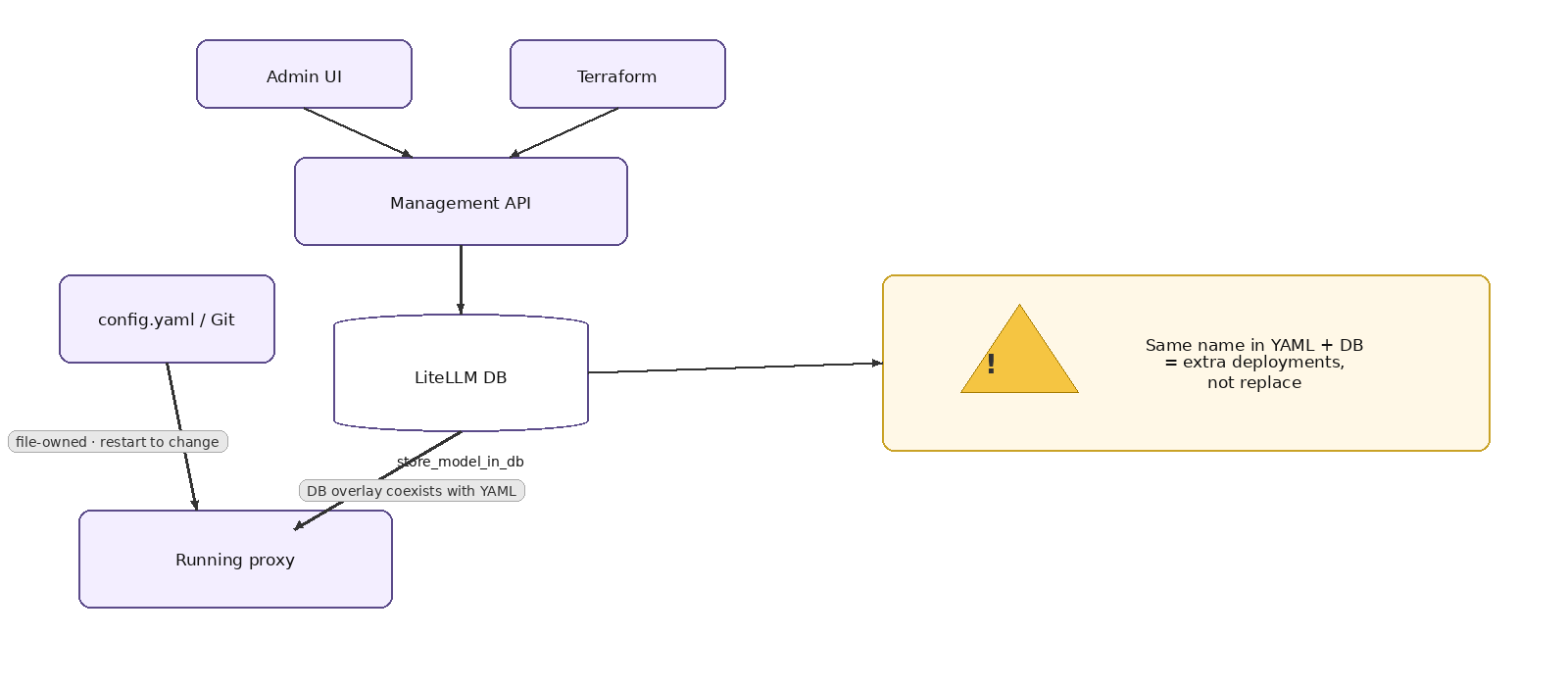
Figure 4. Config sources of truth: YAML/Git, Admin UI / management API, and DB overlays.
Set these early and keep them in a secret manager:
TrueFoundry AI Gateway offre une latence d'environ 3 à 4 ms, gère plus de 350 RPS sur 1 processeur virtuel, évolue horizontalement facilement et est prête pour la production, tandis que LiteLM souffre d'une latence élevée, peine à dépasser un RPS modéré, ne dispose pas d'une mise à l'échelle intégrée et convient parfaitement aux charges de travail légères ou aux prototypes.




LiteLLM is an open-source Python SDK and AI gateway (proxy) that exposes a single OpenAI-compatible API in front of 100+ LLM providers, including OpenAI, Anthropic, Azure OpenAI, Amazon Bedrock, and Google Vertex AI. Applications send OpenAI-shaped requests, and LiteLLM translates them for each provider. Deployed as a proxy, it also adds virtual keys, budgets, rate limits, routing, and spend tracking, backed by Postgres and Redis.
The SDK is a Python library you import into one application to call many providers through one interface. The proxy is a shared service that every team points at via base_url, and it centralizes authentication, virtual keys, budgets, routing, logging, and the Admin UI. Use the SDK for a single app; use the proxy when a platform team needs one governed front door for LLM traffic.
Not in the durable sense: keys, teams, models, budgets, and spend logs live in Postgres, so gateway pods can be scaled and replaced horizontally. They do keep in-memory state, though—per-worker rate-limit counters, local caches, and DB config overlays polled on an interval. That is why Redis becomes required once you run more than one worker or replica; without it, limits and cache hits fragment per pod.
Oui. TrueFoundry s'exécute dans votre VPC, on-premise, en environnement air-gapped ou en hybride, de sorte que les prompts et les réponses ne quittent jamais votre domaine, même lorsque vous routez vers de nombreux fournisseurs.



Les dernières nouvelles, articles et ressources envoyés dans votre boîte de réception
.png)
.png)
.png)
.png)
.png)
.png)
.png)
.png)
.png)


