


.png)
October 17, 2026
|
Lesedauer: 5 Minuten


Erhalten Sie sofortigen Zugriff auf eine TrueFoundry-Live-Umgebung. Stellen Sie Modelle bereit, leiten Sie den LLM-Verkehr weiter und erkunden Sie die gesamte Plattform — Ihre Sandbox ist in Sekundenschnelle einsatzbereit, ohne dass eine Kreditkarte erforderlich ist.



Published: October 17, 2026
.png)
Unglaublich schnelle Methode zum Erstellen, Verfolgen und Bereitstellen Ihrer Modelle!
“Can we self-host it?” is the first question most regulated teams ask about an AI platform, and the honest answer is “yes, but decide which kind.” Self-hosting is not a single switch. It is a spectrum, and the two choices that matter most are whether the platform runs in your cloud account (VPC) or in your own datacenter (on-premises) — with a fully air-gapped install at the strict end of the on-prem option.
They sound similar because both keep your workloads in your environment. They differ in what you operate, where your GPUs come from, how much network isolation you get, and how much of the platform you run yourself. Picking the wrong one means either taking on datacenter operations you did not need or discovering, late, that a public-cloud dependency is a compliance problem.
Think of deployment as a line, where each step moves more of the platform into your control and asks more of your team.
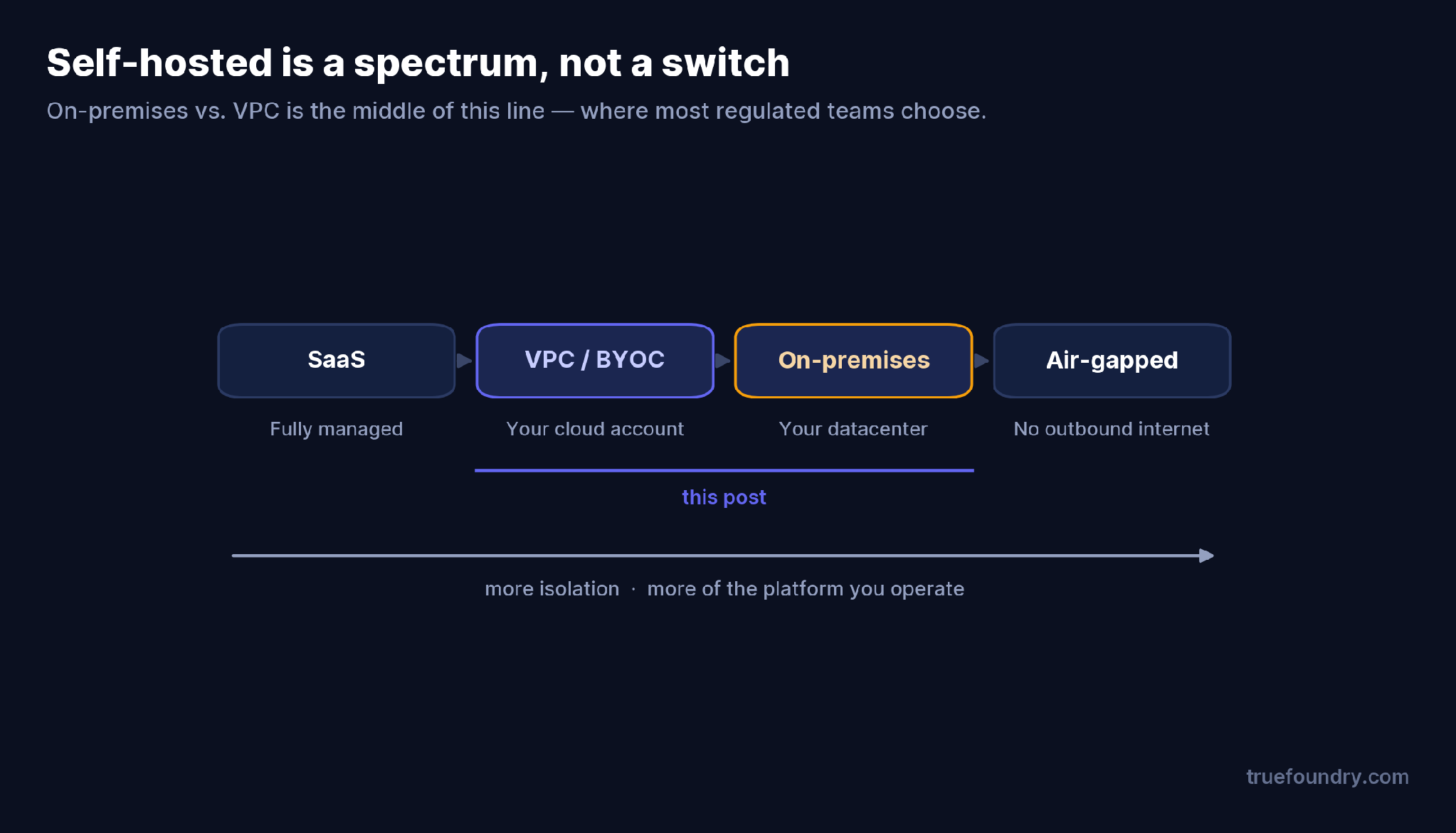
At one end, everything is managed for you (SaaS). Next, the data plane moves into your cloud account (VPC/BYOC). Then the whole thing moves into your datacenter (on-prem). At the far end, it runs with no outbound internet at all (air-gapped). “On-premises vs. VPC” is the middle of this line — the part most regulated enterprises actually choose between.
The reason one platform can run in your cloud or your datacenter is that it separates two planes. The control plane is where you manage and monitor deployments — it can be TrueFoundry-hosted SaaS or self-hosted in your VPC. The compute plane is where your workloads actually run: one or more Kubernetes clusters in your environment.
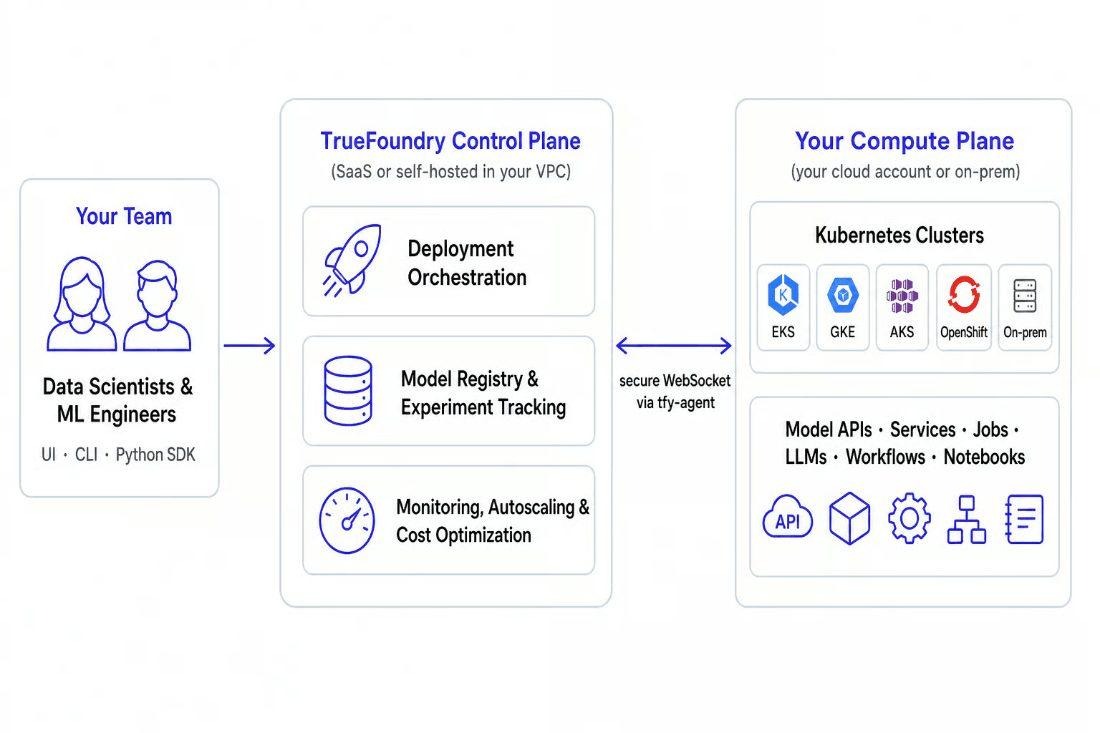
The control plane never accesses your clusters directly; a tfy-agent connects outbound over a secure WebSocket. Source: TrueFoundry docs.
The key architectural detail: the control plane never reaches into your clusters. A tfy-agent runs inside each cluster, connects outbound to the control plane over a secure WebSocket, receives deployment instructions, and streams workload state back. Your code, models, and data never leave your infrastructure. That one design is what lets the compute plane sit in a cloud VPC or an on-prem rack without changing how the platform works.
In a VPC deployment — bring your own cloud — the compute plane is a managed Kubernetes cluster in your cloud account: AWS EKS, Google GKE, or Azure AKS. You provision it with OpenTofu/Terraform, or attach an existing cluster you already run. GPUs come from your cloud provider, scaling is elastic, and the managed control plane (SaaS or self-hosted) orchestrates it through the agent.
This is the sweet spot for a team already operating in the cloud. Data and workloads stay inside your account and your VPC boundary, you get cloud-native autoscaling and GPU availability, and you avoid running bare-metal infrastructure. You still own cluster hygiene — upgrades, quotas, node pools — but not a datacenter.
In an on-premises deployment, the compute plane is your own cluster — any standard Kubernetes or OpenShift cluster, including on-prem GPU clusters and neoclouds. This is the option when a hard rule says data and inference cannot touch a public cloud at all: regulated data, sovereignty requirements, or an existing GPU investment you want to use.
On-prem is also the path to air-gapped, where the environment has no outbound internet and every dependency is mirrored internally. You get the strictest possible isolation, at the cost of running the full stack yourself — the cluster, the GPUs, the storage, and the upgrade process. GPU capacity is whatever you have racked, not whatever the cloud can burst to, so capacity planning becomes your job rather than your provider’s.
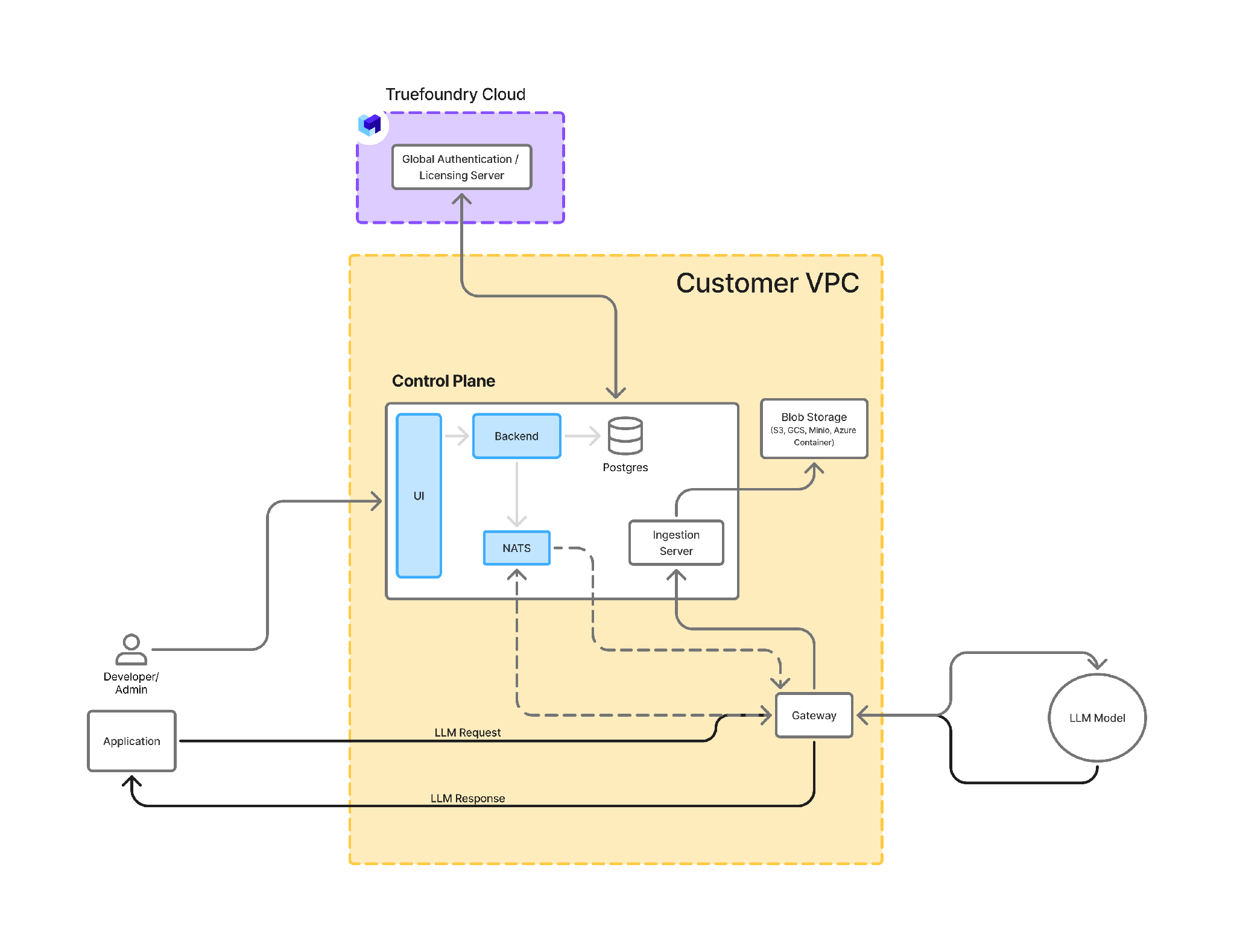
Self-hosted — both the gateway and the control plane run in your environment. Source: TrueFoundry docs.
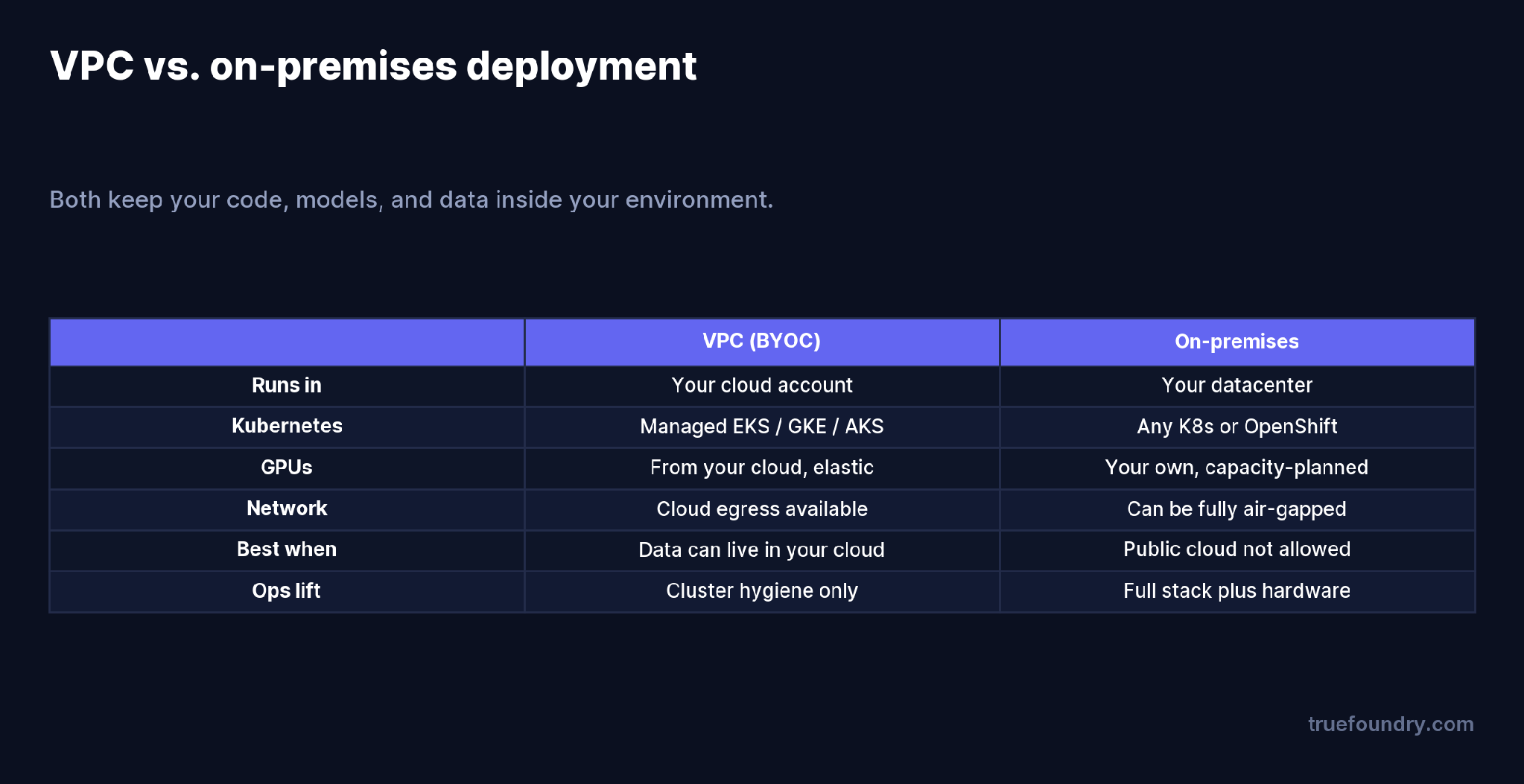
VPC versus on-premises deployment, compared
The decision usually comes down to two questions: can your data sit in a public cloud account at all, and do you want to operate hardware. If the data can live in your cloud and you would rather not run a datacenter, VPC wins. If a rule forbids the public cloud, or you need an air gap, or you already own the GPUs, on-prem is the answer.
The anxiety behind this decision is always about data, so concretely: in both VPC and on-prem, your code, models, and request data stay in your infrastructure, encrypted at rest and in transit. The control plane never pulls from your clusters — it only receives the workload state the tfy-agent streams out. If you also self-host the control plane, the only outbound data is what a licensing server needs (platform-user emails and request counts, for billing). In an air-gapped install, even that is handled through an internal process. Across every option, the data path is the same; what changes is how much of the platform you operate.
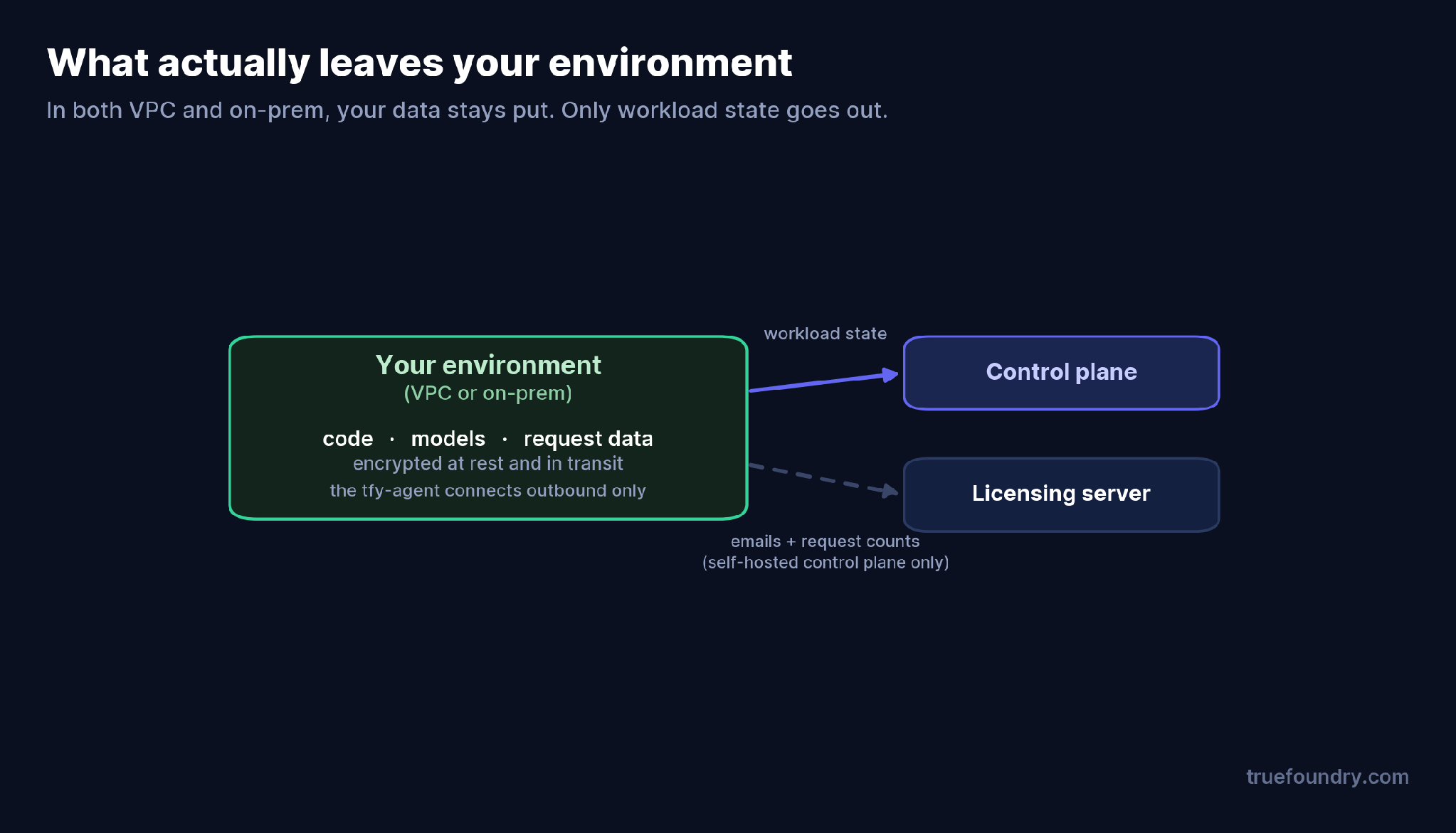
What leaves your environment: only workload state, via the tfy-agent
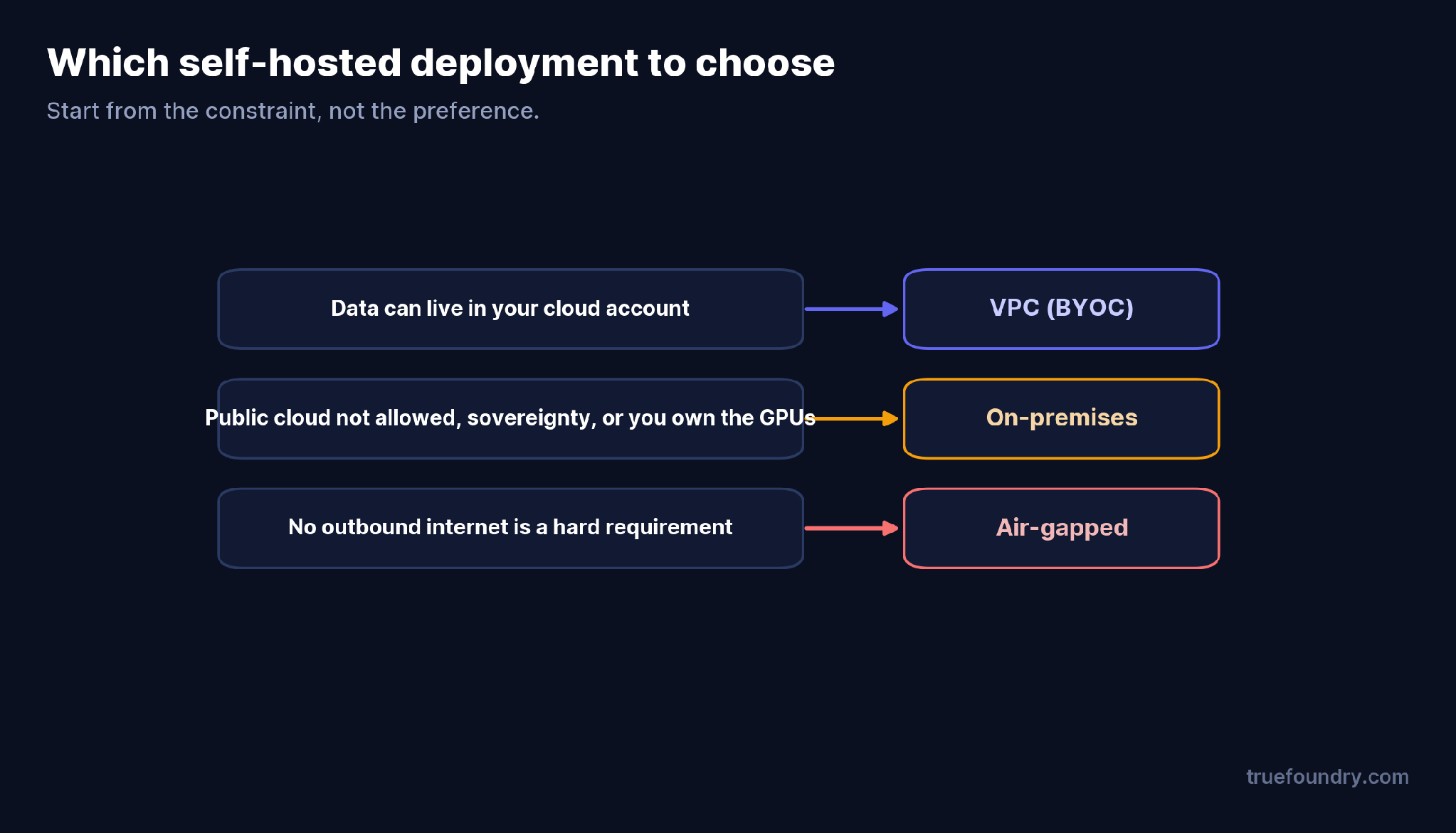
Which self-hosted deployment to choose
Start from the constraint, not the preference. If your data can live in your cloud account, VPC is the lightest self-hosted option and the one most teams should pick — you get isolation and data ownership without standing up a datacenter. Move to on-premises when a concrete rule requires it: data that cannot touch a public cloud, an air-gap mandate, data-sovereignty law, or GPUs you already own and must use. Reach for air-gapped only when “no outbound internet” is an actual requirement, because it is the most to operate. The mistake is choosing on-prem by default “to be safe” and taking on months of infrastructure work a VPC deployment would have avoided.
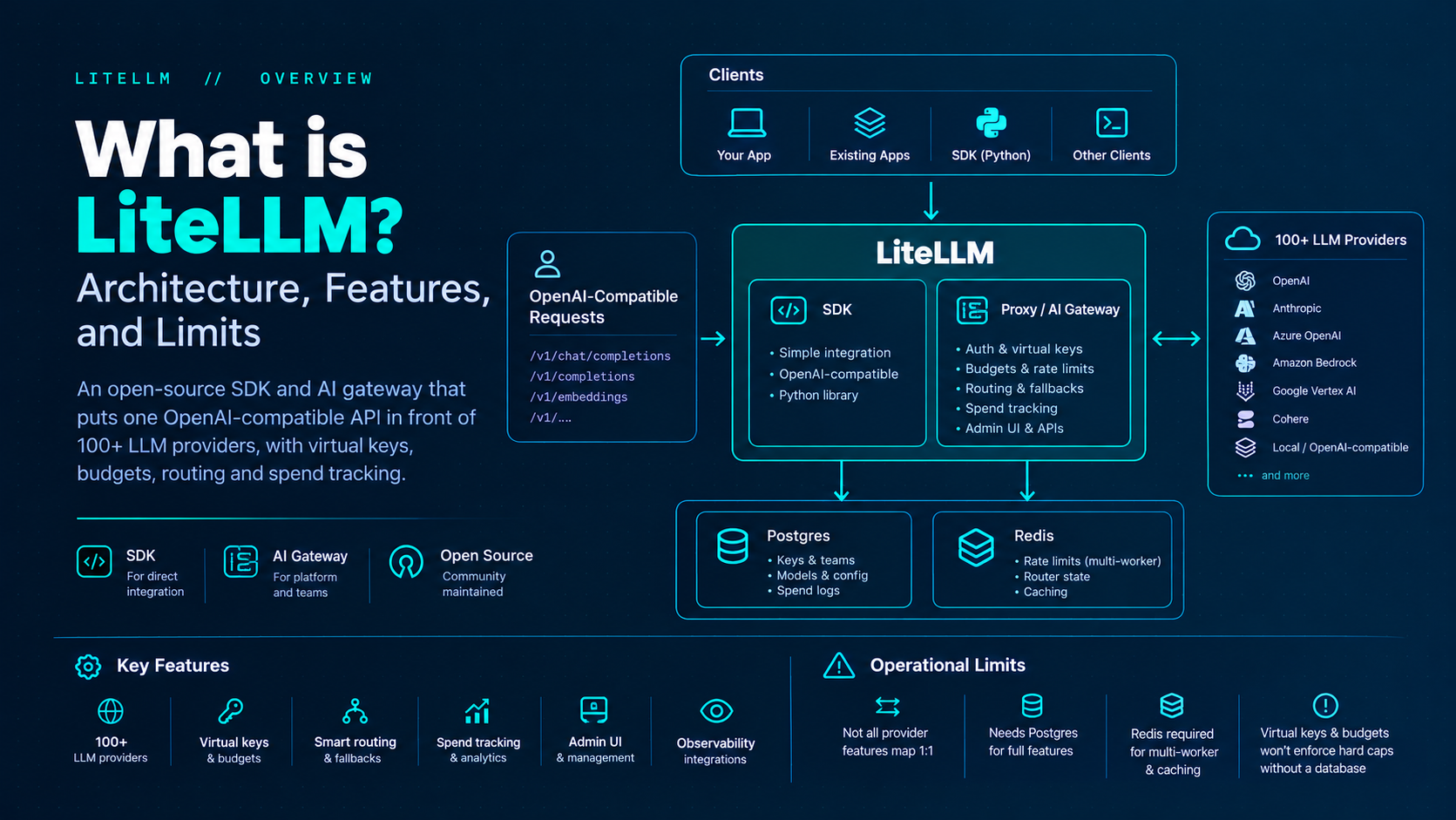
TrueFoundry AI Gateway bietet eine Latenz von ~3—4 ms, verarbeitet mehr als 350 RPS auf einer vCPU, skaliert problemlos horizontal und ist produktionsbereit, während LiteLM unter einer hohen Latenz leidet, mit moderaten RPS zu kämpfen hat, keine integrierte Skalierung hat und sich am besten für leichte Workloads oder Prototyp-Workloads eignet.




VPC deployment runs the platform’s compute plane in your own cloud account (EKS, GKE, or AKS) — managed Kubernetes, cloud GPUs, elastic scaling. On-premises runs it in your own datacenter on any standard Kubernetes or OpenShift cluster, including on-prem GPUs, and can be fully air-gapped. Both keep your data in your environment.
Yes. Your workloads, models, and data run in your cloud account and never leave it. “Self-hosted” means the data plane runs in infrastructure you control, which a VPC account is — it does not have to be a physical datacenter.
In both, your code, models, and request data stay in your infrastructure, encrypted at rest and in transit. The control plane never accesses your clusters directly; a tfy-agent streams workload state outbound. If you self-host the control plane, only licensing data (user emails and request counts) leaves.
When the environment must have no outbound internet access — the strictest regulated and sovereign cases. It runs on-prem with every dependency mirrored internally, and it is the most operationally demanding option, so choose it only when a rule requires it.
VPC needs a managed Kubernetes cluster in your cloud, provisioned with OpenTofu/Terraform or attached. On-prem needs any standard Kubernetes or OpenShift cluster plus your own GPUs and storage. Both connect to the control plane through the tfy-agent over a secure WebSocket.



Die neuesten Nachrichten, Artikel und Ressourcen werden in Ihren Posteingang gesendet
.png)
.png)
.png)
.png)
.png)
.png)
.png)
.png)


