


.png)
September 30, 2026
|
Lesedauer: 5 Minuten


Erhalten Sie sofortigen Zugriff auf eine TrueFoundry-Live-Umgebung. Stellen Sie Modelle bereit, leiten Sie den LLM-Verkehr weiter und erkunden Sie die gesamte Plattform — Ihre Sandbox ist in Sekundenschnelle einsatzbereit, ohne dass eine Kreditkarte erforderlich ist.


Published: August 8, 2026
Unglaublich schnelle Methode zum Erstellen, Verfolgen und Bereitstellen Ihrer Modelle!
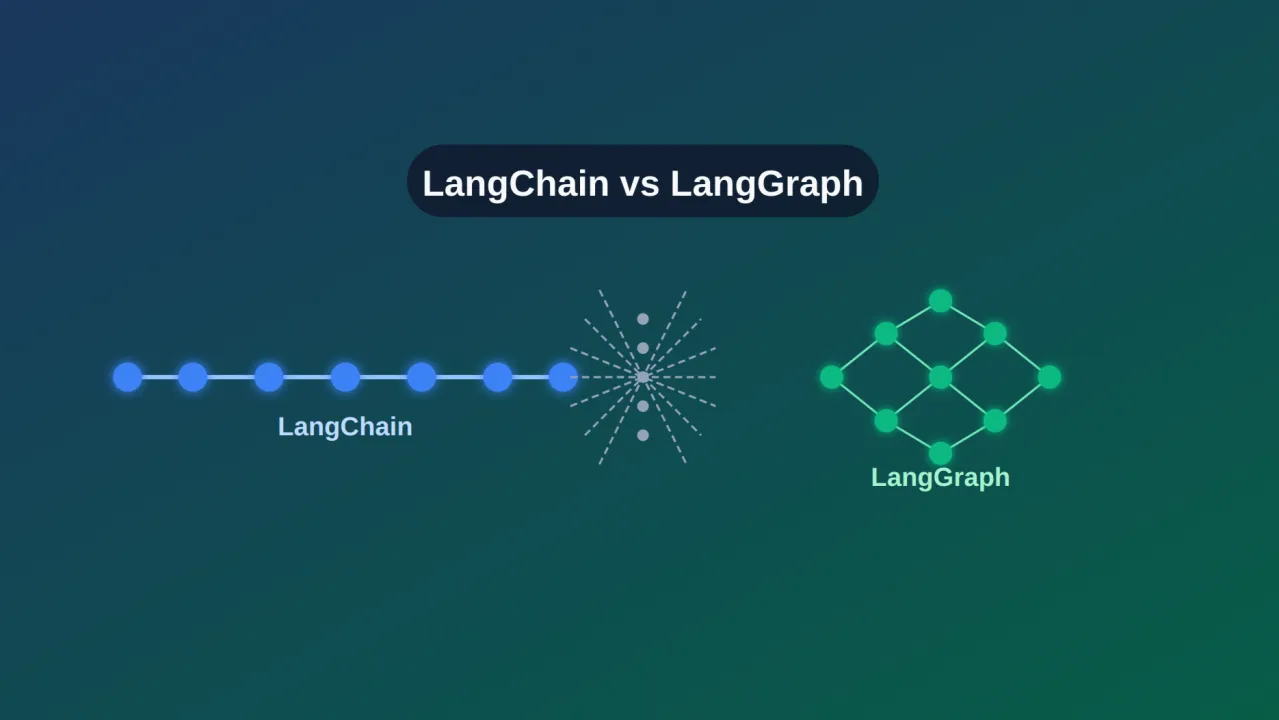
Wenn es darum geht, Anwendungen zu entwickeln, die auf großen Sprachmodellen (LLMs) basieren, haben Entwickler heute mehr Auswahlmöglichkeiten als je zuvor. Zwei der am meisten diskutierten Frameworks sind LangChain und LangGraph. Beide zielen zwar darauf ab, den Prozess der Verbindung von LLMs mit Tools, Daten und Workflows zu vereinfachen, verfolgen jedoch sehr unterschiedliche Ansätze. LangChain hat sich schnell zu einer der beliebtesten Bibliotheken für die Erstellung KI-gesteuerter Anwendungen entwickelt und bietet ein breites Ökosystem an Integrationen und Abstraktionen. Andererseits konzentriert sich LangGraph, das auf Langchain basiert, auf statusbehaftete, agentenähnliche Systeme und verwendet ein graphenbasiertes Ausführungsmodell, um komplexe Überlegungen und mehrstufige Interaktionen zu bewältigen.
Wenn Sie versuchen, sich zwischen LangChain und LangGraph zu entscheiden, ist es wichtig, deren Stärken, Einschränkungen und idealen Anwendungsfälle zu verstehen. Dieser Vergleich hilft Ihnen bei der Bewertung, welches Framework am besten zu Ihrem Projekt passt, unabhängig davon, ob Sie einfache LLM-Apps, robuste KI-Agenten oder skalierbare Unternehmenslösungen erstellen.
Lang-Kette ist ein Open-Source-Framework für die Entwicklung von LLM-gestützten KI-Anwendungen. Es bietet Entwicklern eine Bibliothek modularer Komponenten in Python und JavaScript, die Sprachmodelle mit externen Tools und Datenquellen verbinden. Gleichzeitig bietet es eine konsistente Oberfläche für Aufgabenketten, die Verwaltung von Eingabeaufforderungen und die Speicherverwaltung.
LangChain fungiert als Brücke zwischen reinen LLM-Funktionen und realen Funktionen. Es hilft Entwicklern bei der Erstellung von Workflows, sogenannten „Ketten“, bei denen jeder Schritt das Generieren von Text, das Abfragen einer Datenbank, das Abrufen von Dokumenten oder das Aufrufen externer APIs umfasst, und das alles in einer logischen Reihenfolge. Diese modulare Struktur beschleunigt nicht nur das Prototyping, sondern fördert auch die Übersichtlichkeit und Wiederverwendung. Dies ist hilfreich, egal ob Sie Chatbots erstellen, Dokumente zusammenfassen, Inhalte generieren oder Workflows automatisieren
LangChain wurde ursprünglich im Oktober 2022 gestartet und entwickelte sich schnell zu einem lebendigen, von der Community betriebenen Projekt. Seitdem hat es sich bei Hunderten von Toolintegrationen und Modellanbietern durchgesetzt und ermöglicht einen einfachen Wechsel zwischen OpenAI, Hugging Face, Anthropic, IBM Watsonx und mehr. LangChain bietet eine elegante, strukturierte Möglichkeit, Sprachmodelle in praktische Anwendungen umzusetzen. Es abstrahiert Komplexität, erhöht die Flexibilität und rationalisiert die Entwicklung, was es zu einer ersten Wahl für Teams macht, die leistungsfähige, LLM-basierte Systeme aufbauen.
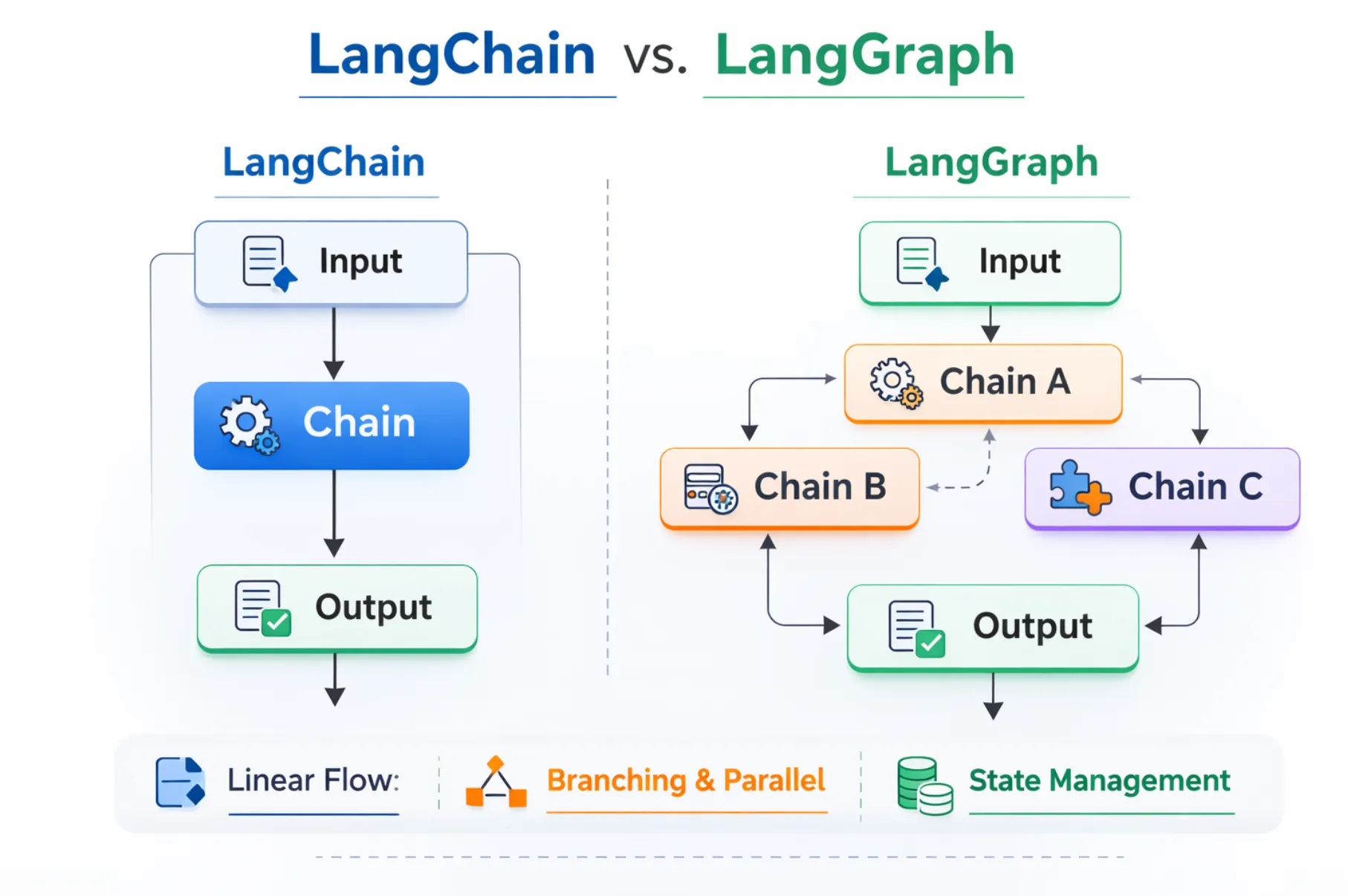
LangChain wurde entwickelt, um die Erstellung von LLM-gestützten Anwendungen mit linearen, schrittweisen Workflows zu vereinfachen. Zu den Kernfunktionen gehören:
LangGraph ist ein Open-Source-Framework des LangChain-Teams, das Entwicklern hilft, intelligentere und anpassungsfähigere KI-Agenten-Workflows zu erstellen. Anstatt Aufgaben wie bei einer herkömmlichen Kette in einer geraden Linie auszuführen, organisiert LangGraph sie in einem Diagramm, in dem jeder „Knoten“ eine Aufgabe darstellt und die „Kanten“ definieren, wie diese Aufgaben miteinander verbunden sind. Dieses Design ermöglicht es, Abläufe zu erstellen, die sich verzweigen, wiederholen und den Status beibehalten können, sodass Agenten die Flexibilität haben, komplexere Szenarien zu bewältigen.
Eine der wichtigsten Stärken von LangGraph besteht darin, dass es langandauernde, zustandsorientierte Agenten unterstützt. Wenn ein Agent auf einen Fehler stößt oder eine Pause einlegen muss, kann er genau dort weitermachen, wo er aufgehört hat. Sie können auch menschliche Checkpoints einbauen, sodass eine Person eine Aktion überprüfen oder anpassen kann, bevor der Agent weitermacht. Darüber hinaus kann sich LangGraph an vergangene Interaktionen und den Kontext im Laufe der Zeit erinnern, was für die Entwicklung von Agenten, die lernen und sich anpassen, unerlässlich ist.
Es verfügt auch über starke Produktionsmerkmale. Entwickler können Arbeitsabläufe mithilfe von Tools wie LangSmith überwachen, die visuelles Debugging, detaillierte Protokolle und einen vollständigen Überblick darüber bieten, wie ein Agent Entscheidungen trifft. LangGraph kann lokal ausgeführt oder auf verwalteten Plattformen wie LangGraph Platform und Studio bereitgestellt werden. LangGraph wurde für Zuverlässigkeit, Flexibilität und Transparenz entwickelt und ist damit eine solide Wahl für komplexe KI-Systeme, die über eine einfache schrittweise Automatisierung hinausgehen.
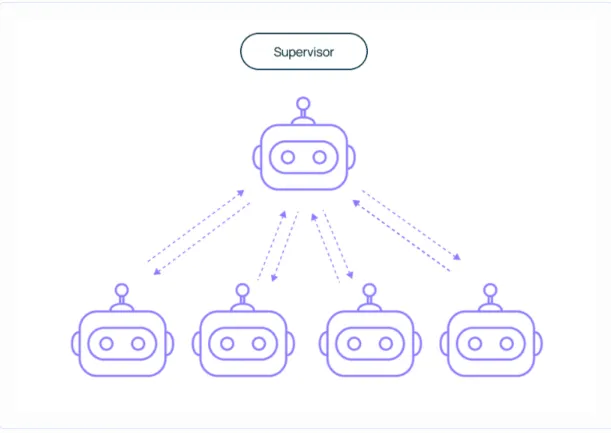
LangGraph wurde für dynamische, statusbehaftete Workflows und Workflows mit mehreren Agenten entwickelt und bietet Funktionen, die über die lineare Aufgabenausführung hinausgehen. Zu seinen Kernfunktionen gehören:
Nun, da wir die Grundlagen von LangGraph und LangChain behandelt haben. Lassen Sie uns einen tiefen Einblick in den Unterschied zwischen LangChain und LangGraph werfen.
LangChain wurde so entwickelt, dass sich komplexe LLM-gestützte Workflows einfach und intuitiv anfühlen. Es zeichnet sich aus, wenn Ihre Aufgaben einem vorhersehbaren, sequentiellen Muster folgen, Daten abrufen, zusammenfassen, Fragen beantworten usw. Sein modularer Aufbau bietet vorgefertigte Bausteine wie Ketten, Speicher, Agenten und Tools, wodurch das Prototyping schnell und das Programmieren unkompliziert ist. Wenn Sie schnell einen Workflow zusammenstellen möchten, der sich an einen bekannten Pfad hält, ist LangChain Ihre erste Wahl.
Andererseits bietet LangGraph Ihnen Leistung und Flexibilität, wenn Dinge kaputt gehen oder sich schleifen. Anstatt linearer Sequenzen entwerfen Sie graphenbasierte Workflows mit Knoten, Kanten, expliziten Zuständen, Wiederholungsversuchen, Verzweigungslogik und sogar Checkpoints, die von Menschen bearbeitet werden. Es ist ideal, wenn sich Ihre Anwendung anpassen, zurückverfolgen, in einer Schleife ablaufen oder sich an lang andauernde Kontexte erinnern muss — denken Sie an mehrstufige Agenten, komplexe Entscheidungsbäume oder virtuelle Assistenten, die im Laufe der Zeit nachdenken müssen.
Arbeitsablauf
Verwaltung des Staates
Einfache Bedienung
Komplexität
Produktion
LangChain eignet sich am besten, wenn Ihr Prozess Schritt für Schritt abläuft, ohne häufiges Verzweigen, Schleifen oder komplexes Zustandsmanagement.
LangChain ist ideal für Aufgaben, die einer klaren Reihenfolge ohne komplexe Verzweigungen folgen. Zum Beispiel das Übersetzen von Text oder das Zusammenfassen von Dokumenten in einem Schritt.
aus langchain.chat_models importiere ChatOpenAI
aus langchain.prompts importiere ChatPromptTemplate
prompt = ChatPromptTemplate.from_template („Fasse diesen Text zusammen: {text}“)
Modell = ChatOpenAI ()
Kette = prompt | Modell
output = chain.invoke ({"text“: „LangChain vereinfacht die Arbeit mit LLMs."})
drucken (ausgeben)
Mit der Bibliothek vorgefertigter Konnektoren (LLMs, Datenbanken, APIs) von Langchain können Entwickler Workflows schnell zusammenstellen und testen. Nützlich für Machbarkeitsstudien oder schnelle Iterationen.
Mit eingebauten Speichermodulen kann LangChain den Kontext vorübergehend beibehalten. Dies ist nützlich für Chat-Experimente, Forschungstests oder mehrstufige Eingabeaufforderungen, für die kein Langzeitstatus erforderlich ist.
aus langchain.memory importiere ConversationBufferMemory
aus langchain.chains importiere ConversationChain
aus langchain.llms importiere OpenAI
Speicher = ConversationBufferMemory ()
Konversation = ConversationChain (LLM=OpenAI (), Speicher=Speicher)
conversation.run („Erkläre LangChain für Anfänger.“)
conversation.run („Gib eine einzeilige Zusammenfassung deiner Erklärung.“)
Für Apps, die kein Looping, keine adaptive Logik oder Orchestrierung mit mehreren Agenten benötigen, sorgt LangChain für einfache, modulare und leicht zu verwaltende Workflows.
aus langchain.chains importiere SimpleSequentialChain, LLMChain
importiere PromptTemplate aus langchain.prompts
aus langchain.llms importiere OpenAI
llm = OpenAI ()
prompt = promptTemplate (template="Ins Französische übersetzen: {text}“, input_variables= ["text"])
chain = llmChain (llm=llm, prompt=prompt)
seq_chain = SimpleSequentialChain (ketten= [Kette])
print (seq_chain.run („Hallo, wie geht's dir?“))
Wählen Sie LangChain, wenn Ihr Fokus darauf liegt, klare, strukturierte und gut integrierte LLM-Workflows mit minimalem Einrichtungsaufwand und maximaler Flexibilität zu erstellen.
LangGraph ist ideal für dynamische, adaptive Workflows, bei denen Zustandsverfolgung, Verzweigung oder Orchestrierung mit mehreren Agenten erforderlich sind. Es eignet sich am besten für KI-Agenten und komplexe Systeme, die Schritte überarbeiten, alternative Pfade bewältigen oder den Kontext im Laufe der Zeit beibehalten müssen.
Verwenden Sie LangGraph, wenn Ihr Prozess die Richtung ändern, Schritte wiederholen oder mehrstufige Entscheidungen treffen muss.
aus Langgraph importieren StateGraph
def process_input (Zustand):
input_data = Zustand ["Eingabe"]
result = input_data.upper () # einfache Transformation
return {"Ergebnis“: Ergebnis, „Eingabe“: Eingabedaten}
graph = StateGraph ()
graph.add_node („Prozessor“, Prozesseingabe)
graph.add_edge („processor“, „processor“) # Loopback für erneuten Versuch
output = graph.run ({"input“: „Hallo Welt"})
drucken (ausgeben)
LangGraph bietet eine explizite Statusverwaltung und eignet sich daher perfekt für Workflows, bei denen der Kontext über mehrere Schritte oder Sitzungen hinweg erhalten werden muss.
def agent_step (Zustand):
state ["history"] .append (state ["input"])
return {"history“: state ["history"], „input“: state ["next_input"]}
graph = StateGraph ()
graph.add_node („agent“, agent_step)
result = graph.run ({"history“: [], „input“: „Schritt 1", „next_input“: „Schritt 2"})
drucken (Ergebnis)
Langgraph koordiniert mehrere KI-Agenten mit speziellen Rollen in einem einzigen Workflow. Schritte wiederholen, verzweigen und wiederholen, während der konsistente Zustand erhalten bleibt.
def agent1 (Bundesstaat):
return {"message“: „Agent1 hat verarbeitet" + state ["data"]}
def agent2 (Bundesstaat):
return {"message“: „Agent2 bestätigt" + state ["message"]}
graph = StateGraph ()
graph.add_node („A1", Agent1)
graph.add_node („A2", Agent2)
graph.add_edge („A1", „A2")
output = graph.run ({"data“: „Aufgabeninfo"})
drucken (ausgeben)
LangGraph lässt sich in LangSmith und LangGraph Studio integrieren, um Agenten-Workflows in Echtzeit zu protokollieren, zu debuggen und zu überwachen. Perfekt für komplexe Anwendungen, bei denen Transparenz und Fehlerbehandlung wichtig sind.
Verwenden Sie LangGraph, wenn Ihre Anwendung dynamische, statusbehaftete und adaptive Workflows erfordert. Es eignet sich hervorragend für Multi-Agenten-Systeme, KI-Orchestrierung und Prozesse, bei denen Speicher, Kontext und Verzweigungslogik entscheidend sind.
Sowohl LangChain als auch LangGraph sind hervorragende Tools, lösen jedoch unterschiedliche Probleme. Die Entscheidung, was für Sie am besten ist, hängt davon ab, wie komplex Ihre Workflows sind und welche Art von Kontrolle Sie über sie benötigen.
LangChain ist perfekt, wenn Ihre Bewerbung einem klaren, schrittweisen Prozess folgt. Es funktioniert gut, wenn der Arbeitsablauf vorhersehbar ist, ohne dass häufig Verzweigungen oder Rückschritte erforderlich sind. Sie können LangChain beispielsweise verwenden, um:
Seine Hauptstärken sind Geschwindigkeit, Einfachheit und eine umfangreiche Bibliothek an Integrationen. Dies macht LangChain besonders attraktiv für das Prototyping, kleine bis mittlere Projekte und den Einsatz im Bildungsbereich, wo es wichtiger ist, etwas schnell zum Laufen zu bringen als die Bearbeitung von Randfällen oder komplexen Verzweigungen.
LangGraph eignet sich hervorragend für Situationen, in denen sich die Anwendung anpassen, zurückverfolgen oder über einen längeren Zeitraum laufen muss, während sie den Status im Auge behält. Es wurde für Workflows im Agentenstil entwickelt, die:
Dies macht LangGraph zur besseren Wahl für Multi-Agenten-Systeme, komplexe Entscheidungsprozesse und produktionstaugliche Bereitstellungen, bei denen Flexibilität und Belastbarkeit entscheidend sind.
Wenn Sie sich immer noch nicht sicher sind, beachten Sie die folgenden Leitpunkte:
Kobold:
LangChain ist die schnelle, zugängliche Option für einfache bis mäßig komplexe Workflows. LangGraph ist die robuste, flexible Wahl für hochkomplexe, dynamische KI-Systeme. Beide sind Teil desselben Ökosystems, sodass Sie mit dem einen beginnen und zum anderen wechseln können, wenn sich Ihre Anforderungen ändern. Ihre Wahl sollte Ihrem aktuellen Projektumfang und Ihren zukünftigen Skalierbarkeitszielen entsprechen.
Verschiedene Unternehmen nutzen LangChain oder LangGraph je nach Komplexität und Art des Workflows, den sie benötigen. LangChain wird in der Regel für lineare, schrittweise Aufgaben ausgewählt, während LangGraph dynamische, statusbehaftete Prozesse und Prozesse mit mehreren Agenten abwickelt.
Wenn Sie mit LangChain oder LangGraph erstellen, erstellen Sie leistungsstarke LLM-gestützte Workflows. Damit sie in der Produktion zuverlässig, kostengünstig und sicher laufen, ist jedoch mehr als nur eine Orchestrierung erforderlich. Das ist der Punkt, an dem ein KI-Gateway kommt rein. Es fungiert als Steuerungsebene zwischen Ihrer Anwendung und den von ihr verwendeten Modellen und gewährleistet reibungsloses Routing, Kostenverfolgung, schnelle Verwaltung und Sicherheit.
Das Erstellen eines Workflows in LangChain oder LangGraph ist nur der erste Schritt. Sobald Sie zur Produktion übergehen, wird die Verwaltung der betrieblichen Seite der LLM-Nutzung genauso wichtig wie die Gestaltung des Workflows selbst. Ein AI-Gateway fungiert als Steuerungsebene und hilft Ihnen dabei, Anfragen an das am besten geeignete Modell weiterzuleiten, die Leistung zu überwachen und den reibungslosen Betrieb Ihrer Anwendungen sicherzustellen.
Ohne diese Ebene kann es leicht zu Problemen wie unvorhersehbarer Latenz, steigenden Kosten oder inkonsistenter Prompt-Nutzung in verschiedenen Teilen Ihres Systems kommen. KI-Gateways bieten die Transparenz und Kontrolle, die Sie benötigen, um die Leistung aufrechtzuerhalten, die Ausgaben zu optimieren und die Sicherheit Ihrer LLM-Endpunkte zu gewährleisten.
TrueFoundry AI Gateway erweitert die Funktionen Ihrer LLM-Workflows um Folgendes:
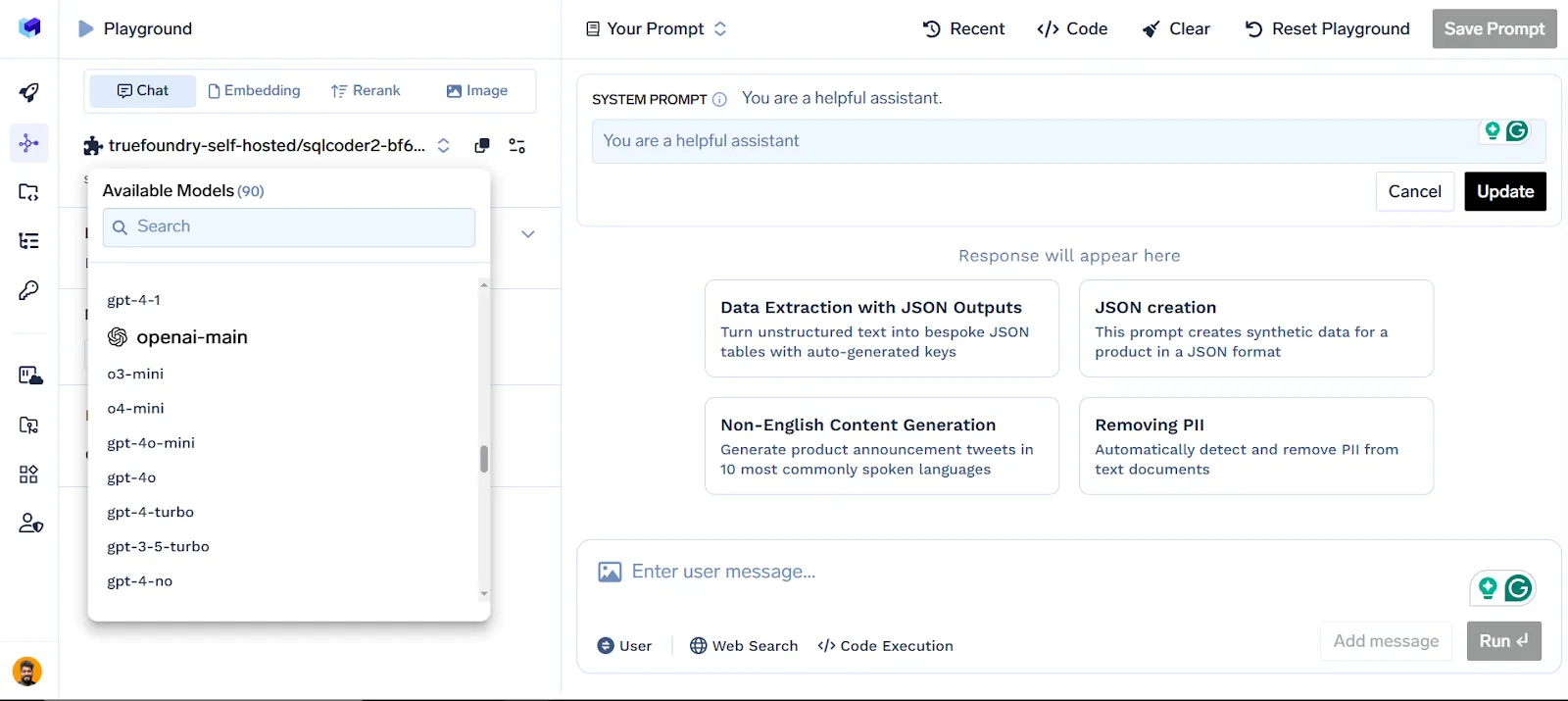
Zentrales LLM-Management: Verbinden und verwalten Sie mehrere Modellanbieter wie OpenAI, Anthropic und Hugging Face von einem Dashboard aus.
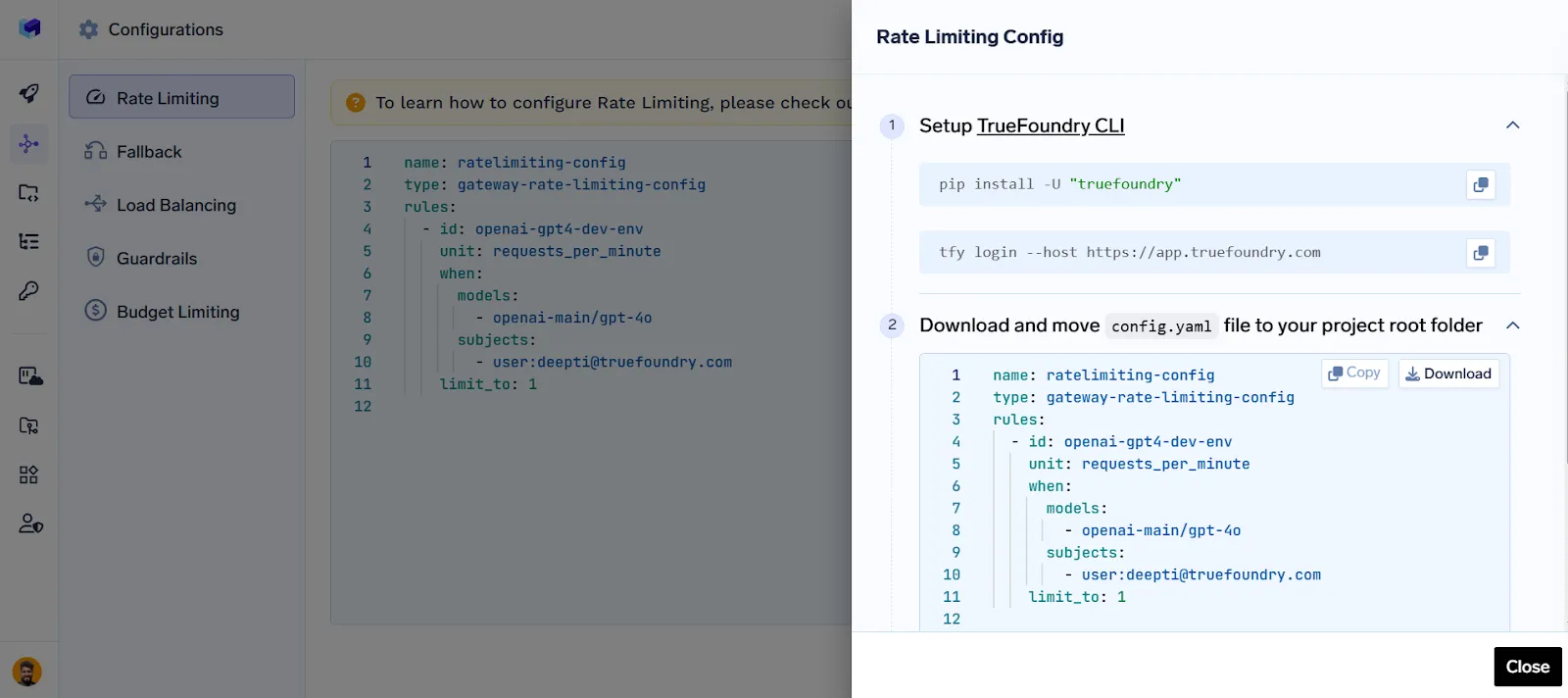
Routing, Ratenbegrenzung, Fallback, Guardrails und Load Balancing: Optimieren Sie den Anforderungsfluss, kontrollieren Sie die Nutzung, sorgen Sie für sichere Ausgaben, wechseln Sie bei einem Ausfall zu Backups und verteilen Sie den Datenverkehr modellübergreifend.
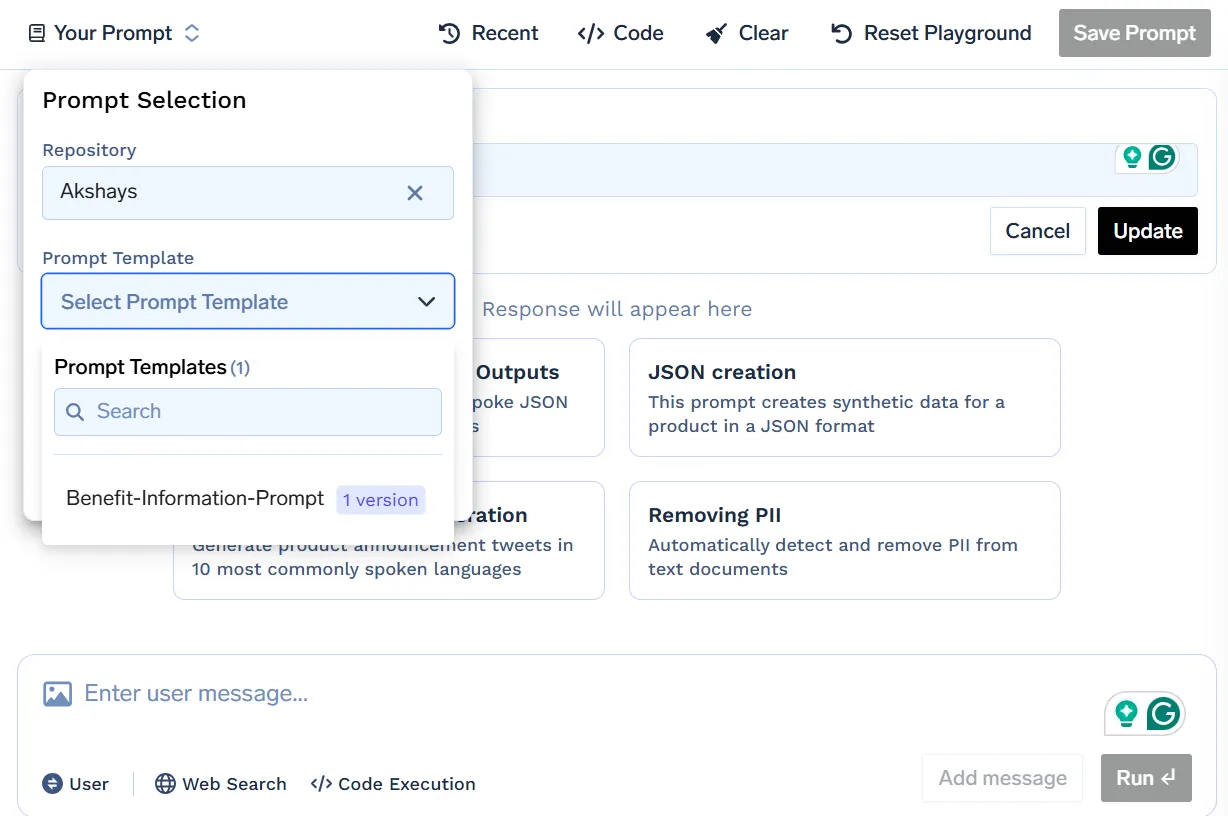
Prompte Verwaltung: Versionier-, Test- und Rollback-Eingabeaufforderungen ohne Unterbrechung Ihres Live-Systems.
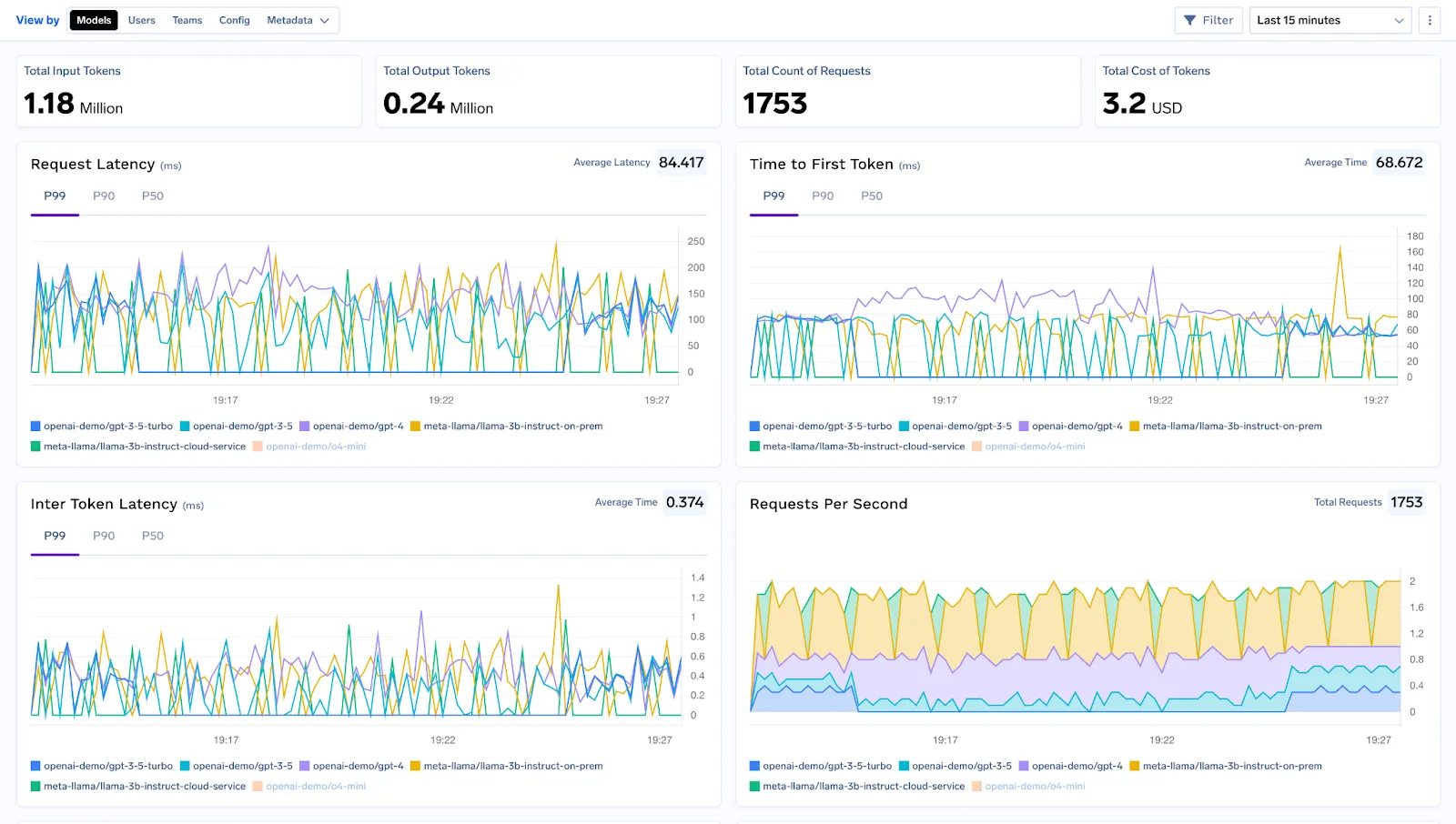
Beobachtbarkeit, Tracing und Debugging: Überwachen Sie Latenz, Token-Nutzung und Fehlerraten in Echtzeit und verfolgen Sie jede Anfrage in Ihrem Workflow, um das Debuggen und Optimieren zu vereinfachen.
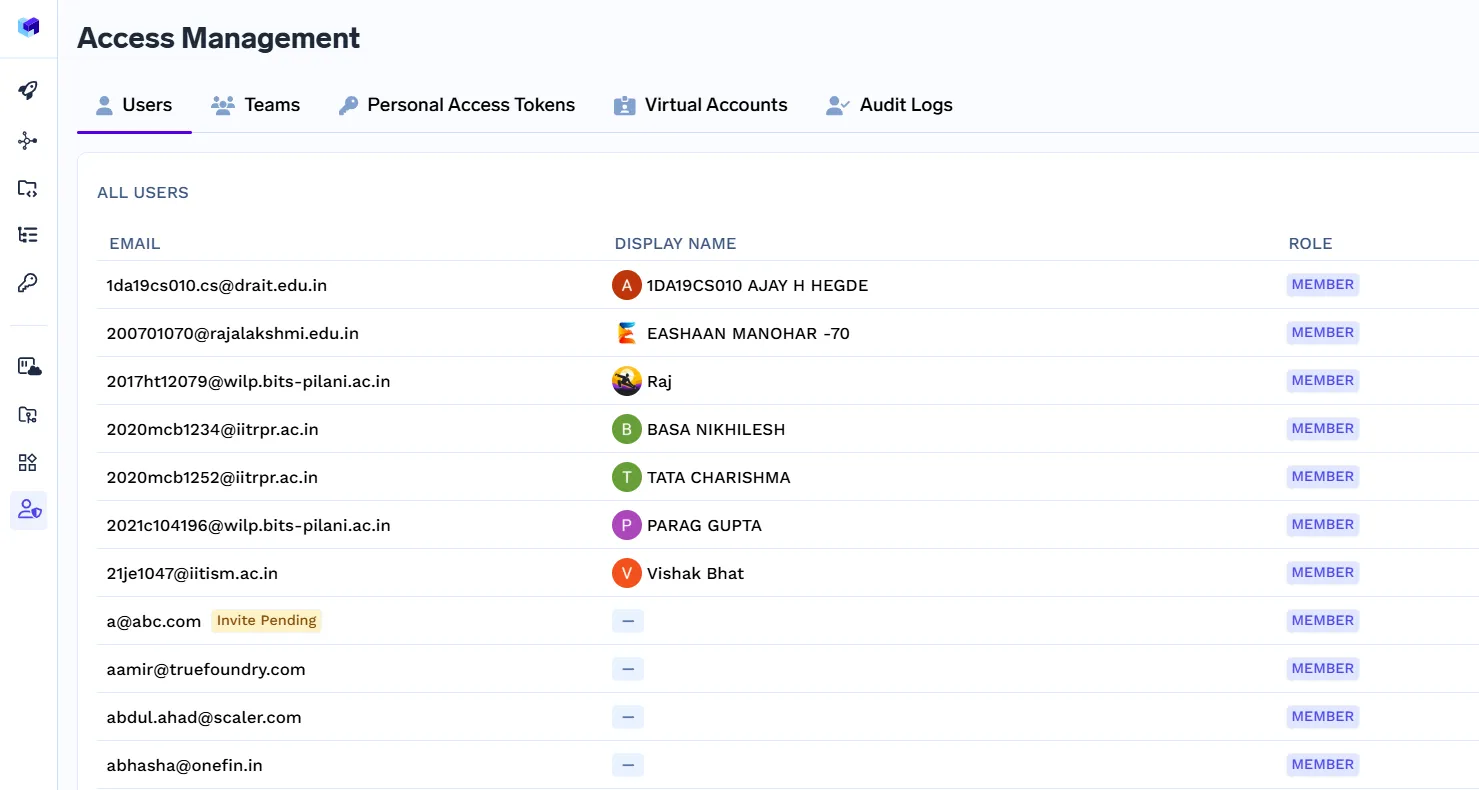
Zugriffskontrolle, RBAC und Compliance: Definieren Sie mithilfe der rollenbasierten Zugriffskontrolle, wer auf die Ressourcen zugreifen kann, und verwalten KI-Sicherheit auf Unternehmensebene und Regierungsführung.
Wahre Gießerei unterstützt sofort über 250 LLMs und bietet Ihnen maximale Flexibilität. Es wurde für eine Leistung auf Produktionsniveau entwickelt und bietet Caching, Ratenbegrenzung und erweiterte Analysen. Egal, ob Sie eine einfache LangChain-Sequenz oder ein komplexes LangGraph-Agentennetzwerk ausführen, es lässt sich nahtlos integrieren.
Mit unternehmensgerechten Compliance-, Data Governance- und Sicherheitsfunktionen stellt TrueFoundry sicher, dass Ihre LLM-Workflows nicht nur funktionsfähig, sondern auch robust, skalierbar und sicher sind.
Sowohl LangChain als auch LangGraph sind leistungsstarke Tools zum Erstellen von LLM-gestützten Anwendungen, die sich jeweils in unterschiedlichen Szenarien auszeichnen. LangChain ist ideal für einfachere, lineare Workflows, die von schnellem Prototyping und umfassenden Integrationen profitieren, während LangGraph für komplexe, adaptive und statusbehaftete Agentensysteme konzipiert ist. Die Wahl des richtigen Produkts hängt von der Komplexität und den langfristigen Zielen Ihres Projekts ab. Unabhängig von Ihrer Wahl stellt die Kombination dieser Frameworks mit TrueFoundry als KI-Gateway sicher, dass Ihre Workflows sicher, effizient und produktionsbereit sind. Mit der richtigen Kombination können Sie mit Zuversicht vom Konzept zu robusten, skalierbaren KI-Lösungen übergehen.
Nein. LangGraph und LangChain dienen unterschiedlichen Zwecken. LangChain ist für lineare, schrittweise LLM-Workflows und schnelles Prototyping optimiert, während LangGraph für dynamische, statusbehaftete Workflows mit mehreren Agenten konzipiert ist. Jedes hat seine eigene Nische, und das eine ersetzt das andere nicht. Sie können sich in komplexen Systemen gegenseitig ergänzen.
Ja. LangGraph kann unabhängig arbeiten, um graphbasierte Workflows, Systeme mit mehreren Agenten und zustandsbehaftete Prozesse zu verwalten. LangChain-Komponenten können zwar für bestimmte Aufgaben integriert werden, Sie benötigen LangChain jedoch nicht, um Anwendungen in LangGraph zu erstellen oder auszuführen, sodass es flexibel für komplexe Workflows ohne lineare Abhängigkeiten ist.
Nein. LangGraph wurde von derselben Organisation entwickelt, die hinter LangChain steht, ist jedoch ein separates Framework. Es konzentriert sich auf grafbasierte Orchestrierung und Workflows mit mehreren Agenten. Obwohl sie einige Integrations- und Design-Philosophien gemeinsam haben, wird LangGraph unabhängig verwaltet und verfügt über eigene Tools wie LangGraph Studio und LangSmith.
Nicht unbedingt. Sie können direkt mit LangGraph beginnen, insbesondere wenn Ihre Anwendung komplexe Workflows, Loops oder eine Orchestrierung mit mehreren Agenten erfordert. Eine Vertrautheit mit LangChain kann jedoch helfen, modulare LLM-Komponenten, Prompt-Chaining und grundlegende Workflows zu verstehen, was das Erlernen von LangGraph für Hybrid-Setups beschleunigen kann.
Die Komplexität von LangGraph kann für einfache Projekte eine Einschränkung sein. Es hat eine steilere Lernkurve als LangChain, und kleinere Workflows können aufgrund seiner Graphstruktur überdimensioniert sein. Darüber hinaus erfordert die Orchestrierung mit mehreren Agenten eine sorgfältige Zustandsverwaltung, Planung und Überwachung, weshalb sie sich weniger für das schnelle Prototyping eignet.
Nein. LangGraph ist kein Superset von LangChain. Es unterstützt zwar fortgeschrittene Workflows, die LangChain nicht effizient bewältigen kann, enthält jedoch nicht automatisch alle linearen Workflow-Dienstprogramme oder vorgefertigten Konnektoren von LangChain. Es handelt sich um ergänzende Frameworks, die jeweils für bestimmte Workflowtypen und Anwendungsfälle optimiert sind.
Der LangChain-Speicher ist implizit und modular, typischerweise für die kurzfristige Aufbewahrung von Kontexten wie dem Chatverlauf. Andererseits ist der LangGraph-Speicher explizit und gibt Entwicklern die volle Kontrolle über die Statusverfolgung, den Multi-Agent-Kontext und lang andauernde Workflows. LangGraph-Speicher eignet sich besser für komplexe, adaptive Systeme, während LangChain-Speicher für lineare, einfachere Aufgaben geeignet ist.
TrueFoundry AI Gateway bietet eine Latenz von ~3—4 ms, verarbeitet mehr als 350 RPS auf einer vCPU, skaliert problemlos horizontal und ist produktionsbereit, während LiteLM unter einer hohen Latenz leidet, mit moderaten RPS zu kämpfen hat, keine integrierte Skalierung hat und sich am besten für leichte Workloads oder Prototyp-Workloads eignet.





Die neuesten Nachrichten, Artikel und Ressourcen werden in Ihren Posteingang gesendet


.webp)

.png)
.png)
.png)

.png)
.png)
.png)
.png)
.png)
.png)
.png)
.png)


