


November 6, 2026
|
5 min read


.png)
Blazingly fast way to build, track and deploy your models!
The OWASP Top 10 for Large Language Model Applications is a consensus list of the most critical security risks in LLM-backed software, maintained by the OWASP GenAI Security Project. The current version is the 2025 list at genai.owasp.org/llm-top-10. The v1.1 list from 2023/24 is still archived there and still widely quoted - so if a post mentions Model Theft or Overreliance, it is describing the retired version.
The 2025 list as OWASP publishes it:
What changed shows where attention moved. System Prompt Leakage and Vector and Embedding Weaknesses are new. Model Denial of Service became the broader Unbounded Consumption. Insecure Plugin Design folded into supply chain and excessive agency as tooling settled around protocols like MCP. Model Theft dropped off entirely.
This is the part most write-ups skip. The Top 10 lists risks, and a risk is not a product feature. Four belong to the inference path, where a gateway sits. Three belong to application code. Three belong to pipelines a gateway never sees.
Four squarely in scope, three partials, three needing an owner elsewhere. If your AI security framework has a gateway row for LLM04 and LLM08, that row is decorative.
A gateway covers LLM01, LLM02, LLM06, and LLM10 well because all four are request-path problems: they happen the moment a prompt goes out or a tool fires, which is the only moment a gateway sees. The rest were decided weeks earlier, in a training run or an indexing job.
Treating the list as a compliance checklist. OWASP publishes a risk taxonomy with mitigation guidance, not a certification. There is no OWASP LLM Top 10 audit and no body that issues a pass. A matrix claiming all ten are “covered” by one tool is written to survive a meeting, not an attack.
Putting output validation in the wrong place. LLM05 is about what your application does with model output. A gateway can flag that a response contains os.system or an unescaped script tag. It cannot stop your service feeding that string into a shell. The control belongs where output is consumed; the gateway check is defence in depth.
Assuming injection detection is prevention. Detection is a classifier, classifiers have false negatives, and attackers iterate against them. The durable mitigation for LLM01 is to assume injection occasionally succeeds and make that survivable - which is really an LLM06 problem. Narrow the tool surface and a successful injection reaches a model with nothing dangerous to call.
Ignoring LLM10 as a billing concern. An agent stuck in a loop is a denial-of-service against your own budget, and high-volume querying is how model extraction works. It is the easiest entry to close, and the most commonly left open.
TrueFoundry’s AI Gateway implements these controls as guardrails on hooks in the request path. There are four, and which risks you can address depends on which hook you are on.
For LLM requests: input, before the prompt reaches the model, and output, after it responds.
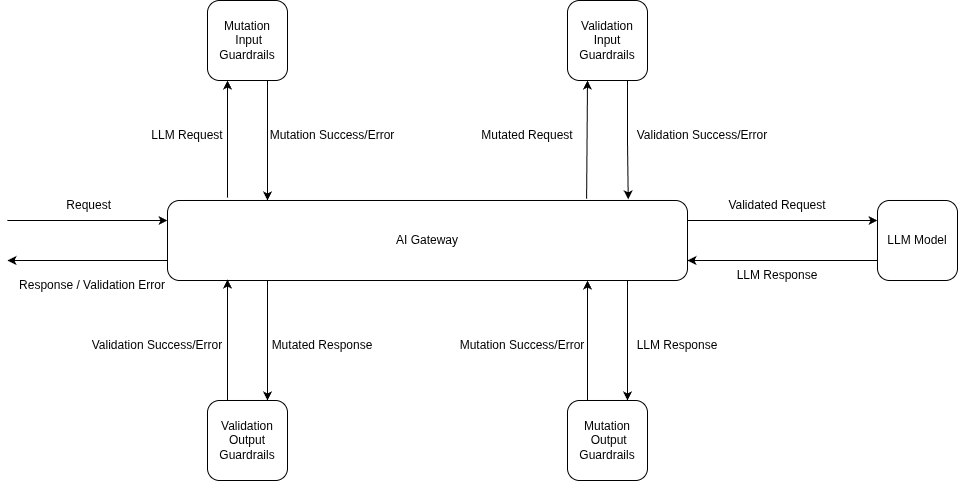
For MCP tool calls: mcp_pre_tool, before the tool executes, and mcp_post_tool, after it returns.
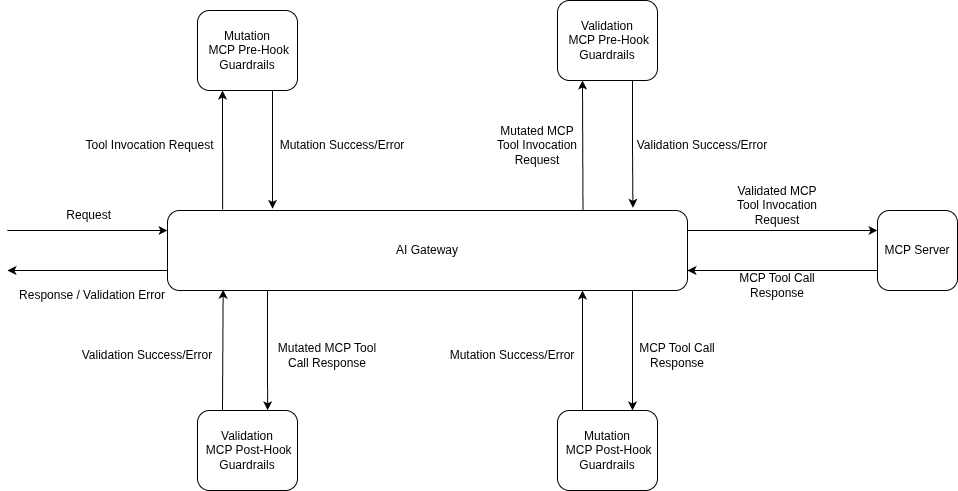
Those MCP hooks make the owasp mcp question tractable. Guardrails run on every tool call separately - five tools in a row means five sets of checks. A pre-tool failure means the tool never runs; a post-tool failure withholds the result.
Each guardrail has an operation mode - validate inspects and can block, mutate also rewrites - and an enforcement strategy covering violations and guardrail errors:
The built-in Prompt Injection guardrail is powered by Azure Prompt Shield and managed by TrueFoundry, with no third-party keys. It analyses the user prompt and any document or context content separately, so indirect injection hidden in a retrieved document is caught alongside a direct “ignore all previous instructions”. Validate-only. Add it from the Guardrails section:
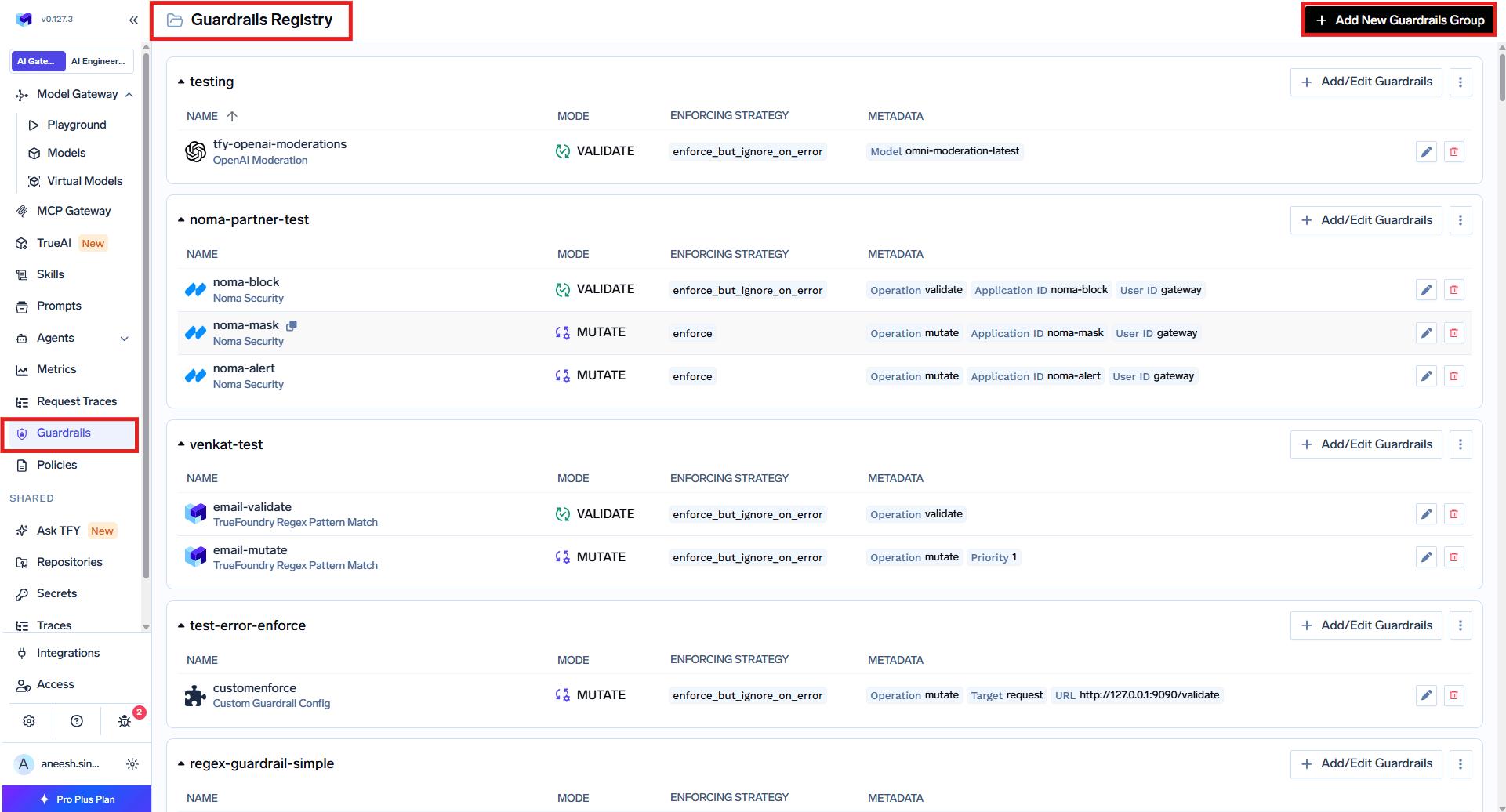
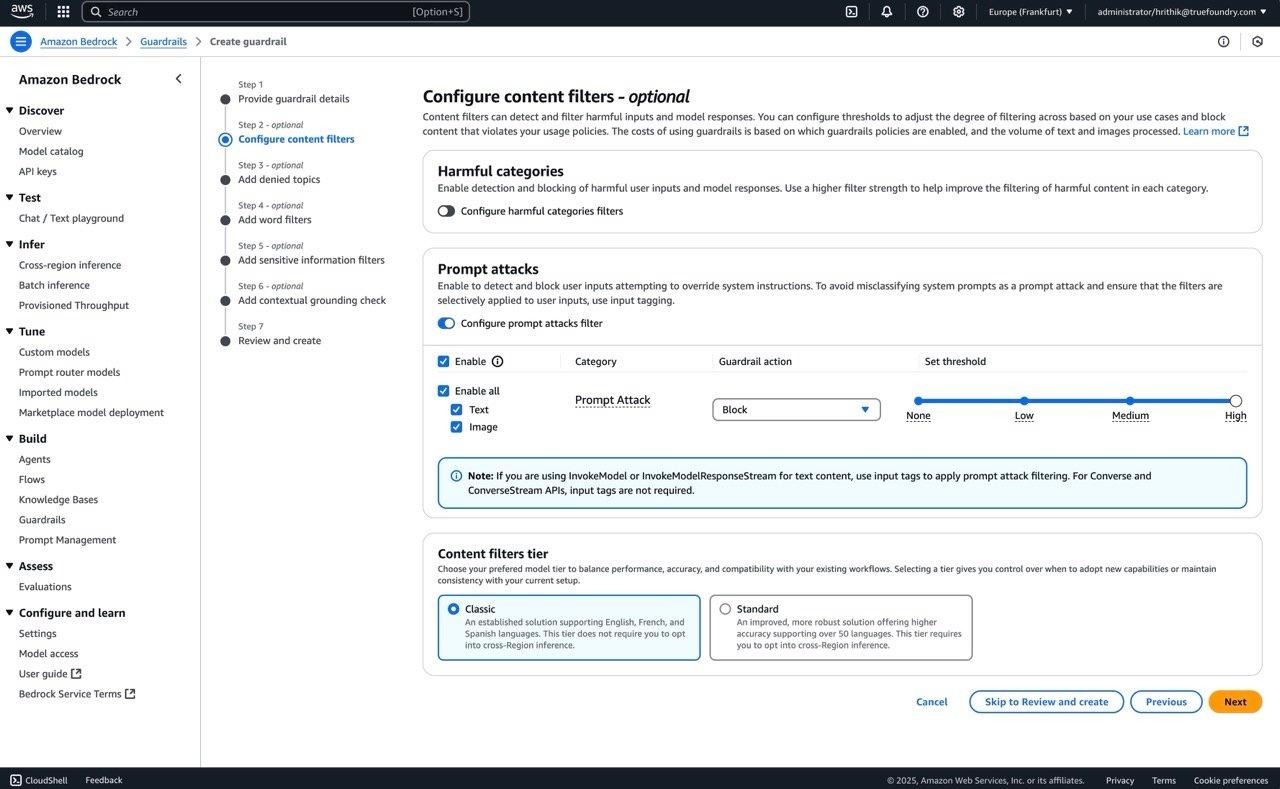
It runs on LLM Input and MCP Pre Tool, where it looks for injection inside tool parameters. To use your own vendor credentials, AWS Bedrock Guardrails does the same job - enable Prompt Attack, set the action to Block, register it:
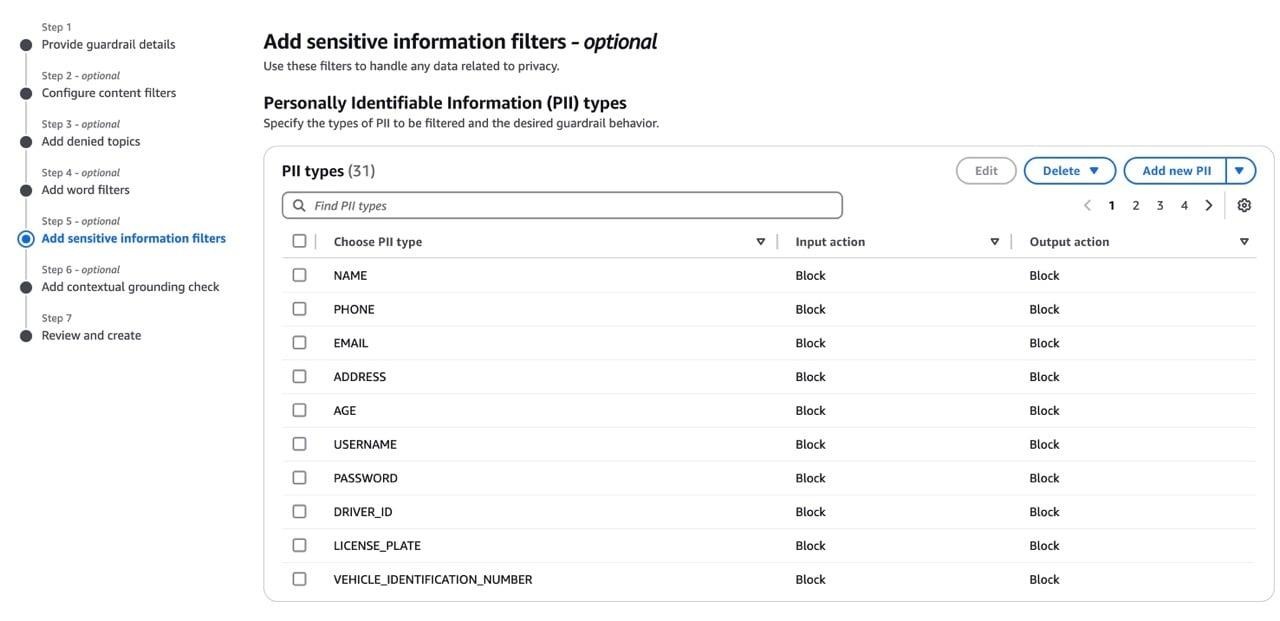
Two built-ins cover most of this. PII / PHI Detection finds names, addresses, SSNs, and medical record numbers with configurable entity categories. Secrets Detection catches AWS keys, OpenAI and Anthropic API keys, GitHub and GitLab tokens, JWTs, private keys, database connection strings, and high-entropy strings near keywords like api_key.
Secrets Detection is the one to understand: it is the only built-in running on all four hooks, and each catches a different failure.
It runs inside the gateway with no external API calls, and in mutate mode replaces findings with configurable text, ***REDACTED*** by default. For PII on self-hosted deployments, Azure PII with your own key, Presidio via a custom guardrail, or Bedrock’s filter all work.
This is where the MCP hooks earn their place. SQL Sanitizer catches DROP, TRUNCATE, DELETE or UPDATE without a WHERE, and string interpolation. Code Safety Linter flags eval, exec, os.system, subprocess calls, and dangerous shell commands. Cedar and OPA apply fine-grained, default-deny policy to MCP tool calls.
Underneath sits the access model, the larger half of LLM06: tools can be disabled so they never appear in tools/list, sensitive calls can require an MCP Server Approver, and per-user OAuth means the upstream system evaluates the acting user’s real permissions rather than a shared token’s. Our MCP access control post covers that layer.
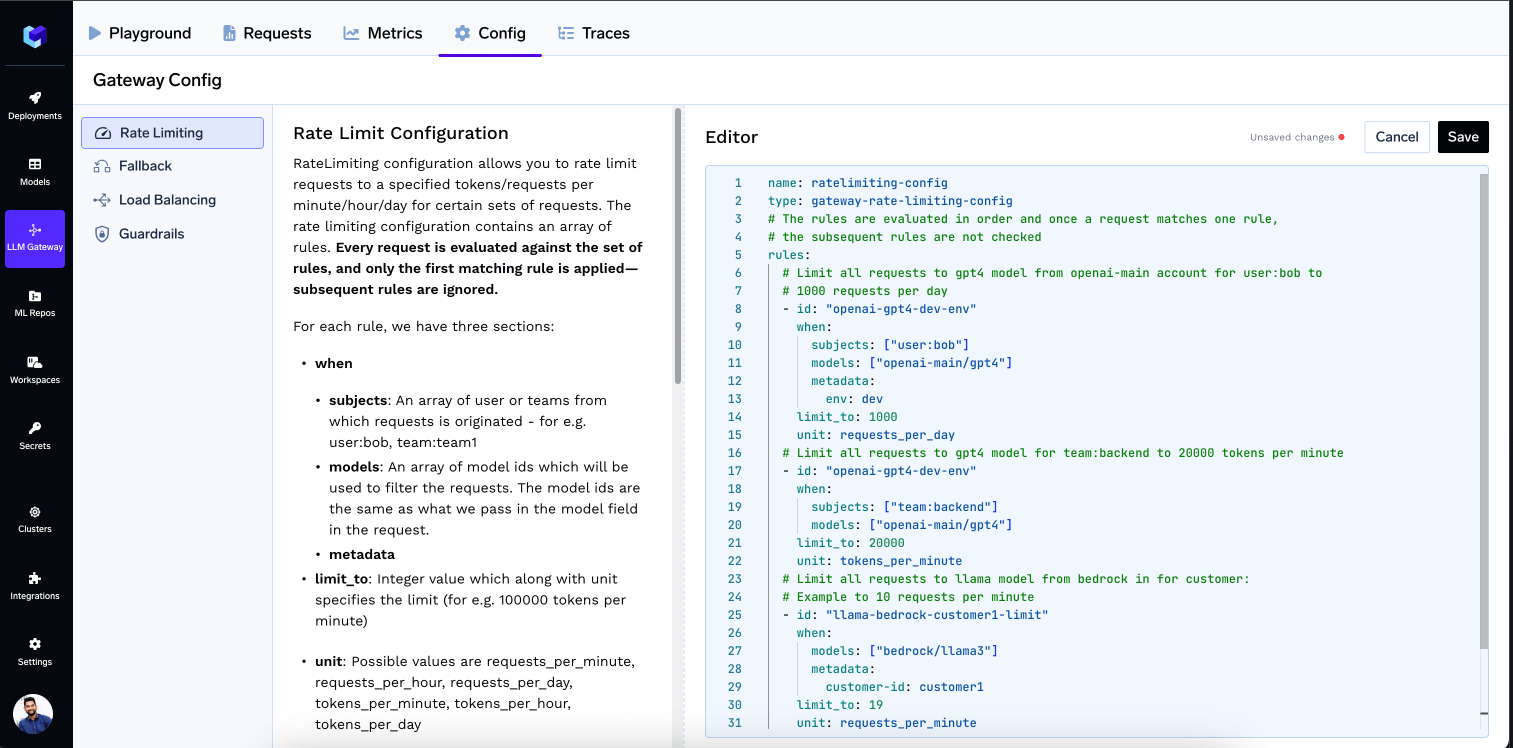
Not a guardrail at all - this is rate limiting and budget configuration, and the most complete coverage on the list. Rules match on subject, model, or metadata and cap requests or tokens per minute, hour, or day:
name: ratelimiting-config
type: gateway-rate-limiting-config
rules:
  - id: "user-daily-limit"
    when: {}
    limit_to: 1000000
    unit: tokens_per_day
    rate_limit_applies_per: ['user']
rate_limit_applies_per accepts user, virtualaccount, model, or metadata.*, up to two per rule, so each entity gets its own counter instead of competing for a shared one. Enforcement uses a sliding window; an exceeded limit returns HTTP 429 with an x-tfy-applied-rules header naming the rule:
LLM09 Misinformation is partly addressable through external providers - Patronus AI and Fiddler offer hallucination and response-faithfulness evaluators on the output hook. Treat them as signal, not fix.
LLM05 Improper Output Handling gets Code Safety Linter and Secrets Detection on the output hook. Neither replaces validation in your own code.
LLM03, LLM04, and LLM08 are where we stop. Supply chain is a procurement and build-pipeline problem; the only gateway contribution is controlling which models and MCP servers exist in your registry. Poisoning happens during training. Vector weaknesses live in a RAG pipeline the gateway does not sit in. If a vendor says otherwise, ask which hook the control runs on.
Take a support agent that reads customer tickets and queries a production database over MCP. Four of the ten risks are live, needing four different controls.
Step one - register the guardrails. Create a guardrail group and add Prompt Injection, PII Detection, and Secrets Detection. If no built-in fits, use a Custom Guardrail pointing at your own HTTPS endpoint:
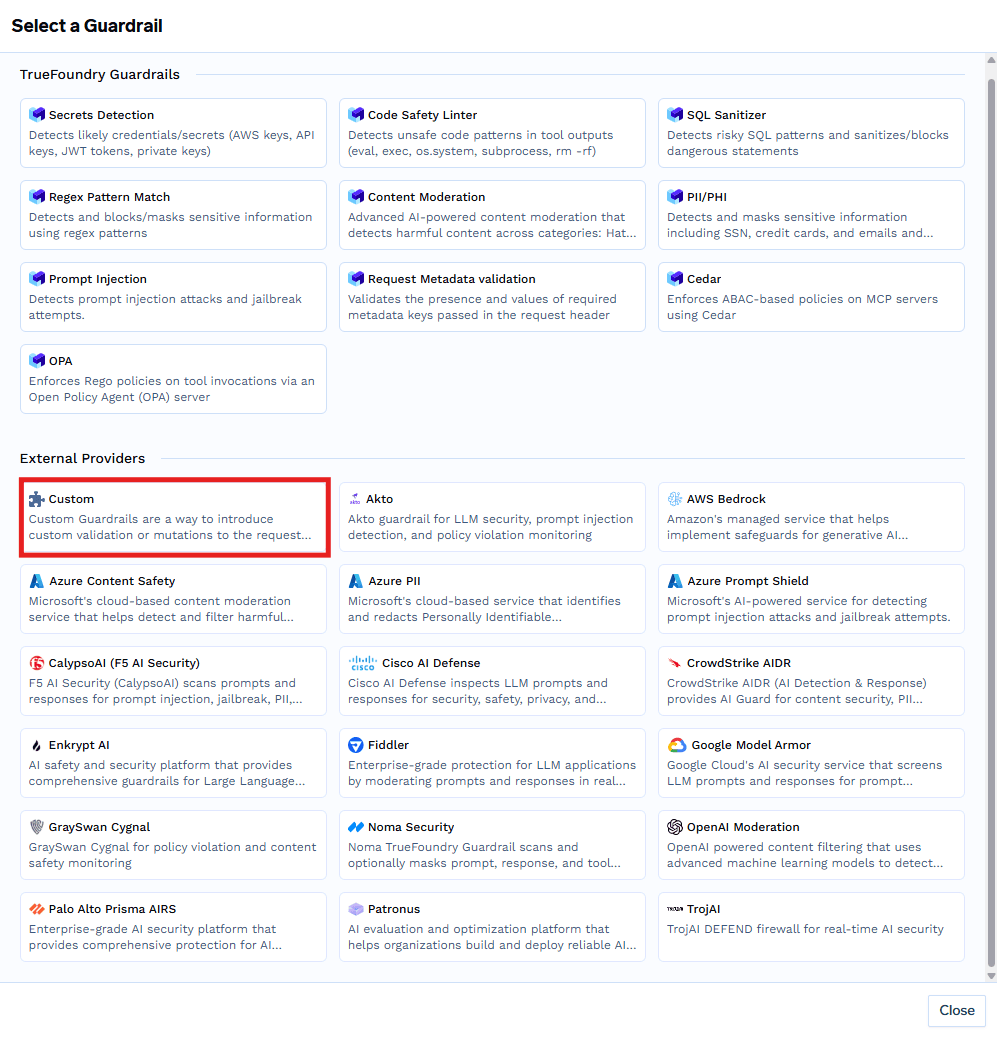
A custom guardrail receives the OpenAI-shaped requestBody, a config object set in the form, and a context carrying the calling subject. For MCP tool guardrails, context.metadata also carries a claims object with verified claims from the caller’s JWT, so you can authorise by application or scope:
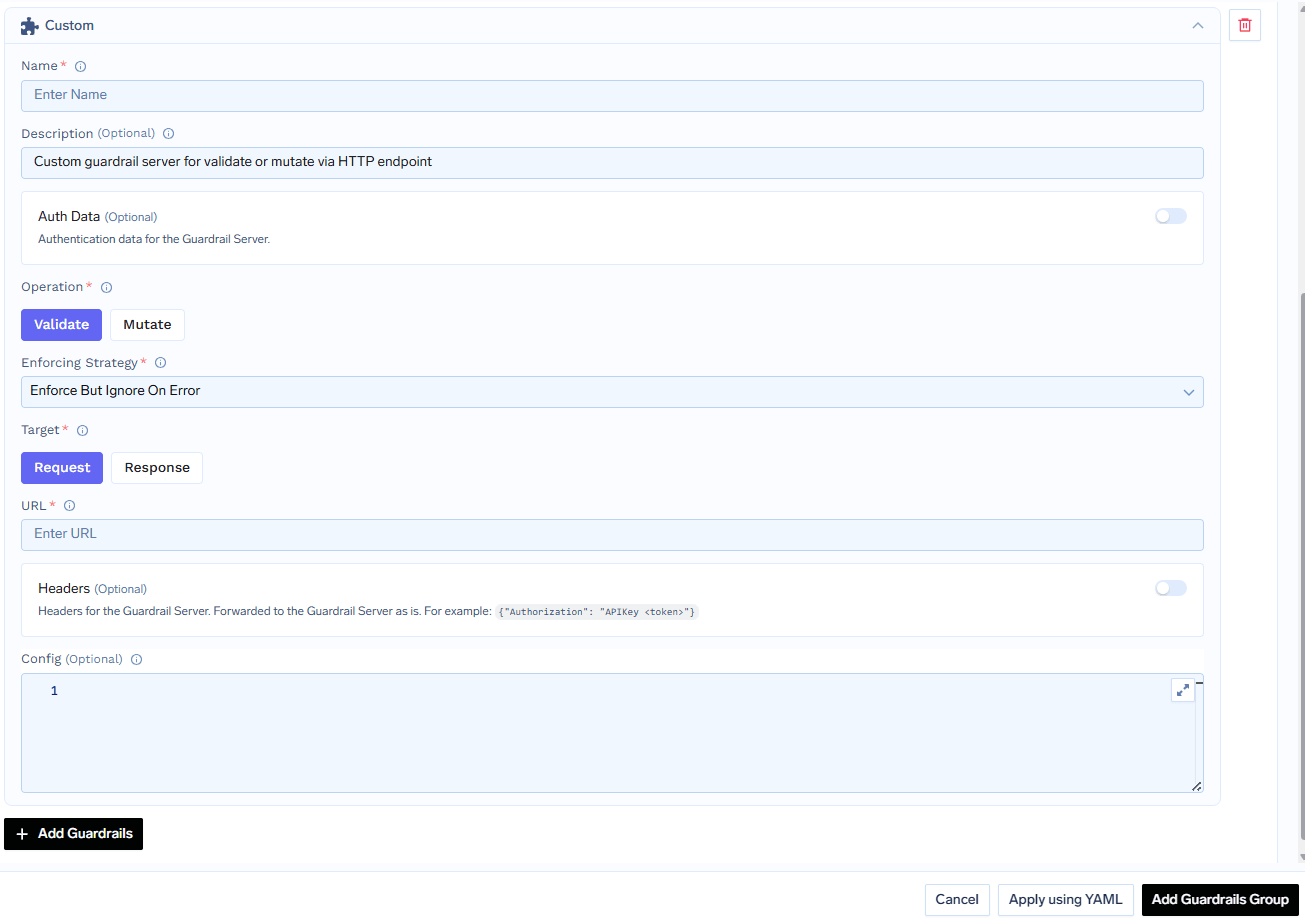
One contract detail catches people: return HTTP 2xx with verdict: false to deny. A 400 reads as a runtime error, and under enforce_but_ignore_on_error the request is allowed through.
Step two - write the policy. Registering a guardrail does not apply it to anything. In Policies → Guardrails, create a rule saying which guardrails run on which hooks, for which models, MCP servers, subjects, and metadata.
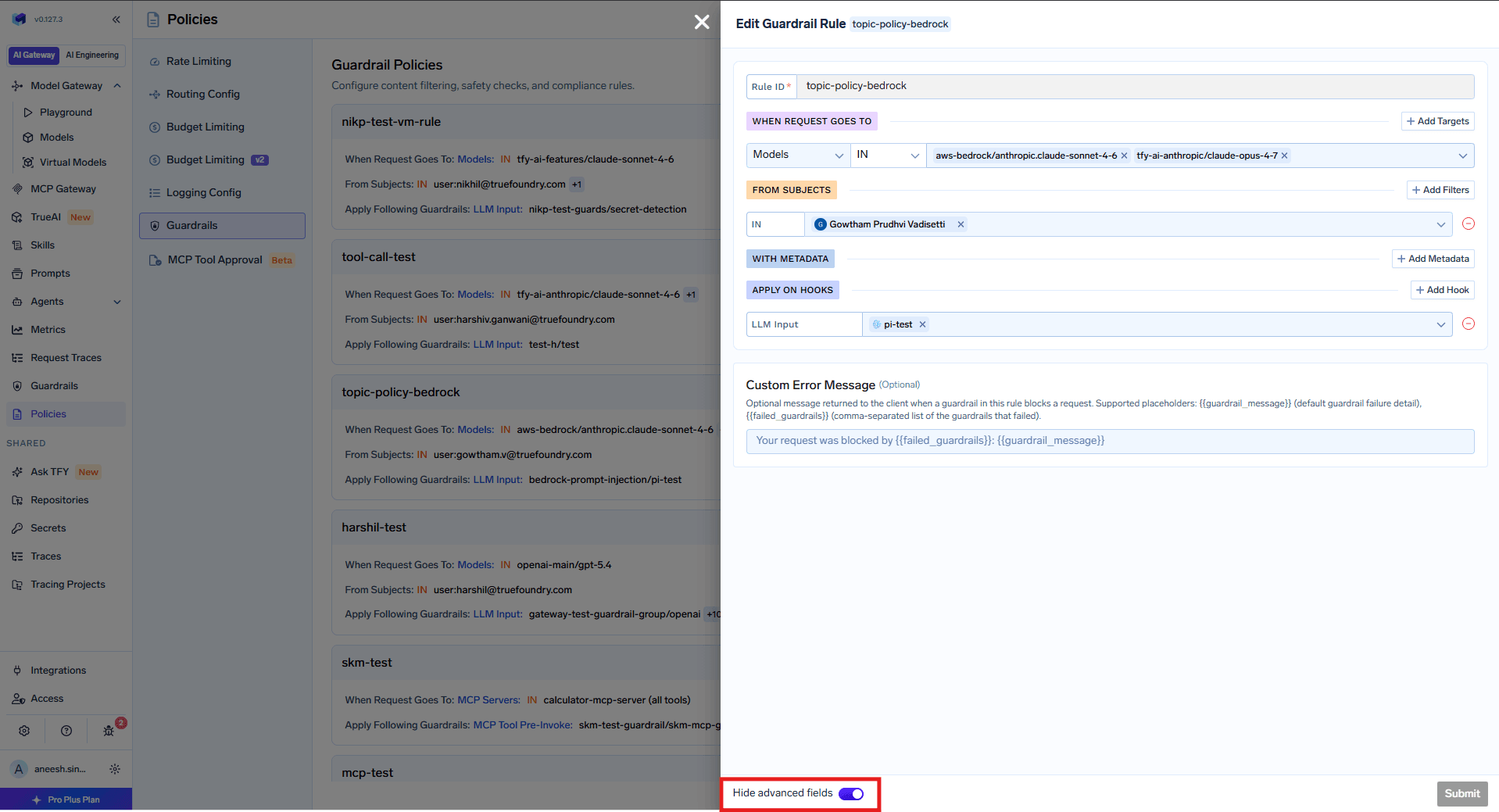
For this agent: Prompt Injection on LLM Input (LLM01); PII Detection on Input and Secrets Detection on Output (LLM02); SQL Sanitizer on MCP Pre-Invoke and Secrets Detection on Post-Invoke (LLM06). A rate limit rule with rate_limit_applies_per: ['user'] closes LLM10.
All rules are evaluated per request and matching ones merge per hook, so a baseline rule plus a stricter production rule both apply. A Custom Error Message using {{failed_guardrails}} beats raw provider output.
Step three - watch it before you trust it. Start every guardrail in Audit. Each appears as its own span in Monitor → Request Traces, with latency, result, scope, and findings:
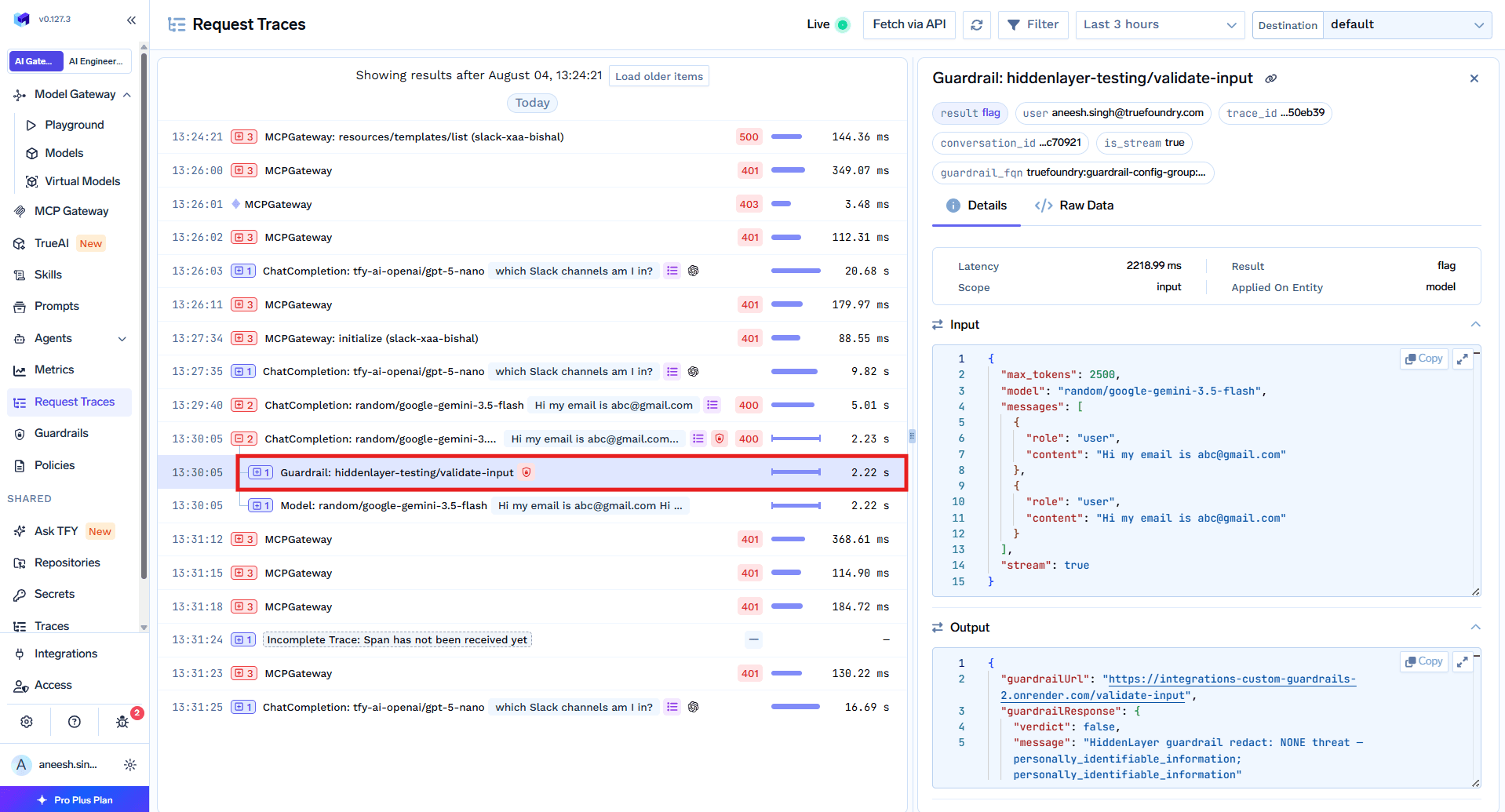
Then move to Enforce But Ignore On Error, which blocks violations without letting a provider outage take your app down. Use full Enforce only where compliance requires it.
Output guardrails do not run on streamed responses. When stream: true they are skipped entirely - evaluating a response needs the complete text, and streaming delivers tokens as generated. That matters for LLM02 and LLM05 coverage, because the chat interface everyone ships streams by default. Either set stream: false where output checks matter, validate client-side, or accept that your output-hook controls are inactive there. Input guardrails are unaffected.
System prompts are excluded from guardrails by default. The gateway strips them before sending content to any guardrail, so they are never inspected, blocked, or redacted. CrowdStrike AIDR is the one exception - it sees the system prompt but never modifies it. Worth knowing for LLM07: the gateway watches for the exfiltration attempt on the way in and secrets on the way out, not the prompt itself.
Where validation failures cost money. Input validation runs in parallel with the model request; if it fails the gateway cancels the in-flight call so you do not pay. Output validation runs after the response arrives - the block protects your user, but the tokens are spent.
Three built-ins are SaaS-only. Content Moderation, PII / PHI Detection, and Prompt Injection are unavailable on self-hosted deployments. Alternatives exist - Azure Prompt Shield or Palo Alto Prisma AIRS for injection, Azure PII or CrowdStrike for PII, OpenAI Moderations or Bedrock Guardrails for moderation - but they need your own credentials.
The OWASP LLM Top 10 is a good list badly used. As a taxonomy it tells you what can go wrong and roughly in what order to care. As a checklist to tick off with one purchase, it produces a control matrix that looks complete and defends nothing.
The useful question is not “does this product cover the Top 10” but “which of these ten happen in the request path, and is anything watching there”. Four do. A gateway is the right place for those four, and the only place you can enforce them once across every model, team, and agent instead of asking ten application teams to each get it right.
For the other six, find the owner. Supply chain belongs to whoever approves models. Poisoning belongs to whoever runs training. Vector weaknesses belong to whoever built the index. Write their names next to the risks. That document is worth more than any vendor’s coverage claim, including ours.
TrueFoundry AI Gateway delivers ~3–4 ms latency, handles 350+ RPS on 1 vCPU, scales horizontally with ease, and is production-ready, while LiteLLM suffers from high latency, struggles beyond moderate RPS, lacks built-in scaling, and is best for light or prototype workloads.




A consensus list of the ten most critical security risks in LLM applications, from the OWASP GenAI Security Project. The current version is the 2025 list: prompt injection, sensitive information disclosure, supply chain, data and model poisoning, improper output handling, excessive agency, system prompt leakage, vector and embedding weaknesses, misinformation, and unbounded consumption. It is guidance, not a certification - there is no audit to pass.
No. A gateway sits in the request path, so it addresses request-path risks well: prompt injection, sensitive information disclosure, excessive agency, and unbounded consumption. It partly helps with improper output handling, misinformation, and supply chain. Poisoning and vector weaknesses happen in training and retrieval pipelines a gateway never touches.
Mostly through LLM06 Excessive Agency and LLM01 Prompt Injection. An MCP tool call is where a compromised prompt turns into a real action, so the controls that matter sit on the tool path: a mcp_pre_tool hook validating arguments before execution, a mcp_post_tool hook cleaning results before the model sees them, tool-level allowlisting, and approval on destructive calls. TrueFoundry runs guardrails on every tool call separately, not once per conversation.
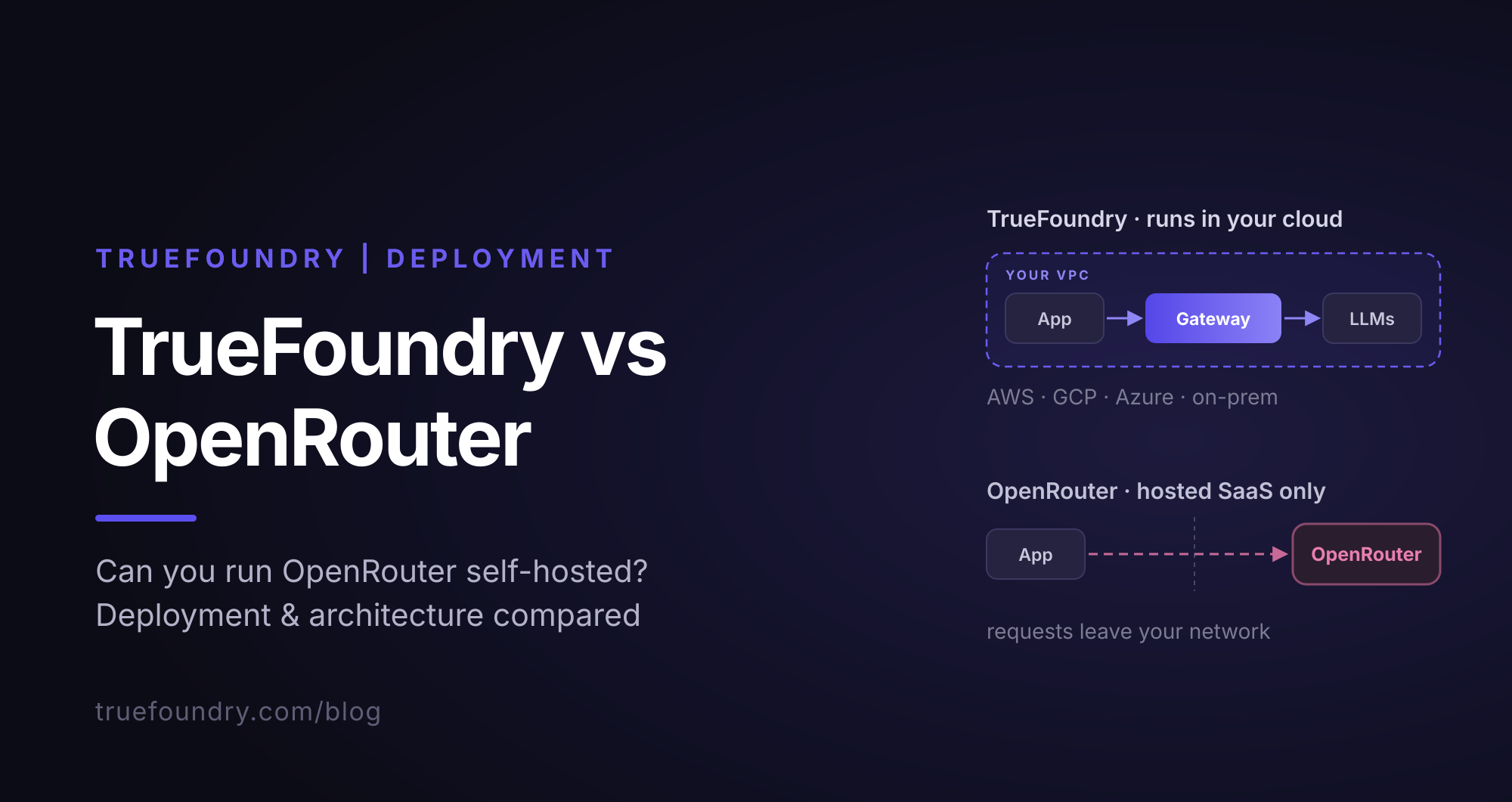
Yes. TrueFoundry runs in your VPC, on-prem, air-gapped, or hybrid, so prompts and responses never leave your domain even as you route across many providers.
Yes. It includes an MCP Gateway, an Agent Gateway, and an MCP & Agents Registry with tool-level access control. Agents on LangGraph, CrewAI, AutoGen, or a custom framework can all be governed centrally.
Yes. The gateway is OpenTelemetry-compliant and plugs into Grafana, Datadog, Prometheus, or your preferred stack. It traces every request from prompt to tool and model execution, so you get unified logging without ripping out what you already run.



The latest news, articles, and resources sent to your inbox


.png)
.png)
.png)
.png)
.png)
.webp)
.webp)
.png)


