November 5, 2026
|
5 min read


.png)
Blazingly fast way to build, track and deploy your models!
Fine grained authorization is about the size of the thing you are deciding on, not the mechanism you decide with. Coarse authorization asks “can this identity use the AI gateway?” Fine grained authorization asks “can this identity call the delete_issue tool on the Linear MCP server, right now, for this person?”
The shift runs along four independent dimensions, worth separating because they cost different amounts:
Most writing on fine grained access control collapses these into one slider labelled “more secure” and turns it up. That is the mistake. Subject and action granularity are nearly free — a user instead of a group, one permission instead of a bundle, costs nothing at review time. Resource and occasion granularity are where the bill arrives.
Granularity is also orthogonal to the RBAC-versus-ABAC choice. Plain roles express very fine permissions if you scope bindings tightly, and attribute policies can be hopelessly coarse. The model is how you decide; granularity is what you decide about.
The arithmetic. Forty engineers and one gateway-wide permission gives an access review 40 states to confirm. Scope it per resource across 12 MCP servers and you have 480. Go per tool at 25 tools a server and you have 12,000 cells. Add per-invocation approval and the object of review stops being a grid — it becomes an event log.
Nobody audits 12,000 cells. What happens instead is the real risk of over-granularity:
So the constraint is answerability. At any rung you should answer three questions without running a job: who can reach this resource, what can they do to it, when did they last do it. Break that and you have bought precision with visibility.
This is also why least privilege permissions and maximum granularity are not the same goal. Least privilege grants no more authority than the job requires; it does not say slice it as thinly as the system allows. A role holding exactly the seven permissions a job needs is least privilege. Seven hundred separate grants adding to the same authority is just expensive.
Four rungs, coarse to fine, each with a specific job. The rule is to sit on the lowest rung that contains the risk.
Two properties make it a ladder, not a menu.
The rungs compose downward, not sideways. Rung 3 only matters for identities that passed rung 2, and a disabled tool is unreachable whatever role someone holds. You can be generous at a coarse rung and strict at a fine one, and the strictness holds.
Each rung is a different shape of record. Rungs 1 and 2 are tables you read. Rung 3 is a list you diff against last quarter. Rung 4 is a log you sample. Treating rung 4 like a table is how teams end up with two hundred policies nobody can summarize.
Using rung 1 to do rung 2’s job. The most common error by far. Someone needs one MCP server, so they get a tenant-wide role containing mcp-server:ReadMcpServer — which reaches every MCP server in the tenant. The grant looks narrow because the permission list is short. It is not.
Climbing to rung 4 to dodge a conversation about rung 2. Approval policies are attractive because they defer the decision. But a gate on a tool the wrong people can reach at all is a gate in front of an open door. Fix the binding first.
Treating tool-level toggles as a boundary against untrusted callers. Disabling a tool removes it from discovery and blocks invocation — right against an agent that would otherwise pick something dangerous off a long list. It does not replace the upstream system’s own permissions on the credential.
Never revisiting the fine rungs. Coarse grants get reviewed because they are conspicuous. A tool enabled for a one-off migration eight months ago is invisible. Audit enabled-tool lists on the cadence you audit roles.
TrueFoundry implements all four rungs. A subject (user, team, virtual account, or agent) plus a resource plus a role is a role binding, managed independently of resource config — so you change who can reach something without redeploying it.
Three tenant roles are built in: Admin (full control, not editable), Member (the editable default baseline), and Read-Only Member (read-only, also fixed).
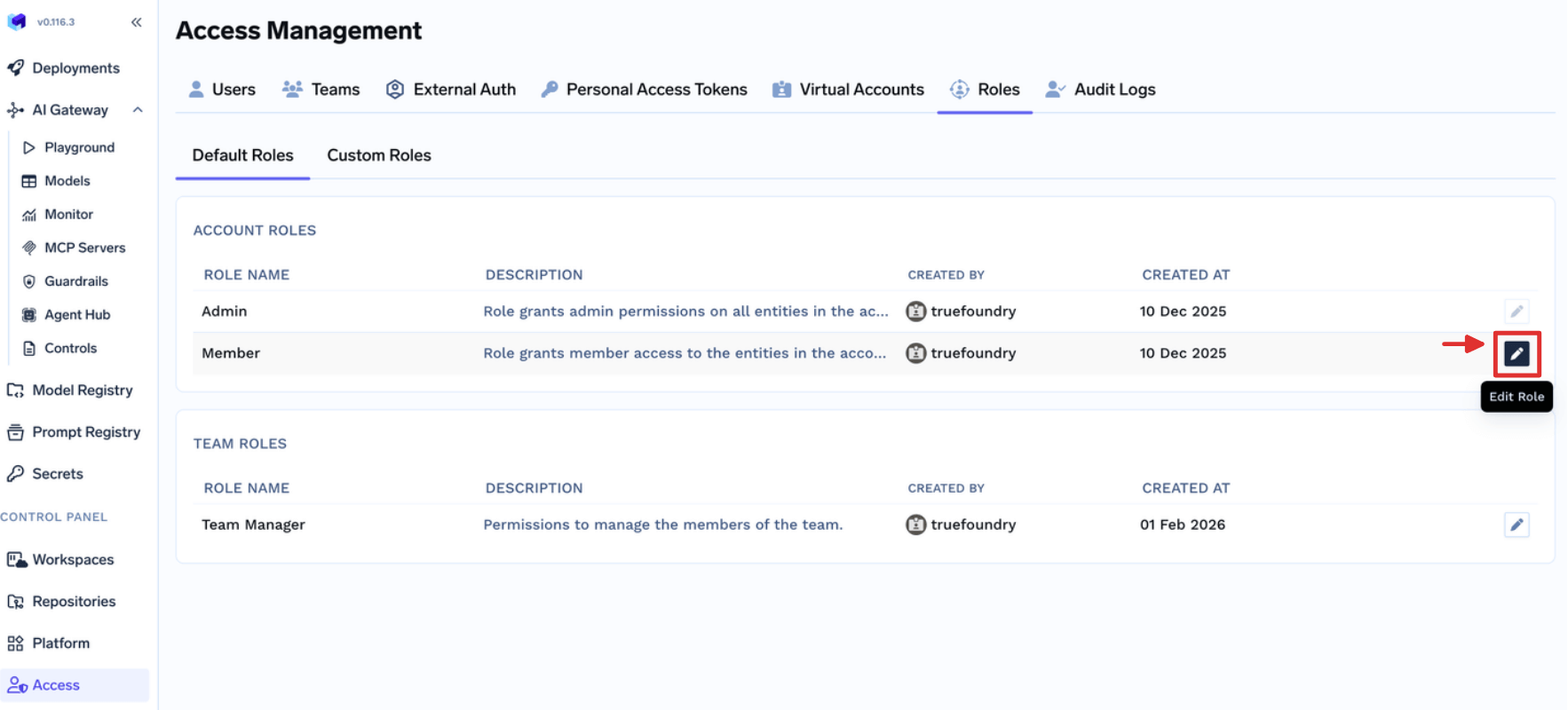
When those are too broad or too narrow, build a custom role from Access > Custom Roles. The catalog is the substance of fine grained permissions here: every entry is a resource:Action key grouped by resource type, and the naming tells you what granularity exists before you design anything.
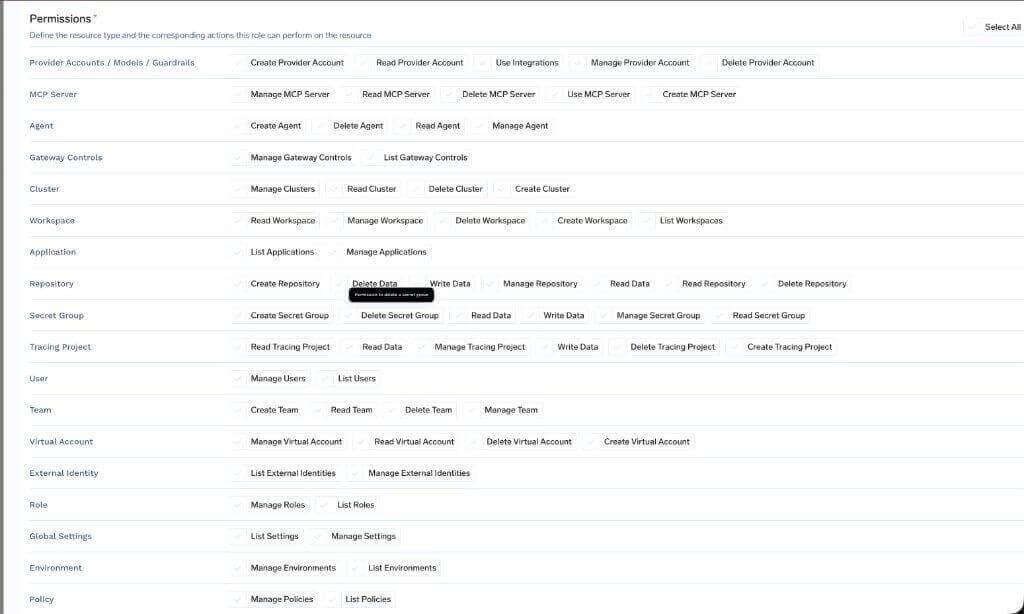
Creating an MCP server and managing one are separate keys. Those splits give an authorization model design its usable resolution.
One rule governs this rung: custom-role permissions apply across all resources of the selected type. For a single resource, use that resource’s Access Control page. Getting this backwards is the rung-1-doing-rung-2’s-job failure above.
Open the resource’s three-dot menu and select Access Control.

Choose subjects and a role. The drawer lists the actions each role includes, so you see the grant first.
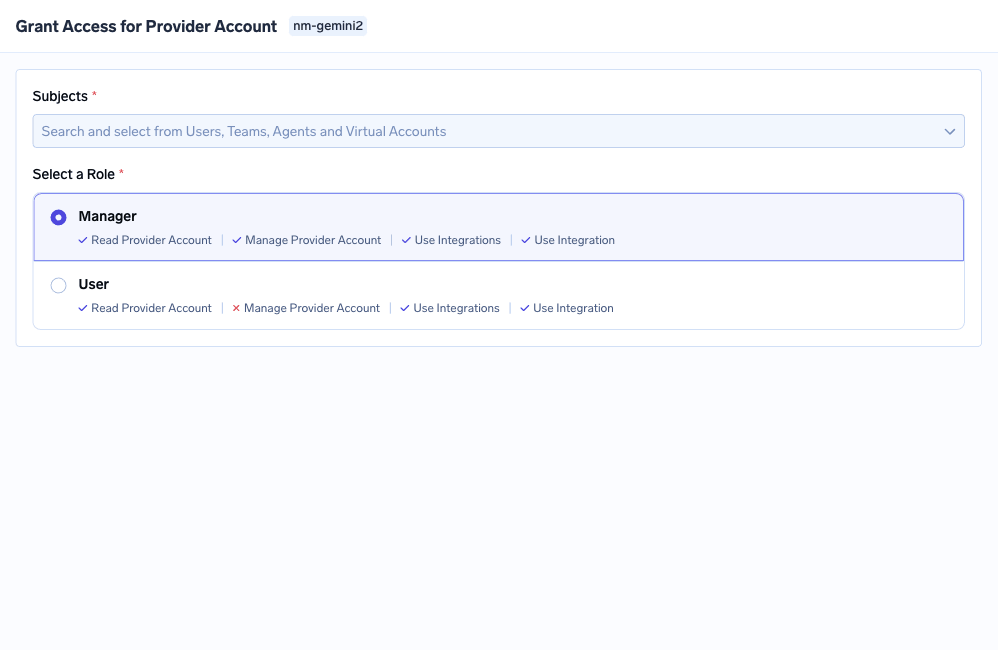
Roles depend on the resource: Manager and User on a provider account; MCP Server Manager, MCP Server User, and MCP Server Approver on an MCP server; Agent Manager and Agent Access on an agent; admin, member, and viewer tiers on clusters and workspaces. Granting to a team beats granting to a person — future joiners inherit it, and the grants table stays short enough to read. The MCP access control model is built on this rung.
This is the rung teams reach for last and agents need most. On a Remote or TrueFoundry-managed MCP server, the Tools tab controls which tools are callable.
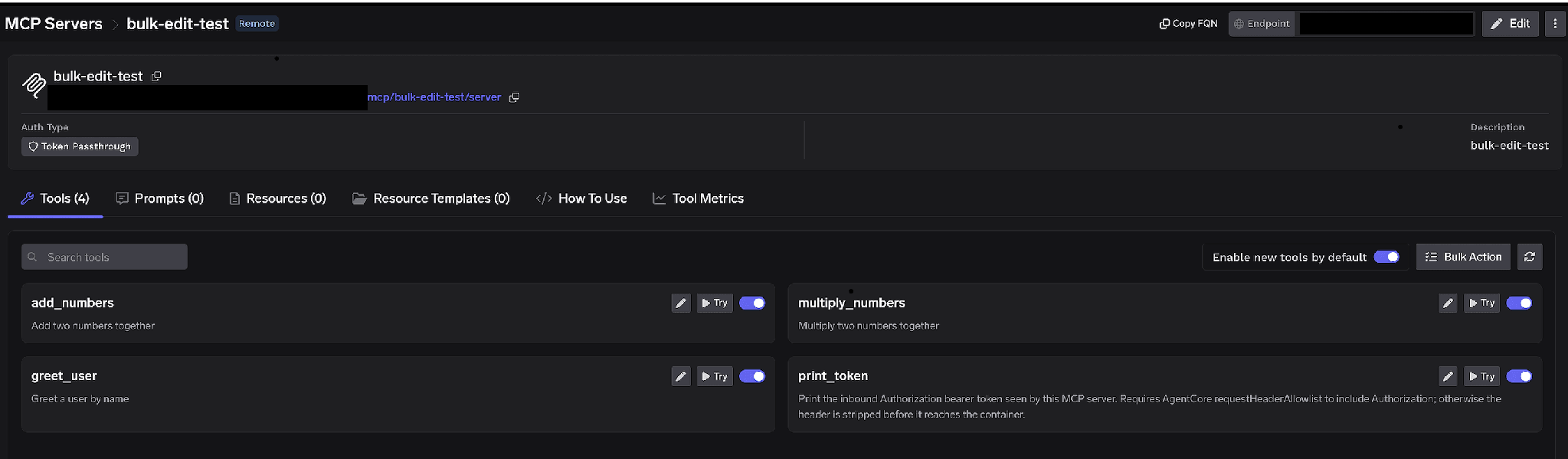
Disabled tools are omitted from tools/list responses and cannot be invoked. Both halves count: the model cannot choose what it never sees, and the gateway refuses the call if something asks anyway.
The Enable new tools by default toggle sets the baseline, and it is a real design choice. On, the list is a denylist and new vendor tools appear automatically. Off, it is an allowlist and new upstream tools stay hidden until someone enables them. Allowlist is right for anything touching production.
Edit Tool does something subtler. Alongside a description override, you set MCP Tool Annotations to None, Read-only, or Destructive, which sets readOnlyHint or destructiveHint.
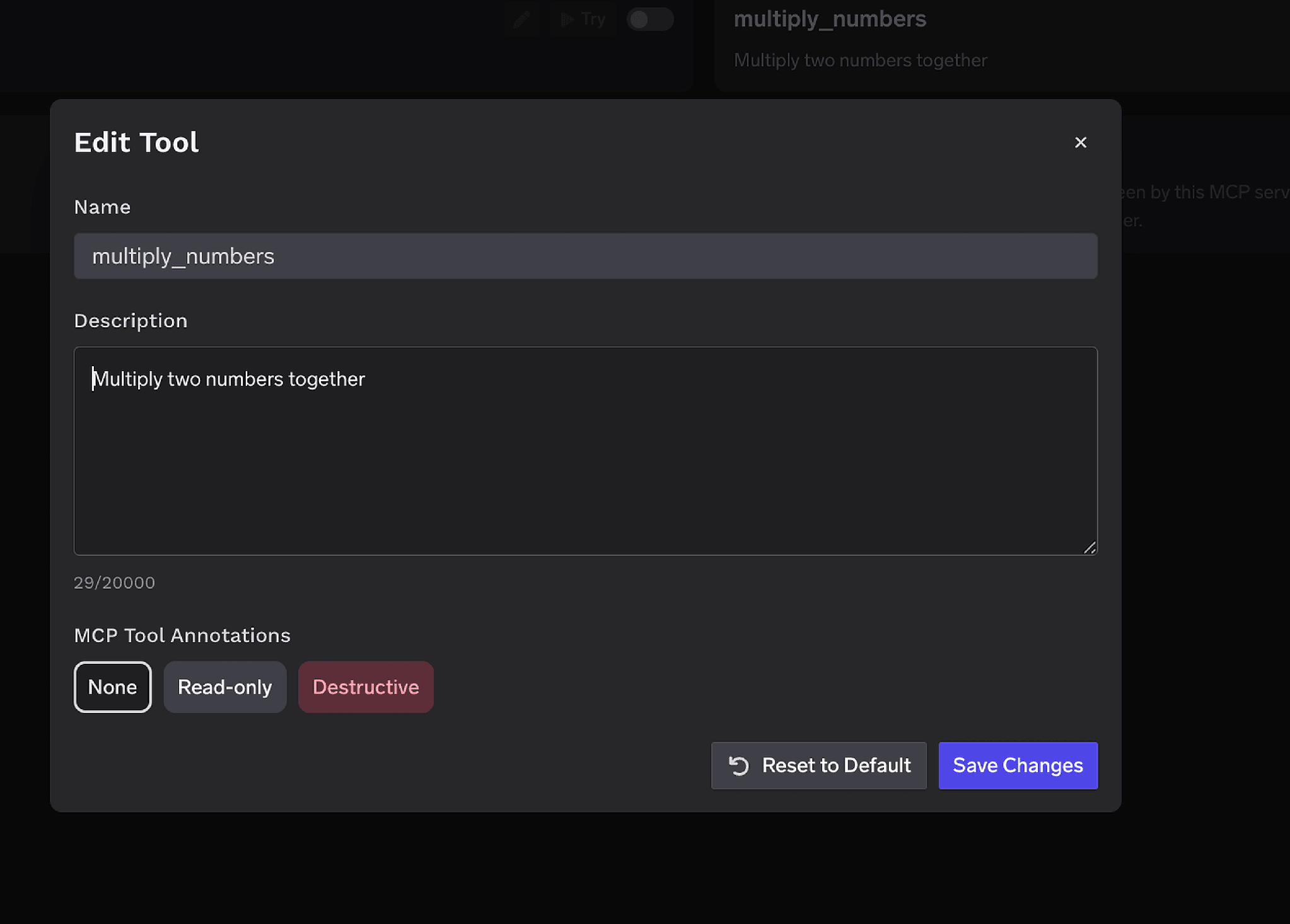
That annotation is the label rung 4 reads, so a one-time classification becomes ongoing policy without naming tools twice.
Tool approval policies hold a gated tools/call at the gateway, create a pending request, and notify approvers. The tool does not execute. Once approved, calls succeed for a validity window, then a fresh approval is needed.
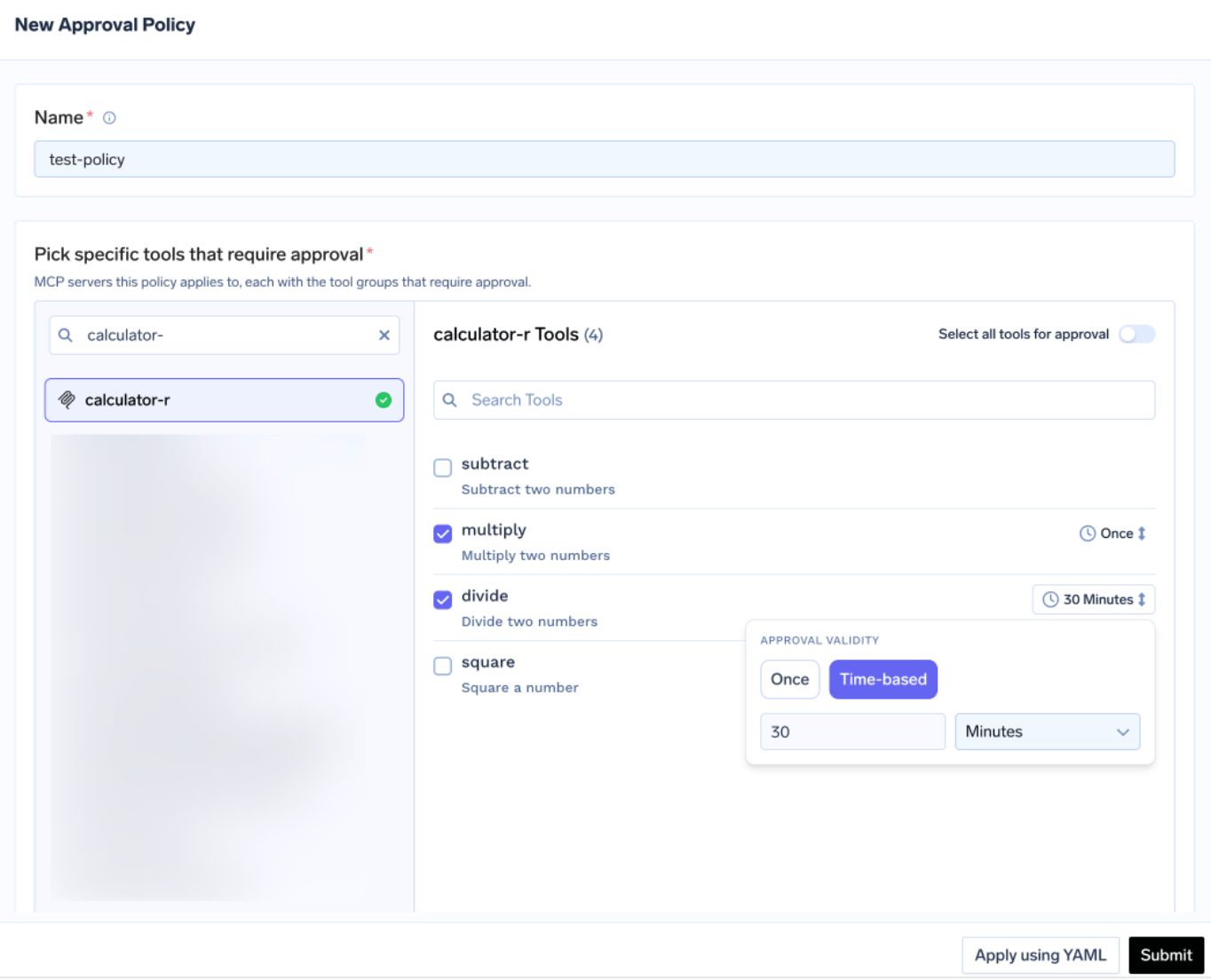
Two dials set the granularity, and both have documented precedence rules:
Grants are scoped to the requester plus the specific server and tool, and are not shared between users. Approvers work from Pending Requests, which shows the tool, policy, requester, validity window, and tool arguments.
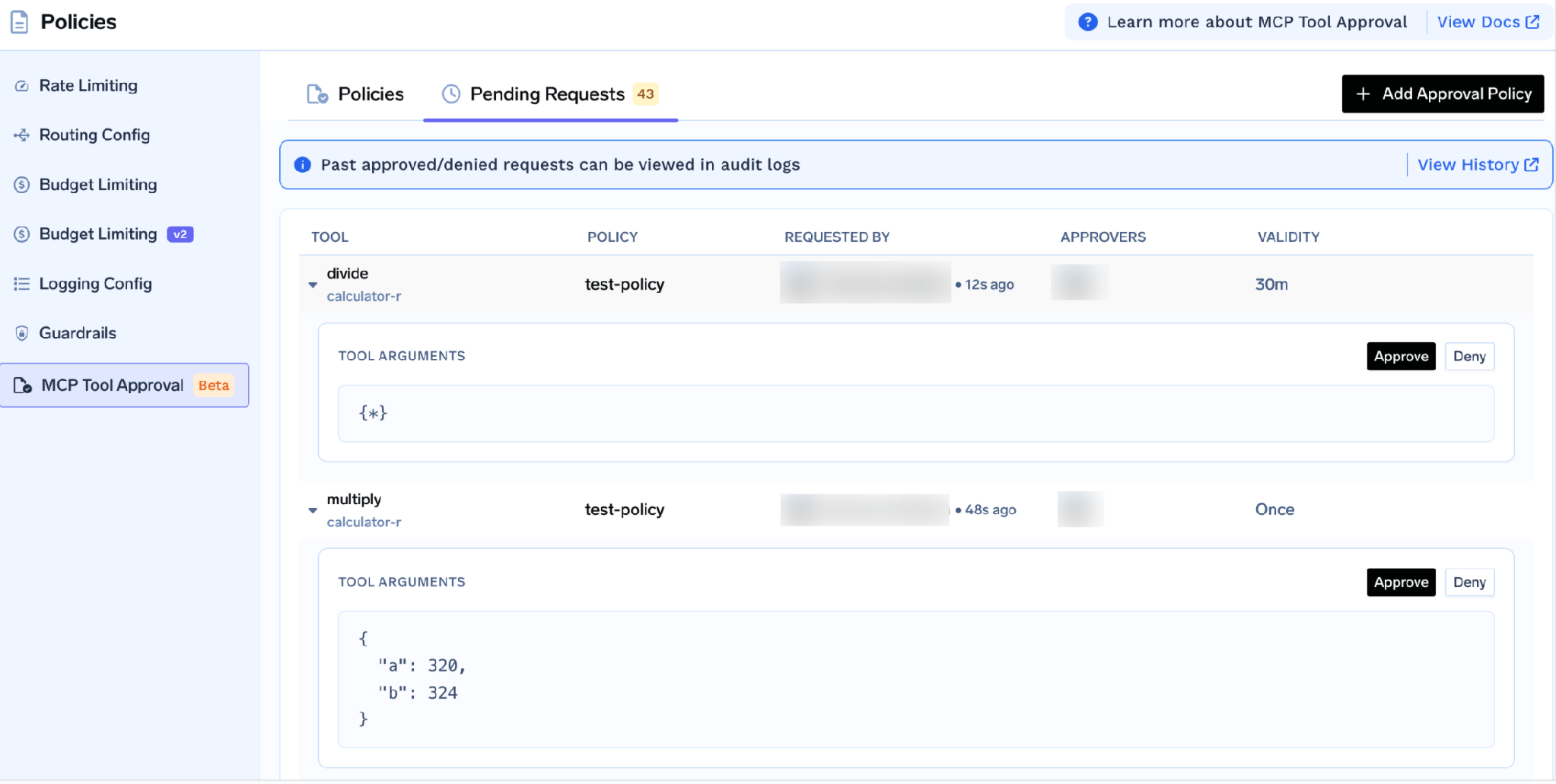
Who can do what here is itself split across rungs. Only tenant administrators create, update, or delete policies. Approving or denying needs tenant admin or the MCP Server Approver role on that server, added from its Collaborators list.
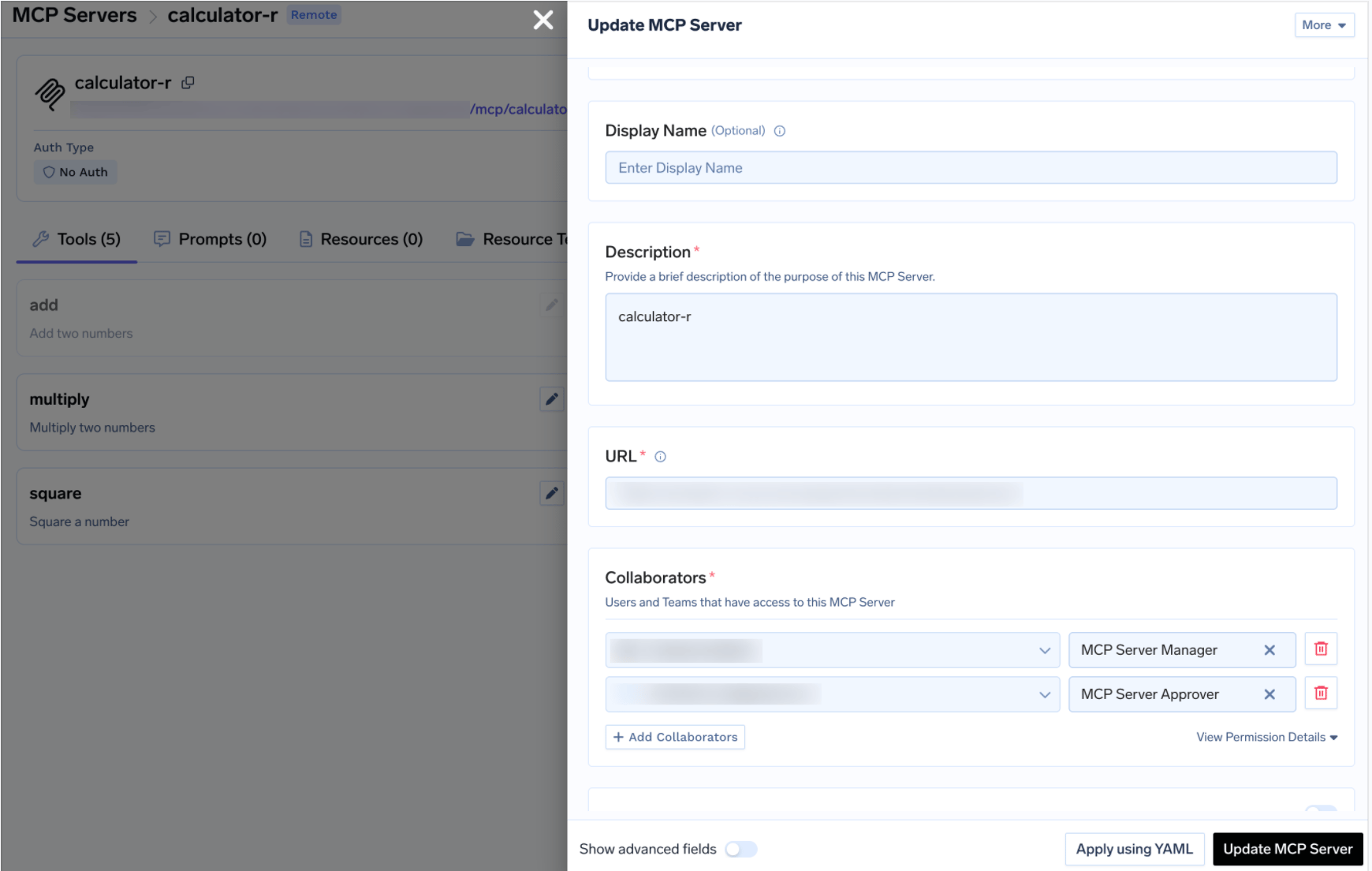
If a server named by a policy has no Approver collaborators, only tenant administrators can decide — a quiet way to funnel every approval to three overloaded people.
One honest limit: a denial is not a block. It is recorded, and the next call raises a new request. To durably stop access, go back down the ladder — remove the subject’s access to the server, or disable the tool. Rung 4 governs occasions, not authority.
Secret groups show most clearly why action granularity earns its keep, because the thing to separate is seeing a value from depending on one.
A secret group organizes related secrets so you manage access once, not per secret. When you save a secret the value goes to your own secret manager — AWS SSM, GCP Secret Manager, HashiCorp Vault, Azure Vault — and TrueFoundry stores a fully-qualified name (FQN) you reference from deployments, volume mounts, integrations, and gateway model API keys.
That indirection is the mechanism: a deployment consuming a secret by FQN needs no human to have read the value. That makes this split real, not cosmetic:
The Viewer row is the payoff. Someone can see that stripe-live-key exists here — enough to review what a project depends on — without the value appearing on their screen. The permission catalog makes the same split explicit: secret-group:ReadSecretGroup views the group, secret-group:ReadData reads values. Different keys, so a custom role can hold one without the other.
Two caveats, because here the docs are narrower than the concept. A tenant admin has access to all secret groups by default; for members and teams you assign a role on each group individually. And the resource-role list names a fourth role, Secret Group Access, alongside Admin, Editor, and Viewer — but the secret management page documents only the three above, so we will not tell you what the fourth grants. Check your own console before building a process on it. [VERIFY]
The pattern generalizes. Wherever a resource has both a description and a payload, look for separate keys covering each — repositories have the same ReadRepository and ReadData split — and grant the description without the payload wherever that suffices.
Grants combine, and removing one does not remove the other. A subject can hold access directly and inherit it through a team. TrueFoundry combines both, so revoking the direct grant leaves the inherited one intact. Check both, in that order. Fine granularity makes this worse: more small grants, more places to look.
Editing a team default role changes it for every team. Team Member and Team Manager are edited under Access > Default Roles, and the change is global. Adding virtual-account:ManageVirtualAccount so one team can retrieve tokens grants that capability in every team. People stay limited to their own teams, but the capability spreads. A rung-1 change wearing rung-2 clothing.
A pending approval is a successful response, not an error. While a request is pending the gateway returns a JSON-RPC result with isError: false and _meta.approval_status: "pending", whose text asks the caller to wait. An agent that only checks for errors treats it as a real tool result and carries on. Read _meta.approval_status and retry.
Fine grained authorization is sold as a dial you turn up. It is a ladder you climb deliberately, stopping when the risk stops rising rather than when the platform runs out of options.
Each rung answers a different question. Tenant capability asks what someone can do at all. Per-resource roles ask where. Tool-level permissions ask which operations exist to be chosen. Per-invocation approval asks whether this call should happen now. In that order each narrows the last, and all stay readable.
Out of order — a per-call gate protecting an over-broad binding, a tenant-wide role standing in for a resource grant — you get a model that looks rigorous in a diagram and cannot be explained in an audit. The finest authorization model is not the best one. The finest model you can read out loud is.
TrueFoundry AI Gateway delivers ~3–4 ms latency, handles 350+ RPS on 1 vCPU, scales horizontally with ease, and is production-ready, while LiteLLM suffers from high latency, struggles beyond moderate RPS, lacks built-in scaling, and is best for light or prototype workloads.




Fine grained authorization is access control that decides about small units rather than whole systems — one named resource instead of a resource type, one action instead of full access, one tool instead of a server, one call instead of a standing grant. The mechanism can be roles, attributes, or policy code; granularity is the size of what is decided, not how.
As fine as the risk requires, no finer than you can audit. For each level you add, ask whether you can still answer “who can do what to this resource” from a table rather than an investigation. Subject and action granularity are cheap. Resource and per-call granularity carry real review cost, so spend them where an operation is irreversible or externally visible.
Tool level permissions decide which individual tools on a server an agent can call. Agents need them because an agent picks its own tools from whatever it discovers, and its inputs can be adversarial — a poisoned document can steer it toward a destructive one. Disabling a tool in TrueFoundry omits it from tools/list and blocks invocation, so the model cannot choose what it cannot see. What is MCP authorization covers the surrounding model.
Yes. TrueFoundry runs in your VPC, on-prem, air-gapped, or hybrid, so prompts and responses never leave your domain even as you route across many providers.
Yes. It includes an MCP Gateway, an Agent Gateway, and an MCP & Agents Registry with tool-level access control. Agents on LangGraph, CrewAI, AutoGen, or a custom framework can all be governed centrally.
Yes. The gateway is OpenTelemetry-compliant and plugs into Grafana, Datadog, Prometheus, or your preferred stack. It traces every request from prompt to tool and model execution, so you get unified logging without ripping out what you already run.



The latest news, articles, and resources sent to your inbox
.png)
.png)
.png)
.png)
.png)
.webp)
.webp)
.png)
.png)
.png)