



October 13, 2026
|
5 min de lecture


Accédez instantanément à un environnement TrueFoundry en direct. Déployez des modèles, acheminez le trafic LLM et explorez la plateforme complète : votre sandbox est prête en quelques secondes, aucune carte de crédit n'est requise.


Published: September 11, 2026

Une méthode incroyablement rapide pour créer, suivre et déployer vos modèles !
Anthropic introduced the Model Context Protocol in November 2024, and within a year nearly every API tooling vendor and several independent generators had shipped a way to mechanically convert an OpenAPI specification into a working MCP server. The basic mapping is mostly clean: path becomes tool name, parameters become input schema, success response becomes output schema. The interesting parts are where the mapping is lossy — pagination, multipart uploads, webhooks, streaming responses — and the operational pieces that determine whether the generated server is actually usable: auth injection, schema validation, description quality. This post walks the full algorithm and the specific patterns that don't translate.
Tuesday at Northwind. Priya, integrations lead on the logistics platform team, gets a ticket: "Make shipment-tracking-svc callable by the routing optimizer agent." The service has 47 REST endpoints, a maintained OpenAPI 3.1 spec, OAuth2 auth, cursor-based pagination, two webhook endpoints, and a streaming endpoint for live truck telemetry. The agent's MCP toolbox is currently 12 tools across three other services, each hand-coded over roughly a week. Forty-seven endpoints at that rate would be most of a quarter of engineering time.
The OpenAPI spec already describes the service in machine-readable form — paths, parameters, schemas, response shapes, even the OAuth2 scopes per operation. None of the hand-coding she's been doing is adding information the spec doesn't already contain. The work has mostly been translation from one schema language to another, with a small set of well-defined edge cases. That work belongs to a build step, not to a quarter of engineering.
This post is the conversion algorithm — what maps cleanly, what doesn't, and the operational pieces (auth, validation, description quality) that make the generated server actually usable.
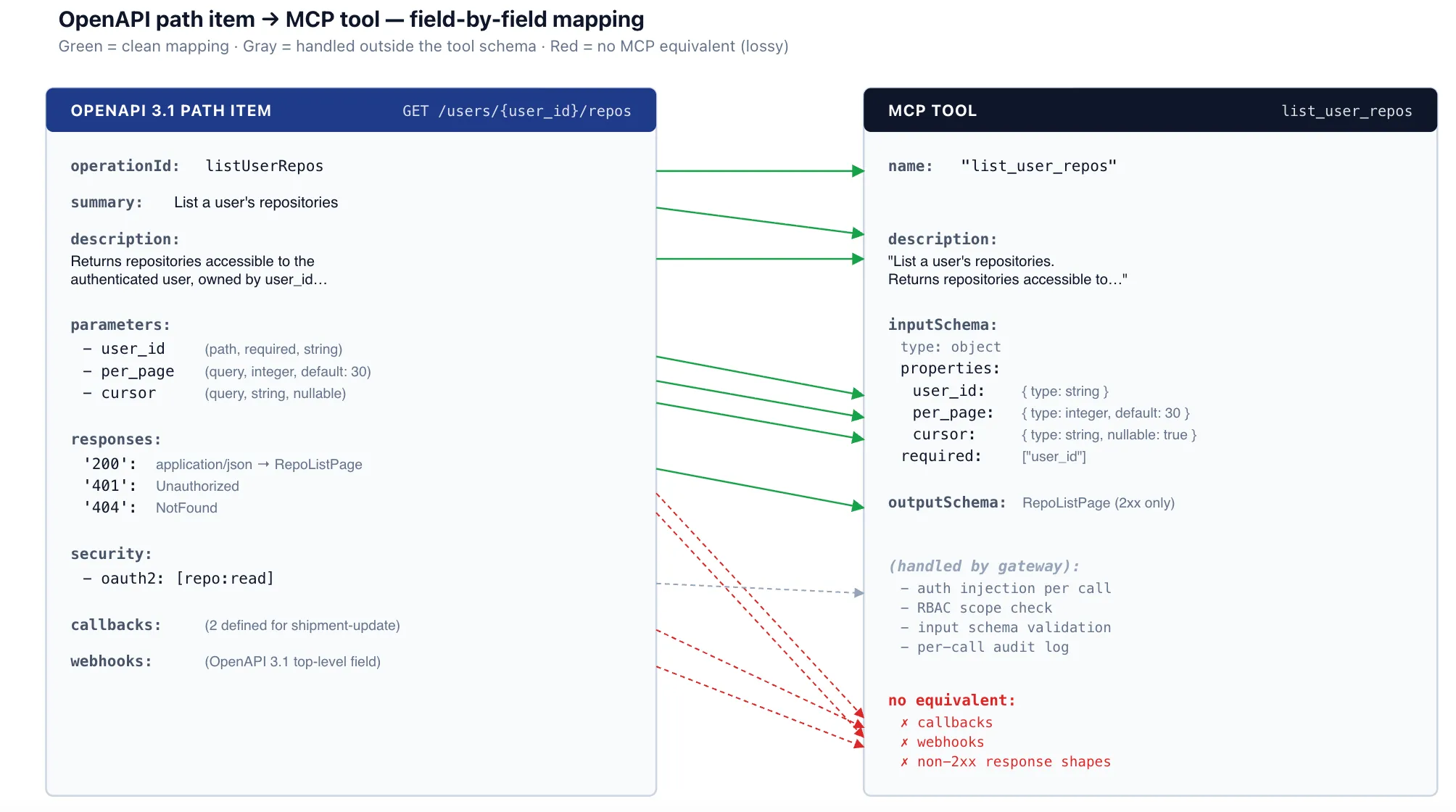
The conversion walks the OpenAPI document and emits one MCP tool per (path, method) pair. For each pair, it computes four things: the tool name, the description, the input schema, and (where the target MCP revision supports it) the output schema.
Tool name. Prefer the operationId if the spec author provided one — operationIds are idiomatic identifiers, usually already chosen for readability. If absent, synthesize from method and path: lowercase the method, append the path with non-alphanumerics replaced by underscores, collapse duplicate underscores. GET /users/{user_id}/repos becomes get_users_user_id_repos. The synthesized form is syntactically valid but verbose; operationIds win where they exist.
Tool description. Prefer summary, then description, then a generated stub from method + path. Section 6 covers why this seemingly minor field matters more than people expect.
Input schema. A merge of path parameters, query parameters, and the request body schema into a single JSON Schema object, with the right required/optional markers. Details in section 2.
Output schema. The schema attached to the first 2xx response for application/json. Other content types and non-2xx responses are not represented. Details in section 3.
YAML — OpenAPI path item (excerpt from shipment-tracking-svc)
paths:
  /users/{user_id}/repos:
    get:
      operationId: listUserRepos
      summary: List a user's repositories
      description: Returns repositories accessible to the
        authenticated user, owned by user_id, paginated by cursor.
      parameters:
        - name: user_id
          in: path
          required: true
          schema: { type: string }
        - name: per_page
          in: query
          schema: { type: integer, default: 30, maximum: 100 }
        - name: cursor
          in: query
          schema: { type: string, nullable: true }
      responses:
        '200':
          description: OK
          content:
            application/json:
              schema:
                $ref: '#/components/schemas/RepoListPage'
        '401': { $ref: '#/components/responses/Unauthorized' }
        '404': { $ref: '#/components/responses/NotFound' }
      security:
        - oauth2: [repo:read]
JSON — generated MCP tool
{
  "name": "list_user_repos",
  "description": "List a user's repositories. Returns repositories accessible to the authenticated user, owned by user_id, paginated by cursor.",
  "inputSchema": {
    "type": "object",
    "properties": {
      "user_id":  { "type": "string" },
      "per_page": { "type": "integer", "default": 30, "maximum": 100 },
      "cursor":   { "type": "string", "nullable": true }
    },
    "required": ["user_id"]
  },
  "outputSchema": { "$ref": "#/$defs/RepoListPage" }
}
TrueFoundry AI Gateway offre une latence d'environ 3 à 4 ms, gère plus de 350 RPS sur 1 processeur virtuel, évolue horizontalement facilement et est prête pour la production, tandis que LiteLM souffre d'une latence élevée, peine à dépasser un RPS modéré, ne dispose pas d'une mise à l'échelle intégrée et convient parfaitement aux charges de travail légères ou aux prototypes.





Les dernières nouvelles, articles et ressources envoyés dans votre boîte de réception

.webp)

.png)
.png)
.png)
.png)
.png)






.png)




