


October 26, 2026
|
5 minutos de lectura


Obtenga acceso instantáneo a un entorno TrueFoundry en vivo. Implemente modelos, dirija el tráfico de LLM y explore la plataforma completa: su sandbox estará listo en segundos, sin necesidad de tarjeta de crédito.



¡Una forma increíblemente rápida de crear, rastrear e implementar sus modelos!
El control de acceso basado en roles funciona bien cuando las decisiones de acceso dependen del rol del usuario. Los problemas surgen cuando los permisos también dependen de los datos solicitados, el entorno, el momento, la ubicación o las acciones previas dentro de la sesión actual.
ABAC evalúa un conjunto más amplio de atributos en cada solicitud de acceso. Considera el sujeto, el recurso, la acción y el contexto antes de permitir o denegar el acceso. Esto lo hace útil cuando los métodos tradicionales de control de acceso no pueden manejar los requisitos dinámicos de la empresa.
Esta guía explica qué es ABAC, cómo funciona, cómo se compara con RBAC y dónde encaja cada modelo. También explica cómo TrueFoundry utiliza el control de acceso basado en atributos para gestionar agentes de IA, llamadas a modelos y acceso a herramientas MCP a gran escala.
El control de acceso basado en atributos es un modelo de control de acceso que evalúa atributos antes de conceder o denegar el acceso. Estos atributos pueden describir al usuario, el recurso, la acción, el entorno, el dispositivo, la sesión, la puntuación de riesgo o el contexto empresarial asociado a la solicitud.
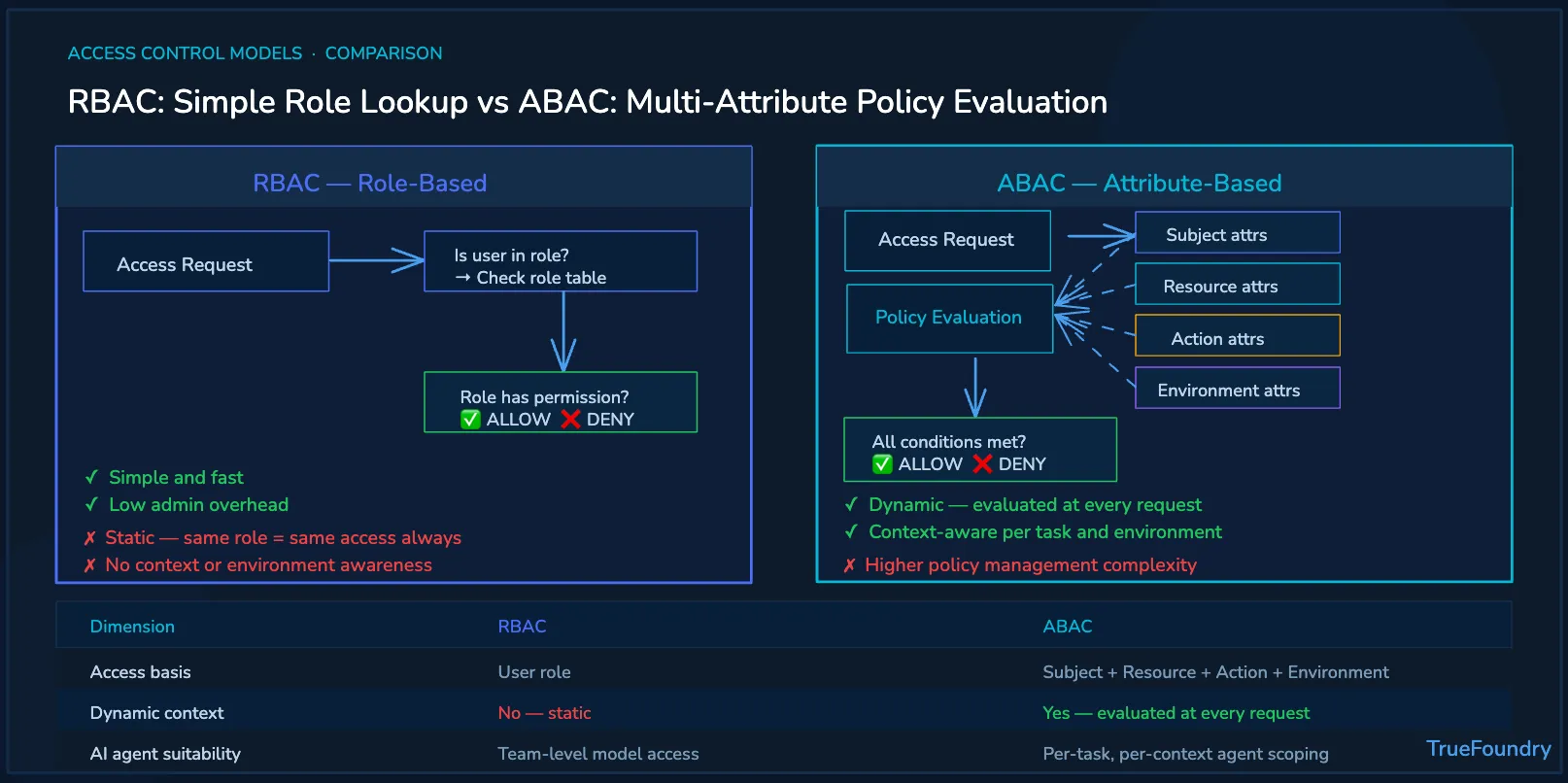
El significado de ABAC es más fácil de entender si se compara con el modelo RBAC. RBAC pregunta si el usuario pertenece a un rol aprobado. El control de acceso ABAC pregunta si una combinación de atributos satisface la política.
Por ejemplo, una política puede permitir el acceso solo cuando el usuario pertenece al departamento de Finanzas, tiene la autorización de seguridad correcta, solicita acceso de lectura y se conecta desde una dirección IP aprobada durante el horario laboral. Si una condición falla, se puede denegar el acceso.
Esto hace que ABAC sea útil para requisitos empresariales complejos. Las organizaciones modernas a menudo necesitan restricciones de acceso inteligentes en datos confidenciales, procesos de negocio, sistemas de planificación de recursos empresariales, registros de pacientes y flujos de trabajo de IA que no pueden ser gobernados solo por roles.
El control de acceso basado en atributos utiliza cuatro categorías principales de atributos para la autorización. Estas categorías son atributos del sujeto, atributos del recurso, atributos de la acción y atributos del entorno. Juntos, crean un conjunto enriquecido de atributos para decisiones de acceso contextuales.
TrueFoundry aplica el control de acceso basado en atributos en la capa de puerta de enlace para cada conexión de agente de IA, modelo y herramienta que ejecutan sus equipos, evaluando el sujeto, el recurso, la acción y el entorno.
Los atributos del sujeto describen a la entidad que solicita el acceso. Estos pueden incluir el departamento, la función laboral, la región, el perfil de usuario, la unidad de negocio, el estado de autenticación, la autorización de seguridad o los atributos del sujeto que realiza la solicitud.
En los sistemas de IA, los atributos del sujeto también pueden incluir la identidad del agente, la identidad de la aplicación y el usuario autenticado detrás del agente. Esto ayuda a las empresas a evitar tratar a todos los agentes de IA como cuentas de servicio genéricas con amplios derechos de acceso.
Los atributos del recurso describen el activo al que se accede. Algunos ejemplos incluyen el propietario del recurso, la clasificación de datos, el nivel del modelo, la categoría de la herramienta, el entorno, el nivel de sensibilidad, la etiqueta de seguridad de los datos y el estado de producción o pruebas.
Estos atributos ayudan a proteger los datos confidenciales y a mejorar la protección de la información. Por ejemplo, una política de atención sanitaria puede permitir que los agentes de soporte lean registros internos de pacientes mientras bloquean el acceso de escritura a los sistemas de facturación y a las actualizaciones de registros clínicos.
Los atributos de acción definen la operación solicitada. Algunos ejemplos comunes incluyen leer, escribir, eliminar, invocar, resumir, generar, ejecutar, exportar, aprobar o modificar. Estas acciones pueden permitirse o denegarse independientemente de los roles de usuario.
Esto es importante para los agentes de IA porque una misma herramienta puede admitir acciones seguras y arriesgadas. Un agente puede resumir un registro de CRM de forma segura, pero ese mismo agente podría necesitar una autorización más estricta antes de actualizar datos de clientes.
Los atributos de entorno describen las condiciones que rodean a la solicitud. Estos pueden incluir la hora del día, la ubicación, la dirección IP, el estado del dispositivo, la puntuación de riesgo, el comportamiento de la sesión, el método de autenticación y las condiciones ambientales.
Las condiciones del entorno hacen que las políticas de acceso sean más adaptables. Una solicitud desde un dispositivo de oficina de confianza durante el horario laboral puede ser aprobada. La misma solicitud desde un dispositivo no gestionado en horarios inusuales puede requerir una denegación o una verificación adicional.
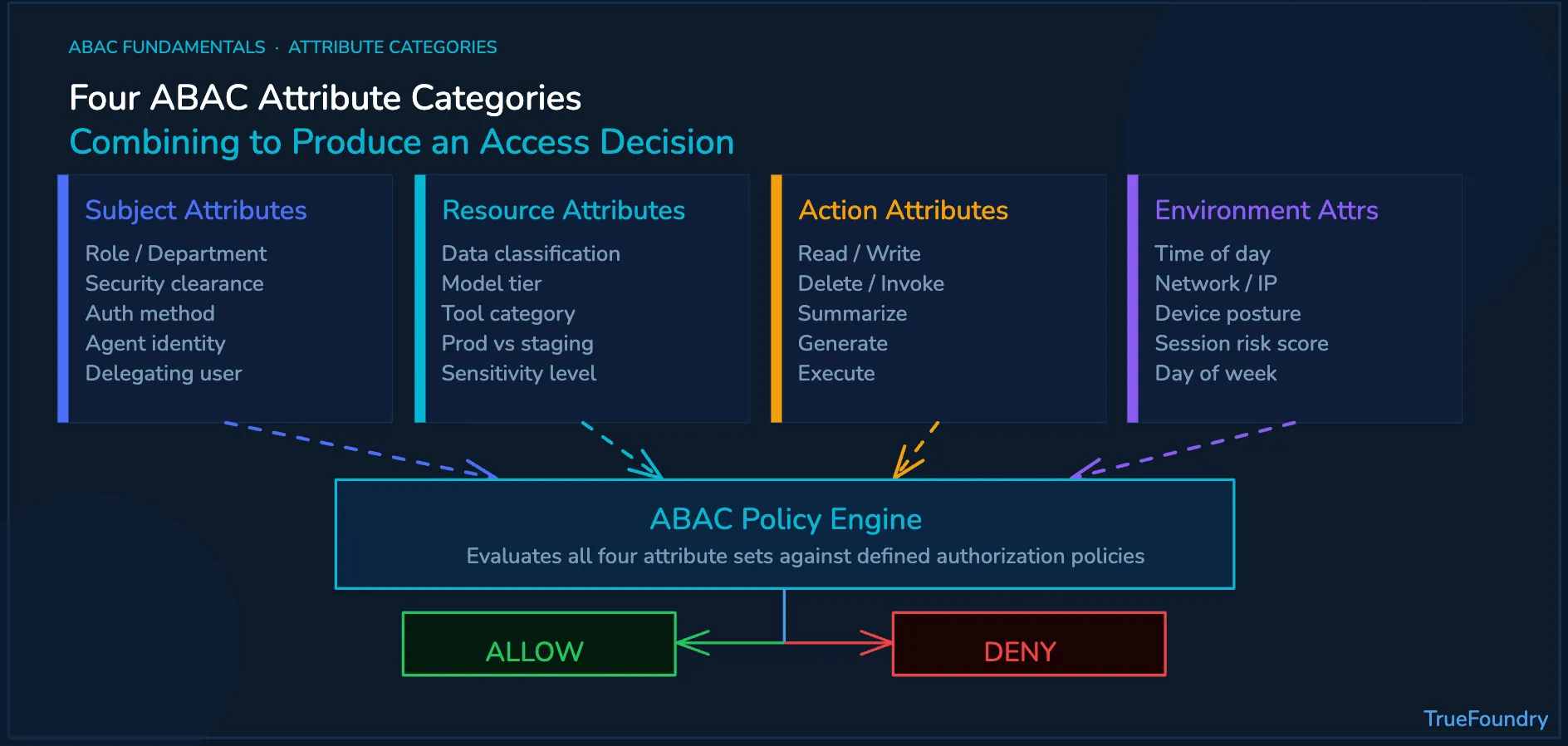
El control de acceso basado en atributos es un enfoque de seguridad impulsado por políticas. Recopila atributos, los evalúa frente a las políticas ABAC y aplica la decisión final antes de que el usuario o el sistema lleguen al recurso protegido.
El proceso suele comenzar en el punto de administración de políticas. Los administradores del sistema definen reglas que describen qué combinaciones de atributos están permitidas. Estas reglas pueden expresarse mediante un lenguaje de políticas como el Extensible Access Control Markup Language (XACML).
Un motor de políticas evalúa la solicitud en tiempo real. Puede verificar información de identidad desde un directorio LDAP (Lightweight Directory Access Protocol), señales del dispositivo, metadatos del recurso, contexto de la sesión y políticas de seguridad antes de tomar una decisión.
El punto de cumplimiento de políticas aplica el resultado antes de acceder al recurso protegido. En los sistemas de IA empresariales, un puerta de enlace de IA (AI Gateway) es una capa de cumplimiento útil porque las llamadas a modelos y las acciones de herramientas pueden regularse antes de su ejecución.
Las empresas deben tratar el ABAC como un modelo de gobernanza, no solo como una sintaxis de políticas. El objetivo es crear reglas que sean comprensibles, aplicables, auditables y gestionables a medida que aumenta el número de usuarios, agentes, herramientas y unidades de negocio.
Estas prácticas recomendadas también se aplican más allá de la IA. Las plataformas web pueden utilizar atributos para partes del sitio, tipos de cookies, usuarios finales, estados de consentimiento y contexto del dispositivo. Los sistemas empresariales utilizan la misma lógica para la seguridad de los datos y la gestión de accesos.
Tanto el RBAC como el control de acceso basado en atributos ayudan a las organizaciones a gestionar el acceso. La diferencia radica en cómo cada sistema decide si se debe permitir el acceso. El RBAC utiliza roles, mientras que el ABAC evalúa un conjunto más amplio de atributos en el momento de la solicitud.
El RBAC es más sencillo de gestionar cuando los permisos se asignan claramente a los roles. Por ejemplo, un director financiero puede necesitar acceso a aplicaciones financieras específicas. Los controles basados en atributos son más eficaces cuando el acceso depende de la sensibilidad de los datos, la ubicación, el dispositivo, la acción o el contexto de la sesión.
Algunas empresas utilizan un enfoque híbrido ARBAC cuando tanto la administración de roles como las comprobaciones de atributos son importantes. Esto permite a los equipos mantener roles de usuario sencillos a la vez que añaden controles más precisos para recursos, herramientas, modelos y flujos de trabajo sensibles.
En comparación con el control de acceso discrecional, los modelos basados en atributos ofrecen a los equipos de seguridad centralizados una mayor coherencia en las políticas. En comparación con las políticas de control de acceso estáticas, también crean una experiencia de usuario más adaptable para el trabajo dinámico en aplicaciones, herramientas y equipos.
Los empleados humanos suelen seguir roles definidos dentro de la organización. Los agentes de IA actúan en función de tareas, instrucciones, herramientas y contexto. Esa diferencia hace que los roles estáticos sean insuficientes para muchos casos de uso de IA agente.
Por ejemplo, un agente de IA de atención al cliente puede leer registros de CRM durante un flujo de trabajo de servicio. El mismo agente no debería modificar registros de facturación confidenciales a menos que el solicitante, la acción, el recurso y el contexto cumplan con la política aprobada.
Sin ABAC, las organizaciones suelen enfrentarse a dos opciones poco eficaces: o bien otorgan demasiados permisos a los agentes de IA, aumentando los riesgos de seguridad, o bien restringen tanto a los agentes que muchos flujos de trabajo útiles requieren excepciones manuales y provocan retrasos operativos.
Los controles basados en atributos permiten a los equipos adaptar el acceso a la tarea. Un flujo de trabajo puede aprobar el acceso de solo lectura a los clientes en una situación, denegar el acceso de escritura en otra y aplicar comprobaciones más estrictas cuando hay datos confidenciales o herramientas de alto riesgo involucradas.
Esto cobra importancia a medida que los agentes de IA se conectan con el Protocolo de Contexto de Modelo (Model Context Protocol). Las herramientas pueden acceder a sistemas internos, documentos, bases de datos y plataformas de gestión de incidencias. La MCP Gateway capa se vuelve relevante cuando esas llamadas a herramientas requieren una autorización contextual.
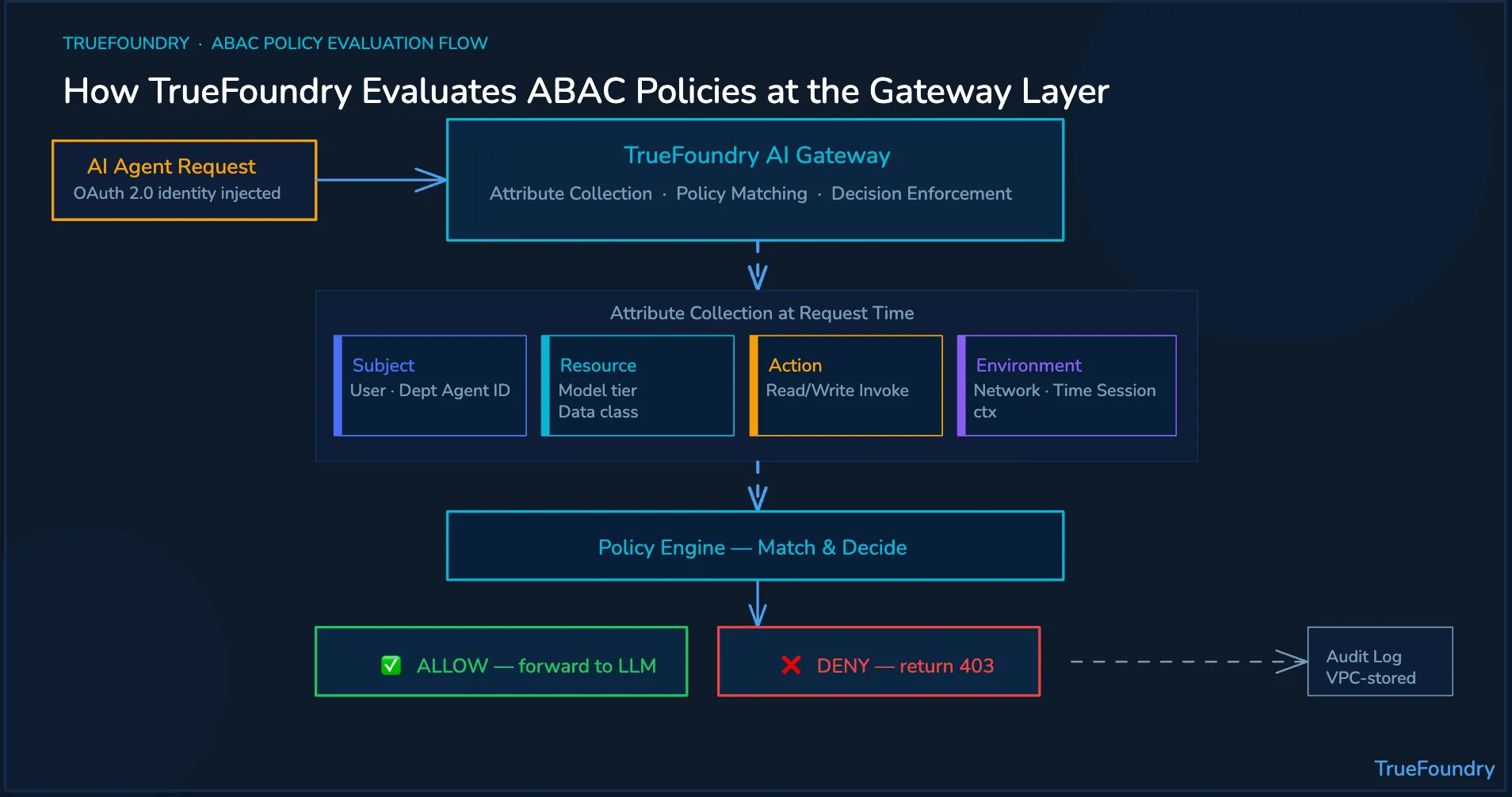
TrueFoundry aplica conceptos de control de acceso basado en atributos a la gobernanza de la IA en producción. Ayuda a las empresas a gestionar el acceso a modelos, herramientas y agentes de IA mediante políticas contextuales aplicadas en la capa de puerta de enlace.
Los atributos de sujeto pueden provenir de proveedores de identidad corporativos. TrueFoundry puede utilizar la inyección de identidad OAuth 2.0 para que cada acción del agente esté vinculada a la identidad y a los atributos organizativos del solicitante. Esto evita depender únicamente de cuentas de servicio compartidas.
Los atributos de recurso y acción pueden aplicarse en la capa de modelos y herramientas. TrueFoundry MCP Gateway puede aplicar políticas por modelo y por herramienta, incluyendo acceso de solo lectura o de lectura y escritura a herramientas corporativas específicas.
Los atributos de entorno pueden evaluarse mediante controles a nivel de flujo de trabajo. El Agent Gateway ayuda a los equipos a gestionar el contexto de la sesión, el comportamiento en tiempo de ejecución, los límites de costes, el estado del flujo de trabajo y los límites de ejecución aprobados para sistemas de IA agentes.
Elpuerta de enlace de LLM (LLM Gateway) regula el acceso a modelos, el enrutamiento, la abstracción de proveedores, los límites de tasa y la visibilidad de costes. En conjunto, estos controles ayudan a las empresas a aplicar políticas antes de que se ejecuten las llamadas a modelos, las acciones de herramientas MCP o los flujos de trabajo de los agentes.
Las decisiones de política se registran junto con los atributos relevantes, las políticas coincidentes y los resultados de la decisión. Estos registros de auditoría pueden permanecer dentro de la VPC del cliente, lo que ayuda a los equipos a respaldar los procesos de cumplimiento de SOC 2, HIPAA y las revisiones internas.
El ABAC ayuda a las empresas a tomar decisiones de acceso basadas en el contexto. TrueFoundry ayuda a aplicar esas decisiones antes de que los agentes de IA llamen a modelos, accedan a herramientas MCP o actúen sobre sistemas corporativos.
Reserve una demostración para ver cómo TrueFoundry aplica políticas ABAC conscientes de la identidad en modelos, herramientas, agentes, presupuestos y registros de auditoría.
TrueFoundry AI Gateway ofrece una latencia de entre 3 y 4 ms, gestiona más de 350 RPS en una vCPU, se escala horizontalmente con facilidad y está listo para la producción, mientras que LitellM presenta una latencia alta, tiene dificultades para superar un RPS moderado, carece de escalado integrado y es ideal para cargas de trabajo ligeras o de prototipos.





Las últimas noticias, artículos y recursos enviados a tu bandeja de entrada
.webp)
.webp)


.png)
.png)
.png)
.png)
.png)
.png)
.png)
.png)
.png)
.png)
.png)


