


August 26, 2026
|
5 minutos de lectura


Obtenga acceso instantáneo a un entorno TrueFoundry en vivo. Implemente modelos, dirija el tráfico de LLM y explore la plataforma completa: su sandbox estará listo en segundos, sin necesidad de tarjeta de crédito.


Published: April 22, 2026

¡Una forma increíblemente rápida de crear, rastrear e implementar sus modelos!
Enterprises building GenAI apps face a familiar trade‑off: pure cloud speeds up experimentation but raises governance and cost concerns, while pure on‑prem tightens control but slows teams down. TrueFoundry’s hybrid approach balances both by combining a split‑plane architecture, Kubernetes‑native operations, and an AI Gateway that centralizes governance, routing, and observability.
- Keep sensitive data private while staying flexible. Run vector databases, embeddings, artifacts, and core model services in your private environments (on‑prem or VPC), and use cloud endpoints when you need elasticity.
- Standardize access to models. The AI Gateway abstracts providers so teams can switch or mix endpoints without refactoring.
- Apply governance without slowing developers. Central policies for auth, rate limits, and costs let platform and security teams set guardrails while developers keep shipping.
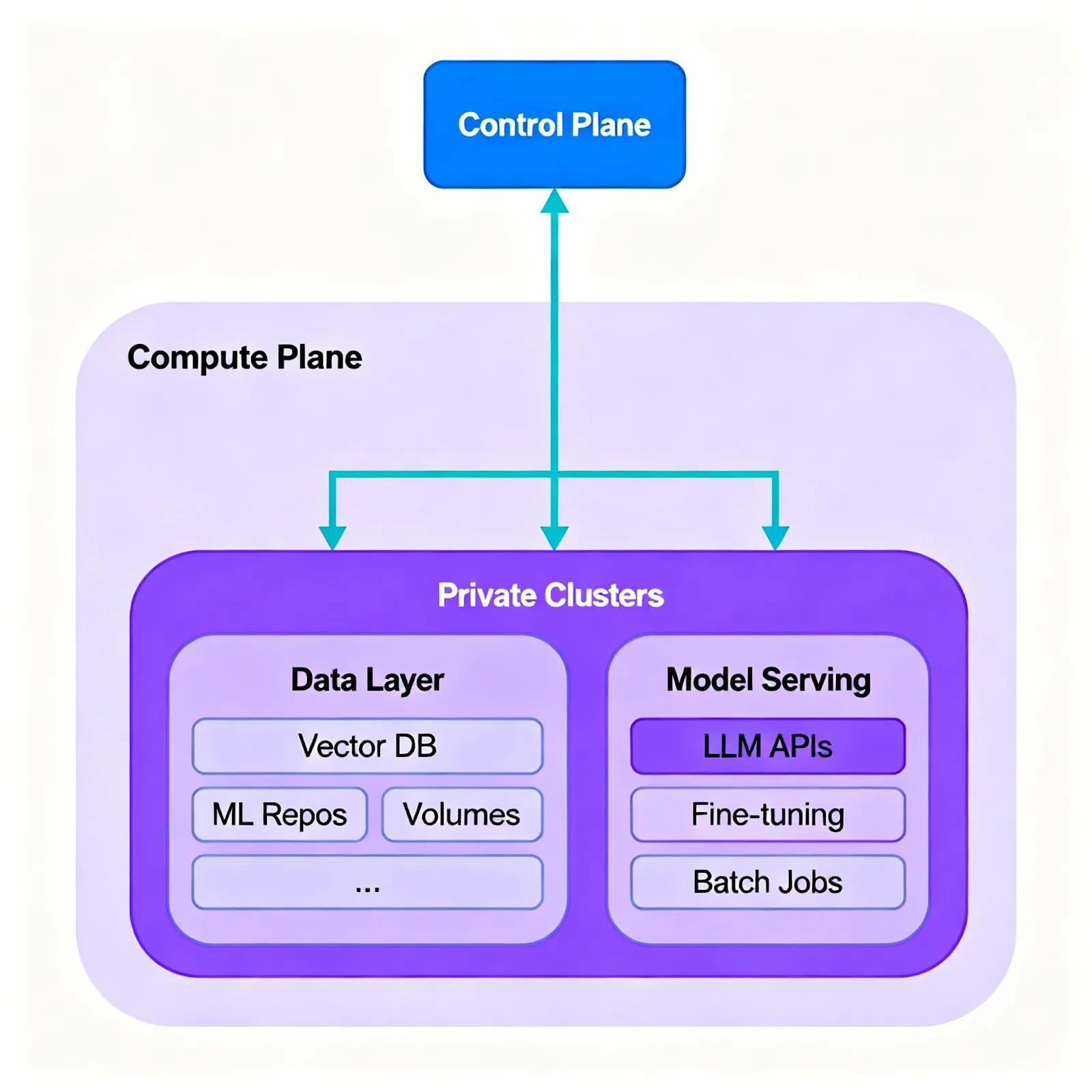
- Split control/compute plane: Use a hosted or self‑hosted control plane for orchestration, policy, and observability; run compute planes in private clusters (on‑prem or VPC) where workloads and data live. This decoupling enables consistent operations across environments.
- Kubernetes‑native operations: Deploy services and jobs via YAML/CLI; use health probes, autoscaling, and standardized rollout strategies across clusters; adopt canary and blue/green promotions to reduce risk; pause or scale down idle stacks to save resources.
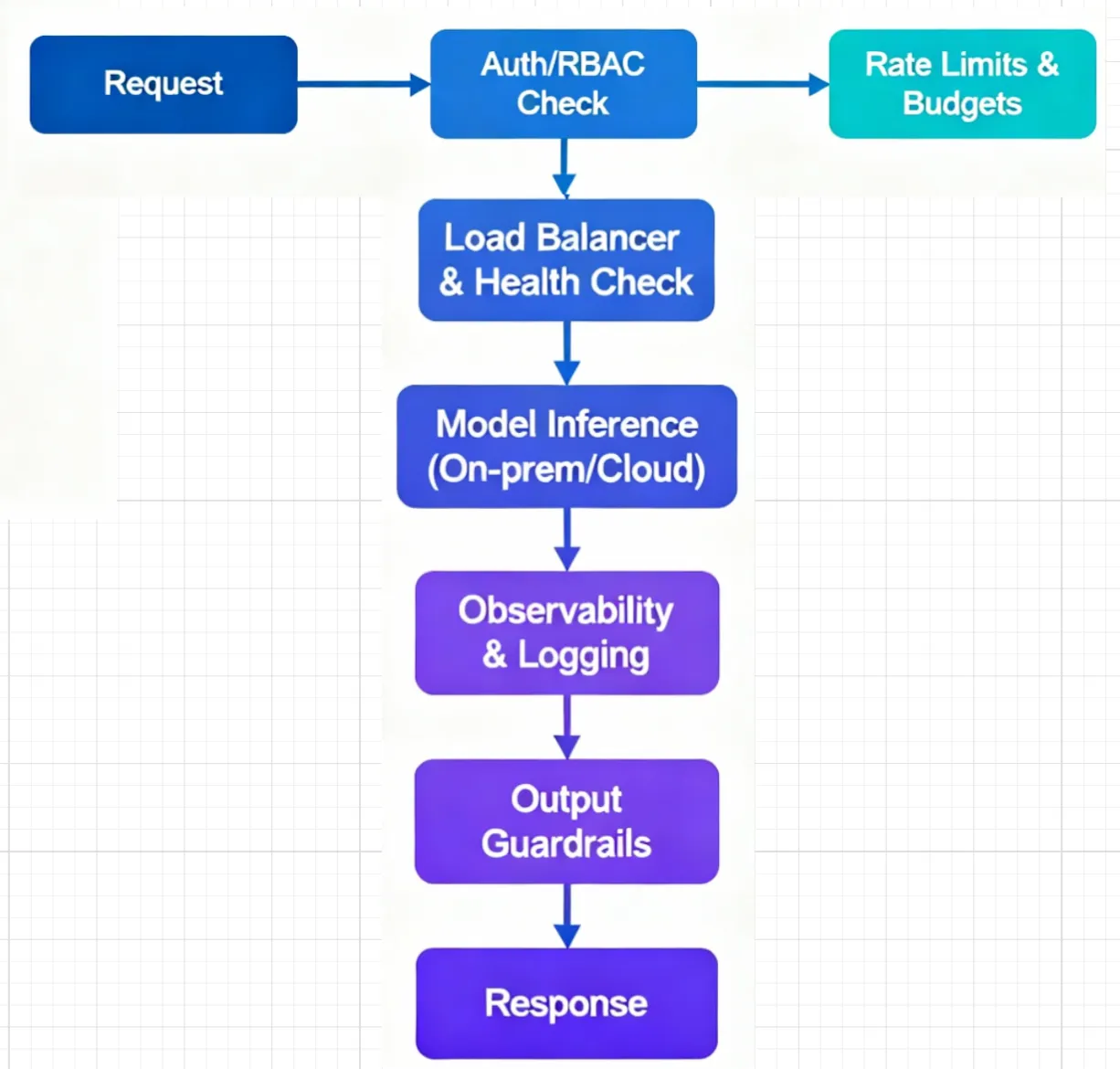
- Authentication and RBAC: Centralize keys, integrate with SSO, and scope access by project/team to avoid credential sprawl.
- Token‑aware quotas and budgets: Set limits that reflect LLM usage (requests and tokens), applied per user, team, or model.
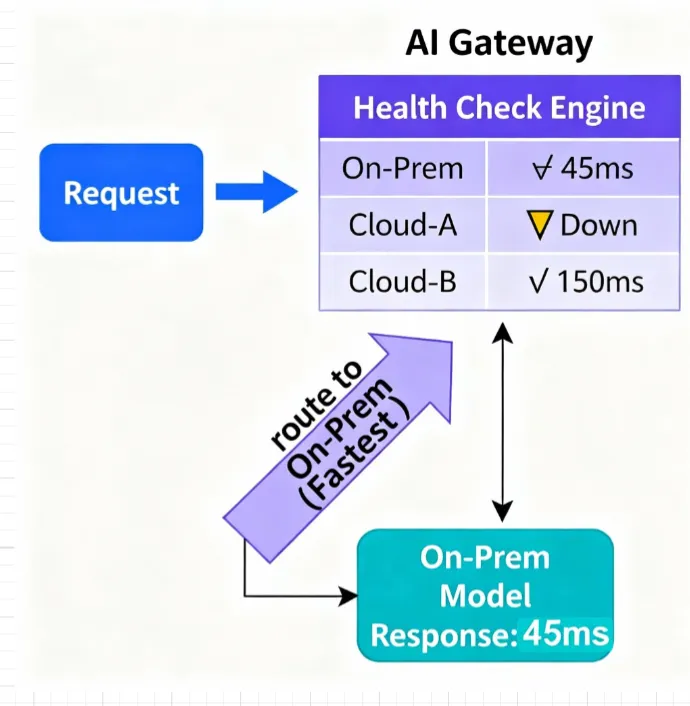
- Multi‑provider routing: Route traffic by weights for experiments, prefer faster healthy endpoints by latency and health, and fail over automatically when an endpoint is unhealthy.
- Observability and cost tracking: Trace requests end‑to‑end, compare provider and model behavior across environments, and attribute usage to teams and applications.
- Guardrails: Apply input/output checks to align prompts and responses with enterprise policies.
- Stand up a private cluster (on‑prem or VPC).
- Connect SSO and secrets.
- Deploy a simple API service and register a model behind the AI Gateway; validate routing, logs, and traces.
- Route existing applications through the gateway.
- Enable RBAC, token‑aware quotas/budgets, and shared observability dashboards.
- Remove hardcoded provider credentials from apps; manage them centrally.
- Host vector DBs, embeddings, and artifacts in your private environment.
- Serve critical models on‑prem/VPC for primary flows; keep using cloud endpoints for overflow or experiments via gateway routing.
- Add staging and production clusters across sites/clouds.
- Use canary/blue‑green promotions, autoscale by traffic, and pause idle environments when appropriate.
- Compare on‑prem and cloud behavior apples‑to‑apples with common tracing and metrics.
- Autoscaling and scale‑to‑zero: Match capacity to demand for APIs, workers, and batch jobs.
- Policy‑based routing: Direct traffic to endpoints that satisfy your latency/SLA and budget policies, with graceful fallback on errors or quota limits.
- Centralized budgets and auditability: Enforce per‑team/model limits and retain a single source of truth for keys, access, and usage.
- Safer rollouts: Canary and blue/green strategies reduce blast radius and support quick rollback.
- Consistent controls: Policies, secrets, and access managed centrally while developers deploy self‑service.
- Unified telemetry: Logs, metrics, and traces in one place speed up debugging, capacity planning, and cost reviews.
- Same workflow everywhere: The Kubernetes-first model keeps dev, staging, and prod aligned across on‑prem and cloud.
- Fast “serve and scale” for APIs and workers using templates and CLI/YAML flows.
- Built‑in observability that shortens feedback cycles.
- Reusable patterns for common GenAI workloads (for example, RAG pipelines, chat APIs, async processing), so teams can ship without reinventing infrastructure.
- Day 1–2: Create one private compute plane, wire SSO/secrets, deploy a small API plus one model behind the gateway, and confirm requests flow with tracing.
- Day 3–5: Route an existing app through the gateway, enable token‑aware quotas and dashboards, and standardize provider credentials centrally.
- Week 2: Add a second environment, introduce canary routing for a production‑adjacent endpoint, and test autoscaling and fallback rules.
- AI Gateway architecture: https://www.truefoundry.com/blog/how-to-think-about-ai-gateway-architecture-in-the-generative-ai-stack
- On‑premise AI platforms: https://www.truefoundry.com/blog/on-premise-ai-platform
- Load balancing strategies: https://www.truefoundry.com/blog/load-balancing-in-ai-gateway
- Rate limiting best practices: https://www.truefoundry.com/blog/rate-limiting-in-llm-gateway
- AI guardrails implementation: https://www.truefoundry.com/blog/ai-guardrails-in-enterprise- Observability patterns: https://www.truefoundry.com/blog/observability-in-ai-gateway
TrueFoundry AI Gateway ofrece una latencia de entre 3 y 4 ms, gestiona más de 350 RPS en una vCPU, se escala horizontalmente con facilidad y está listo para la producción, mientras que LitellM presenta una latencia alta, tiene dificultades para superar un RPS moderado, carece de escalado integrado y es ideal para cargas de trabajo ligeras o de prototipos.





Las últimas noticias, artículos y recursos enviados a tu bandeja de entrada


.png)
.png)
.png)
.png)
.png)
.png)
.png)
.png)
.png)
.png)
.png)
.png)


