


.png)
September 28, 2026
|
Lesedauer: 5 Minuten


Erhalten Sie sofortigen Zugriff auf eine TrueFoundry-Live-Umgebung. Stellen Sie Modelle bereit, leiten Sie den LLM-Verkehr weiter und erkunden Sie die gesamte Plattform — Ihre Sandbox ist in Sekundenschnelle einsatzbereit, ohne dass eine Kreditkarte erforderlich ist.



Published: July 4, 2026
Unglaublich schnelle Methode zum Erstellen, Verfolgen und Bereitstellen Ihrer Modelle!
If you’ve used TrueFoundry to deploy a service, create a cluster, configure an LLM model, or manage secrets, you’ve interacted with forms that look like normal UI, but are built very differently from typical web forms.
TrueFoundry forms often represent manifests - YAML/JSON objects you can also apply with the CLI (tfy apply -f ...). The same object might be edited in the UI, downloaded as YAML, or submitted to the API.
A schema-driven approach gives TrueFoundry:
The mental model: the schema describes the shape of the data and how to edit it; FormBuilder turns that description into a working form.
A form schema is an array of field definitions. Each field is an object with a few important properties:
Here is a simplified generic example - not a real TrueFoundry schema, but close to how the product thinks about configuration:
[
  {
    "sort": 1,
    "jsonKey": "name",
    "label": "Service Name",
    "uiType": "Input",
    "validate": { "required": true, "pattern": "^[a-z0-9-]+$" }
  },
  {
    "sort": 2,
    "jsonKey": "image",
    "label": "Image",
    "uiType": "Group",
    "subParameters": [
      {
        "jsonKey": "type",
        "label": "Source",
        "uiType": "Radio",
        "validate": {
          "required": true,
          "defaultValue": "build",
          "options": [
            { "label": "Build", "value": "build" },
            { "label": "Existing image", "value": "existing" }
          ]
        }
      },
      {
        "jsonKey": "uri",
        "label": "Image URI",
        "uiType": "Input",
        "conditions": [
 		{ "jsonKey": "image.type", "op": "==", "value": "existing"  }
  ],
        "validate": { "required": true }
      }
    ]
  }
]
Resulting manifest/config on submit:
{
  "name": "my-service",
  "image": { "type": "existing", "uri": "registry.io/app:v1" }
}
Rendering happens in a small pipeline, the flow is:
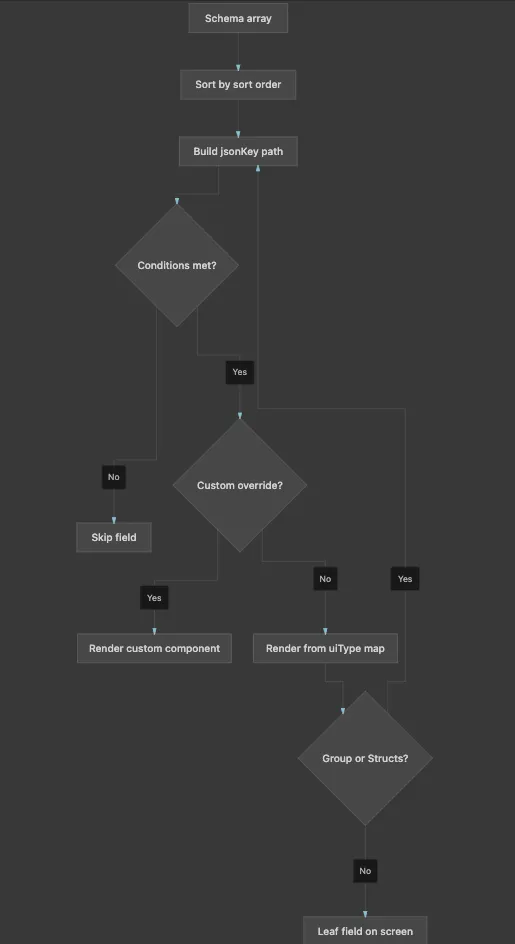
FormBuilder walks the schema tree and picks a React component per node based on uiType.
Component types:
Conditions: If image.type !== "existing", the URI field never mounts. With shouldUnregister: true, it also leaves form state, so hidden values cannot leak into the payload.
Mapping logic in code:
// FormComponentMap
const ComponentType = FormComponents[schema.uiType]
const CustomComp = CustomComponentsMap?.[schema.uiType]

if (!enabledByCondition) return null

return CustomComp
  ? <CustomComp schema={schema} />
  : <ComponentType schema={schema} />
FormBuilder uses react-hook-form as its state engine. That choice matters for how the product behaves.
Initialization/Component Usage - create & edit:
<FormBuilder
  schema={schema}
  defaultValues={existingManifest}   // edit: pre-fill; create: empty/template
  onSubmit={(manifest) => createOrUpdate({ manifest })}
/>
Form setup:
const methods = useForm({
  mode: 'onChange',          // validate as user types
  defaultValues,
  shouldUnregister: true,    // hidden fields drop out of state
})
Field registration - each input binds to its path:
// Inside a text field component
const { register } = useFormContext()

<input
  {...register(schema.jsonKey, registerProps)}
  defaultValue={defaultValue}
/>
Extra context - specific form pass runtime data separate from field values:
<FormBuilder
  schema={schema}
  extraContext={{
    workspace,
    cluster,
    serviceAccountOptions,  // dynamic dropdown options
    dataTestPrefix: 'create-cluster',
  }}
/>
All field values live in one form object. Each field registers under its full jsonKey path:
When you edit a field, you are mutating this shared object. On submit, FormBuilder reads the whole object and passes it to the form’s handler (which usually calls the TrueFoundry API or produces YAML).
When opening a form to create something, defaultValues may be empty or come from a template.
When editing, defaultValues is typically the existing manifest. The form fields pre-fill from that object. Some fields are marked immutable in edit mode (e.g. resource name) so they render read-only.
TrueFoundry forms use shouldUnregister: true. That means:
This is important for conditional forms: you only submit what the user could actually see and edit.
Validation in TrueFoundry forms happens at two layers.
Each field’s validate block can specify:
These rules are converted into react-hook-form validation rules. Errors are shown inline next to the field. Validation runs on change (mode: 'onChange'), so users get feedback as they type, not only on submit.
Schemas can also attach a custom validate function, commonly used for:
useAttachValidation(schema, {
  name: async (name) => {
    const taken = await checkNameExists(name)
    return taken ? 'Name already exists' : true
  },
})When you open “Create Cluster”, “Deploy Service”, “Add Model”, or “Manage Secrets”:
That is why TrueFoundry can support very complex configuration UIs without every screen being a one-off form: the complexity lives in the schema and a library of field components, orchestrated by one shared runtime.
TrueFoundry AI Gateway bietet eine Latenz von ~3—4 ms, verarbeitet mehr als 350 RPS auf einer vCPU, skaliert problemlos horizontal und ist produktionsbereit, während LiteLM unter einer hohen Latenz leidet, mit moderaten RPS zu kämpfen hat, keine integrierte Skalierung hat und sich am besten für leichte Workloads oder Prototyp-Workloads eignet.




Schema-gesteuerte Formulare bieten eine einzige Quelle der Wahrheit für Ihre Konfigurationsmanifeste. Sie gewährleisten ein konsistentes UI-Verhalten, unterstützen verschachtelte/bedingte Logik ohne wiederholten Code und ermöglichen es dem Backend, die Formularstruktur dynamisch zu steuern.
Die Validierung erfolgt in zwei Schichten: Deklarative Schema-Validierung (mithilfe von Regeln wie „required“, „pattern“ oder „min/max“) und benutzerdefinierte/asynchrone Validierung für API-gestützte Prüfungen, wie z. B. die Überprüfung eindeutiger Ressourcennamen.
Ja. Der FormBuilder von TrueFoundry nutzt react-hook-form als zentrale State-Engine, wodurch er mit Standard-React-Mustern kompatibel ist und sich leicht mit benutzerdefinierten Komponenten erweitern lässt.



Die neuesten Nachrichten, Artikel und Ressourcen werden in Ihren Posteingang gesendet
.png)
.png)
.png)
.png)
.png)
.webp)
.webp)

.webp)
.webp)
.webp)


