.png)
October 16, 2026
|
5 min read


Published: October 16, 2026
.png)
Blazingly fast way to build, track and deploy your models!
Voice agents used to simply be a pipeline of speech transcription to text (STT), which is passed on to LLM for generation, then converted back to speech (TTS). Three services, three hops, and cumulative latency at each step.
The Realtime API (OpenAI) and Live API (Google) collapse that into one. The model is connected through an established WebSocket and receives audio input and responds in kind, listening and talking all on its own. This produces noticeably better results in terms of lower latency, making the conversation more interactive, and this is why it is the standard choice for conversations using voice chatbots.
There are downsides associated with cost and control of that capability, and there is the practical fact that introducing an API means another key, another endpoint, another bill. These are both reasons to have this activity occur behind a gateway.
Neither approach is strictly better — they optimize for different things.
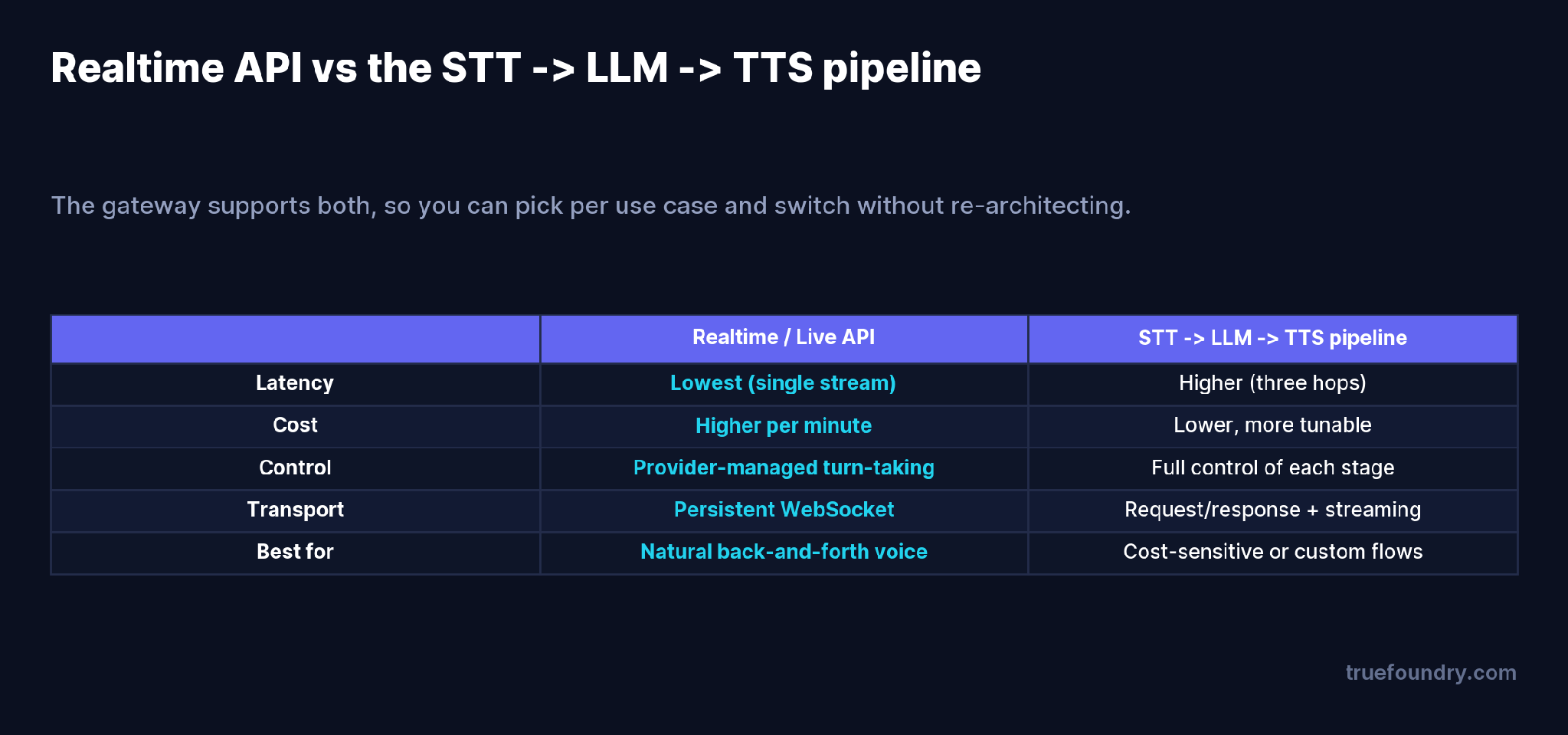
The Realtime / Live API wins on latency and naturalness because there’s a single stream and the provider handles turn detection. The pipeline (the approach we covered in our Deepgram post) wins on cost and control: you pick the STT model, the LLM, and the TTS voice independently, tune each, and swap any one of them. A common pattern is to use Realtime for the premium, latency-sensitive experience and the pipeline for cost-sensitive or highly customized flows — and because the gateway supports both, that’s a routing decision, not a re-architecture.
Realtime voice is priced in audio tokens, and the two leading providers are far apart.
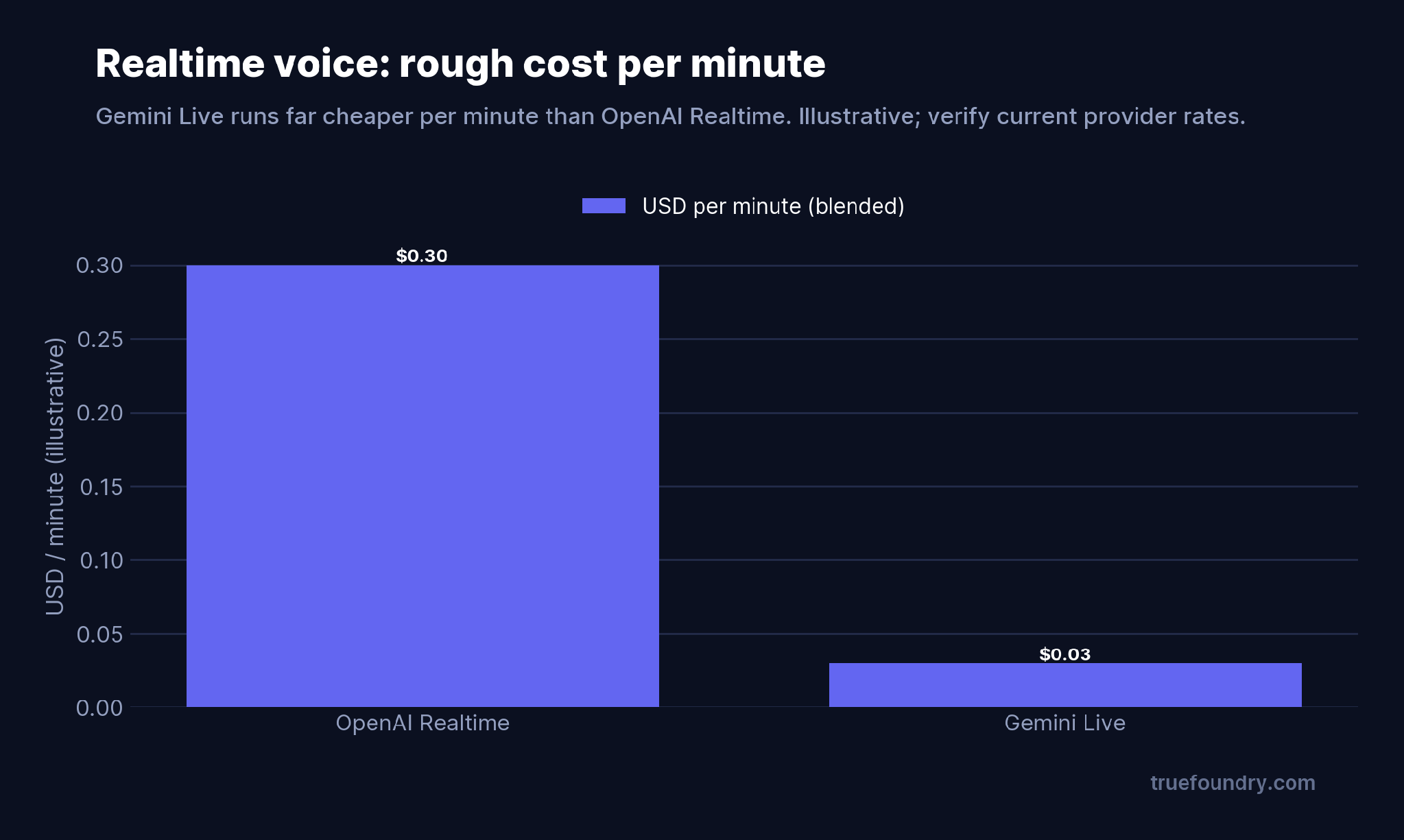
At current rates, OpenAI’s Realtime API runs on the order of $0.30 per minute of active conversation, while Google’s Gemini Live is roughly $0.03 per minute — about a 10× gap [VERIFY current rates on OpenAI and Google pricing pages; figures are blended per-minute estimates]. Both bill per token, and crucially both re-bill the growing context on each turn, so a long call costs more per minute as it goes, not less. For a phone agent handling thousands of minutes a day, the provider choice and the call-length distribution dominate the bill — which is exactly the kind of thing you want metered per call at the gateway rather than discovered on an invoice.
The gateway proxies the WebSocket connection to the provider using each provider’s native SDK, so you get the real Realtime/Live protocol with a governance layer around it.
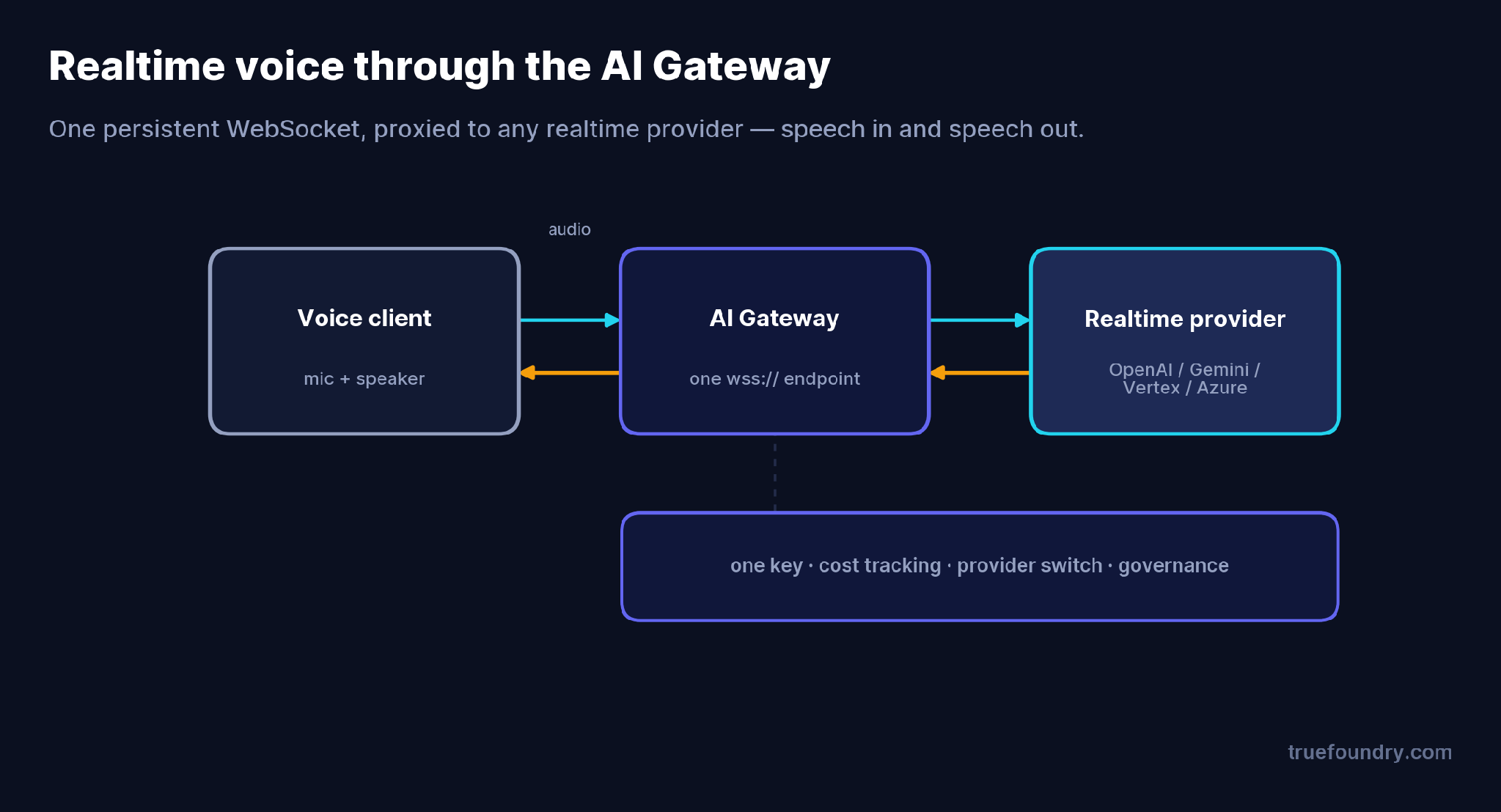
Your client opens one wss:// connection to the gateway; the gateway holds the provider key and relays the bidirectional audio stream. That gives you one endpoint and one key across providers, cost tracking on realtime sessions alongside your other LLM spend, and the ability to switch providers — OpenAI to Gemini, say, when the cost math changes — without re-pointing your client at a new vendor.
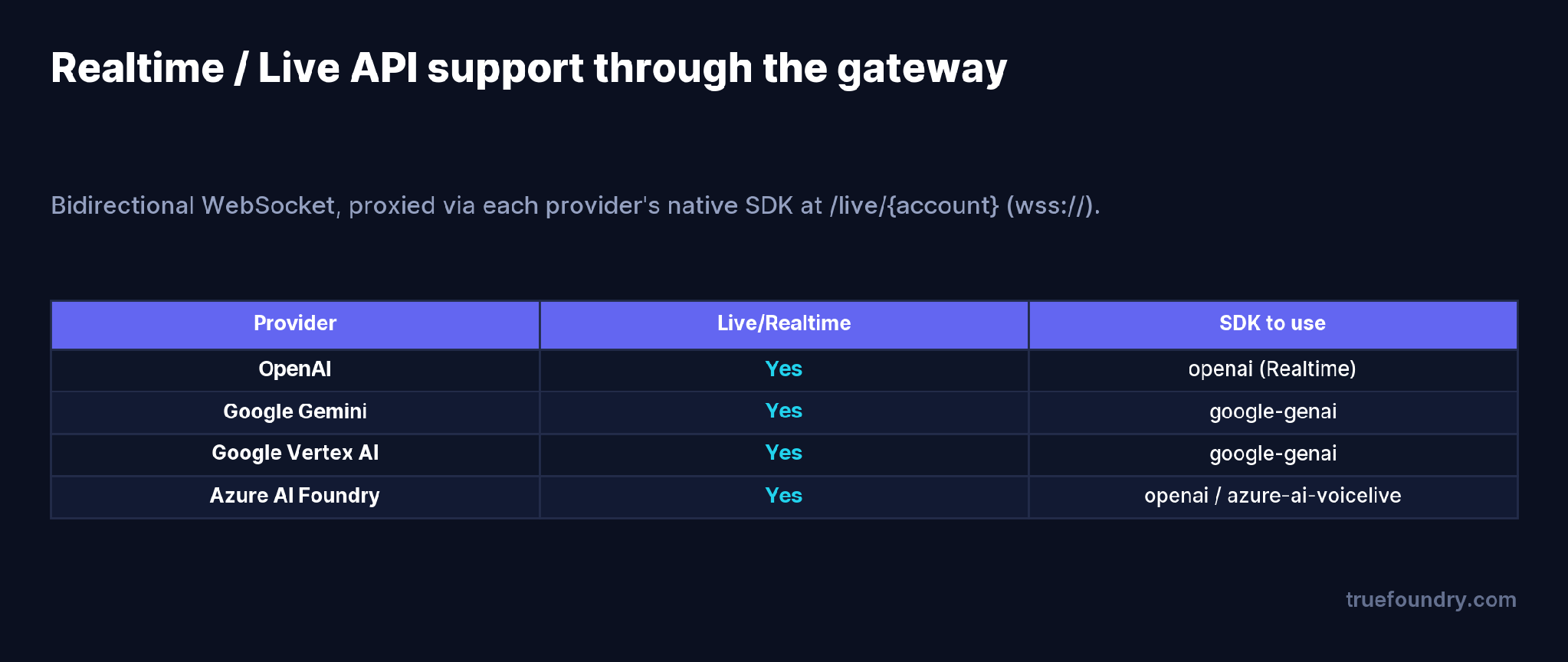
Four providers are supported today — OpenAI, Google Gemini, Google Vertex AI, and Azure AI Foundry — each via its native SDK (openai, google-genai, or azure-ai-voicelive) pointed at the gateway’s WebSocket URL.
They assume Realtime is always the answer. For cost-sensitive or highly custom flows, the STT → LLM → TTS pipeline is cheaper and more controllable. Match the approach to the use case.
They ignore per-turn re-billing. Realtime context is re-charged each turn, so long calls scale worse than you’d expect. Model cost on realistic call lengths.
They lock to one provider’s SDK in the client. Hard-wiring OpenAI’s endpoint into the app means switching to Gemini is a rewrite. Point the SDK at the gateway and switching is config.
They leave realtime spend untracked. Audio-token billing doesn’t show up in token dashboards built for text. Meter it at the gateway.
Add your realtime model to a model account with the Realtime model type, then connect over WebSocket. The model ID in code must match the model’s display name on your account. For the native Live API path, connect to
{GATEWAY_BASE_URL}/live/{providerAccountName} using wss://; for OpenAI’s Realtime protocol you can also use /v1/realtime?model=....
import asyncio, json, websockets

URL = "{GATEWAY_BASE_URL}/v1/realtime?model=openai-main/realtime-preview"
headers = {"Authorization": "Bearer your-tfy-api-key"}

async def main():
    async with websockets.connect(URL, additional_headers=headers) as ws:
        await ws.send(json.dumps({
            "type": "session.update",
            "session": {"modalities": ["audio", "text"], "model": "openai-main/realtime-preview"}
        }))
        await ws.send(json.dumps({"type": "response.create"}))
        async for msg in ws:
            event = json.loads(msg)
            if event.get("type") == "response.done":
                break

asyncio.run(main())
You keep OpenAI’s or Google’s full Realtime/Live event model — session.update, conversation.item.create, response.create, streaming deltas, and tool calling — because the gateway relays the native protocol. For telephony, the gateway also supports WebRTC and LiveKit.
A company ships a phone-support voice agent on OpenAI Realtime for its natural turn-taking. Three months in, call volume is up and the Realtime bill is the single largest line in their AI spend. They want to test Gemini Live, which is roughly 10× cheaper per minute, on a slice of traffic.
Because the agent connects through the gateway, the test is a routing change: point a percentage of sessions at the Gemini account, keep the rest on OpenAI, and compare quality and cost side by side in the gateway’s metrics — same client code, same wss:// endpoint. If Gemini holds up on their calls, they shift more traffic; if not, they roll back instantly. Without the gateway, that experiment would mean integrating a second provider SDK into the client and shipping an app update to every caller.
The Realtime and Live APIs are the fastest path to a natural voice agent — one WebSocket, speech in and speech out, turn-taking handled for you. The catch is cost and lock-in: audio-token billing that grows with call length, and a per-provider SDK that’s easy to wire straight into your client.
Running realtime voice through the TrueFoundry AI Gateway keeps the native protocol and full feature set while adding the layer production needs: one endpoint and key across providers, cost tracked per session, and provider switching as a config change. Build the voice experience you want, and keep the economics and governance under control.
TrueFoundry AI Gateway delivers ~3–4 ms latency, handles 350+ RPS on 1 vCPU, scales horizontally with ease, and is production-ready, while LiteLLM suffers from high latency, struggles beyond moderate RPS, lacks built-in scaling, and is best for light or prototype workloads.




A bidirectional, low-latency streaming API over WebSocket where a model receives and produces audio directly — speech-to-speech — instead of going through separate transcription and text-to-speech steps. OpenAI calls it the Realtime API; Google calls it the Live API.
The Realtime API is a single stream with lower latency and provider-managed turn-taking, but costs more per minute. The pipeline uses three separate services, which is cheaper and more tunable but adds latency. The gateway supports both.
It’s priced in audio tokens. OpenAI Realtime is roughly $0.30 per minute and Gemini Live roughly $0.03 per minute at current rates, and both re-bill context each turn. Verify current figures on the providers’ pricing pages.
OpenAI, Google Gemini, Google Vertex AI, and Azure AI Foundry, each via its native SDK pointed at the gateway’s WebSocket URL.
Yes. Because the client connects to the gateway rather than a provider directly, switching from OpenAI Realtime to Gemini Live is a configuration change, and you can split traffic to compare them.
Yes. TrueFoundry’s data plane runs in your VPC or on-prem, so DSPy’s prompts and optimization data stay in your environment.



The latest news, articles, and resources sent to your inbox
.png)
.png)
.png)
.png)
.png)
.png)