


.png)
November 1, 2026
|
5 min read


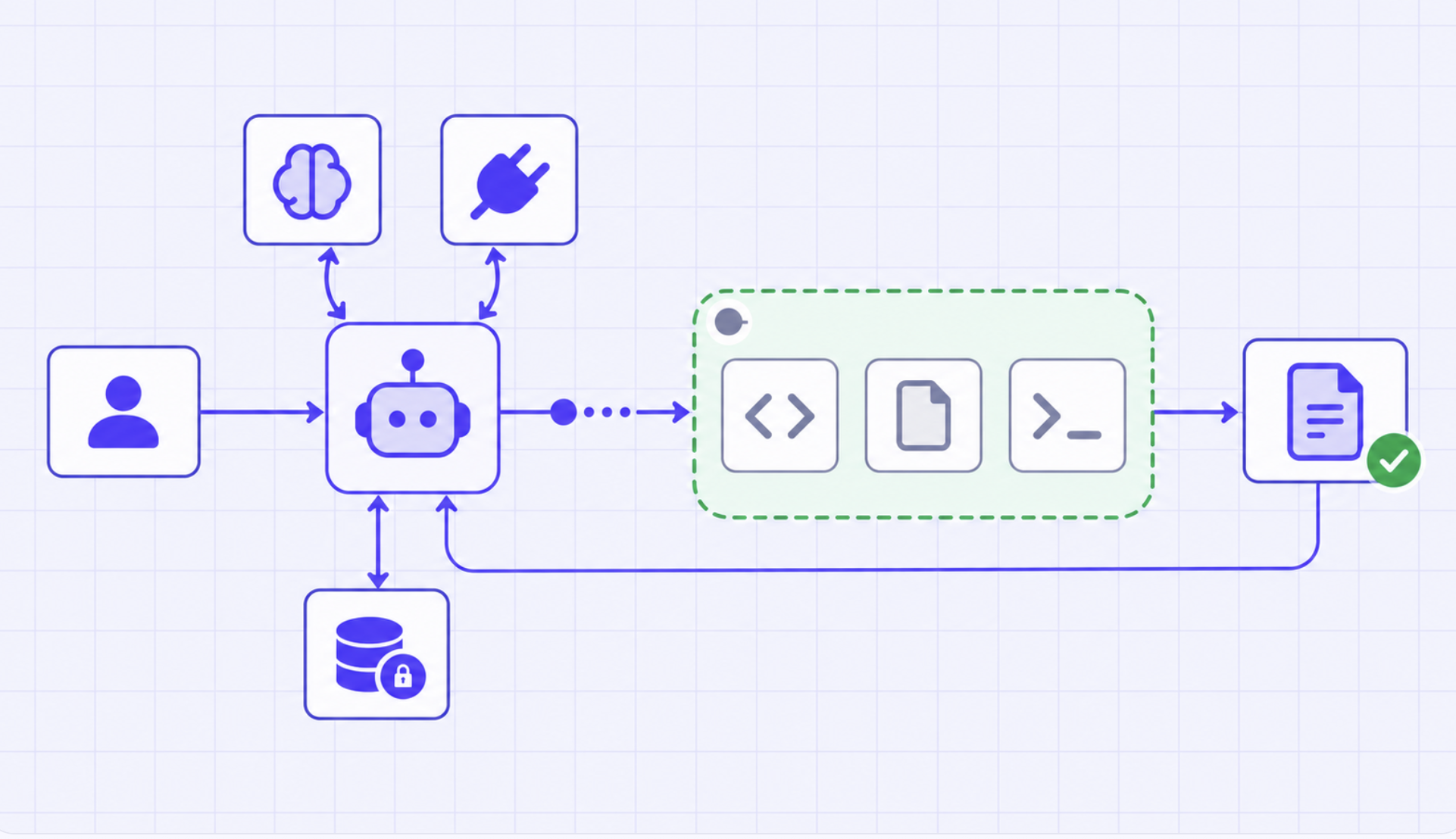
Blazingly fast way to build, track and deploy your models!
A sandbox can isolate code, file, and shell execution without becoming the agent’s entire runtime. That choice changes cost, credential exposure, lifecycle, and recovery semantics.
An agent may need to execute code, manipulate files, inspect a repository, or run shell commands. Those operations should not share an unrestricted process boundary with the orchestration server or the organization’s production infrastructure. A sandbox creates a constrained execution environment for that work.
But “sandboxed agent” is an imprecise phrase. It can mean the entire agent loop runs inside an isolated machine, including model clients, tool credentials, and state. Or it can mean the agent loop remains in a managed runtime and invokes an isolated environment only for execution-heavy tasks. TrueForge chooses the second design: sandbox as a tool.
The distinction changes what is isolated, when compute exists, where secrets live, and what survives a failure. It also prevents a sandbox from becoming a magical security label. The boundary protects only the operations and traffic actually placed behind it.
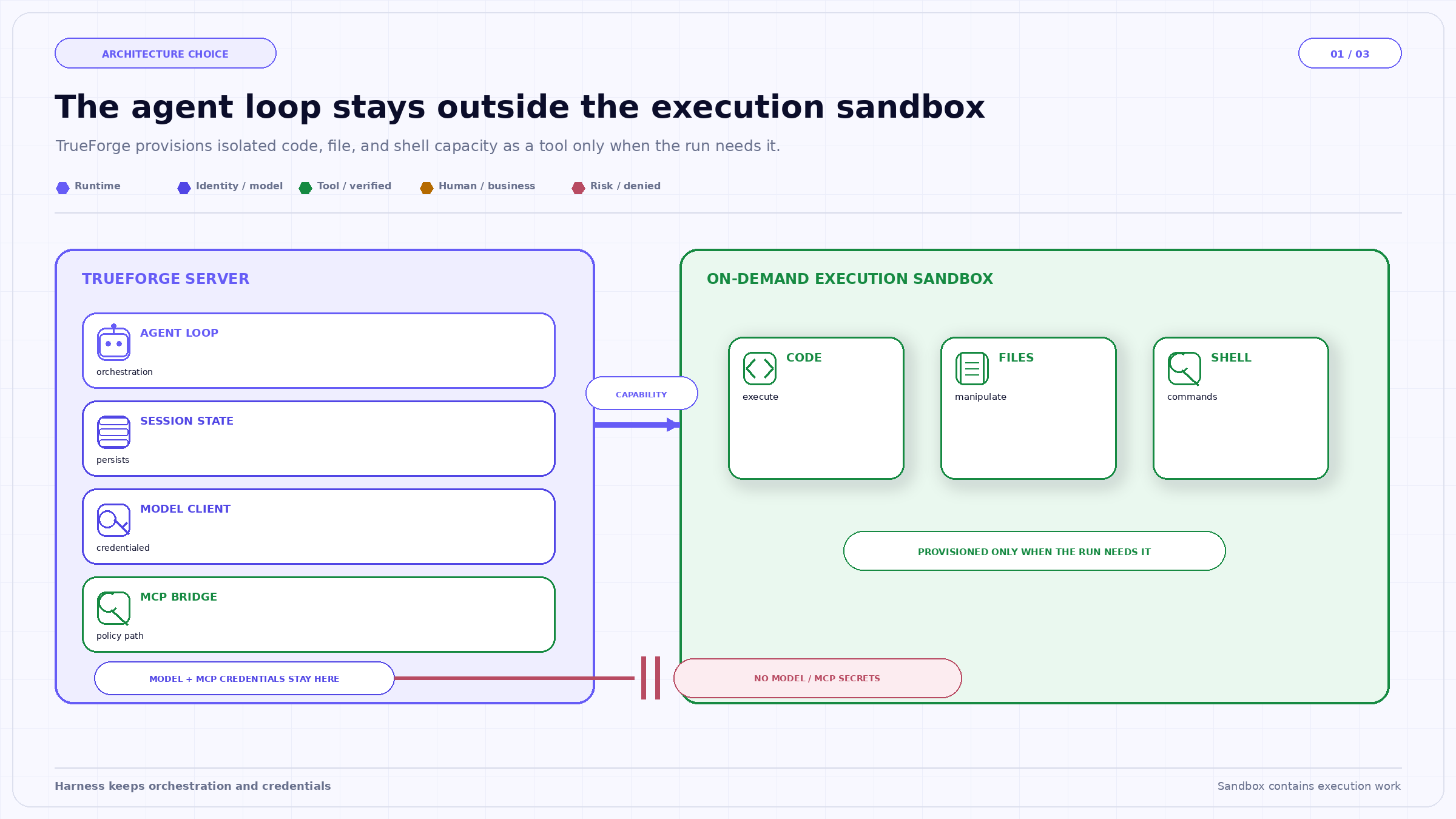
The architecture keeps the secret-bearing model and MCP clients on the harness side while giving code and shell work a separate execution boundary. The connector is a capability path, not a transfer of credentials into the sandbox.
In an agent-inside-sandbox architecture, each run or agent environment may contain the orchestration loop, model client, tools, credentials, and working files. Isolation is conceptually simple because most activity occurs inside one boundary. The costs are heavier provisioning, more complex secret injection, and image rebuilds when runtime dependencies change.
In TrueForge’s documented sandbox-as-tool architecture, the agent loop runs on the TrueForge server. The sandbox is provisioned only when the agent needs code, file, shell, a skill, or Code Mode. Simple conversational turns and MCP calls do not require sandbox compute. Model and MCP credentials remain in the harness, and Code Mode MCP calls are bridged back to the harness rather than giving the sandbox those tokens.
This reduces the secret-bearing surface and allows conversation state to survive a sandbox crash. It also means the sandbox is not the network perimeter for every model and tool call. Model-provider traffic and MCP operations originate through the harness path, and they need their own gateway, identity, credential, and network controls.
TrueForge documents the sandbox as off by default for each agent. When enabled and needed, it is provisioned on demand. The sandbox is reused across turns in the same session, so files persist while the conversation continues. After an idle period it is stopped, then archived and eventually deleted according to provider settings.
That lifecycle is more useful than “one disposable container per prompt,” but it introduces state-management questions. A file from Turn 1 can influence Turn 5. A malicious archive extracted early can remain present after the immediate task is forgotten. A dependency installed during one turn can change later execution. Session continuity is a feature; unmanaged state accumulation is a risk.
Applications should label artifacts with their source event, content digest, data classification, and intended lifetime. Before a later turn executes a file, verify that it still belongs to the active task and that the current user is authorized to access it. When reproducibility matters, record the sandbox snapshot or image identity, dependency lock state, and commands that produced the artifact.
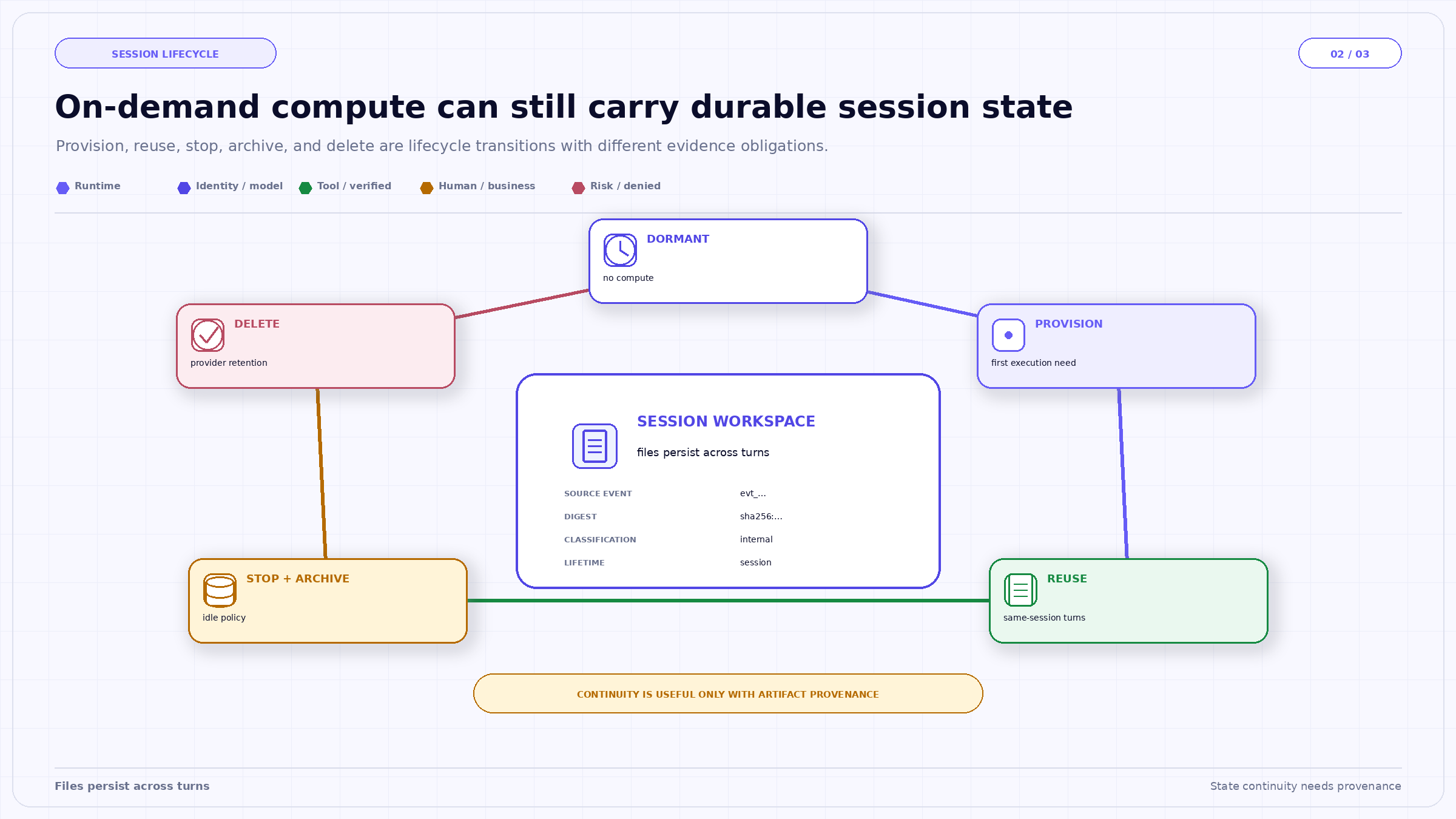
Reuse across turns is shown as a feature and a risk. Files can preserve useful work after a pause, but every restored artifact needs provenance, classification, and a lifecycle rule rather than inheriting trust from the session alone.
Keeping model and MCP credentials in the harness prevents arbitrary sandbox code from reading those secrets directly. That is a strong boundary. Yet a sandboxed script may still be able to ask the harness to perform an MCP call through a controlled bridge. The relevant security question becomes: which calls can this code request, with whose identity, using what arguments, and under which policy?
The bridge should expose a narrow capability rather than a generic credential. Tool definitions, subject identity, destination, data classification, cumulative budgets, and approval requirements should be evaluated outside the sandbox. Results returned to code should be minimized because they can become files, logs, or command input inside the environment.
Likewise, the absence of model credentials does not prove the sandbox has no egress. Provider configuration determines network reachability. A robust deployment separately defines outbound destinations, DNS behavior, package installation policy, metadata-service access, filesystem mounts, resource limits, and termination controls. TrueForge orchestrates the sandbox provider; the organization still validates the provider and its configuration against its threat model.
As of the documentation reviewed for this article, Daytona is the supported sandbox provider. Configuration requires permission to create both sandboxes and snapshots because TrueForge first builds a release snapshot and clones subsequent sandboxes from it. That is a concrete deployment dependency, not a generic promise that any container runtime can be substituted without integration work.
The sandbox is enabled per agent. Skills and Code Mode require it. File downloads are separately configurable in the chat experience. These controls should be reflected in release review: enabling a sandbox adds new execution, storage, egress, and artifact-handling surfaces even if the agent’s model and MCP permissions do not change.
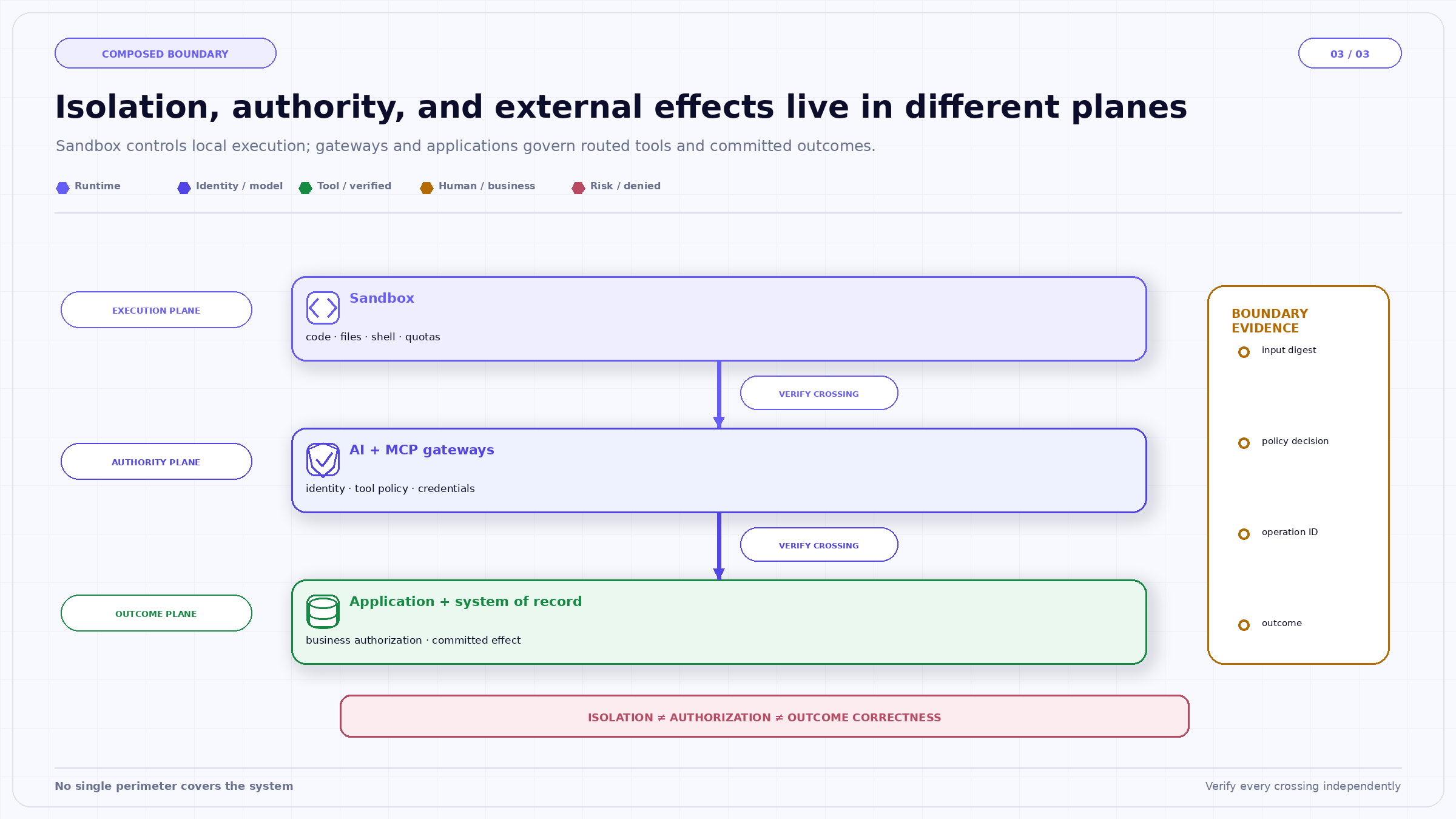
The three planes make the product boundary explicit. A sandbox can contain local execution, MCP Gateway can govern routed tools, and an application can validate business state; none proves the claims owned by the other two.
A software-maintenance agent receives a repository archive and a request to identify a dependency vulnerability. The harness persists the session and invokes the sandbox only when extraction and code inspection begin. The archive is stored with a digest and classified as untrusted. Extraction runs with resource limits and without access to cloud instance metadata.
The agent needs advisory data from an MCP tool. The sandbox does not receive that tool’s credential. Its Code Mode request is bridged to the harness. In this recommended design, policy evaluates the caller, agent, tool, and arguments on the harness side, and the application returns only the advisory fields the script needs. The script produces a report artifact whose digest, commands, snapshot identity, and source files are recorded.
On a later turn, the user asks the agent to apply a patch. The runtime does not assume every file remaining in the session is trusted. It rechecks the repository state, verifies the artifact lineage, and requires a separate approval before any external pull request is created. The sandbox constrains local execution; MCP Gateway and the source-control application constrain the external effect.
Isolation is only one dimension of containment. A sandbox also needs ceilings for CPU, memory, storage, process count, execution time, and output volume. Limits should be selected by task class and should fail predictably. A runaway process that consumes its quota should produce a terminal event and a partial-artifact disposition, not a silent retry with a larger machine.
Package installation deserves its own policy. Allowing arbitrary downloads makes the public package ecosystem part of the runtime trust boundary. Prefer pinned dependencies, approved indexes, snapshot scanning, and network rules that distinguish package retrieval from general egress. Record dependency versions in the artifact lineage so a result can be reproduced or invalidated after a supply-chain advisory.
The transition out of the sandbox is equally important. A generated report, archive, executable, or patch should not become trusted merely because it came from an isolated environment. Before download or external publication, validate type, size, digest, provenance, malware policy, and recipient authorization. Executable outputs may require a separate build or signing pipeline rather than direct handoff from an agent workspace.
These controls also improve cost and reliability. Resource budgets make pathological workloads visible, and artifact metadata lets later turns reuse results without recomputing them or reopening untrusted sources. The sandbox becomes a governed execution service with observable inputs and outputs—not an opaque place where arbitrary work happens.
Multi-tenant deployments add one more requirement: ownership checks must follow every sandbox operation, including file listing, download, restoration, and deletion. A random sandbox identifier is not authorization. The service should resolve the authenticated session owner before touching provider resources, and administrative access should be separately logged and reviewed. Isolation between processes is useful only when the control plane also prevents one subject from addressing another subject’s workspace.
Sandbox-as-tool is a practical architecture because it places high-risk local execution behind an on-demand boundary while keeping state and secrets in the harness. It can reduce cost and credential exposure without forcing every conversational step into an isolated machine.
Its credibility depends on precision. The sandbox protects code, file, and shell work executed there. It does not automatically establish model-provider isolation, MCP authorization, safe artifact provenance, or correct business outcomes. TrueForge provides the runtime separation and lifecycle; the production design completes the boundary with provider configuration, gateway policy, identity, evidence, and downstream authorization.
Editorial disclosure. This article reflects TrueFoundry’s engineering interpretation of the cited public materials as of September 17, 2026. Product capabilities are scoped to linked documentation. Examples and operating defaults are illustrative; they are not legal advice, an audit opinion, an independent benchmark, or a guarantee of security, safety, or compliance.
TrueFoundry AI Gateway delivers ~3–4 ms latency, handles 350+ RPS on 1 vCPU, scales horizontally with ease, and is production-ready, while LiteLLM suffers from high latency, struggles beyond moderate RPS, lacks built-in scaling, and is best for light or prototype workloads.






The latest news, articles, and resources sent to your inbox
.png)
.png)
.png)
.png)
.png)
.png)
.png)
.png)
.png)
.png)
.png)
.png)


