


.png)
September 28, 2026
|
5 min de lecture


Accédez instantanément à un environnement TrueFoundry en direct. Déployez des modèles, acheminez le trafic LLM et explorez la plateforme complète : votre sandbox est prête en quelques secondes, aucune carte de crédit n'est requise.



Published: July 4, 2026
Une méthode incroyablement rapide pour créer, suivre et déployer vos modèles !
If you’ve used TrueFoundry to deploy a service, create a cluster, configure an LLM model, or manage secrets, you’ve interacted with forms that look like normal UI, but are built very differently from typical web forms.
TrueFoundry forms often represent manifests - YAML/JSON objects you can also apply with the CLI (tfy apply -f ...). The same object might be edited in the UI, downloaded as YAML, or submitted to the API.
A schema-driven approach gives TrueFoundry:
The mental model: the schema describes the shape of the data and how to edit it; FormBuilder turns that description into a working form.
A form schema is an array of field definitions. Each field is an object with a few important properties:
Here is a simplified generic example - not a real TrueFoundry schema, but close to how the product thinks about configuration:
[
  {
    "sort": 1,
    "jsonKey": "name",
    "label": "Service Name",
    "uiType": "Input",
    "validate": { "required": true, "pattern": "^[a-z0-9-]+$" }
  },
  {
    "sort": 2,
    "jsonKey": "image",
    "label": "Image",
    "uiType": "Group",
    "subParameters": [
      {
        "jsonKey": "type",
        "label": "Source",
        "uiType": "Radio",
        "validate": {
          "required": true,
          "defaultValue": "build",
          "options": [
            { "label": "Build", "value": "build" },
            { "label": "Existing image", "value": "existing" }
          ]
        }
      },
      {
        "jsonKey": "uri",
        "label": "Image URI",
        "uiType": "Input",
        "conditions": [
 		{ "jsonKey": "image.type", "op": "==", "value": "existing"  }
  ],
        "validate": { "required": true }
      }
    ]
  }
]
Resulting manifest/config on submit:
{
  "name": "my-service",
  "image": { "type": "existing", "uri": "registry.io/app:v1" }
}
Rendering happens in a small pipeline, the flow is:
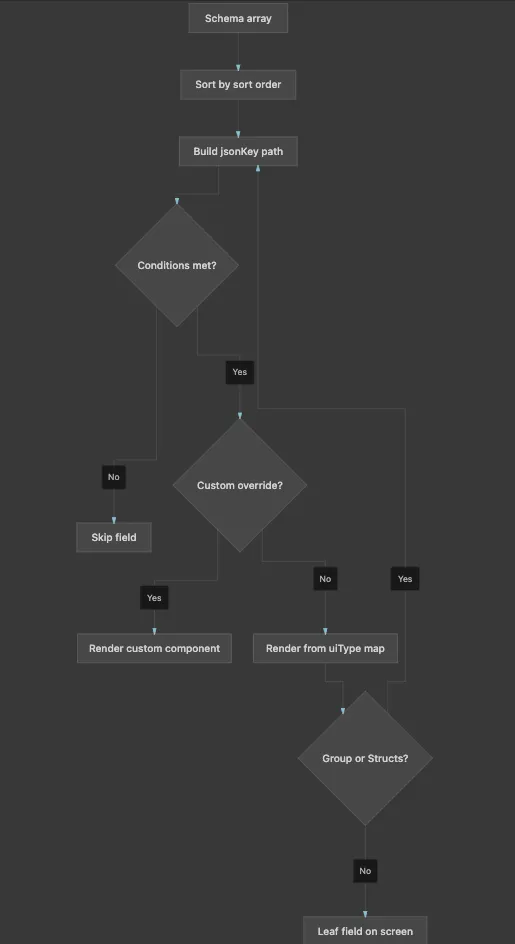
FormBuilder walks the schema tree and picks a React component per node based on uiType.
Component types:
Conditions: If image.type !== "existing", the URI field never mounts. With shouldUnregister: true, it also leaves form state, so hidden values cannot leak into the payload.
Mapping logic in code:
// FormComponentMap
const ComponentType = FormComponents[schema.uiType]
const CustomComp = CustomComponentsMap?.[schema.uiType]

if (!enabledByCondition) return null

return CustomComp
  ? <CustomComp schema={schema} />
  : <ComponentType schema={schema} />
FormBuilder uses react-hook-form as its state engine. That choice matters for how the product behaves.
Initialization/Component Usage - create & edit:
<FormBuilder
  schema={schema}
  defaultValues={existingManifest}   // edit: pre-fill; create: empty/template
  onSubmit={(manifest) => createOrUpdate({ manifest })}
/>
Form setup:
const methods = useForm({
  mode: 'onChange',          // validate as user types
  defaultValues,
  shouldUnregister: true,    // hidden fields drop out of state
})
Field registration - each input binds to its path:
// Inside a text field component
const { register } = useFormContext()

<input
  {...register(schema.jsonKey, registerProps)}
  defaultValue={defaultValue}
/>
Extra context - specific form pass runtime data separate from field values:
<FormBuilder
  schema={schema}
  extraContext={{
    workspace,
    cluster,
    serviceAccountOptions,  // dynamic dropdown options
    dataTestPrefix: 'create-cluster',
  }}
/>
All field values live in one form object. Each field registers under its full jsonKey path:
When you edit a field, you are mutating this shared object. On submit, FormBuilder reads the whole object and passes it to the form’s handler (which usually calls the TrueFoundry API or produces YAML).
When opening a form to create something, defaultValues may be empty or come from a template.
When editing, defaultValues is typically the existing manifest. The form fields pre-fill from that object. Some fields are marked immutable in edit mode (e.g. resource name) so they render read-only.
TrueFoundry forms use shouldUnregister: true. That means:
This is important for conditional forms: you only submit what the user could actually see and edit.
Validation in TrueFoundry forms happens at two layers.
Each field’s validate block can specify:
These rules are converted into react-hook-form validation rules. Errors are shown inline next to the field. Validation runs on change (mode: 'onChange'), so users get feedback as they type, not only on submit.
Schemas can also attach a custom validate function, commonly used for:
useAttachValidation(schema, {
  name: async (name) => {
    const taken = await checkNameExists(name)
    return taken ? 'Name already exists' : true
  },
})When you open “Create Cluster”, “Deploy Service”, “Add Model”, or “Manage Secrets”:
That is why TrueFoundry can support very complex configuration UIs without every screen being a one-off form: the complexity lives in the schema and a library of field components, orchestrated by one shared runtime.
TrueFoundry AI Gateway offre une latence d'environ 3 à 4 ms, gère plus de 350 RPS sur 1 processeur virtuel, évolue horizontalement facilement et est prête pour la production, tandis que LiteLM souffre d'une latence élevée, peine à dépasser un RPS modéré, ne dispose pas d'une mise à l'échelle intégrée et convient parfaitement aux charges de travail légères ou aux prototypes.




Les formulaires pilotés par un schéma constituent une source unique de vérité pour vos manifestes de configuration. Ils garantissent un comportement cohérent de l'interface utilisateur, prennent en charge la logique imbriquée/conditionnelle sans duplication de code, et permettent au backend de piloter la structure du formulaire de manière dynamique.
La validation s'effectue sur deux niveaux : la validation de schéma déclarative (utilisant des règles comme obligatoire, motif ou min/max) et la validation personnalisée/asynchrone pour les contrôles adossés à une API, tels que la vérification de noms de ressources uniques.
Oui. Le FormBuilder de TrueFoundry utilise react-hook-form comme moteur d'état principal, ce qui le rend compatible avec les modèles React standards et facile à étendre avec des composants personnalisés.



Les dernières nouvelles, articles et ressources envoyés dans votre boîte de réception
.png)
.png)
.png)
.png)
.png)
.webp)
.webp)

.webp)
.webp)
.webp)


