


August 31, 2026
|
5 min de lecture


Accédez instantanément à un environnement TrueFoundry en direct. Déployez des modèles, acheminez le trafic LLM et explorez la plateforme complète : votre sandbox est prête en quelques secondes, aucune carte de crédit n'est requise.




Une méthode incroyablement rapide pour créer, suivre et déployer vos modèles !
Most teams building with AI hit the same wall. They are running thousands of model calls a day across different providers and apps, and they have very little idea what is actually happening inside them. Which prompts worked? Why did that agent give a strange answer? Was the response any good? Answering those questions usually means adding tracking code to every app by hand, which nobody enjoys and most teams skip. The integration between the TrueFoundry AI Gateway and HoneyHive fixes this by automatically capturing every call that flows through the gateway, the one place they all already pass through.
Think of the TrueFoundry AI Gateway as a single front door for every model your team uses. Instead of each app talking to OpenAI, Anthropic, or anyone else directly, they all go through the gateway. It handles the messy parts in one place: who is allowed to call what, which model a request should go to, and keeping things safe and within limits. Because every request passes through this one door, it is also the perfect spot to keep a record of what happened.
The best part is that no additional instrumentation is required. The gateway automatically notes the key details of each call, the model used, how long it took, the tokens involved, and the prompt and response, and it does this after the request is already on its way back to the user. So adding this visibility never slows anything down for the people using your app.
HoneyHive is where all that activity becomes something you can actually see and improve your agent from. It takes the records of your AI calls and turns them into clear, end-to-end traces, a step-by-step view of everything that happened in a single request or entire session, including any tools or agent steps along the way, with the inputs, outputs, and timing laid out. When something goes wrong, you can follow the trail instead of guessing. You can also use your coding agent to root cause any issues using the Honeyhive CLI.
HoneyHive does not stop at watching. The same activity it records can be pulled into evaluations and experiments, so you can measure whether your AI is getting better or worse over time, and test changes before shipping them. A trace stops being just a log of what happened and becomes a real example you can use to improve quality.
The two tools fit together because they speak the same language. TrueFoundry already keeps a record of every call; HoneyHive knows how to read that kind of record. So they just connect.For traffic already routed through the gateway, there is no code to add inside your apps and nothing for each team to maintain. You switch on trace export once in the gateway, and from then on every model call flowing through TrueFoundry shows up automatically in HoneyHive.
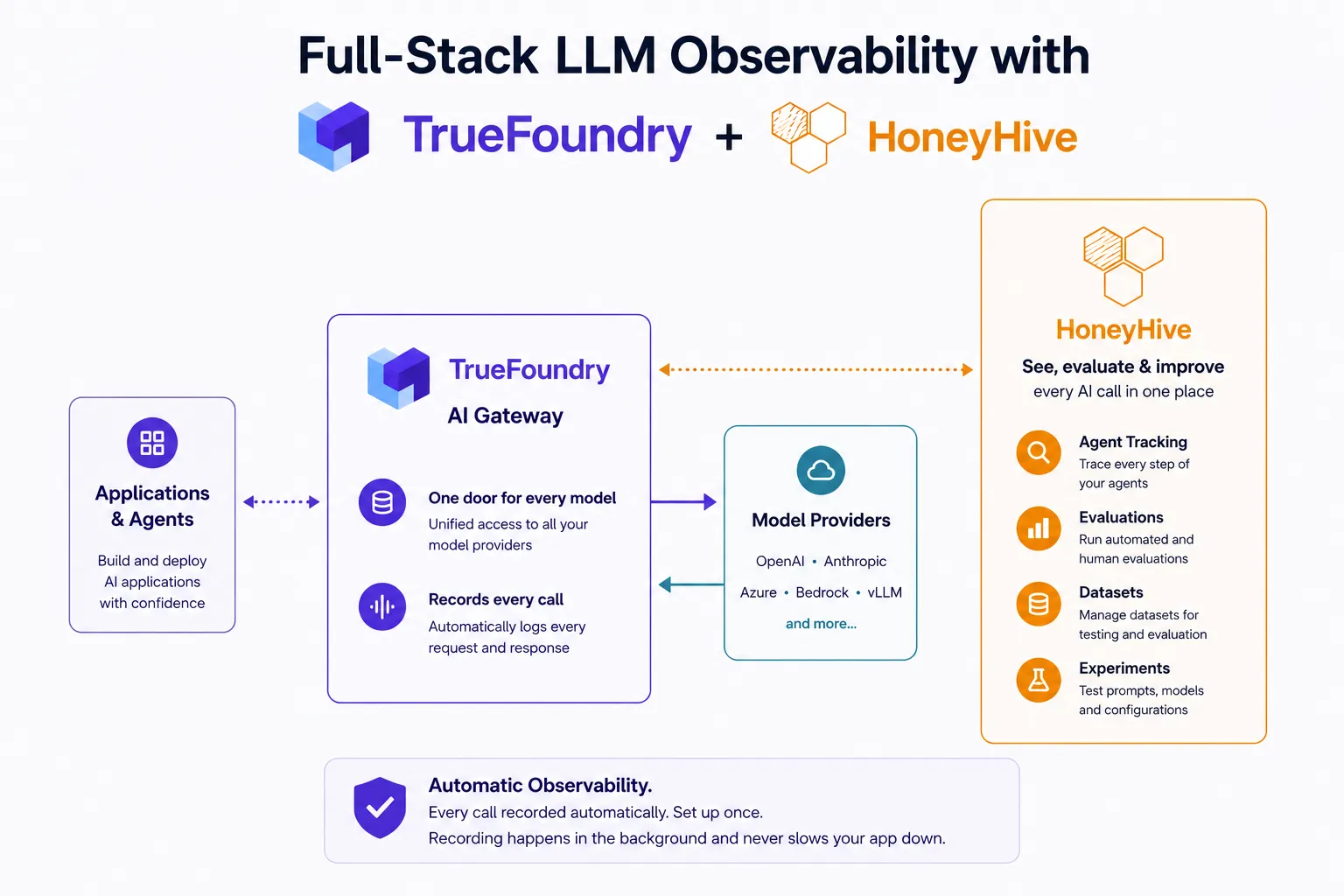
Figure 1: Requests flow through the TrueFoundry AI Gateway to model providers, while the gateway sends a copy of each trace to HoneyHive.
The connection only goes one way and only adds to what you have. The gateway sends a copy of each finished call to HoneyHive, without changing anything about how your app runs and without putting HoneyHive in the middle of a live request. And if you handle sensitive data, a single Exclude Request Data toggle strips out the prompt and response content before anything leaves the gateway.
The key idea is that the user always comes first. The request is answered, and only then does the gateway quietly send the record over to HoneyHive.
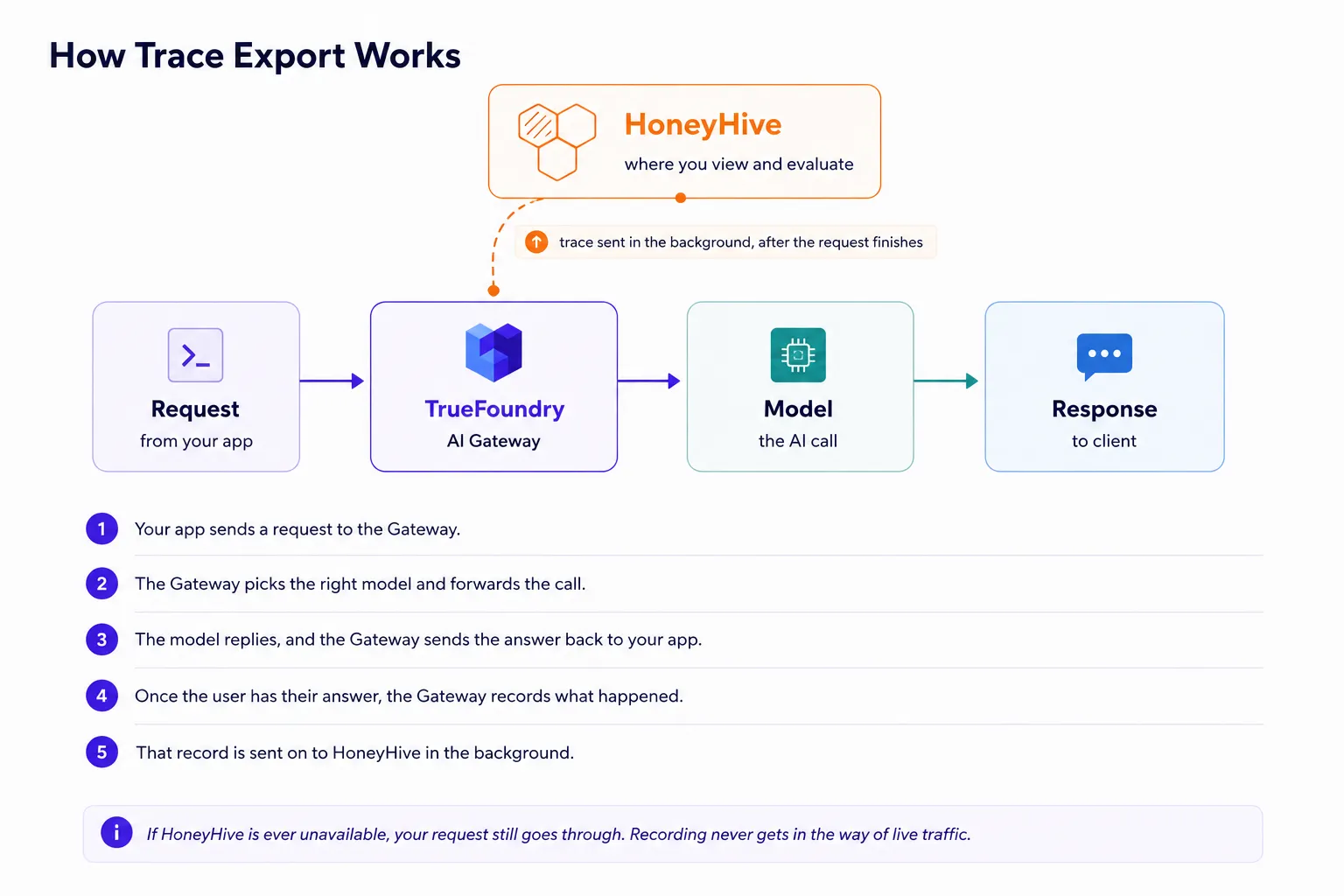
Figure 2: A request is answered end to end, and the trace is sent to HoneyHive afterward, in the background.
Setup is a configuration change, not an engineering project. Create a project API key in HoneyHive, then in the TrueFoundry dashboard open AI Gateway → Controls → Settings, enable the OTEL traces exporter, and point it at your HoneyHive OTLP endpoint. The exact values are below.
Traces endpoint: https://<provider-host>/opentelemetry/v1/traces
Protocol: OTLP/HTTP
Encoding: Json
Auth header: Authorization: Bearer <HH_API_Key>
To confirm the wiring, send a few requests through the gateway, then open Observe → Traces in HoneyHive and look for new events with their SOURCE set to otlp. Full steps live in the TrueFoundry HoneyHive integration docs.
What makes this pairing work is that each tool sticks to what it does best, and they share one simple connection. TrueFoundry runs and directs your AI calls; HoneyHive helps you see, measure, and improve them. Because the gateway already sits in front of everything, visibility stops being a chore each team has to remember and simply becomes part of how the platform works.
TrueFoundry AI Gateway offre une latence d'environ 3 à 4 ms, gère plus de 350 RPS sur 1 processeur virtuel, évolue horizontalement facilement et est prête pour la production, tandis que LiteLM souffre d'une latence élevée, peine à dépasser un RPS modéré, ne dispose pas d'une mise à l'échelle intégrée et convient parfaitement aux charges de travail légères ou aux prototypes.





Les dernières nouvelles, articles et ressources envoyés dans votre boîte de réception



.webp)

.png)
.png)
.png)
.png)
.png)
.png)
.png)
.png)
.png)
.png)
.png)


