.png)
September 29, 2026
|
5 min read


Published: September 29, 2026
.png)
Blazingly fast way to build, track and deploy your models!
Every other AI workload runs on infrastructure you own — your cluster, your network policy, a credential you can rotate. Codex is a CLI process on a developer’s laptop that reads a TOML file in their home directory and talks straight to a model provider. Five properties make it a different class of problem:
The usual reflex is a policy document. It fails for one reason: everything it asks for lives in a file the developer can edit.
Four properties have to hold on every request:
A gateway gives you all four — but only if the client points at it and keeps pointing at it. There are three postures for that, and only one is enforcement:
Locking the file without rotating the token handles tampering but ignores credential theft; rotating without locking does the reverse. You need both.
Treating the model provider account as the control point. Identity, SSO, workspace membership and admin-console policy for Codex live in OpenAI’s console, not your gateway — as does prompt and output retention, which “is governed by your agreement with OpenAI.” A gateway controls routing, spend, guardrails and its own logging, not your provider contract.
Assuming one MDM push equals permanent enforcement. Clients change config precedence between releases. Codex v0.149.0 dropped managed_config.toml on Windows entirely — it now ignores the file with a startup warning (Ignoring deprecated managed config file), with no registry equivalent. A fleet configured before that release is unenforced and reports no error.
Shipping a shared API key. The fastest way to get thirty developers working, and it destroys every downstream control at once. You cannot rate-limit a person or answer “who sent that prompt” from a tenant-wide credential.
Codex treats the TrueFoundry AI Gateway as a model provider; everything else follows from traffic arriving somewhere you control. The gateway details come from the code snippet in the UI.
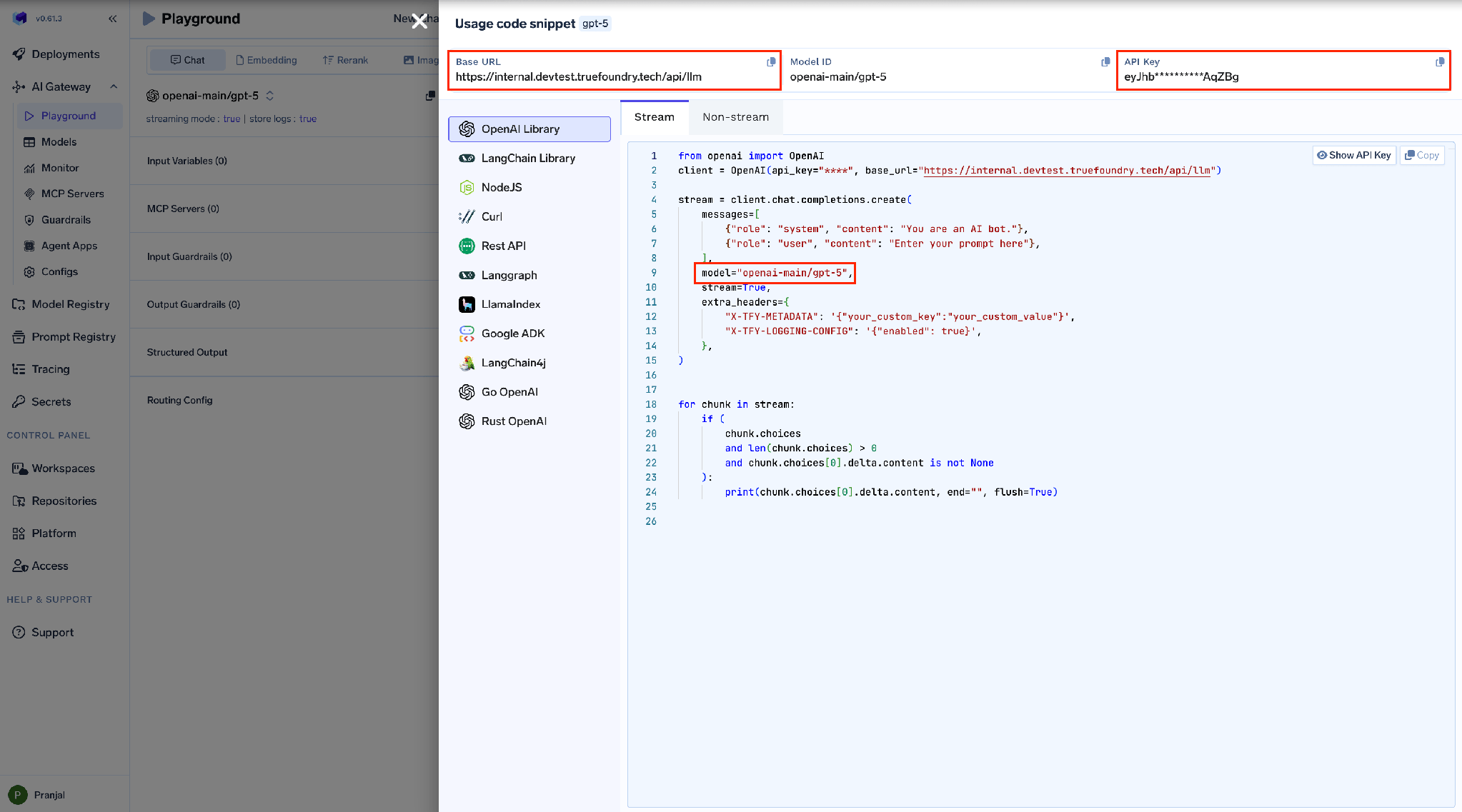
The single-developer form: the token goes in Authorization and the gateway resolves it to a person.
model = "gpt-5.2-codex"
model_provider = "truefoundry"
[model_providers.truefoundry]
name = "TrueFoundry AI Gateway"
base_url = "{GATEWAY_BASE_URL}"
wire_api = "responses"
[model_providers.truefoundry.http_headers]
Authorization = "Bearer TFY_API_KEY"
The developer’s ChatGPT subscription pays for inference and the gateway still governs the traffic. Two things change: requires_openai_auth = true, and the TrueFoundry credential moves from Authorization into x-tfy-api-key, because Codex needs Authorization for its own ChatGPT OAuth token.
model = "gpt-5.2-codex"
model_provider = "truefoundry"
[model_providers.truefoundry]
name = "TrueFoundry AI Gateway"
base_url = "{GATEWAY_BASE_URL}"
wire_api = "responses"
requires_openai_auth = true
[model_providers.truefoundry.http_headers]
x-tfy-api-key = "TFY_API_KEY"
On the gateway side, create a provider under Integrations → Providers of type OpenAI, base URL https://chatgpt.com/backend-api/codex, and leave the API key field empty.
The empty field is the signal, not an omission. If a stored key is present, the gateway uses it instead of the developer’s ChatGPT credentials — breaking the subscription flow and possibly routing traffic under the wrong account. An admin who “helpfully” fills that field converts thirty individually-attributed developers into one anonymous API-key tenant, and nothing errors.
Left empty, you get dual attribution: TrueFoundry records the developer from x-tfy-api-key, OpenAI attributes usage to their ChatGPT seat. Model IDs look like chatgpt-codex/gpt-5.2-codex.
Two constraints follow from the credential being tied to one ChatGPT account. Only one of a virtual model’s targets can be a ChatGPT-subscription model account; API-key-backed targets coexist alongside it. And a per-developer 401, 403 or 429 does not put the shared target into load-balancer cooldown, so one developer’s exhausted quota cannot affect anyone else.
(The docs disagree on plan eligibility: the enterprise-security page says Business or Enterprise, the CLI page also lists Personal. [VERIFY] before promising a tier.)
This is the line teams copy wrong and then debug for an afternoon. The gateway appends the /responses endpoint only for the Responses wire. Set wire_api = "chat" and the request goes to /chat/completions against the same base URL, which is not a valid endpoint for Codex traffic. It is also what makes gpt-5.x-codex thinking tokens behave correctly.
The Codex CLI page frames it more softly — responses for gpt-5.x-codex, chat for other models. They reconcile: for Codex-family models the Responses wire is mandatory.
Codex sends thinking tokens to certain models and identifies them by matching the model string. Fully qualified names — openai-main/gpt-5, azure-openai/gpt-5 — do not match, so feature detection fails.
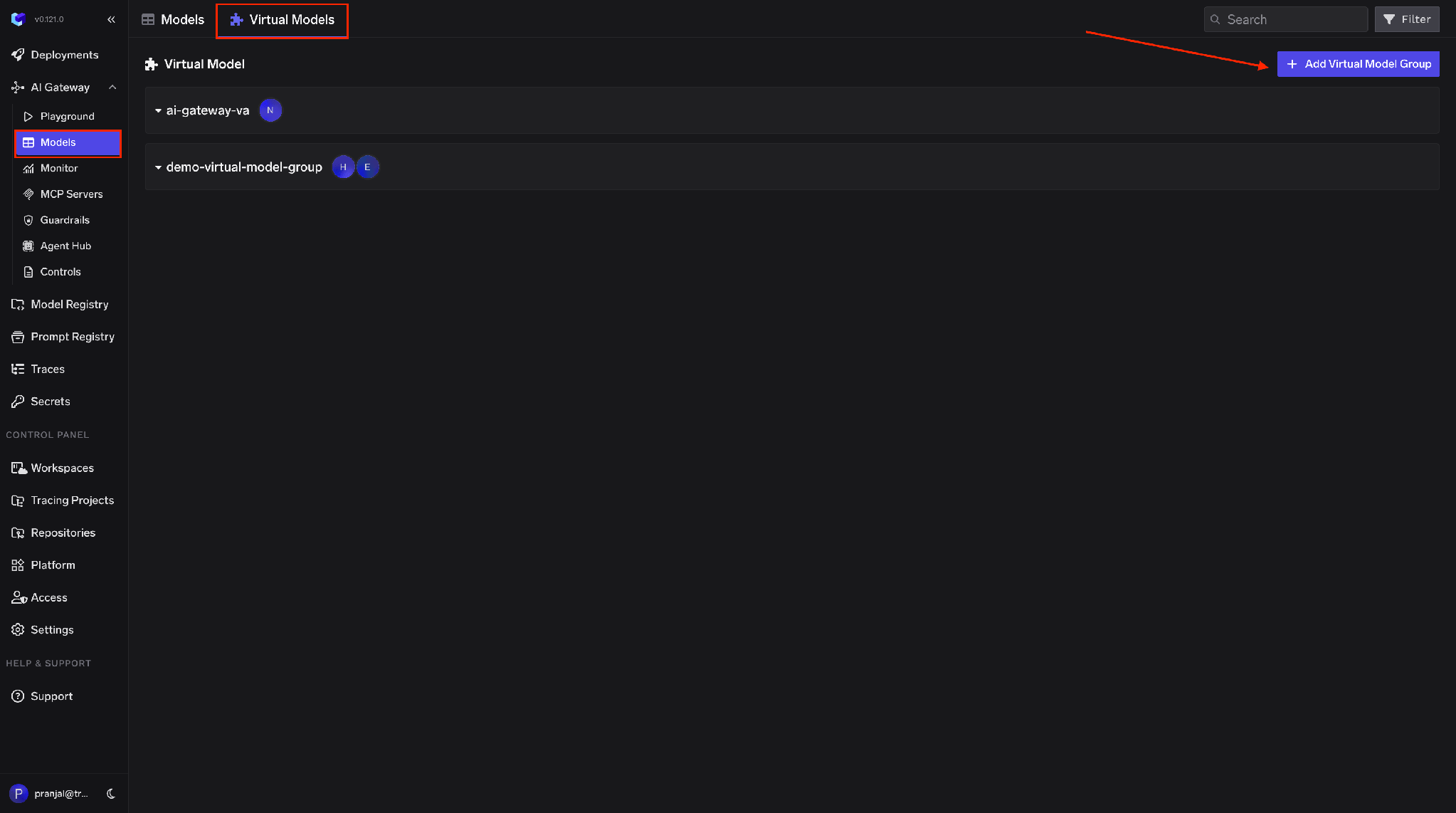
The rule: use a slug matching the actual model ID, e.g. gpt-5.2-codex. Codex recognises those IDs and enables the right features. Do not put the fully qualified name in the Codex config.
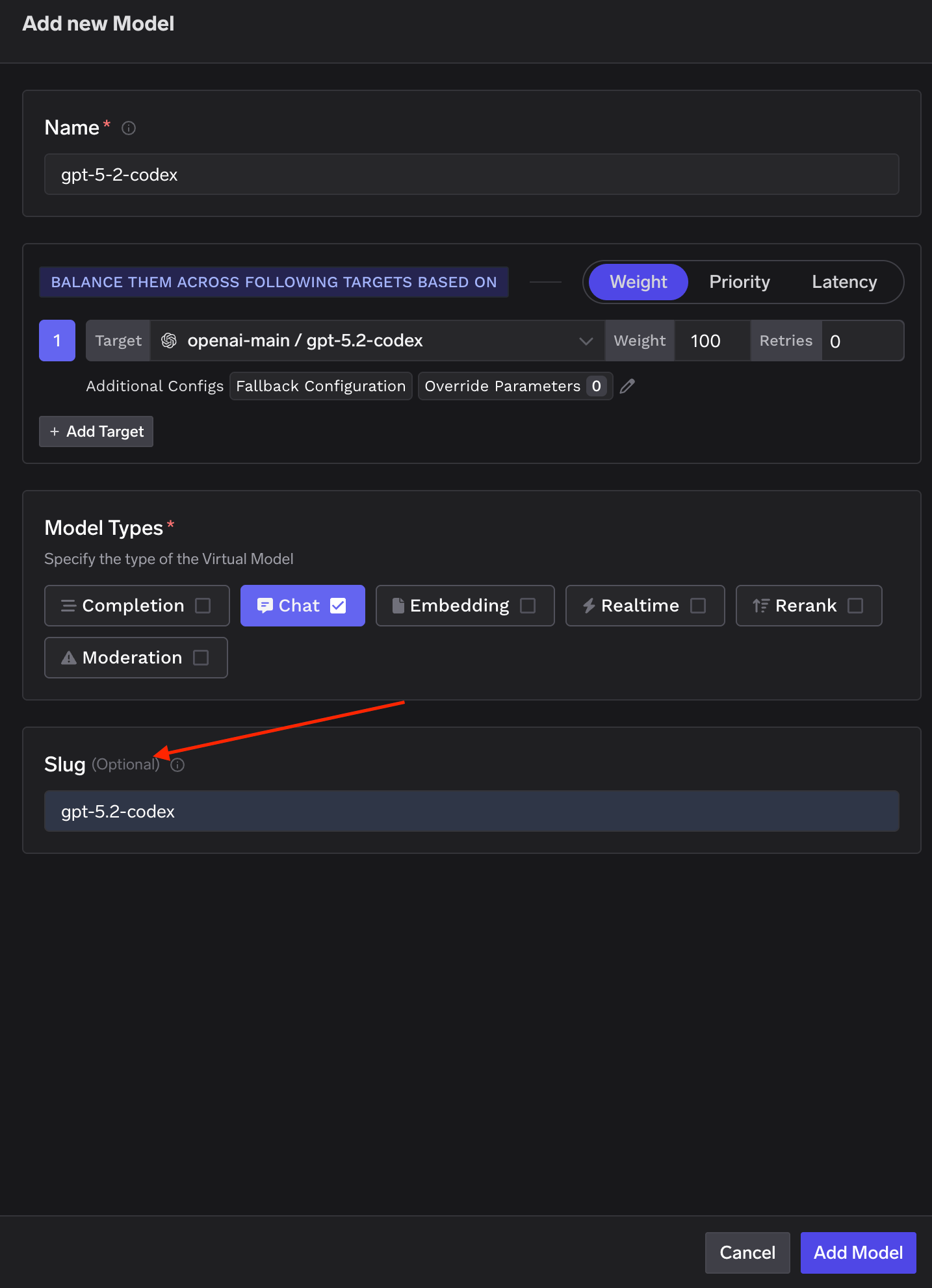
Slugs are unique across the tenant and set in Virtual Model Provider Group settings. Both the slug and the full group/model path work in a request body; Codex needs the slug form.
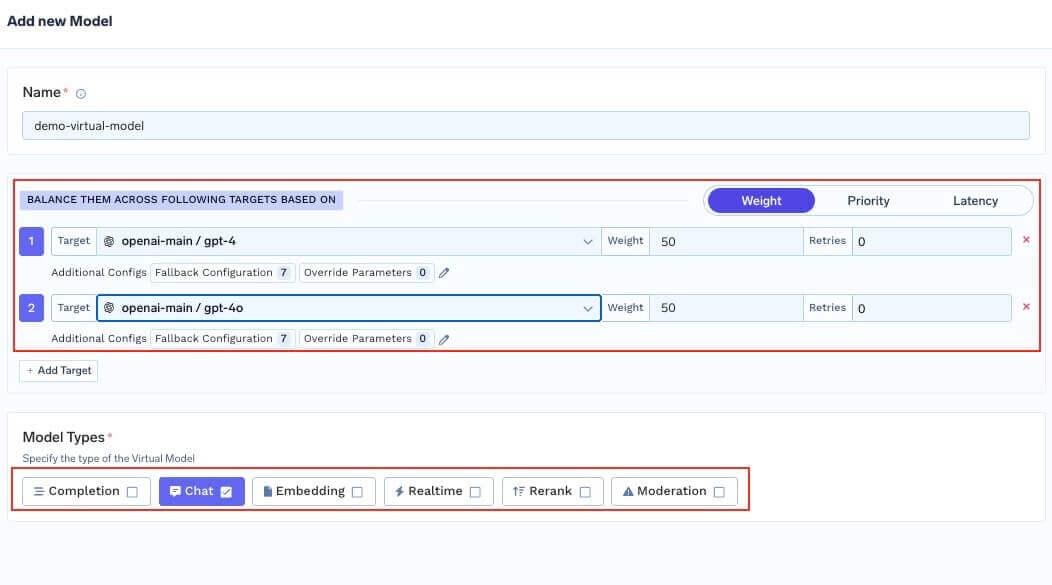
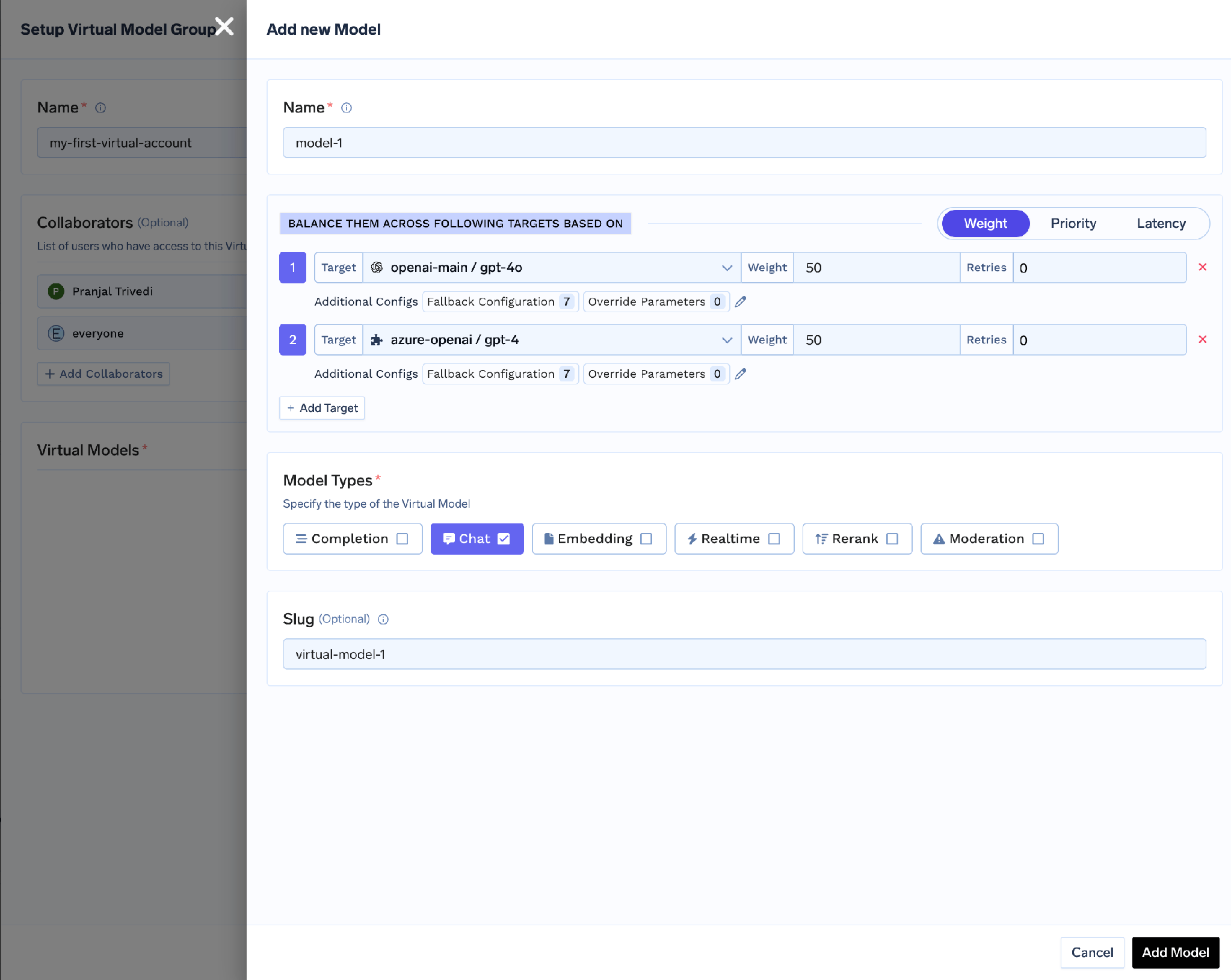
Behind one slug you can weight targets — openai-main/gpt-5 at 70, azure-openai/gpt-5 at 30 — and change the mix without touching a laptop, as in model deprecations and staged cutovers.
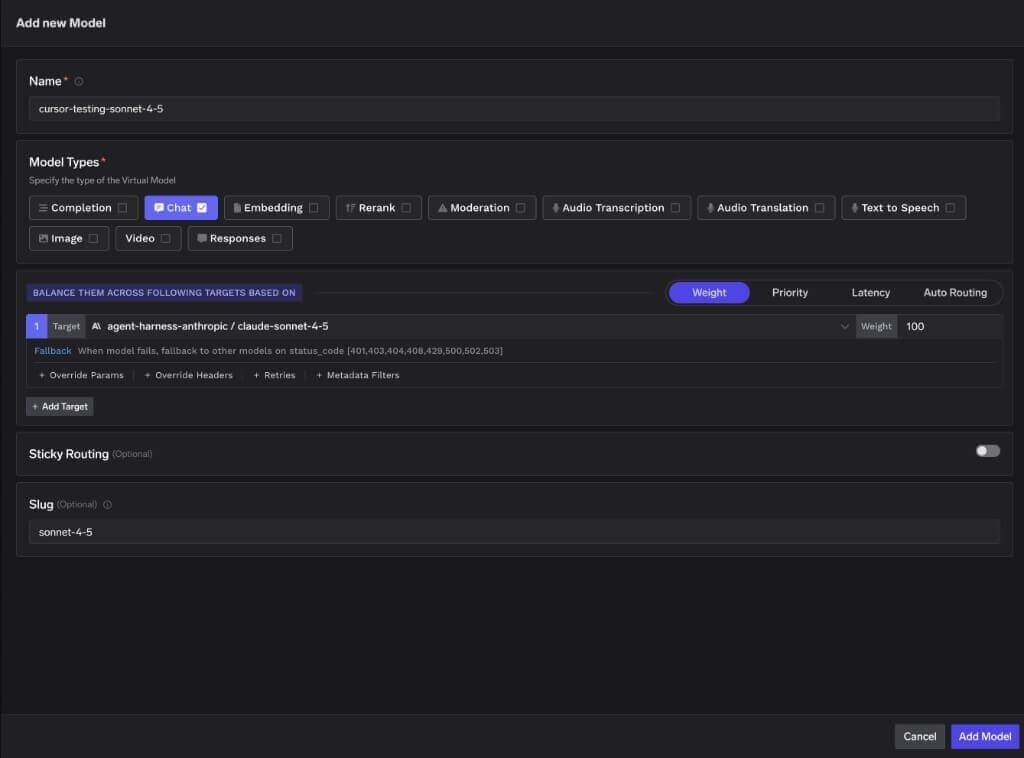
Slug naming is also where clients differ sharply. Cursor picks its request format from slug keywords and switches format silently if the slug contains anthropic, claude, openai, gpt, gemini or vertex. Codex wants the model ID in the slug; Cursor wants those keywords out.
A per-developer config is a documented setup, not a control. Fleet enforcement uses tfy-local-ai-setup, a binary pushed by your MDM and run as root (Administrator on Windows) on a recommended hourly cadence, from github.com/truefoundry/tfy-local-ai-setup/releases; the Codex scripts pin RELEASE_TAG="v1.3.5". Each run does four things:
Step three matters most. The laptop never holds a long-lived gateway token: the refresh token is valid 30 days from last issue, every successful run rotates it, and the credential in the managed config is freshly fetched and scoped to that user’s identity.
Required config: GATEWAY_URL, CONTROL_PLANE_URL, TENANT_NAME. Optional: CODEX_GATEWAY_URL, CODEX_AUTH_MODE, CODEX_DEFAULT_MODEL, CODEX_SETTINGS_FILE. CODEX_AUTH_MODE="api-key" is the default; "chatgpt-subscription" makes the binary write requires_openai_auth = true and move the token to x-tfy-api-key. Machines without Codex are a clean no-op — the binary skips them and exits.
On macOS and Linux the admin file wins, reapplied on every launch:
/etc/codex/managed_config.toml → ~/.codex/config.toml → CLI flags
model_provider = "truefoundry"
model = "gpt-5.2-codex"
[model_providers.truefoundry]
name = "TrueFoundry Gateway"
base_url = "https://<your-truefoundry-gateway-url>"
wire_api = "responses"
[model_providers.truefoundry.http_headers]
Authorization = "Bearer <freshly-fetched-tfy-token>"
The top-level model key is written only when CODEX_DEFAULT_MODEL is set; unset, model choice stays with the developer while the provider stays enforced.
On Windows the file, the order and the schema all change.
C:\ProgramData\OpenAI\Codex\requirements.toml → ~/.codex/config.toml → CLI flags → C:\ProgramData\OpenAI\Codex\config.toml
Note the last position: Windows config.toml is the machine default with the lowest precedence of the four, so a developer’s own file beats it. requirements.toml beats everything. The provider block matches macOS; the model pin does not:
# C:\ProgramData\OpenAI\Codex\requirements.toml
model_provider = "truefoundry"
# ... same [model_providers.truefoundry] and http_headers blocks ...
[models.new_thread]
model = "gpt-5.2-codex"
The requirements schema has no top-level model key. CODEX_DEFAULT_MODEL goes under [models.new_thread] instead. Copy the macOS block onto Windows unchanged and the model pin silently does nothing.
Two version numbers decide whether any of this is real on Windows. v0.149.0 dropped managed_config.toml there. v0.156.0 is the minimum for enforcement — Codex honours model_provider in requirements.toml only from that build; older builds fall back to the lowest-precedence config.toml, which a developer overrides from their home directory. Check codex --version before treating Windows as controlled. Windows Codex management in the setup binary arrives in tfy-local-ai-setup v1.3.5.
Locking turns the file into a control:
# macOS
chflags schg /etc/codex/managed_config.toml
ls -lO /etc/codex/managed_config.toml      # expect: schg

# Linux
chattr +i /etc/codex/managed_config.toml
lsattr /etc/codex/managed_config.toml      # expect: i

# Windows
icacls C:\ProgramData\OpenAI\Codex         # expect: owner Administrators, Users:(RX)
On macOS, /etc/codex/ is root:wheel 755 and the file is root:wheel 644 plus schg — root itself must run chflags noschg to edit it.
The Windows ACL warning deserves its own line. C:\ProgramData\OpenAI\Codex\ is owned by Administrators with inheritance stripped: SYSTEM and Admins full, Users read; both TOML files SYSTEM full, Admins read, Users read. The reason is blunt — ProgramData lets any authenticated user create directories, and Codex loads whatever config it finds there rather than refusing a user-writable one. Do not relax that ACL; a permissive directory turns an enforced config into a suggestion, silently.
Codex reaches the open web two ways. Provider-hosted search sends the Responses API web_search tool, including on supported models on AWS Bedrock Mantle — fast, but behaviour varies by provider and it is not a tool call you control. MCP web search — Tavily or Exa behind the TrueFoundry MCP Gateway — is recommended for consistency, because MCP tools run client-side in the Codex process whichever model the gateway routes to.
[mcp_servers.web-search]
url = "https://<gateway>/<tenant>/mcp/<mcp-server-name>/server"
http_headers = { Authorization = "Bearer TFY_API_KEY" }
Use bearer_token_env_var = "TFY_API_KEY" rather than inlining the token. To disable provider-hosted search, set web_search = "disabled" in ~/.codex/config.toml — this disables only the provider-hosted path; the MCP server keeps working until you remove its [mcp_servers.<name>] block. Registering search as an MCP server is also what makes that tool traffic governable under MCP gateway access control.
Because every completion crosses the gateway, the trail exists whether the developer wants it or not — each request in Request Traces with the resolved user, model served, tokens and latency.

Above that, the metrics dashboard aggregates the fleet: spend and volume by user, team and model.
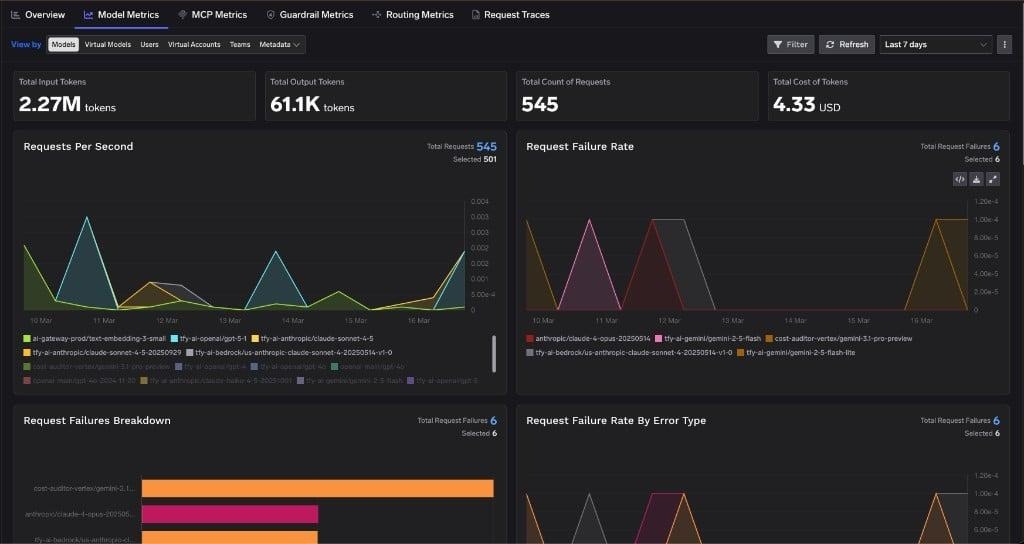
Every coding client on the gateway lands in the same view — one cost picture instead of four, as in centralising cost control across AI coding IDEs.
Two hundred engineers, macOS and Windows, ChatGPT Enterprise already bought. Developers keep Codex; security gets attribution; finance gets a per-team number.
1. Create the provider. Integrations → Providers → OpenAI, base URL https://chatgpt.com/backend-api/codex, API key field empty — note that in the runbook so the next admin does not “fix” it.
2. Create the Virtual Model. Slug gpt-5.2-codex — the real model ID, not the fully qualified name. One ChatGPT-subscription target, plus API-key-backed targets for failover.
3. Set the MDM config. GATEWAY_URL, CONTROL_PLANE_URL, TENANT_NAME, plus CODEX_AUTH_MODE="chatgpt-subscription" and CODEX_DEFAULT_MODEL="gpt-5.2-codex".
4. Push the script hourly, as root. It installs tfy-local-ai-setup v1.3.5, refreshes each user’s token, writes managed_config.toml on macOS and requirements.toml on Windows, and locks both.
5. Gate the Windows rollout on codex --version. Anything below v0.156.0 is unenforced; report the fleet version distribution before claiming coverage.
6. Verify. ls -lO for schg, lsattr for i, icacls for owner Administrators and Users:(RX). Then open Request Traces and confirm a developer’s name, not a service account, is on the request.
7. Close the web-search path. Register Tavily or Exa behind the MCP Gateway, then set web_search = "disabled".
The honest limit: these steps govern the model provider, auth and spend. They do not control which MCP servers a developer may enable.
The MDM script does not control MCP servers. It manages managed_config.toml, covering the model provider and auth. Codex’s enforcement of which MCP servers a developer may enable lives in a separate /etc/codex/requirements.toml on macOS and Linux, which tfy-local-ai-setup does not write. Deploy that alongside the script — and do not tell an auditor the MDM setup covers MCP allowlisting.
Two MDM scripts, one config file, different pinned versions. The Codex scripts pin tfy-local-ai-setup v1.3.5; the Claude Code scripts pin v1.3.4. Both describe one binary sharing one saved config file on the same machine, so a fleet running both would reinstall a different version each hour — and Windows Codex support only exists from v1.3.5. [VERIFY] the pin before enabling both.
Model version drift in the docs. The Codex page announces GPT-5.3-Codex while every config example, the slug guidance and the MDM default use gpt-5.2-codex. Pin explicitly in CODEX_DEFAULT_MODEL; [VERIFY] the current model ID before rollout.
Cursor is not enforceable the same way. Its MDM policies cover hooks, not models: base URL, API key and model list are not MDM-enforceable, so a developer can revert them at any time. Copilot CLI has no settings.json path for BYOK either. Codex and Claude Code are the two that hold — Cursor security covers the gap.
Most advice on OpenAI Codex governance stops at “route it through a proxy.” That is the easy half. The hard half decides whether the routing survives a real fleet: an empty API key field that looks like a mistake and is not, a mandatory wire protocol, a slug that must match a model ID exactly, a Windows file with its own schema, a version floor below which the control silently does nothing, and an ACL you must not relax.
None are policy questions. They are configuration facts, each with a command you can run to check it. That is the difference between a governance document and a governed fleet: someone walks up to any laptop, runs ls -lO or icacls, and gets a yes or a no.
TrueFoundry AI Gateway delivers ~3–4 ms latency, handles 350+ RPS on 1 vCPU, scales horizontally with ease, and is production-ready, while LiteLLM suffers from high latency, struggles beyond moderate RPS, lacks built-in scaling, and is best for light or prototype workloads.




Four controls that hold without developer cooperation: a per-developer identity on every request, admin control over reachable models, spend attributed to a person and a team, and audit produced on the network path. In practice: an admin-owned config file read at higher precedence than the developer’s, a file lock, and short-lived credentials.
Yes. Set requires_openai_auth = true, move the gateway credential to x-tfy-api-key so Codex can use Authorization for its own ChatGPT OAuth token, and create the gateway provider with the API key field empty — a stored key overrides the developer’s ChatGPT credentials and breaks the flow. You get the developer’s identity on the gateway side and their ChatGPT seat on OpenAI’s.
Only from Codex v0.156.0. v0.149.0 removed managed_config.toml support with no registry equivalent; enforcement moved to requirements.toml, a different schema with no top-level model key. Below v0.156.0 only the lowest-precedence config.toml applies, which a developer’s own config overrides.
Yes. TrueFoundry runs in your VPC, on-prem, air-gapped, or hybrid, so prompts and responses never leave your domain even as you route across many providers.
Yes. It includes an MCP Gateway, an Agent Gateway, and an MCP & Agents Registry with tool-level access control. Agents on LangGraph, CrewAI, AutoGen, or a custom framework can all be governed centrally.
Yes. The gateway is OpenTelemetry-compliant and plugs into Grafana, Datadog, or Prometheus. Each LLM classifier call produces its own span, so classifier latency is visible separately from the served model’s.



The latest news, articles, and resources sent to your inbox
.png)
.png)
.png)
.png)
.png)
.png)
.png)
.png)
.webp)
.webp)