.png)
September 28, 2026
|
5 min read


Published: September 28, 2026
.png)
Blazingly fast way to build, track and deploy your models!
Data loss prevention was built for artefacts. A file with an extension. An email with an attachment. An upload to a consumer drive. A USB write. Each has a shape a policy engine recognises, a destination it classifies, an action it interrupts.
An LLM API call has none of that shape. A prompt is an HTTPS POST to api.openai.com carrying a JSON body with a messages array. No file, no attachment, and a destination you pay for and allowlist - indistinguishable at the network layer from every other legitimate call you make.
The problem in one sentence: the exfiltration path and the approved business path are the same path.
Even with TLS inspection - which many organisations skip on API traffic - the proxy sees a JSON document. Engines built for documents and form posts do not understand a conversation array holding a system prompt, a retrieved document and four interleaved tool results. They match a credit card regex in plaintext; they do not notice that message four contains the customer table. And the destination cannot be blocked: a rule stopping traffic to OpenAI stops the product.
Secrets pasted into prompts. A developer hits an error, copies the stack trace, and copies the config block above it - which holds an AWS key or a database connection string. They are not careless with secrets; they are thorough about debugging. The secret is incidental context, and it still leaves.
Source code in context windows. Coding agents changed the volume by an order of magnitude. A human pastes a function. An agent attaches the file, its imports, the test suite and whatever else fits, every turn, unattended. Over a week, three coding agents send out more source than a departing employee could carry on a USB stick.
Customer PII from RAG retrieval. The subtle one. Your application retrieves a ticket the user is entitled to read and puts it in the prompt. Entitlement to read is not approval to transmit to a third-party provider. Access control answers the first question correctly and the data leaves anyway, because nothing asks the second.
Data moving through tool calls. With MCP the model does not just receive context - it fetches more. An agent calls a database tool, 500 rows land in the context window, and next turn they go to the provider with everything else. Arguments leak outward, results inward, and both legs are invisible to anything watching only the first prompt.
Training and retention at the provider. Everything above is what leaves; this is what happens next. How long the payload is stored, whether it trains a model, who reads it.
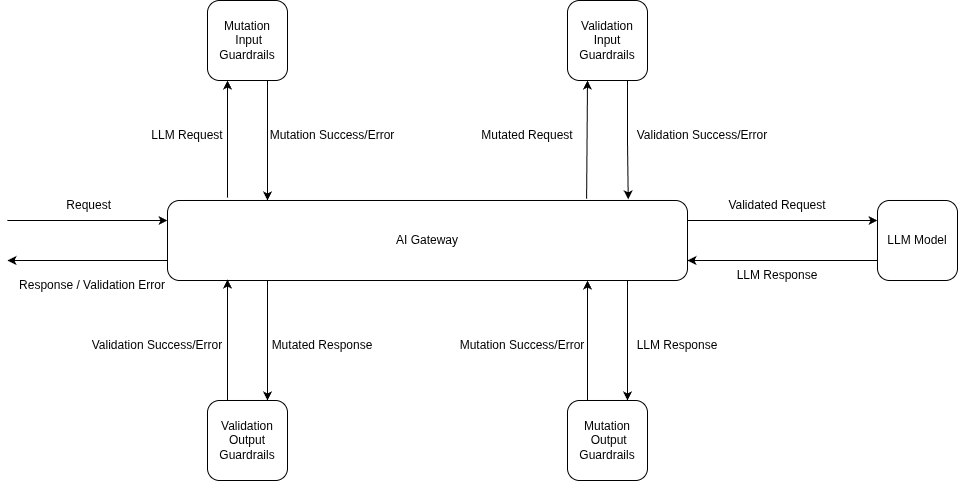
TrueFoundry AI Gateway LLM request flow: input guardrails before the model call, output guardrails after the response
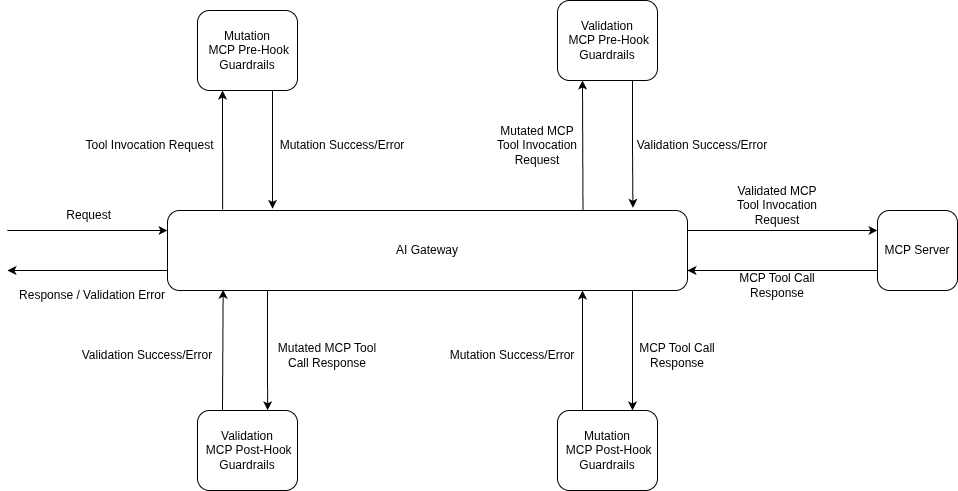
MCP tool invocation flow: pre-invoke guardrails before the tool runs, post-invoke guardrails before the result reaches the model
Most AI programmes close the DLP question with a procurement answer: we signed the zero-retention addendum. Useful to have. Not a control, for three reasons.
It is an assertion, not an enforcement point. No API tells you a request was excluded from training, and nothing in your SIEM fires when the promise breaks. You are trusting a counterparty’s process - reasonable commercially, poor architecturally.
It covers only the account you negotiated. A developer who runs out of quota and drops a personal key into an environment variable calls the same provider with none of your terms attached. That is shadow AI, and no contract reaches it.
It says nothing about what you should not have sent. Zero retention on a prompt carrying a live AWS key still means that key travelled to a third party and needs rotating. Retention terms address storage, not disclosure.
The control you own ends at your perimeter. Past it, everything is someone else’s promise, and your only lever is deciding what crosses.
Four places can hold it. One holds it well.
The gateway wins on four properties at once: it terminates the request, so it holds plaintext; it understands the schema, reasoning about messages[2].content rather than bytes; it authenticated the caller, so findings attach to a user or team; and it sits on the tool path too, the only way to cover the MCP channel. Same argument that puts PII redaction in the gateway rather than each application.
The honest limit: a gateway governs only what routes through it. Egress network policy - deny direct outbound to provider domains, allow the gateway - is a prerequisite, not an extra.
Redacting the log instead of the wire. Easy to do, because both features are called redaction. Scrubbing PII from stored request bodies protects your observability store; it does nothing about what the provider received, because the live request was forwarded first and redaction applied to the copy. Two controls, two threat models, and confusing them yields a clean trace viewer and an unchanged leak.
Assuming detection implies blocking. A mutate-only detector rewrites the payload and lets it through by design. If your policy is “reject any request containing a national ID”, a redacting guardrail implements a weaker one. Check the operation mode of every control, not only its detection coverage.
Watching only the input. Secrets leak outward as often as inward: a model shown a credential will repeat it, and a tool result carrying a connection string flows back into context. Output and post-tool hooks are not optional extras.
The honest framing first: TrueFoundry has no product called DLP. No DLP page, no policy object, no dashboard. What exists is guardrails on four hooks plus a rule-based logging configuration, and you assemble a posture from those parts.
The hooks are LLM Input, LLM Output, MCP Tool Pre-Invoke and MCP Tool Post-Invoke, and guardrails run on every tool call separately - five tools in a row means five sets of checks. Redaction happens in Mutate mode, which rewrites the payload before the request goes out; Validate inspects and can block but never touches the data. The sibling post on data masking in the AI gateway covers those mechanics in full.
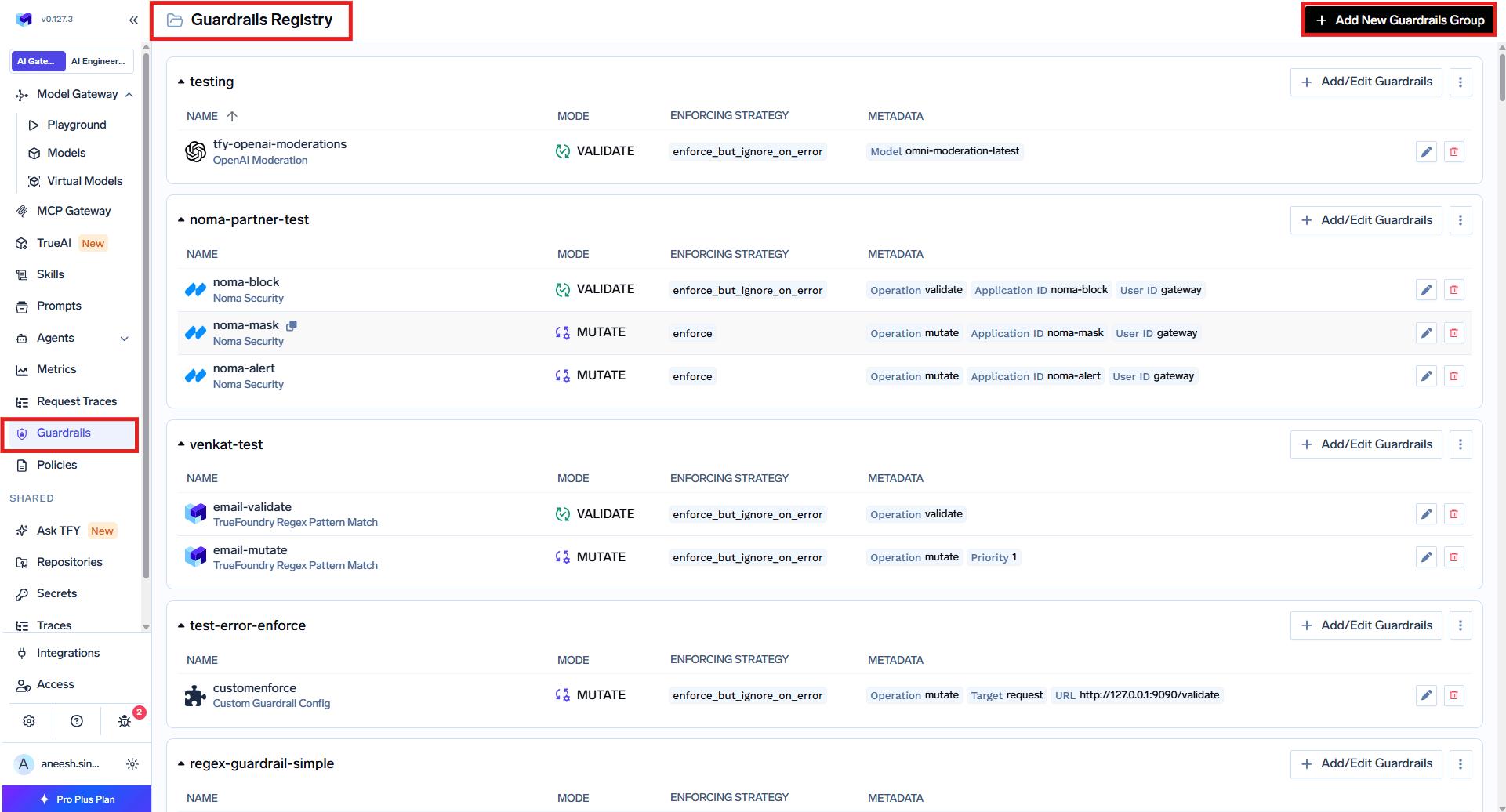
One more built-in, Content Moderation, validates Hate, Self-Harm, Sexual and Violence at configurable severity. Secrets Detection runs inside the gateway with no external call, covering twelve cloud-credential formats, four AI-provider keys, eight repository and package-manager tokens, chat, payment and database URI schemes and seven private-key formats - plus long hex and base64 strings near keywords like api_key. Regex Pattern Matching takes organisation-specific identifiers: presets for SSN, passports, Aadhaar, PAN and the card networks, plus custom patterns mapping a regex to a replacement - EMP-\d{6} to [REDACTED EMPLOYEE ID].
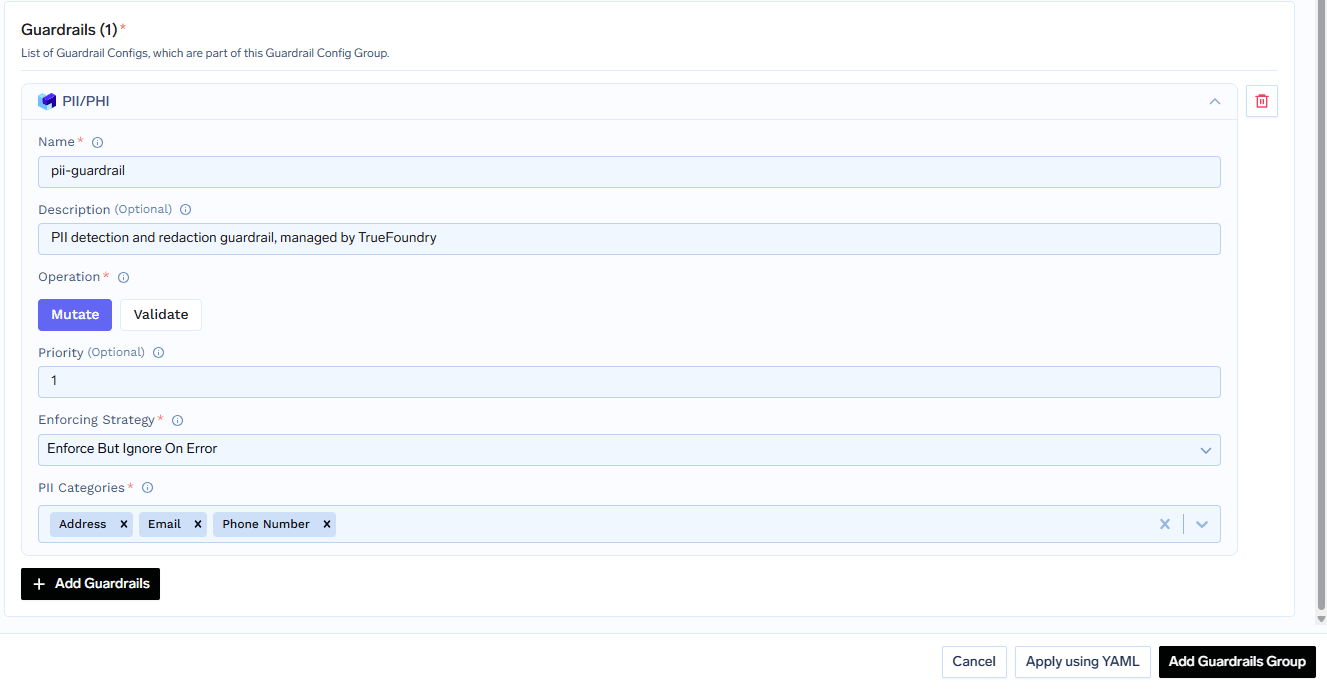
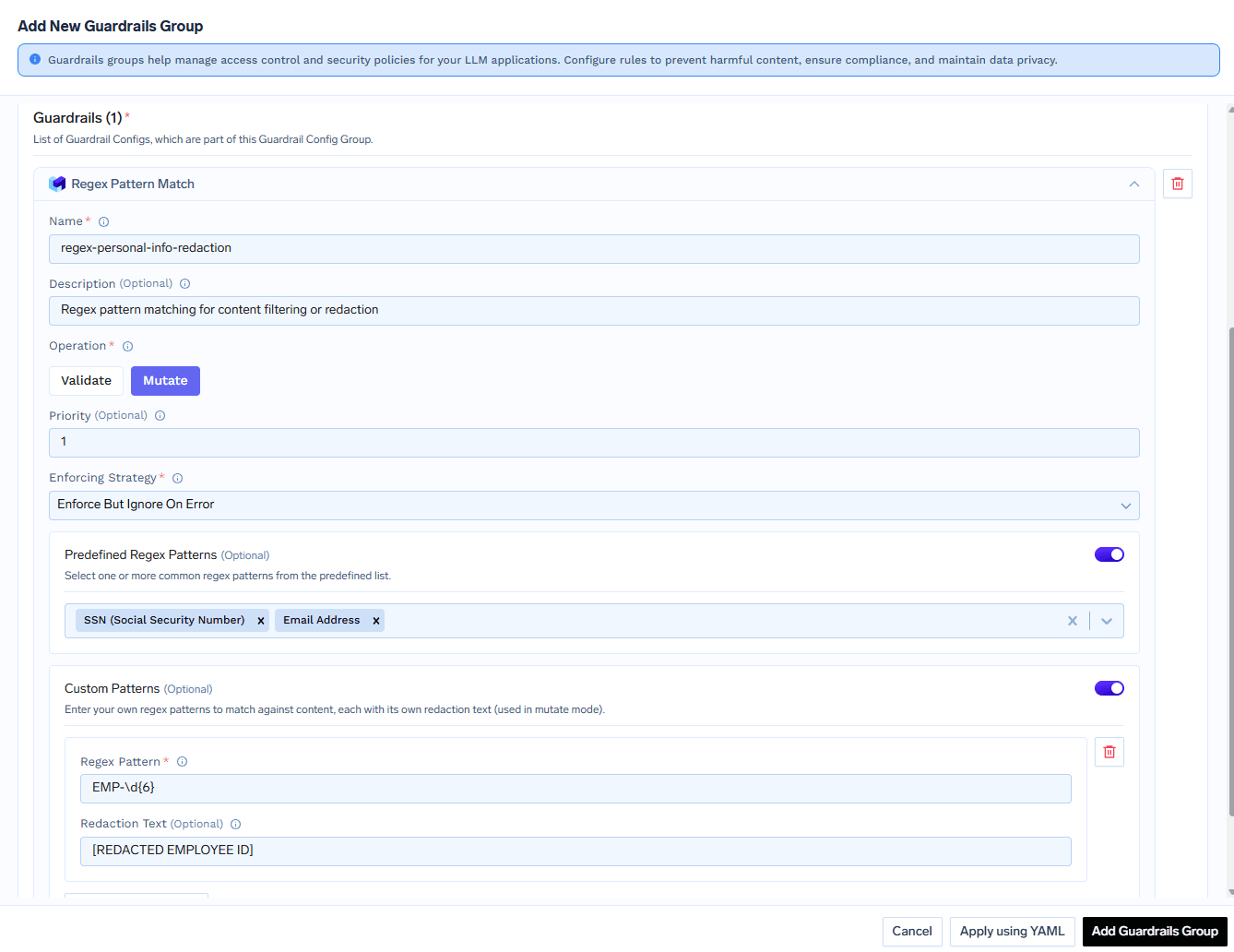
Three built-ins run on managed Azure services TrueFoundry operates, and are available only when TrueFoundry hosts the gateway - not on your own infrastructure, which includes fully self-hosted and hybrid “Gateway Plane only” deployments, even though TrueFoundry manages the control plane in the hybrid case. For a regulated team that is exactly the deployment they were planning, so the documented alternatives matter:
Secrets Detection, Regex Pattern Matching, SQL Sanitizer, Code Safety Linter, Metadata Validation, Cedar and OPA are unaffected - they run in the gateway process. A self-hosted deployment keeps the credential and pattern controls intact and swaps the PII engine for a bring-your-own-key one. Azure PII is the closest substitute, identifying over 50 types of personal information via your own Foundry endpoint, categories and a Domain setting (Healthcare for PHI). One difference: it sends the last message to the Azure API, not the whole conversation.
If your policy is genuinely “reject on PII” rather than “redact PII”, the built-in cannot do it - AWS Bedrock Guardrails set to block on sensitive information is the documented hard stop:
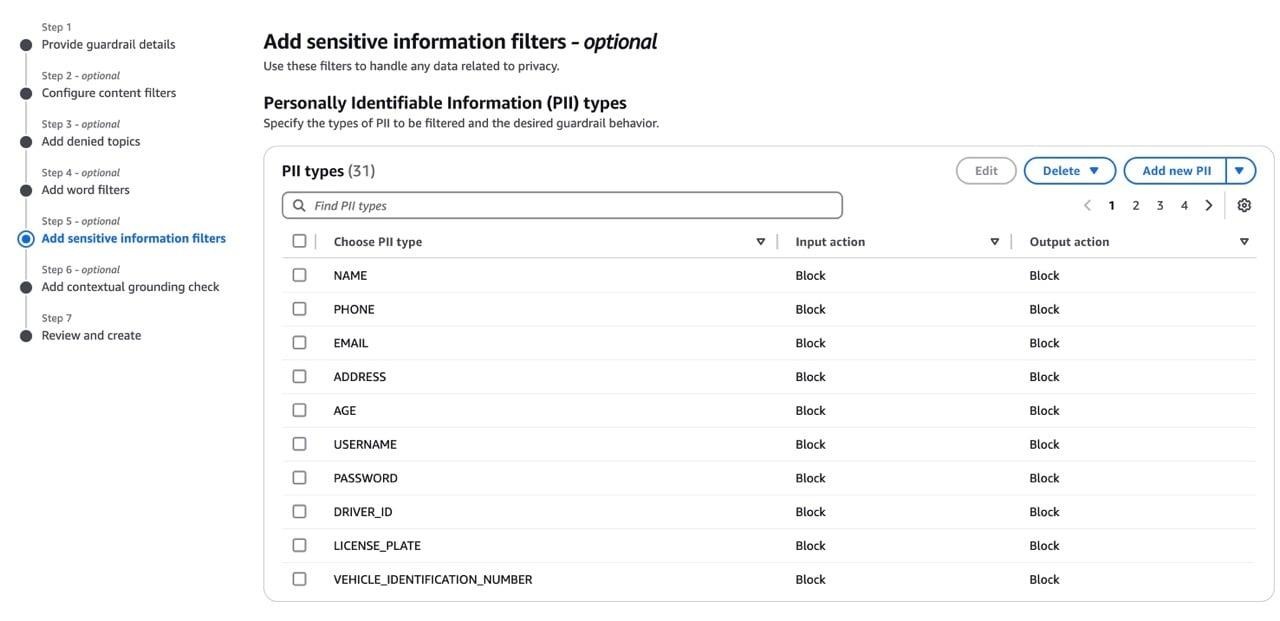
Partner products plug in as guardrails too: CrowdStrike AIDR (the only one documenting a round trip - format-preserving encryption on input, restored via /v1/unredact), Google Model Armor (needs an inspect and a de-identify template or Mutate fails), Lasso Security (classify blocks, classifix masks), Pillar Security (plr_mask) and Cisco AI Defense (validate-only).
The other half of a DLP posture is what your own platform keeps. Logging Configuration is rule-based: rules match on subjects (user:, team:, virtualaccount:), models or metadata, then set whether bodies are logged and what is redacted in storage.
Three things matter. Deny wins - a body is stored only when every matching rule allows logging. Redaction applies only to the logged copy; the live request to the provider is never modified. And it controls bodies only - cost, tokens, latency and metadata are always recorded. Per-request, X-TFY-LOGGING-CONFIG takes stringified JSON such as '{"enabled": true}', and tfy.logging.prompt_logging_enabled records the outcome on the trace.
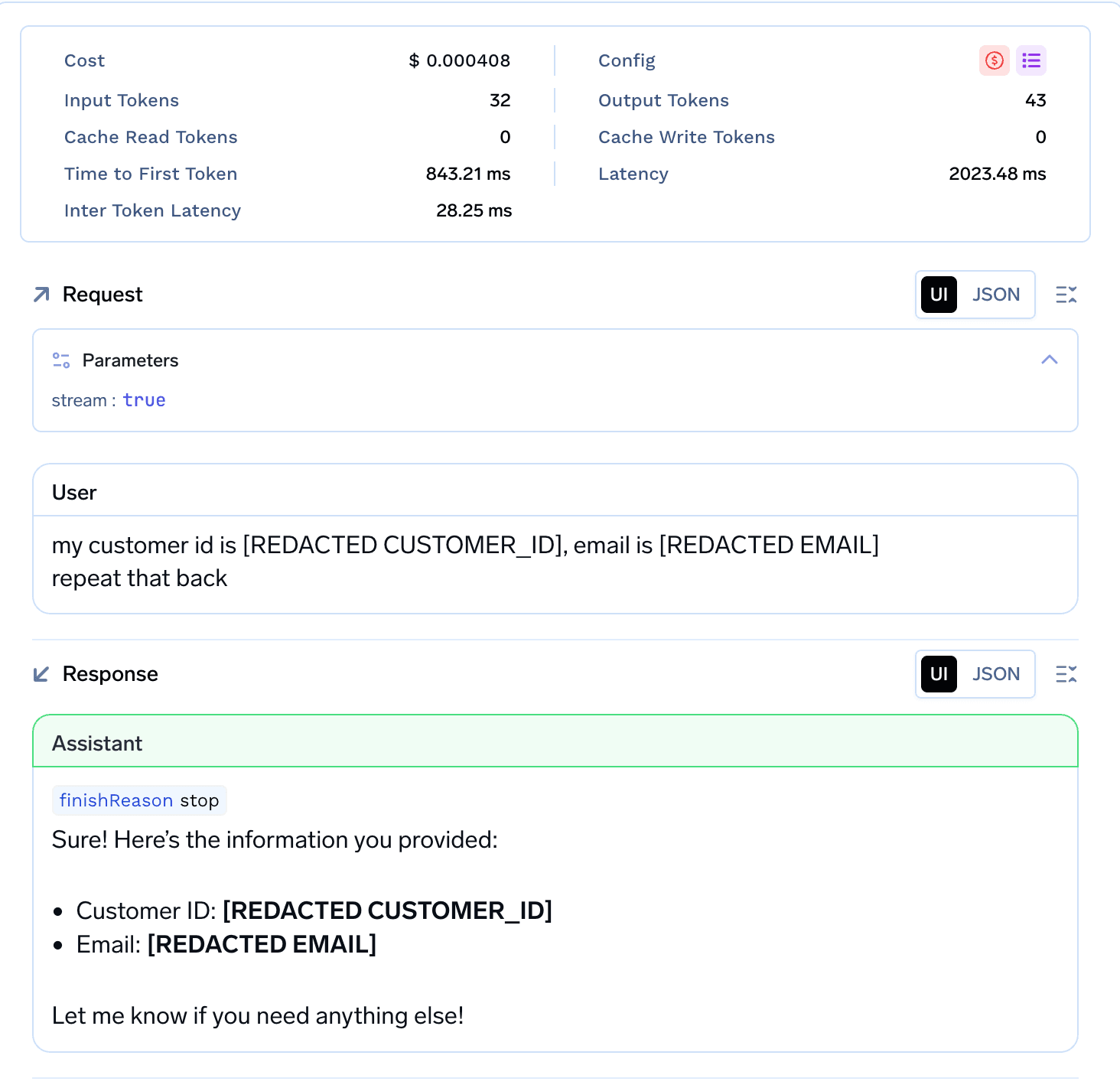
On where data sits: as of September 2026 the SaaS control plane is hosted in Ireland. A middle deployment option stores request and response bodies in your own bucket in parquet - with the documented caveat that they still flow through the control plane, which “might cache some of the data”. No zero-retention mode is documented. If that matters, the answer is self-hosted or hybrid, and you accept losing the Azure-backed built-ins.
The agent reads customer tickets, queries a production replica through an MCP tool, and drafts replies - touching all five channels.
Register the guardrails. A group with Secrets Detection, PII / PHI Detection, Regex Pattern Matching (SSN, credit card and email presets plus a custom CUST-\d{8}), SQL Sanitizer and Code Safety Linter. Registering applies nothing to traffic; you need a policy.
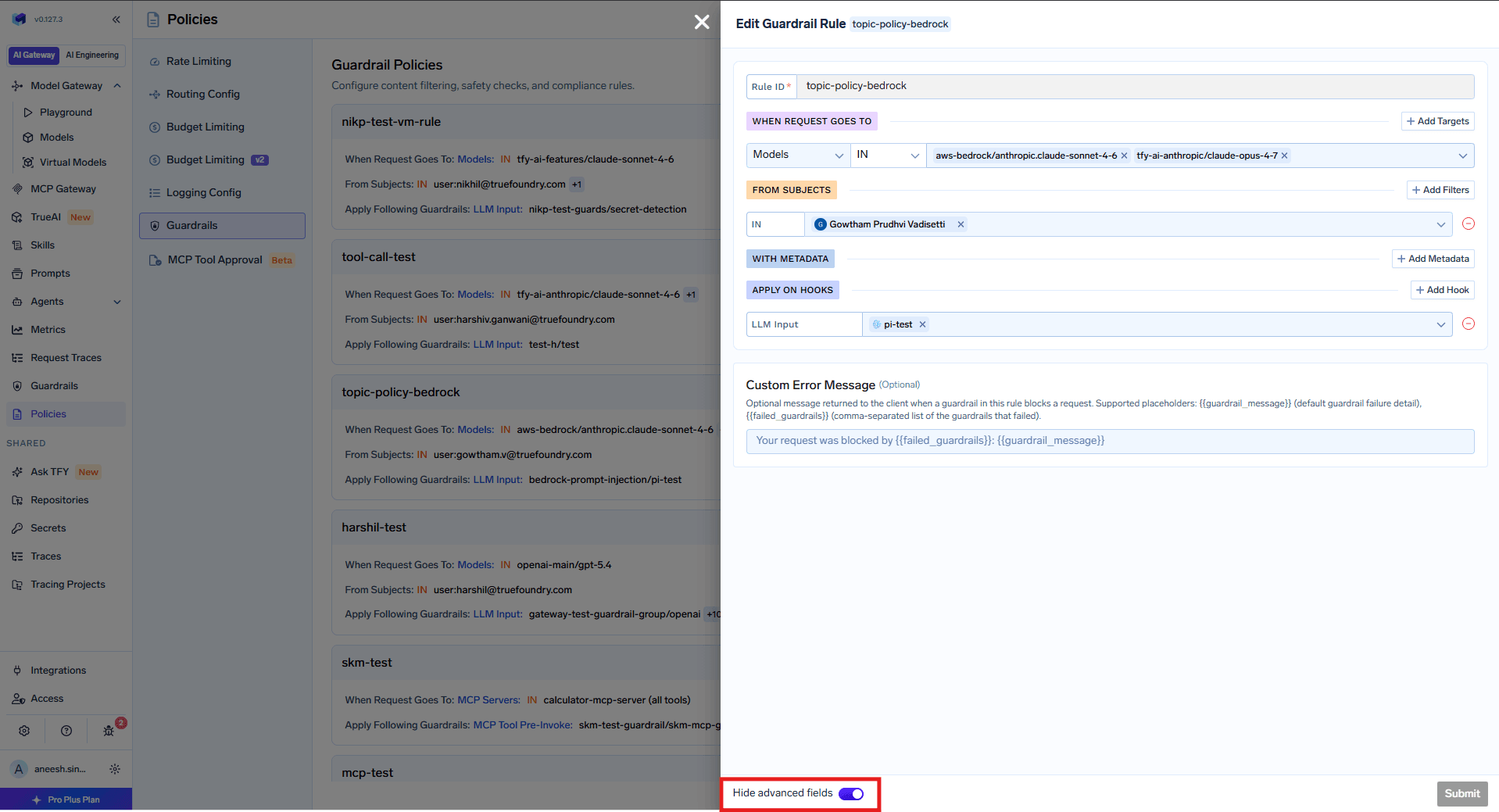
Write the policy rule. Under AI Gateway → Policies → Guardrails → Add Rule, target the models and MCP servers the agent uses, scope the subject to its virtual account, assign per hook:
Add the logging rule. Same virtual account: bodies logged, email, us_ssn and credit_card redacted in storage, so on-call can read traces without seeing customer data.
Run it in audit, then promote. Every guardrail is its own span in Monitor → Request Traces, for blocked and successful requests alike. Read a week - the custom CUST-\d{8} pattern will misfire first - then move to Enforce But Ignore On Error, which blocks real violations but lets traffic through when a guardrail errors.
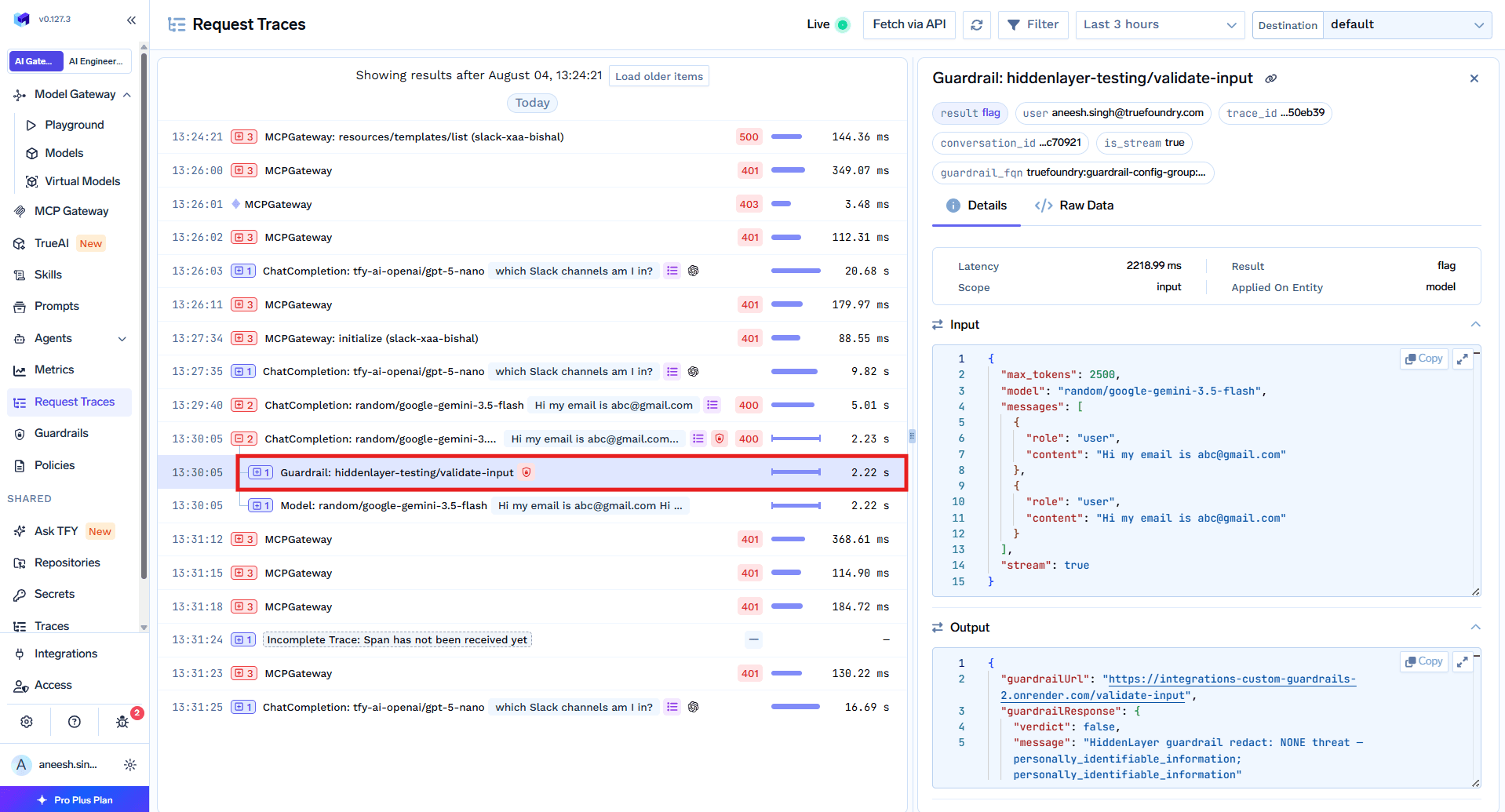
Output guardrails are skipped on streamed responses. When stream: true, output-hook checks do not run - evaluating a response needs the complete text. Every chat UI streams by default. Set stream: false where output checks matter, or accept the control is inactive there. Input and MCP hooks are unaffected.
System prompts are never inspected. The gateway strips them before sending content to any guardrail, so nothing there is scanned, redacted or blocked. CrowdStrike AIDR is the documented exception, and read-only.
SQL Sanitizer in Mutate mode does not block DROP. The docs are explicit: in mutate mode dangerous statements are logged, not blocked. Use Validate on the pre-invoke hook for anything touching a real database.
The uncomfortable thing about DLP for LLM traffic is that the tooling most organisations already bought does not apply. The appliance in the datacentre spots a file going somewhere it should not. This is a string going somewhere it should - an API on the allowlist, a session nobody inspects, a format the engine was never taught to read.
So the question is not which DLP product to extend. It is where the chokepoint is. Whatever terminates your model traffic, parses the body and knows who is behind the call is the only place a policy can be expressed and enforced. Everything upstream lacks the schema; everything downstream lacks the authority.
The rest is ordinary engineering: name the entity types you care about, run the detectors in audit until the false positives stop, promote to enforcement, and be honest about where coverage stops - streamed output, system prompts, and any traffic clever enough to route around you. That last one is not a guardrail problem; it is a network policy.
TrueFoundry AI Gateway delivers ~3–4 ms latency, handles 350+ RPS on 1 vCPU, scales horizontally with ease, and is production-ready, while LiteLLM suffers from high latency, struggles beyond moderate RPS, lacks built-in scaling, and is best for light or prototype workloads.




Inspecting and controlling sensitive data before it leaves your perimeter in a prompt, tool call or model response. It differs from classic DLP because there is no file and no unsanctioned destination - the payload is JSON inside a TLS session to an API you pay for. Controls must understand the request schema and sit at an authenticated egress chokepoint.
Three reasons compound. The destination is allowlisted by design, so destination rules never fire. The content sits in a nested conversation array rather than a file or form field, which document-oriented engines parse poorly. And without TLS inspection there is nothing to parse - while even an inspecting proxy cannot tell which caller sent the request.
It depends on the detector. TrueFoundry’s built-in PII / PHI Detection is mutate-only - it always redacts, never rejects. For a hard block you need a validate-capable integration such as AWS Bedrock Guardrails, Azure PII or CrowdStrike. “PII detection” in a feature list never tells you whether the outcome is a redaction or a 400.
Yes. TrueFoundry runs in your VPC, on-prem, air-gapped, or hybrid, so prompts and responses never leave your domain even as you route across many providers.
Yes. It includes an MCP Gateway, an Agent Gateway, and an MCP & Agents Registry with tool-level access control. Agents on LangGraph, CrewAI, AutoGen, or a custom framework can all be governed centrally.
Yes. The gateway is OpenTelemetry-compliant and plugs into Grafana, Datadog, Prometheus, or your preferred stack. It traces every request from prompt to tool and model execution, so you get unified logging without ripping out what you already run.



The latest news, articles, and resources sent to your inbox
.png)
.png)
.png)
.png)
.webp)
.webp)
.webp)
.webp)
.webp)